Swap-space
Management
Swap-Space Management
• Swap-space — virtual memory uses disk
space as an extension of main memory.
• Main goal for the design and
implementation of swap space is to
provide the best throughput for VM system
• Swap-space use –Swapping –use swap
space to hold entire process image –
Paging –store pages that have been
pushed out of memory
Swap-Space
Management(con..)
• Some OS may support multiple swap-
space
–Put on separate disks to balance the
load
• Better to overestimate than underestimate
–If out of swap-space, some
processes must be aborted or system
crashed
Swap-Space Location
• Swap-space can be carved out of the
normal file system, or in a separate disk
partition.
• A large file within the file system: simple
but inefficient
–Navigating the directory structure and
the disk-allocation data structure takes
time and potentially extra disk accesses
Swap-Space Location (con..)
–External fragmentation can greatly increase
swapping times by forcing multiple seeks during
reading or writing of a process image
–Improvement
• Caching block location information in main
memory
• Contiguous allocation for the swap file
–But, the cost of traversing FS data structure
still remains
Swap-Space Location (con..)
• In a separate partition: raw partition
–Create a swap space during disk partitioning
–A separate swap-space storage manager is
used to allocate and de-allocate blocks
–Use algorithms optimized for speed, rather
than storage efficiency –Internal fragment may
increase
•Linux supports both approaches
Swap-space Management:
Example
• Solaris 1
–Text-segment pages are brought in
from the file system and are thrown away
if selected for paged out
• More efficient to re-read from FS than
write it to the swap space
–Swap space: only used as a backing
store for pages of anonymous memory
Example
• Stack, heap, and uninitialized data
• Solaris 2
–Allocates swap space only when a
page is forced out of physical memory
• Not when the virtual memory page is first
created.
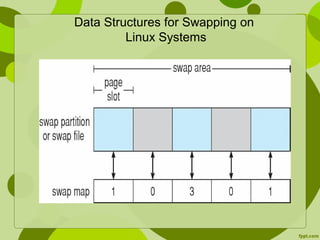
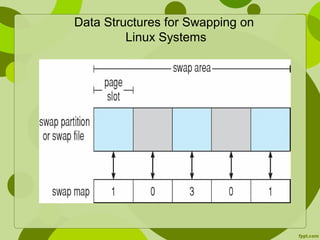
Data Structures for Swapping on
Linux Systems
Data Structures for Swapping on
Linux Systems

Swap-space Management

  • 1.
  • 2.
    Swap-Space Management • Swap-space— virtual memory uses disk space as an extension of main memory. • Main goal for the design and implementation of swap space is to provide the best throughput for VM system • Swap-space use –Swapping –use swap space to hold entire process image – Paging –store pages that have been pushed out of memory
  • 3.
    Swap-Space Management(con..) • Some OSmay support multiple swap- space –Put on separate disks to balance the load • Better to overestimate than underestimate –If out of swap-space, some processes must be aborted or system crashed
  • 4.
    Swap-Space Location • Swap-spacecan be carved out of the normal file system, or in a separate disk partition. • A large file within the file system: simple but inefficient –Navigating the directory structure and the disk-allocation data structure takes time and potentially extra disk accesses
  • 5.
    Swap-Space Location (con..) –Externalfragmentation can greatly increase swapping times by forcing multiple seeks during reading or writing of a process image –Improvement • Caching block location information in main memory • Contiguous allocation for the swap file –But, the cost of traversing FS data structure still remains
  • 6.
    Swap-Space Location (con..) •In a separate partition: raw partition –Create a swap space during disk partitioning –A separate swap-space storage manager is used to allocate and de-allocate blocks –Use algorithms optimized for speed, rather than storage efficiency –Internal fragment may increase •Linux supports both approaches
  • 7.
    Swap-space Management: Example • Solaris1 –Text-segment pages are brought in from the file system and are thrown away if selected for paged out • More efficient to re-read from FS than write it to the swap space –Swap space: only used as a backing store for pages of anonymous memory
  • 8.
    Example • Stack, heap,and uninitialized data • Solaris 2 –Allocates swap space only when a page is forced out of physical memory • Not when the virtual memory page is first created.
  • 9.
    Data Structures forSwapping on Linux Systems
  • 10.
    Data Structures forSwapping on Linux Systems