Operating System Overview
Introduction of different types of Operating
System
Scheduling
Memory Management
Operating System Support
Objectives and Functions
Convenience
 Making the computer easier to use
Efficiency
 Allowing better use of computer resources
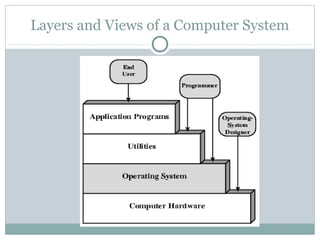
Layers and Views of a Computer System
Operating System Services
Program creation
Program execution
Access to I/O devices
Controlled access to files
System access
Error detection and response
Accounting
O/S as a Resource Manager
Types of Operating System
Interactive
Batch
Single program (Uni-programming)
Multi-programming (Multi-tasking)
Early Systems
Late 1940s to mid 1950s
No Operating System
Programs interact directly with hardware
Two main problems:
 Scheduling
 Setup time
Simple Batch Systems
Resident Monitor program
Users submit jobs to operator
Operator batches jobs
Monitor controls sequence of events to process batch
When one job is finished, control returns to Monitor
which reads next job
Monitor handles scheduling
Memory Layout for Resident Monitor
Job Control Language
Instructions to Monitor
Usually denoted by $
e.g.
 $JOB
 $FTN
 ... Some Fortran instructions
 $LOAD
 $RUN
 ... Some data
 $END
Other Desirable Hardware Features
Memory protection
 To protect the Monitor
Timer
 To prevent a job monopolizing the system
Privileged instructions
 Only executed by Monitor
 e.g. I/O
Interrupts
 Allows for relinquishing and regaining control
Multi-programmed Batch Systems
I/O devices very slow
When one program is waiting for I/O, another can
use the CPU
Single Program
Multi-Programming with
Two Programs
Multi-Programming with
Three Programs
Effects of Multiprogramming
on Resource Utilization
Time Sharing Systems
Allow users to interact directly with the computer
 i.e. Interactive
Multi-programming allows a number of users to
interact with the computer
Scheduling
Key to multi-programming
Long term
Medium term
Short term
I/O
Long Term Scheduling
Determines which programs are submitted for
processing
i.e. controls the degree of multi-programming
Once submitted, a job becomes a process for the
short term scheduler
(or it becomes a swapped out job for the medium
term scheduler)
Medium Term Scheduling
Part of the swapping function (more later…)
Usually based on the need to manage multi-
programming
If no virtual memory, memory management is also
an issue
Short Term Scheduler
Dispatcher
Fine grained decisions of which job to execute next
i.e. which job actually gets to use the processor in the
next time slot
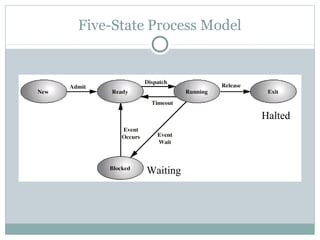
Five-State Process Model
Waiting
Halted
Process Control Block
Identifier
State
Priority
Program counter
Memory pointers
Context data
I/O status
Accounting information
PCB Diagram
Key Elements of O/S
Process Scheduling
Memory Management
Uni-program
 Memory split into two
 One for Operating System (monitor)
 One for currently executing program
Multi-program
 “User” part is sub-divided and shared among active processes
Swapping
Problem: I/O is so slow compared with CPU that
even in multi-programming system, CPU can be idle
most of the time
Solutions:
 Increase main memory
 Expensive
 Leads to larger programs
 Swapping
What is Swapping?
Long term queue of processes stored on disk
Processes “swapped” in as space becomes available
As a process completes it is moved out of main
memory
If none of the processes in memory are ready (i.e. all
I/O blocked)
 Swap out a blocked process to intermediate queue
 Swap in a ready process or a new process
 But swapping is an I/O process...
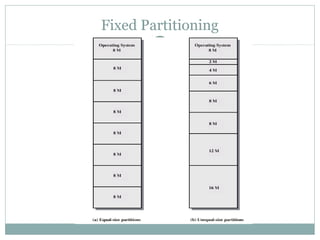
Partitioning
Splitting memory into sections to allocate to
processes (including Operating System)
Fixed-sized partitions
 May not be equal size
 Process is fitted into smallest hole that will take it (best fit)
 Some wasted memory
 Leads to variable sized partitions
Fixed Partitioning
Variable Sized Partitions (1)
Allocate exactly the required memory to a process
This leads to a hole at the end of memory, too small
to use
 Only one small hole - less waste
When all processes are blocked, swap out a process
and bring in another
New process may be smaller than swapped out
process
Another hole
Variable Sized Partitions (2)
Eventually have lots of holes (fragmentation)
Solutions:
 Coalesce - Join adjacent holes into one large hole
 Compaction - From time to time go through memory and move
all hole into one free block (c.f. disk de-fragmentation)
Effect of Dynamic Partitioning
Paging
Split memory into equal sized, small chunks -page
frames
Split programs (processes) into equal sized small
chunks - pages
Allocate the required number page frames to a
process
Operating System maintains list of free frames
A process does not require contiguous page frames
Use page table to keep track
Logical and Physical Addresses - Paging
Virtual Memory
Demand paging
 Do not require all pages of a process in memory
 Bring in pages as required
Page fault
 Required page is not in memory
 Operating System must swap in required page
 May need to swap out a page to make space
 Select page to throw out based on recent history
Thrashing
Too many processes in too little memory
Operating System spends all its time swapping
Little or no real work is done
Solutions
 Good page replacement algorithms
 Reduce number of processes running
 Fit more memory
Segmentation
Paging is not (usually) visible to the programmer
Segmentation is visible to the programmer
Usually different segments allocated to program and
data
May be a number of program and data segments
Advantages of Segmentation
Simplifies handling of growing data structures
Allows programs to be altered and recompiled
independently, without re-linking and re-loading
Lends itself to sharing among processes
Lends itself to protection
Some systems combine segmentation with paging

Operating System

  • 1.
    Operating System Overview Introductionof different types of Operating System Scheduling Memory Management Operating System Support
  • 2.
    Objectives and Functions Convenience Making the computer easier to use Efficiency  Allowing better use of computer resources
  • 3.
    Layers and Viewsof a Computer System
  • 4.
    Operating System Services Programcreation Program execution Access to I/O devices Controlled access to files System access Error detection and response Accounting
  • 5.
    O/S as aResource Manager
  • 6.
    Types of OperatingSystem Interactive Batch Single program (Uni-programming) Multi-programming (Multi-tasking)
  • 7.
    Early Systems Late 1940sto mid 1950s No Operating System Programs interact directly with hardware Two main problems:  Scheduling  Setup time
  • 8.
    Simple Batch Systems ResidentMonitor program Users submit jobs to operator Operator batches jobs Monitor controls sequence of events to process batch When one job is finished, control returns to Monitor which reads next job Monitor handles scheduling
  • 9.
    Memory Layout forResident Monitor
  • 10.
    Job Control Language Instructionsto Monitor Usually denoted by $ e.g.  $JOB  $FTN  ... Some Fortran instructions  $LOAD  $RUN  ... Some data  $END
  • 11.
    Other Desirable HardwareFeatures Memory protection  To protect the Monitor Timer  To prevent a job monopolizing the system Privileged instructions  Only executed by Monitor  e.g. I/O Interrupts  Allows for relinquishing and regaining control
  • 12.
    Multi-programmed Batch Systems I/Odevices very slow When one program is waiting for I/O, another can use the CPU
  • 13.
  • 14.
  • 15.
  • 16.
    Effects of Multiprogramming onResource Utilization
  • 17.
    Time Sharing Systems Allowusers to interact directly with the computer  i.e. Interactive Multi-programming allows a number of users to interact with the computer
  • 19.
    Scheduling Key to multi-programming Longterm Medium term Short term I/O
  • 21.
    Long Term Scheduling Determineswhich programs are submitted for processing i.e. controls the degree of multi-programming Once submitted, a job becomes a process for the short term scheduler (or it becomes a swapped out job for the medium term scheduler)
  • 22.
    Medium Term Scheduling Partof the swapping function (more later…) Usually based on the need to manage multi- programming If no virtual memory, memory management is also an issue
  • 23.
    Short Term Scheduler Dispatcher Finegrained decisions of which job to execute next i.e. which job actually gets to use the processor in the next time slot
  • 24.
  • 25.
    Process Control Block Identifier State Priority Programcounter Memory pointers Context data I/O status Accounting information
  • 26.
  • 28.
  • 29.
  • 30.
    Memory Management Uni-program  Memorysplit into two  One for Operating System (monitor)  One for currently executing program Multi-program  “User” part is sub-divided and shared among active processes
  • 31.
    Swapping Problem: I/O isso slow compared with CPU that even in multi-programming system, CPU can be idle most of the time Solutions:  Increase main memory  Expensive  Leads to larger programs  Swapping
  • 32.
    What is Swapping? Longterm queue of processes stored on disk Processes “swapped” in as space becomes available As a process completes it is moved out of main memory If none of the processes in memory are ready (i.e. all I/O blocked)  Swap out a blocked process to intermediate queue  Swap in a ready process or a new process  But swapping is an I/O process...
  • 33.
    Partitioning Splitting memory intosections to allocate to processes (including Operating System) Fixed-sized partitions  May not be equal size  Process is fitted into smallest hole that will take it (best fit)  Some wasted memory  Leads to variable sized partitions
  • 34.
  • 35.
    Variable Sized Partitions(1) Allocate exactly the required memory to a process This leads to a hole at the end of memory, too small to use  Only one small hole - less waste When all processes are blocked, swap out a process and bring in another New process may be smaller than swapped out process Another hole
  • 36.
    Variable Sized Partitions(2) Eventually have lots of holes (fragmentation) Solutions:  Coalesce - Join adjacent holes into one large hole  Compaction - From time to time go through memory and move all hole into one free block (c.f. disk de-fragmentation)
  • 37.
    Effect of DynamicPartitioning
  • 38.
    Paging Split memory intoequal sized, small chunks -page frames Split programs (processes) into equal sized small chunks - pages Allocate the required number page frames to a process Operating System maintains list of free frames A process does not require contiguous page frames Use page table to keep track
  • 39.
    Logical and PhysicalAddresses - Paging
  • 40.
    Virtual Memory Demand paging Do not require all pages of a process in memory  Bring in pages as required Page fault  Required page is not in memory  Operating System must swap in required page  May need to swap out a page to make space  Select page to throw out based on recent history
  • 41.
    Thrashing Too many processesin too little memory Operating System spends all its time swapping Little or no real work is done Solutions  Good page replacement algorithms  Reduce number of processes running  Fit more memory
  • 42.
    Segmentation Paging is not(usually) visible to the programmer Segmentation is visible to the programmer Usually different segments allocated to program and data May be a number of program and data segments
  • 43.
    Advantages of Segmentation Simplifieshandling of growing data structures Allows programs to be altered and recompiled independently, without re-linking and re-loading Lends itself to sharing among processes Lends itself to protection Some systems combine segmentation with paging