Name:- Tanmay Kataria
Class:- X-A
Roll No. :- 36
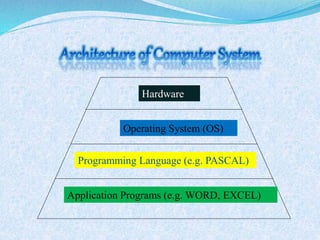
Hardware
Operating System (OS)
Programming Language (e.g. PASCAL)
Application Programs (e.g. WORD, EXCEL)
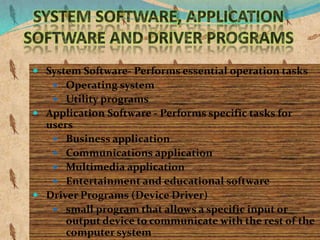
 System Software- Performs essential operation tasks
 Operating system
 Utility programs
 Application Software - Performs specific tasks for
users
 Business application
 Communications application
 Multimedia application
 Entertainment and educational software
 Driver Programs (Device Driver)
 small program that allows a specific input or
output device to communicate with the rest of the
computer system
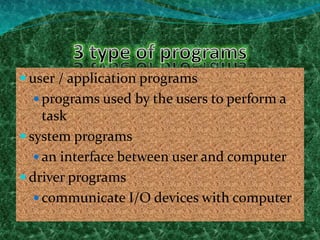
 user / application programs
 programs used by the users to perform a
task
 system programs
 an interface between user and computer
 driver programs
 communicate I/O devices with computer
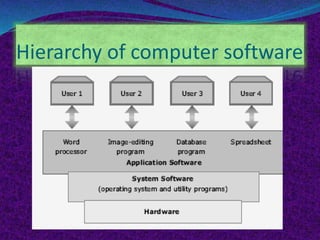
Hierarchy of computer software
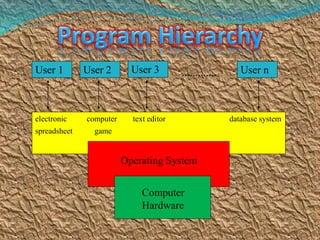
User 1 User 2 User 3 User n.............
electronic computer text editor database system
spreadsheet game
Operating System
Computer
Hardware
A collection of programs which control the resources of a
computer system.
Written in low-level languages (i.e. machine-dependent).
An interface between the users and the hardware.
When the computer is on, OS will first load into the
main memory.
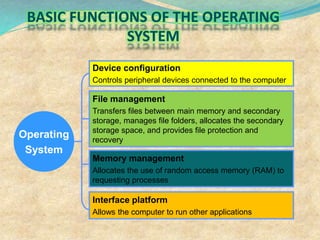
Operating
System
Device configuration
Controls peripheral devices connected to the computer
File management
Transfers files between main memory and secondary
storage, manages file folders, allocates the secondary
storage space, and provides file protection and
recovery
Memory management
Allocates the use of random access memory (RAM) to
requesting processes
Interface platform
Allows the computer to run other applications
Best use of the computer resources.
Provide a background for user’s programs to execute.
Display and deal with errors when it happens.
Control the selection and operation of the
peripherals.
Act as a communication link between users.
System protection.
Common Operating Systems and
Their Differences
 Network Operating System
 UNIX / Linux / MS Windows2000 Server
 Desktop Operating System
 MS Windows 9X/Me / Mac OS / DOS
 Mobile Operating System
 Palm OS and Pocket PC
Examples
Common operating systems:-
WINDOW
 used in IBM compatible microcomputers
UNIX
 multi-user, multi-tasking OS used in minicomputers and
microcomputers
VAX/VMS
 used in DEC’s VAX series of minicomputers
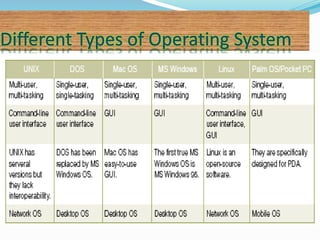
Different Types of Operating System
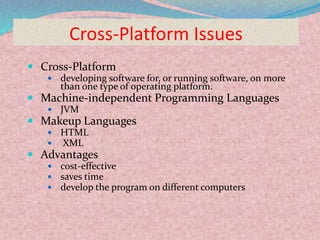
Cross-Platform Issues
 Cross-Platform
 developing software for, or running software, on more
than one type of operating platform.
 Machine-independent Programming Languages
 JVM
 Makeup Languages
 HTML
 XML
 Advantages
 cost-effective
 saves time
 develop the program on different computers
A part of operating system to control disk operation.
2 parts
Small system data
 Keep track of key information of the disk
Data area
 Where data file is stored
 3 parts:-
 boot/boot record
 i.e. a short program for loading DOS into
computer’s memory
 File allocation table (FAT)
 i.e. record the status of each part of the disk and
keep track of all data
 Root directory
 i.e. record the filename, size of the file , date and
time
 Efficient
 time spent to execute its programs should be short
 Small in size
 memory occupied should be as small as possible
 Reliable
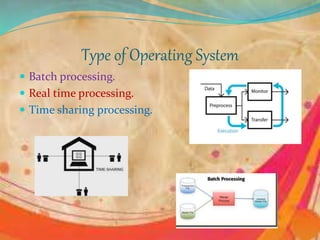
Type of Operating System
 Batch processing.
 Real time processing.
 Time sharing processing.
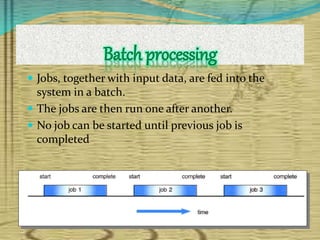
Batch processing
 Jobs, together with input data, are fed into the
system in a batch.
 The jobs are then run one after another.
 No job can be started until previous job is
completed
 Immediate response is needed.
 For example
 anti-missile defense system
 airplane landing control system
 interrupt error in computer system
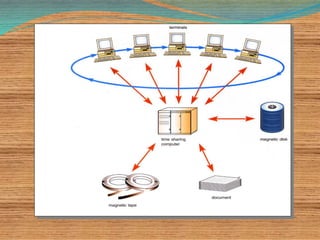
 Each user is given a time slice to interact with
the CPU.
 The size of the time slice will depend on the
system.
 Each user is served in sequence.
 multi-tasking
 multi-programming
 parallel processing
 buffering
 spooling
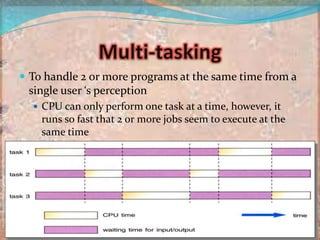
 To handle 2 or more programs at the same time from a
single user ‘s perception
 CPU can only perform one task at a time, however, it
runs so fast that 2 or more jobs seem to execute at the
same time
 2 or more programs store in the main
memory at the same time
 When one job reeds to wait (e.g. I/O
operation), CPU switch to another job to
execute
 When the first job finishes waiting, CPU will
get back the first job to execute
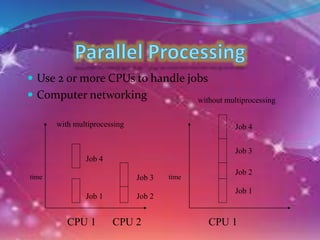
 Use 2 or more CPUs to handle jobs
 Computer networking
Job 1 Job 2
Job 3
Job 4
Job 1
Job 2
Job 3
Job 4
CPU 1 CPU 2 CPU 1
time time
without multiprocessing
with multiprocessing
Buffering
 A temporary storage area (buffers) to read data from
input device or send data to the output device
 Keep CPU busy
 Because I/O operation is slow
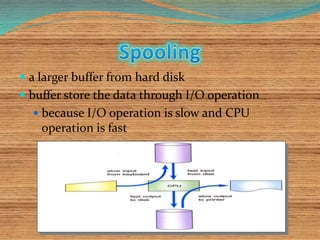
 a larger buffer from hard disk
 buffer store the data through I/O operation
 because I/O operation is slow and CPU
operation is fast
Operating system

Operating system

  • 1.
  • 2.
    Hardware Operating System (OS) ProgrammingLanguage (e.g. PASCAL) Application Programs (e.g. WORD, EXCEL)
  • 4.
     System Software-Performs essential operation tasks  Operating system  Utility programs  Application Software - Performs specific tasks for users  Business application  Communications application  Multimedia application  Entertainment and educational software  Driver Programs (Device Driver)  small program that allows a specific input or output device to communicate with the rest of the computer system
  • 5.
     user /application programs  programs used by the users to perform a task  system programs  an interface between user and computer  driver programs  communicate I/O devices with computer
  • 6.
  • 7.
    User 1 User2 User 3 User n............. electronic computer text editor database system spreadsheet game Operating System Computer Hardware
  • 8.
    A collection ofprograms which control the resources of a computer system. Written in low-level languages (i.e. machine-dependent). An interface between the users and the hardware. When the computer is on, OS will first load into the main memory.
  • 9.
    Operating System Device configuration Controls peripheraldevices connected to the computer File management Transfers files between main memory and secondary storage, manages file folders, allocates the secondary storage space, and provides file protection and recovery Memory management Allocates the use of random access memory (RAM) to requesting processes Interface platform Allows the computer to run other applications
  • 10.
    Best use ofthe computer resources. Provide a background for user’s programs to execute. Display and deal with errors when it happens. Control the selection and operation of the peripherals. Act as a communication link between users. System protection.
  • 11.
    Common Operating Systemsand Their Differences  Network Operating System  UNIX / Linux / MS Windows2000 Server  Desktop Operating System  MS Windows 9X/Me / Mac OS / DOS  Mobile Operating System  Palm OS and Pocket PC
  • 12.
    Examples Common operating systems:- WINDOW used in IBM compatible microcomputers UNIX  multi-user, multi-tasking OS used in minicomputers and microcomputers VAX/VMS  used in DEC’s VAX series of minicomputers
  • 13.
    Different Types ofOperating System
  • 14.
    Cross-Platform Issues  Cross-Platform developing software for, or running software, on more than one type of operating platform.  Machine-independent Programming Languages  JVM  Makeup Languages  HTML  XML  Advantages  cost-effective  saves time  develop the program on different computers
  • 15.
    A part ofoperating system to control disk operation. 2 parts Small system data  Keep track of key information of the disk Data area  Where data file is stored
  • 16.
     3 parts:- boot/boot record  i.e. a short program for loading DOS into computer’s memory  File allocation table (FAT)  i.e. record the status of each part of the disk and keep track of all data  Root directory  i.e. record the filename, size of the file , date and time
  • 17.
     Efficient  timespent to execute its programs should be short  Small in size  memory occupied should be as small as possible  Reliable
  • 18.
    Type of OperatingSystem  Batch processing.  Real time processing.  Time sharing processing.
  • 19.
    Batch processing  Jobs,together with input data, are fed into the system in a batch.  The jobs are then run one after another.  No job can be started until previous job is completed
  • 20.
     Immediate responseis needed.  For example  anti-missile defense system  airplane landing control system  interrupt error in computer system
  • 21.
     Each useris given a time slice to interact with the CPU.  The size of the time slice will depend on the system.  Each user is served in sequence.
  • 23.
     multi-tasking  multi-programming parallel processing  buffering  spooling
  • 24.
     To handle2 or more programs at the same time from a single user ‘s perception  CPU can only perform one task at a time, however, it runs so fast that 2 or more jobs seem to execute at the same time
  • 25.
     2 ormore programs store in the main memory at the same time  When one job reeds to wait (e.g. I/O operation), CPU switch to another job to execute  When the first job finishes waiting, CPU will get back the first job to execute
  • 26.
     Use 2or more CPUs to handle jobs  Computer networking Job 1 Job 2 Job 3 Job 4 Job 1 Job 2 Job 3 Job 4 CPU 1 CPU 2 CPU 1 time time without multiprocessing with multiprocessing
  • 27.
    Buffering  A temporarystorage area (buffers) to read data from input device or send data to the output device  Keep CPU busy  Because I/O operation is slow
  • 28.
     a largerbuffer from hard disk  buffer store the data through I/O operation  because I/O operation is slow and CPU operation is fast