Unit 9
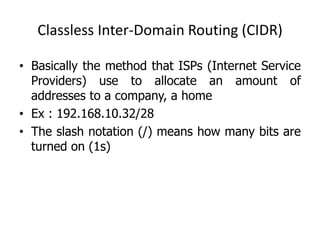
Classless Inter-Domain Routing (CIDR)
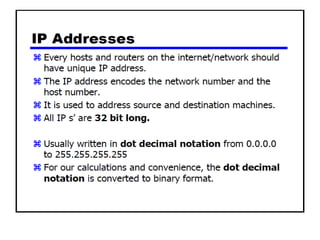
• Basically the method that ISPs (Internet Service
Providers) use to allocate an amount of
addresses to a company, a home
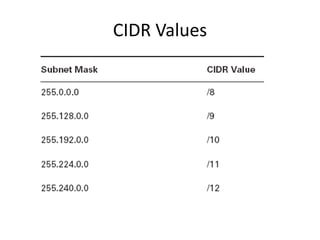
• Ex : 192.168.10.32/28
• The slash notation (/) means how many bits are
turned on (1s)
CIDR Values
11111111
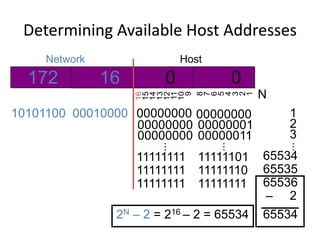
Determining Available Host Addresses
172 16 0 0
10101100 00010000 00000000 00000000
16
15
14
13
12
11
10
9
8
7
6
5
4
3
2
1
Network Host
00000000 00000001
11111111 11111111
11111111 11111110
...
...
00000000 00000011
11111101
1
2
3
65534
65535
65536
–
...
2
65534
N
2N – 2 = 216 – 2 = 65534
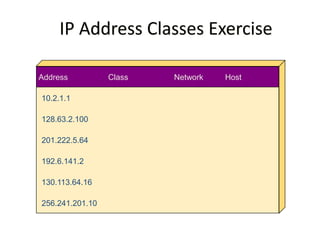
IP Address Classes Exercise
Address Class Network Host
10.2.1.1
128.63.2.100
201.222.5.64
192.6.141.2
130.113.64.16
256.241.201.10
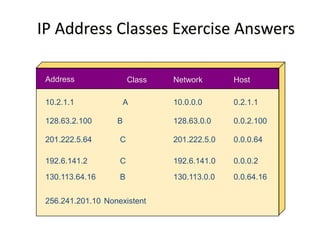
IP Address Classes Exercise Answers
Address Class Network Host
10.2.1.1
128.63.2.100
201.222.5.64
192.6.141.2
130.113.64.16
256.241.201.10
A
B
C
C
B
Nonexistent
10.0.0.0
128.63.0.0
201.222.5.0
192.6.141.0
130.113.0.0
0.2.1.1
0.0.2.100
0.0.0.64
0.0.0.2
0.0.64.16
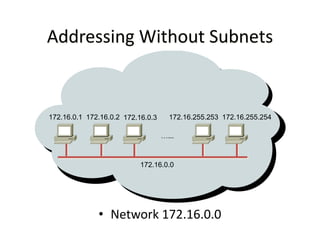
• Network 172.16.0.0
172.16.0.0
Addressing Without Subnets
172.16.0.1 172.16.0.2 172.16.0.3
…...
172.16.255.253 172.16.255.254
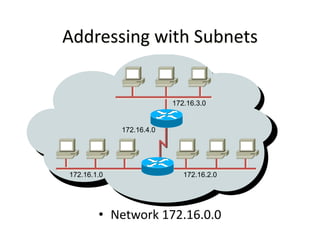
• Network 172.16.0.0
Addressing with Subnets
172.16.1.0 172.16.2.0
172.16.3.0
172.16.4.0
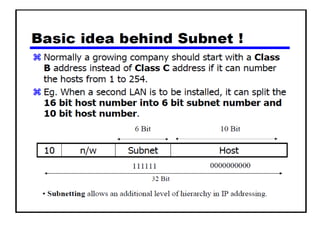
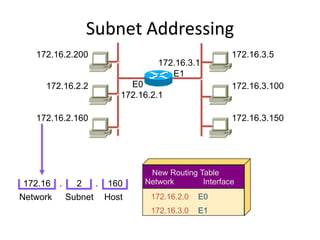
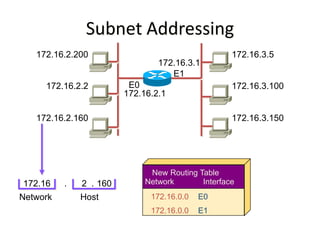
Subnet Addressing
172.16.2.200
172.16.2.2
172.16.2.160
172.16.2.1
172.16.3.5
172.16.3.100
172.16.3.150
E0
172.16
Network
Network Interface
172.16.0.0
172.16.0.0
E0
E1
New Routing Table
2 160
Host
. .
172.16.3.1
E1
Subnet Addressing
172.16.2.200
172.16.2.2
172.16.2.160
172.16.2.1
172.16.3.5
172.16.3.100
172.16.3.150
172.16.3.1
E0
E1
172.16 2 160
Network Host
. . Network Interface
172.16.2.0
172.16.3.0
E0
E1
New Routing Table
Subnet
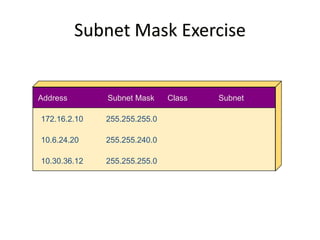
Subnet Mask Exercise
Address Subnet Mask Class Subnet
172.16.2.10
10.6.24.20
10.30.36.12
255.255.255.0
255.255.240.0
255.255.255.0
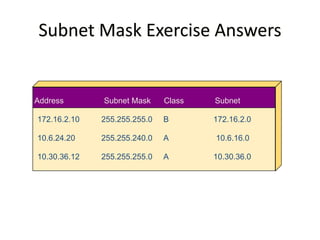
Subnet Mask Exercise Answers
Address Subnet Mask Class Subnet
172.16.2.10
10.6.24.20
10.30.36.12
255.255.255.0
255.255.240.0
255.255.255.0
B
A
A
172.16.2.0
10.6.16.0
10.30.36.0
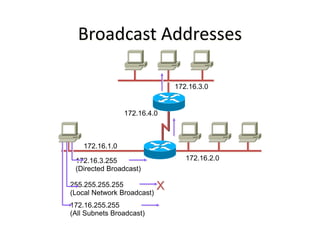
Broadcast Addresses
172.16.1.0
172.16.2.0
172.16.3.0
172.16.4.0
172.16.3.255
(Directed Broadcast)
255.255.255.255
(Local Network Broadcast)
X
172.16.255.255
(All Subnets Broadcast)
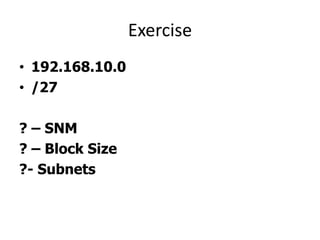
Exercise
• 192.168.10.0
• /27
? – SNM
? – Block Size
?- Subnets
Exercise
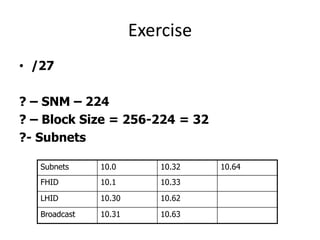
• /27
? – SNM – 224
? – Block Size = 256-224 = 32
?- Subnets
Subnets 10.0 10.32 10.64
FHID 10.1 10.33
LHID 10.30 10.62
Broadcast 10.31 10.63
Exercise
• 192.168.10.0
• /30
? – SNM
? – Block Size
?- Subnets
Exercise
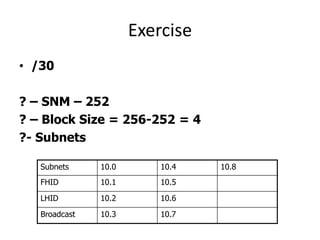
• /30
? – SNM – 252
? – Block Size = 256-252 = 4
?- Subnets
Subnets 10.0 10.4 10.8
FHID 10.1 10.5
LHID 10.2 10.6
Broadcast 10.3 10.7
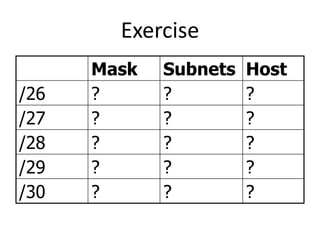
Exercise
Mask Subnets Host
/26 ? ? ?
/27 ? ? ?
/28 ? ? ?
/29 ? ? ?
/30 ? ? ?
Exercise
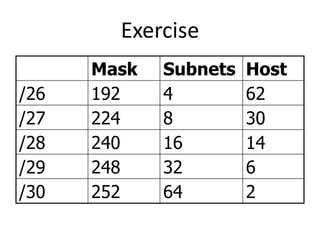
Mask Subnets Host
/26 192 4 62
/27 224 8 30
/28 240 16 14
/29 248 32 6
/30 252 64 2
Exercise
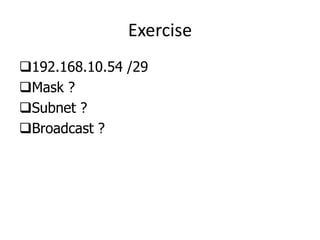
192.168.10.54 /29
Mask ?
Subnet ?
Broadcast ?
Exercise
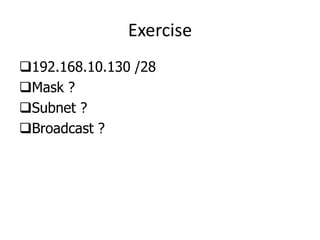
192.168.10.130 /28
Mask ?
Subnet ?
Broadcast ?
Exercise
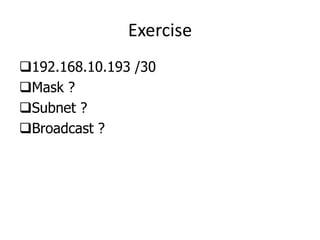
192.168.10.193 /30
Mask ?
Subnet ?
Broadcast ?
Exercise
192.168.1.100 /26
Mask ?
Subnet ?
Broadcast ?
Exercise
192.168.20.158 /27
Mask ?
Subnet ?
Broadcast ?
Class B
172.16.0.0 /19
Subnets ?
Hosts ?
Block Size ?
Class B
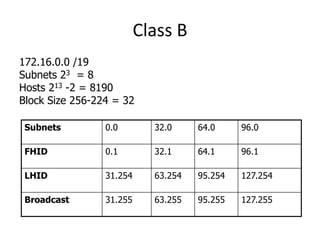
172.16.0.0 /19
Subnets 23 = 8
Hosts 213 -2 = 8190
Block Size 256-224 = 32
Subnets 0.0 32.0 64.0 96.0
FHID 0.1 32.1 64.1 96.1
LHID 31.254 63.254 95.254 127.254
Broadcast 31.255 63.255 95.255 127.255
Class B
172.16.0.0 /27
Subnets ?
Hosts ?
Block Size ?
Class B
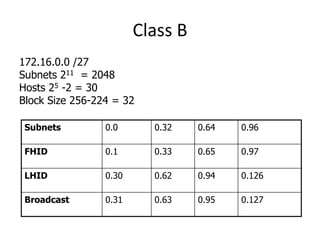
172.16.0.0 /27
Subnets 211 = 2048
Hosts 25 -2 = 30
Block Size 256-224 = 32
Subnets 0.0 0.32 0.64 0.96
FHID 0.1 0.33 0.65 0.97
LHID 0.30 0.62 0.94 0.126
Broadcast 0.31 0.63 0.95 0.127
Class B
172.16.0.0 /23
Subnets ?
Hosts ?
Block Size ?
Class B
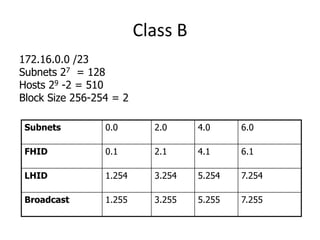
172.16.0.0 /23
Subnets 27 = 128
Hosts 29 -2 = 510
Block Size 256-254 = 2
Subnets 0.0 2.0 4.0 6.0
FHID 0.1 2.1 4.1 6.1
LHID 1.254 3.254 5.254 7.254
Broadcast 1.255 3.255 5.255 7.255
Class B
172.16.0.0 /24
Subnets ?
Hosts ?
Block Size ?
Class B
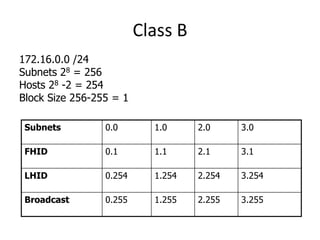
172.16.0.0 /24
Subnets 28 = 256
Hosts 28 -2 = 254
Block Size 256-255 = 1
Subnets 0.0 1.0 2.0 3.0
FHID 0.1 1.1 2.1 3.1
LHID 0.254 1.254 2.254 3.254
Broadcast 0.255 1.255 2.255 3.255
Class B
172.16.0.0 /25
Subnets ?
Hosts ?
Block Size ?
Class B
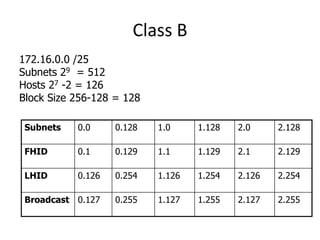
172.16.0.0 /25
Subnets 29 = 512
Hosts 27 -2 = 126
Block Size 256-128 = 128
Subnets 0.0 0.128 1.0 1.128 2.0 2.128
FHID 0.1 0.129 1.1 1.129 2.1 2.129
LHID 0.126 0.254 1.126 1.254 2.126 2.254
Broadcast 0.127 0.255 1.127 1.255 2.127 2.255
Find out Subnet and Broadcast Address
• 172.16.85.30/29
Find out Subnet and Broadcast Address
• 172.30.101.62/23
Find out Subnet and Broadcast Address
• 172.20.210.80/24
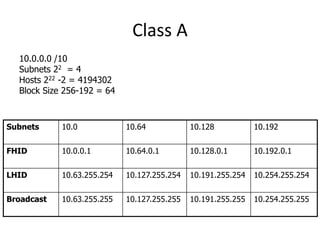
Class A
10.0.0.0 /10
Subnets ?
Hosts ?
Block Size ?
Class A
10.0.0.0 /10
Subnets 22 = 4
Hosts 222 -2 = 4194302
Block Size 256-192 = 64
Subnets 10.0 10.64 10.128 10.192
FHID 10.0.0.1 10.64.0.1 10.128.0.1 10.192.0.1
LHID 10.63.255.254 10.127.255.254 10.191.255.254 10.254.255.254
Broadcast 10.63.255.255 10.127.255.255 10.191.255.255 10.254.255.255
Class A
10.0.0.0 /18
Subnets ?
Hosts ?
Block Size ?
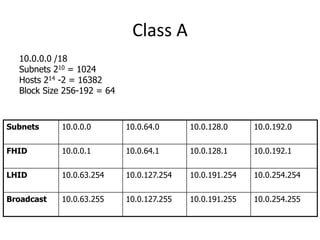
Class A
10.0.0.0 /18
Subnets 210 = 1024
Hosts 214 -2 = 16382
Block Size 256-192 = 64
Subnets 10.0.0.0 10.0.64.0 10.0.128.0 10.0.192.0
FHID 10.0.0.1 10.0.64.1 10.0.128.1 10.0.192.1
LHID 10.0.63.254 10.0.127.254 10.0.191.254 10.0.254.254
Broadcast 10.0.63.255 10.0.127.255 10.0.191.255 10.0.254.255
VLSM(Variable Length Subnet Mask)
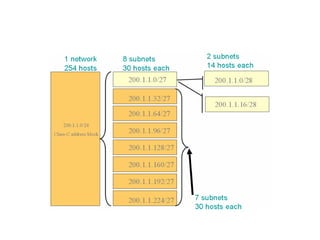
• VLSM extends classic subnetting.
• VLSM is a process of breaking down subnets
into the smaller subnets, according to the
need of individual networks.
VLSM
 An organization with a class C address and
needs to have 5 subnets with the following
number of hosts: 60, 60, 60, 30, 30.
 The site cannot use a subnet mask with only 2
bits in the subnet section because this allows
only 4 subnetworks each 62.
 Nor can the site use a subnet mask with 3 bits in
the subnet section because this allows 8
subnetworks each with 30 hosts.
VLSM
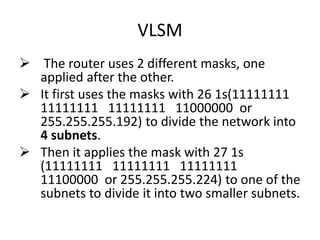
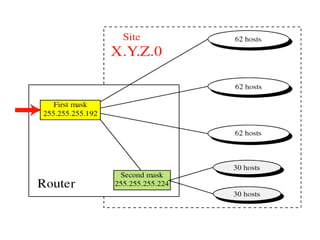
 The router uses 2 different masks, one
applied after the other.
 It first uses the masks with 26 1s(11111111
11111111 11111111 11000000 or
255.255.255.192) to divide the network into
4 subnets.
 Then it applies the mask with 27 1s
(11111111 11111111 11111111
11100000 or 255.255.255.224) to one of the
subnets to divide it into two smaller subnets.
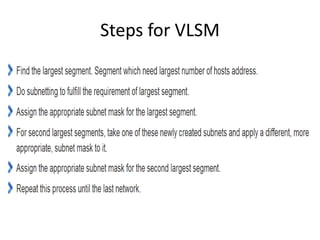
Steps for VLSM
• If an ISP has a 200.1.1.0 Network, he wants to
give assign to 5 customers who need 20, 12, 6,
25, 18 hosts.
– What should the subnet mask be?
– What is the address range in each subnet?
– What should the routing table entries be?
– Can it be done efficiently to conserve IP
addresses?
Question
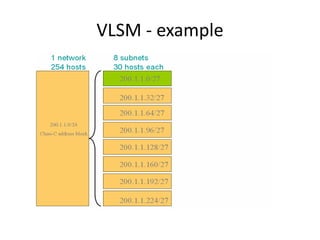
VLSM - example
Supernetting
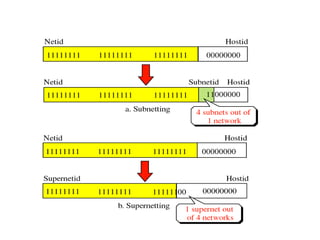
• Supernets are the opposite of Subnets in that
they combine multiple Class C networks into
blocks rather than dividing them into segments.
• When Subnetting, we borrow bits from the Host
ID portion, which increases the number of bits
used for the Network ID portion.
• With Supernetting we do exactly the opposite,
meaning we take the bits from the Network ID
portion and give them to the Host ID portion
Supernet Masks
 A supernet mask is the reverse of the subnet
mask.
 In a supernet mask, we change some 1s in
the netid section to 0s.
Example
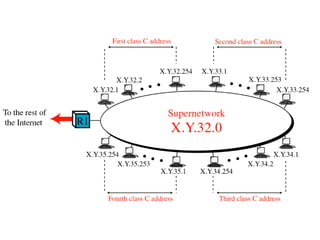
• With the supernet mask of 255.255.252.0 we
can have 4 class C address combined into one
supernetwork.
• If we choose the first address to be X.Y.32.0, the
other three addresses are X.Y.33.0, X.Y.34.0, and
X.Y.35.0.
• Whenever the router receives a packet, it
applies the supernet mask to the destination
address and compares the result to the lowest
address. If the result and the lowest address are
the same, the packet belongs to the supernet.
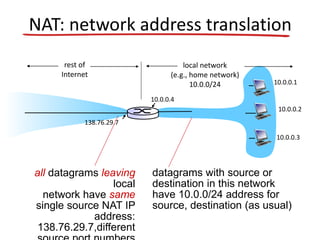
NAT: network address translation
10.0.0.1
10.0.0.2
10.0.0.3
10.0.0.4
138.76.29.7
local network
(e.g., home network)
10.0.0/24
rest of
Internet
datagrams with source or
destination in this network
have 10.0.0/24 address for
source, destination (as usual)
all datagrams leaving
local
network have same
single source NAT IP
address:
138.76.29.7,different
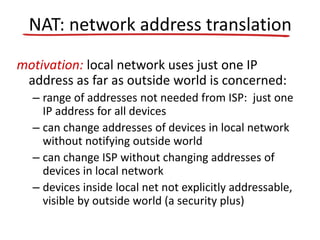
motivation: local network uses just one IP
address as far as outside world is concerned:
– range of addresses not needed from ISP: just one
IP address for all devices
– can change addresses of devices in local network
without notifying outside world
– can change ISP without changing addresses of
devices in local network
– devices inside local net not explicitly addressable,
visible by outside world (a security plus)
NAT: network address translation
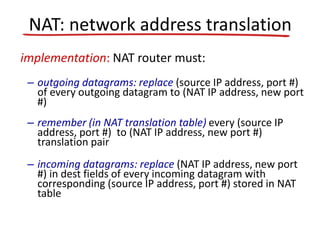
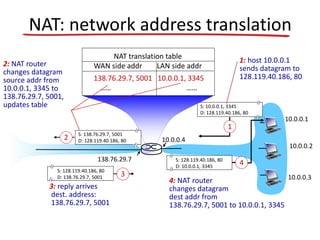
implementation: NAT router must:
– outgoing datagrams: replace (source IP address, port #)
of every outgoing datagram to (NAT IP address, new port
#)
– remember (in NAT translation table) every (source IP
address, port #) to (NAT IP address, new port #)
translation pair
– incoming datagrams: replace (NAT IP address, new port
#) in dest fields of every incoming datagram with
corresponding (source IP address, port #) stored in NAT
table
NAT: network address translation
10.0.0.1
10.0.0.2
10.0.0.3
S: 10.0.0.1, 3345
D: 128.119.40.186, 80
1
10.0.0.4
138.76.29.7
1: host 10.0.0.1
sends datagram to
128.119.40.186, 80
NAT translation table
WAN side addr LAN side addr
138.76.29.7, 5001 10.0.0.1, 3345
…… ……
S: 128.119.40.186, 80
D: 10.0.0.1, 3345
4
S: 138.76.29.7, 5001
D: 128.119.40.186, 802
2: NAT router
changes datagram
source addr from
10.0.0.1, 3345 to
138.76.29.7, 5001,
updates table
S: 128.119.40.186, 80
D: 138.76.29.7, 5001 3
3: reply arrives
dest. address:
138.76.29.7, 5001
4: NAT router
changes datagram
dest addr from
138.76.29.7, 5001 to 10.0.0.1, 3345
NAT: network address translation
IGMP(Internet Group Management
Protocol)
• IGMP is a protocol that manages group
membership.
• The IGMP protocol gives the multicast routers
information about the membership status of
hosts (routers) connected to the network.
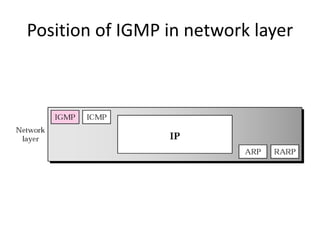
Position of IGMP in network layer
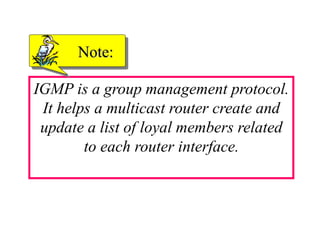
IGMP is a group management protocol.
It helps a multicast router create and
update a list of loyal members related
to each router interface.
Note:
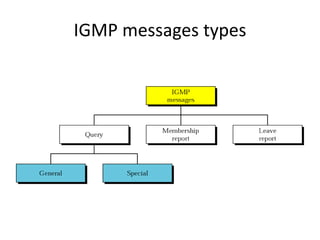
IGMP messages types
• aggregate routers into
regions, “autonomous
systems” (AS)
• routers in same AS run
same routing protocol
– “intra-AS” routing
protocol
– routers in different AS
can run different intra-
AS routing protocol
gateway router:
• at “edge” of its own AS
• has link to router in
another AS
Hierarchical routing
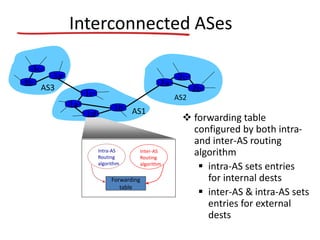
3b
1d
3a
1c
2a
AS3
AS1
AS2
1a
2c
2b
1b
Intra-AS
Routing
algorithm
Inter-AS
Routing
algorithm
Forwarding
table
3c
Interconnected ASes
 forwarding table
configured by both intra-
and inter-AS routing
algorithm
 intra-AS sets entries
for internal dests
 inter-AS & intra-AS sets
entries for external
dests
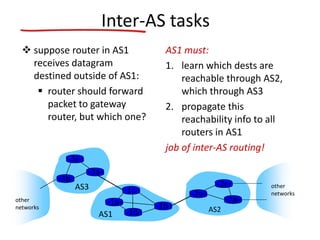
Inter-AS tasks
 suppose router in AS1
receives datagram
destined outside of AS1:
 router should forward
packet to gateway
router, but which one?
AS1 must:
1. learn which dests are
reachable through AS2,
which through AS3
2. propagate this
reachability info to all
routers in AS1
job of inter-AS routing!
AS3
AS2
3b
3c
3a
AS1
1c
1a
1d
1b
2a
2c
2b
other
networks
other
networks
Intra-AS Routing
also known as interior gateway protocols (IGP)
most common intra-AS routing protocols:
 RIP: Routing Information Protocol
 OSPF: Open Shortest Path First
 IGRP: Interior Gateway Routing Protocol (Cisco
proprietary)
OSPF (Open Shortest Path First)
• “open”: publicly available
• uses link state algorithm
– route computation using Dijkstra’s algorithm
• OSPF advertisement carries one entry per
neighbor
• advertisements flooded to entire AS
– carried in OSPF messages directly over IP
OSPF “advanced” features (not in RIP)
• security: all OSPF messages authenticated (to
prevent malicious intrusion)
• multiple same-cost paths allowed (only one
path in RIP)
• for each link, multiple cost metrics for
different TOS(Type Of Service)
• integrated uni- and multicast support
• hierarchical OSPF in large domains.
Internet inter-AS routing: BGP
• BGP (Border Gateway Protocol): the de facto
inter-domain routing protocol
– “glue that holds the Internet together”
• BGP provides each AS a means to:
– eBGP: obtain subnet reachability information from
neighboring ASs.
– iBGP: propagate reachability information to all AS-
internal routers.
– determine “good” routes to other networks based
on reachability information and policy.
• allows subnet to advertise its existence to rest
of Internet: “I am here”
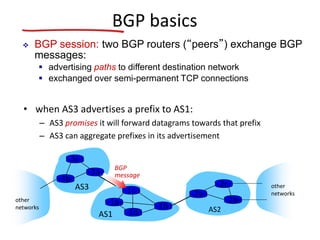
BGP basics
• when AS3 advertises a prefix to AS1:
– AS3 promises it will forward datagrams towards that prefix
– AS3 can aggregate prefixes in its advertisement
AS3
AS2
3b
3c
3a
AS1
1c
1a
1d
1b
2a
2c
2b
other
networks
other
networks
 BGP session: two BGP routers (“peers”) exchange BGP
messages:
 advertising paths to different destination network
 exchanged over semi-permanent TCP connections
BGP
message
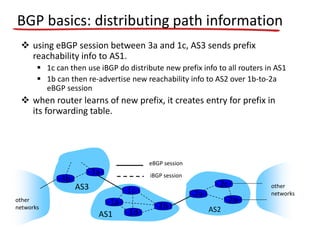
BGP basics: distributing path information
AS3
AS2
3b
3a
AS1
1c
1a
1d
1b
2a
2c
2b
other
networks
other
networks
 using eBGP session between 3a and 1c, AS3 sends prefix
reachability info to AS1.
 1c can then use iBGP do distribute new prefix info to all routers in AS1
 1b can then re-advertise new reachability info to AS2 over 1b-to-2a
eBGP session
 when router learns of new prefix, it creates entry for prefix in
its forwarding table.
eBGP session
iBGP session
IPv6: motivation
• initial motivation: 32-bit address space soon
to be completely allocated.
• additional motivation:
– header format helps speed processing/forwarding
– header changes to facilitate QoS
IPv6 datagram format:
– fixed-length 40 byte header
– no fragmentation allowed
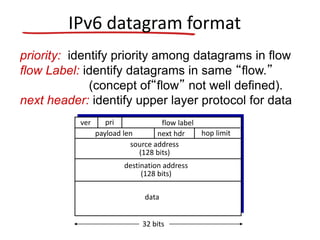
IPv6 datagram format
priority: identify priority among datagrams in flow
flow Label: identify datagrams in same “flow.”
(concept of“flow” not well defined).
next header: identify upper layer protocol for data
data
destination address
(128 bits)
source address
(128 bits)
payload len next hdr hop limit
flow labelpriver
32 bits
Other changes from IPv4
• checksum: removed entirely to reduce
processing time at each hop
• options: allowed, but outside of header,
indicated by “Next Header” field
• ICMPv6: new version of ICMP
– additional message types, e.g. “Packet Too Big
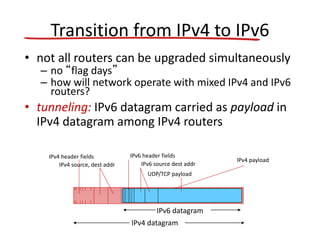
Transition from IPv4 to IPv6
• not all routers can be upgraded simultaneously
– no “flag days”
– how will network operate with mixed IPv4 and IPv6
routers?
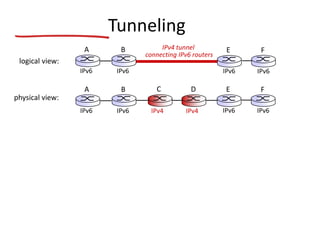
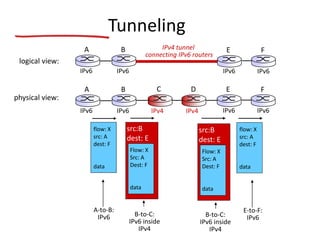
• tunneling: IPv6 datagram carried as payload in
IPv4 datagram among IPv4 routers
IPv4 source, dest addr
IPv4 header fields
IPv4 datagram
IPv6 datagram
IPv4 payload
UDP/TCP payload
IPv6 source dest addr
IPv6 header fields
Tunneling
physical view:
IPv4 IPv4
A B
IPv6 IPv6
E
IPv6 IPv6
FC D
logical view:
IPv4 tunnel
connecting IPv6 routers
E
IPv6 IPv6
FA B
IPv6 IPv6
flow: X
src: A
dest: F
data
A-to-B:
IPv6
Flow: X
Src: A
Dest: F
data
src:B
dest: E
B-to-C:
IPv6 inside
IPv4
E-to-F:
IPv6
flow: X
src: A
dest: F
data
B-to-C:
IPv6 inside
IPv4
Flow: X
Src: A
Dest: F
data
src:B
dest: E
physical view:
A B
IPv6 IPv6
E
IPv6 IPv6
FC D
logical view:
IPv4 tunnel
connecting IPv6 routers
E
IPv6 IPv6
FA B
IPv6 IPv6
Tunneling
IPv4 IPv4
IPv6: adoption
• US National Institutes of Standards estimate
[2013]:
– ~3% of industry IP routers
– ~11% of US gov’t routers
• Long (long!) time for deployment, use
– 20 years and counting!
– think of application-level changes in last 20 years:
WWW, Facebook, …
– Why?

Network Layer

  • 1.
  • 31.
    Classless Inter-Domain Routing(CIDR) • Basically the method that ISPs (Internet Service Providers) use to allocate an amount of addresses to a company, a home • Ex : 192.168.10.32/28 • The slash notation (/) means how many bits are turned on (1s)
  • 32.
  • 33.
    11111111 Determining Available HostAddresses 172 16 0 0 10101100 00010000 00000000 00000000 16 15 14 13 12 11 10 9 8 7 6 5 4 3 2 1 Network Host 00000000 00000001 11111111 11111111 11111111 11111110 ... ... 00000000 00000011 11111101 1 2 3 65534 65535 65536 – ... 2 65534 N 2N – 2 = 216 – 2 = 65534
  • 34.
    IP Address ClassesExercise Address Class Network Host 10.2.1.1 128.63.2.100 201.222.5.64 192.6.141.2 130.113.64.16 256.241.201.10
  • 35.
    IP Address ClassesExercise Answers Address Class Network Host 10.2.1.1 128.63.2.100 201.222.5.64 192.6.141.2 130.113.64.16 256.241.201.10 A B C C B Nonexistent 10.0.0.0 128.63.0.0 201.222.5.0 192.6.141.0 130.113.0.0 0.2.1.1 0.0.2.100 0.0.0.64 0.0.0.2 0.0.64.16
  • 36.
    • Network 172.16.0.0 172.16.0.0 AddressingWithout Subnets 172.16.0.1 172.16.0.2 172.16.0.3 …... 172.16.255.253 172.16.255.254
  • 37.
    • Network 172.16.0.0 Addressingwith Subnets 172.16.1.0 172.16.2.0 172.16.3.0 172.16.4.0
  • 38.
  • 39.
    Subnet Addressing 172.16.2.200 172.16.2.2 172.16.2.160 172.16.2.1 172.16.3.5 172.16.3.100 172.16.3.150 172.16.3.1 E0 E1 172.16 2160 Network Host . . Network Interface 172.16.2.0 172.16.3.0 E0 E1 New Routing Table Subnet
  • 40.
    Subnet Mask Exercise AddressSubnet Mask Class Subnet 172.16.2.10 10.6.24.20 10.30.36.12 255.255.255.0 255.255.240.0 255.255.255.0
  • 41.
    Subnet Mask ExerciseAnswers Address Subnet Mask Class Subnet 172.16.2.10 10.6.24.20 10.30.36.12 255.255.255.0 255.255.240.0 255.255.255.0 B A A 172.16.2.0 10.6.16.0 10.30.36.0
  • 42.
  • 43.
    Exercise • 192.168.10.0 • /27 ?– SNM ? – Block Size ?- Subnets
  • 44.
    Exercise • /27 ? –SNM – 224 ? – Block Size = 256-224 = 32 ?- Subnets Subnets 10.0 10.32 10.64 FHID 10.1 10.33 LHID 10.30 10.62 Broadcast 10.31 10.63
  • 45.
    Exercise • 192.168.10.0 • /30 ?– SNM ? – Block Size ?- Subnets
  • 46.
    Exercise • /30 ? –SNM – 252 ? – Block Size = 256-252 = 4 ?- Subnets Subnets 10.0 10.4 10.8 FHID 10.1 10.5 LHID 10.2 10.6 Broadcast 10.3 10.7
  • 47.
    Exercise Mask Subnets Host /26? ? ? /27 ? ? ? /28 ? ? ? /29 ? ? ? /30 ? ? ?
  • 48.
    Exercise Mask Subnets Host /26192 4 62 /27 224 8 30 /28 240 16 14 /29 248 32 6 /30 252 64 2
  • 49.
  • 50.
  • 51.
  • 52.
  • 53.
  • 54.
    Class B 172.16.0.0 /19 Subnets? Hosts ? Block Size ?
  • 55.
    Class B 172.16.0.0 /19 Subnets23 = 8 Hosts 213 -2 = 8190 Block Size 256-224 = 32 Subnets 0.0 32.0 64.0 96.0 FHID 0.1 32.1 64.1 96.1 LHID 31.254 63.254 95.254 127.254 Broadcast 31.255 63.255 95.255 127.255
  • 56.
    Class B 172.16.0.0 /27 Subnets? Hosts ? Block Size ?
  • 57.
    Class B 172.16.0.0 /27 Subnets211 = 2048 Hosts 25 -2 = 30 Block Size 256-224 = 32 Subnets 0.0 0.32 0.64 0.96 FHID 0.1 0.33 0.65 0.97 LHID 0.30 0.62 0.94 0.126 Broadcast 0.31 0.63 0.95 0.127
  • 58.
    Class B 172.16.0.0 /23 Subnets? Hosts ? Block Size ?
  • 59.
    Class B 172.16.0.0 /23 Subnets27 = 128 Hosts 29 -2 = 510 Block Size 256-254 = 2 Subnets 0.0 2.0 4.0 6.0 FHID 0.1 2.1 4.1 6.1 LHID 1.254 3.254 5.254 7.254 Broadcast 1.255 3.255 5.255 7.255
  • 60.
    Class B 172.16.0.0 /24 Subnets? Hosts ? Block Size ?
  • 61.
    Class B 172.16.0.0 /24 Subnets28 = 256 Hosts 28 -2 = 254 Block Size 256-255 = 1 Subnets 0.0 1.0 2.0 3.0 FHID 0.1 1.1 2.1 3.1 LHID 0.254 1.254 2.254 3.254 Broadcast 0.255 1.255 2.255 3.255
  • 62.
    Class B 172.16.0.0 /25 Subnets? Hosts ? Block Size ?
  • 63.
    Class B 172.16.0.0 /25 Subnets29 = 512 Hosts 27 -2 = 126 Block Size 256-128 = 128 Subnets 0.0 0.128 1.0 1.128 2.0 2.128 FHID 0.1 0.129 1.1 1.129 2.1 2.129 LHID 0.126 0.254 1.126 1.254 2.126 2.254 Broadcast 0.127 0.255 1.127 1.255 2.127 2.255
  • 64.
    Find out Subnetand Broadcast Address • 172.16.85.30/29
  • 65.
    Find out Subnetand Broadcast Address • 172.30.101.62/23
  • 66.
    Find out Subnetand Broadcast Address • 172.20.210.80/24
  • 67.
    Class A 10.0.0.0 /10 Subnets? Hosts ? Block Size ?
  • 68.
    Class A 10.0.0.0 /10 Subnets22 = 4 Hosts 222 -2 = 4194302 Block Size 256-192 = 64 Subnets 10.0 10.64 10.128 10.192 FHID 10.0.0.1 10.64.0.1 10.128.0.1 10.192.0.1 LHID 10.63.255.254 10.127.255.254 10.191.255.254 10.254.255.254 Broadcast 10.63.255.255 10.127.255.255 10.191.255.255 10.254.255.255
  • 69.
    Class A 10.0.0.0 /18 Subnets? Hosts ? Block Size ?
  • 70.
    Class A 10.0.0.0 /18 Subnets210 = 1024 Hosts 214 -2 = 16382 Block Size 256-192 = 64 Subnets 10.0.0.0 10.0.64.0 10.0.128.0 10.0.192.0 FHID 10.0.0.1 10.0.64.1 10.0.128.1 10.0.192.1 LHID 10.0.63.254 10.0.127.254 10.0.191.254 10.0.254.254 Broadcast 10.0.63.255 10.0.127.255 10.0.191.255 10.0.254.255
  • 71.
    VLSM(Variable Length SubnetMask) • VLSM extends classic subnetting. • VLSM is a process of breaking down subnets into the smaller subnets, according to the need of individual networks.
  • 72.
    VLSM  An organizationwith a class C address and needs to have 5 subnets with the following number of hosts: 60, 60, 60, 30, 30.  The site cannot use a subnet mask with only 2 bits in the subnet section because this allows only 4 subnetworks each 62.  Nor can the site use a subnet mask with 3 bits in the subnet section because this allows 8 subnetworks each with 30 hosts.
  • 73.
    VLSM  The routeruses 2 different masks, one applied after the other.  It first uses the masks with 26 1s(11111111 11111111 11111111 11000000 or 255.255.255.192) to divide the network into 4 subnets.  Then it applies the mask with 27 1s (11111111 11111111 11111111 11100000 or 255.255.255.224) to one of the subnets to divide it into two smaller subnets.
  • 75.
  • 76.
    • If anISP has a 200.1.1.0 Network, he wants to give assign to 5 customers who need 20, 12, 6, 25, 18 hosts. – What should the subnet mask be? – What is the address range in each subnet? – What should the routing table entries be? – Can it be done efficiently to conserve IP addresses? Question
  • 77.
  • 79.
    Supernetting • Supernets arethe opposite of Subnets in that they combine multiple Class C networks into blocks rather than dividing them into segments. • When Subnetting, we borrow bits from the Host ID portion, which increases the number of bits used for the Network ID portion. • With Supernetting we do exactly the opposite, meaning we take the bits from the Network ID portion and give them to the Host ID portion
  • 80.
    Supernet Masks  Asupernet mask is the reverse of the subnet mask.  In a supernet mask, we change some 1s in the netid section to 0s.
  • 81.
    Example • With thesupernet mask of 255.255.252.0 we can have 4 class C address combined into one supernetwork. • If we choose the first address to be X.Y.32.0, the other three addresses are X.Y.33.0, X.Y.34.0, and X.Y.35.0. • Whenever the router receives a packet, it applies the supernet mask to the destination address and compares the result to the lowest address. If the result and the lowest address are the same, the packet belongs to the supernet.
  • 84.
    NAT: network addresstranslation 10.0.0.1 10.0.0.2 10.0.0.3 10.0.0.4 138.76.29.7 local network (e.g., home network) 10.0.0/24 rest of Internet datagrams with source or destination in this network have 10.0.0/24 address for source, destination (as usual) all datagrams leaving local network have same single source NAT IP address: 138.76.29.7,different
  • 85.
    motivation: local networkuses just one IP address as far as outside world is concerned: – range of addresses not needed from ISP: just one IP address for all devices – can change addresses of devices in local network without notifying outside world – can change ISP without changing addresses of devices in local network – devices inside local net not explicitly addressable, visible by outside world (a security plus) NAT: network address translation
  • 86.
    implementation: NAT routermust: – outgoing datagrams: replace (source IP address, port #) of every outgoing datagram to (NAT IP address, new port #) – remember (in NAT translation table) every (source IP address, port #) to (NAT IP address, new port #) translation pair – incoming datagrams: replace (NAT IP address, new port #) in dest fields of every incoming datagram with corresponding (source IP address, port #) stored in NAT table NAT: network address translation
  • 87.
    10.0.0.1 10.0.0.2 10.0.0.3 S: 10.0.0.1, 3345 D:128.119.40.186, 80 1 10.0.0.4 138.76.29.7 1: host 10.0.0.1 sends datagram to 128.119.40.186, 80 NAT translation table WAN side addr LAN side addr 138.76.29.7, 5001 10.0.0.1, 3345 …… …… S: 128.119.40.186, 80 D: 10.0.0.1, 3345 4 S: 138.76.29.7, 5001 D: 128.119.40.186, 802 2: NAT router changes datagram source addr from 10.0.0.1, 3345 to 138.76.29.7, 5001, updates table S: 128.119.40.186, 80 D: 138.76.29.7, 5001 3 3: reply arrives dest. address: 138.76.29.7, 5001 4: NAT router changes datagram dest addr from 138.76.29.7, 5001 to 10.0.0.1, 3345 NAT: network address translation
  • 92.
    IGMP(Internet Group Management Protocol) •IGMP is a protocol that manages group membership. • The IGMP protocol gives the multicast routers information about the membership status of hosts (routers) connected to the network.
  • 93.
    Position of IGMPin network layer
  • 94.
    IGMP is agroup management protocol. It helps a multicast router create and update a list of loyal members related to each router interface. Note:
  • 95.
  • 96.
    • aggregate routersinto regions, “autonomous systems” (AS) • routers in same AS run same routing protocol – “intra-AS” routing protocol – routers in different AS can run different intra- AS routing protocol gateway router: • at “edge” of its own AS • has link to router in another AS Hierarchical routing
  • 97.
    3b 1d 3a 1c 2a AS3 AS1 AS2 1a 2c 2b 1b Intra-AS Routing algorithm Inter-AS Routing algorithm Forwarding table 3c Interconnected ASes  forwardingtable configured by both intra- and inter-AS routing algorithm  intra-AS sets entries for internal dests  inter-AS & intra-AS sets entries for external dests
  • 98.
    Inter-AS tasks  supposerouter in AS1 receives datagram destined outside of AS1:  router should forward packet to gateway router, but which one? AS1 must: 1. learn which dests are reachable through AS2, which through AS3 2. propagate this reachability info to all routers in AS1 job of inter-AS routing! AS3 AS2 3b 3c 3a AS1 1c 1a 1d 1b 2a 2c 2b other networks other networks
  • 99.
    Intra-AS Routing also knownas interior gateway protocols (IGP) most common intra-AS routing protocols:  RIP: Routing Information Protocol  OSPF: Open Shortest Path First  IGRP: Interior Gateway Routing Protocol (Cisco proprietary)
  • 100.
    OSPF (Open ShortestPath First) • “open”: publicly available • uses link state algorithm – route computation using Dijkstra’s algorithm • OSPF advertisement carries one entry per neighbor • advertisements flooded to entire AS – carried in OSPF messages directly over IP
  • 101.
    OSPF “advanced” features(not in RIP) • security: all OSPF messages authenticated (to prevent malicious intrusion) • multiple same-cost paths allowed (only one path in RIP) • for each link, multiple cost metrics for different TOS(Type Of Service) • integrated uni- and multicast support • hierarchical OSPF in large domains.
  • 102.
    Internet inter-AS routing:BGP • BGP (Border Gateway Protocol): the de facto inter-domain routing protocol – “glue that holds the Internet together” • BGP provides each AS a means to: – eBGP: obtain subnet reachability information from neighboring ASs. – iBGP: propagate reachability information to all AS- internal routers. – determine “good” routes to other networks based on reachability information and policy. • allows subnet to advertise its existence to rest of Internet: “I am here”
  • 103.
    BGP basics • whenAS3 advertises a prefix to AS1: – AS3 promises it will forward datagrams towards that prefix – AS3 can aggregate prefixes in its advertisement AS3 AS2 3b 3c 3a AS1 1c 1a 1d 1b 2a 2c 2b other networks other networks  BGP session: two BGP routers (“peers”) exchange BGP messages:  advertising paths to different destination network  exchanged over semi-permanent TCP connections BGP message
  • 104.
    BGP basics: distributingpath information AS3 AS2 3b 3a AS1 1c 1a 1d 1b 2a 2c 2b other networks other networks  using eBGP session between 3a and 1c, AS3 sends prefix reachability info to AS1.  1c can then use iBGP do distribute new prefix info to all routers in AS1  1b can then re-advertise new reachability info to AS2 over 1b-to-2a eBGP session  when router learns of new prefix, it creates entry for prefix in its forwarding table. eBGP session iBGP session
  • 105.
    IPv6: motivation • initialmotivation: 32-bit address space soon to be completely allocated. • additional motivation: – header format helps speed processing/forwarding – header changes to facilitate QoS IPv6 datagram format: – fixed-length 40 byte header – no fragmentation allowed
  • 106.
    IPv6 datagram format priority:identify priority among datagrams in flow flow Label: identify datagrams in same “flow.” (concept of“flow” not well defined). next header: identify upper layer protocol for data data destination address (128 bits) source address (128 bits) payload len next hdr hop limit flow labelpriver 32 bits
  • 107.
    Other changes fromIPv4 • checksum: removed entirely to reduce processing time at each hop • options: allowed, but outside of header, indicated by “Next Header” field • ICMPv6: new version of ICMP – additional message types, e.g. “Packet Too Big
  • 108.
    Transition from IPv4to IPv6 • not all routers can be upgraded simultaneously – no “flag days” – how will network operate with mixed IPv4 and IPv6 routers? • tunneling: IPv6 datagram carried as payload in IPv4 datagram among IPv4 routers IPv4 source, dest addr IPv4 header fields IPv4 datagram IPv6 datagram IPv4 payload UDP/TCP payload IPv6 source dest addr IPv6 header fields
  • 109.
    Tunneling physical view: IPv4 IPv4 AB IPv6 IPv6 E IPv6 IPv6 FC D logical view: IPv4 tunnel connecting IPv6 routers E IPv6 IPv6 FA B IPv6 IPv6
  • 110.
    flow: X src: A dest:F data A-to-B: IPv6 Flow: X Src: A Dest: F data src:B dest: E B-to-C: IPv6 inside IPv4 E-to-F: IPv6 flow: X src: A dest: F data B-to-C: IPv6 inside IPv4 Flow: X Src: A Dest: F data src:B dest: E physical view: A B IPv6 IPv6 E IPv6 IPv6 FC D logical view: IPv4 tunnel connecting IPv6 routers E IPv6 IPv6 FA B IPv6 IPv6 Tunneling IPv4 IPv4
  • 111.
    IPv6: adoption • USNational Institutes of Standards estimate [2013]: – ~3% of industry IP routers – ~11% of US gov’t routers • Long (long!) time for deployment, use – 20 years and counting! – think of application-level changes in last 20 years: WWW, Facebook, … – Why?