Operating System
Chapter 3: Process
Process
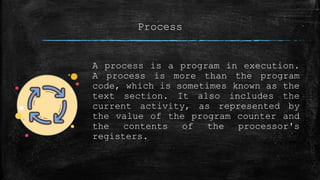
A process is a program in execution.
A process is more than the program
code, which is sometimes known as the
text section. It also includes the
current activity, as represented by
the value of the program counter and
the contents of the processor's
registers.
Process states
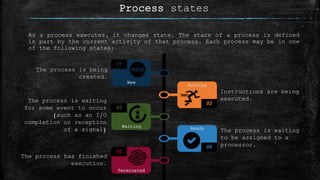
As a process executes, it changes state. The state of a process is defined
in part by the current activity of that process. Each process may be in one
of the following states:
Instructions are being
executed.
The process is waiting
to be assigned to a
processor.
The process is being
created.
The process is waiting
for some event to occur
(such as an I/O
completion or reception
of a signal)
The process has finished
execution.
01
New
02
Running
03
Waiting
04
Ready
05
Terminated
Process states
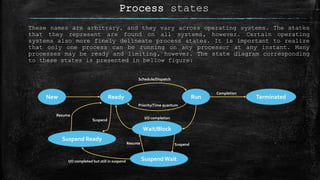
These names are arbitrary, and they vary across operating systems. The states
that they represent are found on all systems, however. Certain operating
systems also more finely delineate process states. It is important to realize
that only one process can be running on any processor at any instant. Many
processes may be ready and limiting, however. The state diagram corresponding
to these states is presented in bellow figure:
Ready Run TerminatedNew
Wait/Block
SuspendWait
Suspend Ready
Schedule/Dispatch
Priority/Time quantum
Completion
I/O completion
Suspend
Resume
I/O completed but still in suspend
Resume
Suspend
Process control block (PCB)
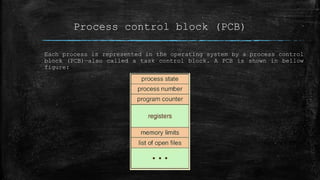
Each process is represented in the operating system by a process control
block (PCB)—also called a task control block. A PCB is shown in bellow
figure:
Information of PCB
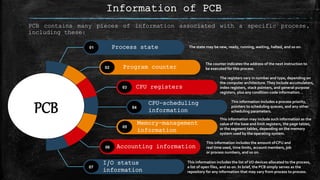
PCB contains many pieces of information associated with a specific process,
including these:
The state may be new, ready, running, waiting, halted, and so on.
The counter indicates the address of the next instruction to
be executed for this process.
The registers vary in number and type, depending on
the computer architecture.They include accumulators,
index registers, stack pointers, and general-purpose
registers, plus any condition-code information. .
This information includes a process priority,
pointers to scheduling queues, and any other
scheduling parameters.
This information may include such information as the
value of the base and limit registers, the page tables,
or the segment tables, depending on the memory
system used by the operating system.
This information includes the amount of CPU and
real time used, time limits, account members, job
or process numbers, and so on.
This information includes the list of I/O devices allocated to the process,
a list of open files, and so on. In brief, the PCB simply serves as the
repository for any information that may vary from process to process.
Process state01
Program counter02
CPU registers03
CPU-scheduling
information
04
Memory-management
information
05
Accounting information06
I/O status
information
07
PCB
PCB
Highlights
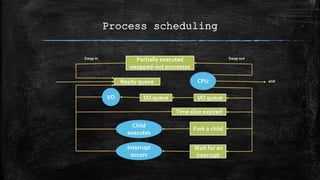
Process scheduling queue
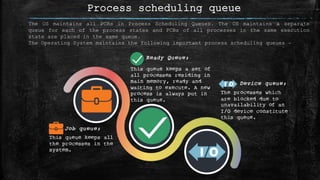
The OS maintains all PCBs in Process Scheduling Queues. The OS maintains a separate
queue for each of the process states and PCBs of all processes in the same execution
state are placed in the same queue.
The Operating System maintains the following important process scheduling queues −
Process scheduling
Partially executed
swapped-out processes
Ready queue CPU
I/O I/O queue I/O queue
Time slice expired
Child
executes
Fork a child
Interrupt
occurs
Wait for an
interrupt
Swap in Swap out
end
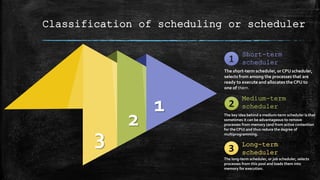
Classification of scheduling or scheduler
1
2
3
Medium-term
scheduler
The key idea behind a medium-term scheduler is that
sometimes it can be advantageous to remove
processes from memory (and from active contention
for the CPU) and thus reduce the degree of
multiprogramming.
Long-term
scheduler
The long-term scheduler, or job scheduler, selects
processes from this pool and loads them into
memory for execution.
Short-term
scheduler
The short-term scheduler, or CPU scheduler,
selects from among the processes that are
ready to execute and allocates the CPU to
one of them.
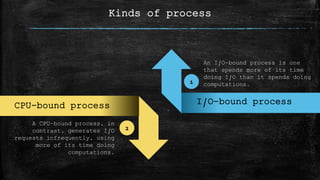
Kinds of process
I/O-bound processYourText Here
An I/O-bound process is one
that spends more of its time
doing I/O than it spends doing
computations.
A CPU-bound process, in
contrast, generates I/O
requests infrequently, using
more of its time doing
computations.
2
1
CPU-bound process
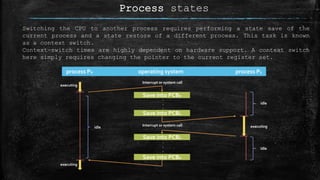
Process states
Switching the CPU to another process requires performing a state save of the
current process and a state restore of a different process. This task is known
as a context switch.
Context-switch times are highly dependent on hardware support. A context switch
here simply requires changing the pointer to the current register set.
process Po operating system process P1
Save into PCBo
Save into PCB1
Save into PCB1
Save into PCBo
.
.
.
.
.
.
Interrupt or system call
idle
idle
idle executing
executing
executing
Prepared by:
Ankon Gopal Banik
Front End Developer | WWF
(Web With Friends)
m: +8801771981989
p: 027730402
e: agbanik2081@outlook.com
75-B, Kyetpara, Dhamrai,
Dhaka, Bangladesh
www.wwfriends.org

Operating system || Chapter 3: Process

  • 1.
  • 2.
    Process A process isa program in execution. A process is more than the program code, which is sometimes known as the text section. It also includes the current activity, as represented by the value of the program counter and the contents of the processor's registers.
  • 3.
    Process states As aprocess executes, it changes state. The state of a process is defined in part by the current activity of that process. Each process may be in one of the following states: Instructions are being executed. The process is waiting to be assigned to a processor. The process is being created. The process is waiting for some event to occur (such as an I/O completion or reception of a signal) The process has finished execution. 01 New 02 Running 03 Waiting 04 Ready 05 Terminated
  • 4.
    Process states These namesare arbitrary, and they vary across operating systems. The states that they represent are found on all systems, however. Certain operating systems also more finely delineate process states. It is important to realize that only one process can be running on any processor at any instant. Many processes may be ready and limiting, however. The state diagram corresponding to these states is presented in bellow figure: Ready Run TerminatedNew Wait/Block SuspendWait Suspend Ready Schedule/Dispatch Priority/Time quantum Completion I/O completion Suspend Resume I/O completed but still in suspend Resume Suspend
  • 5.
    Process control block(PCB) Each process is represented in the operating system by a process control block (PCB)—also called a task control block. A PCB is shown in bellow figure:
  • 6.
    Information of PCB PCBcontains many pieces of information associated with a specific process, including these: The state may be new, ready, running, waiting, halted, and so on. The counter indicates the address of the next instruction to be executed for this process. The registers vary in number and type, depending on the computer architecture.They include accumulators, index registers, stack pointers, and general-purpose registers, plus any condition-code information. . This information includes a process priority, pointers to scheduling queues, and any other scheduling parameters. This information may include such information as the value of the base and limit registers, the page tables, or the segment tables, depending on the memory system used by the operating system. This information includes the amount of CPU and real time used, time limits, account members, job or process numbers, and so on. This information includes the list of I/O devices allocated to the process, a list of open files, and so on. In brief, the PCB simply serves as the repository for any information that may vary from process to process. Process state01 Program counter02 CPU registers03 CPU-scheduling information 04 Memory-management information 05 Accounting information06 I/O status information 07 PCB PCB Highlights
  • 7.
    Process scheduling queue TheOS maintains all PCBs in Process Scheduling Queues. The OS maintains a separate queue for each of the process states and PCBs of all processes in the same execution state are placed in the same queue. The Operating System maintains the following important process scheduling queues −
  • 8.
    Process scheduling Partially executed swapped-outprocesses Ready queue CPU I/O I/O queue I/O queue Time slice expired Child executes Fork a child Interrupt occurs Wait for an interrupt Swap in Swap out end
  • 9.
    Classification of schedulingor scheduler 1 2 3 Medium-term scheduler The key idea behind a medium-term scheduler is that sometimes it can be advantageous to remove processes from memory (and from active contention for the CPU) and thus reduce the degree of multiprogramming. Long-term scheduler The long-term scheduler, or job scheduler, selects processes from this pool and loads them into memory for execution. Short-term scheduler The short-term scheduler, or CPU scheduler, selects from among the processes that are ready to execute and allocates the CPU to one of them.
  • 10.
    Kinds of process I/O-boundprocessYourText Here An I/O-bound process is one that spends more of its time doing I/O than it spends doing computations. A CPU-bound process, in contrast, generates I/O requests infrequently, using more of its time doing computations. 2 1 CPU-bound process
  • 11.
    Process states Switching theCPU to another process requires performing a state save of the current process and a state restore of a different process. This task is known as a context switch. Context-switch times are highly dependent on hardware support. A context switch here simply requires changing the pointer to the current register set. process Po operating system process P1 Save into PCBo Save into PCB1 Save into PCB1 Save into PCBo . . . . . . Interrupt or system call Interrupt or system call idle idle idle executing executing executing
  • 12.
    Prepared by: Ankon GopalBanik Front End Developer | WWF (Web With Friends) m: +8801771981989 p: 027730402 e: agbanik2081@outlook.com 75-B, Kyetpara, Dhamrai, Dhaka, Bangladesh www.wwfriends.org