OpenStack	
  and	
  Windows	
  

Alessandro	
  Pilo5	
  
CEO	
  
@cloudbaseit	
  
Agenda
• 
• 
• 
• 
• 

Windows as a guest
Windows licensing on OpenStack
Heat templates
Windows hypervisor (Hyper-V)
Crowbar and SUSE Cloud 2
Windows as a guest
•  Can be executed on any hypervisor used in
Nova
•  No differences compared to Linux for
image handling (glance etc)
•  Images are tipically sysprepped
–  Why?
–  It can be avoided to speed up boot times
Synthetic drivers
•  Modern Hypervisors provide drivers to replace
emulated devices with synthetic ones
–  Network adapters, etc

•  Hyper-V
–  Integration components / LIS

•  KVM
–  VirtIO

•  VMWare
–  VMWare Tools

•  XenServer / XCP
–  XenServer Tools
Cloudbase-Init
•  100% Python code
•  Wrapped in a Windows service
•  Plugin based architecture:
–  Each plugin can be executed once or more
times at boot
–  Status for each plugin is mantained in the
registry
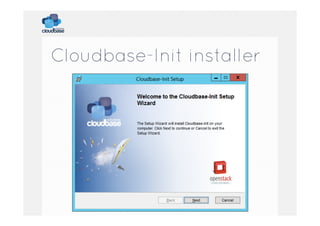
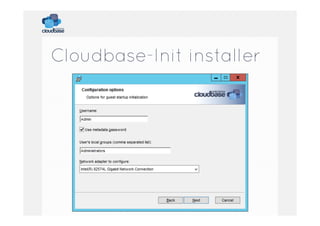
Cloudbase-Init installer
Most important plugins
•  CreateUser
•  SetUserPassword
•  SetHostName
–  Requires a reboot

•  SSHPublicKeys
•  ExtendVolumes
–  Useful for different flavors / resizes

•  User data
–  Including multipart: Heat!!
Sysprep
•  Prepares a Windows image to be
distributed
–  Typically on large scales

•  Run before distributing any Windows
image
•  OOBE
–  Out of the box experience
–  Normally used to let the user customize the
system
SSH Equivalent?
•  It exists: WSMan / WinRM
•  Execute remote command via HTTP / HTTPS
•  Can be used for remote PowerShell or from
Linux
•  Configuration example:
–  https://github.com/cloudbase/unattended-setupscripts/blob/master/SetupWinRMAccess.ps1
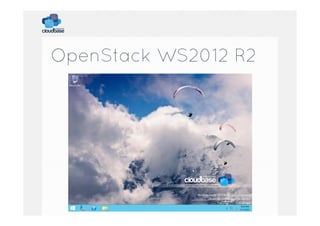
OpenStack WS2012 R2
OpenStack WS2012 R2
•  Complete with:
–  Drivers / tools:
•  VirtIO, etc

–  Cloudbase-Init
–  Sysprepped

•  Eval edition can be upgraded with a simple
uder_data script:
–  DISM /online /Set-Edition:ServerStandard /
ProductKey:XXXXX-XXXXX-XXXXX-XXXXX-XXXXX /
AcceptEula
–  Make sure to respect the eval license!!
How to build an image?
•  Windows has the equivalent of a kickstart /
preseed
–  https://github.com/cloudbase/windowsopenstack-imaging-tools

•  We get lots of questions about how to build
those images
•  This project automates the entire process
Lincensing
•  Windows is surprising in OpenStack
–  Datacenter license => unlimited instances
–  1 license per socket
–  Works with Hyper-V, VMWare, KVM, etc
–  The cost is 3 EUR / Month per VM with a
density of 50 VM / host

•  Volume licensing
•  Multitenant? SPLA
SVVP support
•  Windows guests are supported on:
–  Hyper-V

•  SVVP
–  Windows Server Virtualization Validation
Program
–  http://www.windowsservercatalog.com/
svvp.aspx

•  Red Hat, VMWare, SUSE
•  Your solution is not there?
–  Microsoft won’t give you support
Heat
•  Heat and Windows are a great mix
•  Templates for:
–  Active directory
–  Exchange (multi server)
–  Sharepoint (multi server)
–  SQL Server
–  IIS

•  No need to know the provisioning details
Hyper-V
•  Setup is very easy
•  Our Nova driver is at it’s 3rd release!
–  Folsom, Grizzly, Havana

• 
• 
• 
• 

Support for Hyper-V 2012 R2
VHDX support
Ceilometer support
more…
Hyper-V 2012 availability
•  FREE edition
–  Full Hypervisor
–  Minimum OS support
•  Minimum impact on security updates, etc

•  Windows Server 2012
–  Just enable the related role

•  Windows 8
–  For workstation / testing / development usage
Hyper-V / Windows
Openstack components
• 
• 
• 
• 
• 

Nova Compute driver
Quantum plugin
Cinder Volume driver
Windows Cloud-Init
Ceilometer Agent (Havana)
Hyper-V Nova Compute
•  Python Application installed as an
application/service on the Hyper-V node.
•  OpenStack compute utilizes key features
baked into the Hyper-V Virtualization
Platform
•  Does not require windows clustering
services
•  Does not require shared storage
Neutron
•  Hyper-V plugin is part of Quantum since Jan
2013
–  Project renamed in Neutron since Havana

•  Supported network types:
– 
– 
– 
– 

VLAN
Flat
Local
NVGRE (Icehouse)

•  Plugin / agent model
–  Plugin runs in quantum-server (controller)
–  Agent runs on each Hyper-V compute node
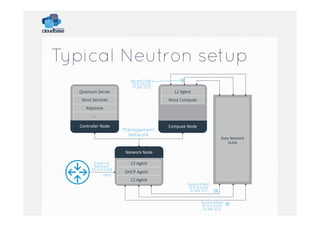
Typical Neutron setup
Quantum Server

TenantCNet2
10.0.1.0/24
VLAN ID:3

Nova Services

L2 Agent
Nova Compute

Keystone
...
Controller Node

Management
Network

Compute Node
Data Network
VLAN

Network Node
External
Network
30.0.0.0/24
eth0

L3 Agent
DHCP Agent
L2 Agent

TenantANet1
10.0.0.0/24
VLAN ID:1
TenantANet1
10.0.0.0/24
VLAN ID:2
Neutron OVS interop
•  Quantum plugin / agent AMQP RPC protocol is
compatible with OpenVSwitch!
•  You can use the OVS plugin with Hyper-V
agents (or vice versa)
–  Limited to compatible L2 protocols: Flat / VLAN

•  You can use the L3 and DHCP agents with the
Hyper-V plugin
–  Using the OVS L2 agent on the networking nodes

•  Supports ML2 plugin!
Hyper-V OpenVSwitch!
We are officially porting
OpenVSwitch to Windows!
Why OpenVSwitch?
•  De facto standard for SDN
•  Great interoperability
–  Hyper-V / KVM / etc

•  OpenFlow
•  Tunnelling
–  VXLAN
–  GRE

•  Quantum OVS plugin
–  No need for a different one
Dashboard integration
•  Hyper-V uses RDP for accessing the console
instead of VNC
•  By default it accepts connections on port 2179
–  Not the RDP connection on 3389!
–  Access to any guest: Windows, Linux, FreeRDP, etc

•  The VM id is provided as part of an RDP
protocol additional buffer called PCB (Pre
Connection Buffer)
•  Authentication is performed against the host,
not the guest!
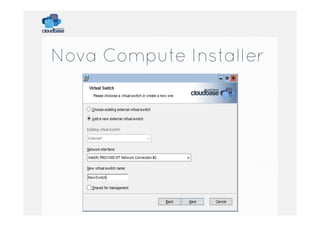
Nova Compute Installer
•  Independent Python environment to avoid
conflicts with existing applications
•  Installs and registers all the required
dependencies
•  Generates dynamically a nova.conf file based
on the parameters provided by the user
Nova Compute Installer
From our web site J
Puppet and Chef
•  Hyper-V compute nodes can be installed
via Puppet or Chef as well
•  Puppet
–  https://github.com/openstack-hyper-v/puppetopenstack_hyper_v

•  Chef
–  https://github.com/cloudbase/barclamphyperv-compute
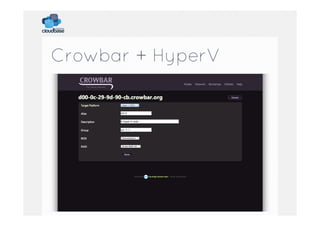
Crowbar
• 
• 
• 
• 

Big part of Dell’s cloud strategy
Bare-metal deployment
vendor independent
PXE booting
–  Sledgehammer image boots and gets
configuration

•  Provisioning via Crowbar web site
•  Barclams
–  Configuration
–  Chef recipes
Crowbar + HyperV
SUSE Cloud 2.0
•  Supports Hyper-V and many other
hypervisor options
•  Based on Crowbar
–  Grizzly
–  Havana
Q&A	
  

OpenStack in action 4! Alessandro Pilotti - OpenStack, Hyper-V and Windows

  • 1.
    OpenStack  and  Windows   Alessandro  Pilo5   CEO   @cloudbaseit  
  • 2.
    Agenda •  •  •  •  •  Windows as aguest Windows licensing on OpenStack Heat templates Windows hypervisor (Hyper-V) Crowbar and SUSE Cloud 2
  • 3.
    Windows as aguest •  Can be executed on any hypervisor used in Nova •  No differences compared to Linux for image handling (glance etc) •  Images are tipically sysprepped –  Why? –  It can be avoided to speed up boot times
  • 4.
    Synthetic drivers •  ModernHypervisors provide drivers to replace emulated devices with synthetic ones –  Network adapters, etc •  Hyper-V –  Integration components / LIS •  KVM –  VirtIO •  VMWare –  VMWare Tools •  XenServer / XCP –  XenServer Tools
  • 5.
    Cloudbase-Init •  100% Pythoncode •  Wrapped in a Windows service •  Plugin based architecture: –  Each plugin can be executed once or more times at boot –  Status for each plugin is mantained in the registry
  • 6.
  • 7.
  • 8.
    Most important plugins • CreateUser •  SetUserPassword •  SetHostName –  Requires a reboot •  SSHPublicKeys •  ExtendVolumes –  Useful for different flavors / resizes •  User data –  Including multipart: Heat!!
  • 9.
    Sysprep •  Prepares aWindows image to be distributed –  Typically on large scales •  Run before distributing any Windows image •  OOBE –  Out of the box experience –  Normally used to let the user customize the system
  • 10.
    SSH Equivalent? •  Itexists: WSMan / WinRM •  Execute remote command via HTTP / HTTPS •  Can be used for remote PowerShell or from Linux •  Configuration example: –  https://github.com/cloudbase/unattended-setupscripts/blob/master/SetupWinRMAccess.ps1
  • 11.
  • 12.
    OpenStack WS2012 R2 • Complete with: –  Drivers / tools: •  VirtIO, etc –  Cloudbase-Init –  Sysprepped •  Eval edition can be upgraded with a simple uder_data script: –  DISM /online /Set-Edition:ServerStandard / ProductKey:XXXXX-XXXXX-XXXXX-XXXXX-XXXXX / AcceptEula –  Make sure to respect the eval license!!
  • 13.
    How to buildan image? •  Windows has the equivalent of a kickstart / preseed –  https://github.com/cloudbase/windowsopenstack-imaging-tools •  We get lots of questions about how to build those images •  This project automates the entire process
  • 14.
    Lincensing •  Windows issurprising in OpenStack –  Datacenter license => unlimited instances –  1 license per socket –  Works with Hyper-V, VMWare, KVM, etc –  The cost is 3 EUR / Month per VM with a density of 50 VM / host •  Volume licensing •  Multitenant? SPLA
  • 15.
    SVVP support •  Windowsguests are supported on: –  Hyper-V •  SVVP –  Windows Server Virtualization Validation Program –  http://www.windowsservercatalog.com/ svvp.aspx •  Red Hat, VMWare, SUSE •  Your solution is not there? –  Microsoft won’t give you support
  • 16.
    Heat •  Heat andWindows are a great mix •  Templates for: –  Active directory –  Exchange (multi server) –  Sharepoint (multi server) –  SQL Server –  IIS •  No need to know the provisioning details
  • 17.
    Hyper-V •  Setup isvery easy •  Our Nova driver is at it’s 3rd release! –  Folsom, Grizzly, Havana •  •  •  •  Support for Hyper-V 2012 R2 VHDX support Ceilometer support more…
  • 18.
    Hyper-V 2012 availability • FREE edition –  Full Hypervisor –  Minimum OS support •  Minimum impact on security updates, etc •  Windows Server 2012 –  Just enable the related role •  Windows 8 –  For workstation / testing / development usage
  • 19.
    Hyper-V / Windows Openstackcomponents •  •  •  •  •  Nova Compute driver Quantum plugin Cinder Volume driver Windows Cloud-Init Ceilometer Agent (Havana)
  • 20.
    Hyper-V Nova Compute • Python Application installed as an application/service on the Hyper-V node. •  OpenStack compute utilizes key features baked into the Hyper-V Virtualization Platform •  Does not require windows clustering services •  Does not require shared storage
  • 21.
    Neutron •  Hyper-V pluginis part of Quantum since Jan 2013 –  Project renamed in Neutron since Havana •  Supported network types: –  –  –  –  VLAN Flat Local NVGRE (Icehouse) •  Plugin / agent model –  Plugin runs in quantum-server (controller) –  Agent runs on each Hyper-V compute node
  • 22.
    Typical Neutron setup QuantumServer TenantCNet2 10.0.1.0/24 VLAN ID:3 Nova Services L2 Agent Nova Compute Keystone ... Controller Node Management Network Compute Node Data Network VLAN Network Node External Network 30.0.0.0/24 eth0 L3 Agent DHCP Agent L2 Agent TenantANet1 10.0.0.0/24 VLAN ID:1 TenantANet1 10.0.0.0/24 VLAN ID:2
  • 23.
    Neutron OVS interop • Quantum plugin / agent AMQP RPC protocol is compatible with OpenVSwitch! •  You can use the OVS plugin with Hyper-V agents (or vice versa) –  Limited to compatible L2 protocols: Flat / VLAN •  You can use the L3 and DHCP agents with the Hyper-V plugin –  Using the OVS L2 agent on the networking nodes •  Supports ML2 plugin!
  • 24.
    Hyper-V OpenVSwitch! We areofficially porting OpenVSwitch to Windows!
  • 25.
    Why OpenVSwitch? •  Defacto standard for SDN •  Great interoperability –  Hyper-V / KVM / etc •  OpenFlow •  Tunnelling –  VXLAN –  GRE •  Quantum OVS plugin –  No need for a different one
  • 26.
    Dashboard integration •  Hyper-Vuses RDP for accessing the console instead of VNC •  By default it accepts connections on port 2179 –  Not the RDP connection on 3389! –  Access to any guest: Windows, Linux, FreeRDP, etc •  The VM id is provided as part of an RDP protocol additional buffer called PCB (Pre Connection Buffer) •  Authentication is performed against the host, not the guest!
  • 27.
    Nova Compute Installer • Independent Python environment to avoid conflicts with existing applications •  Installs and registers all the required dependencies •  Generates dynamically a nova.conf file based on the parameters provided by the user
  • 28.
  • 29.
    From our website J
  • 30.
    Puppet and Chef • Hyper-V compute nodes can be installed via Puppet or Chef as well •  Puppet –  https://github.com/openstack-hyper-v/puppetopenstack_hyper_v •  Chef –  https://github.com/cloudbase/barclamphyperv-compute
  • 31.
    Crowbar •  •  •  •  Big part ofDell’s cloud strategy Bare-metal deployment vendor independent PXE booting –  Sledgehammer image boots and gets configuration •  Provisioning via Crowbar web site •  Barclams –  Configuration –  Chef recipes
  • 32.
  • 33.
    SUSE Cloud 2.0 • Supports Hyper-V and many other hypervisor options •  Based on Crowbar –  Grizzly –  Havana
  • 34.