OpenStack
  Technical WorkShop
    Paris, 20th December 2012


Emilien Macchi
OpenStack Operator @ eNovance
# whoami
  EmilienM on IRC
  25 old

  Student in Master Degree (Part time)

  OpenStack Operator at eNovance :

     Maintain and manage eNoCloud (Public

      Cloud using OpenStack)
     Building CloudWatt Cloud

     OpenStack contributor (HA stuffs + doc)
OpenStack
  Created in 2010 by NASA & RackSpace
  Licence Apache 2.0

  Manage IaaS

  Open-Source Framework

  API, Plugins, Drivers

  Multi-tenancy, Scalable, multi-plateform

  Developed in Python
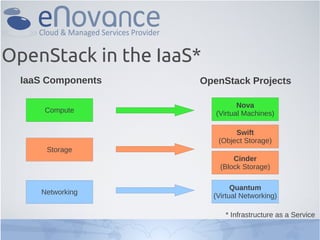
OpenStack in the IaaS*
  IaaS Components    OpenStack Projects

                                Nova
      Compute            (Virtual Machines)

                               Swift
                          (Object Storage)
      Storage
                               Cinder
                           (Block Storage)

                               Quantum
     Networking
                         (Virtual Networking)

                            * Infrastructure as a Service
Get the VM
 
   Download it : http://goo.gl/01Dr5
 
   Ubuntu 12.04 with Cloud Archives
 
   root / password
 
   MySQL installed
 
   Scripts already in /root
 
   Packages downloaded, NOT installed
 
   Usable with VMware & Virtual Box
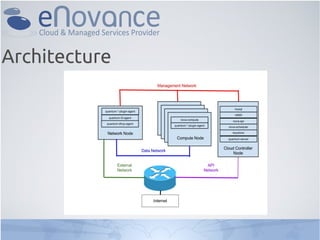
Architecture
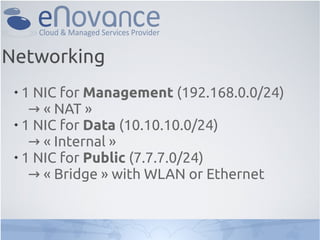
Networking
 
   1 NIC for Management (192.168.0.0/24)
    → « NAT »
 
   1 NIC for Data (10.10.10.0/24)
    → « Internal »
 
   1 NIC for Public (7.7.7.0/24)
    → « Bridge » with WLAN or Ethernet
Common Services
 
     MySQL (Backend Databases)
      → Used by Keystone, Glance, Nova,
      Cinder, and Quantum.

 
     RabbitMQ (Middleware for queuing)
      → Used by Glance, Nova, Cinder and
      Quantum.
Keystone : Identity as a Service 1/2
 
   Identity (Users, tenants, roles, metadata)
   → Can be backed by LDAP
 
   Token : Authentify requests from user /
 tenant
 
   Service Catalog : Endpoint registry
 
   Policy Services : Rule-based authorization
 engine
Keystone : Identity as a Service 2/2
 1) Install packages & Configuration

 2) Synchronize the Database

 3) Create Users, Tenants, Roles

 4) Create Services and Endpoints

 5) Test the identity.
Glance : Image Delivery 1/2
 
   Discovering, Registring, Retrieving Virtual
 Machine images.
 
   The images can be stored in : regular FS,
 RBD (Ceph), Amazon S3 or Swift.
 
   Disk Formats : raw, vhd, vmdk, vdi, iso,
 qcow2, aki, ari, ami.
 
   Container Formats : bare, ovf, aki, ami, ari.
Glance : Image Delivery 2/2

 1) Install packages & Configuration

 2) Synchronize the Database

 3) Import CirrOS image with CLI
Cinder : Block Storage 1/2
 
   Formerly « nova-volume »
 
   Create / Delete / Attach / Detach volumes
 to a VM
 
   Storage backed by : NFS, iSCSI, SolidFire,
 NetAPP, etc...
Cinder : Block Storage 2/2

 1) Prepare the second disk with LVM
 2) Install packages & Configuration
 3) Synchronize the Database
 4) Create a 1GB volume for testing
Quantum : Networking 1/2
 
   Provides connectivity to Vms
 
   Manage L2 & L3 with an API
 
   Networking backed by plugins : Open-
 vSwitch, Linux Bridge, Cisco, OpenFlow
 (BigSwitch, Floodlight, NEC, Ryu, etc),
 Midonet (Midokura) and NVP (Nicira /
 Vmware).
Quantum : Networking 2/2

 1) Install packages & Configuration
 2) Create virtual L2 with Open-vSwitch
 3) Create virtual L3 with the script
 4) Configure L3 Agent
Nova : Compute Service 1/2
 
   Manages Virtual Machines
 
   Libvirt friendly
 
   Hypervisors supported : KVM / qemu, Xen,
 Hyper-V (all ready for production)
 
   Interact with other services (Cinder,
 Quantum, Glance, Keystone, etc)
Nova : Compute Service 2/2

 1) Install packages & Configuration
 2) Synchronize the Database
 3) Configure the Hypervisor
 4) Spawn a VM with CLI
Horizon : Dashboard 1/2
 
   Developped with Python / Django
 
   Manage VMs, Images, Identity, Volumes
 
   Not yet full-integraded with Quantum :
 only L2 is working. L3 should be managed
 from CLI.
Horizon : Dashboard 2/2

 1) Install the packages

 2) Connect to the dashboard :
    → http://<ip>/horizon
Start your first VM !
 
   Use demo tenant / user
 
   Check networking before
 
   Spawn a VM from CirrOS image
 
   Attach the virtual port to a floating IP
 (from Quantum CLI)
 
   Ping the VM
 
   SSH the VM
 
   Play with volumes
Questions ?


E-mail : emilien@enovance.com
irc : EmilienM
twitter : EmilienMacchi

Workshop eNovance/OpenStack 20-12-2012

  • 1.
    OpenStack TechnicalWorkShop Paris, 20th December 2012 Emilien Macchi OpenStack Operator @ eNovance
  • 2.
    # whoami EmilienM on IRC  25 old  Student in Master Degree (Part time)  OpenStack Operator at eNovance :  Maintain and manage eNoCloud (Public Cloud using OpenStack)  Building CloudWatt Cloud  OpenStack contributor (HA stuffs + doc)
  • 3.
    OpenStack  Createdin 2010 by NASA & RackSpace  Licence Apache 2.0  Manage IaaS  Open-Source Framework  API, Plugins, Drivers  Multi-tenancy, Scalable, multi-plateform  Developed in Python
  • 4.
    OpenStack in theIaaS* IaaS Components OpenStack Projects Nova Compute (Virtual Machines) Swift (Object Storage) Storage Cinder (Block Storage) Quantum Networking (Virtual Networking) * Infrastructure as a Service
  • 5.
    Get the VM  Download it : http://goo.gl/01Dr5  Ubuntu 12.04 with Cloud Archives  root / password  MySQL installed  Scripts already in /root  Packages downloaded, NOT installed  Usable with VMware & Virtual Box
  • 6.
  • 7.
    Networking  1 NIC for Management (192.168.0.0/24) → « NAT »  1 NIC for Data (10.10.10.0/24) → « Internal »  1 NIC for Public (7.7.7.0/24) → « Bridge » with WLAN or Ethernet
  • 8.
    Common Services  MySQL (Backend Databases) → Used by Keystone, Glance, Nova, Cinder, and Quantum.  RabbitMQ (Middleware for queuing) → Used by Glance, Nova, Cinder and Quantum.
  • 9.
    Keystone : Identityas a Service 1/2  Identity (Users, tenants, roles, metadata) → Can be backed by LDAP  Token : Authentify requests from user / tenant  Service Catalog : Endpoint registry  Policy Services : Rule-based authorization engine
  • 10.
    Keystone : Identityas a Service 2/2 1) Install packages & Configuration 2) Synchronize the Database 3) Create Users, Tenants, Roles 4) Create Services and Endpoints 5) Test the identity.
  • 11.
    Glance : ImageDelivery 1/2  Discovering, Registring, Retrieving Virtual Machine images.  The images can be stored in : regular FS, RBD (Ceph), Amazon S3 or Swift.  Disk Formats : raw, vhd, vmdk, vdi, iso, qcow2, aki, ari, ami.  Container Formats : bare, ovf, aki, ami, ari.
  • 12.
    Glance : ImageDelivery 2/2 1) Install packages & Configuration 2) Synchronize the Database 3) Import CirrOS image with CLI
  • 13.
    Cinder : BlockStorage 1/2  Formerly « nova-volume »  Create / Delete / Attach / Detach volumes to a VM  Storage backed by : NFS, iSCSI, SolidFire, NetAPP, etc...
  • 14.
    Cinder : BlockStorage 2/2 1) Prepare the second disk with LVM 2) Install packages & Configuration 3) Synchronize the Database 4) Create a 1GB volume for testing
  • 15.
    Quantum : Networking1/2  Provides connectivity to Vms  Manage L2 & L3 with an API  Networking backed by plugins : Open- vSwitch, Linux Bridge, Cisco, OpenFlow (BigSwitch, Floodlight, NEC, Ryu, etc), Midonet (Midokura) and NVP (Nicira / Vmware).
  • 16.
    Quantum : Networking2/2 1) Install packages & Configuration 2) Create virtual L2 with Open-vSwitch 3) Create virtual L3 with the script 4) Configure L3 Agent
  • 17.
    Nova : ComputeService 1/2  Manages Virtual Machines  Libvirt friendly  Hypervisors supported : KVM / qemu, Xen, Hyper-V (all ready for production)  Interact with other services (Cinder, Quantum, Glance, Keystone, etc)
  • 18.
    Nova : ComputeService 2/2 1) Install packages & Configuration 2) Synchronize the Database 3) Configure the Hypervisor 4) Spawn a VM with CLI
  • 19.
    Horizon : Dashboard1/2  Developped with Python / Django  Manage VMs, Images, Identity, Volumes  Not yet full-integraded with Quantum : only L2 is working. L3 should be managed from CLI.
  • 20.
    Horizon : Dashboard2/2 1) Install the packages 2) Connect to the dashboard : → http://<ip>/horizon
  • 21.
    Start your firstVM !  Use demo tenant / user  Check networking before  Spawn a VM from CirrOS image  Attach the virtual port to a floating IP (from Quantum CLI)  Ping the VM  SSH the VM  Play with volumes
  • 22.
    Questions ? E-mail :emilien@enovance.com irc : EmilienM twitter : EmilienMacchi