
Alessandro Pilotti
CEO Cloudbase Solutions
@cloudbaseit
OpenStack & Hyper-V
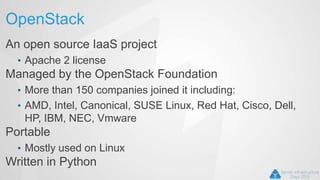
OpenStack
An open source IaaS project
• Apache 2 license
Managed by the OpenStack Foundation
• More than 150 companies joined it including:
• AMD, Intel, Canonical, SUSE Linux, Red Hat, Cisco, Dell,
HP, IBM, NEC, Vmware
Portable
• Mostly used on Linux
Written in Python
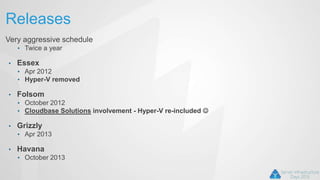
Releases
Very aggressive schedule
• Twice a year
• Essex
• Apr 2012
• Hyper-V removed
• Folsom
• October 2012
• Cloudbase Solutions involvement - Hyper-V re-included 
• Grizzly
• Apr 2013
• Havana
• October 2013
Reasons for success
• Most cloud providers want a platform to embed and extend
• E.g. Rackspace, HP
• Most cloud engineers want a platform which is easy to mantain and troubleshoot
• Python, due to it’s dynamic nature, fits the role and is widely known by Linux admins and DevOps
• Great scalability
• Great support for multiple hypervisors
• Nowadays hypervisors are “simple” components in the global architecture, not the focal point anymore
• Difference between products is getting narrower
Reasons for success
• Great support for virtual networking
• OpenVSwitch is becoming the “standard de facto” in SDN
• Compatibility with EC2 and S3 API
• Excellent project lifecycle
• Code review
• Unit / System / integration tests
Drawbacks
• Setup experience
• Lack of unified deployment tools
• Lack of proper documentation
• Some “youth” issues
• The project is anyway maturing really fast
• The UI is not at the level of the competition
• E.g. Cloudstack
Target market
• Public clouds
• Big private clouds
• Not really suitable for mid / small clouds
• Flavors limit flexibility
• Failover clusters are not considered in typical Openstack
deployments, due to large scalability requirements
• Complex installation
• Lack of maturity requires troubleshooting experience
• Not suited for poorly scalable applications
Pets vs Cattle
• 2 ways of looking at your VMs
• Pets
• You name them
• Each one has a specific role
• If one “dies”, it’s hard to replace
• Poor scalability
• Cattle
• You don’t name them
• If one “dies”, another will take it’s place
• Great scalability
OpenStack Architecture
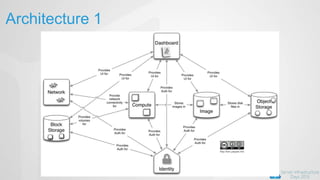
• Distributed Components
• Can be deployed on a single server or multiple servers
• Public RESTful API
• Bindings available for various languages (including .Net)
• Queues (AMQP) for private APIs
• Great scalability
• Relational DBs for storing the configuration
• MySQL, PostgreSQL, SQLite (and SQL server)
• UI
• CLI tools
• Web dashboard
Deployment
• How do you deploy 1000+ physical servers?
• Puppet
• We are working on the CI infrastructure with Microsoft
• Chef
• Crowbar
• Uses mainly Chef
• Dell, Suse, etc
• We are currently adding Hyper-V support for 1.6 and 2.0
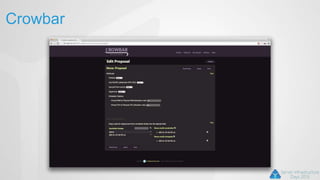
Crowbar
• Big part of Dell’s cloud strategy
• Bare-metal deployment
• vendor independent
• PXE booting
• Sledgehammer image boots and gets configuration
• Provisioning via Crowbar web site
• Barclams
• Configuration
• Chef recipes
Crowbar
Hyper-V 2012 availability
• FREE edition
• Full Hypervisor
• Minimum OS support
• Minimum impact on security updates, etc
• Windows Server 2012
• Just enable the related role
• Windows 8
• For workstation / testing / development usage
• Hyper-V 2012 R2 coming with lots of new features!
Components
Compute (Nova)
Object Storage (Swift)
Block Storage (Cinder)
Image Service (Glance)
Networking (Quantum)
Dashboard (Horizon)
Identity (Keystone)
Metering (Ceilometer) - new
Orchestration (Heat) - new
Architecture 1
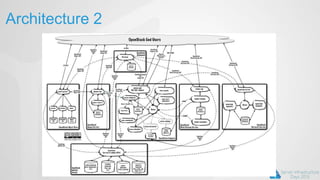
Architecture 2
Component interaction
• AMQP
• RabbitMQ
• Apache Qpid
• API
• RESTful services
• Database
• Any Python SQLAlchemy provider
• Mostly MySQL
• SQL Server required various bug fixes
Keystone
• Single point of integration for:
• Authentication
• Catalog
• Policy
• Token
• Plugin based architecture for backends, e.g.:
• SQL
• LDAP, including Active Directory
• PAM
• Provides Restful APIs
Swift
Scalable and fault tolerant object storage
• Achieved via replication
Optional cache (e.g. memcache) used to improve
performance
Objects served via RESTful APIs or raw HTTP requests
Lifecycle independent from the other OpenStack projects
Glance
Image store
• glance-registry
• glance-api
Actual storage is plugin based, currently including:
• Swift
• S3
• Local filesystem
• RADOS
Glance images
• Created by providing:
• Container format
• Bare, OVF, AKI, ARI, AMI
• Disk Format
• RAW, VHD, VMDK, VDI, ISO, QCow2, AKI, ARI, AMI
• Metadata properties
• E.g.: hypervisor_type
Cinder
• Block storage management
• cinder-api
• cinder-volume
• Mainly iSCSI
• Driver based architecture:
• EMC
• Netapp
• Nexenta
• HP Lefthand
• IBM XIV
• NFS
• LVM
• Windows Storage Server 2012
• And more…
Nova
Compute
• nova-compute
Scheduler
• nova-scheduler
API (including metadata)
• nova-api
• EC2 API compatibility
• Metadata API for guests
Console
• nova-novncproxy
• nova-xvpvncproxy
• nova-consoleauth
No-DB-Compute (Grizzly)
• nova-conductor
Network (deprecated, replaced by Quantum)
• nova –network
Volume (deprecated, replaced by Cinder)
• nova-volume
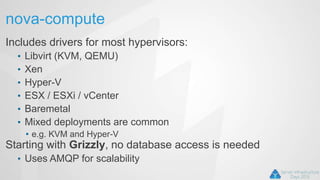
nova-compute
Includes drivers for most hypervisors:
• Libvirt (KVM, QEMU)
• Xen
• Hyper-V
• ESX / ESXi / vCenter
• Baremetal
• Mixed deployments are common
• e.g. KVM and Hyper-V
Starting with Grizzly, no database access is needed
• Uses AMQP for scalability
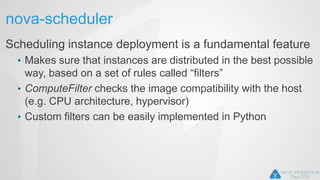
nova-scheduler
Scheduling instance deployment is a fundamental feature
• Makes sure that instances are distributed in the best possible
way, based on a set of rules called “filters”
• ComputeFilter checks the image compatibility with the host
(e.g. CPU architecture, hypervisor)
• Custom filters can be easily implemented in Python
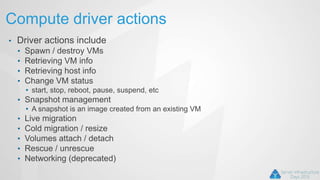
Compute driver actions
• Driver actions include
• Spawn / destroy VMs
• Retrieving VM info
• Retrieving host info
• Change VM status
• start, stop, reboot, pause, suspend, etc
• Snapshot management
• A snapshot is an image created from an existing VM
• Live migration
• Cold migration / resize
• Volumes attach / detach
• Rescue / unrescue
• Networking (deprecated)
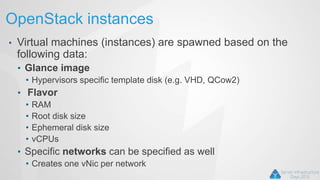
OpenStack instances
• Virtual machines (instances) are spawned based on the
following data:
• Glance image
• Hypervisors specific template disk (e.g. VHD, QCow2)
• Flavor
• RAM
• Root disk size
• Ephemeral disk size
• vCPUs
• Specific networks can be specified as well
• Creates one vNic per network
Hyper-V driver
WMI
• Currently V1 namespace (root/virtualization)
• V2 namespace used for live migration
• Complete migration to V2 for Havana
Grizzly OS support
• Windows Server / Hyper-V 2008 R2, 2012
• Windows 8 supported for development
Havana OS Support
• New features will target 2012 and above only
Hyper-V driver disks
• Copy on write (CoW) implemented with differencing
disks
• Reconnected and merged during snapshots
• Reconnected and merged on resize
• Not necessary for VHDX (Havana)
Quantum
• Network connectivity as a service
• Plugin based architecture
• Official plugins:
• Open vSwitch
• Cisco UCS/Nexus
• Linux bridge
• Nicira NVP
• Ryu OpenFlow
• NEC OpenFlow
• Big Switch OpenFlow
• Hyper-V
Hyper-V plugin
Quantum plugin
• Runs in quantum-server
• Database based configuration
• Networks, subnets, ports
Quantum agent
• Runs on any compute node
• Supports:
• Local (private vSwitch)
• Flat
• VLAN
• NVGRE (Havana)
• Communicates with plugin via AMQP
L3 support:
• Using the Linux L3 and DHCP plugins
Hyper-V plugin
Nova compute driver
• Creates the vNics (one per network)
• Does not connect them
Quantum agent
• Creates the vswitch ports
• Sets the VLAN ID and proper vswitch mode
• For NVGRE creates instances of:
• MSFT_NetVirtualizationLookupRecordSettingData
• etc
Quantum OVS interop
• Quantum plugin / agent AMQP RPC protocol is compatible
with OpenVSwitch!!
• You can use the OVS plugin with Hyper-V agents (or vice
versa)
• Limited to compatible L2 protocols: Flat / VLAN
• You can use the L3 and DHCP agents with the Hyper-V
plugin
• Using the OVS L2 agent on the networking nodes
• Great for interoperability (e.g. KVM + Hyper-V)
Hyper-V OpenVSwitch!
We officially started porting OpenVSwitch to
Windows!!
Why OpenVSwitch?
• De facto standard for SDN
• Great interoperability
• Hyper-V / KVM / etc
• OpenFlow
• Tunnelling
• VXLAN
• GRE
• Quantum OVS plugin
• No need for a different one
OpenVSwitch porting
• Porting Posix calls to Windows API
• Same CLI as on Linux
• Open Source
• Windows kernel drivers
• NDIS Hyper-V extensions
• VXLAN, GRE
• Best performance
• Support for Hyper-V 2012 and above
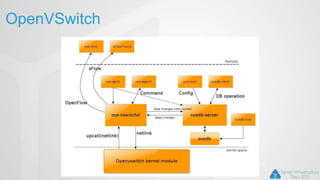
OpenVSwitch
Windows Kernel drivers
Horizon
• Main UI
• Implemented in Python with Django
• Typically deployed on Apache with mod_wsgi
• Includes console access
• Currently only VNC
• RDP to be added for Havana
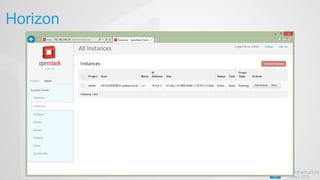
Horizon
Dashboard integration
• Hyper-V uses RDP for accessing the console instead of
VNC
• By default it accepts connections on port 2179
• Not the RDP connection on 3389!
• Access to any guest: Windows, Linux, FreeRDP, etc
• The VM id is provided as part of an RDP protocol
additional buffer called PCB (Pre Connection Buffer)
• Authentication is performed against the host, not the
guest!
Dashboard integration
Decoupling from VNC
• Create plugin that embed the canvas in the Dashboard
Authentication layer
• Keystone token validation
Logic for retrieving VM id from OpenStack instance ID
• Ask Nova about the instance details, in particular the Hyper-V host running it
• Get cached hypervisor credentials from keyring or similar
• Query the Hyper-V host about the RDP console port (2179 by default)
• Retrieve the VM id from the host given the instance name
• Perform connection via wsgate
Webcast: http://bit.ly/VgwMvs
FreeRDP
• FreeRDP is an amazing RDP open source client.
• Apache 2 license
• Multiplatform
• Linux
• Mac OS X
• Windows
• It provides support for the PCB parameter required by
Hyper-V
• We are using it as a standalone client on the free
Hyper-V server and on Linux, Mac OS X
FreeRDP - Web Gateway
Client
• HTML5
• Works on any modern browser
• Web sockets for data transfer
• Canvas for painting
• Can be embedded in any web site
Server proxy
• (wsgate) written in C++
• Currently working on Linux
• can work on Windows
Instance initialization
Guests require cloud specific customization on startup,
e.g.:
• Hostname
• SSH keys
• Users / groups, password management
• Partition resize
• Static network configuration
• Custom scripts
• On Windows: Powershell, cmd.exe, bash
Metadata access
• Metadata needs to be provided to the guest:
• Metadata API, accessed via 169.254.169.254
• Openstack or EC2 format
• ConfigDriveV2
Cloud-Init
Project provided by Canonical
• Currently Linux specific
• GPL
• Windows Cloud-Init (cloudbase-init)
• Written in Python
• Apache 2
• Very easy to install
• Supports any Hypervisor
Windows Cloud-Init
• Cloudbase-init (aka Windows Cloud-Init)
• Similar to the Linux cloud-init
• License: Apache 2
• Porting Cloud-Init to Linux was not possible
• It requires some major refactoring
• Supported data sources:
• OpenStack HTTP metadata
• ConfigDrive V2
• EC2 HTTP metadata (contributed by Mirantis)
Windows Cloud-Init
• Plugin based architecture
• Supported plugins:
• SetHostNamePlugin
• CreateUserPlugin
• NetworkConfigPlugin
• SetUserSSHPublicKeysPlugin
• UserDataPlugin
• ResizeFSPlugin
Userdata format
• Windows Batch
• Powershell
• Bash
• Multi-part (Havana)
• Heat support
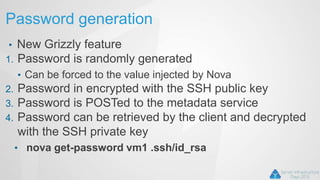
Password generation
• New Grizzly feature
1. Password is randomly generated
• Can be forced to the value injected by Nova
2. Password in encrypted with the SSH public key
3. Password is POSTed to the metadata service
4. Password can be retrieved by the client and decrypted
with the SSH private key
• nova get-password vm1 .ssh/id_rsa
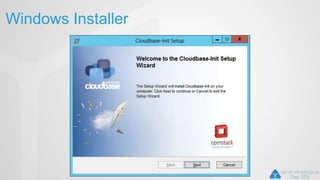
Windows Installer
Unattended mode
• Like all our installers, it can be executed in fully
unattended mode:
• msiexec /i CloudbaseInitSetup.msi /qn /l*v log.txt
NETWORKADAPTERNAME="Intel(R) PRO/1000 MT
Network Connection"
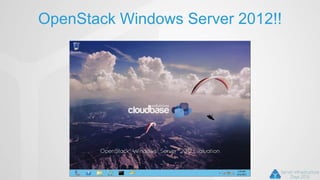
OpenStack Windows Server 2012!!
OpenStack WS2012
• WS 2012 Standard - Evaluation edition
• Testing only!!
• Available for:
• Hyper-V
• KVM
• XenServer / XCP
• www.cloudbase.it
OpenStack WS2012
• Complete with:
• Drivers / tools:
• VirtIO / XenServer Tools
• Cloudbase-Init
• Sysprepped
• Eval edition can be upgraded with a simple uder_data script:
• DISM /online /Set-Edition:ServerStandard /ProductKey:XXXXX-
XXXXX-XXXXX-XXXXX-XXXXX /AcceptEula
• Make sure to respect the eval license!!
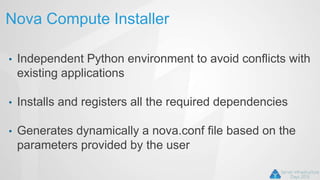
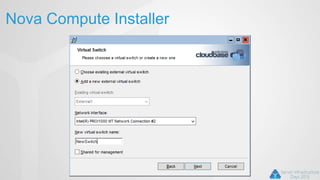
Nova Compute Installer
• Independent Python environment to avoid conflicts with
existing applications
• Installs and registers all the required dependencies
• Generates dynamically a nova.conf file based on the
parameters provided by the user
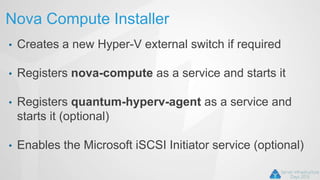
Nova Compute Installer
• Creates a new Hyper-V external switch if required
• Registers nova-compute as a service and starts it
• Registers quantum-hyperv-agent as a service and
starts it (optional)
• Enables the Microsoft iSCSI Initiator service (optional)
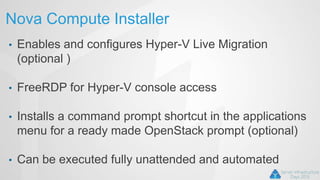
Nova Compute Installer
• Enables and configures Hyper-V Live Migration
(optional )
• FreeRDP for Hyper-V console access
• Installs a command prompt shortcut in the applications
menu for a ready made OpenStack prompt (optional)
• Can be executed fully unattended and automated
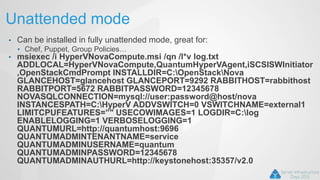
Unattended mode
• Can be installed in fully unattended mode, great for:
• Chef, Puppet, Group Policies…
• msiexec /i HyperVNovaCompute.msi /qn /l*v log.txt
ADDLOCAL=HyperVNovaCompute,QuantumHyperVAgent,iSCSISWInitiator
,OpenStackCmdPrompt INSTALLDIR=C:OpenStackNova
GLANCEHOST=glancehost GLANCEPORT=9292 RABBITHOST=rabbithost
RABBITPORT=5672 RABBITPASSWORD=12345678
NOVASQLCONNECTION=mysql://user:password@host/nova
INSTANCESPATH=C:HyperV ADDVSWITCH=0 VSWITCHNAME=external1
LIMITCPUFEATURES=”" USECOWIMAGES=1 LOGDIR=C:log
ENABLELOGGING=1 VERBOSELOGGING=1
QUANTUMURL=http://quantumhost:9696
QUANTUMADMINTENANTNAME=service
QUANTUMADMINUSERNAME=quantum
QUANTUMADMINPASSWORD=12345678
QUANTUMADMINAUTHURL=http://keystonehost:35357/v2.0
Nova Compute Installer
From our web site 
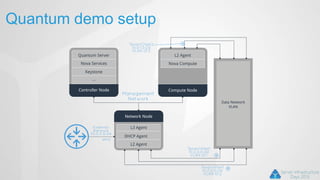
Quantum demo setup
Quick multi-node setup
• Controller
• Network
• Compute (Hyper-V)
• Compute (Hyper-V, optional)
• For live migration and resize
• Compute (KVM, optional)
• Devstack localrcs in the next slides 
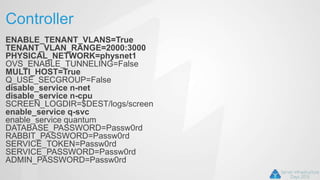
Controller
ENABLE_TENANT_VLANS=True
TENANT_VLAN_RANGE=2000:3000
PHYSICAL_NETWORK=physnet1
OVS_ENABLE_TUNNELING=False
MULTI_HOST=True
Q_USE_SECGROUP=False
disable_service n-net
disable_service n-cpu
SCREEN_LOGDIR=$DEST/logs/screen
enable_service q-svc
enable_service quantum
DATABASE_PASSWORD=Passw0rd
RABBIT_PASSWORD=Passw0rd
SERVICE_TOKEN=Passw0rd
SERVICE_PASSWORD=Passw0rd
ADMIN_PASSWORD=Passw0rd
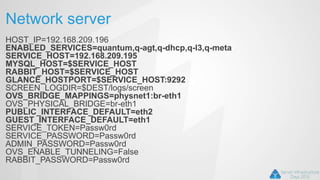
Network server
HOST_IP=192.168.209.196
ENABLED_SERVICES=quantum,q-agt,q-dhcp,q-l3,q-meta
SERVICE_HOST=192.168.209.195
MYSQL_HOST=$SERVICE_HOST
RABBIT_HOST=$SERVICE_HOST
GLANCE_HOSTPORT=$SERVICE_HOST:9292
SCREEN_LOGDIR=$DEST/logs/screen
OVS_BRIDGE_MAPPINGS=physnet1:br-eth1
OVS_PHYSICAL_BRIDGE=br-eth1
PUBLIC_INTERFACE_DEFAULT=eth2
GUEST_INTERFACE_DEFAULT=eth1
SERVICE_TOKEN=Passw0rd
SERVICE_PASSWORD=Passw0rd
ADMIN_PASSWORD=Passw0rd
OVS_ENABLE_TUNNELING=False
RABBIT_PASSWORD=Passw0rd
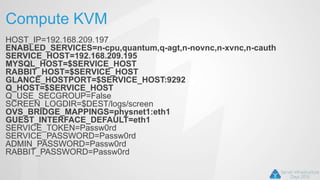
Compute KVM
HOST_IP=192.168.209.197
ENABLED_SERVICES=n-cpu,quantum,q-agt,n-novnc,n-xvnc,n-cauth
SERVICE_HOST=192.168.209.195
MYSQL_HOST=$SERVICE_HOST
RABBIT_HOST=$SERVICE_HOST
GLANCE_HOSTPORT=$SERVICE_HOST:9292
Q_HOST=$SERVICE_HOST
Q_USE_SECGROUP=False
SCREEN_LOGDIR=$DEST/logs/screen
OVS_BRIDGE_MAPPINGS=physnet1:eth1
GUEST_INTERFACE_DEFAULT=eth1
SERVICE_TOKEN=Passw0rd
SERVICE_PASSWORD=Passw0rd
ADMIN_PASSWORD=Passw0rd
RABBIT_PASSWORD=Passw0rd
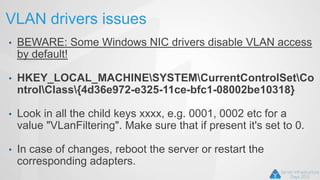
VLAN drivers issues
• BEWARE: Some Windows NIC drivers disable VLAN access
by default!
• HKEY_LOCAL_MACHINESYSTEMCurrentControlSetCo
ntrolClass{4d36e972-e325-11ce-bfc1-08002be10318}
• Look in all the child keys xxxx, e.g. 0001, 0002 etc for a
value "VLanFiltering". Make sure that if present it's set to 0.
• In case of changes, reboot the server or restart the
corresponding adapters.
Demo
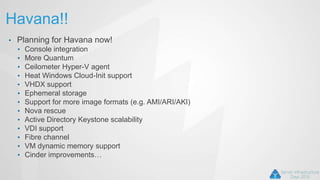
Havana!!
• Planning for Havana now!
• Console integration
• More Quantum
• Ceilometer Hyper-V agent
• Heat Windows Cloud-Init support
• VHDX support
• Ephemeral storage
• Support for more image formats (e.g. AMI/ARI/AKI)
• Nova rescue
• Active Directory Keystone scalability
• VDI support
• Fibre channel
• VM dynamic memory support
• Cinder improvements…
Questions & Answers

OpenStack and Windows

  • 1.
    Alessandro Pilotti CEO CloudbaseSolutions @cloudbaseit OpenStack & Hyper-V
  • 2.
    OpenStack An open sourceIaaS project • Apache 2 license Managed by the OpenStack Foundation • More than 150 companies joined it including: • AMD, Intel, Canonical, SUSE Linux, Red Hat, Cisco, Dell, HP, IBM, NEC, Vmware Portable • Mostly used on Linux Written in Python
  • 3.
    Releases Very aggressive schedule •Twice a year • Essex • Apr 2012 • Hyper-V removed • Folsom • October 2012 • Cloudbase Solutions involvement - Hyper-V re-included  • Grizzly • Apr 2013 • Havana • October 2013
  • 4.
    Reasons for success •Most cloud providers want a platform to embed and extend • E.g. Rackspace, HP • Most cloud engineers want a platform which is easy to mantain and troubleshoot • Python, due to it’s dynamic nature, fits the role and is widely known by Linux admins and DevOps • Great scalability • Great support for multiple hypervisors • Nowadays hypervisors are “simple” components in the global architecture, not the focal point anymore • Difference between products is getting narrower
  • 5.
    Reasons for success •Great support for virtual networking • OpenVSwitch is becoming the “standard de facto” in SDN • Compatibility with EC2 and S3 API • Excellent project lifecycle • Code review • Unit / System / integration tests
  • 6.
    Drawbacks • Setup experience •Lack of unified deployment tools • Lack of proper documentation • Some “youth” issues • The project is anyway maturing really fast • The UI is not at the level of the competition • E.g. Cloudstack
  • 7.
    Target market • Publicclouds • Big private clouds • Not really suitable for mid / small clouds • Flavors limit flexibility • Failover clusters are not considered in typical Openstack deployments, due to large scalability requirements • Complex installation • Lack of maturity requires troubleshooting experience • Not suited for poorly scalable applications
  • 8.
    Pets vs Cattle •2 ways of looking at your VMs • Pets • You name them • Each one has a specific role • If one “dies”, it’s hard to replace • Poor scalability • Cattle • You don’t name them • If one “dies”, another will take it’s place • Great scalability
  • 9.
    OpenStack Architecture • DistributedComponents • Can be deployed on a single server or multiple servers • Public RESTful API • Bindings available for various languages (including .Net) • Queues (AMQP) for private APIs • Great scalability • Relational DBs for storing the configuration • MySQL, PostgreSQL, SQLite (and SQL server) • UI • CLI tools • Web dashboard
  • 10.
    Deployment • How doyou deploy 1000+ physical servers? • Puppet • We are working on the CI infrastructure with Microsoft • Chef • Crowbar • Uses mainly Chef • Dell, Suse, etc • We are currently adding Hyper-V support for 1.6 and 2.0
  • 11.
    Crowbar • Big partof Dell’s cloud strategy • Bare-metal deployment • vendor independent • PXE booting • Sledgehammer image boots and gets configuration • Provisioning via Crowbar web site • Barclams • Configuration • Chef recipes
  • 12.
  • 13.
    Hyper-V 2012 availability •FREE edition • Full Hypervisor • Minimum OS support • Minimum impact on security updates, etc • Windows Server 2012 • Just enable the related role • Windows 8 • For workstation / testing / development usage • Hyper-V 2012 R2 coming with lots of new features!
  • 14.
    Components Compute (Nova) Object Storage(Swift) Block Storage (Cinder) Image Service (Glance) Networking (Quantum) Dashboard (Horizon) Identity (Keystone) Metering (Ceilometer) - new Orchestration (Heat) - new
  • 15.
  • 16.
  • 17.
    Component interaction • AMQP •RabbitMQ • Apache Qpid • API • RESTful services • Database • Any Python SQLAlchemy provider • Mostly MySQL • SQL Server required various bug fixes
  • 18.
    Keystone • Single pointof integration for: • Authentication • Catalog • Policy • Token • Plugin based architecture for backends, e.g.: • SQL • LDAP, including Active Directory • PAM • Provides Restful APIs
  • 19.
    Swift Scalable and faulttolerant object storage • Achieved via replication Optional cache (e.g. memcache) used to improve performance Objects served via RESTful APIs or raw HTTP requests Lifecycle independent from the other OpenStack projects
  • 20.
    Glance Image store • glance-registry •glance-api Actual storage is plugin based, currently including: • Swift • S3 • Local filesystem • RADOS
  • 21.
    Glance images • Createdby providing: • Container format • Bare, OVF, AKI, ARI, AMI • Disk Format • RAW, VHD, VMDK, VDI, ISO, QCow2, AKI, ARI, AMI • Metadata properties • E.g.: hypervisor_type
  • 22.
    Cinder • Block storagemanagement • cinder-api • cinder-volume • Mainly iSCSI • Driver based architecture: • EMC • Netapp • Nexenta • HP Lefthand • IBM XIV • NFS • LVM • Windows Storage Server 2012 • And more…
  • 23.
    Nova Compute • nova-compute Scheduler • nova-scheduler API(including metadata) • nova-api • EC2 API compatibility • Metadata API for guests Console • nova-novncproxy • nova-xvpvncproxy • nova-consoleauth No-DB-Compute (Grizzly) • nova-conductor Network (deprecated, replaced by Quantum) • nova –network Volume (deprecated, replaced by Cinder) • nova-volume
  • 24.
    nova-compute Includes drivers formost hypervisors: • Libvirt (KVM, QEMU) • Xen • Hyper-V • ESX / ESXi / vCenter • Baremetal • Mixed deployments are common • e.g. KVM and Hyper-V Starting with Grizzly, no database access is needed • Uses AMQP for scalability
  • 25.
    nova-scheduler Scheduling instance deploymentis a fundamental feature • Makes sure that instances are distributed in the best possible way, based on a set of rules called “filters” • ComputeFilter checks the image compatibility with the host (e.g. CPU architecture, hypervisor) • Custom filters can be easily implemented in Python
  • 26.
    Compute driver actions •Driver actions include • Spawn / destroy VMs • Retrieving VM info • Retrieving host info • Change VM status • start, stop, reboot, pause, suspend, etc • Snapshot management • A snapshot is an image created from an existing VM • Live migration • Cold migration / resize • Volumes attach / detach • Rescue / unrescue • Networking (deprecated)
  • 27.
    OpenStack instances • Virtualmachines (instances) are spawned based on the following data: • Glance image • Hypervisors specific template disk (e.g. VHD, QCow2) • Flavor • RAM • Root disk size • Ephemeral disk size • vCPUs • Specific networks can be specified as well • Creates one vNic per network
  • 28.
    Hyper-V driver WMI • CurrentlyV1 namespace (root/virtualization) • V2 namespace used for live migration • Complete migration to V2 for Havana Grizzly OS support • Windows Server / Hyper-V 2008 R2, 2012 • Windows 8 supported for development Havana OS Support • New features will target 2012 and above only
  • 29.
    Hyper-V driver disks •Copy on write (CoW) implemented with differencing disks • Reconnected and merged during snapshots • Reconnected and merged on resize • Not necessary for VHDX (Havana)
  • 30.
    Quantum • Network connectivityas a service • Plugin based architecture • Official plugins: • Open vSwitch • Cisco UCS/Nexus • Linux bridge • Nicira NVP • Ryu OpenFlow • NEC OpenFlow • Big Switch OpenFlow • Hyper-V
  • 31.
    Hyper-V plugin Quantum plugin •Runs in quantum-server • Database based configuration • Networks, subnets, ports Quantum agent • Runs on any compute node • Supports: • Local (private vSwitch) • Flat • VLAN • NVGRE (Havana) • Communicates with plugin via AMQP L3 support: • Using the Linux L3 and DHCP plugins
  • 32.
    Hyper-V plugin Nova computedriver • Creates the vNics (one per network) • Does not connect them Quantum agent • Creates the vswitch ports • Sets the VLAN ID and proper vswitch mode • For NVGRE creates instances of: • MSFT_NetVirtualizationLookupRecordSettingData • etc
  • 33.
    Quantum OVS interop •Quantum plugin / agent AMQP RPC protocol is compatible with OpenVSwitch!! • You can use the OVS plugin with Hyper-V agents (or vice versa) • Limited to compatible L2 protocols: Flat / VLAN • You can use the L3 and DHCP agents with the Hyper-V plugin • Using the OVS L2 agent on the networking nodes • Great for interoperability (e.g. KVM + Hyper-V)
  • 34.
    Hyper-V OpenVSwitch! We officiallystarted porting OpenVSwitch to Windows!!
  • 35.
    Why OpenVSwitch? • Defacto standard for SDN • Great interoperability • Hyper-V / KVM / etc • OpenFlow • Tunnelling • VXLAN • GRE • Quantum OVS plugin • No need for a different one
  • 36.
    OpenVSwitch porting • PortingPosix calls to Windows API • Same CLI as on Linux • Open Source • Windows kernel drivers • NDIS Hyper-V extensions • VXLAN, GRE • Best performance • Support for Hyper-V 2012 and above
  • 37.
  • 38.
    Horizon • Main UI •Implemented in Python with Django • Typically deployed on Apache with mod_wsgi • Includes console access • Currently only VNC • RDP to be added for Havana
  • 39.
  • 40.
    Dashboard integration • Hyper-Vuses RDP for accessing the console instead of VNC • By default it accepts connections on port 2179 • Not the RDP connection on 3389! • Access to any guest: Windows, Linux, FreeRDP, etc • The VM id is provided as part of an RDP protocol additional buffer called PCB (Pre Connection Buffer) • Authentication is performed against the host, not the guest!
  • 41.
    Dashboard integration Decoupling fromVNC • Create plugin that embed the canvas in the Dashboard Authentication layer • Keystone token validation Logic for retrieving VM id from OpenStack instance ID • Ask Nova about the instance details, in particular the Hyper-V host running it • Get cached hypervisor credentials from keyring or similar • Query the Hyper-V host about the RDP console port (2179 by default) • Retrieve the VM id from the host given the instance name • Perform connection via wsgate Webcast: http://bit.ly/VgwMvs
  • 42.
    FreeRDP • FreeRDP isan amazing RDP open source client. • Apache 2 license • Multiplatform • Linux • Mac OS X • Windows • It provides support for the PCB parameter required by Hyper-V • We are using it as a standalone client on the free Hyper-V server and on Linux, Mac OS X
  • 43.
    FreeRDP - WebGateway Client • HTML5 • Works on any modern browser • Web sockets for data transfer • Canvas for painting • Can be embedded in any web site Server proxy • (wsgate) written in C++ • Currently working on Linux • can work on Windows
  • 44.
    Instance initialization Guests requirecloud specific customization on startup, e.g.: • Hostname • SSH keys • Users / groups, password management • Partition resize • Static network configuration • Custom scripts • On Windows: Powershell, cmd.exe, bash
  • 45.
    Metadata access • Metadataneeds to be provided to the guest: • Metadata API, accessed via 169.254.169.254 • Openstack or EC2 format • ConfigDriveV2
  • 46.
    Cloud-Init Project provided byCanonical • Currently Linux specific • GPL • Windows Cloud-Init (cloudbase-init) • Written in Python • Apache 2 • Very easy to install • Supports any Hypervisor
  • 47.
    Windows Cloud-Init • Cloudbase-init(aka Windows Cloud-Init) • Similar to the Linux cloud-init • License: Apache 2 • Porting Cloud-Init to Linux was not possible • It requires some major refactoring • Supported data sources: • OpenStack HTTP metadata • ConfigDrive V2 • EC2 HTTP metadata (contributed by Mirantis)
  • 48.
    Windows Cloud-Init • Pluginbased architecture • Supported plugins: • SetHostNamePlugin • CreateUserPlugin • NetworkConfigPlugin • SetUserSSHPublicKeysPlugin • UserDataPlugin • ResizeFSPlugin
  • 49.
    Userdata format • WindowsBatch • Powershell • Bash • Multi-part (Havana) • Heat support
  • 50.
    Password generation • NewGrizzly feature 1. Password is randomly generated • Can be forced to the value injected by Nova 2. Password in encrypted with the SSH public key 3. Password is POSTed to the metadata service 4. Password can be retrieved by the client and decrypted with the SSH private key • nova get-password vm1 .ssh/id_rsa
  • 51.
  • 52.
    Unattended mode • Likeall our installers, it can be executed in fully unattended mode: • msiexec /i CloudbaseInitSetup.msi /qn /l*v log.txt NETWORKADAPTERNAME="Intel(R) PRO/1000 MT Network Connection"
  • 53.
  • 54.
    OpenStack WS2012 • WS2012 Standard - Evaluation edition • Testing only!! • Available for: • Hyper-V • KVM • XenServer / XCP • www.cloudbase.it
  • 55.
    OpenStack WS2012 • Completewith: • Drivers / tools: • VirtIO / XenServer Tools • Cloudbase-Init • Sysprepped • Eval edition can be upgraded with a simple uder_data script: • DISM /online /Set-Edition:ServerStandard /ProductKey:XXXXX- XXXXX-XXXXX-XXXXX-XXXXX /AcceptEula • Make sure to respect the eval license!!
  • 56.
    Nova Compute Installer •Independent Python environment to avoid conflicts with existing applications • Installs and registers all the required dependencies • Generates dynamically a nova.conf file based on the parameters provided by the user
  • 57.
    Nova Compute Installer •Creates a new Hyper-V external switch if required • Registers nova-compute as a service and starts it • Registers quantum-hyperv-agent as a service and starts it (optional) • Enables the Microsoft iSCSI Initiator service (optional)
  • 58.
    Nova Compute Installer •Enables and configures Hyper-V Live Migration (optional ) • FreeRDP for Hyper-V console access • Installs a command prompt shortcut in the applications menu for a ready made OpenStack prompt (optional) • Can be executed fully unattended and automated
  • 59.
    Unattended mode • Canbe installed in fully unattended mode, great for: • Chef, Puppet, Group Policies… • msiexec /i HyperVNovaCompute.msi /qn /l*v log.txt ADDLOCAL=HyperVNovaCompute,QuantumHyperVAgent,iSCSISWInitiator ,OpenStackCmdPrompt INSTALLDIR=C:OpenStackNova GLANCEHOST=glancehost GLANCEPORT=9292 RABBITHOST=rabbithost RABBITPORT=5672 RABBITPASSWORD=12345678 NOVASQLCONNECTION=mysql://user:password@host/nova INSTANCESPATH=C:HyperV ADDVSWITCH=0 VSWITCHNAME=external1 LIMITCPUFEATURES=”" USECOWIMAGES=1 LOGDIR=C:log ENABLELOGGING=1 VERBOSELOGGING=1 QUANTUMURL=http://quantumhost:9696 QUANTUMADMINTENANTNAME=service QUANTUMADMINUSERNAME=quantum QUANTUMADMINPASSWORD=12345678 QUANTUMADMINAUTHURL=http://keystonehost:35357/v2.0
  • 60.
  • 61.
    From our website 
  • 62.
  • 63.
    Quick multi-node setup •Controller • Network • Compute (Hyper-V) • Compute (Hyper-V, optional) • For live migration and resize • Compute (KVM, optional) • Devstack localrcs in the next slides 
  • 64.
  • 65.
  • 66.
  • 67.
    VLAN drivers issues •BEWARE: Some Windows NIC drivers disable VLAN access by default! • HKEY_LOCAL_MACHINESYSTEMCurrentControlSetCo ntrolClass{4d36e972-e325-11ce-bfc1-08002be10318} • Look in all the child keys xxxx, e.g. 0001, 0002 etc for a value "VLanFiltering". Make sure that if present it's set to 0. • In case of changes, reboot the server or restart the corresponding adapters.
  • 68.
  • 69.
    Havana!! • Planning forHavana now! • Console integration • More Quantum • Ceilometer Hyper-V agent • Heat Windows Cloud-Init support • VHDX support • Ephemeral storage • Support for more image formats (e.g. AMI/ARI/AKI) • Nova rescue • Active Directory Keystone scalability • VDI support • Fibre channel • VM dynamic memory support • Cinder improvements…
  • 70.