Windows Containers,
Hyper-V and OpenStack
Who are we?
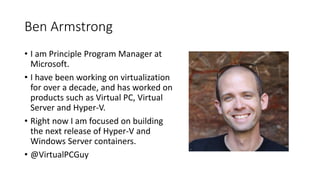
Ben Armstrong
• I am Principle Program Manager at
Microsoft.
• I have been working on virtualization
for over a decade, and has worked on
products such as Virtual PC, Virtual
Server and Hyper-V.
• Right now I am focused on building
the next release of Hyper-V and
Windows Server containers.
• @VirtualPCGuy
Alessandro Pilotti
• CEO at Cloudbase Solutions
• Project lead for all the Windows and
Hyper-V integration in OpenStack
• Hyper-V MVP
• @cloudbaseit
Agenda
• Windows Containers
• Hyper-V
• OpenStack Integration
• Docker Integration
• Rude Questions
• Friendly Questions
Windows Containers
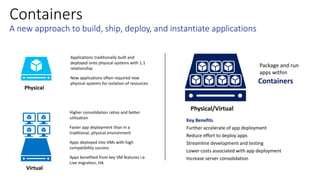
Containers
Physical
Virtual
Physical/Virtual
Key Benefits
Containers
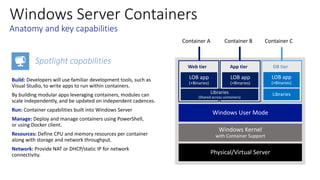
Windows Server Containers
Spotlight capabilities
Windows User Mode
Web tier
Container A Container B Container C
App tier DB tier
Demo
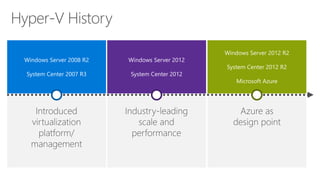
Windows Containers
Hyper-V
OpenStack Integration
file
cloud service
Access Control
Virtual Network
VHD storage blob
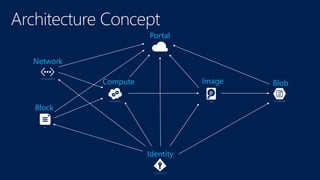
Portal
Network
Block
BlobImageCompute
Identity
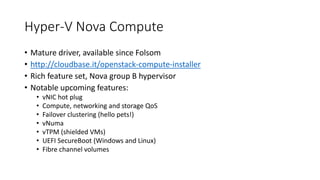
Hyper-V Nova Compute
• Mature driver, available since Folsom
• http://cloudbase.it/openstack-compute-installer
• Rich feature set, Nova group B hypervisor
• Notable upcoming features:
• vNIC hot plug
• Compute, networking and storage QoS
• Failover clustering (hello pets!)
• vNuma
• vTPM (shielded VMs)
• UEFI SecureBoot (Windows and Linux)
• Fibre channel volumes
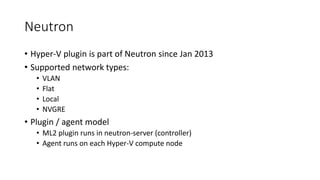
Neutron
• Hyper-V plugin is part of Neutron since Jan 2013
• Supported network types:
• VLAN
• Flat
• Local
• NVGRE
• Plugin / agent model
• ML2 plugin runs in neutron-server (controller)
• Agent runs on each Hyper-V compute node
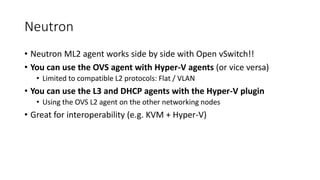
Neutron
• Neutron ML2 agent works side by side with Open vSwitch!!
• You can use the OVS agent with Hyper-V agents (or vice versa)
• Limited to compatible L2 protocols: Flat / VLAN
• You can use the L3 and DHCP agents with the Hyper-V plugin
• Using the OVS L2 agent on the other networking nodes
• Great for interoperability (e.g. KVM + Hyper-V)
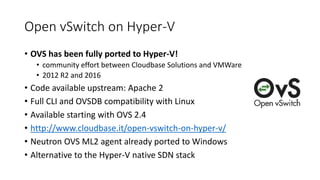
Open vSwitch on Hyper-V
• OVS has been fully ported to Hyper-V!
• community effort between Cloudbase Solutions and VMWare
• 2012 R2 and 2016
• Code available upstream: Apache 2
• Full CLI and OVSDB compatibility with Linux
• Available starting with OVS 2.4
• http://www.cloudbase.it/open-vswitch-on-hyper-v/
• Neutron OVS ML2 agent already ported to Windows
• Alternative to the Hyper-V native SDN stack
Cinder volume on Windows iSCSI / SMB3
• Cinder includes drivers for Windows Server 2012 / 2012 R2 / 2016
• iSCSI
• SMB3 (recommended for Hyper-V)
• Installer available for Windows
• Supports Storage Spaces and Storage Spaces Direct (Calabria)
• http://www.cloudbase.it/cinder-volume-on-windows-storage-server-
2012/
• Deployment easily integrated with Puppet, Juju, Chef, SaltStack, etc
Keystone & Active Directory
• Keystone fully supports partial and full integration with Active
Directory
• AD is the 3rd most common backing store for Keystone deployments
todat
More Windows OpenStack support
• Ceilometer
• Compute inspector
• Manila
• Windows file server
• Coming in Liberty
Windows As A Guest - Windows Cloud-Init
• Cloudbase-init (aka Windows Cloud-Init)
• Similar to the Linux cloud-init
• License: Apache 2
• Upcoming Cloud-Init v2
• Full rewrite, merging Cloud-Init and Cloudbase-Init efforts and teams
• Supported data sources:
• OpenStack HTTP
• ConfigDrive
• EC2
• And more: CloudStack, OpenNebula, Ubuntu MAAS
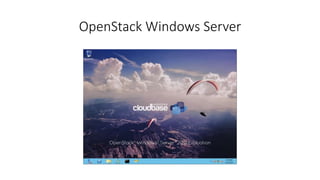
OpenStack Windows Server
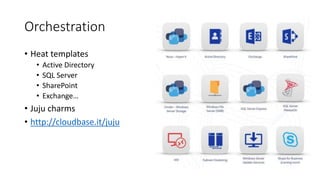
Orchestration
• Heat templates
• Active Directory
• SQL Server
• SharePoint
• Exchange…
• Juju charms
• http://cloudbase.it/juju
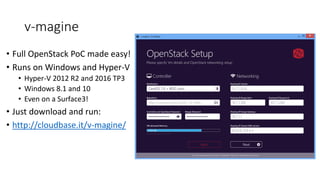
v-magine
• Full OpenStack PoC made easy!
• Runs on Windows and Hyper-V
• Hyper-V 2012 R2 and 2016 TP3
• Windows 8.1 and 10
• Even on a Surface3!
• Just download and run:
• http://cloudbase.it/v-magine/
Demo
OpenStack Integration Demo
Docker Integration
}
Demo
Docker Integration Demo
Rude Questions
But you have your own Cloud Stack!
• Yes – and we would like you to use it 
• However – we are happy to be part of any cloud computing platform
that you build
But you won’t support this!
• Yes – we will*
• We support Windows + Enterprise Server applications on any
virtualization platform that is part of the SVVP
(http://www.windowsservercatalog.com/svvp.aspx)
• We do not make support statements about any management
software – we don’t need to. That is the point of an ecosystem 
Friendly Questions?

Open stack + Containers + Hyper-V

  • 1.
  • 2.
  • 3.
    Ben Armstrong • Iam Principle Program Manager at Microsoft. • I have been working on virtualization for over a decade, and has worked on products such as Virtual PC, Virtual Server and Hyper-V. • Right now I am focused on building the next release of Hyper-V and Windows Server containers. • @VirtualPCGuy
  • 4.
    Alessandro Pilotti • CEOat Cloudbase Solutions • Project lead for all the Windows and Hyper-V integration in OpenStack • Hyper-V MVP • @cloudbaseit
  • 5.
    Agenda • Windows Containers •Hyper-V • OpenStack Integration • Docker Integration • Rude Questions • Friendly Questions
  • 6.
  • 7.
  • 8.
    Windows Server Containers Spotlightcapabilities Windows User Mode Web tier Container A Container B Container C App tier DB tier
  • 10.
  • 11.
  • 14.
  • 15.
    file cloud service Access Control VirtualNetwork VHD storage blob Portal Network Block BlobImageCompute Identity
  • 16.
    Hyper-V Nova Compute •Mature driver, available since Folsom • http://cloudbase.it/openstack-compute-installer • Rich feature set, Nova group B hypervisor • Notable upcoming features: • vNIC hot plug • Compute, networking and storage QoS • Failover clustering (hello pets!) • vNuma • vTPM (shielded VMs) • UEFI SecureBoot (Windows and Linux) • Fibre channel volumes
  • 17.
    Neutron • Hyper-V pluginis part of Neutron since Jan 2013 • Supported network types: • VLAN • Flat • Local • NVGRE • Plugin / agent model • ML2 plugin runs in neutron-server (controller) • Agent runs on each Hyper-V compute node
  • 18.
    Neutron • Neutron ML2agent works side by side with Open vSwitch!! • You can use the OVS agent with Hyper-V agents (or vice versa) • Limited to compatible L2 protocols: Flat / VLAN • You can use the L3 and DHCP agents with the Hyper-V plugin • Using the OVS L2 agent on the other networking nodes • Great for interoperability (e.g. KVM + Hyper-V)
  • 19.
    Open vSwitch onHyper-V • OVS has been fully ported to Hyper-V! • community effort between Cloudbase Solutions and VMWare • 2012 R2 and 2016 • Code available upstream: Apache 2 • Full CLI and OVSDB compatibility with Linux • Available starting with OVS 2.4 • http://www.cloudbase.it/open-vswitch-on-hyper-v/ • Neutron OVS ML2 agent already ported to Windows • Alternative to the Hyper-V native SDN stack
  • 20.
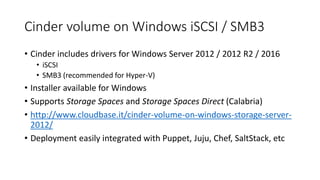
    Cinder volume onWindows iSCSI / SMB3 • Cinder includes drivers for Windows Server 2012 / 2012 R2 / 2016 • iSCSI • SMB3 (recommended for Hyper-V) • Installer available for Windows • Supports Storage Spaces and Storage Spaces Direct (Calabria) • http://www.cloudbase.it/cinder-volume-on-windows-storage-server- 2012/ • Deployment easily integrated with Puppet, Juju, Chef, SaltStack, etc
  • 21.
    Keystone & ActiveDirectory • Keystone fully supports partial and full integration with Active Directory • AD is the 3rd most common backing store for Keystone deployments todat
  • 22.
    More Windows OpenStacksupport • Ceilometer • Compute inspector • Manila • Windows file server • Coming in Liberty
  • 23.
    Windows As AGuest - Windows Cloud-Init • Cloudbase-init (aka Windows Cloud-Init) • Similar to the Linux cloud-init • License: Apache 2 • Upcoming Cloud-Init v2 • Full rewrite, merging Cloud-Init and Cloudbase-Init efforts and teams • Supported data sources: • OpenStack HTTP • ConfigDrive • EC2 • And more: CloudStack, OpenNebula, Ubuntu MAAS
  • 24.
  • 25.
    Orchestration • Heat templates •Active Directory • SQL Server • SharePoint • Exchange… • Juju charms • http://cloudbase.it/juju
  • 26.
    v-magine • Full OpenStackPoC made easy! • Runs on Windows and Hyper-V • Hyper-V 2012 R2 and 2016 TP3 • Windows 8.1 and 10 • Even on a Surface3! • Just download and run: • http://cloudbase.it/v-magine/
  • 27.
  • 28.
  • 29.
  • 31.
  • 32.
  • 33.
    But you haveyour own Cloud Stack! • Yes – and we would like you to use it  • However – we are happy to be part of any cloud computing platform that you build
  • 34.
    But you won’tsupport this! • Yes – we will* • We support Windows + Enterprise Server applications on any virtualization platform that is part of the SVVP (http://www.windowsservercatalog.com/svvp.aspx) • We do not make support statements about any management software – we don’t need to. That is the point of an ecosystem 
  • 35.

Editor's Notes

  • #8 When it comes to applications, historically, IT administrators deployed with a 1:1 application to server ratio. When a new application was required by the business, it was deployed onto a newly provisioned physical system, to ensure no conflicts with existing applications and workloads. This resulted in a huge number of physical servers, all with very low utilization. Fast forward to a more modern datacenter, where virtualization is now prevalent, and you’ll find significantly higher consolidation ratios, much greater utilization and significantly accelerated app deployment speeds as administrators deploy applications in minutes, compared with hours, days or weeks in a purely physical datacenter. Compared with applications that ran on individual physical servers, the compatibility of those same apps to run inside virtual machines was typically very high. After all, the virtual machine just presents virtual hardware to the same operating system that was running in the physical world. The only consideration being, if that application or workload has a requirement for a specific piece of hardware, such as a PCI-E card, that couldn’t be virtualized and presented through to the guest operating system. In addition, once that application was encapsulated inside the virtual machine, it benefited from higher levels of redundancy, and also mobility, through features such as live migration. There is however, a new and increasingly popular way to build, ship, deploy and instantiate applications. Containers can further accelerate application deployment and streamline the way IT operations and development teams collaborate to deliver applications to the business. But what are containers? Well, to give the computer science definition, containers are an operating system-level isolation method for running multiple applications on a single control host. With developers building, and then packaging their applications into containers, and providing them to IT to run on a standardized platform, it reduces the overall effort to deploy applications, and can streamline the whole dev and test cycle, ultimately reducing costs. As containers can run on a host OS which itself could be physical or virtual, it provides IT with flexibility, and the opportunity to drive an increased level of server consolidation, all whilst maintaining a level of isolation that allows many containers to share the same host operating system.
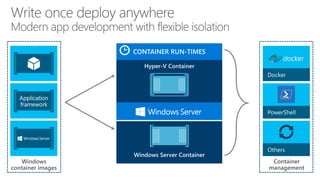
  • #9 So what are some of the core Windows Server container capabilities. The first key takeaway, is that there is core functionality for containers, supported natively within the kernel, and they will be available in the next release of Windows Server. Developers will use familiar development tools, such as Visual Studio, to write apps to run within containers. Instead of trying to backport existing applications, by building modular apps leveraging containers, modules can scale independently, and be updated on independent cadences, providing the developer with much greater flexibility and speed. Applications can rely on other packages to provide core functionality. As you can see from the graphic, there are 2 containers that are sharing a number of libraries. In addition, when packaging, the packages also depend on a base package which describes the underlying operating system, such as Server Core, which has a large number of APIs that Windows supports, such as .NET, IIS etc. Nano Server is another, however this has a much smaller surface, that will target apps that have been written from the ground up, with the cloud in mind. Containers are isolated behind their own network compartment. This can be provided a NAT DHCP or Static IP. Each container has an independent session namespace, which helps to provide isolation and additional security. The kernel object namespace is isolated per container. Each container also has access to certain CPU and memory resources, along with storage and network capacity – these are controlled by the administrator, and ensures predictable and guaranteed control of processes. These containers can be managed using tools such as PowerShell, or using the Docker management tools.