

Openstack Components as
Containerized Microservices
Miguel Zuniga
Agenda
• Microservices
• Why Openstack?
• Openstack as Microservices
• Openstack Architecture
• From Devstack To Microservices under Openshift/Kubernetes
• Using openstack latest code to build your containers
• Building docker files for openshift/kubernetes
• Dockerfile… Keystone template example… Keystone Microservice
• Openstack controllers with Openshift/Kubernetes
• Rolling Updates
• Openstack Cloud Architecture using Microservices
Copyright © 2016 Symantec Corporation
2
MicroServices
• Wikipedia:
“microservices is a software architecture style in which complex applications are
composed of small, independent processes communicating with each other using
language-agnostic APIs. These services are small building blocks, highly decoupled and
focussed on doing a small task, facilitating a modular approach to system-building.”
Copyright © 2016 Symantec Corporation
3
Why Openstack?
• Openstack is an ecosystem of multiple components
• Each component provides an specific service (compute, identity, images, etc)
• Components interact with each other using API’s
• Components are completely independent from each other.
Copyright © 2016 Symantec Corporation
4
Openstack as Microservices
• Each openstack component require a database or some tables.
• Interact between each other using REST API’s.
• Architecture of share nothing.
• Designed from scratch to work as separate services which allows them to run as
microservices.
• Easy to deploy using containers which allows them to enter into the Kubernetes world.
Copyright © 2016 Symantec Corporation
5
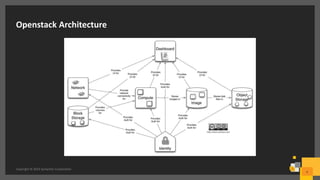
Openstack Architecture
Copyright © 2016 Symantec Corporation
6
From Devstack To Microservices under Openshift/Kubernetes
• Devstack
– All in one execution
– Developers don’t get the real idea of what exactly is going on.
– Configurations difficult to track.
– Debugging is a nightmare.
• Microservices
– Deploy one service or all of them.
– Easy to debug (each service becomes a separate entity)
– 1 click deployments
– It allow developers to get a better idea on how the openstack ecosystem works.
Copyright © 2016 Symantec Corporation
7
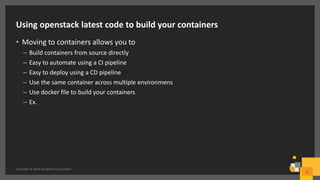
Using openstack latest code to build your containers
• Moving to containers allows you to
– Build containers from source directly
– Easy to automate using a CI pipeline
– Easy to deploy using a CD pipeline
– Use the same container across multiple environmens
– Use docker file to build your containers
– Ex.
Copyright © 2016 Symantec Corporation
8
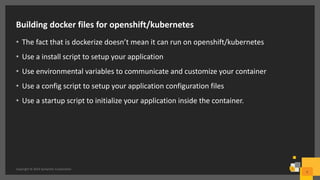
Building docker files for openshift/kubernetes
• The fact that is dockerize doesn’t mean it can run on openshift/kubernetes
• Use a install script to setup your application
• Use environmental variables to communicate and customize your container
• Use a config script to setup your application configuration files
• Use a startup script to initialize your application inside the container.
Copyright © 2016 Symantec Corporation
9
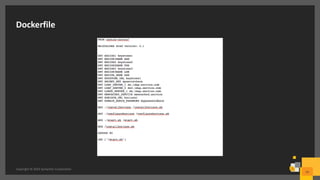
Dockerfile
Copyright © 2016 Symantec Corporation
10
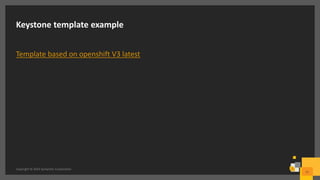
Keystone template example
Template based on openshift V3 latest
Copyright © 2016 Symantec Corporation
11
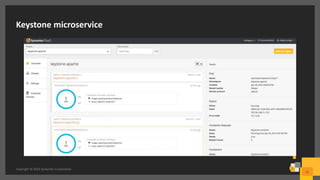
Keystone microservice
Copyright © 2016 Symantec Corporation
12
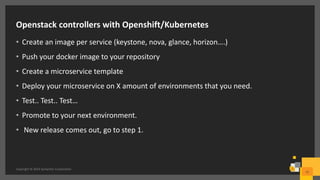
Openstack controllers with Openshift/Kubernetes
• Create an image per service (keystone, nova, glance, horizon….)
• Push your docker image to your repository
• Create a microservice template
• Deploy your microservice on X amount of environments that you need.
• Test.. Test.. Test…
• Promote to your next environment.
• New release comes out, go to step 1.
Copyright © 2016 Symantec Corporation
13
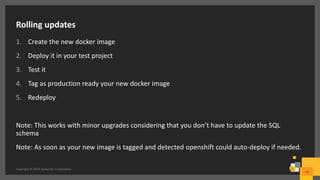
Rolling updates
1. Create the new docker image
2. Deploy it in your test project
3. Test it
4. Tag as production ready your new docker image
5. Redeploy
Note: This works with minor upgrades considering that you don’t have to update the SQL
schema
Note: As soon as your new image is tagged and detected openshift could auto-deploy if needed.
Copyright © 2016 Symantec Corporation
14
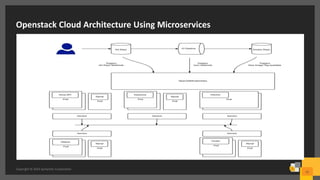
Openstack Cloud Architecture Using Microservices
Copyright © 2016 Symantec Corporation
15
Q&A
16Copyright © 2016 Symantec Corporation
Thank you!
Copyright © 2016 Symantec Corporation. All rights reserved. Symantec and the Symantec Logo are trademarks or registered trademarks of Symantec Corporation or its affiliates in the U.S. and other countries. Other names may be
trademarks of their respective owners.
This document is provided for informational purposes only and is not intended as advertising. All warranties relating to the information in this document, either express or implied, are disclaimed to the maximum extent allowed by
law. The information in this document is subject to change without notice.
17

Openstack components as containerized microservices

  • 1.
    Openstack Components as ContainerizedMicroservices Miguel Zuniga
  • 2.
    Agenda • Microservices • WhyOpenstack? • Openstack as Microservices • Openstack Architecture • From Devstack To Microservices under Openshift/Kubernetes • Using openstack latest code to build your containers • Building docker files for openshift/kubernetes • Dockerfile… Keystone template example… Keystone Microservice • Openstack controllers with Openshift/Kubernetes • Rolling Updates • Openstack Cloud Architecture using Microservices Copyright © 2016 Symantec Corporation 2
  • 3.
    MicroServices • Wikipedia: “microservices isa software architecture style in which complex applications are composed of small, independent processes communicating with each other using language-agnostic APIs. These services are small building blocks, highly decoupled and focussed on doing a small task, facilitating a modular approach to system-building.” Copyright © 2016 Symantec Corporation 3
  • 4.
    Why Openstack? • Openstackis an ecosystem of multiple components • Each component provides an specific service (compute, identity, images, etc) • Components interact with each other using API’s • Components are completely independent from each other. Copyright © 2016 Symantec Corporation 4
  • 5.
    Openstack as Microservices •Each openstack component require a database or some tables. • Interact between each other using REST API’s. • Architecture of share nothing. • Designed from scratch to work as separate services which allows them to run as microservices. • Easy to deploy using containers which allows them to enter into the Kubernetes world. Copyright © 2016 Symantec Corporation 5
  • 6.
    Openstack Architecture Copyright ©2016 Symantec Corporation 6
  • 7.
    From Devstack ToMicroservices under Openshift/Kubernetes • Devstack – All in one execution – Developers don’t get the real idea of what exactly is going on. – Configurations difficult to track. – Debugging is a nightmare. • Microservices – Deploy one service or all of them. – Easy to debug (each service becomes a separate entity) – 1 click deployments – It allow developers to get a better idea on how the openstack ecosystem works. Copyright © 2016 Symantec Corporation 7
  • 8.
    Using openstack latestcode to build your containers • Moving to containers allows you to – Build containers from source directly – Easy to automate using a CI pipeline – Easy to deploy using a CD pipeline – Use the same container across multiple environmens – Use docker file to build your containers – Ex. Copyright © 2016 Symantec Corporation 8
  • 9.
    Building docker filesfor openshift/kubernetes • The fact that is dockerize doesn’t mean it can run on openshift/kubernetes • Use a install script to setup your application • Use environmental variables to communicate and customize your container • Use a config script to setup your application configuration files • Use a startup script to initialize your application inside the container. Copyright © 2016 Symantec Corporation 9
  • 10.
    Dockerfile Copyright © 2016Symantec Corporation 10
  • 11.
    Keystone template example Templatebased on openshift V3 latest Copyright © 2016 Symantec Corporation 11
  • 12.
    Keystone microservice Copyright ©2016 Symantec Corporation 12
  • 13.
    Openstack controllers withOpenshift/Kubernetes • Create an image per service (keystone, nova, glance, horizon….) • Push your docker image to your repository • Create a microservice template • Deploy your microservice on X amount of environments that you need. • Test.. Test.. Test… • Promote to your next environment. • New release comes out, go to step 1. Copyright © 2016 Symantec Corporation 13
  • 14.
    Rolling updates 1. Createthe new docker image 2. Deploy it in your test project 3. Test it 4. Tag as production ready your new docker image 5. Redeploy Note: This works with minor upgrades considering that you don’t have to update the SQL schema Note: As soon as your new image is tagged and detected openshift could auto-deploy if needed. Copyright © 2016 Symantec Corporation 14
  • 15.
    Openstack Cloud ArchitectureUsing Microservices Copyright © 2016 Symantec Corporation 15
  • 16.
    Q&A 16Copyright © 2016Symantec Corporation
  • 17.
    Thank you! Copyright ©2016 Symantec Corporation. All rights reserved. Symantec and the Symantec Logo are trademarks or registered trademarks of Symantec Corporation or its affiliates in the U.S. and other countries. Other names may be trademarks of their respective owners. This document is provided for informational purposes only and is not intended as advertising. All warranties relating to the information in this document, either express or implied, are disclaimed to the maximum extent allowed by law. The information in this document is subject to change without notice. 17