

































Technical SEO Audit
With Screaming Frog
@glen_dimaandal
Glen Dimaandal
Online Marketing
Manager
Glen Dimaandal
Founder & CEO
On-Site SEO
Applying SEO
best practices to
on-site elements.
Maximizing
Crawlability
Relevance of Content
More
Important
than Ever!
Beware of
Frauds
What is
Screaming
Frog?
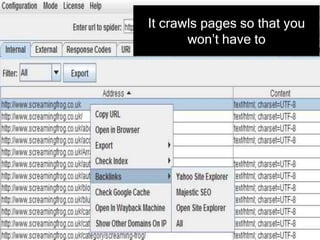
It crawls pages so that you
won’t have to
Should You
Pay?
Basic Functions
Detect broken links
Detect broken links
Check Crawl Errors
Detect broken links
Check Crawl Errors
Audit Meta Data
Uncommon but
Useful
Applications
Finding Thin
Content
1. Crawl a site or a list of pages
2. Go to the Internal Tab
1. Crawl a site or a list of pages
2. Go to the Internal Tab
Use the “Filter” dropdown and
choose “HTML
4. Find the Word Count column on the far right
5. Export to CSV
4. Find the Word Count column on the far right
5. Export to CSV
6. Sort Word count values from smallest to largest
4. Find the Word Count column on the far right
5. Export to CSV
6. Sort Word count values from smallest to largest
7. Investigate all pages with 200 and below word
count values
Finding Images
Missing Alt
Text
1. Crawl a site or a list of pages
2. Goto the Images Tab
1. Crawl a site or a list of pages
2. Goto the Images Tab
3. Go to Advanced exports
1. Crawl a site or a list of pages
2. Goto the Images Tab
3. Go to Advanced exports
4. Choose “Missing Alt text”
Auditing meta
directives
1. Crawl a site or a list of pages
2. Go to the directives tab
1. Crawl a site or a list of pages
2. Go to the directives tab
3. Filter according to directive (noindex,
noarchive, canonical tags, etc)
1. Crawl a site or a list of pages
2. Go to the directives tab
3. Filter according to directive (noindex,
noarchive, canonical tags, etc)
4. Export to CSV and address
Auditing Site
Migrations
1. Install SEOQuake
1. Install SEOQuake
2. Go to site settings and turn off Google Instant
1. Install SEOQuake
2. Go to site settings and turn off Google Instant
3. Set search results per page to 100
1. Install SEOQuake
2. Go to site settings and turn off Google Instant
3. Set search results per page to 100
4. Run a “site:” query for the old domain
5. Export all listings to CSV
6 Complie all URLs into one .txt file
5. Export all listings to CSV
6 Complie all URLs into one .txt file
7. On Screamin Frog, go to Mode and choose
“List”
5. Export all listings to CSV
6 Complie all URLs into one .txt file
7. On Screamin Frog, go to Mode and choose
“List”
8. Choose the .txt file with the URLs from Google
9. In the Interbal tab, check the “status” column
9. In the Internal tab, check the “status” column
10. Investigate all results that are not 301
redirecting
Tracking Link
Cleanup
Campaigns
1. Go to Configuration and find “cstom”
2. Create an “includes” filter and type your root
domain
1. Go to Configuration and find “cstom”
2. Create an “includes” filter and type your root
domain
3. Prepare a .txt file of external pages that you
requested link removal from
1. Go to Configuration and find “cstom”
2. Create an “includes” filter and type your root
domain
3. Prepare a .txt file of external pages that you
requested link removal from
4. Set Screaming Frog to List mode and have it
crawl the list
5. When the crawl finishes, go to the Custom tab
6. You’ll see which unwanted links are still live for
your site
Where Credit is Due
Thank
You!

On site audit with screaming frog gdi