
HOW TO DO A SEO
SITE AUDIT
Kathy Alice Brown
à About these slides ß
•  These slides are from my online course:
“How to do a SEO Site Audit”
For Access & Discounted Price ! http://webenso.com/ssas
•  The course also has demos and me lecturing on video, so not
everything is covered in these slides.
•  But don’t worry, there is still a lot of great information here!
Course Agenda
•  Introduction
•  Make sure to download the checklist and tools list!
•  Initial Technical Checks
•  What Google Sees
•  Traffic and Site Speed
•  Google Search Console
•  Advanced Technical Section
•  Authority Checks
Thank you!
Big Thanks to
Mirror-Engraving.com
FOUR TIERS OF SEO
Defining SEO
What is SEO?
SEO (Search Engine Optimization) is the art and science to
having your site rank well in Google as well as increasing
your site’s organic traffic.
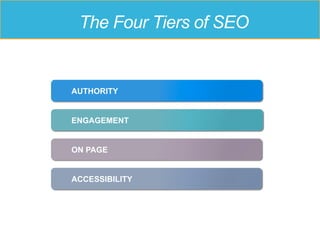
The Four Tiers of SEO
ACCESSIBILITY
ON PAGE
AUTHORITY
ENGAGEMENT
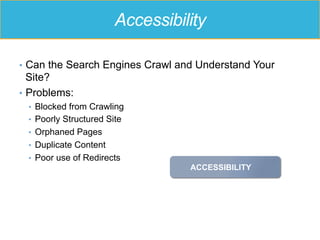
Accessibility
•  Can the Search Engines Crawl and Understand Your
Site?
•  Problems:
•  Blocked from Crawling
•  Poorly Structured Site
•  Orphaned Pages
•  Duplicate Content
•  Poor use of Redirects
ACCESSIBILITY
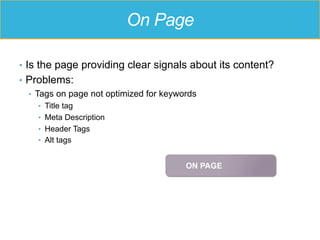
On Page
•  Is the page providing clear signals about its content?
•  Problems:
•  Tags on page not optimized for keywords
•  Title tag
•  Meta Description
•  Header Tags
•  Alt tags
ON PAGE
Engagement
•  Is the page/site useful and engaging with users?
•  Problems:
•  Slow loading
•  Not mobile friendly
•  Content not written well
•  Not visually appealing
ENGAGEMENT
Authority
•  Is the site a recognized authority in its niche?
•  Problems:
•  No relevant backlinks
•  OR too many spammy backlinks
•  No social activity
AUTHORITY
GOAL OF THE AUDIT
How to do a SEO Site Audit
Why are you doing the audit?
•  To make sure everything is Ok with my site.
•  To reassess my SEO approach and make sure I’m in
compliance with Google guidelines.
•  Because my organic traffic has been going down.
•  To see if there is any opportunity to increase my organic
traffic.
•  To deliver a more complete service to my client.
The different types of audits
•  General Health Audit
•  Competitive Review
•  Forensic
•  Content Quality Review
•  Backlink Audit
•  Local SEO
Problems .. and Opportunities
•  Approach audit with an open mind
•  You are looking for problems
•  And you are also looking for opportunities
GETTING STARTED
How to do a SEO Site Audit
Getting Started
•  MUST have
•  Google Analytics
•  Google Search Console
•  Understand the history of the Site
•  Download the Checklist attached to this lecture
Questions
•  How many domains
•  Recent changes (migrations, redesign …)
•  Any deliberate link building
•  Business Goals
•  How is it monetization?
•  Competitors
•  Top Keywords
TECHNICAL CHECKS
Quick checks to find major SEO problems
REDIRECTS
… and HTTP Status Codes
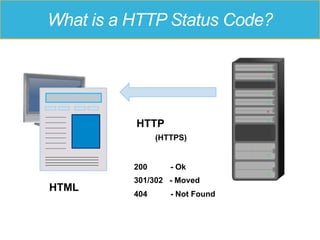
What is a HTTP Status Code?
HTML
HTTP
(HTTPS)
200 - Ok
301/302 - Moved
404 - Not Found
HTTP Status Codes
200 – Here’s your page, everything is great!
301 – The page you requested has moved,
Here’s where it moved to
302 – The page you requested has temporarily moved
404 – I can’t find the page
5xx – Something went wrong
Why Redirects Matter
Make sure Google has your forwarding address
•  Use a 301 Redirect if the move is
permanent.
•  302 Redirect for temporary moves
•  Best for SEO to use 301 redirects
Top Level Redirects
•  Check that there is a 301 Canonical Redirect
•  The site should have one canonical location
•  Either www or non-www but NOT both
•  Check for other redirects as appropriate
•  Other domains
•  http -> https
ROBOTS.TXT
Don’t block Googlebot and friends
About robots.txt
No crawling allowed here
Don’t Block Your Entire Site
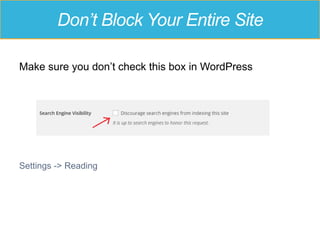
Make sure you don’t check this box in WordPress
Settings -> Reading
Don’t Block Your Entire Site
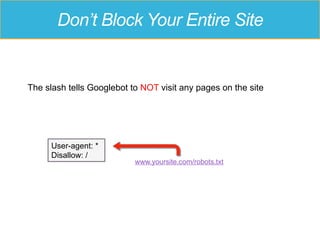
The slash tells Googlebot to NOT visit any pages on the site
www.yoursite.com/robots.txt
User-agent: *
Disallow: /
When Spiders are Blocked
IMPORTANT: Does not necessarily keep pages out of the
Google index!!
“A description for this result is not available because of this
site’s robots.txt file”
When Spiders are Blocked
Don’t block JavaScript and CSS files
MOBILE FRIENDLY
A great user experience across all devices
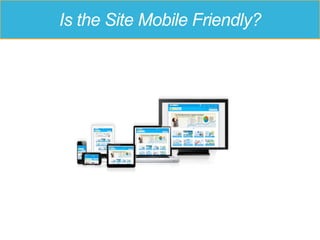
Is the Site Mobile Friendly?
Mobile Friendly – 3 Approaches
•  Responsive Web Design (RWD)
•  Site adjusts to different screen sizes
•  Separate URLs
•  Redirects to a separate URL (“m dot site”) based on a mobile User
Agent
•  Dynamic Serving
•  Same URL but serves different HTML based on User Agent
https://developers.google.com/webmasters/mobile-sites/mobile-seo/
… and AMP
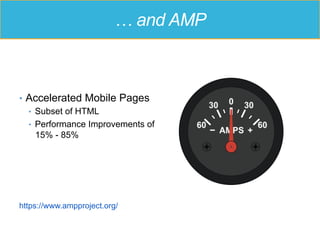
•  Accelerated Mobile Pages
•  Subset of HTML
•  Performance Improvements of
15% - 85%
https://www.ampproject.org/
Google Mobile Friendly Test
https://www.google.com/webmasters/tools/mobile-friendly/
WHAT GOOGLE SEES
How to crawl a site and what to look for
Why we crawl
• To see what Googlebot (other)
sees, we crawl the site.
• Uncover problems with accessibility
as well as on page optimization
opportunities.
• Lectures in priority order
• Screaming Frog, BrowseSEO.net
(free)
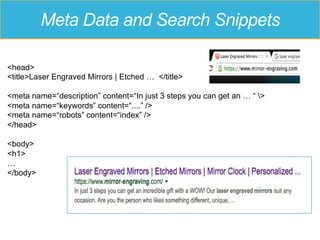
SEARCH SNIPPETS
Where the search snippet gets it’s info
<head>
<title>Laser Engraved Mirrors | Etched … </title>
<meta name=“description” content=“In just 3 steps you can get an … “ >
<meta name=“keywords” content=“....” />
<meta name=“robots” content=“index” />
</head>
<body>
<h1>
…
</body>
Meta Data and Search Snippets
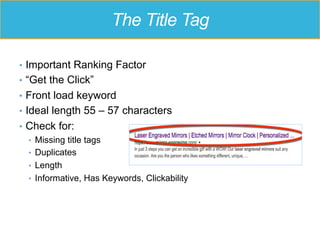
The Title Tag
•  Important Ranking Factor
•  “Get the Click”
•  Front load keyword
•  Ideal length 55 – 57 characters
•  Check for:
•  Missing title tags
•  Duplicates
•  Length
•  Informative, Has Keywords, Clickability
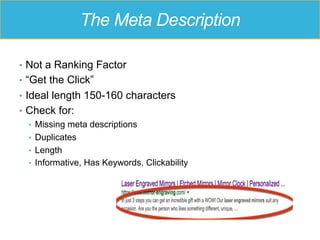
The Meta Description
•  Not a Ranking Factor
•  “Get the Click”
•  Ideal length 150-160 characters
•  Check for:
•  Missing meta descriptions
•  Duplicates
•  Length
•  Informative, Has Keywords, Clickability
PAGE BY PAGE REVIEW
What Google Sees
Page by Page
•  Browse the site page by page as a search bot would
•  Set up a browser to mimic a search bot
•  Review the source code
•  Fetch page as Google bot (in Google Search Console) or use the
cache: command
•  Use browseo.net
•  Identify page archetypes and browse representative
pages
Page by Page
•  What are you looking for?
•  Text is really text
•  Avoid really thin pages
•  Missing or Hidden Elements
•  Links are not obfuscated, with descriptive anchors
•  Proper use of tags
TRAFFIC
The Lifeblood of a Website
The Different Types of Traffic
•  Organic
•  Referral
•  Direct
•  Paid
Google Analytics
•  Not only a measure of Organic Traffic but useful for:
•  Tracking Conversions
•  Engagement Metrics
•  Time On Site, Bounce Rate, Pages per Visit
•  Content Performance
•  Demographics and Interests (if enabled)
•  % mobile
•  Location
•  Social Referrals
The Different Types of Traffic
•  Is Organic Traffic rising? Falling? Or Flat?
•  What are the top Landing Pages?
•  How is the site performing with Users?
•  How well is the site optimized for Speed?
GOOGLE SEARCH
CONSOLE
Google’s Communication Channel to
Webmasters
Google Search Console
Formerly known as Google Webmasters Tools
www.google.com/webmasters/tools
•  Site needs to be verified,
•  “admin” access not absolutely required
Google Search Console
•  Messages
•  Search Appearance
•  Search Traffic
•  Google Index
•  Crawl
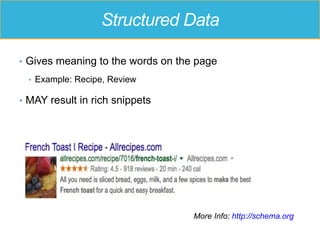
Structured Data
•  Gives meaning to the words on the page
•  Example: Recipe, Review
•  MAY result in rich snippets
More Info: http://schema.org
DOMAIN AUTHORITY
Authority Checks
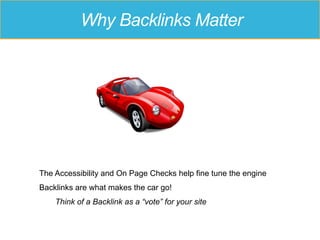
Why Backlinks Matter
The Accessibility and On Page Checks help fine tune the engine
Backlinks are what makes the car go!
Think of a Backlink as a “vote” for your site
Domain Authority
•  Not all backlinks are the same
•  You want links from high authority, relevant sites
•  Domain Authority
•  Third party metric from Moz.com
•  Not perfect
•  Moz Bar Plugin
BACKLINKS
Authority Checks
Backlinks
•  Note # of backlinks and # of referring domains
•  Note any high DA links
•  Flag any links that look suspicious
•  Check anchor text
•  A good portion should be branded links
Backlinks - Tools
•  Google Search Console – Links to Your Site
•  Moz’s OpenSiteExplorer
•  Ahrefs
•  MajesticSEO
CONTENT QUALITY
… and User Experience
CONTENT QUALITY
•  Length: in most cases the longer the better
•  Readable
•  At least one image
•  Scannable – lots of white space
•  Better than the competition
User Experience
•  Look at the site from the perspective of a new site visitor
•  Is it ….
•  Easy to navigate?
•  Is what it is offering clear?
•  Looks professional and credible?
QDF and Content Scraping Checks
•  QDF – Query Deserves Freshness
•  Content is unique – Not found elsewhere
REL CANONICAL
Advanced Technical – Controlling Indexation
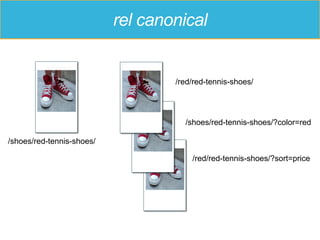
rel canonical
/shoes/red-tennis-shoes/
/red/red-tennis-shoes/
/red/red-tennis-shoes/?sort=price
/shoes/red-tennis-shoes/?color=red
Duplicate Page Titles
•  To get a list of duplicate page titles in Screaming Frog:
•  Reports -> SERP Summary -> Filter: Page Titles – Duplicate
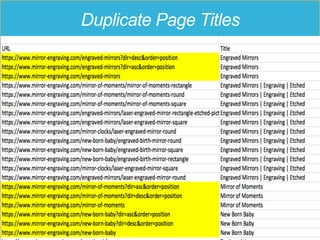
Duplicate Page Titles
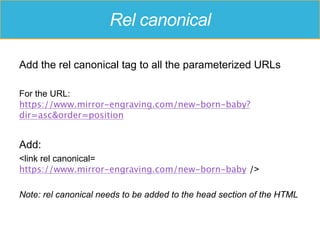
Rel canonical
Add the rel canonical tag to all the parameterized URLs
For the URL:
https://www.mirror-engraving.com/new-born-baby?
dir=asc&order=position
Add:
<link rel canonical=
https://www.mirror-engraving.com/new-born-baby />
Note: rel canonical needs to be added to the head section of the HTML
META ROBOTS
NOINDEX
Advanced Technical – Controlling Indexation
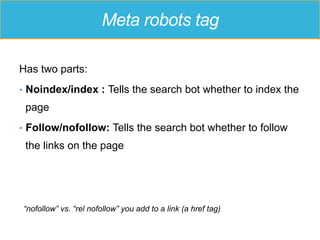
Meta robots tag
Has two parts:
•  Noindex/index : Tells the search bot whether to index the
page
•  Follow/nofollow: Tells the search bot whether to follow
the links on the page
“nofollow” vs. “rel nofollow” you add to a link (a href tag)
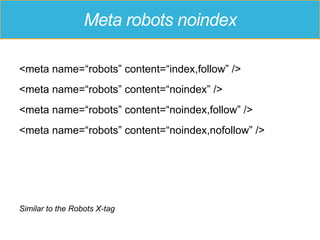
Meta robots noindex
<meta name=“robots” content=“index,follow” />
<meta name=“robots” content=“noindex” />
<meta name=“robots” content=“noindex,follow” />
<meta name=“robots” content=“noindex,nofollow” />
Similar to the Robots X-tag
Noindex vs. Robots.txt
•  A meta robots noindex tells the search bot to crawl the
page but to not put it into the index (and remove it if
already there)
•  A disallow in robots.txt tells the search bot not to crawl the
page
•  Blocks link authority from passing through
•  Blocks Google from seeing the page
•  Does NOT remove the page from the index
Don’t block the search bot
Remember: If you block the search bot from crawling with a
robots.txt Disallow, then it won’t SEE the noindex tag.
When to use noindex
•  Consider noindex if the page is not a great landing page
•  Thin low quality pages
•  Pages with no unique content on them
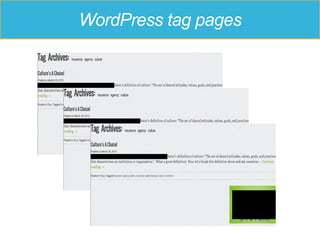
•  WordPress archive pages such as tag or date pages
•  Empty checkout pages
•  Empty wishlist pages
WordPress tag pages
REL PREV & REL NEXT
Controlling Indexation
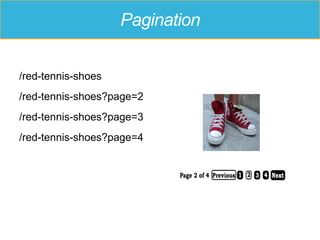
Pagination
/red-tennis-shoes
/red-tennis-shoes?page=2
/red-tennis-shoes?page=3
/red-tennis-shoes?page=4
Pagination
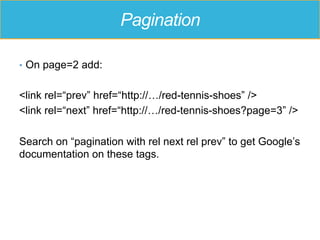
•  On page=2 add:
<link rel=“prev” href=“http://…/red-tennis-shoes” />
<link rel=“next” href=“http://…/red-tennis-shoes?page=3” />
Search on “pagination with rel next rel prev” to get Google’s
documentation on these tags.
OTHER TECHNICAL
TOPICS
Random Interesting Stuff
Other Technical Topics
•  Lazy Loading/Infinite Scroll
•  Not SEO friendly out of the box
•  AJAX Crawling (deprecated)
•  Dynamic generated content with a HTML snapshot
More Interesting Tools
•  https://validator.w3.org/
•  https://gtmetrix.com/
BONUS: LOCAL SEO
SEO + NAP and Citations
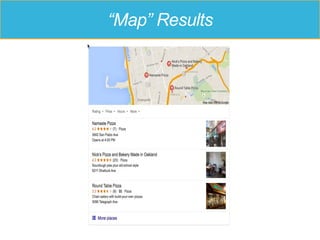
“Map” Results
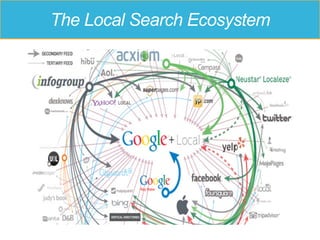
The Local Search Ecosystem
NAP and Citations
•  NAP
•  Name, Address and Phone Number
•  Citations
•  Listings in local directories (Yelp, Superpages, YP, hotfrog)
•  Listings in Google My Business, Yahoo Local, Bing Local
•  CORRECT listing in “core data aggregators”
•  Factual, Infogroup, Localeze, Acxiom
•  Consider Moz Local
BONUS: WORDPRESS
WordPress powers 25% of the internet’s
websites
WordPress
•  WordPress is SEO Friendly
•  Make sure the Yoast SEO plugin is installed and
configured properly.
•  Yoast provides:
•  A way to customize title and meta description tags
•  Social optimization tags
•  Indexation control
•  Generates a XML sitemap
WordPress
•  Not all WordPress themes are responsive
•  You need a Responsive theme or WP Touch
•  Performance
•  WP Smush for images
•  WP Super Cache or W3 Total Cache for Caching
Thank you!
Kathy Alice Brown
Digital Marketing Consultant
•  SEO Site Audits
•  Copywriting
•  Facebook Campaigns
Discount Link for
Course:
http://webenso.com/ssas

How to do a SEO Site Audit

  • 1.
    HOW TO DOA SEO SITE AUDIT Kathy Alice Brown
  • 2.
    à About theseslides ß •  These slides are from my online course: “How to do a SEO Site Audit” For Access & Discounted Price ! http://webenso.com/ssas •  The course also has demos and me lecturing on video, so not everything is covered in these slides. •  But don’t worry, there is still a lot of great information here!
  • 3.
    Course Agenda •  Introduction • Make sure to download the checklist and tools list! •  Initial Technical Checks •  What Google Sees •  Traffic and Site Speed •  Google Search Console •  Advanced Technical Section •  Authority Checks
  • 4.
    Thank you! Big Thanksto Mirror-Engraving.com
  • 5.
    FOUR TIERS OFSEO Defining SEO
  • 6.
    What is SEO? SEO(Search Engine Optimization) is the art and science to having your site rank well in Google as well as increasing your site’s organic traffic.
  • 7.
    The Four Tiersof SEO ACCESSIBILITY ON PAGE AUTHORITY ENGAGEMENT
  • 8.
    Accessibility •  Can theSearch Engines Crawl and Understand Your Site? •  Problems: •  Blocked from Crawling •  Poorly Structured Site •  Orphaned Pages •  Duplicate Content •  Poor use of Redirects ACCESSIBILITY
  • 9.
    On Page •  Isthe page providing clear signals about its content? •  Problems: •  Tags on page not optimized for keywords •  Title tag •  Meta Description •  Header Tags •  Alt tags ON PAGE
  • 10.
    Engagement •  Is thepage/site useful and engaging with users? •  Problems: •  Slow loading •  Not mobile friendly •  Content not written well •  Not visually appealing ENGAGEMENT
  • 11.
    Authority •  Is thesite a recognized authority in its niche? •  Problems: •  No relevant backlinks •  OR too many spammy backlinks •  No social activity AUTHORITY
  • 12.
    GOAL OF THEAUDIT How to do a SEO Site Audit
  • 13.
    Why are youdoing the audit? •  To make sure everything is Ok with my site. •  To reassess my SEO approach and make sure I’m in compliance with Google guidelines. •  Because my organic traffic has been going down. •  To see if there is any opportunity to increase my organic traffic. •  To deliver a more complete service to my client.
  • 14.
    The different typesof audits •  General Health Audit •  Competitive Review •  Forensic •  Content Quality Review •  Backlink Audit •  Local SEO
  • 15.
    Problems .. andOpportunities •  Approach audit with an open mind •  You are looking for problems •  And you are also looking for opportunities
  • 16.
    GETTING STARTED How todo a SEO Site Audit
  • 17.
    Getting Started •  MUSThave •  Google Analytics •  Google Search Console •  Understand the history of the Site •  Download the Checklist attached to this lecture
  • 18.
    Questions •  How manydomains •  Recent changes (migrations, redesign …) •  Any deliberate link building •  Business Goals •  How is it monetization? •  Competitors •  Top Keywords
  • 19.
    TECHNICAL CHECKS Quick checksto find major SEO problems
  • 20.
  • 21.
    What is aHTTP Status Code? HTML HTTP (HTTPS) 200 - Ok 301/302 - Moved 404 - Not Found
  • 22.
    HTTP Status Codes 200– Here’s your page, everything is great! 301 – The page you requested has moved, Here’s where it moved to 302 – The page you requested has temporarily moved 404 – I can’t find the page 5xx – Something went wrong
  • 23.
    Why Redirects Matter Makesure Google has your forwarding address •  Use a 301 Redirect if the move is permanent. •  302 Redirect for temporary moves •  Best for SEO to use 301 redirects
  • 24.
    Top Level Redirects • Check that there is a 301 Canonical Redirect •  The site should have one canonical location •  Either www or non-www but NOT both •  Check for other redirects as appropriate •  Other domains •  http -> https
  • 25.
  • 26.
  • 27.
    Don’t Block YourEntire Site Make sure you don’t check this box in WordPress Settings -> Reading
  • 28.
    Don’t Block YourEntire Site The slash tells Googlebot to NOT visit any pages on the site www.yoursite.com/robots.txt User-agent: * Disallow: /
  • 29.
    When Spiders areBlocked IMPORTANT: Does not necessarily keep pages out of the Google index!! “A description for this result is not available because of this site’s robots.txt file”
  • 30.
    When Spiders areBlocked Don’t block JavaScript and CSS files
  • 31.
    MOBILE FRIENDLY A greatuser experience across all devices
  • 32.
    Is the SiteMobile Friendly?
  • 33.
    Mobile Friendly –3 Approaches •  Responsive Web Design (RWD) •  Site adjusts to different screen sizes •  Separate URLs •  Redirects to a separate URL (“m dot site”) based on a mobile User Agent •  Dynamic Serving •  Same URL but serves different HTML based on User Agent https://developers.google.com/webmasters/mobile-sites/mobile-seo/
  • 34.
    … and AMP • Accelerated Mobile Pages •  Subset of HTML •  Performance Improvements of 15% - 85% https://www.ampproject.org/
  • 35.
    Google Mobile FriendlyTest https://www.google.com/webmasters/tools/mobile-friendly/
  • 36.
    WHAT GOOGLE SEES Howto crawl a site and what to look for
  • 37.
    Why we crawl • Tosee what Googlebot (other) sees, we crawl the site. • Uncover problems with accessibility as well as on page optimization opportunities. • Lectures in priority order • Screaming Frog, BrowseSEO.net (free)
  • 38.
    SEARCH SNIPPETS Where thesearch snippet gets it’s info
  • 39.
    <head> <title>Laser Engraved Mirrors| Etched … </title> <meta name=“description” content=“In just 3 steps you can get an … “ > <meta name=“keywords” content=“....” /> <meta name=“robots” content=“index” /> </head> <body> <h1> … </body> Meta Data and Search Snippets
  • 40.
    The Title Tag • Important Ranking Factor •  “Get the Click” •  Front load keyword •  Ideal length 55 – 57 characters •  Check for: •  Missing title tags •  Duplicates •  Length •  Informative, Has Keywords, Clickability
  • 41.
    The Meta Description • Not a Ranking Factor •  “Get the Click” •  Ideal length 150-160 characters •  Check for: •  Missing meta descriptions •  Duplicates •  Length •  Informative, Has Keywords, Clickability
  • 42.
    PAGE BY PAGEREVIEW What Google Sees
  • 43.
    Page by Page • Browse the site page by page as a search bot would •  Set up a browser to mimic a search bot •  Review the source code •  Fetch page as Google bot (in Google Search Console) or use the cache: command •  Use browseo.net •  Identify page archetypes and browse representative pages
  • 44.
    Page by Page • What are you looking for? •  Text is really text •  Avoid really thin pages •  Missing or Hidden Elements •  Links are not obfuscated, with descriptive anchors •  Proper use of tags
  • 45.
  • 46.
    The Different Typesof Traffic •  Organic •  Referral •  Direct •  Paid
  • 47.
    Google Analytics •  Notonly a measure of Organic Traffic but useful for: •  Tracking Conversions •  Engagement Metrics •  Time On Site, Bounce Rate, Pages per Visit •  Content Performance •  Demographics and Interests (if enabled) •  % mobile •  Location •  Social Referrals
  • 48.
    The Different Typesof Traffic •  Is Organic Traffic rising? Falling? Or Flat? •  What are the top Landing Pages? •  How is the site performing with Users? •  How well is the site optimized for Speed?
  • 49.
  • 50.
    Google Search Console Formerlyknown as Google Webmasters Tools www.google.com/webmasters/tools •  Site needs to be verified, •  “admin” access not absolutely required
  • 51.
    Google Search Console • Messages •  Search Appearance •  Search Traffic •  Google Index •  Crawl
  • 52.
    Structured Data •  Givesmeaning to the words on the page •  Example: Recipe, Review •  MAY result in rich snippets More Info: http://schema.org
  • 53.
  • 54.
    Why Backlinks Matter TheAccessibility and On Page Checks help fine tune the engine Backlinks are what makes the car go! Think of a Backlink as a “vote” for your site
  • 55.
    Domain Authority •  Notall backlinks are the same •  You want links from high authority, relevant sites •  Domain Authority •  Third party metric from Moz.com •  Not perfect •  Moz Bar Plugin
  • 56.
  • 57.
    Backlinks •  Note #of backlinks and # of referring domains •  Note any high DA links •  Flag any links that look suspicious •  Check anchor text •  A good portion should be branded links
  • 58.
    Backlinks - Tools • Google Search Console – Links to Your Site •  Moz’s OpenSiteExplorer •  Ahrefs •  MajesticSEO
  • 59.
    CONTENT QUALITY … andUser Experience
  • 60.
    CONTENT QUALITY •  Length:in most cases the longer the better •  Readable •  At least one image •  Scannable – lots of white space •  Better than the competition
  • 61.
    User Experience •  Lookat the site from the perspective of a new site visitor •  Is it …. •  Easy to navigate? •  Is what it is offering clear? •  Looks professional and credible?
  • 62.
    QDF and ContentScraping Checks •  QDF – Query Deserves Freshness •  Content is unique – Not found elsewhere
  • 63.
    REL CANONICAL Advanced Technical– Controlling Indexation
  • 64.
  • 65.
    Duplicate Page Titles • To get a list of duplicate page titles in Screaming Frog: •  Reports -> SERP Summary -> Filter: Page Titles – Duplicate
  • 66.
  • 67.
    Rel canonical Add therel canonical tag to all the parameterized URLs For the URL: https://www.mirror-engraving.com/new-born-baby? dir=asc&order=position Add: <link rel canonical= https://www.mirror-engraving.com/new-born-baby /> Note: rel canonical needs to be added to the head section of the HTML
  • 68.
    META ROBOTS NOINDEX Advanced Technical– Controlling Indexation
  • 69.
    Meta robots tag Hastwo parts: •  Noindex/index : Tells the search bot whether to index the page •  Follow/nofollow: Tells the search bot whether to follow the links on the page “nofollow” vs. “rel nofollow” you add to a link (a href tag)
  • 70.
    Meta robots noindex <metaname=“robots” content=“index,follow” /> <meta name=“robots” content=“noindex” /> <meta name=“robots” content=“noindex,follow” /> <meta name=“robots” content=“noindex,nofollow” /> Similar to the Robots X-tag
  • 71.
    Noindex vs. Robots.txt • A meta robots noindex tells the search bot to crawl the page but to not put it into the index (and remove it if already there) •  A disallow in robots.txt tells the search bot not to crawl the page •  Blocks link authority from passing through •  Blocks Google from seeing the page •  Does NOT remove the page from the index
  • 72.
    Don’t block thesearch bot Remember: If you block the search bot from crawling with a robots.txt Disallow, then it won’t SEE the noindex tag.
  • 73.
    When to usenoindex •  Consider noindex if the page is not a great landing page •  Thin low quality pages •  Pages with no unique content on them •  WordPress archive pages such as tag or date pages •  Empty checkout pages •  Empty wishlist pages
  • 74.
  • 75.
    REL PREV &REL NEXT Controlling Indexation
  • 76.
  • 77.
    Pagination •  On page=2add: <link rel=“prev” href=“http://…/red-tennis-shoes” /> <link rel=“next” href=“http://…/red-tennis-shoes?page=3” /> Search on “pagination with rel next rel prev” to get Google’s documentation on these tags.
  • 78.
  • 79.
    Other Technical Topics • Lazy Loading/Infinite Scroll •  Not SEO friendly out of the box •  AJAX Crawling (deprecated) •  Dynamic generated content with a HTML snapshot
  • 80.
    More Interesting Tools • https://validator.w3.org/ •  https://gtmetrix.com/
  • 81.
    BONUS: LOCAL SEO SEO+ NAP and Citations
  • 82.
  • 83.
  • 84.
    NAP and Citations • NAP •  Name, Address and Phone Number •  Citations •  Listings in local directories (Yelp, Superpages, YP, hotfrog) •  Listings in Google My Business, Yahoo Local, Bing Local •  CORRECT listing in “core data aggregators” •  Factual, Infogroup, Localeze, Acxiom •  Consider Moz Local
  • 85.
    BONUS: WORDPRESS WordPress powers25% of the internet’s websites
  • 86.
    WordPress •  WordPress isSEO Friendly •  Make sure the Yoast SEO plugin is installed and configured properly. •  Yoast provides: •  A way to customize title and meta description tags •  Social optimization tags •  Indexation control •  Generates a XML sitemap
  • 87.
    WordPress •  Not allWordPress themes are responsive •  You need a Responsive theme or WP Touch •  Performance •  WP Smush for images •  WP Super Cache or W3 Total Cache for Caching
  • 88.
    Thank you! Kathy AliceBrown Digital Marketing Consultant •  SEO Site Audits •  Copywriting •  Facebook Campaigns Discount Link for Course: http://webenso.com/ssas