Google Me This…
How to Make Collaboration
Work in a Wiki World

             Ben Smith and Jared Mader
             @edtechben @rlmaderj
             www.edtechinnovators.com
Ben Smith:                    Jared Mader:
 • Physics Teacher             • Director of Technology
 • Keystone Technology         • Former Chemistry Teacher
   Integrator                  • Technology Staff Development
 • Doctoral Student in           Trainer
   Instructional Technology    • Keystone Technology
 • Making IT Happen Award        Integrator
   Winner                      • Masters in Instructional
 • ISTE Board of Directors       Technology
                               • ISTE Consultant


   About Us
www.edtechinnovators.com
Our Website
• Nonprofit international membership
  association.
• Focuses on improving teaching and student
  learning using technology as a tool.
• Connects educators to learn from each other.
• Promotes best practices from the field.
ISTE NETS
Thursday
 • 8:00 – 9:30 AM – Using iPads to Create
   Innovative Scientists
 • 10:00 AM – 11:00 AM - The World of
   Google in Science
 • 1:00 – 2:30 PM – Putting Web 2.0 into the
   Science Classroom
 • 3:00 – 4:00 PM – sTem: You’ve Never
   Seen Student Technology Work Like This


 2013 Presentations
Friday
 • 8:00 – 9:00 AM – Digitizing the Learning
   Experience and Taking IT Mobile
 • 9:30 – 10:30 AM – Going Beyond Data
   Collection: Sharing in a Science
   Classroom
 • 11:00 AM – 12:30 PM – Google Me This:
   How to Make Collaboration Work in a
   Wiki World
 • 2:00 – 3:00 PM – Tech Talk: A Terabyte of
   Ideas in an Hour

 2013 Presentations
                   http://bit.ly/nsta13
Saturday
 • 12:30 – 1:30 PM – Adding a Bit of
   Technology to a NASA Educational
   Project


 2013 Presentations
Wednesday, April 24, 2013
 • 4:00 - 5:00 PM, EST
 • Transforming the Science Classroom

 • http://iste.org/webinars


Webinars
Special Interest Groups
ISTE 2013
Monday, June 24, 2013
    • 5:30 – 6:45 PM – SIGsci Shareathon
Tuesday, June 25, 2013
•   8:30 – 10 AM – The Mobile Classroom: Going Digital
•   4 – 6 PM – Got Data? Let’s Share Our Work
Wednesday, June 26, 2013
    • 8:30 – 11:30 AM
    • Every Student Computes in Science


    ISTE Conference
Google - More than Just Search
Success in the Digital Age


Marc Prensky - Digital Natives, Digital Immigrants - See Article
http://www.iste.org/learn/iste-toolkit.aspx
Increasing Complexity of Technology Skills
                Technology choices become autonomous


         Increasing Levels of Cognition
                     Curriculum mastery deepens


A Taxonomy for Integrating Technology
What Can Google Do for You?
Typical Class Activity
• Setting up Record Keeping
• Activity 1 – Reading
• Activity 2 – Brainstorm
• Activity 3 – Note Taking
• Activity 4 – Recording Data
• Activity 4A – Viewing the Data
• Activity 4B – Graphing the Data
• Activity 5 – Analyzing
• Activity 6 – Communicating
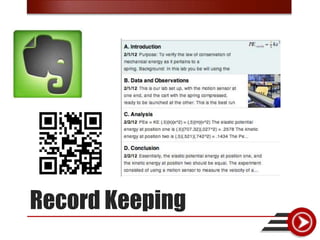
Record Keeping
Pre-Reading/Reading
Brainstorming
Notetaking
• Documents
• Spreadsheets
• Presentations


 Recording - Google Drive
Google Drive
Sharing
Sharing Folders
Improving the Use of Forms
• Clicking on “Add Form” lets you select types of questions and
  compiles answers into a spreadsheet.
• Clicking on “Add Item” allows you to add six different types of
  questions or formatting:


      Creating Forms
• Front End - Questions
• Back End - Spreadsheet


    Design
• When you choose to share a form, a link is created.
• You can email the link to others or you can create a
  TinyURL or MooURL quick link that can be remembered
  and easily used.


   Sharing Forms - Link
Sharing Forms - Embedding
Wiki – Form Embed
Wiki – Data Warehouse
Data Analysis
Communicate / Report
Assessment
• Email: info@edtechinnovators.com
• Website: www.edtechinnovators.com

• Ben  @edtechben ben@edtechinnovators.com
• Jared  @rlmaderj jared@edtechinnovators.com


Questions

NSTA - Google Me This

  • 1.
    Google Me This… Howto Make Collaboration Work in a Wiki World Ben Smith and Jared Mader @edtechben @rlmaderj www.edtechinnovators.com
  • 2.
    Ben Smith: Jared Mader: • Physics Teacher • Director of Technology • Keystone Technology • Former Chemistry Teacher Integrator • Technology Staff Development • Doctoral Student in Trainer Instructional Technology • Keystone Technology • Making IT Happen Award Integrator Winner • Masters in Instructional • ISTE Board of Directors Technology • ISTE Consultant About Us
  • 3.
  • 4.
    • Nonprofit internationalmembership association. • Focuses on improving teaching and student learning using technology as a tool. • Connects educators to learn from each other. • Promotes best practices from the field.
  • 5.
  • 6.
    Thursday • 8:00– 9:30 AM – Using iPads to Create Innovative Scientists • 10:00 AM – 11:00 AM - The World of Google in Science • 1:00 – 2:30 PM – Putting Web 2.0 into the Science Classroom • 3:00 – 4:00 PM – sTem: You’ve Never Seen Student Technology Work Like This 2013 Presentations
  • 7.
    Friday • 8:00– 9:00 AM – Digitizing the Learning Experience and Taking IT Mobile • 9:30 – 10:30 AM – Going Beyond Data Collection: Sharing in a Science Classroom • 11:00 AM – 12:30 PM – Google Me This: How to Make Collaboration Work in a Wiki World • 2:00 – 3:00 PM – Tech Talk: A Terabyte of Ideas in an Hour 2013 Presentations http://bit.ly/nsta13
  • 8.
    Saturday • 12:30– 1:30 PM – Adding a Bit of Technology to a NASA Educational Project 2013 Presentations
  • 9.
    Wednesday, April 24,2013 • 4:00 - 5:00 PM, EST • Transforming the Science Classroom • http://iste.org/webinars Webinars
  • 10.
  • 11.
  • 12.
    Monday, June 24,2013 • 5:30 – 6:45 PM – SIGsci Shareathon Tuesday, June 25, 2013 • 8:30 – 10 AM – The Mobile Classroom: Going Digital • 4 – 6 PM – Got Data? Let’s Share Our Work Wednesday, June 26, 2013 • 8:30 – 11:30 AM • Every Student Computes in Science ISTE Conference
  • 13.
    Google - Morethan Just Search
  • 14.
    Success in theDigital Age Marc Prensky - Digital Natives, Digital Immigrants - See Article http://www.iste.org/learn/iste-toolkit.aspx
  • 16.
    Increasing Complexity ofTechnology Skills Technology choices become autonomous Increasing Levels of Cognition Curriculum mastery deepens A Taxonomy for Integrating Technology
  • 17.
    What Can GoogleDo for You?
  • 18.
    Typical Class Activity •Setting up Record Keeping • Activity 1 – Reading • Activity 2 – Brainstorm • Activity 3 – Note Taking • Activity 4 – Recording Data • Activity 4A – Viewing the Data • Activity 4B – Graphing the Data • Activity 5 – Analyzing • Activity 6 – Communicating
  • 19.
  • 20.
  • 21.
  • 22.
  • 23.
    • Documents • Spreadsheets •Presentations Recording - Google Drive
  • 24.
  • 25.
  • 26.
  • 27.
  • 28.
    • Clicking on“Add Form” lets you select types of questions and compiles answers into a spreadsheet. • Clicking on “Add Item” allows you to add six different types of questions or formatting: Creating Forms
  • 29.
    • Front End- Questions • Back End - Spreadsheet Design
  • 30.
    • When youchoose to share a form, a link is created. • You can email the link to others or you can create a TinyURL or MooURL quick link that can be remembered and easily used. Sharing Forms - Link
  • 31.
    Sharing Forms -Embedding
  • 32.
  • 33.
    Wiki – DataWarehouse
  • 34.
  • 35.
  • 36.
  • 37.
    • Email: info@edtechinnovators.com •Website: www.edtechinnovators.com • Ben  @edtechben ben@edtechinnovators.com • Jared  @rlmaderj jared@edtechinnovators.com Questions