Common Core Standards + NETS
=
Better Learning
Ben Smith and Jared Mader
www.edtechinnovators.com
Red Lion Area School District
Wednesday, January 16, 2013
About Us
Ben Smith:
» Physics Teacher
» K-12 Science Coordinator
» Technology Resource Teacher
» Keystone Technology
Integrator
» STAR Discovery Educator
» ISTE Board of Directors
» ISTE Faculty
Jared Mader:
» Director of Technology
» Former Chemistry Teacher
» Technology Staff Development
Trainer
» Keystone Technology
Integrator
» M.Ed Instructional Technology
» STAR Discovery Educator
» ISTE Consultant/Faculty
Our Website
www.edtechinnovators.com
 Make work easier - productivity
» Typing, calculating, recording information
 Help students learn better
» Visualization, reading
 Prepare students for 21st century jobs
» Communicate
» Collaborate
» Be Creative
» Solve Problems
Image from http://www.21stcenturyskills.org/
Why Use Technology?
21st Century Learning
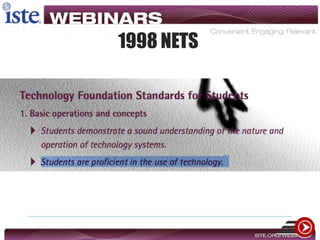
1998 NETS
“What students should know and be able to do to learn effectively and
live productively in an increasingly digital world ...”
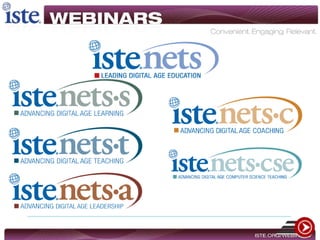
ISTE: NETS-S: www.iste.org/nets
Performance Indicators
Student K-U-D…
Know Understand Do
Know Understand Do
Student K-U-D…
Knowing CONTENT is NOT enough
• Students must be able to
• Construct new understandings
• Solve problems
• Make decisions
• Communicate and express themselves
• Understand complex issues
• Work collaboratively
• Set goals and work to a timeline
• Make ethical choices
Student K-U-D…
Know Understand Do
Success in the Digital Age
Marc Prensky - Digital Natives, Digital Immigrants - See Article
http://www.iste.org/learn/iste-toolkit.aspx
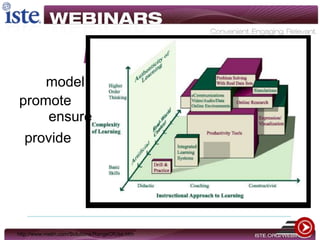
Authentic Learning
http://www.metiri.com/Solutions/RangeOfUse.htm
model
promote
ensure
provide
Understanding the Structure
Essential Elements
 The essence of the Common Core lies
within the Practices
» Observable
Crosswalking
Prioritizing
Essential
• Vital to K-U-D
Important
• Supports Essential
Compact
• Prior Knowledge/
Not Essential
The NETS as a Lens
Combing
Mapping to the NETS
Focus Point
Targeting our Maps
Is IT integration?
A Taxonomy for Integrating Technology
Increasing Levels of Cognition
Curriculum mastery deepens
Increasing Complexity of Technology Skills
Technology choices become autonomous
Observing
Students are passive spectators of the technology
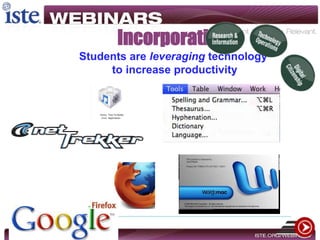
Incorporating
Students are leveraging technology
to increase productivity
Producing
Students create a product with
a single technology
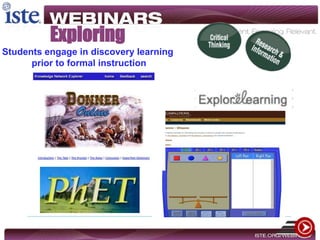
Exploring
Students engage in discovery learning
prior to formal instruction
Collaborating
Students interact with peers, instructors,
and outside resources
Applying
Students are guided to combine
and integrate technologies
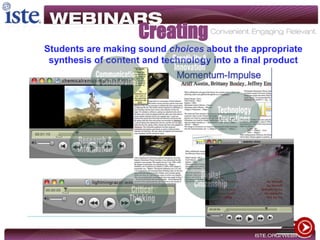
Creating
Students are making sound choices about the appropriate
synthesis of content and technology into a final product
Tools for Integration
10,000’ View
Example
Example
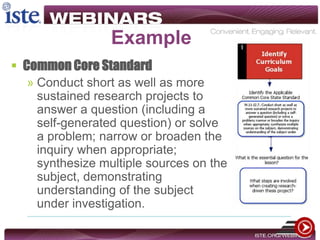
 Common Core Standard
» Conduct short as well as more
sustained research projects to
answer a question (including a
self-generated question) or solve
a problem; narrow or broaden the
inquiry when appropriate;
synthesize multiple sources on the
subject, demonstrating
understanding of the subject
under investigation.
Example
Performance Indicators
Example
 Performance Indicator
» Students demonstrate creative
thinking, construct knowledge,
and develop innovative products
and processes using technology.
• Performance Indicator
• Students interact, collaborate, and publish
with peers, experts, or others employing a
variety of digital environments and media.
• Performance Indicator
• Students
locate, organize, analyze, evaluate, synthesi
ze, and ethically use information from a
variety of sources and media.
Example
Need for PD…
Example
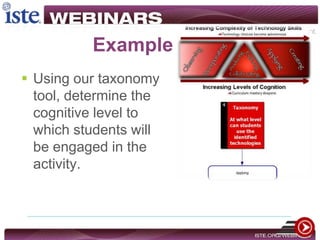
 Moving back to the
curriculum planning
document, we see
that the designing
creative activities
tool informs the
curriculum
template…
Example
 Using our taxonomy
tool, determine the
cognitive level to
which students will
be engaged in the
activity.
Creating the Activities
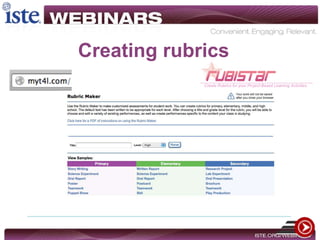
Creating rubrics
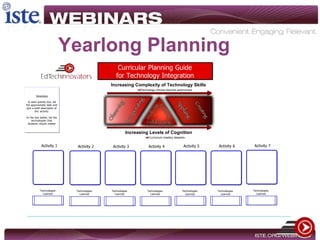
Curricular Planning Guide
for Technology Integration
Increasing Levels of Cognition
Curriculum mastery deepens
Increasing Complexity of Technology Skills
Technology choices become autonomous
Activity 1
Technologies
Learned
Directions
In each activity box, list
the approximate date and
give a brief description of
the activity.
In the box below, list the
technologies that
students should master
Activity 2
Technologies
Learned
Activity 3
Technologies
Learned
Activity 4
Technologies
Learned
Activity 5
Technologies
Learned
Activity 6
Technologies
Learned
Activity 7
Technologies
Learned
Yearlong Planning
Support
 Professional Development
 Modeling
 Budgeting and Sustaining
 Redefine Observation
Motivation
 Evaluation
 Engagement
 Evidence-based Research
Required Reading:NETS-A available through www.iste.org
Visionary Leadership
Image from http://www.501c3.org/blog/
Questions
 Email:
 jared@edtechinnovators.com
 @rlmaderj
 ben@edtechinnovators.com
 @edtechben
 Website Resources:
www.edtechinnovators.com

12 13 common core nets webinar

Editor's Notes

  • #10 JARED
  • #16 BEN
  • #17 JaredOrganization provides us with the domains (math) and the standards or the standards and key ideas/detail for literacy through which we must search for the applications of technology.They may not be overt by nature.
  • #18 CC are about what students should be able to DOProblem solving. How can I make this observable. Well, I may use geometer’s sketchpad to draw, or Audacity to explain in words how I’m using PT to sovle RT.Jared
  • #19 Ben
  • #20 BenEssential – 70%Important – 20%Compact – 5%
  • #21 Jared - Discuss that we will focus on the NETS as the lens through which we view the Common Core Standards
  • #22 Ben
  • #23 Ben
  • #24 BenPAUSE FOR Q&A
  • #25 Ben
  • #26 Jared
  • #36 Ben
  • #37 JaredIdentified by the unpacking processGenerated from the Performance Indicators
  • #38 BenIdentified by the unpacking processGenerated from the Performance Indicators
  • #39 JaredEmphasize the non-digital components of how someone could read this.
  • #40 BenPAUSE FOR Q&AIdentified by the unpacking processGenerated from the Performance Indicators
  • #41 JaredThe 21st century skills from step 2 come from the performance indicators.We now are beginning to create the crosswalk between CC standards and NETS P.I.
  • #42 Ben
  • #43 BEN STARTSJared FINISHESThis is not an exhaustive list. These are broad categories of instructional tools ==== IMPORTANT ----- By choosing a tool that we can emphasize that which we otherwise may not have been able to do without the tool
  • #44 Ben
  • #45 Ben
  • #46 JaredExplain our taxonomy and how it applies to the rigor and observable nature of the CC standards and indicators.
  • #47 JaredPAUSE FOR Q&A
  • #48 Ben
  • #49 Ben
  • #50 Jared
  • #51 JaredEvaluation – Like it or not, it is a motivator and as a future leader, we need to set expectations.Engagement – While there still is not a wealth of research on tech, there is on engagementEvidence-based Research -
  • #52 Jared
  • #53 Jared