EDUCATIONAL
TECHNOLOGY
About us
studio shodweHome Startegy Contact
PRESENTERS:
ERICKA EVONNEY JENIUS
MOHD KHAIRUL AFIF BIN MD ZAINI
SAZWANI BINTI ANSIAN
LECTURER:
DR. EBON GANSOI
EDUP 2112: TECHNOLOGICAL AND MEDIA DEVELOPMENT
2.
CONTENT
About us
studio shodweHome Startegy Contact
Pge 01
1. CONCEPT OF EDUCATIONAL TECHNOLOGY
2. ISTE – FOR STUDENT
3. ISTE – FOR TEACHER
4. ISTE – FOR LEADERS
5. ISTE – FOR COACHES
6. ISTE – FOR COMPUTATIONAL THINKING
7. INTRODUCTION TO EDUCATIONAL TECHNOLOGY DEVELOPMENT
8. GLOBAL EDUCATIONAL TECHNOLOGY DEVELOPMENT
9. EDUCATIONAL TECHNOLOGY DEVELOPMENT IN MALAYSIA
3.
About us
studio shodweHome Startegy Contact
Page 02
CONCEPT
Educational technology is a sophisticated process that
addresses systemic educational demands.
The scientific approach aims to improve the effectiveness
of teaching and learning by integrating ideas, energy,
resources, materials, methods, and procedures.
4.
Page 03
This includeseverything from interactive whiteboards and tablets to
educational software and online courses. These tools help to create an
immersive learning environment.
Digital Learning
Tools
Learning
Managemen
t Systems
(LMS)
Platforms like Moodle, Canvas, and Google Classroom help educators
manage coursework, track student progress, and provide resources
and assignments in a centralized online location.
Online
Learning
This encompasses e-learning courses, MOOCs (Massive Open Online
Courses), and online degrees. It allows learners to access education from
anywhere in the world
Artificial
Intelligence (AI)
AI can assist in grading, provide tutoring, and offer feedback. It's also used
to analyze student data to predict performance and identify areas where
they might need additional support.
Gamification
Applying game-design elements in non-game contexts to motivate and
increase user engagement. Examples include badges, leaderboards, and
point systems to encourage participation and competition among students.
5.
Page 04
ASSOCIATION FOREDUCATIONAL COMMUNICATIONS AND
TECHNOLOGY 1977(AECT)
1.DESIGN
The Process of
creating instructional
system, including
instructional design,
message design, and
learner
characteristics
2.DEVELOPMENT
The production of
instructional
materials, media, and
learning environment
3. UTILISATION
The applications and
diffusion of
instructional
technology tools and
resources
4. MANAGEMENT
The organisation,
implementation, and
supervision of
instructional
technology programs
5. EVALUATION
The assessment and
measurement of
instructional
effectiveness and
learning outcomes
6.
Aspect AECT 1977AECT 1994
Number of Domains 5 Domains 5 Domains (Refined and Expanded)
1. Design
Broad category for instructional design and
planning
More detailed, including instructional
strategies and learner characteristics
2. Development Focus on media production
Expanded to include specific technologies:
print, audiovisual, computer-based, and
integrated technologies
3. Utilization
General use of instructional materials and
tools
More detailed, covering media utilization,
diffusion of innovations, policy-making, and
implementation
4. Management
General administration of instructional
technology
Expanded to include project management,
resource management, delivery system
management, and information management
5. Evaluation Broad assessment of instructional effectiveness
More refined, including problem analysis,
formative and summative evaluation, and
criterion-referenced measurement
Overall Focus
General framework for educational
technology
More structured and aligned with
technological advancement in the 1980s and
early 1990s
7.
About us
studio shodweHome Startegy Contact
Page 09
INTERNATIONAL SOCIETY FOR
TECHNOLOGY IN EDUCATION
ISTE stands for the International Society for
Technology in Education. It is a nonprofit
organization that focuses on advancing the use of
technology in education to improve learning
outcomes. ISTE provides standards, professional
development, and resources to help educators
integrate technology effectively in the classroom.
8.
Page 06
ISTE -STUDENT: A framework to help students develop the skills they need to thrive in a digital world. These standards
focus on critical thinking, collaboration, creativity, and responsible digital citizenship.
EMPOWERED LEARNER
• Student take an active role in their learning and set
personal learning goals / They use technology to track
their progress and seek feedback
• Examples: A student uses an online portfolio to track
improvements in writing over time
ISTE - STUDENT
DIGITAL CITIZEN
• Students practice safe, ethical, and responsible
technology use. / They protect personal data, respect
digital laws, and combat misinformation
• Examples: A student recognise phishing emails and
understands the importance of privacy settings
KNOWLEDGE CONSTRUCTOR
• Student use digital tools to research, evaluate, and
create knowledge. / They curate reliable sources and
present information effectively
• Examples: A student uses online database to research
climate change and creates an infographic to share
findings
INNOVATIVE DESIGNER
• Student analyse data, automate tasks, and break
down complex problems. / They use technology to
prototype, test, and refine ideas.
• Examples: A student writes a simple program to organise
and sort survey data.
9.
Page 06
COMPUTATIONAL THINKER
•Student analyse data, automate tasks, break down
complex problems. / They use logic, patterns, and
algorithms to solve real-world challenges.
• Examples: A student writes a simple program to organise
and sort survey data
ISTE - STUDENT
GLOBAL COLLABORATOR
• Student uses technology to connect, collaborate,
and learn with others worldwide. / They respect
diverse perspectives and contribute to group projects.
• Examples: A student participates in a virtual exchange
program to collaborate with peers from another country
on a science project
CREATIVE COMMUNICATOR
• Students uses various digital tools to express ideas
creatively and effectively. / They adapt their
communication style based on the audience.
• Examples: A student creates a podcast series about
historical events instead of writing a traditional essay.
10.
Page 06
ISTE -TEACHER: A framework for teachers to integrate technology into their teaching practices effectively. These
standards encourage educators to innovate, collaborate, and empower students using digital tools.
LEARNER
• Educators continuously learn to improve their teaching
and stay updated with new technologies. / They seek
professional growth through workshops, online
courses, and peer collaboration.
• Examples: A teacher joins an EdTech webinar to learn
how to use AI tools in lesson planning.
ISTE - TEACHERS
CITIZEN
• Educators promote digital citizenship by teaching
students to use technology ethically, responsible, and
safely. / They model online responsibility, protect
privacy, and address digital equity.
• Examples: A teacher educates students on recognising
misinformation and the importance of online safety
LEADER
• Educators advocate for technology use and guide
students and colleagues in adopting digital learning
strategies. / They create a vision for transformative
learning experiences.
• Examples: A student uses online database to research
climate change and creates an infographic to share
findings
COLLABORATOR
• Educators work with colleagues, students, and
experts to improve learning through technology. / They
use online platforms and digital tools for
collaboration.
• Examples: A teacher partners with an international
classroom to co-develop a virtual project on climate
change
11.
Page 06
DESIGNER
• Educatorsdesign authentic, personalized learning
experiences using technology. / They create lessons
that are student-centred and engaging.
• Examples: A teacher uses gamification and interactive
simulations to teach math concepts
ISTE - TEACHER
ANALYST
• Educators use data and technology to assess student
progress and refine instruction. / They leverage analytics
and formative assessments to improve student outcomes.
• Examples: A teacher uses an AI-powered grading tool to
analyse student writing patterns and provide targeted
feedback
FACILITATOR
• Educators support active, student-driven learning
and encourage critical thinking and creativity. / They
use technology to facilitate exploration, problem-
solving and innovation.
• Examples: A teacher integrates coding into a science
lesson, allowing students to simulate a planetary orbit.
12.
ISTE: EDUCATION LEADERS
•FOCUSES ON:
• EQUITY
• DIGITAL
CITIZENSHIP
• VISIONEERING
• TEAM AND SYSTEM
BUILDING
• CONTINUOUS
IMPROVEMENT
• PROFESSIONAL
GROWTH
ISTE Standards for Leaders
supports
Students Educators Coach
Targeting the knowledge and behaviours required
for leaders
Empower teachers and coaches, and boost student
learning
13.
3.1
Equity and Citizenship
Advocate
Ensureaccess to
skilled teachers
• Educators skilled in
technology: create
authentic and engaging
learning experiences
a
Ensure access to
meet student
needs
• Ensure access to
technology, connectivity,
inclusive digital content and
learning environment
b
Model inclusive,
healthy use
• Use of technology: to solve
problems and strengthen
community
c
Model safe,
ethical and legal
use
• Use of technology
• Critical examination of
digital content
d
Use technology to
increase equity,
inclusion and digital
citizenship practices
14.
3.2
Visionary Planner
Develop, sustain
vision
•Wide range of perspectives
from community
Advance student learning
and success
a
Build a strategic
plan
• Shared vision:
collaboratively create a
strategic plan – articulates
how technology will be used
to enhance learning
b
Evaluate plan
progress
• Evaluate plan
Make corrections
Measure impact
Scale effective
approaches:
transform learning
c
Engage others in
establishing a vision,
strategic plan and
ongoing evaluation
cycle: transforming
learning with
technology
15.
3.2
Visionary Planner
Communicate with
stakeholders
•Communicate effectively
Gather input on plan
Celebrate successes
Engage in a continuous
improvement cycle
d
Share experience
with peers
• Share:
Lessons learned
Best practices
Challenges
Impact of learning
with technology
(Peer sharing with
other leaders)
e
Engage others in
establishing a vision,
strategic plan and
ongoing evaluation
cycle: transforming
learning with
technology
16.
3.3
Empowering leader
Empower
educators
• Empowereducators –
Exercise professional agency
Build teacher leadership
skills
Pursue personalized
professional training
a
Build educator
competency
• Build confidence and
competency of educators:
putting the ISTE Student
Standards and ISTE
Educator Standards into
practice
b
Create culture
that empowers
teachers and learners
to use technology
innovatively enrich
teaching and learning
17.
3.4
System designer
Ensure
sufficient and
scalable
resources
•Ensure resources and
infrastructure – sufficient and
scalable
Support effective use of
technology
Able to meet future demands
b
Leaders build teams
and systems: to
implement, sustain and
continually improve –
use of technology
support learning
Establish
equitable policies
• Establish equitable
technology policies
support effective learning
a
18.
3.4
System designer
Establish
strategic
partnerships
• Supportstrategic vision
• Achieve learning priorities
• Improve operations
d
Leaders build teams
and systems: to
implement, sustain and
continually improve –
use of technology
support learning
Protect student
privacy and
security
• Ensure students and staff
observe:
Effective privacy and
data management policies
c
19.
3.5
Connected learner
Participate in
PLNs
•Professional Learning Networks
(PLNs)
Participate regularly:
collaboratively learn with and
mentor other professionals
b
Leaders:
• Model and promote
continuous
professional learning
for themselves and
others
Stay current on
innovation in
learning
• Set goals: remain current on
• Emerging technologies
for learning
• Innovations in pedagogy
• Advancements in the
learning sciences
a
20.
3.5
Connected learner
Navigate
continuous
development
• Developskills needed to:
• Lead and navigate change
• Advance systems
• Promote mindset of continuous
improvement
how technology can improve
learning
d
Leaders:
• Model and promote
continuous
professional learning
for themselves and
others
Engage in
reflective
practice
• Use technology to: regularly
engage in reflective
practices
support personal and
professional growth
c
21.
ISTE: Coaches
4.1 Change
Agent
Createa shared
vision
Ensure
equitable use
of tool
Cultivate
supportive
coaching culture
Coaches: inspire
educators and leaders
to use technology
• Using
technology to
learn and
accelerate
transformation
through
the coaching
process.
• Meeting the
needs of each
learner.
• Create equitable
and ongoing access
to meaningful
learning
• Encouraging
educators and
leaders to
achieve a
shared vision
and meet
individual
goals.
Recognise
high-impact
teaching
• Recognise
educators acro
ss the
organization
who use
technology
effectively to
enable high-
impact
teaching and
learning
Maximise
potential of
energy
• Connect
• Leaders,
• Educators,
• Instructiona
l support,
• Technical
support,
• Domain
experts
• Solution
providers
Maximize
potential of
technology for
learning.
22.
ISTE: Coaches
4.2 Connected
learner
Deepenexpertise
through professional
learning
Participate in
PLNs
Commit to
continuous
improvement
Coaches: model the
Student and Educator
standards
• Pursue professional
learning: deepens
expertise with the
ISTE Standards
• Serve as a model for
educators and
leaders
• Actively participate
in professional learning
networks
• Enhance coaching practice
• Keep current
with emerging
technology, innovations in
pedagogy and the learning
• Identify ways to
improve their
coaching practice
• Establish shared
goals with
educators
• Reflect on
successes
• Continually
improve coaching
and teaching
practice.
23.
ISTE: Coaches
4.3 Collaborator
Personalised
supportfor
educators
Evaluate effectiveness
of tools for learning
Identify relevant
learning content
with educators
• Planning and
modeling the
effective use of
technology
improve student
learning
• Partner with educators
to evaluate the
efficacy:
• To inform
procurement
decisions and
adoption
• improve instructional
practice and learning
outcomes
• Partner with
educators to
identify digital
learning
content that is:
Culturally
relevant,
Developmentally
appropriate
Aligned to
Cultivate
coaching
relationship
• Establish
trusting and
respectful coa
ching
relationships t
hat encourage
educators
to explore new
instructional
strategies
Coaches: establish
productive relationships
with educators
24.
ISTE: Coaches
4.4 Learning
Designer
Modelinstructional
design principles
Collaborate to
accommodate learner
needs
Support effective
assessment
• Model use of
instructional design
principles with
educators
• Create effective
digital learning
environments
• Collab. with educators:
• Design accessible
and active digital
learning
environments
Accommodate
learner
variability
• Design learning
experiences and
environments that meet
the needs and interests
of all students
• Help educators use
digital tools
Provide timely
feedback
Support
personalized
learning
Collaborate on
learning design
• Develop
authentic, active
learning
experiences
Foster
student
agency
Deepen
content
mastery
Allow
students to
demonstrate
competency
Coaches: model and
support educators
25.
ISTE: Coaches
4.5 Professional
learning
facilitator
EvaluatePD
impact
Build capacity
Design quality
professional
learning
Coaches: plan, provide
and evaluate the impact
of professional learning
for educators and
leaders
• Evaluate the
impact of
professional
learning
• Continually
make
improvements
to meet
the
schoolwide
vision
• Using
technology
for high-
impact
teaching and
learning
• Build the capacity of
educators, leaders and
instructional teams to
put the ISTE Standards
into practice
by facilitating active
learning and
providing meaningful
feedback
• Use of technology
to advance
teaching and
learning.
• Design based on
needs assessments
and frameworks
for working with
adults
• Supports their
cultural, social-
emotional and
learning needs
26.
ISTE: Coaches
4.6 Data-driven
decisionmaker
Support student
data use
Help
educators
interpret
data
Facilitate data
collection and
analysis
Coaches: model and
support the use of
qualitative and
quantitative data
• Partner with
educators
• Empower
students to
use learning
data:
a) Set their
own goals
b) Measure
their
progress
• Support educators
to interpret
qualitative and
quantitative data
• Inform their
decisions and
support
individual
student
learning
• Inform their own
instruction and
professional
learning
• Securely
collecting,
protecting and
analysing
student data.
27.
ISTE: Coaches
4.7 Digital
citizen
advocate
Supportothers in
protecting
personal data
Evaluate online
content
Foster inclusive,
balanced use
• Empower educators, leaders
and students to
make informed decisions
To protect their personal
data,
To curate the digital
profile they intend to
reflect
• Recognise the
responsibilities
and opportunities
essential in living
in a digital world
• Coaches collaborate
with educators,
leaders and
students
• Foster inclusive
online spaces
• Foster healthy
balance in their
use of
technology
Encourage
civic
engagement
• Encourage
educators and
students
to use
technology to
address
community
challenges
Coaches: model
digital citizenship
and support
educators and
students • Coaches support educators and
students
To critically examine the
sources and accuracy of online
content
To evaluate underlying
assumptions, biases, and
perspectives
28.
ISTE: COMPUTATIONAL THINKING
Components
1.Computational Thinking (Learner)
Educators continually improve their practice by developing an understanding of
computational thinking and its application as a cross-curricular skill. Educators develop
a working knowledge of core components of computational thinking, such as
decomposition, gathering and analyzing data, abstraction, algorithm design, and the
impacts of computing on people and society.
2. Equity Leader (Leader)
All students and educators have the ability to be computational thinkers and CS
learners. Educators proactively counter stereotypes that exclude students from
opportunities to excel in computing and foster an inclusive and diverse classroom
culture that incorporates and values unique perspectives; build student self-efficacy
and confidence around computing; address varying needs and strengths; and address
bias in interactions, design and development methods.
3. Collaborating Around Computing (Collaborator)
Effective collaboration around computing requires educators to incorporate diverse
perspectives and unique skills when developing student learning opportunities, and
recognize that collaboration skills must be explicitly taught to lead to better
outcomes. Educators work together to select tools and design activities and
environments that facilitate these collaborations and outcomes.
29.
ISTE: COMPUTATIONAL THINKING
Components
4.Creativity & Design (Designer)
CT skills can empower students to create computational artifacts that allow for
personal expression. Educators recognize that design and creativity can encourage a
growth mindset, and work to create meaningful CS learning experiences and
environments that inspire students to build their skills and confidence around computing
in ways that reflect their interests and experiences.
5. Integrating Computational Thinking (Facilitator)
Educators facilitate learning by integrating computational thinking practices into the
classroom. Since computational thinking is a foundational skill, educators develop
every student’s ability to recognize opportunities to apply computational thinking in
their environment.
30.
Set professional
learning goals
Learnhow & when
to use computation
Leverage CT
experts &
resources
Develop a growth
mindset
Recognize
inequities &
opportunities of CT
ISTE: COMPUTATIONAL THINKING
a) Computational Thinking: Learner
Hybrid and Flexible
Learning
ArtificialIntelligence
(AI)
Gamification Microlearning
Blockchain
Project-Based learning
with Technology
Coding Initiative and
Computational Thinking
Data-Driven Learning
Augmented Reality
(AR) and Virtual Reality
(VR)
Global Collaboration in
Digital Education
39.
3
• Used to
personalise
learning.
•Century Tech
and Squirrel
AI suggests
suitable
learning that
tailor the
weaknesses
and strengths
of students.
GLOBAL EDUCATIONAL TECHNOLOGY DEVELOPMENT
• The
combination
of face-to-
face and
online
learning.
• University
such as
Harvard and
Stanford offer
courses
online and
hybrid
learning.
• Elements of
game is
implemented to
engage higher
students’
participation
and motivation.
• Kahoot!,
Quizziz,
Wordwall and
Classcraft
enable teachers
to do interactive
quizzes.
• An approach
where
contents are
divided into
smaller parts,
usually into a
short video or
quiz.
• Duolingo and
Linked In
Learning help
students to
learn new
skills faster.
• Used to store
and verify
academic
records
safely.
• MIT
distributes
digital
diploma using
blockchain
technology to
ensure
originality and
reliability.
Hybrid and
flexible learning
Artificial
Intelligence (AI)
Gamification Microlearning Blockchain
40.
3
• A lotof schools
have been
introducing
coding and
computational
thinking into
the school
curriculums –
21st
century
learning skills.
• UK introduced
coding in the
curriculum
since 2014.
GLOBAL EDUCATIONAL TECHNOLOGY DEVELOPMENT
• Students
carry out
projects
creatively
using
technology
devices.
• Students use
Scratch to
create
animation or
portable
application.
• Data analysis is
used to evaluate
students’
achievement
and increase the
effectiveness of
teaching
process.
• Knewton and
Dreambox uses
data to give
suggestions that
tailor students’
needs.
• AR and VR
create better
and
interactive
learning
experiences.
• Students are
able to use
VR to explore
historical sites
or carry out
Science
experiments
virtually.
• A lots of
countries
cooperate in
developing
digital
education.
• Google and
UNESCO
collaborate to
provide
technology
courses to
teachers in
developing
countries.
Project-Based
Learning with
Technology
Coding Initiative
and
Computational
Thinking
Data-Driven
Learning
Augmented
Reality (AR) and
Virtual Reality
(VR)
Global
Collaboration in
Digital Education
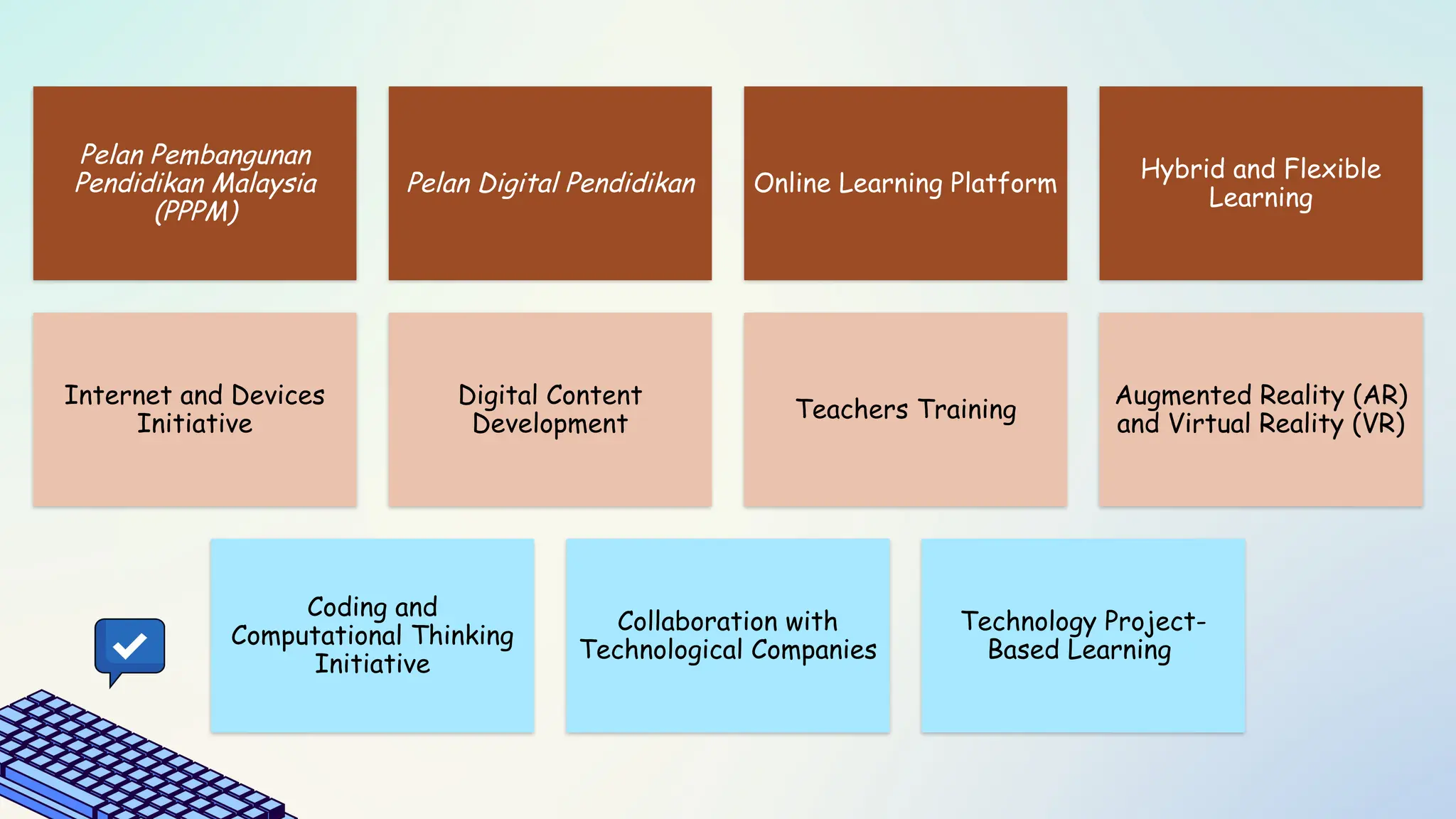
Pelan Pembangunan
Pendidikan Malaysia
(PPPM)
PelanDigital Pendidikan Online Learning Platform
Hybrid and Flexible
Learning
Internet and Devices
Initiative
Digital Content
Development
Teachers Training
Augmented Reality (AR)
and Virtual Reality (VR)
Coding and
Computational Thinking
Initiative
Collaboration with
Technological Companies
Technology Project-
Based Learning
43.
Pelan Pembangunan
Pendidikan Malaysia(PPPM)
2013-2025
Emphasises the
importance of integrating
technology into education -
increase learning quality.
44.
Pelan Digital
Pendidikan
To fastendigital
transformation in education
system – usage of digital
devices, online platform
and technological
infrastructure development.
Schools integrate PBL with
technology – students utilise
technology to produce
creative projects.
i.e. Students use Scratch to
create animation or portable
application.
Technology Project-
Based Learning
45.
Online Learning Platform
DELIMa (Digital Educational
Learning Initiative Malaysia)
- Access to materials i.e.
ebooks, videos and interactive
application.
Google Classroom and
Microsoft Teams
– Assign tasks and conduct online
classes.
46.
Hybrid and
Flexible Learning
Combination of face-to-
face session and online
session.
Activities include sharing
videos, online quizzes
and forums.
Program Jaringan PRIHATIN
- Government provides free
internet access to students and
teachers.
- B40: receives laptops or
tablets.
Program Cerdik
- Government and NGO
provide internet access and
devices to students in need.
Internet and Devices
Initiative
47.
Digital Content
Development
MOEand local
educational institutions
develop digital contents
such as eBooks and
interactive applications.
i.e. TV Pendidikan
48.
Teachers
Training
MOE implements
trainingprogrammes to
increase teacher skills in
using technology.
i.e. PLC, Program Guru
Digital
MOE introduces coding and
computational thinking in the
curriculum via RBT and Asas
Komputer.
i.e. mydigitalmaker
Coding and Computational
Thinking Initiative
49.
Augmented Reality (AR)
andVirtual Reality (VR)
Some schools in Malaysia
apply AR and VR to enhance
learning experience.
i.e. Students use AR/VR to
explore Science, History and
Geography concepts
interactively.
50.
Collaboration with
Technological Companies
MOE collaborates with
companies such as Google,
Microsoft and Intel to provide
devices and digital learning
platforms.
i.e. Google offers free
access to Google
Workspace for schools in
Malaysia.
51.
SIGNIFICANCE
• Makes educationmore accessible to people
worldwide
Accessibility
• Makes learning more engaging and fun
Engagement
• Automation of administrative tasks and
grading systems allows educators to focus
more on teaching and less on paperwork
Efficiency