TI-Nspire App Tutorial
Graphs of Linear Inequalities
Summary
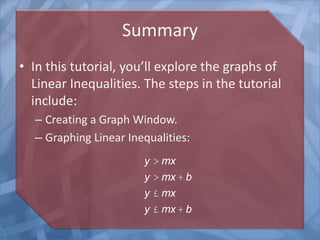
• In this tutorial, you’ll explore the graphs of
Linear Inequalities. The steps in the tutorial
include:
– Creating a Graph Window.
– Graphing Linear Inequalities:
y > mx
y > mx + b
y £ mx
y £ mx + b
Create a Graph Window
Click on the +tool to activate this menu.
Input the Inequality
Press the Delete key to remove the equals
sign. A menu of Inequalities comes up.
Input the Inequality
Input the inequality shown. Press Enter.
f1(x) = x
Graph the Inequality
This is the basic graph of a Linear Inequality.
Edit the Inequality
Click on the + sign at the upper right to bring up the
Function Entry line. Then press the up arrow. You’ll see
the inequality.
Click
here.
Then
Click
here.
Edit the Inequality
Change the inequality to the one shown above.
Then press Enter.
Edit the Inequality
Note the change in the graph of the inequality.
Edit the Inequality
Now change the inequality to the one shown above.
Press Enter. A greater slope value leads to a steeper
graph.
y £ 3x
Edit the Inequality
Now change the inequality to the one shown above.
Press Enter. Note how the y-intercept displaces the
graph vertically.
y ³ x +1
Edit the Inequality
Now change the inequality to the one shown above.
Press Enter. Note how the y-intercept displaces the
graph vertically.
y £ x -1
Graph a Second Inequality
Now change the Inequality to the one shown above. In
addition, graph a second inequality.
y < -3x + 2
y > 2x +1

Nspire--iPadAppTutorial--Graphs of Linear Inequalities

  • 1.
    TI-Nspire App Tutorial Graphsof Linear Inequalities
  • 2.
    Summary • In thistutorial, you’ll explore the graphs of Linear Inequalities. The steps in the tutorial include: – Creating a Graph Window. – Graphing Linear Inequalities: y > mx y > mx + b y £ mx y £ mx + b
  • 3.
    Create a GraphWindow Click on the +tool to activate this menu.
  • 4.
    Input the Inequality Pressthe Delete key to remove the equals sign. A menu of Inequalities comes up.
  • 5.
    Input the Inequality Inputthe inequality shown. Press Enter. f1(x) = x
  • 6.
    Graph the Inequality Thisis the basic graph of a Linear Inequality.
  • 7.
    Edit the Inequality Clickon the + sign at the upper right to bring up the Function Entry line. Then press the up arrow. You’ll see the inequality. Click here. Then Click here.
  • 8.
    Edit the Inequality Changethe inequality to the one shown above. Then press Enter.
  • 9.
    Edit the Inequality Notethe change in the graph of the inequality.
  • 10.
    Edit the Inequality Nowchange the inequality to the one shown above. Press Enter. A greater slope value leads to a steeper graph. y £ 3x
  • 11.
    Edit the Inequality Nowchange the inequality to the one shown above. Press Enter. Note how the y-intercept displaces the graph vertically. y ³ x +1
  • 12.
    Edit the Inequality Nowchange the inequality to the one shown above. Press Enter. Note how the y-intercept displaces the graph vertically. y £ x -1
  • 13.
    Graph a SecondInequality Now change the Inequality to the one shown above. In addition, graph a second inequality. y < -3x + 2 y > 2x +1