An Introduction to Network Simulator
AWK, GnuPlot
Dr. Ajit K Nayak
Dept of CSIT, ITER
S‘O’A University, BBSR
Part III
• Introducing AWK
• Introducing gnuPlot
Basics of AWK
• AWK is a scripting language suitable for text processing /
data extraction and report formatting.
• It is interpreted line by line and produces the output in a
required format.
• Input text files are considered to be a set of records
containing different fields, i.e. each line in the file is a record
(row) and each word of a line is considered as a field
(column).
• The default column separator is white space, however other
delimiters such as a comma (,), or a tab space may also be
used.
• First column of the file is accesses using $1, second column
using $2 etc.
NS-2/AN/Intro/ 3
Example-1
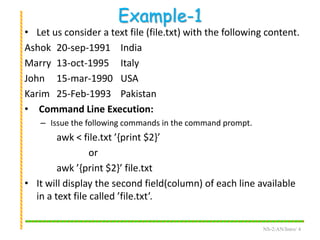
• Let us consider a text file (file.txt) with the following content.
Ashok 20-sep-1991 India
Marry 13-oct-1995 Italy
John 15-mar-1990 USA
Karim 25-Feb-1993 Pakistan
• Command Line Execution:
– Issue the following commands in the command prompt.
awk < file.txt ’{print $2}’
or
awk ’{print $2}’ file.txt
• It will display the second field(column) of each line available
in a text file called ’file.txt’.
NS-2/AN/Intro/ 4
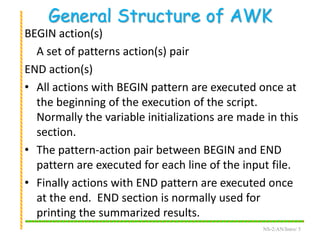
General Structure of AWK
BEGIN action(s)
A set of patterns action(s) pair
END action(s)
• All actions with BEGIN pattern are executed once at
the beginning of the execution of the script.
Normally the variable initializations are made in this
section.
• The pattern-action pair between BEGIN and END
pattern are executed for each line of the input file.
• Finally actions with END pattern are executed once
at the end. END section is normally used for
printing the summarized results.
NS-2/AN/Intro/ 5
Example
• Let us consider a text file (file.txt) with the following content.
1001 Ashok 83 73 93
1002 Ram 30 43 67
1003 John 45 69 83
1004 Marry 43 35 59
1005 Samita 20 33 47
1006 Shibani 66 66 76
1007 Sourav 30 25 45
1008 Samyak 71 75 65
1009 Rudra 30 43 67
1010 Laila 85 83 87
NS-2/AN/Intro/ 6
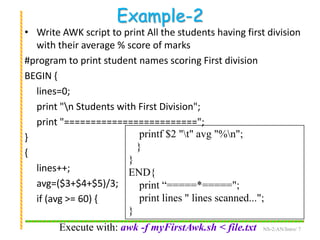
Example-2
• Write AWK script to print All the students having first division
with their average % score of marks
#program to print student names scoring First division
BEGIN {
lines=0;
print "n Students with First Division";
print "=========================";
}
{
lines++;
avg=($3+$4+$5)/3;
if (avg >= 60) {
NS-2/AN/Intro/ 7
printf $2 "t" avg "%n";
}
}
END{
print “=====*=====";
print lines " lines scanned...";
}
Execute with: awk -f myFirstAwk.sh < file.txt
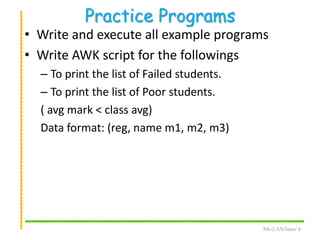
Practice Programs
• Write and execute all example programs
• Write AWK script for the followings
– To print the list of Failed students.
– To print the list of Poor students.
( avg mark < class avg)
Data format: (reg, name m1, m2, m3)
NS-2/AN/Intro/ 8
GNUPlot
• GNUPlot is a software used to plot graphs using
data or functions.
• It is a command driven and suitable for 2D as well
as 3D plots.
• To start, issue the command gnuplot in the
command line, that will a result a prompt like,
gnuplot>
• This is called the gnuplot command line. A plot now
can be created using any of the following two ways.
i) use the plot command in command line, or
ii) create a script file with extension ’<script_file>.p’ then load
the script.
NS-2/AN/Intro/ 9
Plotting
• Plot using a predefined function:
gnuplot > plot sin(x)/x
• Plot using a data file (scheduling.dat)
# Processor requirement for different algorithms
#Tasks Alg1 Alg2 Alg3
70 5 8 10
80 6 10 11
90 7 12 12
100 10 14 15
plot “scheduling.dat" using 1:2 title ’Alg1’ with lines, 
“scheduling.dat" u 1:4 t ’Alg’ w linespoints
NS-2/AN/Intro/ 10
#Task Alg1 Alg2 Alg3
110 10 16 18
120 11 19 22
130 12 25 23
140 13 30 24
150 13 34 26
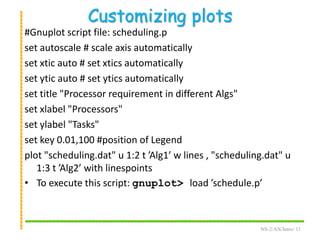
Customizing plots
#Gnuplot script file: scheduling.p
set autoscale # scale axis automatically
set xtic auto # set xtics automatically
set ytic auto # set ytics automatically
set title "Processor requirement in different Algs"
set xlabel "Processors"
set ylabel "Tasks"
set key 0.01,100 #position of Legend
plot "scheduling.dat" u 1:2 t ’Alg1’ w lines , "scheduling.dat" u
1:3 t ’Alg2’ with linespoints
• To execute this script: gnuplot> load ’schedule.p’
NS-2/AN/Intro/ 11
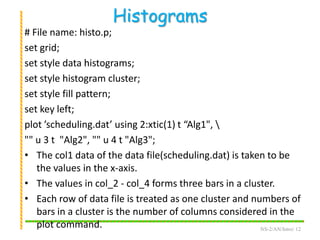
Histograms
# File name: histo.p;
set grid;
set style data histograms;
set style histogram cluster;
set style fill pattern;
set key left;
plot ’scheduling.dat’ using 2:xtic(1) t “Alg1", 
"" u 3 t "Alg2", "" u 4 t "Alg3";
• The col1 data of the data file(scheduling.dat) is taken to be
the values in the x-axis.
• The values in col_2 - col_4 forms three bars in a cluster.
• Each row of data file is treated as one cluster and numbers of
bars in a cluster is the number of columns considered in the
plot command. NS-2/AN/Intro/ 12
Practice Programs
• Write and execute all example programs
• Consider the data file containing marks of the
students in 3 subjects and plot the following
graphs.
– Draw a line plot containing 3 lines i) regNo vs
mark1, ii) regNo vs mark2, and iii) regNo vs mark3.
– A histogram that contains regNo in x axis and 3
different marks of one student is plotted as 3
clustered bars for each students.
NS-2/AN/Intro/ 13
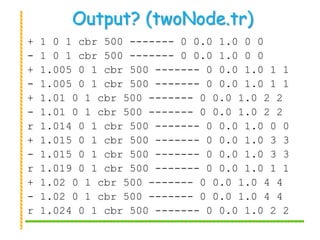
Output? (twoNode.tr)
+ 1 0 1 cbr 500 ------- 0 0.0 1.0 0 0
- 1 0 1 cbr 500 ------- 0 0.0 1.0 0 0
+ 1.005 0 1 cbr 500 ------- 0 0.0 1.0 1 1
- 1.005 0 1 cbr 500 ------- 0 0.0 1.0 1 1
+ 1.01 0 1 cbr 500 ------- 0 0.0 1.0 2 2
- 1.01 0 1 cbr 500 ------- 0 0.0 1.0 2 2
r 1.014 0 1 cbr 500 ------- 0 0.0 1.0 0 0
+ 1.015 0 1 cbr 500 ------- 0 0.0 1.0 3 3
- 1.015 0 1 cbr 500 ------- 0 0.0 1.0 3 3
r 1.019 0 1 cbr 500 ------- 0 0.0 1.0 1 1
+ 1.02 0 1 cbr 500 ------- 0 0.0 1.0 4 4
- 1.02 0 1 cbr 500 ------- 0 0.0 1.0 4 4
r 1.024 0 1 cbr 500 ------- 0 0.0 1.0 2 2
Explaining Output (I)
• Column 1: events
– +: enqueue
– -: dequeue
– r: receive
– d: drop
• Column 2:
– Time of event
• Column 3 & 4:
– Trace between which two nodes?
Network Performance - I
Average Delay:
• It is the average of total delay incurred due
to all packets.
– For each packet i received, find the delay as
delayi
= arrivalTimePacketi - sendingTimePacketi
– Compute Average delay for n packets as follows
avgDelay = 1..n delayi / n
NS-2/AN/Intro/ 16
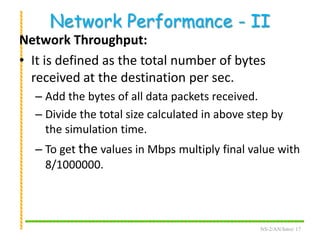
Network Performance - II
Network Throughput:
• It is defined as the total number of bytes
received at the destination per sec.
– Add the bytes of all data packets received.
– Divide the total size calculated in above step by
the simulation time.
– To get the values in Mbps multiply final value with
8/1000000.
NS-2/AN/Intro/ 17
AWK Script to find Packet Statistics
#== =packetStat.awk ===
# Run with: awk -f packetStat.awk < trace.tr
BEGIN {
totPktRecvd=0
drop=0
}
{
event = $1
intDest = $4
if (event == "r" && intDest == dest) {
totPktRecvd ++
}
NS-2/AN/Intro/ 18
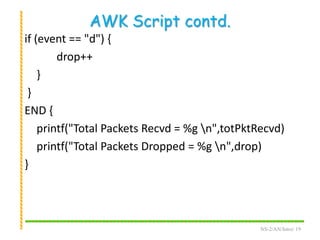
AWK Script contd.
if (event == "d") {
drop++
}
}
END {
printf("Total Packets Recvd = %g n",totPktRecvd)
printf("Total Packets Dropped = %g n",drop)
}
NS-2/AN/Intro/ 19
AWK Script to compute Avg Delay
#== =avgDelay.awk ===
# Run with: awk -f avgDelay.awk < trace.tr
BEGIN {
for (i in pktSent) {
pktSent[i] = 0
}
for (i in pktRecvd) {
pktRecvd[i] = 0
}
delay = avgDelay = 0
} # begin ends here
NS-2/AN/Intro/ 20
Avg Delay script contd.
{
event = $1
time = $2
intSrc=$3
intDest=$4
src=$9
dest=$10
pktSeq = $12
intSrc = (intSrc".0")
intDest = (intDest".0")
# Store packets send times
if (pktSent[pktSeq] == 0 && event == "+" && intSrc == src) {
pktSent[pktSeq] = time
} NS-2/AN/Intro/ 21
Avg Delay script contd. - I
# Store packets arrival time
if (event == "r" && intDest == dest) {
pktRecvd[pktSeq] = time
}
}
END {
# Compute average delay
for (i in pktRecvd) {
if (pktSent[i] == 0) {
printf("nError %gn",i)
}
delay += pktRecvd[i] - pktSent[i]
num ++
} NS-2/AN/Intro/ 22
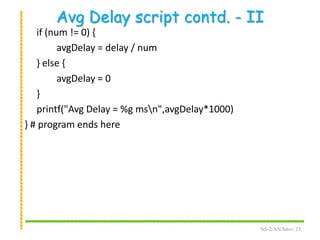
Avg Delay script contd. - II
if (num != 0) {
avgDelay = delay / num
} else {
avgDelay = 0
}
printf("Avg Delay = %g msn",avgDelay*1000)
} # program ends here
NS-2/AN/Intro/ 23
Practice Programs
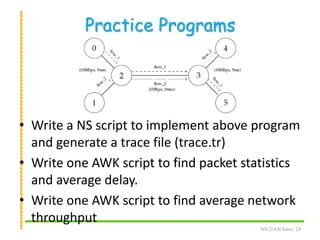
• Write a NS script to implement above program
and generate a trace file (trace.tr)
• Write one AWK script to find packet statistics
and average delay.
• Write one AWK script to find average network
throughput
NS-2/AN/Intro/ 24
Suggested Readings
• The GNU Awk User's Guide
–http://www.gnu.org/software/gawk/
manual/gawk.html
• Official gnuplot documentation
–http://www.gnuplot.info/documentation.html
NS-2/AN/Intro/ 25
Thank You
End of NS2

NS2: AWK and GNUplot - PArt III

  • 1.
    An Introduction toNetwork Simulator AWK, GnuPlot Dr. Ajit K Nayak Dept of CSIT, ITER S‘O’A University, BBSR
  • 2.
    Part III • IntroducingAWK • Introducing gnuPlot
  • 3.
    Basics of AWK •AWK is a scripting language suitable for text processing / data extraction and report formatting. • It is interpreted line by line and produces the output in a required format. • Input text files are considered to be a set of records containing different fields, i.e. each line in the file is a record (row) and each word of a line is considered as a field (column). • The default column separator is white space, however other delimiters such as a comma (,), or a tab space may also be used. • First column of the file is accesses using $1, second column using $2 etc. NS-2/AN/Intro/ 3
  • 4.
    Example-1 • Let usconsider a text file (file.txt) with the following content. Ashok 20-sep-1991 India Marry 13-oct-1995 Italy John 15-mar-1990 USA Karim 25-Feb-1993 Pakistan • Command Line Execution: – Issue the following commands in the command prompt. awk < file.txt ’{print $2}’ or awk ’{print $2}’ file.txt • It will display the second field(column) of each line available in a text file called ’file.txt’. NS-2/AN/Intro/ 4
  • 5.
    General Structure ofAWK BEGIN action(s) A set of patterns action(s) pair END action(s) • All actions with BEGIN pattern are executed once at the beginning of the execution of the script. Normally the variable initializations are made in this section. • The pattern-action pair between BEGIN and END pattern are executed for each line of the input file. • Finally actions with END pattern are executed once at the end. END section is normally used for printing the summarized results. NS-2/AN/Intro/ 5
  • 6.
    Example • Let usconsider a text file (file.txt) with the following content. 1001 Ashok 83 73 93 1002 Ram 30 43 67 1003 John 45 69 83 1004 Marry 43 35 59 1005 Samita 20 33 47 1006 Shibani 66 66 76 1007 Sourav 30 25 45 1008 Samyak 71 75 65 1009 Rudra 30 43 67 1010 Laila 85 83 87 NS-2/AN/Intro/ 6
  • 7.
    Example-2 • Write AWKscript to print All the students having first division with their average % score of marks #program to print student names scoring First division BEGIN { lines=0; print "n Students with First Division"; print "========================="; } { lines++; avg=($3+$4+$5)/3; if (avg >= 60) { NS-2/AN/Intro/ 7 printf $2 "t" avg "%n"; } } END{ print “=====*====="; print lines " lines scanned..."; } Execute with: awk -f myFirstAwk.sh < file.txt
  • 8.
    Practice Programs • Writeand execute all example programs • Write AWK script for the followings – To print the list of Failed students. – To print the list of Poor students. ( avg mark < class avg) Data format: (reg, name m1, m2, m3) NS-2/AN/Intro/ 8
  • 9.
    GNUPlot • GNUPlot isa software used to plot graphs using data or functions. • It is a command driven and suitable for 2D as well as 3D plots. • To start, issue the command gnuplot in the command line, that will a result a prompt like, gnuplot> • This is called the gnuplot command line. A plot now can be created using any of the following two ways. i) use the plot command in command line, or ii) create a script file with extension ’<script_file>.p’ then load the script. NS-2/AN/Intro/ 9
  • 10.
    Plotting • Plot usinga predefined function: gnuplot > plot sin(x)/x • Plot using a data file (scheduling.dat) # Processor requirement for different algorithms #Tasks Alg1 Alg2 Alg3 70 5 8 10 80 6 10 11 90 7 12 12 100 10 14 15 plot “scheduling.dat" using 1:2 title ’Alg1’ with lines, “scheduling.dat" u 1:4 t ’Alg’ w linespoints NS-2/AN/Intro/ 10 #Task Alg1 Alg2 Alg3 110 10 16 18 120 11 19 22 130 12 25 23 140 13 30 24 150 13 34 26
  • 11.
    Customizing plots #Gnuplot scriptfile: scheduling.p set autoscale # scale axis automatically set xtic auto # set xtics automatically set ytic auto # set ytics automatically set title "Processor requirement in different Algs" set xlabel "Processors" set ylabel "Tasks" set key 0.01,100 #position of Legend plot "scheduling.dat" u 1:2 t ’Alg1’ w lines , "scheduling.dat" u 1:3 t ’Alg2’ with linespoints • To execute this script: gnuplot> load ’schedule.p’ NS-2/AN/Intro/ 11
  • 12.
    Histograms # File name:histo.p; set grid; set style data histograms; set style histogram cluster; set style fill pattern; set key left; plot ’scheduling.dat’ using 2:xtic(1) t “Alg1", "" u 3 t "Alg2", "" u 4 t "Alg3"; • The col1 data of the data file(scheduling.dat) is taken to be the values in the x-axis. • The values in col_2 - col_4 forms three bars in a cluster. • Each row of data file is treated as one cluster and numbers of bars in a cluster is the number of columns considered in the plot command. NS-2/AN/Intro/ 12
  • 13.
    Practice Programs • Writeand execute all example programs • Consider the data file containing marks of the students in 3 subjects and plot the following graphs. – Draw a line plot containing 3 lines i) regNo vs mark1, ii) regNo vs mark2, and iii) regNo vs mark3. – A histogram that contains regNo in x axis and 3 different marks of one student is plotted as 3 clustered bars for each students. NS-2/AN/Intro/ 13
  • 14.
    Output? (twoNode.tr) + 10 1 cbr 500 ------- 0 0.0 1.0 0 0 - 1 0 1 cbr 500 ------- 0 0.0 1.0 0 0 + 1.005 0 1 cbr 500 ------- 0 0.0 1.0 1 1 - 1.005 0 1 cbr 500 ------- 0 0.0 1.0 1 1 + 1.01 0 1 cbr 500 ------- 0 0.0 1.0 2 2 - 1.01 0 1 cbr 500 ------- 0 0.0 1.0 2 2 r 1.014 0 1 cbr 500 ------- 0 0.0 1.0 0 0 + 1.015 0 1 cbr 500 ------- 0 0.0 1.0 3 3 - 1.015 0 1 cbr 500 ------- 0 0.0 1.0 3 3 r 1.019 0 1 cbr 500 ------- 0 0.0 1.0 1 1 + 1.02 0 1 cbr 500 ------- 0 0.0 1.0 4 4 - 1.02 0 1 cbr 500 ------- 0 0.0 1.0 4 4 r 1.024 0 1 cbr 500 ------- 0 0.0 1.0 2 2
  • 15.
    Explaining Output (I) •Column 1: events – +: enqueue – -: dequeue – r: receive – d: drop • Column 2: – Time of event • Column 3 & 4: – Trace between which two nodes?
  • 16.
    Network Performance -I Average Delay: • It is the average of total delay incurred due to all packets. – For each packet i received, find the delay as delayi = arrivalTimePacketi - sendingTimePacketi – Compute Average delay for n packets as follows avgDelay = 1..n delayi / n NS-2/AN/Intro/ 16
  • 17.
    Network Performance -II Network Throughput: • It is defined as the total number of bytes received at the destination per sec. – Add the bytes of all data packets received. – Divide the total size calculated in above step by the simulation time. – To get the values in Mbps multiply final value with 8/1000000. NS-2/AN/Intro/ 17
  • 18.
    AWK Script tofind Packet Statistics #== =packetStat.awk === # Run with: awk -f packetStat.awk < trace.tr BEGIN { totPktRecvd=0 drop=0 } { event = $1 intDest = $4 if (event == "r" && intDest == dest) { totPktRecvd ++ } NS-2/AN/Intro/ 18
  • 19.
    AWK Script contd. if(event == "d") { drop++ } } END { printf("Total Packets Recvd = %g n",totPktRecvd) printf("Total Packets Dropped = %g n",drop) } NS-2/AN/Intro/ 19
  • 20.
    AWK Script tocompute Avg Delay #== =avgDelay.awk === # Run with: awk -f avgDelay.awk < trace.tr BEGIN { for (i in pktSent) { pktSent[i] = 0 } for (i in pktRecvd) { pktRecvd[i] = 0 } delay = avgDelay = 0 } # begin ends here NS-2/AN/Intro/ 20
  • 21.
    Avg Delay scriptcontd. { event = $1 time = $2 intSrc=$3 intDest=$4 src=$9 dest=$10 pktSeq = $12 intSrc = (intSrc".0") intDest = (intDest".0") # Store packets send times if (pktSent[pktSeq] == 0 && event == "+" && intSrc == src) { pktSent[pktSeq] = time } NS-2/AN/Intro/ 21
  • 22.
    Avg Delay scriptcontd. - I # Store packets arrival time if (event == "r" && intDest == dest) { pktRecvd[pktSeq] = time } } END { # Compute average delay for (i in pktRecvd) { if (pktSent[i] == 0) { printf("nError %gn",i) } delay += pktRecvd[i] - pktSent[i] num ++ } NS-2/AN/Intro/ 22
  • 23.
    Avg Delay scriptcontd. - II if (num != 0) { avgDelay = delay / num } else { avgDelay = 0 } printf("Avg Delay = %g msn",avgDelay*1000) } # program ends here NS-2/AN/Intro/ 23
  • 24.
    Practice Programs • Writea NS script to implement above program and generate a trace file (trace.tr) • Write one AWK script to find packet statistics and average delay. • Write one AWK script to find average network throughput NS-2/AN/Intro/ 24
  • 25.
    Suggested Readings • TheGNU Awk User's Guide –http://www.gnu.org/software/gawk/ manual/gawk.html • Official gnuplot documentation –http://www.gnuplot.info/documentation.html NS-2/AN/Intro/ 25
  • 26.