Open Source Operating
System
‫المصدر‬ ‫مفتوحة‬ ‫تشغيل‬ ‫نظم‬
Lecture (12)
WHAT IS AWK?
 created by: Aho, Weinberger, and Kernighan
 scripting language used for manipulating data and
generating reports
 versions of awk
 awk, nawk, mawk, pgawk, …
 GNU awk: gawk
2
WHAT CAN YOU DO WITH AWK?
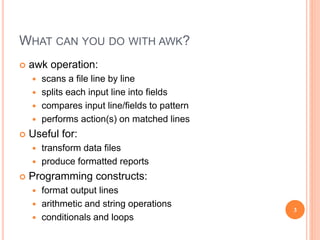
 awk operation:
 scans a file line by line
 splits each input line into fields
 compares input line/fields to pattern
 performs action(s) on matched lines
 Useful for:
 transform data files
 produce formatted reports
 Programming constructs:
 format output lines
 arithmetic and string operations
 conditionals and loops
3
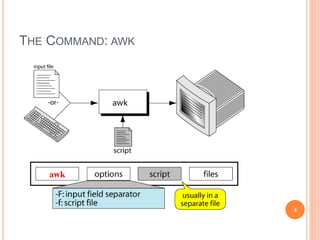
THE COMMAND: AWK
4
BASIC AWK SYNTAX
 awk [options] ‘script’ file(s)
 awk [options] –f scriptfile file(s)
Options:
-F to change input field separator
-f to name script file
5
BASIC AWK PROGRAM
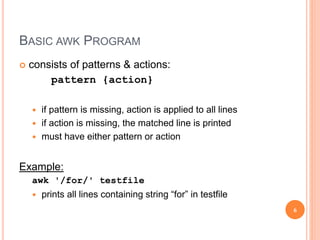
 consists of patterns & actions:
pattern {action}
 if pattern is missing, action is applied to all lines
 if action is missing, the matched line is printed
 must have either pattern or action
Example:
awk '/for/' testfile
 prints all lines containing string “for” in testfile
6
BASIC TERMINOLOGY: INPUT FILE
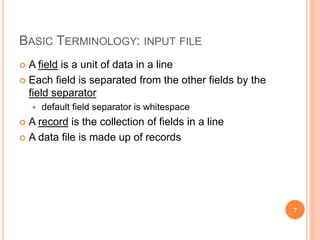
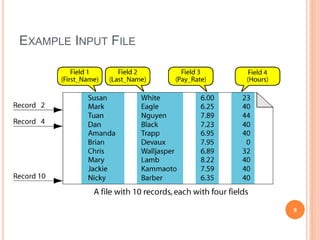
 A field is a unit of data in a line
 Each field is separated from the other fields by the
field separator
 default field separator is whitespace
 A record is the collection of fields in a line
 A data file is made up of records
7
EXAMPLE INPUT FILE
8
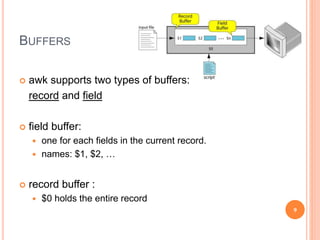
BUFFERS
 awk supports two types of buffers:
record and field
 field buffer:
 one for each fields in the current record.
 names: $1, $2, …
 record buffer :
 $0 holds the entire record
9
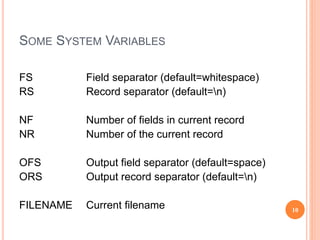
SOME SYSTEM VARIABLES
FS Field separator (default=whitespace)
RS Record separator (default=n)
NF Number of fields in current record
NR Number of the current record
OFS Output field separator (default=space)
ORS Output record separator (default=n)
FILENAME Current filename 10
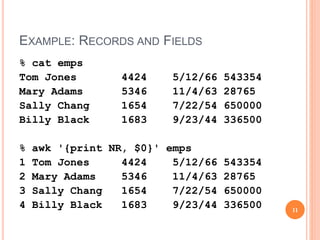
EXAMPLE: RECORDS AND FIELDS
% cat emps
Tom Jones 4424 5/12/66 543354
Mary Adams 5346 11/4/63 28765
Sally Chang 1654 7/22/54 650000
Billy Black 1683 9/23/44 336500
% awk '{print NR, $0}' emps
1 Tom Jones 4424 5/12/66 543354
2 Mary Adams 5346 11/4/63 28765
3 Sally Chang 1654 7/22/54 650000
4 Billy Black 1683 9/23/44 336500 11
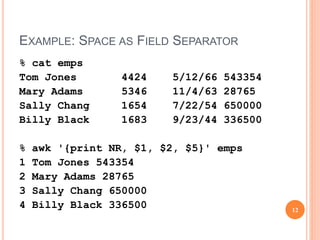
EXAMPLE: SPACE AS FIELD SEPARATOR
% cat emps
Tom Jones 4424 5/12/66 543354
Mary Adams 5346 11/4/63 28765
Sally Chang 1654 7/22/54 650000
Billy Black 1683 9/23/44 336500
% awk '{print NR, $1, $2, $5}' emps
1 Tom Jones 543354
2 Mary Adams 28765
3 Sally Chang 650000
4 Billy Black 336500 12
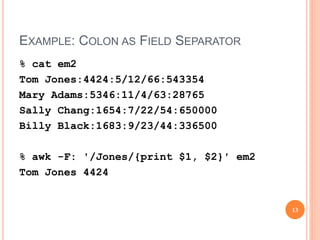
EXAMPLE: COLON AS FIELD SEPARATOR
% cat em2
Tom Jones:4424:5/12/66:543354
Mary Adams:5346:11/4/63:28765
Sally Chang:1654:7/22/54:650000
Billy Black:1683:9/23/44:336500
% awk -F: '/Jones/{print $1, $2}' em2
Tom Jones 4424
13
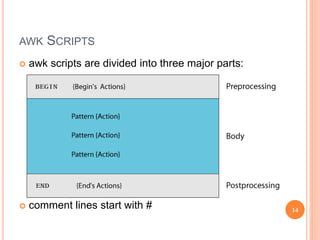
AWK SCRIPTS
 awk scripts are divided into three major parts:
 comment lines start with # 14
AWK SCRIPTS
BEGIN: pre-processing
 performs processing that must be
completed before the file processing
starts (i.e., before awk starts reading
records from the input file)
 useful for initialization tasks such as to
initialize variables and to create report
headings
15
AWK SCRIPTS
BODY: Processing
 contains main processing logic to be
applied to input records
 like a loop that processes input data one
record at a time:
if a file contains 100 records, the body will be
executed 100 times, one for each record
16
AWK SCRIPTS
END: post-processing
 contains logic to be executed after all
input data have been processed
 logic such as printing report grand total
should be performed in this part of the
script
17
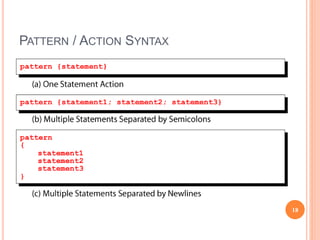
PATTERN / ACTION SYNTAX
18
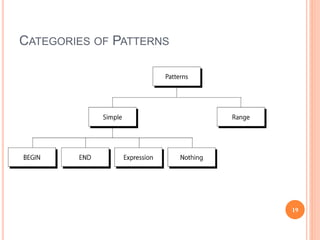
CATEGORIES OF PATTERNS
19
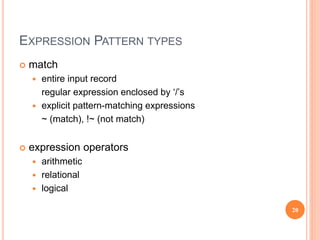
EXPRESSION PATTERN TYPES
 match
 entire input record
regular expression enclosed by ‘/’s
 explicit pattern-matching expressions
~ (match), !~ (not match)
 expression operators
 arithmetic
 relational
 logical
20
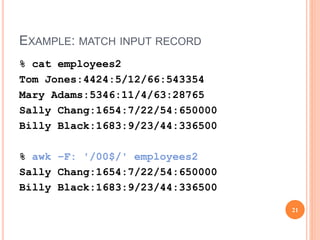
EXAMPLE: MATCH INPUT RECORD
% cat employees2
Tom Jones:4424:5/12/66:543354
Mary Adams:5346:11/4/63:28765
Sally Chang:1654:7/22/54:650000
Billy Black:1683:9/23/44:336500
% awk –F: '/00$/' employees2
Sally Chang:1654:7/22/54:650000
Billy Black:1683:9/23/44:336500
21
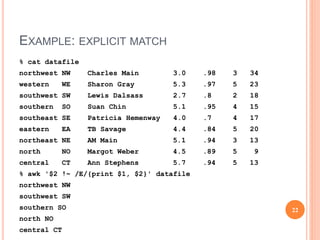
EXAMPLE: EXPLICIT MATCH
% cat datafile
northwest NW Charles Main 3.0 .98 3 34
western WE Sharon Gray 5.3 .97 5 23
southwest SW Lewis Dalsass 2.7 .8 2 18
southern SO Suan Chin 5.1 .95 4 15
southeast SE Patricia Hemenway 4.0 .7 4 17
eastern EA TB Savage 4.4 .84 5 20
northeast NE AM Main 5.1 .94 3 13
north NO Margot Weber 4.5 .89 5 9
central CT Ann Stephens 5.7 .94 5 13
% awk '$2 !~ /E/{print $1, $2}' datafile
northwest NW
southwest SW
southern SO
north NO
central CT
22
EXAMPLES: MATCHING WITH RES
% awk '/^[ns]/{print $1}' datafile
northwest
southwest
southern
southeast
northeast
north
23
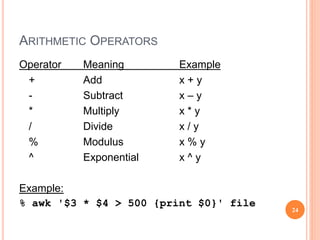
ARITHMETIC OPERATORS
Operator Meaning Example
+ Add x + y
- Subtract x – y
* Multiply x * y
/ Divide x / y
% Modulus x % y
^ Exponential x ^ y
Example:
% awk '$3 * $4 > 500 {print $0}' file
24
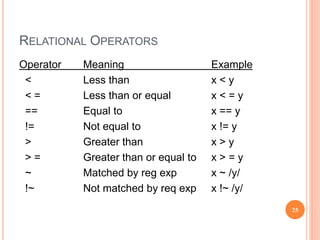
RELATIONAL OPERATORS
Operator Meaning Example
< Less than x < y
< = Less than or equal x < = y
== Equal to x == y
!= Not equal to x != y
> Greater than x > y
> = Greater than or equal to x > = y
~ Matched by reg exp x ~ /y/
!~ Not matched by req exp x !~ /y/
25
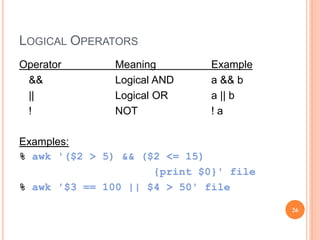
LOGICAL OPERATORS
Operator Meaning Example
&& Logical AND a && b
|| Logical OR a || b
! NOT ! a
Examples:
% awk '($2 > 5) && ($2 <= 15)
{print $0}' file
% awk '$3 == 100 || $4 > 50' file
26
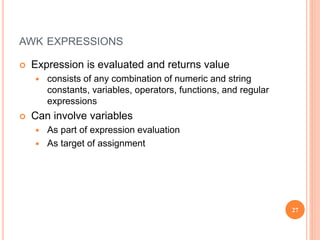
AWK EXPRESSIONS
 Expression is evaluated and returns value
 consists of any combination of numeric and string
constants, variables, operators, functions, and regular
expressions
 Can involve variables
 As part of expression evaluation
 As target of assignment
27
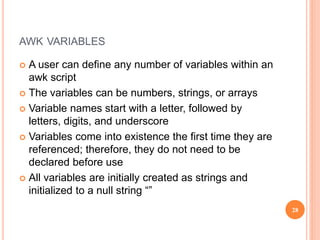
AWK VARIABLES
 A user can define any number of variables within an
awk script
 The variables can be numbers, strings, or arrays
 Variable names start with a letter, followed by
letters, digits, and underscore
 Variables come into existence the first time they are
referenced; therefore, they do not need to be
declared before use
 All variables are initially created as strings and
initialized to a null string “”
28
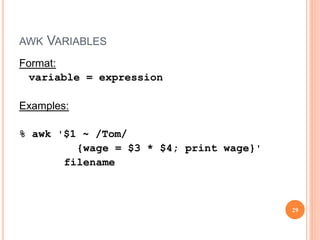
AWK VARIABLES
Format:
variable = expression
Examples:
% awk '$1 ~ /Tom/
{wage = $3 * $4; print wage}'
filename
29
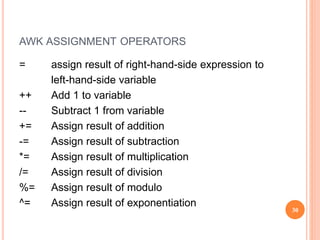
AWK ASSIGNMENT OPERATORS
= assign result of right-hand-side expression to
left-hand-side variable
++ Add 1 to variable
-- Subtract 1 from variable
+= Assign result of addition
-= Assign result of subtraction
*= Assign result of multiplication
/= Assign result of division
%= Assign result of modulo
^= Assign result of exponentiation
30
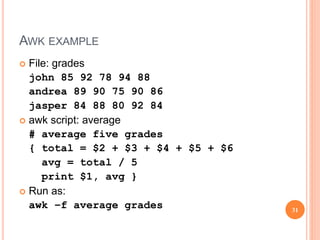
AWK EXAMPLE
 File: grades
john 85 92 78 94 88
andrea 89 90 75 90 86
jasper 84 88 80 92 84
 awk script: average
# average five grades
{ total = $2 + $3 + $4 + $5 + $6
avg = total / 5
print $1, avg }
 Run as:
awk –f average grades 31
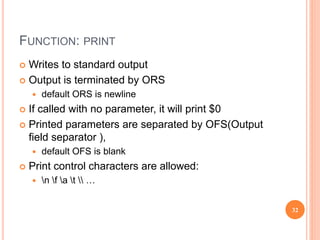
FUNCTION: PRINT
 Writes to standard output
 Output is terminated by ORS
 default ORS is newline
 If called with no parameter, it will print $0
 Printed parameters are separated by OFS(Output
field separator ),
 default OFS is blank
 Print control characters are allowed:
 n f a t  …
32
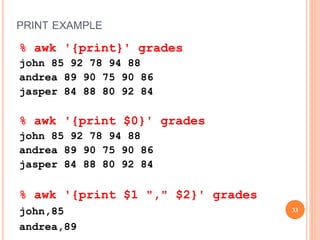
PRINT EXAMPLE
% awk '{print}' grades
john 85 92 78 94 88
andrea 89 90 75 90 86
jasper 84 88 80 92 84
% awk '{print $0}' grades
john 85 92 78 94 88
andrea 89 90 75 90 86
jasper 84 88 80 92 84
% awk '{print $1 "," $2}' grades
john,85
andrea,89
33

Lec_11.ppt

  • 1.
    Open Source Operating System ‫المصدر‬‫مفتوحة‬ ‫تشغيل‬ ‫نظم‬ Lecture (12)
  • 2.
    WHAT IS AWK? created by: Aho, Weinberger, and Kernighan  scripting language used for manipulating data and generating reports  versions of awk  awk, nawk, mawk, pgawk, …  GNU awk: gawk 2
  • 3.
    WHAT CAN YOUDO WITH AWK?  awk operation:  scans a file line by line  splits each input line into fields  compares input line/fields to pattern  performs action(s) on matched lines  Useful for:  transform data files  produce formatted reports  Programming constructs:  format output lines  arithmetic and string operations  conditionals and loops 3
  • 4.
  • 5.
    BASIC AWK SYNTAX awk [options] ‘script’ file(s)  awk [options] –f scriptfile file(s) Options: -F to change input field separator -f to name script file 5
  • 6.
    BASIC AWK PROGRAM consists of patterns & actions: pattern {action}  if pattern is missing, action is applied to all lines  if action is missing, the matched line is printed  must have either pattern or action Example: awk '/for/' testfile  prints all lines containing string “for” in testfile 6
  • 7.
    BASIC TERMINOLOGY: INPUTFILE  A field is a unit of data in a line  Each field is separated from the other fields by the field separator  default field separator is whitespace  A record is the collection of fields in a line  A data file is made up of records 7
  • 8.
  • 9.
    BUFFERS  awk supportstwo types of buffers: record and field  field buffer:  one for each fields in the current record.  names: $1, $2, …  record buffer :  $0 holds the entire record 9
  • 10.
    SOME SYSTEM VARIABLES FSField separator (default=whitespace) RS Record separator (default=n) NF Number of fields in current record NR Number of the current record OFS Output field separator (default=space) ORS Output record separator (default=n) FILENAME Current filename 10
  • 11.
    EXAMPLE: RECORDS ANDFIELDS % cat emps Tom Jones 4424 5/12/66 543354 Mary Adams 5346 11/4/63 28765 Sally Chang 1654 7/22/54 650000 Billy Black 1683 9/23/44 336500 % awk '{print NR, $0}' emps 1 Tom Jones 4424 5/12/66 543354 2 Mary Adams 5346 11/4/63 28765 3 Sally Chang 1654 7/22/54 650000 4 Billy Black 1683 9/23/44 336500 11
  • 12.
    EXAMPLE: SPACE ASFIELD SEPARATOR % cat emps Tom Jones 4424 5/12/66 543354 Mary Adams 5346 11/4/63 28765 Sally Chang 1654 7/22/54 650000 Billy Black 1683 9/23/44 336500 % awk '{print NR, $1, $2, $5}' emps 1 Tom Jones 543354 2 Mary Adams 28765 3 Sally Chang 650000 4 Billy Black 336500 12
  • 13.
    EXAMPLE: COLON ASFIELD SEPARATOR % cat em2 Tom Jones:4424:5/12/66:543354 Mary Adams:5346:11/4/63:28765 Sally Chang:1654:7/22/54:650000 Billy Black:1683:9/23/44:336500 % awk -F: '/Jones/{print $1, $2}' em2 Tom Jones 4424 13
  • 14.
    AWK SCRIPTS  awkscripts are divided into three major parts:  comment lines start with # 14
  • 15.
    AWK SCRIPTS BEGIN: pre-processing performs processing that must be completed before the file processing starts (i.e., before awk starts reading records from the input file)  useful for initialization tasks such as to initialize variables and to create report headings 15
  • 16.
    AWK SCRIPTS BODY: Processing contains main processing logic to be applied to input records  like a loop that processes input data one record at a time: if a file contains 100 records, the body will be executed 100 times, one for each record 16
  • 17.
    AWK SCRIPTS END: post-processing contains logic to be executed after all input data have been processed  logic such as printing report grand total should be performed in this part of the script 17
  • 18.
  • 19.
  • 20.
    EXPRESSION PATTERN TYPES match  entire input record regular expression enclosed by ‘/’s  explicit pattern-matching expressions ~ (match), !~ (not match)  expression operators  arithmetic  relational  logical 20
  • 21.
    EXAMPLE: MATCH INPUTRECORD % cat employees2 Tom Jones:4424:5/12/66:543354 Mary Adams:5346:11/4/63:28765 Sally Chang:1654:7/22/54:650000 Billy Black:1683:9/23/44:336500 % awk –F: '/00$/' employees2 Sally Chang:1654:7/22/54:650000 Billy Black:1683:9/23/44:336500 21
  • 22.
    EXAMPLE: EXPLICIT MATCH %cat datafile northwest NW Charles Main 3.0 .98 3 34 western WE Sharon Gray 5.3 .97 5 23 southwest SW Lewis Dalsass 2.7 .8 2 18 southern SO Suan Chin 5.1 .95 4 15 southeast SE Patricia Hemenway 4.0 .7 4 17 eastern EA TB Savage 4.4 .84 5 20 northeast NE AM Main 5.1 .94 3 13 north NO Margot Weber 4.5 .89 5 9 central CT Ann Stephens 5.7 .94 5 13 % awk '$2 !~ /E/{print $1, $2}' datafile northwest NW southwest SW southern SO north NO central CT 22
  • 23.
    EXAMPLES: MATCHING WITHRES % awk '/^[ns]/{print $1}' datafile northwest southwest southern southeast northeast north 23
  • 24.
    ARITHMETIC OPERATORS Operator MeaningExample + Add x + y - Subtract x – y * Multiply x * y / Divide x / y % Modulus x % y ^ Exponential x ^ y Example: % awk '$3 * $4 > 500 {print $0}' file 24
  • 25.
    RELATIONAL OPERATORS Operator MeaningExample < Less than x < y < = Less than or equal x < = y == Equal to x == y != Not equal to x != y > Greater than x > y > = Greater than or equal to x > = y ~ Matched by reg exp x ~ /y/ !~ Not matched by req exp x !~ /y/ 25
  • 26.
    LOGICAL OPERATORS Operator MeaningExample && Logical AND a && b || Logical OR a || b ! NOT ! a Examples: % awk '($2 > 5) && ($2 <= 15) {print $0}' file % awk '$3 == 100 || $4 > 50' file 26
  • 27.
    AWK EXPRESSIONS  Expressionis evaluated and returns value  consists of any combination of numeric and string constants, variables, operators, functions, and regular expressions  Can involve variables  As part of expression evaluation  As target of assignment 27
  • 28.
    AWK VARIABLES  Auser can define any number of variables within an awk script  The variables can be numbers, strings, or arrays  Variable names start with a letter, followed by letters, digits, and underscore  Variables come into existence the first time they are referenced; therefore, they do not need to be declared before use  All variables are initially created as strings and initialized to a null string “” 28
  • 29.
    AWK VARIABLES Format: variable =expression Examples: % awk '$1 ~ /Tom/ {wage = $3 * $4; print wage}' filename 29
  • 30.
    AWK ASSIGNMENT OPERATORS =assign result of right-hand-side expression to left-hand-side variable ++ Add 1 to variable -- Subtract 1 from variable += Assign result of addition -= Assign result of subtraction *= Assign result of multiplication /= Assign result of division %= Assign result of modulo ^= Assign result of exponentiation 30
  • 31.
    AWK EXAMPLE  File:grades john 85 92 78 94 88 andrea 89 90 75 90 86 jasper 84 88 80 92 84  awk script: average # average five grades { total = $2 + $3 + $4 + $5 + $6 avg = total / 5 print $1, avg }  Run as: awk –f average grades 31
  • 32.
    FUNCTION: PRINT  Writesto standard output  Output is terminated by ORS  default ORS is newline  If called with no parameter, it will print $0  Printed parameters are separated by OFS(Output field separator ),  default OFS is blank  Print control characters are allowed:  n f a t … 32
  • 33.
    PRINT EXAMPLE % awk'{print}' grades john 85 92 78 94 88 andrea 89 90 75 90 86 jasper 84 88 80 92 84 % awk '{print $0}' grades john 85 92 78 94 88 andrea 89 90 75 90 86 jasper 84 88 80 92 84 % awk '{print $1 "," $2}' grades john,85 andrea,89 33

Editor's Notes

  • #3 Copyright Department of Computer Science, Northern Illinois University, 2004
  • #6 Copyright Department of Computer Science, Northern Illinois University, 2004
  • #7 Copyright Department of Computer Science, Northern Illinois University, 2004
  • #8 Copyright Department of Computer Science, Northern Illinois University, 2004
  • #12 Copyright Department of Computer Science, Northern Illinois University, 2004
  • #13 Copyright Department of Computer Science, Northern Illinois University, 2004
  • #14 Copyright Department of Computer Science, Northern Illinois University, 2004
  • #21 Copyright Department of Computer Science, Northern Illinois University, 2004
  • #22 Copyright Department of Computer Science, Northern Illinois University, 2004
  • #23 Copyright Department of Computer Science, Northern Illinois University, 2004
  • #24 Copyright Department of Computer Science, Northern Illinois University, 2004
  • #25 Copyright Department of Computer Science, Northern Illinois University, 2004
  • #26 Copyright Department of Computer Science, Northern Illinois University, 2004
  • #27 Copyright Department of Computer Science, Northern Illinois University, 2004
  • #30 Copyright Department of Computer Science, Northern Illinois University, 2004
  • #34 Copyright Department of Computer Science, Northern Illinois University, 2004