UNIX - awk


        Data extraction and
     formatted Reporting Tool


               Presentation By

                         Nihar R Paital
Introduction

   Developer          : Alfred Aho
                         Peter Weinberger
                         Brian Kernighan

   Appears in         : Version 7 UNIX onwards

   Developed during   : 1970 s

   Developed at       : Bell Labs

   Category           : UNIX Utility

   Supported by       : All UNIX flavors         Nihar R Paital
Definition


 The AWK utility is a data extraction and
 reporting tool that uses a data-driven
 scripting language consisting of a set of
 actions to be taken against textual data
 (either in files or data streams) for the
 purpose of producing formatted reports.


                               Nihar R Paital
It performs basic text formatting on an input
stream ( A file / input from a pipeline )

 Formatting using input file
$ awk {print $n} Filename
Example:
$ awk {print $1} awk.txt > awk.txt.bak

 Formatting using a filter in a pipeline
$ generate_data | awk {print $1}
Example:
$ cat awk.txt | awk {print $1} > awk.txt.bak


Before proceeding to next slide please create a file named awk.txt with following Contents.

07.46.199.184 [28/Sep/2010:04:08:20] "GET /robots.txt HTTP/1.1" 200 0 "msnbot"
123.125.71.19 [28/Sep/2010:04:20:11] "GET / HTTP/1.1" 304 - "Baiduspider"


                                                                        Nihar R Paital
Basic but important for awk

   Syntax :
        awk {print $n} filename
        Generate data : awk {print $n}

   Awk programs will start with a "{" and end with a "}"

   $0 is the entire line

   Awk parses the line in to fields for you automatically, using any whitespace
    (space, tab) as a delimiter.

   Fields of a regular file will be available using $1,$2,$3 … etc

   NF : It is a special Variable contains the number of fields in the current line. We
    can print the last field by printing the field $NF
   NR : It prints the row number being currently processed.          Nihar R Paital
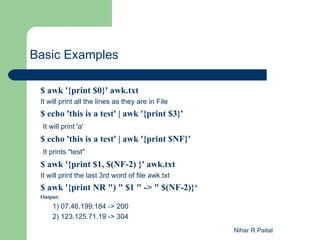
Basic Examples

 $ awk '{print $0}' awk.txt
 It will print all the lines as they are in File
 $ echo 'this is a test' | awk '{print $3}'
  It will print 'a'
 $ echo 'this is a test' | awk '{print $NF}'
  It prints "test"
 $ awk '{print $1, $(NF-2) }' awk.txt
 It will print the last 3rd word of file awk.txt
 $ awk '{print NR ") " $1 " -> " $(NF-2)}‘
 Output:
      1) 07.46.199.184 -> 200
      2) 123.125.71.19 -> 304
                                                   Nihar R Paital
Advance use of AWK
$ awk '{print $2}' logs.txt
Output:
    [28/Sep/2010:04:08:20]
    [28/Sep/2010:04:20:11]
The date field is separated by "/" and ":" characters.
Suppose I want to print like
[28/Sep/2010
[28/Sep/2010

$ awk '{print $2}' logs.txt | awk 'BEGIN{FS=":"}{print $1}'
Output:
    [28/Sep/2010
    [28/Sep/2010
Here FS=“:” means Field Separator as colon(:)

$ awk '{print $2}' logs.txt | awk 'BEGIN{FS=":"}{print $1}' | sed 's/[//'
Output:
    28/Sep/2010
    28/Sep/2010
Here We are Substituting [ with NULL value                  Nihar R Paital
Advance Use of AWK
If I want to return only the 200 status lines
$ awk '{if ($(NF-2) == "200") {print $0}}' logs.txt

   Output:
   07.46.199.184 [28/Sep/2010:04:08:20] "GET /robots.txt HTTP/1.1" 200 0 "msnbot"


$ awk '{a+=$(NF-2); print "Total so far:", a}' logs.txt

   Output:
   Total so far: 200
   Total so far: 504


$ awk '{a+=$(NF-2)}END{print "Total:", a}' logs.txt

   Output:
   Total: 504
                                                                  Nihar R Paital
Nihar R Paital

Unix - Class7 - awk

  • 1.
    UNIX - awk Data extraction and formatted Reporting Tool Presentation By Nihar R Paital
  • 2.
    Introduction  Developer : Alfred Aho Peter Weinberger Brian Kernighan  Appears in : Version 7 UNIX onwards  Developed during : 1970 s  Developed at : Bell Labs  Category : UNIX Utility  Supported by : All UNIX flavors Nihar R Paital
  • 3.
    Definition The AWKutility is a data extraction and reporting tool that uses a data-driven scripting language consisting of a set of actions to be taken against textual data (either in files or data streams) for the purpose of producing formatted reports. Nihar R Paital
  • 4.
    It performs basictext formatting on an input stream ( A file / input from a pipeline )  Formatting using input file $ awk {print $n} Filename Example: $ awk {print $1} awk.txt > awk.txt.bak  Formatting using a filter in a pipeline $ generate_data | awk {print $1} Example: $ cat awk.txt | awk {print $1} > awk.txt.bak Before proceeding to next slide please create a file named awk.txt with following Contents. 07.46.199.184 [28/Sep/2010:04:08:20] "GET /robots.txt HTTP/1.1" 200 0 "msnbot" 123.125.71.19 [28/Sep/2010:04:20:11] "GET / HTTP/1.1" 304 - "Baiduspider" Nihar R Paital
  • 5.
    Basic but importantfor awk  Syntax :  awk {print $n} filename  Generate data : awk {print $n}  Awk programs will start with a "{" and end with a "}"  $0 is the entire line  Awk parses the line in to fields for you automatically, using any whitespace (space, tab) as a delimiter.  Fields of a regular file will be available using $1,$2,$3 … etc  NF : It is a special Variable contains the number of fields in the current line. We can print the last field by printing the field $NF  NR : It prints the row number being currently processed. Nihar R Paital
  • 6.
    Basic Examples $awk '{print $0}' awk.txt It will print all the lines as they are in File $ echo 'this is a test' | awk '{print $3}' It will print 'a' $ echo 'this is a test' | awk '{print $NF}' It prints "test" $ awk '{print $1, $(NF-2) }' awk.txt It will print the last 3rd word of file awk.txt $ awk '{print NR ") " $1 " -> " $(NF-2)}‘ Output: 1) 07.46.199.184 -> 200 2) 123.125.71.19 -> 304 Nihar R Paital
  • 7.
    Advance use ofAWK $ awk '{print $2}' logs.txt Output: [28/Sep/2010:04:08:20] [28/Sep/2010:04:20:11] The date field is separated by "/" and ":" characters. Suppose I want to print like [28/Sep/2010 [28/Sep/2010 $ awk '{print $2}' logs.txt | awk 'BEGIN{FS=":"}{print $1}' Output: [28/Sep/2010 [28/Sep/2010 Here FS=“:” means Field Separator as colon(:) $ awk '{print $2}' logs.txt | awk 'BEGIN{FS=":"}{print $1}' | sed 's/[//' Output: 28/Sep/2010 28/Sep/2010 Here We are Substituting [ with NULL value Nihar R Paital
  • 8.
    Advance Use ofAWK If I want to return only the 200 status lines $ awk '{if ($(NF-2) == "200") {print $0}}' logs.txt Output: 07.46.199.184 [28/Sep/2010:04:08:20] "GET /robots.txt HTTP/1.1" 200 0 "msnbot" $ awk '{a+=$(NF-2); print "Total so far:", a}' logs.txt Output: Total so far: 200 Total so far: 504 $ awk '{a+=$(NF-2)}END{print "Total:", a}' logs.txt Output: Total: 504 Nihar R Paital
  • 9.