Software Engineering Principles
Ajit K Nayak, Ph.D.
ajitnayak@soauniversity.ac.in
9338749992
Lecture Notes – 2
Process Models
Why Study Software Engineering?
• To acquire skills to develop large programs.
– Exponential growth in complexity and difficulty level
with size.
– The ad hoc approach breaks down when size of
software increases.
• Ability to solve complex programming problems:
– How to break large projects into smaller and
manageable parts?
• Learn techniques of:
– specification, design, interface development,
testing, project management, etc.
Evolution of Design Techniques
Object-Oriented
Exploratory
Style
Data flow-based
Data structure-
based
Control flow-
based
Modern S/W Development Practices
• Use of Life Cycle Models
– Software is developed through several well-defined
stages:
• requirements analysis and specification,
• design,
• coding,
• testing, etc.
• Emphasis has shifted from error correction to error
prevention.
• Modern practices emphasize on detection of errors as
close to their point of introduction as possible.
• Unlike exploratory style, now coding is considered
only a small part of program development effort.
Software Life Cycle
• The life cycle of a software represents the series of
identifiable stages through which it evolves during its
life time
• Also called Software Development Life Cycle Model
(SDLC)
Classical Waterfall Model
• Classical waterfall model divides life cycle into phases:
Feasibility Study
Req. Analysis & Spec.
Design
Implementation
Testing
Maintenance
• It is simple and idealistic
model
• Hard to use for any non-
trivial SD project
• All other models are
extension to this model.
Relative Effort for Phases
• Phases between feasibility
study and testing known as
development phases.
• Among all life cycle phases
maintenance phase consumes
maximum effort.
• Among development phases,
testing phase consumes the
maximum effort.
0
10
20
30
40
50
60
Req.Sp
Design
Coding
Test
Maintnce
Feasibility Study
• Main aim of feasibility study is to determine whether
developing the product
– financially worthwhile
– technically feasible.
• First roughly understand what the customer wants:
– different data which would be input to the system,
– processing needed on these data,
– output data to be produced by the system,
– various constraints on the behavior of the system.
Activities during Feasibility Study
• Work out an overall understanding of the problem.
• Formulate different solution strategies.
• Examine alternate solution strategies in terms of:
– resources required,
– cost of development, and
– development time.
• Perform a cost/benefit analysis:
– To determine which solution is the best.
– None of the solutions may be feasible due to:
• high cost,
• resource constraints,
• technical reasons.
Requirements Analysis and Specification
• Aim of this phase:
– understand the exact requirements of the customer,
– document them properly.
• Consists of two distinct activities:
– requirements gathering and analysis
– requirements specification.
Requirements Analysis - I
• To Collect all related data from the customer:
– analyze the collected data to clearly understand
what the customer wants,
– find out any inconsistencies and incompleteness in
the requirements,
– resolve all inconsistencies and incompleteness.
• Usually collected from the end-users through
interviews and discussions.
• Example: business accounting software
– interview all the accountants of the organization to
find out their requirements
Requirements Analysis - II
• The data collected initially from the users:
– would usually contain several contradictions and
ambiguities:
– each user typically has only a partial and
incomplete view of the system.
• Ambiguities and contradictions must be identified,
resolved by discussions with the customers.
• Then, requirements are organized into a Software
Requirements Specification (SRS) document.
• Engineers doing requirements analysis and
specification are designated as analysts.
Design
• Design phase transforms requirements specification
into a form suitable for implementation in some
programming language.
• In technical terms:
– during design phase, software architecture is
derived from the SRS document.
• Two design approaches:
– traditional approach,
– object oriented approach.
Object Oriented Design
• First identify various objects (real world entities)
occurring in the problem:
• Example: the objects in a pay-roll software may be:
– employees, managers, pay-roll register,
Departments, etc.
• identify the relationships among the objects.
• OOD has several advantages:
– lower development effort,
– lower development time,
– better maintainability.
Implementation
• Implementation phase is also known as coding and
unit testing phase
– software design is translated into source code.
– each module of the design is coded,
– each module is unit tested
• tested independently as a stand alone unit, and debugged,
– each module is documented.
• The purpose of unit testing to test test if individual
modules work correctly.
• The end product of implementation phase
– a set of program modules that have been tested
individually.
Integration and System Testing
• Different modules are integrated in a planned manner
through a number of steps
• During each integration step, the partially integrated
system is tested.
• After all the modules have been successfully
integrated and tested:
– system testing is carried out.
• Goal of system testing:
– ensure that the developed system functions
according to its requirements as specified in the SRS
document.
Maintenance
• Maintenance of any software product requires much more
effort than the effort to develop the product itself.
• development effort to maintenance effort is typically
40:60.
• Corrective maintenance:
– Correct errors which were not discovered during the
product development phases.
• Perfective maintenance:
– Improve implementation of the system
– enhance functionalities of the system.
• Adaptive maintenance:
– Port software to a new environment,
– e.g. to a new computer or to a new operating system.
Limitations
• Classical waterfall model is idealistic
– assumes that no defect is introduced during any
development activity.
– in practice defects do get introduced in almost every
phase of the life cycle.
• Defects usually get detected much later in the life cycle
– For example, a design defect might go unnoticed till the
coding or testing phase.
• Once a defect is detected:
– we need to go back to the phase where it was
introduced
– redo some of the work done during that and all
subsequent phases.
Iterative Waterfall Model - I
Feasibility Study
Req. Analysis &
Specification
Design
Coding & Unit
test
Integration &
System Testing
Maintenance
There are feedback paths in
the Iterative waterfall
model
Iterative Waterfall Model - II
• Errors should be detected
– in the same phase in which they are introduced.
• For example:
– if a design problem is detected in the design phase
itself, then the problem can be taken care of much
more easily.
– if it is identified at the end of the integration and
system testing phase, then it would be difficult,
• because rework must be carried out not only to the design but
also to code and test phases
Iterative Waterfall Model - III
• The principle of detecting errors as close to its point
of introduction as possible is known as phase
containment of errors.
• Iterative waterfall model is by far the most widely
used model.
• Almost every other model is derived from the
waterfall model.
• Irrespective of the life cycle model actually followed
the documents should reflect a classical waterfall
model of development.
Use Waterfall models if…
• Project is large, expensive.
• Project has clear objectives and solution.
• Pressure does not exist for immediate
implementation.
• Project requirements can be stated unambiguously
and comprehensively.
• Project requirements are stable or unchanging during
the system development life cycle.
• User community is fully knowledgeable in the
business and application.
• Team members may be inexperienced.
Don’t Use these models when …
• Large projects where the requirements are not well
understood or are changing for any reasons such as
external changes, changing expectations, budget changes
or rapidly changing technology.
• Web Information Systems (WIS)
– primarily due to the pressure of implementing a WIS
project quickly;
– the continual evolution of the project requirements;
– the need for experienced, flexible team members drawn
from multiple disciplines; and
– the inability to make assumptions regarding the users’
knowledge level.
• Real-time systems.
• Event-driven systems.
• Leading-edge applications
V Model
• It is an extension to
iterative waterfall model
• Used in systems
requiring high reliability
Req. Analysis &
Specification
High-level Design
System Testing
Integration Testing
Unit Testing
Coding
Unit test design
System test design
Unit test design
• Two Phases
• Development
• Validation
V Model
• It is a variant of the Waterfall model
– emphasizes verification and validation
– Both V&V activities are spread over the entire life cycle.
• In every phase of development:
– Testing activities are planned in parallel with
development.
• Strengths
– Starting from early stages , it emphasize planning for
verification and validation of the software
– Each deliverable is made testable, easy to use
• Weaknesses
– Does not support overlapping of phases, does not
handle iterations or phases, does not easily handle later
changes in requirements
Prototyping Model - I
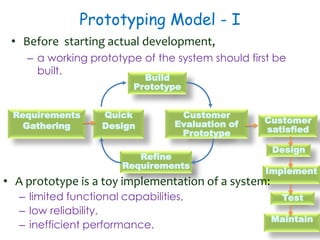
• Before starting actual development,
– a working prototype of the system should first be
built.
Requirements
Gathering
Quick
Design
Refine
Requirements
Build
Prototype
Customer
Evaluation of
Prototype
Design
Implement
Test
Maintain
Customer
satisfied
• A prototype is a toy implementation of a system:
– limited functional capabilities,
– low reliability,
– inefficient performance.
Why Prototyping Model?
• It is also a derivative of waterfall model
• To illustrate to the customer
– input data formats, messages, reports, or interactive
dialogs.
• Examine technical issues associated with product
development:
– Often major design decisions depend on issues like:
– response time of a hardware controller,
– efficiency of a sorting algorithm, etc.
• It is impossible to ``get it right'' the first time
– we must plan to throw away the first product if we
want to develop a good product.
Prototyping Model - II
• Start with approximate requirements.
• Carry out a quick design.
• Prototype model is built using several short-cuts:
– Short-cuts might involve using inefficient, inaccurate, or
dummy functions.
– A function may use a table look-up rather than
performing the actual computations.
• The developed prototype is submitted to the customer for
his evaluation:
– Based on the user feedback, requirements are refined.
– This cycle continues until the user approves the
prototype.
– The actual system is developed using the classical
waterfall approach.
Prototyping Model - III
• Requirements analysis and specification phase becomes
redundant:
– final working prototype (with all user feedbacks incorporated)
serves as an animated requirements specification.
• Design and code for the prototype is usually thrown away
– However, the experience gathered from developing the
prototype helps a great deal while developing the actual
product.
• Even though construction of a working prototype model
involves additional cost --- overall development cost might be
lower for:
– systems with unclear user requirements,
– systems with unresolved technical issues.
• Many user requirements get properly defined and technical
issues get resolved:
– these would have appeared later as change requests and
resulted in incurring massive redesign costs.
Major difficulties of Waterfall-Based
Models
• Difficulty in accommodating change requests during
development.
– 40% of requirements change during development
• High cost incurred in developing custom applications.
• Heavy weight processes.
Incremental Model
• Idea
– take advantage of what was being learned during
the development of earlier, incremental, deliverable
versions of the system.
– Learning comes from both the development and
use of the system…
– Start with a simple implementation of a subset of the
software requirements and iteratively enhance the
evolving sequence of versions.
– At each version design modifications are made
along with adding new functional capabilities.
Evolutionary Model - I
• In Evolutionary model (aka successive versions or
incremental model)
– The system is broken down into several modules
which can be incrementally implemented and
delivered.
• First develop the core modules of the system.
• The initial product skeleton is refined into increasing
levels of capability:
– by adding new functionalities in successive versions.
A
B
C
A A
B
Advantages / Disadvantages
• Users get a chance to experiment with a partially
developed system:
– much before the full working version is released,
• Helps finding exact user requirements:
– much before fully working system is developed.
• Core modules get tested thoroughly:
– reduces chances of errors in final product.
• Often, difficult to subdivide problems into functional units:
– which can be incrementally implemented and delivered.
• Evolutionary model is useful for very large problems,
– where it is easier to find modules for incremental
implementation.
Use
• Most Appropriate
– Large projects where requirements are not well
understood or are changing due to
– external changes, changing expectations, budget
changes or rapidly changing technology.
– Web Information Systems (WIS ) and event-driven
systems.
– Leading-edge applications.
• Least Appropriate
– Very small projects of very short duration.
– Integration and architectural risks are very low.
– Highly interactive applications where the data for the
project already exists (completely or in part), and the
project largely comprises analysis or reporting of the
data.
Rapid Application Development (RAD)
• Also known as Rapid Prototyping Model
• Clients do not know what they exactly wanted until they
saw a working system.
– In waterfall models, customer can’t see the S/W until the
development is complete in all respects.
• Working
– Functional modules are developed in parallel as
prototypes.
– Integrated to make the complete product for faster
product delivery.
– Follow iterative and incremental model.
– Prototypes developed are reusable.
• Reduces the communication gap between customers and
developers
RAD Model
Usability
• Suitable
– Customized product developed for one or two
customers only
– Performance and reliability are not critical.
– The system can be split into several independent
modules.
• Unsuitable
– Few plug-in components are available
– High performance or reliability required
– No precedence for similar products exists
– The system cannot be modularized.
Spiral Model
 Each loop of the spiral represents a phase of the software
process:
 the innermost loop might be concerned with system feasibility,
 the next loop with system requirements definition,
 the next one with system design, and so on.
(1)
Determine
Objectives
(2)
Identify &
Resolve Risks
(3)
Develop Next Level
of Product
(4)
Customer
Evaluation of
Prototype
4 Quadrants - I
• Objective Setting (First Quadrant)
• Identify objectives of the phase
– Examine the risks associated with these objectives.
• Risk:
– any adverse circumstance that might hamper successful
completion of a software project.
• Find alternate solutions possible.
• Risk Assessment and Reduction (Second Quadrant)
• For each identified project risk
– a detailed analysis is carried out.
– Steps are taken to reduce the risk.
• Example: if there is a risk that the requirements are
inappropriate:
– a prototype system may be developed
4 Quadrants - II
• Development and Validation (Third quadrant)
– develop and validate the next level of the product.
• Review and Planning (Fourth quadrant)
– review the results achieved so far with the
customer and plan the next iteration around the
spiral.
• With each iteration around the spiral
– progressively more complete version of the software
gets built.
Spiral Model as a meta model
• Subsumes all discussed models
– a single loop spiral represents waterfall model.
– iterations through the spiral are evolutionary levels.
– enables understanding and reacting to risks during
each iteration along the spiral.
– Uses prototyping as a risk reduction mechanism
– retains the step-wise approach of the waterfall
model.
Agile Development Models I
• Used to overcome the shortcomings of the waterfall
model of development.
– Proposed in mid-1990s
• The agile model was primarily designed to help a
project to adapt to change requests
• In this model, the requirements are decomposed into
many small incremental parts that can be developed
over, one to four weeks each.
Agile Development Models II
• Characteristics
– Quick project completion
– Makes the process light weight
• Removing activities not necessary to specific project.
• Removing anything that wastes time and effort.
– Emphasize face-to-face communication with the client,
with small team size may be working on-site.
– Emphasizes incremental release of working software.
– Deployment of pair-programming.
• Popular SDLC Models
– Extreme Programming (XP)
– Scrum
– Unified process
– Crystal
– DSDM
– Lean
– . . .
Agile Model: Principal Techniques
• User stories:
– Simpler than use cases.
• Metaphors:
– Based on user stories, developers propose a
common vision of what is required.
• Spike:
– A very simple program to explore potential solutions
should be considered.
• Refactor:
– Restructure code without affecting behavior,
improve efficiency, structure, etc.
Methodology
• Face-to-face communication favoured over written
documents.
• To facilitate face-to-face communication,
– development team to share a single office space.
– Team size is deliberately kept small (5-9 people)
– This makes the agile model most suited to the
development of small projects.
• At a time, only one increment is planned, developed,
deployed at the customer site.
– No long-term plans are made.
• An iteration may not add significant functionality,
– but still a new release is invariably made at the end of
each iteration
– Delivered to the customer for regular use.
Comparisons - I
• Waterfall Model
– steps through in a planned sequence over
– Progress is measured in terms of delivered artifacts
like Requirement specifications, design documents,
test plans, code reviews, etc.
• Agile model sequences delivery of working versions of
a product in several increments.
• Agile teams use the waterfall model on a small scale.
Comparisons - II
• RAD Model Vs Agile model
– RAD is based on designing quick-and-dirty
prototypes, which are then refined into production
quality code.
– Agile model does not recommend developing
prototypes
– Agile projects logically break down the solution into
a number of features:
• These are incrementally developed and delivered
– Systematic development of each incremental
feature is emphasized.
Comparisons - III
• Exploratory programming vs Agile Model
• Similarity
– Frequent re-evaluation of plans,
– Emphasis on face-to-face communication,
– Relatively sparse use of documents.
• Contrast
– Agile teams, however, do follow defined and
disciplined processes and carry out rigorous designs
Thank You
Acknowledgements
Dr. Rajib Mall, IIT, KGP

Software Engineering : Process Models

  • 1.
    Software Engineering Principles AjitK Nayak, Ph.D. ajitnayak@soauniversity.ac.in 9338749992 Lecture Notes – 2 Process Models
  • 2.
    Why Study SoftwareEngineering? • To acquire skills to develop large programs. – Exponential growth in complexity and difficulty level with size. – The ad hoc approach breaks down when size of software increases. • Ability to solve complex programming problems: – How to break large projects into smaller and manageable parts? • Learn techniques of: – specification, design, interface development, testing, project management, etc.
  • 3.
    Evolution of DesignTechniques Object-Oriented Exploratory Style Data flow-based Data structure- based Control flow- based
  • 4.
    Modern S/W DevelopmentPractices • Use of Life Cycle Models – Software is developed through several well-defined stages: • requirements analysis and specification, • design, • coding, • testing, etc. • Emphasis has shifted from error correction to error prevention. • Modern practices emphasize on detection of errors as close to their point of introduction as possible. • Unlike exploratory style, now coding is considered only a small part of program development effort.
  • 5.
    Software Life Cycle •The life cycle of a software represents the series of identifiable stages through which it evolves during its life time • Also called Software Development Life Cycle Model (SDLC)
  • 6.
    Classical Waterfall Model •Classical waterfall model divides life cycle into phases: Feasibility Study Req. Analysis & Spec. Design Implementation Testing Maintenance • It is simple and idealistic model • Hard to use for any non- trivial SD project • All other models are extension to this model.
  • 7.
    Relative Effort forPhases • Phases between feasibility study and testing known as development phases. • Among all life cycle phases maintenance phase consumes maximum effort. • Among development phases, testing phase consumes the maximum effort. 0 10 20 30 40 50 60 Req.Sp Design Coding Test Maintnce
  • 8.
    Feasibility Study • Mainaim of feasibility study is to determine whether developing the product – financially worthwhile – technically feasible. • First roughly understand what the customer wants: – different data which would be input to the system, – processing needed on these data, – output data to be produced by the system, – various constraints on the behavior of the system.
  • 9.
    Activities during FeasibilityStudy • Work out an overall understanding of the problem. • Formulate different solution strategies. • Examine alternate solution strategies in terms of: – resources required, – cost of development, and – development time. • Perform a cost/benefit analysis: – To determine which solution is the best. – None of the solutions may be feasible due to: • high cost, • resource constraints, • technical reasons.
  • 10.
    Requirements Analysis andSpecification • Aim of this phase: – understand the exact requirements of the customer, – document them properly. • Consists of two distinct activities: – requirements gathering and analysis – requirements specification.
  • 11.
    Requirements Analysis -I • To Collect all related data from the customer: – analyze the collected data to clearly understand what the customer wants, – find out any inconsistencies and incompleteness in the requirements, – resolve all inconsistencies and incompleteness. • Usually collected from the end-users through interviews and discussions. • Example: business accounting software – interview all the accountants of the organization to find out their requirements
  • 12.
    Requirements Analysis -II • The data collected initially from the users: – would usually contain several contradictions and ambiguities: – each user typically has only a partial and incomplete view of the system. • Ambiguities and contradictions must be identified, resolved by discussions with the customers. • Then, requirements are organized into a Software Requirements Specification (SRS) document. • Engineers doing requirements analysis and specification are designated as analysts.
  • 13.
    Design • Design phasetransforms requirements specification into a form suitable for implementation in some programming language. • In technical terms: – during design phase, software architecture is derived from the SRS document. • Two design approaches: – traditional approach, – object oriented approach.
  • 14.
    Object Oriented Design •First identify various objects (real world entities) occurring in the problem: • Example: the objects in a pay-roll software may be: – employees, managers, pay-roll register, Departments, etc. • identify the relationships among the objects. • OOD has several advantages: – lower development effort, – lower development time, – better maintainability.
  • 15.
    Implementation • Implementation phaseis also known as coding and unit testing phase – software design is translated into source code. – each module of the design is coded, – each module is unit tested • tested independently as a stand alone unit, and debugged, – each module is documented. • The purpose of unit testing to test test if individual modules work correctly. • The end product of implementation phase – a set of program modules that have been tested individually.
  • 16.
    Integration and SystemTesting • Different modules are integrated in a planned manner through a number of steps • During each integration step, the partially integrated system is tested. • After all the modules have been successfully integrated and tested: – system testing is carried out. • Goal of system testing: – ensure that the developed system functions according to its requirements as specified in the SRS document.
  • 17.
    Maintenance • Maintenance ofany software product requires much more effort than the effort to develop the product itself. • development effort to maintenance effort is typically 40:60. • Corrective maintenance: – Correct errors which were not discovered during the product development phases. • Perfective maintenance: – Improve implementation of the system – enhance functionalities of the system. • Adaptive maintenance: – Port software to a new environment, – e.g. to a new computer or to a new operating system.
  • 18.
    Limitations • Classical waterfallmodel is idealistic – assumes that no defect is introduced during any development activity. – in practice defects do get introduced in almost every phase of the life cycle. • Defects usually get detected much later in the life cycle – For example, a design defect might go unnoticed till the coding or testing phase. • Once a defect is detected: – we need to go back to the phase where it was introduced – redo some of the work done during that and all subsequent phases.
  • 19.
    Iterative Waterfall Model- I Feasibility Study Req. Analysis & Specification Design Coding & Unit test Integration & System Testing Maintenance There are feedback paths in the Iterative waterfall model
  • 20.
    Iterative Waterfall Model- II • Errors should be detected – in the same phase in which they are introduced. • For example: – if a design problem is detected in the design phase itself, then the problem can be taken care of much more easily. – if it is identified at the end of the integration and system testing phase, then it would be difficult, • because rework must be carried out not only to the design but also to code and test phases
  • 21.
    Iterative Waterfall Model- III • The principle of detecting errors as close to its point of introduction as possible is known as phase containment of errors. • Iterative waterfall model is by far the most widely used model. • Almost every other model is derived from the waterfall model. • Irrespective of the life cycle model actually followed the documents should reflect a classical waterfall model of development.
  • 22.
    Use Waterfall modelsif… • Project is large, expensive. • Project has clear objectives and solution. • Pressure does not exist for immediate implementation. • Project requirements can be stated unambiguously and comprehensively. • Project requirements are stable or unchanging during the system development life cycle. • User community is fully knowledgeable in the business and application. • Team members may be inexperienced.
  • 23.
    Don’t Use thesemodels when … • Large projects where the requirements are not well understood or are changing for any reasons such as external changes, changing expectations, budget changes or rapidly changing technology. • Web Information Systems (WIS) – primarily due to the pressure of implementing a WIS project quickly; – the continual evolution of the project requirements; – the need for experienced, flexible team members drawn from multiple disciplines; and – the inability to make assumptions regarding the users’ knowledge level. • Real-time systems. • Event-driven systems. • Leading-edge applications
  • 24.
    V Model • Itis an extension to iterative waterfall model • Used in systems requiring high reliability Req. Analysis & Specification High-level Design System Testing Integration Testing Unit Testing Coding Unit test design System test design Unit test design • Two Phases • Development • Validation
  • 25.
    V Model • Itis a variant of the Waterfall model – emphasizes verification and validation – Both V&V activities are spread over the entire life cycle. • In every phase of development: – Testing activities are planned in parallel with development. • Strengths – Starting from early stages , it emphasize planning for verification and validation of the software – Each deliverable is made testable, easy to use • Weaknesses – Does not support overlapping of phases, does not handle iterations or phases, does not easily handle later changes in requirements
  • 26.
    Prototyping Model -I • Before starting actual development, – a working prototype of the system should first be built. Requirements Gathering Quick Design Refine Requirements Build Prototype Customer Evaluation of Prototype Design Implement Test Maintain Customer satisfied • A prototype is a toy implementation of a system: – limited functional capabilities, – low reliability, – inefficient performance.
  • 27.
    Why Prototyping Model? •It is also a derivative of waterfall model • To illustrate to the customer – input data formats, messages, reports, or interactive dialogs. • Examine technical issues associated with product development: – Often major design decisions depend on issues like: – response time of a hardware controller, – efficiency of a sorting algorithm, etc. • It is impossible to ``get it right'' the first time – we must plan to throw away the first product if we want to develop a good product.
  • 28.
    Prototyping Model -II • Start with approximate requirements. • Carry out a quick design. • Prototype model is built using several short-cuts: – Short-cuts might involve using inefficient, inaccurate, or dummy functions. – A function may use a table look-up rather than performing the actual computations. • The developed prototype is submitted to the customer for his evaluation: – Based on the user feedback, requirements are refined. – This cycle continues until the user approves the prototype. – The actual system is developed using the classical waterfall approach.
  • 29.
    Prototyping Model -III • Requirements analysis and specification phase becomes redundant: – final working prototype (with all user feedbacks incorporated) serves as an animated requirements specification. • Design and code for the prototype is usually thrown away – However, the experience gathered from developing the prototype helps a great deal while developing the actual product. • Even though construction of a working prototype model involves additional cost --- overall development cost might be lower for: – systems with unclear user requirements, – systems with unresolved technical issues. • Many user requirements get properly defined and technical issues get resolved: – these would have appeared later as change requests and resulted in incurring massive redesign costs.
  • 30.
    Major difficulties ofWaterfall-Based Models • Difficulty in accommodating change requests during development. – 40% of requirements change during development • High cost incurred in developing custom applications. • Heavy weight processes.
  • 31.
    Incremental Model • Idea –take advantage of what was being learned during the development of earlier, incremental, deliverable versions of the system. – Learning comes from both the development and use of the system… – Start with a simple implementation of a subset of the software requirements and iteratively enhance the evolving sequence of versions. – At each version design modifications are made along with adding new functional capabilities.
  • 32.
    Evolutionary Model -I • In Evolutionary model (aka successive versions or incremental model) – The system is broken down into several modules which can be incrementally implemented and delivered. • First develop the core modules of the system. • The initial product skeleton is refined into increasing levels of capability: – by adding new functionalities in successive versions. A B C A A B
  • 33.
    Advantages / Disadvantages •Users get a chance to experiment with a partially developed system: – much before the full working version is released, • Helps finding exact user requirements: – much before fully working system is developed. • Core modules get tested thoroughly: – reduces chances of errors in final product. • Often, difficult to subdivide problems into functional units: – which can be incrementally implemented and delivered. • Evolutionary model is useful for very large problems, – where it is easier to find modules for incremental implementation.
  • 34.
    Use • Most Appropriate –Large projects where requirements are not well understood or are changing due to – external changes, changing expectations, budget changes or rapidly changing technology. – Web Information Systems (WIS ) and event-driven systems. – Leading-edge applications. • Least Appropriate – Very small projects of very short duration. – Integration and architectural risks are very low. – Highly interactive applications where the data for the project already exists (completely or in part), and the project largely comprises analysis or reporting of the data.
  • 35.
    Rapid Application Development(RAD) • Also known as Rapid Prototyping Model • Clients do not know what they exactly wanted until they saw a working system. – In waterfall models, customer can’t see the S/W until the development is complete in all respects. • Working – Functional modules are developed in parallel as prototypes. – Integrated to make the complete product for faster product delivery. – Follow iterative and incremental model. – Prototypes developed are reusable. • Reduces the communication gap between customers and developers
  • 36.
  • 37.
    Usability • Suitable – Customizedproduct developed for one or two customers only – Performance and reliability are not critical. – The system can be split into several independent modules. • Unsuitable – Few plug-in components are available – High performance or reliability required – No precedence for similar products exists – The system cannot be modularized.
  • 38.
    Spiral Model  Eachloop of the spiral represents a phase of the software process:  the innermost loop might be concerned with system feasibility,  the next loop with system requirements definition,  the next one with system design, and so on. (1) Determine Objectives (2) Identify & Resolve Risks (3) Develop Next Level of Product (4) Customer Evaluation of Prototype
  • 39.
    4 Quadrants -I • Objective Setting (First Quadrant) • Identify objectives of the phase – Examine the risks associated with these objectives. • Risk: – any adverse circumstance that might hamper successful completion of a software project. • Find alternate solutions possible. • Risk Assessment and Reduction (Second Quadrant) • For each identified project risk – a detailed analysis is carried out. – Steps are taken to reduce the risk. • Example: if there is a risk that the requirements are inappropriate: – a prototype system may be developed
  • 40.
    4 Quadrants -II • Development and Validation (Third quadrant) – develop and validate the next level of the product. • Review and Planning (Fourth quadrant) – review the results achieved so far with the customer and plan the next iteration around the spiral. • With each iteration around the spiral – progressively more complete version of the software gets built.
  • 41.
    Spiral Model asa meta model • Subsumes all discussed models – a single loop spiral represents waterfall model. – iterations through the spiral are evolutionary levels. – enables understanding and reacting to risks during each iteration along the spiral. – Uses prototyping as a risk reduction mechanism – retains the step-wise approach of the waterfall model.
  • 42.
    Agile Development ModelsI • Used to overcome the shortcomings of the waterfall model of development. – Proposed in mid-1990s • The agile model was primarily designed to help a project to adapt to change requests • In this model, the requirements are decomposed into many small incremental parts that can be developed over, one to four weeks each.
  • 43.
    Agile Development ModelsII • Characteristics – Quick project completion – Makes the process light weight • Removing activities not necessary to specific project. • Removing anything that wastes time and effort. – Emphasize face-to-face communication with the client, with small team size may be working on-site. – Emphasizes incremental release of working software. – Deployment of pair-programming. • Popular SDLC Models – Extreme Programming (XP) – Scrum – Unified process – Crystal – DSDM – Lean – . . .
  • 44.
    Agile Model: PrincipalTechniques • User stories: – Simpler than use cases. • Metaphors: – Based on user stories, developers propose a common vision of what is required. • Spike: – A very simple program to explore potential solutions should be considered. • Refactor: – Restructure code without affecting behavior, improve efficiency, structure, etc.
  • 45.
    Methodology • Face-to-face communicationfavoured over written documents. • To facilitate face-to-face communication, – development team to share a single office space. – Team size is deliberately kept small (5-9 people) – This makes the agile model most suited to the development of small projects. • At a time, only one increment is planned, developed, deployed at the customer site. – No long-term plans are made. • An iteration may not add significant functionality, – but still a new release is invariably made at the end of each iteration – Delivered to the customer for regular use.
  • 46.
    Comparisons - I •Waterfall Model – steps through in a planned sequence over – Progress is measured in terms of delivered artifacts like Requirement specifications, design documents, test plans, code reviews, etc. • Agile model sequences delivery of working versions of a product in several increments. • Agile teams use the waterfall model on a small scale.
  • 47.
    Comparisons - II •RAD Model Vs Agile model – RAD is based on designing quick-and-dirty prototypes, which are then refined into production quality code. – Agile model does not recommend developing prototypes – Agile projects logically break down the solution into a number of features: • These are incrementally developed and delivered – Systematic development of each incremental feature is emphasized.
  • 48.
    Comparisons - III •Exploratory programming vs Agile Model • Similarity – Frequent re-evaluation of plans, – Emphasis on face-to-face communication, – Relatively sparse use of documents. • Contrast – Agile teams, however, do follow defined and disciplined processes and carry out rigorous designs
  • 49.