Operating Systems
Basics
Ajit K Nayak, Ph.D.
SOA University
AKN/OSI.2Introduction to Operating Systems
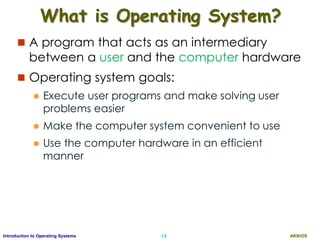
What is Operating System?
 A program that acts as an intermediary
between a user and the computer hardware
 Operating system goals:
 Execute user programs and make solving user
problems easier
 Make the computer system convenient to use
 Use the computer hardware in an efficient
manner
AKN/OSI.3Introduction to Operating Systems
Operating Systems
AKN/OSI.4Introduction to Operating Systems
Computer System Structure
 Computer system can be divided into four
components:
 Hardware – provides basic computing resources
 CPU, memory, I/O devices
 Operating system
 Controls and coordinates use of hardware among various
applications and users
 Application programs – define the ways in which the
system resources are used to solve the computing
problems of the users
 Word processors, compilers, web browsers, database
systems, video games
 Users
 People, machines, other computers
AKN/OSI.5Introduction to Operating Systems
Four Components of a Computer System
AKN/OSI.6Introduction to Operating Systems
Operating System Definition
 OS is a resource allocator
 Manages all resources
 Decides between conflicting requests for efficient
and fair resource use
 OS is a control program
 Controls execution of programs to prevent errors and
improper use of the computer
 “The one program running at all times on the
computer” is the kernel.
 Everything else is either a system program (ships with
the operating system) , or an application program.
AKN/OSI.7Introduction to Operating Systems
Computer Startup
 bootstrap program is loaded at power-up or
reboot
 Typically stored in ROM or EPROM, generally
known as firmware
 Initializes all aspects of system
 Loads operating system kernel and starts
execution
AKN/OSI.8Introduction to Operating Systems
Computer System Organization
 Computer-system operation
 One or more CPUs, device controllers connected
through common bus providing access to shared
memory
 Concurrent execution of CPUs and devices competing
for memory cycles
AKN/OSI.9Introduction to Operating Systems
Operating System Definition
 OS is a resource allocator
 Manages all resources
 Decides between conflicting requests for efficient
and fair resource use
 OS is a control program
 Controls execution of programs to prevent errors and
improper use of the computer
 “The one program running at all times on the
computer” is the kernel.
 Everything else is either a system program (ships with
the operating system) , or an application program.
AKN/OSI.10Introduction to Operating Systems
Computer Startup
 bootstrap program is loaded at power-up or
reboot
 Typically stored in ROM or EPROM, generally
known as firmware
 Initializes all aspects of system
 Loads operating system kernel and starts
execution
AKN/OSI.11Introduction to Operating Systems
Computer System Organization
 Computer-system operation
 One or more CPUs, device controllers connect through
common bus providing access to shared memory
 Concurrent execution of CPUs and devices competing
for memory cycles
AKN/OSI.12Introduction to Operating Systems
Computer-System Operation
 I/O devices and the CPU can execute concurrently
 Each device controller is in charge of a particular
device type
 Each device controller has a local buffer
 CPU moves data from/to main memory to/from local
buffers
 I/O is from the device to local buffer of controller
 Device controller informs CPU that it has finished its
operation by causing an interrupt
AKN/OSI.13Introduction to Operating Systems
Interrupts
 The occurrence of an event is usually signaled by an
interrupt from either the hardware or the software.
 Hardware may trigger an interrupt at any time by
sending a signal to the CPU.
 Software may trigger an interrupt by executing a
special operation called a system call (also called a
monitor call).
 When the CPU is interrupted, it stops current execution
and immediately transfers execution to a fixed
location.
 The fixed location usually contains the starting address
where the service routine for the interrupt is located.
 On completion, the CPU resumes the interrupted
computation.
AKN/OSI.14Introduction to Operating Systems
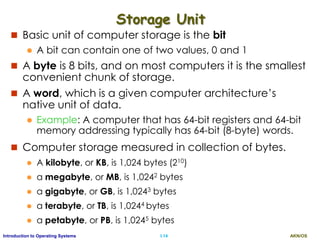
Storage Unit
 Basic unit of computer storage is the bit
 A bit can contain one of two values, 0 and 1
 A byte is 8 bits, and on most computers it is the smallest
convenient chunk of storage.
 A word, which is a given computer architecture’s
native unit of data.
 Example: A computer that has 64-bit registers and 64-bit
memory addressing typically has 64-bit (8-byte) words.
 Computer storage measured in collection of bytes.
 A kilobyte, or KB, is 1,024 bytes (210)
 a megabyte, or MB, is 1,0242 bytes
 a gigabyte, or GB, is 1,0243 bytes
 a terabyte, or TB, is 1,0244 bytes
 a petabyte, or PB, is 1,0245 bytes
AKN/OSI.15Introduction to Operating Systems
Storage Structure
 Main memory – only storage media that the CPU can access
directly. Too small to store all programs/data needed.
 Random access
 Typically volatile
 Secondary storage – extension of main memory that provides
large nonvolatile storage capacity
 Hard disks – rigid metal or glass platters covered with magnetic
recording material
 Disk surface is logically divided into tracks, which are subdivided into
sectors
 The disk controller determines the logical interaction between the
device and the computer
 Solid-state disks – faster than hard disks, nonvolatile
 Various technologies
 Becoming more popular
AKN/OSI.16Introduction to Operating Systems
Storage-Device Hierarchy
Storage systems organized in
hierarchy according to their
Speed, Cost, and Volatility
AKN/OSI.17Introduction to Operating Systems
I/O Structure
 Each device controller is in charge of a specific device
and is responsible for moving the data between the
peripheral device and the local buffer.
 OS have a device driver for each device controller
 To start an I/O, device driver loads the appropriate
register within the device controller.
 The controller starts tarnsfer from device to the local
buffer.
 Once complete, it informs the device driver via an
interrupt and the driver then returns the control to the
OS.
 It is called inturrupt driven data transfer.
AKN/OSI.18Introduction to Operating Systems
I/O Structure - DMA
 The inturrupt driven data transfer produce high
overhead when used for bulk data transfer as te
processor is blocked.
 To avoid this problem Direct Memory Access (DMA) is
used
 Used for high-speed I/O devices able to transmit
information at close to memory speeds
 Device controller transfers entire blocks of data from
buffer storage directly to main memory without CPU
intervention
 Only one interrupt is generated per block, rather
than the one interrupt per byte
AKN/OSI.19Introduction to Operating Systems
I/O Structure
AKN/OSI.20Introduction to Operating Systems
Computer-System Architecture
 Most systems use a single general-purpose processor
 Most systems have special-purpose processors as well
 Multiprocessors systems growing in use and importance
 Also known as parallel systems, tightly-coupled systems
 Advantages include:
1. Increased throughput: increased number of task in less time
2. Economy of scale: costs less then multiple single processor
systems as peripherals etc. can be shared.
3. Increased reliability – graceful degradation or fault tolerance
 Two types:
1. Asymmetric Multiprocessing – each processor is assigned a
specific task and a master processor controls it.
2. Symmetric Multiprocessing – each processor performs all
tasks. All processors are peers no master-slave.
AKN/OSI.21Introduction to Operating Systems
Symmetric Multiprocessing Architecture
AKN/OSI.22Introduction to Operating Systems
A Dual-Core Design
 Multiple computing cores on a single chip.
 These are more efficient as on chip communication is
faster.
 It consumes less power.
 Suitable for database and web servers
AKN/OSI.23Introduction to Operating Systems
Clustered Systems
 Multiple systems working together
 Usually sharing storage via a storage-area network (SAN)
 Provides a high-availability service which survives failures
 Asymmetric clustering has one machine in hot-standby
mode
 Symmetric clustering has multiple nodes running
applications, monitoring each other
 Some clusters are used for high-performance computing
(HPC)
 Applications must be written to use parallelization
 Some have distributed lock manager (DLM) to avoid
conflicting operations
AKN/OSI.24Introduction to Operating Systems
Clustered Systems
AKN/OSI.25Introduction to Operating Systems
Operating System Structure/ OS Types
 Multiprogramming (Batch system)
 needed for efficiency
 Single user cannot keep CPU and I/O
devices busy at all times
 Multiprogramming organizes jobs so that
CPU always has one to execute
 A subset of total jobs in system is kept in
memory, rest are kept in disk (job pool)
 One job is selected and run via job
scheduling
 When it has to wait (for I/O for example),
OS switches to another job
 Resources utilized effectively but does not
provide for user interaction.
AKN/OSI.26Introduction to Operating Systems
Operating System Structure
 Timesharing (multitasking)
 logical extension of batch processing in which CPU
switches jobs so frequently that users can interact with
each job while it is running, creating interactive
computing
 Response time should be < 1 second so that each user
feels as if the entire system is dedicated to him/her.
 Each user has at least one program executing in
memory process
 If several jobs ready to run at the same time then CPU
scheduling is used to provide each user with a small
portion of time-shared computer.
 If processes don’t fit in memory, swapping moves them
in and out to run
 Virtual memory allows execution of processes not
completely in memory.
AKN/OSI.27Introduction to Operating Systems
Operating-System Operations
 Interrupt driven (hardware and software)
 Hardware interrupt by one of the devices
 Software interrupt (exception or trap):
Software error (e.g., division by zero)
Request for operating system service
Other process problems include infinite
loop, processes modifying each other or
the operating system
AKN/OSI.28Introduction to Operating Systems
Operating-System Operations
 Dual-mode operation allows OS to protect itself and
other system components
 User mode and kernel mode
 Mode bit provided by hardware
Provides ability to distinguish when system is
running user code or kernel code
Some instructions designated as privileged, only
executable in kernel mode
System call changes mode to kernel, return from
call resets it to user
 Increasingly CPUs support multi-mode operations
 i.e. virtual machine manager (VMM) mode for
guest VMs
AKN/OSI.29Introduction to Operating Systems
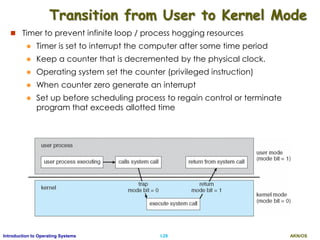
Transition from User to Kernel Mode
 Timer to prevent infinite loop / process hogging resources
 Timer is set to interrupt the computer after some time period
 Keep a counter that is decremented by the physical clock.
 Operating system set the counter (privileged instruction)
 When counter zero generate an interrupt
 Set up before scheduling process to regain control or terminate
program that exceeds allotted time
AKN/OSI.30Introduction to Operating Systems
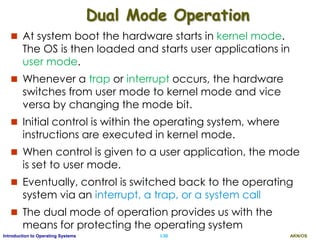
Dual Mode Operation
 At system boot the hardware starts in kernel mode.
The OS is then loaded and starts user applications in
user mode.
 Whenever a trap or interrupt occurs, the hardware
switches from user mode to kernel mode and vice
versa by changing the mode bit.
 Initial control is within the operating system, where
instructions are executed in kernel mode.
 When control is given to a user application, the mode
is set to user mode.
 Eventually, control is switched back to the operating
system via an interrupt, a trap, or a system call
 The dual mode of operation provides us with the
means for protecting the operating system
AKN/OSI.31Introduction to Operating Systems
OS Services
AKN/OSI.32Introduction to Operating Systems
Operating System Services-I
 Operating systems provide an environment for
execution of programs and services to programs and
users
 One set of operating-system services provides
functions that are helpful to the user:
 User interface - Almost all operating systems have a user
interface (UI).
 Varies between Command-Line (CLI), Graphics User Interface
(GUI), Batch
 Program execution - The system must be able to load a
program into memory and to run that program, end
execution, either normally or abnormally (indicating error)
 I/O operations - A running program may require I/O, which
may involve a file or an I/O device
AKN/OSI.33Introduction to Operating Systems
Operating System Services-II
 File-system manipulation - The file system is of particular
interest. Programs need to read and write files and directories,
create and delete them, search them, list file Information,
permission management.
 Communications – Processes may exchange information, on
the same computer or between computers over a network
 Communications may be via shared memory or through
message passing (packets moved by the OS)
 Error detection – OS needs to be constantly aware of possible
errors
 May occur in the CPU and memory hardware, in I/O
devices, in user program
 For each type of error, OS should take the appropriate
action to ensure correct and consistent computing
 Debugging facilities can greatly enhance the user’s and
programmer’s abilities to efficiently use the system
AKN/OSI.34Introduction to Operating Systems
Operating System Services-III
 Another set of OS functions exists for ensuring the efficient
operation of the system itself via resource sharing
 Resource allocation - When multiple users or multiple jobs
running concurrently, resources must be allocated to each of
them
 Many types of resources - CPU cycles, main memory, file
storage, I/O devices.
 Accounting - To keep track of which users use how much and
what kinds of computer resources
 Protection and security - The owners of information stored in a
multiuser or networked computer system may want to control
use of that information, concurrent processes should not
interfere with each other
 Protection involves ensuring that all access to system
resources is controlled
 Security of the system from outsiders requires user
authentication, extends to defending external I/O devices
from invalid access attempts
AKN/OSI.35Introduction to Operating Systems
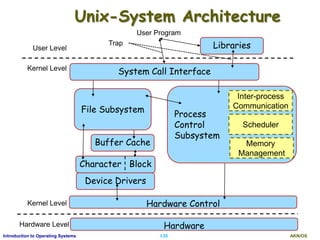
Unix-System Architecture
Device Drivers
Hardware
User Level
Kernel Level
Kernel Level
Hardware Level
User Program
Buffer Cache
Hardware Control
File Subsystem
Process
Control
Subsystem
Scheduler
Memory
Management
Inter-process
Communication
Trap Libraries
System Call Interface
Character Block
AKN/OSI.36Introduction to Operating Systems
Unix System Architecture-I
 The system call and library interface represent the
border between user programs and the kernel
 The libraries are linked with the programs at compile
time and are thus part of the user programs
 There are two sets of system calls, one interacts with
the file subststem and the other with process control
sub system.
 The file subsystem manages files, allocating file space,
administering free space, controlling access to files, and
retrieving data for users.
 e.g. open (to open a file), chown (change the owner of the
file), chmod (change the access permissions of a file).
 The file subsystem accesses file data using a buffering
mechanism that regulates data flow between the kernel and
secondary storage devices.
AKN/OSI.37Introduction to Operating Systems
Unix System Architecture-II
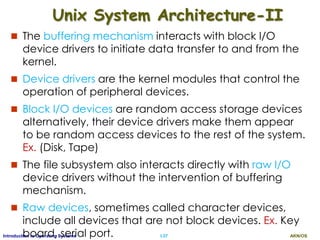
 The buffering mechanism interacts with block I/O
device drivers to initiate data transfer to and from the
kernel.
 Device drivers are the kernel modules that control the
operation of peripheral devices.
 Block I/O devices are random access storage devices
alternatively, their device drivers make them appear
to be random access devices to the rest of the system.
Ex. (Disk, Tape)
 The file subsystem also interacts directly with raw I/O
device drivers without the intervention of buffering
mechanism.
 Raw devices, sometimes called character devices,
include all devices that are not block devices. Ex. Key
board, serial port.
AKN/OSI.38Introduction to Operating Systems
Unix System Architecture-III
 The process control subsystem is responsible for
process synchronization, interprocess communication,
memory management, and process scheduling.
 The file subsystem and the process control subsystem
interact when loading a file into memory for execution
 Some of the system calls for controlling processes are
 fork (create a new process),
 exec (overlay the image of a program onto the running
process),
 exit (finish executing a process),
 wait (synchronize process execution with the exit of a
previously forked process),
 brk (control the size of memory allocated to a process),
 signal (control process response to extraordinary events).
AKN/OSI.39Introduction to Operating Systems
Unix System Architecture-IV
 The memory management module controls the
allocation of memory.
 If at any time the system does not have enough physical
memory for all processes, the kernel moves them between
main memory and secondary memory so that all processes
get a fair chance to execute. (swapping, demand paging)
 The scheduler module allocates the CPU to processes.
It schedules them to run in turn until they
 voluntarily relinquish the CPU while awaiting a resource or
 until the kernel preempts them when their recent run time
exceeds a time quantum.
 The scheduler then chooses the highest priority eligible
process to run; the original process will run again when it is the
highest priority eligible process available.
AKN/OSI.40Introduction to Operating Systems
Unix System Architecture-V
 There are several forms of interprocess
communication, ranging from asynchronous signaling
of events to synchronous transmission of messages
between processes.
 Finally, the hardware control is responsible for handling
interrupts and for communicating with the machine.
 Devices such as disks or terminals may interrupt the
CPU while a process is executing.
 If so, the kernel may resume execution of the
interrupted process after serving the interrupt.
 Interrupts are not served by special processes but by
special functions in the kernel, called in the context of
the currently running process.
AKN/OSI.41Introduction to Operating Systems
File Subsystem - I
 The UNIX system keeps regular files and directories on
block devices such as disks
 An installation may have several physical disk units,
each containing one or more file systems.
 Partitioning a disk into several file systems makes it easier for
administrators to manage the data stored there.
 The kernel deals on a logical level with file systems
rather than with disks, treating each one as a logica!
device identified by a logical device number.
 The conversion between logical device (file system)
addresses and physical device (disk) addresses is
done by the disk driver.
 We will use the term device to mean a logical device
unless explicitly stated otherwise.
AKN/OSI.42Introduction to Operating Systems
File System Layout - II
 A file system consists of a sequence of logical blocks,
each containing 512, 1024, 2048, … any multiple of 512
bytes, depending on the system implementation.
 The size of a logical block is homogeneous within a file
system but may vary between different file systems in
a system configuration.
 Using large logical blocks increases the effective data
transfer rate between disk and memory, as less
number of disk operations are required.
 Ex:, reading 1K bytes from a disk in one read operation is faster
than reading 512 bytes twice.
 However, if a logical block is too large, effective
storage capacity may drop.
AKN/OSI.43Introduction to Operating Systems
File System Layout -II
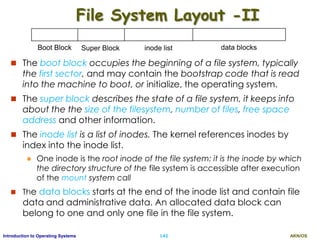
 The boot block occupies the beginning of a file system, typically
the first sector, and may contain the bootstrap code that is read
into the machine to boot, or initialize, the operating system.
 The super block describes the state of a file system, it keeps info
about the the size of the filesystem, number of files, free space
address and other information.
 The inode list is a list of inodes. The kernel references inodes by
index into the inode list.
 One inode is the root inode of the file system: it is the inode by which
the directory structure of the file system is accessible after execution
of the mount system call
 The data blocks starts at the end of the inode list and contain file
data and administrative data. An allocated data block can
belong to one and only one file in the file system.
Boot Block Super Block inode list data blocks
AKN/OSI.44Introduction to Operating Systems
Internal representation of a file-I
 A file is internally represented as an inode(index node)
which contains a description of the disk layout of the
file data and other information such as the file owner,
access permissions, and access times.
 Every file has one inode, but it may have several
names, called links and all of them map into the same
inode.
 When a process creates a new file, the kernel assigns it
an unused inode.
 Inodes are stored in the file system, the kernel reads
them into an in-core inode table when manipulating
files.
AKN/OSI.45Introduction to Operating Systems
Internal representation of a file-II
 The kernel contains two other data structures, the file
table and the user/process file descriptor table.
 The file table contains information that is global to the kernel
 e.g. the byte offset in the file where the user's next read/write
will start and the access rights allowed to the opening
process.
 user file descriptor table is local to every process and contains
information like the identifiers of the files opened by the
process.
 Whenever, a process creates a file, kernel returns a file
descriptor, which is an index in the user file descriptor table.
 Ex: Process A:
 fd1 = open("/var/file1", O_RDONLY);
fd2 = open("/var/file2", O_RDWR);
fd3 = open("/var/file1", O_WRONLY);
AKN/OSI.46Introduction to Operating Systems
Internal representation of a file-III
 Process B:
 fd1 = open("/var/file1", O_RDONLY);
fd2 = open("/var/file3", O_RDONLY);
 When a process opens/creates a file, the kernel
allocates an entry to each table, corresponding to the
files inode.
 open() system call returns an integer called the file
descriptor that can be used further to handle the file.
 Using file descriptor, it finds the pointers to file table
and inode table entries.
 From inode it finds the data in the file.
AKN/OSI.47Introduction to Operating Systems
Internal representation of a file-III
AKN/OSI.48Introduction to Operating Systems
Processes
 A process is the execuion of a program and consists of
text, data and stack in memory.
 The kernel loads an executable file into memory
during an exec system call,
 Program's text and data are loaded to coresponding
regions in memory.
 But the stack region automatically created with
dynamically adjusted size.
 Logical frames are pushed when calling a function and
popped when returns.
 A special register called the stack pointer indicates the
current stack depth.
 Frame contains the parameters to a function, local variables,
and data required to recover previous stack frame, value of
the program counter and stack pointer
AKN/OSI.49Introduction to Operating Systems
Example Program- copy a file
#include<fcntl.h>
main(int argc, char *argv[]){
int fdOld, fdNew;
fdOld = open(argv[1], O_RDONLY);
fdNew = creat(argv[2], 0666);
copy(fdOld,fdNew);
}
copy(int old, int new){
int count;
while((count = read(old, buffer, sizeof(buffer))) > 0)
write(new, buffer, count);
}
AKN/OSI.50Introduction to Operating Systems
Ex. User Stack for Copy Program
Parameters to main argc, argv
Return address after main
Address of Frame 0
Local variables fdOld, fdNew
Parameters to main argc, argv
Return address after main
Address of Frame 0
Local variables fdOld, fdNew
Parameters to main argc, argv
Return address after main
Address of Frame 0
Local variables fdOld, fdNew
User Stack
Frame 0
start
 The process startup procedure calls
the main function with two
parameters, thus pushing frame 1
 main then calls copy with two
parameters and pushes Frame 2
 Kernel stack contains stack frames
for functions executing in kernel
mode similar to user stack
 Finally process invoked system calls
write that causes pushing frame 3
 When write is executed, causes an
interrupt that results in a hardware
switch to kernel mode.
 Now the process get executed in
kernel code and uses kernel stack.
AKN/OSI.51Introduction to Operating Systems
Process data structures
 Each process has an entry in the kernel process table.
 Each process contains an u area that contains private data
manipulated by kernel.
 The process table points to a per process region table, which
again points to entries in region table
 Region table is a contiguous area of a processor’s address space
(text, data, stack)
 Process table fields:
 state
 uid: owner of the
process
 event descriptor
when a process is
suspended
AKN/OSI.52Introduction to Operating Systems
Process datastructure - II
 Fields of u area table
 Pointer to process table slot of the current executing process
 Parameters of current system call
 File descriptors for all open files
 Internal I/O parameters
 Current directory
 Process and file size limits
 Kernel can directly access fileds of the u area of the
executing process.
AKN/OSI.53Introduction to Operating Systems
Processes
 A process is the execuion of a program and consists of
text, data and stack in memory.
 The kernel loads an executable file into memory
during an exec system call,
 Program's text and data are loaded to coresponding
regions in memory.
 But the stack region automatically created with
dynamically adjusted size.
 Logical frames are pushed when calling a function and
popped when returns.
 A special register called the stack pointer indicates the
current stack depth.
 Frame contains the parameters to a function, local variables,
and data required to recover previous stack frame, value of
the program counter and stack pointer
AKN/OSI.54Introduction to Operating Systems
Example Program- copy a file
main(int argc, char *argv[]){
int fdOld, fdNew;
fdOld = open(argv[1], O_RDONLY);
fdNew = creat(argv[2], 0666);
copy(fdOld,fdNew);
}
copy(int old, int new){
int count, buffer[1024];
while((count = read(old, buffer, sizeof(buffer))) > 0)
write(new, buffer, count);
}
AKN/OSI.55Introduction to Operating Systems
Ex. User Stack for Copy Program
Parameters to main argc, argv
Return address after main
Address of Frame 0
Local variables fdOld, fdNew
Parameters to copy old, new
Return address after copy
Address of Frame 1
Local variables count, buffer
Param. write new, buffer, count
Return address after write
Address of Frame 2
Local variables -----------
User Stack
Frame 0
start
 The process startup procedure calls
the main function with two
parameters, thus pushing frame 1
 main then calls copy with two
parameters and pushes Frame 2
 Kernel stack contains stack frames
for functions executing in kernel
mode similar to user stack
 Finally process invoked system calls
write that causes pushing frame 3
 When write is executed, causes an
interrupt that results in a hardware
switch to kernel mode.
 Now the process get executed in
kernel code and uses kernel stack.
AKN/OSI.56Introduction to Operating Systems
Process data structures
 Each process has an entry in the kernel process table.
 Each process contains an u area that contains private data
manipulated by kernel
 The process table points to a per process region table, which
again points to entries in region table
 Region table is a contiguous area of a process’s address space
(text, data, stack)
 Process table fields:
 state
 uid: owner of the
process
 event descriptor
when a process is
suspended
AKN/OSI.57Introduction to Operating Systems
Process datastructure - II
 Fields of u area table
 Pointer to process table slot of the current executing process
 Parameters of current system call
 File descriptors for all open files
 Internal I/O parameters
 Current directory
 Process and file size limits
 Kernel can directly access fileds of the u area of the
executing process.
AKN/OSI.58Introduction to Operating Systems
Context of a Process
 The context of a process is its state,
 its text
 the values of its global user variables and data
structures
 the values of machine registers it uses
 The values stored in its process table and u area
 the contents of its user and kernel stacks.
 When executing a process, the system is said to be
executing in the context of the process.
 To execute another process, it does a context switch,
so that the system executes in the context of the other
process.
AKN/OSI.59Introduction to Operating Systems
Process States
 The process undergoes several
state transitions during its life time.
 Several processes can execute
simultaneously in a time-shared
manner
 The kernel allows a context switch
only when a process moves from
the state kernel running to the state
asleep"
 i.e. Processes running in
kernel mode cannot be
preempted by other
processes
 kernel also prevents interrupts when inside a critical regions of code.
 i.e. A section of code is critical if execution of arbitrary interrupt
handlers could result in consistency problems.
 The process scheduler periodically preempts processes executing in
user mode so that processes cannot monopolize use of the CPU
AKN/OSI.60Introduction to Operating Systems
Process States contd.
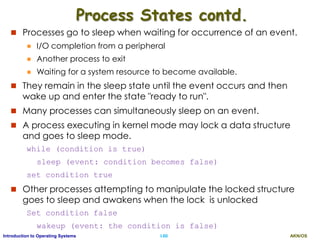
 Processes go to sleep when waiting for occurrence of an event.
 I/O completion from a peripheral
 Another process to exit
 Waiting for a system resource to become available.
 They remain in the sleep state until the event occurs and then
wake up and enter the state "ready to run".
 Many processes can simultaneously sleep on an event.
 A process executing in kernel mode may lock a data structure
and goes to sleep mode.
while (condition is true)
sleep (event: condition becomes false)
set condition true
 Other processes attempting to manipulate the locked structure
goes to sleep and awakens when the lock is unlocked
Set condition false
wakeup (event: the condition is false)
AKN/OSI.61Introduction to Operating Systems
Processes Slipping on a lock
Time
Process A Process B Process C
Buffer locked
sleeps Buffer locked
sleeps
Buffer locked
sleeps
Runs, Buffer unlocked
Lock buffer
Context Switch
Runs
Ready to runReady to run Ready to run
Buffer unlocked, wake up all sleeping processes
Buffer locked, sleeps
Goes to sleep
Wakes up, Unlocks buffer
Ready to run Ready to run
AKN/OSI.62Introduction to Operating Systems
Process Control Block (PCB)
Information associated with each process
(also called task control block)
 Process state – running, waiting, etc
 Program counter – location of instruction to
next execute
 CPU registers – accumulator, index registers,
stack pointers, . . .
 CPU scheduling information- priorities,
pointers to scheduling queue etc.
 Memory-management information – memory
allocated to the process
 Accounting information – CPU used, clock
time elapsed since start, time limits
 I/O status information – I/O devices allocated
to process, list of open files
AKN/OSI.63Introduction to Operating Systems
Process Scheduling
 To Maximize CPU use, quickly switch processes
onto CPU for time sharing
 Process scheduler selects among available
processes for next execution on CPU
 Maintains scheduling queues of processes
 Job queue – set of all processes in the system
 Ready queue – set of all processes residing in main
memory, ready and waiting to execute
 Device queues – set of processes waiting for an I/O
device
 Processes migrate among the various queues
AKN/OSI.64Introduction to Operating Systems
Various queues
AKN/OSI.65Introduction to Operating Systems
Scheduling process: Queuing Diagram
AKN/OSI.66Introduction to Operating Systems
Schedulers
 The selection process is carried by appropriate scheduler
 Long-term scheduler (or job scheduler) – selects which processes
should be brought into the ready queue
 Suitable for a batch system
 Long-term scheduler is invoked infrequently (seconds, minutes)
 (may be slow)
 The long-term scheduler controls the degree of
multiprogramming (number of processes in memory)
 Need to be invoked when a process leaves the system
 Short-term scheduler (or CPU scheduler) – selects which process
should be executed next and allocates CPU
 Suitable for a time-shared system
 Short-term scheduler is invoked frequently once in every 100ms
 The scheduler must be fast. (if it takes 10ms to decide a 100ms
task, then 9% of the CPU time wasted in scheduling!)
AKN/OSI.67Introduction to Operating Systems
Impact of Types of processes
 Processes can be described as either:
 I/O-bound process – spends more time doing I/O than
computations, many short CPU bursts
 CPU-bound process – spends more time doing computations;
few very long CPU bursts
 All processes are I/O bound => ready queue almost
empty
 All processes are CPU bound => I/O queue almost
empty
 Therefore Long-term scheduler should select a good
process mix
 In UNIX and MS-Windows, there is no long-term
scheduler.
 Some system may introduce medium-term scheduler
AKN/OSI.68Introduction to Operating Systems
Medium-Term Scheduler
 Remove process from memory, store on disk, bring
back in from disk to continue execution: swapping
 It reduces multiprogramming and improves the
process mix.
AKN/OSI.69Introduction to Operating Systems
Process Creation
 Parent process create children processes, which, in turn
create other processes, forming a tree of processes
 Generally, process identified and managed via a
process identifier (pid)
 Resource sharing options
 Parent and children share all resources
 Children share subset of parent’s resources
 Parent and child share no resources
 Execution options
 Parent and children execute concurrently
 Parent waits until children terminate
AKN/OSI.70Introduction to Operating Systems
A Tree of Processes in Linux
init
pid = 1
sshd
pid = 3028
login
pid = 8415
kthreadd
pid = 2
sshd
pid = 3610
pdflush
pid = 200
khelper
pid = 6
tcsch
pid = 4005
emacs
pid = 9204
bash
pid = 8416
ps
pid = 9298
AKN/OSI.71Introduction to Operating Systems
Process Creation (Cont.)
 Address space
 Child is a duplicate of parent
 Child has a new program loaded into it
 UNIX examples
 fork() system call creates new process
 exec() system call used after a fork() to replace the
process’ memory space with a new program
AKN/OSI.72Introduction to Operating Systems
C Program Forking Separate Process
AKN/OSI.73Introduction to Operating Systems
Process Termination
 Process executes last statement and then asks the
operating system to delete it using the exit() system
call.
 Returns status data from child to parent (via wait())
 Process’ resources are deallocated by operating system
 Parent may terminate the execution of children
processes using the abort() system call. Some
reasons for doing so:
 Child has exceeded allocated resources
 Task assigned to child is no longer required
 The parent is exiting and the operating systems does not allow
a child to continue if its parent terminates
AKN/OSI.74Introduction to Operating Systems
Process Termination
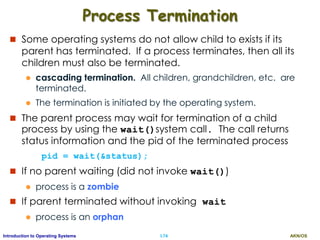
 Some operating systems do not allow child to exists if its
parent has terminated. If a process terminates, then all its
children must also be terminated.
 cascading termination. All children, grandchildren, etc. are
terminated.
 The termination is initiated by the operating system.
 The parent process may wait for termination of a child
process by using the wait()system call. The call returns
status information and the pid of the terminated process
pid = wait(&status);
 If no parent waiting (did not invoke wait())
 process is a zombie
 If parent terminated without invoking wait
 process is an orphan

Operating Systems Part I-Basics

  • 1.
    Operating Systems Basics Ajit KNayak, Ph.D. SOA University
  • 2.
    AKN/OSI.2Introduction to OperatingSystems What is Operating System?  A program that acts as an intermediary between a user and the computer hardware  Operating system goals:  Execute user programs and make solving user problems easier  Make the computer system convenient to use  Use the computer hardware in an efficient manner
  • 3.
    AKN/OSI.3Introduction to OperatingSystems Operating Systems
  • 4.
    AKN/OSI.4Introduction to OperatingSystems Computer System Structure  Computer system can be divided into four components:  Hardware – provides basic computing resources  CPU, memory, I/O devices  Operating system  Controls and coordinates use of hardware among various applications and users  Application programs – define the ways in which the system resources are used to solve the computing problems of the users  Word processors, compilers, web browsers, database systems, video games  Users  People, machines, other computers
  • 5.
    AKN/OSI.5Introduction to OperatingSystems Four Components of a Computer System
  • 6.
    AKN/OSI.6Introduction to OperatingSystems Operating System Definition  OS is a resource allocator  Manages all resources  Decides between conflicting requests for efficient and fair resource use  OS is a control program  Controls execution of programs to prevent errors and improper use of the computer  “The one program running at all times on the computer” is the kernel.  Everything else is either a system program (ships with the operating system) , or an application program.
  • 7.
    AKN/OSI.7Introduction to OperatingSystems Computer Startup  bootstrap program is loaded at power-up or reboot  Typically stored in ROM or EPROM, generally known as firmware  Initializes all aspects of system  Loads operating system kernel and starts execution
  • 8.
    AKN/OSI.8Introduction to OperatingSystems Computer System Organization  Computer-system operation  One or more CPUs, device controllers connected through common bus providing access to shared memory  Concurrent execution of CPUs and devices competing for memory cycles
  • 9.
    AKN/OSI.9Introduction to OperatingSystems Operating System Definition  OS is a resource allocator  Manages all resources  Decides between conflicting requests for efficient and fair resource use  OS is a control program  Controls execution of programs to prevent errors and improper use of the computer  “The one program running at all times on the computer” is the kernel.  Everything else is either a system program (ships with the operating system) , or an application program.
  • 10.
    AKN/OSI.10Introduction to OperatingSystems Computer Startup  bootstrap program is loaded at power-up or reboot  Typically stored in ROM or EPROM, generally known as firmware  Initializes all aspects of system  Loads operating system kernel and starts execution
  • 11.
    AKN/OSI.11Introduction to OperatingSystems Computer System Organization  Computer-system operation  One or more CPUs, device controllers connect through common bus providing access to shared memory  Concurrent execution of CPUs and devices competing for memory cycles
  • 12.
    AKN/OSI.12Introduction to OperatingSystems Computer-System Operation  I/O devices and the CPU can execute concurrently  Each device controller is in charge of a particular device type  Each device controller has a local buffer  CPU moves data from/to main memory to/from local buffers  I/O is from the device to local buffer of controller  Device controller informs CPU that it has finished its operation by causing an interrupt
  • 13.
    AKN/OSI.13Introduction to OperatingSystems Interrupts  The occurrence of an event is usually signaled by an interrupt from either the hardware or the software.  Hardware may trigger an interrupt at any time by sending a signal to the CPU.  Software may trigger an interrupt by executing a special operation called a system call (also called a monitor call).  When the CPU is interrupted, it stops current execution and immediately transfers execution to a fixed location.  The fixed location usually contains the starting address where the service routine for the interrupt is located.  On completion, the CPU resumes the interrupted computation.
  • 14.
    AKN/OSI.14Introduction to OperatingSystems Storage Unit  Basic unit of computer storage is the bit  A bit can contain one of two values, 0 and 1  A byte is 8 bits, and on most computers it is the smallest convenient chunk of storage.  A word, which is a given computer architecture’s native unit of data.  Example: A computer that has 64-bit registers and 64-bit memory addressing typically has 64-bit (8-byte) words.  Computer storage measured in collection of bytes.  A kilobyte, or KB, is 1,024 bytes (210)  a megabyte, or MB, is 1,0242 bytes  a gigabyte, or GB, is 1,0243 bytes  a terabyte, or TB, is 1,0244 bytes  a petabyte, or PB, is 1,0245 bytes
  • 15.
    AKN/OSI.15Introduction to OperatingSystems Storage Structure  Main memory – only storage media that the CPU can access directly. Too small to store all programs/data needed.  Random access  Typically volatile  Secondary storage – extension of main memory that provides large nonvolatile storage capacity  Hard disks – rigid metal or glass platters covered with magnetic recording material  Disk surface is logically divided into tracks, which are subdivided into sectors  The disk controller determines the logical interaction between the device and the computer  Solid-state disks – faster than hard disks, nonvolatile  Various technologies  Becoming more popular
  • 16.
    AKN/OSI.16Introduction to OperatingSystems Storage-Device Hierarchy Storage systems organized in hierarchy according to their Speed, Cost, and Volatility
  • 17.
    AKN/OSI.17Introduction to OperatingSystems I/O Structure  Each device controller is in charge of a specific device and is responsible for moving the data between the peripheral device and the local buffer.  OS have a device driver for each device controller  To start an I/O, device driver loads the appropriate register within the device controller.  The controller starts tarnsfer from device to the local buffer.  Once complete, it informs the device driver via an interrupt and the driver then returns the control to the OS.  It is called inturrupt driven data transfer.
  • 18.
    AKN/OSI.18Introduction to OperatingSystems I/O Structure - DMA  The inturrupt driven data transfer produce high overhead when used for bulk data transfer as te processor is blocked.  To avoid this problem Direct Memory Access (DMA) is used  Used for high-speed I/O devices able to transmit information at close to memory speeds  Device controller transfers entire blocks of data from buffer storage directly to main memory without CPU intervention  Only one interrupt is generated per block, rather than the one interrupt per byte
  • 19.
  • 20.
    AKN/OSI.20Introduction to OperatingSystems Computer-System Architecture  Most systems use a single general-purpose processor  Most systems have special-purpose processors as well  Multiprocessors systems growing in use and importance  Also known as parallel systems, tightly-coupled systems  Advantages include: 1. Increased throughput: increased number of task in less time 2. Economy of scale: costs less then multiple single processor systems as peripherals etc. can be shared. 3. Increased reliability – graceful degradation or fault tolerance  Two types: 1. Asymmetric Multiprocessing – each processor is assigned a specific task and a master processor controls it. 2. Symmetric Multiprocessing – each processor performs all tasks. All processors are peers no master-slave.
  • 21.
    AKN/OSI.21Introduction to OperatingSystems Symmetric Multiprocessing Architecture
  • 22.
    AKN/OSI.22Introduction to OperatingSystems A Dual-Core Design  Multiple computing cores on a single chip.  These are more efficient as on chip communication is faster.  It consumes less power.  Suitable for database and web servers
  • 23.
    AKN/OSI.23Introduction to OperatingSystems Clustered Systems  Multiple systems working together  Usually sharing storage via a storage-area network (SAN)  Provides a high-availability service which survives failures  Asymmetric clustering has one machine in hot-standby mode  Symmetric clustering has multiple nodes running applications, monitoring each other  Some clusters are used for high-performance computing (HPC)  Applications must be written to use parallelization  Some have distributed lock manager (DLM) to avoid conflicting operations
  • 24.
    AKN/OSI.24Introduction to OperatingSystems Clustered Systems
  • 25.
    AKN/OSI.25Introduction to OperatingSystems Operating System Structure/ OS Types  Multiprogramming (Batch system)  needed for efficiency  Single user cannot keep CPU and I/O devices busy at all times  Multiprogramming organizes jobs so that CPU always has one to execute  A subset of total jobs in system is kept in memory, rest are kept in disk (job pool)  One job is selected and run via job scheduling  When it has to wait (for I/O for example), OS switches to another job  Resources utilized effectively but does not provide for user interaction.
  • 26.
    AKN/OSI.26Introduction to OperatingSystems Operating System Structure  Timesharing (multitasking)  logical extension of batch processing in which CPU switches jobs so frequently that users can interact with each job while it is running, creating interactive computing  Response time should be < 1 second so that each user feels as if the entire system is dedicated to him/her.  Each user has at least one program executing in memory process  If several jobs ready to run at the same time then CPU scheduling is used to provide each user with a small portion of time-shared computer.  If processes don’t fit in memory, swapping moves them in and out to run  Virtual memory allows execution of processes not completely in memory.
  • 27.
    AKN/OSI.27Introduction to OperatingSystems Operating-System Operations  Interrupt driven (hardware and software)  Hardware interrupt by one of the devices  Software interrupt (exception or trap): Software error (e.g., division by zero) Request for operating system service Other process problems include infinite loop, processes modifying each other or the operating system
  • 28.
    AKN/OSI.28Introduction to OperatingSystems Operating-System Operations  Dual-mode operation allows OS to protect itself and other system components  User mode and kernel mode  Mode bit provided by hardware Provides ability to distinguish when system is running user code or kernel code Some instructions designated as privileged, only executable in kernel mode System call changes mode to kernel, return from call resets it to user  Increasingly CPUs support multi-mode operations  i.e. virtual machine manager (VMM) mode for guest VMs
  • 29.
    AKN/OSI.29Introduction to OperatingSystems Transition from User to Kernel Mode  Timer to prevent infinite loop / process hogging resources  Timer is set to interrupt the computer after some time period  Keep a counter that is decremented by the physical clock.  Operating system set the counter (privileged instruction)  When counter zero generate an interrupt  Set up before scheduling process to regain control or terminate program that exceeds allotted time
  • 30.
    AKN/OSI.30Introduction to OperatingSystems Dual Mode Operation  At system boot the hardware starts in kernel mode. The OS is then loaded and starts user applications in user mode.  Whenever a trap or interrupt occurs, the hardware switches from user mode to kernel mode and vice versa by changing the mode bit.  Initial control is within the operating system, where instructions are executed in kernel mode.  When control is given to a user application, the mode is set to user mode.  Eventually, control is switched back to the operating system via an interrupt, a trap, or a system call  The dual mode of operation provides us with the means for protecting the operating system
  • 31.
  • 32.
    AKN/OSI.32Introduction to OperatingSystems Operating System Services-I  Operating systems provide an environment for execution of programs and services to programs and users  One set of operating-system services provides functions that are helpful to the user:  User interface - Almost all operating systems have a user interface (UI).  Varies between Command-Line (CLI), Graphics User Interface (GUI), Batch  Program execution - The system must be able to load a program into memory and to run that program, end execution, either normally or abnormally (indicating error)  I/O operations - A running program may require I/O, which may involve a file or an I/O device
  • 33.
    AKN/OSI.33Introduction to OperatingSystems Operating System Services-II  File-system manipulation - The file system is of particular interest. Programs need to read and write files and directories, create and delete them, search them, list file Information, permission management.  Communications – Processes may exchange information, on the same computer or between computers over a network  Communications may be via shared memory or through message passing (packets moved by the OS)  Error detection – OS needs to be constantly aware of possible errors  May occur in the CPU and memory hardware, in I/O devices, in user program  For each type of error, OS should take the appropriate action to ensure correct and consistent computing  Debugging facilities can greatly enhance the user’s and programmer’s abilities to efficiently use the system
  • 34.
    AKN/OSI.34Introduction to OperatingSystems Operating System Services-III  Another set of OS functions exists for ensuring the efficient operation of the system itself via resource sharing  Resource allocation - When multiple users or multiple jobs running concurrently, resources must be allocated to each of them  Many types of resources - CPU cycles, main memory, file storage, I/O devices.  Accounting - To keep track of which users use how much and what kinds of computer resources  Protection and security - The owners of information stored in a multiuser or networked computer system may want to control use of that information, concurrent processes should not interfere with each other  Protection involves ensuring that all access to system resources is controlled  Security of the system from outsiders requires user authentication, extends to defending external I/O devices from invalid access attempts
  • 35.
    AKN/OSI.35Introduction to OperatingSystems Unix-System Architecture Device Drivers Hardware User Level Kernel Level Kernel Level Hardware Level User Program Buffer Cache Hardware Control File Subsystem Process Control Subsystem Scheduler Memory Management Inter-process Communication Trap Libraries System Call Interface Character Block
  • 36.
    AKN/OSI.36Introduction to OperatingSystems Unix System Architecture-I  The system call and library interface represent the border between user programs and the kernel  The libraries are linked with the programs at compile time and are thus part of the user programs  There are two sets of system calls, one interacts with the file subststem and the other with process control sub system.  The file subsystem manages files, allocating file space, administering free space, controlling access to files, and retrieving data for users.  e.g. open (to open a file), chown (change the owner of the file), chmod (change the access permissions of a file).  The file subsystem accesses file data using a buffering mechanism that regulates data flow between the kernel and secondary storage devices.
  • 37.
    AKN/OSI.37Introduction to OperatingSystems Unix System Architecture-II  The buffering mechanism interacts with block I/O device drivers to initiate data transfer to and from the kernel.  Device drivers are the kernel modules that control the operation of peripheral devices.  Block I/O devices are random access storage devices alternatively, their device drivers make them appear to be random access devices to the rest of the system. Ex. (Disk, Tape)  The file subsystem also interacts directly with raw I/O device drivers without the intervention of buffering mechanism.  Raw devices, sometimes called character devices, include all devices that are not block devices. Ex. Key board, serial port.
  • 38.
    AKN/OSI.38Introduction to OperatingSystems Unix System Architecture-III  The process control subsystem is responsible for process synchronization, interprocess communication, memory management, and process scheduling.  The file subsystem and the process control subsystem interact when loading a file into memory for execution  Some of the system calls for controlling processes are  fork (create a new process),  exec (overlay the image of a program onto the running process),  exit (finish executing a process),  wait (synchronize process execution with the exit of a previously forked process),  brk (control the size of memory allocated to a process),  signal (control process response to extraordinary events).
  • 39.
    AKN/OSI.39Introduction to OperatingSystems Unix System Architecture-IV  The memory management module controls the allocation of memory.  If at any time the system does not have enough physical memory for all processes, the kernel moves them between main memory and secondary memory so that all processes get a fair chance to execute. (swapping, demand paging)  The scheduler module allocates the CPU to processes. It schedules them to run in turn until they  voluntarily relinquish the CPU while awaiting a resource or  until the kernel preempts them when their recent run time exceeds a time quantum.  The scheduler then chooses the highest priority eligible process to run; the original process will run again when it is the highest priority eligible process available.
  • 40.
    AKN/OSI.40Introduction to OperatingSystems Unix System Architecture-V  There are several forms of interprocess communication, ranging from asynchronous signaling of events to synchronous transmission of messages between processes.  Finally, the hardware control is responsible for handling interrupts and for communicating with the machine.  Devices such as disks or terminals may interrupt the CPU while a process is executing.  If so, the kernel may resume execution of the interrupted process after serving the interrupt.  Interrupts are not served by special processes but by special functions in the kernel, called in the context of the currently running process.
  • 41.
    AKN/OSI.41Introduction to OperatingSystems File Subsystem - I  The UNIX system keeps regular files and directories on block devices such as disks  An installation may have several physical disk units, each containing one or more file systems.  Partitioning a disk into several file systems makes it easier for administrators to manage the data stored there.  The kernel deals on a logical level with file systems rather than with disks, treating each one as a logica! device identified by a logical device number.  The conversion between logical device (file system) addresses and physical device (disk) addresses is done by the disk driver.  We will use the term device to mean a logical device unless explicitly stated otherwise.
  • 42.
    AKN/OSI.42Introduction to OperatingSystems File System Layout - II  A file system consists of a sequence of logical blocks, each containing 512, 1024, 2048, … any multiple of 512 bytes, depending on the system implementation.  The size of a logical block is homogeneous within a file system but may vary between different file systems in a system configuration.  Using large logical blocks increases the effective data transfer rate between disk and memory, as less number of disk operations are required.  Ex:, reading 1K bytes from a disk in one read operation is faster than reading 512 bytes twice.  However, if a logical block is too large, effective storage capacity may drop.
  • 43.
    AKN/OSI.43Introduction to OperatingSystems File System Layout -II  The boot block occupies the beginning of a file system, typically the first sector, and may contain the bootstrap code that is read into the machine to boot, or initialize, the operating system.  The super block describes the state of a file system, it keeps info about the the size of the filesystem, number of files, free space address and other information.  The inode list is a list of inodes. The kernel references inodes by index into the inode list.  One inode is the root inode of the file system: it is the inode by which the directory structure of the file system is accessible after execution of the mount system call  The data blocks starts at the end of the inode list and contain file data and administrative data. An allocated data block can belong to one and only one file in the file system. Boot Block Super Block inode list data blocks
  • 44.
    AKN/OSI.44Introduction to OperatingSystems Internal representation of a file-I  A file is internally represented as an inode(index node) which contains a description of the disk layout of the file data and other information such as the file owner, access permissions, and access times.  Every file has one inode, but it may have several names, called links and all of them map into the same inode.  When a process creates a new file, the kernel assigns it an unused inode.  Inodes are stored in the file system, the kernel reads them into an in-core inode table when manipulating files.
  • 45.
    AKN/OSI.45Introduction to OperatingSystems Internal representation of a file-II  The kernel contains two other data structures, the file table and the user/process file descriptor table.  The file table contains information that is global to the kernel  e.g. the byte offset in the file where the user's next read/write will start and the access rights allowed to the opening process.  user file descriptor table is local to every process and contains information like the identifiers of the files opened by the process.  Whenever, a process creates a file, kernel returns a file descriptor, which is an index in the user file descriptor table.  Ex: Process A:  fd1 = open("/var/file1", O_RDONLY); fd2 = open("/var/file2", O_RDWR); fd3 = open("/var/file1", O_WRONLY);
  • 46.
    AKN/OSI.46Introduction to OperatingSystems Internal representation of a file-III  Process B:  fd1 = open("/var/file1", O_RDONLY); fd2 = open("/var/file3", O_RDONLY);  When a process opens/creates a file, the kernel allocates an entry to each table, corresponding to the files inode.  open() system call returns an integer called the file descriptor that can be used further to handle the file.  Using file descriptor, it finds the pointers to file table and inode table entries.  From inode it finds the data in the file.
  • 47.
    AKN/OSI.47Introduction to OperatingSystems Internal representation of a file-III
  • 48.
    AKN/OSI.48Introduction to OperatingSystems Processes  A process is the execuion of a program and consists of text, data and stack in memory.  The kernel loads an executable file into memory during an exec system call,  Program's text and data are loaded to coresponding regions in memory.  But the stack region automatically created with dynamically adjusted size.  Logical frames are pushed when calling a function and popped when returns.  A special register called the stack pointer indicates the current stack depth.  Frame contains the parameters to a function, local variables, and data required to recover previous stack frame, value of the program counter and stack pointer
  • 49.
    AKN/OSI.49Introduction to OperatingSystems Example Program- copy a file #include<fcntl.h> main(int argc, char *argv[]){ int fdOld, fdNew; fdOld = open(argv[1], O_RDONLY); fdNew = creat(argv[2], 0666); copy(fdOld,fdNew); } copy(int old, int new){ int count; while((count = read(old, buffer, sizeof(buffer))) > 0) write(new, buffer, count); }
  • 50.
    AKN/OSI.50Introduction to OperatingSystems Ex. User Stack for Copy Program Parameters to main argc, argv Return address after main Address of Frame 0 Local variables fdOld, fdNew Parameters to main argc, argv Return address after main Address of Frame 0 Local variables fdOld, fdNew Parameters to main argc, argv Return address after main Address of Frame 0 Local variables fdOld, fdNew User Stack Frame 0 start  The process startup procedure calls the main function with two parameters, thus pushing frame 1  main then calls copy with two parameters and pushes Frame 2  Kernel stack contains stack frames for functions executing in kernel mode similar to user stack  Finally process invoked system calls write that causes pushing frame 3  When write is executed, causes an interrupt that results in a hardware switch to kernel mode.  Now the process get executed in kernel code and uses kernel stack.
  • 51.
    AKN/OSI.51Introduction to OperatingSystems Process data structures  Each process has an entry in the kernel process table.  Each process contains an u area that contains private data manipulated by kernel.  The process table points to a per process region table, which again points to entries in region table  Region table is a contiguous area of a processor’s address space (text, data, stack)  Process table fields:  state  uid: owner of the process  event descriptor when a process is suspended
  • 52.
    AKN/OSI.52Introduction to OperatingSystems Process datastructure - II  Fields of u area table  Pointer to process table slot of the current executing process  Parameters of current system call  File descriptors for all open files  Internal I/O parameters  Current directory  Process and file size limits  Kernel can directly access fileds of the u area of the executing process.
  • 53.
    AKN/OSI.53Introduction to OperatingSystems Processes  A process is the execuion of a program and consists of text, data and stack in memory.  The kernel loads an executable file into memory during an exec system call,  Program's text and data are loaded to coresponding regions in memory.  But the stack region automatically created with dynamically adjusted size.  Logical frames are pushed when calling a function and popped when returns.  A special register called the stack pointer indicates the current stack depth.  Frame contains the parameters to a function, local variables, and data required to recover previous stack frame, value of the program counter and stack pointer
  • 54.
    AKN/OSI.54Introduction to OperatingSystems Example Program- copy a file main(int argc, char *argv[]){ int fdOld, fdNew; fdOld = open(argv[1], O_RDONLY); fdNew = creat(argv[2], 0666); copy(fdOld,fdNew); } copy(int old, int new){ int count, buffer[1024]; while((count = read(old, buffer, sizeof(buffer))) > 0) write(new, buffer, count); }
  • 55.
    AKN/OSI.55Introduction to OperatingSystems Ex. User Stack for Copy Program Parameters to main argc, argv Return address after main Address of Frame 0 Local variables fdOld, fdNew Parameters to copy old, new Return address after copy Address of Frame 1 Local variables count, buffer Param. write new, buffer, count Return address after write Address of Frame 2 Local variables ----------- User Stack Frame 0 start  The process startup procedure calls the main function with two parameters, thus pushing frame 1  main then calls copy with two parameters and pushes Frame 2  Kernel stack contains stack frames for functions executing in kernel mode similar to user stack  Finally process invoked system calls write that causes pushing frame 3  When write is executed, causes an interrupt that results in a hardware switch to kernel mode.  Now the process get executed in kernel code and uses kernel stack.
  • 56.
    AKN/OSI.56Introduction to OperatingSystems Process data structures  Each process has an entry in the kernel process table.  Each process contains an u area that contains private data manipulated by kernel  The process table points to a per process region table, which again points to entries in region table  Region table is a contiguous area of a process’s address space (text, data, stack)  Process table fields:  state  uid: owner of the process  event descriptor when a process is suspended
  • 57.
    AKN/OSI.57Introduction to OperatingSystems Process datastructure - II  Fields of u area table  Pointer to process table slot of the current executing process  Parameters of current system call  File descriptors for all open files  Internal I/O parameters  Current directory  Process and file size limits  Kernel can directly access fileds of the u area of the executing process.
  • 58.
    AKN/OSI.58Introduction to OperatingSystems Context of a Process  The context of a process is its state,  its text  the values of its global user variables and data structures  the values of machine registers it uses  The values stored in its process table and u area  the contents of its user and kernel stacks.  When executing a process, the system is said to be executing in the context of the process.  To execute another process, it does a context switch, so that the system executes in the context of the other process.
  • 59.
    AKN/OSI.59Introduction to OperatingSystems Process States  The process undergoes several state transitions during its life time.  Several processes can execute simultaneously in a time-shared manner  The kernel allows a context switch only when a process moves from the state kernel running to the state asleep"  i.e. Processes running in kernel mode cannot be preempted by other processes  kernel also prevents interrupts when inside a critical regions of code.  i.e. A section of code is critical if execution of arbitrary interrupt handlers could result in consistency problems.  The process scheduler periodically preempts processes executing in user mode so that processes cannot monopolize use of the CPU
  • 60.
    AKN/OSI.60Introduction to OperatingSystems Process States contd.  Processes go to sleep when waiting for occurrence of an event.  I/O completion from a peripheral  Another process to exit  Waiting for a system resource to become available.  They remain in the sleep state until the event occurs and then wake up and enter the state "ready to run".  Many processes can simultaneously sleep on an event.  A process executing in kernel mode may lock a data structure and goes to sleep mode. while (condition is true) sleep (event: condition becomes false) set condition true  Other processes attempting to manipulate the locked structure goes to sleep and awakens when the lock is unlocked Set condition false wakeup (event: the condition is false)
  • 61.
    AKN/OSI.61Introduction to OperatingSystems Processes Slipping on a lock Time Process A Process B Process C Buffer locked sleeps Buffer locked sleeps Buffer locked sleeps Runs, Buffer unlocked Lock buffer Context Switch Runs Ready to runReady to run Ready to run Buffer unlocked, wake up all sleeping processes Buffer locked, sleeps Buffer locked, sleeps Goes to sleep Wakes up, Unlocks buffer Ready to run Ready to run
  • 62.
    AKN/OSI.62Introduction to OperatingSystems Process Control Block (PCB) Information associated with each process (also called task control block)  Process state – running, waiting, etc  Program counter – location of instruction to next execute  CPU registers – accumulator, index registers, stack pointers, . . .  CPU scheduling information- priorities, pointers to scheduling queue etc.  Memory-management information – memory allocated to the process  Accounting information – CPU used, clock time elapsed since start, time limits  I/O status information – I/O devices allocated to process, list of open files
  • 63.
    AKN/OSI.63Introduction to OperatingSystems Process Scheduling  To Maximize CPU use, quickly switch processes onto CPU for time sharing  Process scheduler selects among available processes for next execution on CPU  Maintains scheduling queues of processes  Job queue – set of all processes in the system  Ready queue – set of all processes residing in main memory, ready and waiting to execute  Device queues – set of processes waiting for an I/O device  Processes migrate among the various queues
  • 64.
  • 65.
    AKN/OSI.65Introduction to OperatingSystems Scheduling process: Queuing Diagram
  • 66.
    AKN/OSI.66Introduction to OperatingSystems Schedulers  The selection process is carried by appropriate scheduler  Long-term scheduler (or job scheduler) – selects which processes should be brought into the ready queue  Suitable for a batch system  Long-term scheduler is invoked infrequently (seconds, minutes)  (may be slow)  The long-term scheduler controls the degree of multiprogramming (number of processes in memory)  Need to be invoked when a process leaves the system  Short-term scheduler (or CPU scheduler) – selects which process should be executed next and allocates CPU  Suitable for a time-shared system  Short-term scheduler is invoked frequently once in every 100ms  The scheduler must be fast. (if it takes 10ms to decide a 100ms task, then 9% of the CPU time wasted in scheduling!)
  • 67.
    AKN/OSI.67Introduction to OperatingSystems Impact of Types of processes  Processes can be described as either:  I/O-bound process – spends more time doing I/O than computations, many short CPU bursts  CPU-bound process – spends more time doing computations; few very long CPU bursts  All processes are I/O bound => ready queue almost empty  All processes are CPU bound => I/O queue almost empty  Therefore Long-term scheduler should select a good process mix  In UNIX and MS-Windows, there is no long-term scheduler.  Some system may introduce medium-term scheduler
  • 68.
    AKN/OSI.68Introduction to OperatingSystems Medium-Term Scheduler  Remove process from memory, store on disk, bring back in from disk to continue execution: swapping  It reduces multiprogramming and improves the process mix.
  • 69.
    AKN/OSI.69Introduction to OperatingSystems Process Creation  Parent process create children processes, which, in turn create other processes, forming a tree of processes  Generally, process identified and managed via a process identifier (pid)  Resource sharing options  Parent and children share all resources  Children share subset of parent’s resources  Parent and child share no resources  Execution options  Parent and children execute concurrently  Parent waits until children terminate
  • 70.
    AKN/OSI.70Introduction to OperatingSystems A Tree of Processes in Linux init pid = 1 sshd pid = 3028 login pid = 8415 kthreadd pid = 2 sshd pid = 3610 pdflush pid = 200 khelper pid = 6 tcsch pid = 4005 emacs pid = 9204 bash pid = 8416 ps pid = 9298
  • 71.
    AKN/OSI.71Introduction to OperatingSystems Process Creation (Cont.)  Address space  Child is a duplicate of parent  Child has a new program loaded into it  UNIX examples  fork() system call creates new process  exec() system call used after a fork() to replace the process’ memory space with a new program
  • 72.
    AKN/OSI.72Introduction to OperatingSystems C Program Forking Separate Process
  • 73.
    AKN/OSI.73Introduction to OperatingSystems Process Termination  Process executes last statement and then asks the operating system to delete it using the exit() system call.  Returns status data from child to parent (via wait())  Process’ resources are deallocated by operating system  Parent may terminate the execution of children processes using the abort() system call. Some reasons for doing so:  Child has exceeded allocated resources  Task assigned to child is no longer required  The parent is exiting and the operating systems does not allow a child to continue if its parent terminates
  • 74.
    AKN/OSI.74Introduction to OperatingSystems Process Termination  Some operating systems do not allow child to exists if its parent has terminated. If a process terminates, then all its children must also be terminated.  cascading termination. All children, grandchildren, etc. are terminated.  The termination is initiated by the operating system.  The parent process may wait for termination of a child process by using the wait()system call. The call returns status information and the pid of the terminated process pid = wait(&status);  If no parent waiting (did not invoke wait())  process is a zombie  If parent terminated without invoking wait  process is an orphan