
An Introduction to
Network Simulator
Dr. Ajit K Nayak
Dept of CSIT, ITER
S‘O’A University, BBSR
Part II
• Introducing OTcl
• Working with NS2
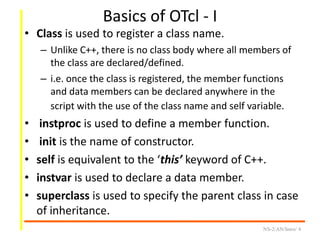
Basics of OTcl - I
• Class is used to register a class name.
– Unlike C++, there is no class body where all members of
the class are declared/defined.
– i.e. once the class is registered, the member functions
and data members can be declared anywhere in the
script with the use of the class name and self variable.
• instproc is used to define a member function.
• init is the name of constructor.
• self is equivalent to the ‘this’ keyword of C++.
• instvar is used to declare a data member.
• superclass is used to specify the parent class in case
of inheritance.
NS-2/AN/Intro/ 4
Basics of OTcl - II
• Object initialization:
– set ctr [ new Counter ]
• ctr is an object of class Counter
• It calls the constructor to initialize the instance
variables.
• Method invocation:
– $ctr increment
• invokes the method increment of class Counter
– puts [ $ctr getValue ]
• invokes the method getValue of class Counter and
prints the value returned from the member function
NS-2/AN/Intro/ 5
NS-2/AN/Intro/ 6
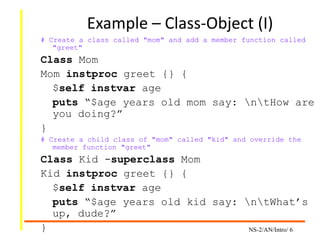
Example – Class-Object (I)
# Create a class called "mom" and add a member function called
"greet"
Class Mom
Mom instproc greet {} {
$self instvar age
puts “$age years old mom say: ntHow are
you doing?”
}
# Create a child class of "mom" called "kid" and override the
member function "greet"
Class Kid -superclass Mom
Kid instproc greet {} {
$self instvar age
puts “$age years old kid say: ntWhat’s
up, dude?”
}
Example – Class-Object (II)
NS-2/AN/Intro/ 7
# Create a mom and a kid object & set age for each
set mom [new Mom]
$mom set age 45
set kid [new Kid]
$kid set age 15
# Calling member function "greet" of each object
$mom greet
$kid greet
Output:
45 year old mom say:
How are you doing?
15 year old kid say:
what’s up dude?
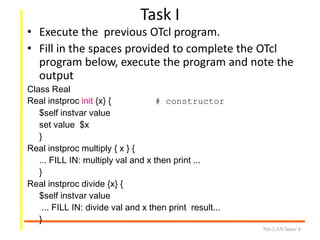
Task I
• Execute the previous OTcl program.
• Fill in the spaces provided to complete the OTcl
program below, execute the program and note the
output
Class Real
Real instproc init {x} { # constructor
$self instvar value
set value $x
}
Real instproc multiply { x } {
... FILL IN: multiply val and x then print ...
}
Real instproc divide {x} {
$self instvar value
... FILL IN: divide val and x then print result...
}
NS-2/AN/Intro/ 8
Task I contd.
Class Integer -superclass Real
Integer instproc divide {x} {
... FILL IN ...
}
set realA [new Real 12.3]
set realB [new Real 0.5]
$realA multiply $realB
$realA divide $realB
set integerA [new Integer 12]
set integerB [new Integer 5]
$integerA multiply $integerB
$integerA divide $integerB
NS-2/AN/Intro/ 9
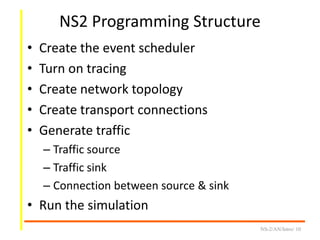
NS2 Programming Structure
• Create the event scheduler
• Turn on tracing
• Create network topology
• Create transport connections
• Generate traffic
– Traffic source
– Traffic sink
– Connection between source & sink
• Run the simulation
NS-2/AN/Intro/ 10
Creating the event scheduler
• Create event scheduler
– set ns [new Simulator]
• Schedule an event
– syntax: $ns at <time> <event>
– $ns at 5.0 “finish”
• Start Scheduler
– $ns run
NS-2/AN/Intro/ 11
proc finish {} {
global ns nf
close $nf
exec nam out.nam &
exit 0
}
Tracing (outputs)
• Packet/Event Trace
– $ns trace-all[open out.tr w]
• NAM Trace (Network Animator)
– set nf [open out.nam w]
– $ns namtrace-all $nf
NS-2/AN/Intro/ 12
Creating topology
(Two nodes connected by a link)
• Creating nodes
– set n0 [$ns node]
– set n1 [$ns node]
• Creating link between
nodes
– syntax: $ns <link_type> <node1> <node2>
<bandwidth> <delay> <queueType>
– $ns duplexlink $n0 $n1 1Mb 10ms DropTail
NS-2/AN/Intro/ 13
Program for two node network
1. Create a file named
twoNode.tcl and add the
following contents in it.
set ns [new Simulator]
set nf [open twoNode.nam w]
$ns namtrace-all $nf
set n0 [$ns node]
set n1 [$ns node]
$ns duplex-link $n0 $n2
100Mb 5ms DropTail
$ns run
NS-2/AN/Intro/ 14
2. Save and exit from the editor,
Now execute the program with
following command in command
line
ns twoNode.tcl
3. This will generate
twoNode.nam. To see the
visualization, issue the following
command in command line
nam twoNode.nam &
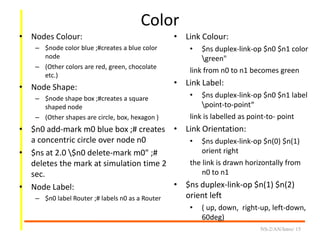
Color
• Nodes Colour:
– $node color blue ;#creates a blue color
node
– (Other colors are red, green, chocolate
etc.)
• Node Shape:
– $node shape box ;#creates a square
shaped node
– (Other shapes are circle, box, hexagon )
• $n0 add-mark m0 blue box ;# creates
a concentric circle over node n0
• $ns at 2.0 $n0 delete-mark m0" ;#
deletes the mark at simulation time 2
sec.
• Node Label:
– $n0 label Router ;# labels n0 as a Router
NS-2/AN/Intro/ 15
• Link Colour:
• $ns duplex-link-op $n0 $n1 color
green"
link from n0 to n1 becomes green
• Link Label:
• $ns duplex-link-op $n0 $n1 label
point-to-point“
link is labelled as point-to- point
• Link Orientation:
• $ns duplex-link-op $n(0) $n(1)
orient right
the link is drawn horizontally from
n0 to n1
• $ns duplex-link-op $n(1) $n(2)
orient left
• ( up, down, right-up, left-down,
60deg)
Task II
• Execute the twoNode.tcl
• Create a ring network of 3 nodes with
adjacent nodes of different color and red
color links between them.
NS-2/AN/Intro/ 16
Sending data (UDP)
• Create UDP source agent (transport
connection)
– set udp [new Agent/UDP]
– $ns attach-agent $n0 $udp
• Create UDP sink agent
– set null [new Agent/Null]
– $ns attach-agent $n1 $null
• Connect two transport (source-sink) agents
– $ns connect $udp $null
NS-2/AN/Intro/ 17
Sending data contd.
• Create CBR traffic source on the top of UDP
agent (Application)
– set cbr [new Application/Traffic/CBR]
– $cbr attach-agent $udp
• Start and stop of data transmission
– $ns at 0.5 “$cbr start”
– $ns at 4.5 “$cbr stop”
NS-2/AN/Intro/ 18
Complete Program
set ns [new Simulator]
set n0 [$ns node]
set n1 [$ns node]
$ns trace-all [open
twoNode.tr w]
set nf [open twoNode.nam w]
$ns namtrace-all $nf
$ns duplex-link $n0 $n1
100Kb 10ms DropTail
set udp [new Agent/UDP]
$ns attach-agent $n0 $udp
set null [new Agent/Null]
$ns attach-agent $n1 $null
$ns connect $udp $null
NS-2/AN/Intro/ 19
set cbr [new
Application/Traffic/CBR]
$cbr attach-agent $udp
$ns at 0.1 “$cbr start”
$ns at 2.35 “$cbr stop”
$ns at 2.4 “finish”
proc finish {} {
global nf ; close $nf
exec nam twoNode.nam &
exit 0
}
$ns run
Sending data (TCP)
• Create TCP agent and attach it to the node
– set tcp0 [new Agent/TCP]
– $ns attach-agent $n0 $tcp0
• Create a Null Agent and attach it to the node
– set null0 [new Agent/TCPSink]
– $ns attach-agent $n1 $null0
• Connect the agents
– $ns connect $tcp0 $null0
• Trafic on the top of TCP (FTP or Telnet)
– set ftp [new Application/FTP]
– $ftp attach-agent $tcp0 OR
– set telnet [new Application/Telnet]
– $telnet attach-agent $tcp0
Task III
1)Execute modified twoNode.tcl
and observe the animation
output.
2) Excute the same usng TCP and
ftp .
Output? (twoNode.tr)
+ 1 0 1 cbr 500 ------- 0 0.0 1.0 0 0
- 1 0 1 cbr 500 ------- 0 0.0 1.0 0 0
+ 1.005 0 1 cbr 500 ------- 0 0.0 1.0 1 1
- 1.005 0 1 cbr 500 ------- 0 0.0 1.0 1 1
+ 1.01 0 1 cbr 500 ------- 0 0.0 1.0 2 2
- 1.01 0 1 cbr 500 ------- 0 0.0 1.0 2 2
r 1.014 0 1 cbr 500 ------- 0 0.0 1.0 0 0
+ 1.015 0 1 cbr 500 ------- 0 0.0 1.0 3 3
- 1.015 0 1 cbr 500 ------- 0 0.0 1.0 3 3
r 1.019 0 1 cbr 500 ------- 0 0.0 1.0 1 1
+ 1.02 0 1 cbr 500 ------- 0 0.0 1.0 4 4
- 1.02 0 1 cbr 500 ------- 0 0.0 1.0 4 4
r 1.024 0 1 cbr 500 ------- 0 0.0 1.0 2 2
Explaining Output (I)
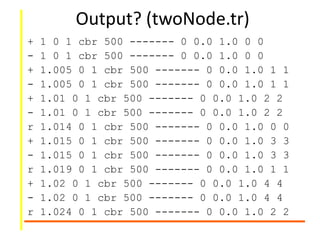
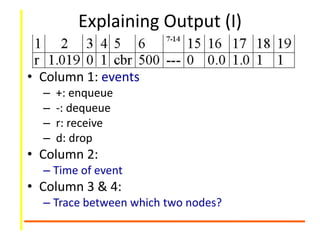
• Column 1: events
– +: enqueue
– -: dequeue
– r: receive
– d: drop
• Column 2:
– Time of event
• Column 3 & 4:
– Trace between which two nodes?
Explaining Output (II)
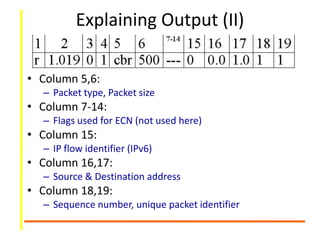
• Column 5,6:
– Packet type, Packet size
• Column 7-14:
– Flags used for ECN (not used here)
• Column 15:
– IP flow identifier (IPv6)
• Column 16,17:
– Source & Destination address
• Column 18,19:
– Sequence number, unique packet identifier
Suggested Readings
• OTcl Tutorials
– http://www.tcl.tk/man/tcl8.5/tutorial/tcltutorial.h
tml
• NS-2 Tutorials
– http://www.isi.edu/nsnam/ns/tutorial
– http://nile.wpi.edu/NS/
– NS Manual
NS-2/AN/Intro/ 26
Thank You
End of Part II

Ns2: OTCL - PArt II

  • 1.
    An Introduction to NetworkSimulator Dr. Ajit K Nayak Dept of CSIT, ITER S‘O’A University, BBSR
  • 3.
    Part II • IntroducingOTcl • Working with NS2
  • 4.
    Basics of OTcl- I • Class is used to register a class name. – Unlike C++, there is no class body where all members of the class are declared/defined. – i.e. once the class is registered, the member functions and data members can be declared anywhere in the script with the use of the class name and self variable. • instproc is used to define a member function. • init is the name of constructor. • self is equivalent to the ‘this’ keyword of C++. • instvar is used to declare a data member. • superclass is used to specify the parent class in case of inheritance. NS-2/AN/Intro/ 4
  • 5.
    Basics of OTcl- II • Object initialization: – set ctr [ new Counter ] • ctr is an object of class Counter • It calls the constructor to initialize the instance variables. • Method invocation: – $ctr increment • invokes the method increment of class Counter – puts [ $ctr getValue ] • invokes the method getValue of class Counter and prints the value returned from the member function NS-2/AN/Intro/ 5
  • 6.
    NS-2/AN/Intro/ 6 Example –Class-Object (I) # Create a class called "mom" and add a member function called "greet" Class Mom Mom instproc greet {} { $self instvar age puts “$age years old mom say: ntHow are you doing?” } # Create a child class of "mom" called "kid" and override the member function "greet" Class Kid -superclass Mom Kid instproc greet {} { $self instvar age puts “$age years old kid say: ntWhat’s up, dude?” }
  • 7.
    Example – Class-Object(II) NS-2/AN/Intro/ 7 # Create a mom and a kid object & set age for each set mom [new Mom] $mom set age 45 set kid [new Kid] $kid set age 15 # Calling member function "greet" of each object $mom greet $kid greet Output: 45 year old mom say: How are you doing? 15 year old kid say: what’s up dude?
  • 8.
    Task I • Executethe previous OTcl program. • Fill in the spaces provided to complete the OTcl program below, execute the program and note the output Class Real Real instproc init {x} { # constructor $self instvar value set value $x } Real instproc multiply { x } { ... FILL IN: multiply val and x then print ... } Real instproc divide {x} { $self instvar value ... FILL IN: divide val and x then print result... } NS-2/AN/Intro/ 8
  • 9.
    Task I contd. ClassInteger -superclass Real Integer instproc divide {x} { ... FILL IN ... } set realA [new Real 12.3] set realB [new Real 0.5] $realA multiply $realB $realA divide $realB set integerA [new Integer 12] set integerB [new Integer 5] $integerA multiply $integerB $integerA divide $integerB NS-2/AN/Intro/ 9
  • 10.
    NS2 Programming Structure •Create the event scheduler • Turn on tracing • Create network topology • Create transport connections • Generate traffic – Traffic source – Traffic sink – Connection between source & sink • Run the simulation NS-2/AN/Intro/ 10
  • 11.
    Creating the eventscheduler • Create event scheduler – set ns [new Simulator] • Schedule an event – syntax: $ns at <time> <event> – $ns at 5.0 “finish” • Start Scheduler – $ns run NS-2/AN/Intro/ 11 proc finish {} { global ns nf close $nf exec nam out.nam & exit 0 }
  • 12.
    Tracing (outputs) • Packet/EventTrace – $ns trace-all[open out.tr w] • NAM Trace (Network Animator) – set nf [open out.nam w] – $ns namtrace-all $nf NS-2/AN/Intro/ 12
  • 13.
    Creating topology (Two nodesconnected by a link) • Creating nodes – set n0 [$ns node] – set n1 [$ns node] • Creating link between nodes – syntax: $ns <link_type> <node1> <node2> <bandwidth> <delay> <queueType> – $ns duplexlink $n0 $n1 1Mb 10ms DropTail NS-2/AN/Intro/ 13
  • 14.
    Program for twonode network 1. Create a file named twoNode.tcl and add the following contents in it. set ns [new Simulator] set nf [open twoNode.nam w] $ns namtrace-all $nf set n0 [$ns node] set n1 [$ns node] $ns duplex-link $n0 $n2 100Mb 5ms DropTail $ns run NS-2/AN/Intro/ 14 2. Save and exit from the editor, Now execute the program with following command in command line ns twoNode.tcl 3. This will generate twoNode.nam. To see the visualization, issue the following command in command line nam twoNode.nam &
  • 15.
    Color • Nodes Colour: –$node color blue ;#creates a blue color node – (Other colors are red, green, chocolate etc.) • Node Shape: – $node shape box ;#creates a square shaped node – (Other shapes are circle, box, hexagon ) • $n0 add-mark m0 blue box ;# creates a concentric circle over node n0 • $ns at 2.0 $n0 delete-mark m0" ;# deletes the mark at simulation time 2 sec. • Node Label: – $n0 label Router ;# labels n0 as a Router NS-2/AN/Intro/ 15 • Link Colour: • $ns duplex-link-op $n0 $n1 color green" link from n0 to n1 becomes green • Link Label: • $ns duplex-link-op $n0 $n1 label point-to-point“ link is labelled as point-to- point • Link Orientation: • $ns duplex-link-op $n(0) $n(1) orient right the link is drawn horizontally from n0 to n1 • $ns duplex-link-op $n(1) $n(2) orient left • ( up, down, right-up, left-down, 60deg)
  • 16.
    Task II • Executethe twoNode.tcl • Create a ring network of 3 nodes with adjacent nodes of different color and red color links between them. NS-2/AN/Intro/ 16
  • 17.
    Sending data (UDP) •Create UDP source agent (transport connection) – set udp [new Agent/UDP] – $ns attach-agent $n0 $udp • Create UDP sink agent – set null [new Agent/Null] – $ns attach-agent $n1 $null • Connect two transport (source-sink) agents – $ns connect $udp $null NS-2/AN/Intro/ 17
  • 18.
    Sending data contd. •Create CBR traffic source on the top of UDP agent (Application) – set cbr [new Application/Traffic/CBR] – $cbr attach-agent $udp • Start and stop of data transmission – $ns at 0.5 “$cbr start” – $ns at 4.5 “$cbr stop” NS-2/AN/Intro/ 18
  • 19.
    Complete Program set ns[new Simulator] set n0 [$ns node] set n1 [$ns node] $ns trace-all [open twoNode.tr w] set nf [open twoNode.nam w] $ns namtrace-all $nf $ns duplex-link $n0 $n1 100Kb 10ms DropTail set udp [new Agent/UDP] $ns attach-agent $n0 $udp set null [new Agent/Null] $ns attach-agent $n1 $null $ns connect $udp $null NS-2/AN/Intro/ 19 set cbr [new Application/Traffic/CBR] $cbr attach-agent $udp $ns at 0.1 “$cbr start” $ns at 2.35 “$cbr stop” $ns at 2.4 “finish” proc finish {} { global nf ; close $nf exec nam twoNode.nam & exit 0 } $ns run
  • 20.
    Sending data (TCP) •Create TCP agent and attach it to the node – set tcp0 [new Agent/TCP] – $ns attach-agent $n0 $tcp0 • Create a Null Agent and attach it to the node – set null0 [new Agent/TCPSink] – $ns attach-agent $n1 $null0 • Connect the agents – $ns connect $tcp0 $null0 • Trafic on the top of TCP (FTP or Telnet) – set ftp [new Application/FTP] – $ftp attach-agent $tcp0 OR – set telnet [new Application/Telnet] – $telnet attach-agent $tcp0
  • 21.
    Task III 1)Execute modifiedtwoNode.tcl and observe the animation output. 2) Excute the same usng TCP and ftp .
  • 23.
    Output? (twoNode.tr) + 10 1 cbr 500 ------- 0 0.0 1.0 0 0 - 1 0 1 cbr 500 ------- 0 0.0 1.0 0 0 + 1.005 0 1 cbr 500 ------- 0 0.0 1.0 1 1 - 1.005 0 1 cbr 500 ------- 0 0.0 1.0 1 1 + 1.01 0 1 cbr 500 ------- 0 0.0 1.0 2 2 - 1.01 0 1 cbr 500 ------- 0 0.0 1.0 2 2 r 1.014 0 1 cbr 500 ------- 0 0.0 1.0 0 0 + 1.015 0 1 cbr 500 ------- 0 0.0 1.0 3 3 - 1.015 0 1 cbr 500 ------- 0 0.0 1.0 3 3 r 1.019 0 1 cbr 500 ------- 0 0.0 1.0 1 1 + 1.02 0 1 cbr 500 ------- 0 0.0 1.0 4 4 - 1.02 0 1 cbr 500 ------- 0 0.0 1.0 4 4 r 1.024 0 1 cbr 500 ------- 0 0.0 1.0 2 2
  • 24.
    Explaining Output (I) •Column 1: events – +: enqueue – -: dequeue – r: receive – d: drop • Column 2: – Time of event • Column 3 & 4: – Trace between which two nodes?
  • 25.
    Explaining Output (II) •Column 5,6: – Packet type, Packet size • Column 7-14: – Flags used for ECN (not used here) • Column 15: – IP flow identifier (IPv6) • Column 16,17: – Source & Destination address • Column 18,19: – Sequence number, unique packet identifier
  • 26.
    Suggested Readings • OTclTutorials – http://www.tcl.tk/man/tcl8.5/tutorial/tcltutorial.h tml • NS-2 Tutorials – http://www.isi.edu/nsnam/ns/tutorial – http://nile.wpi.edu/NS/ – NS Manual NS-2/AN/Intro/ 26
  • 27.