crontab and more
crontab and more
By : Khawar Nehal
26 October 2021
Agenda
awk
crontab
At
Shell scripting ( sh , bash )
Quizzes
Bloomy Week 3
Linux: Quiz 1
https://bloomy360.moodlecloud.com/mod/quiz/view.php?i
d=68
Linux: Quiz 2
https://bloomy360.moodlecloud.com/mod/quiz/view.php?i
d=69
Bloomy Week 5
Linux: Quiz
https://bloomy360.moodlecloud.com/mod/quiz/view.php?i
d=95
Awk
$cat > employee.txt
ajay manager account 45000
sunil clerk account 25000
varun manager sales 50000
amit manager account 47000
tarun peon sales 15000
deepak clerk sales 23000
sunil peon sales 13000
satvik director purchase 80000
Awk
$ awk '{print}' employee.txt
Output:
ajay manager account 45000
sunil clerk account 25000
varun manager sales 50000
amit manager account 47000
tarun peon sales 15000
deepak clerk sales 23000
sunil peon sales 13000
satvik director purchase 80000
Awk
Print the lines which match the given pattern.
$ awk '/manager/ {print}' employee.txt
Output:
ajay manager account 45000
varun manager sales 50000
amit manager account 47000
Awk
Splitting a Line Into Fields : For each record i.e line, the awk
command splits the record delimited by whitespace character by
default and stores it in the $n variables. If the line has 4 words, it
will be stored in $1, $2, $3 and $4 respectively. Also, $0 represents
the whole line.
Awk
$ awk '{print $1,$4}' employee.txt
Output:
ajay 45000
sunil 25000
varun 50000
amit 47000
tarun 15000
deepak 23000
sunil 13000
satvik 80000
Awk
In the above example, $1 and $4 represents Name and Salary
fields respectively.
Built-In Variables In Awk
Awk’s built-in variables include the field variables—$1, $2, $3, and
so on ($0 is the entire line) — that break a line of text into
individual words or pieces called fields.
Awk
NR: NR command keeps a current count of the number of input
records. Remember that records are usually lines. Awk command
performs the pattern/action statements once for each record in a
file.
NF: NF command keeps a count of the number of fields within
the current input record.
FS: FS command contains the field separator character which is
used to divide fields on the input line. The default is “white space”,
meaning space and tab characters. FS can be reassigned to
another character (typically in BEGIN) to change the field
separator.
Awk
RS: RS command stores the current record separator character.
Since, by default, an input line is the input record, the default
record separator character is a newline.
OFS: OFS command stores the output field separator, which
separates the fields when Awk prints them. The default is a blank
space. Whenever print has several parameters separated with
commas, it will print the value of OFS in between each parameter.
ORS: ORS command stores the output record separator, which
separates the output lines when Awk prints them. The default is a
newline character. print automatically outputs the contents of ORS
at the end of whatever it is given to print.
Awk
Examples:
Use of NR built-in variables (Display Line Number)
$ awk '{print NR,$0}' employee.txt
Output:
1 ajay manager account 45000
2 sunil clerk account 25000
3 varun manager sales 50000
4 amit manager account 47000
5 tarun peon sales 15000
6 deepak clerk sales 23000
7 sunil peon sales 13000
8 satvik director purchase 80000
Awk
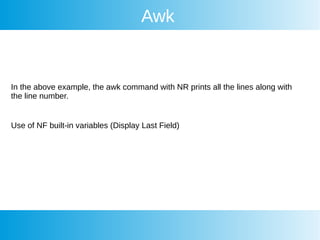
In the above example, the awk command with NR prints all the lines along with
the line number.
Use of NF built-in variables (Display Last Field)
Awk
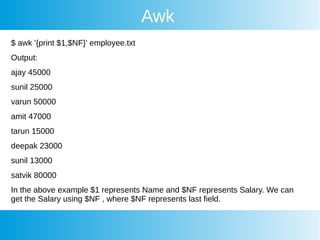
$ awk '{print $1,$NF}' employee.txt
Output:
ajay 45000
sunil 25000
varun 50000
amit 47000
tarun 15000
deepak 23000
sunil 13000
satvik 80000
In the above example $1 represents Name and $NF represents Salary. We can
get the Salary using $NF , where $NF represents last field.
Awk
Another use of NR built-in variables (Display Line From 3 to 6)
$ awk 'NR==3, NR==6 {print NR,$0}' employee.txt
Output:
3 varun manager sales 50000
4 amit manager account 47000
5 tarun peon sales 15000
6 deepak clerk sales 23000
Awk
$cat > geeksforgeeks.txt
A B C
Tarun A12 1
Man B6 2
Praveen M42 3
Awk
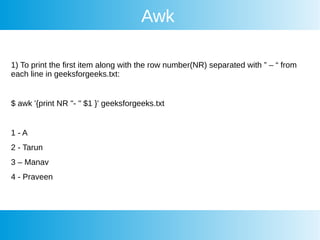
1) To print the first item along with the row number(NR) separated with ” – “ from
each line in geeksforgeeks.txt:
$ awk '{print NR "- " $1 }' geeksforgeeks.txt
1 - A
2 - Tarun
3 – Manav
4 - Praveen
Awk
To return the second row/item from geeksforgeeks.txt:
The question should be:- To return the second column/item from
geeksforgeeks.txt:
$ awk '{print $2}' geeksforgeeks.txt
A12
B6
M42
Awk
More on awk
https://www.geeksforgeeks.org/awk-command-unixlinux-examples/
Cron
Cron
Cron
Cron
Cron
Cron
Cron
Cron
Cron
Cron
Cron
Cron
Cron
Cron
Cron
More on crontab
https://www.adminschoice.com/crontab-quick-refe
rence
crontab
Crontab calculator
https://crontab.guru/

Linux class 15 26 oct 2021

  • 1.
  • 2.
    crontab and more By: Khawar Nehal 26 October 2021
  • 3.
  • 4.
    Quizzes Bloomy Week 3 Linux:Quiz 1 https://bloomy360.moodlecloud.com/mod/quiz/view.php?i d=68 Linux: Quiz 2 https://bloomy360.moodlecloud.com/mod/quiz/view.php?i d=69 Bloomy Week 5 Linux: Quiz https://bloomy360.moodlecloud.com/mod/quiz/view.php?i d=95
  • 5.
    Awk $cat > employee.txt ajaymanager account 45000 sunil clerk account 25000 varun manager sales 50000 amit manager account 47000 tarun peon sales 15000 deepak clerk sales 23000 sunil peon sales 13000 satvik director purchase 80000
  • 6.
    Awk $ awk '{print}'employee.txt Output: ajay manager account 45000 sunil clerk account 25000 varun manager sales 50000 amit manager account 47000 tarun peon sales 15000 deepak clerk sales 23000 sunil peon sales 13000 satvik director purchase 80000
  • 7.
    Awk Print the lineswhich match the given pattern. $ awk '/manager/ {print}' employee.txt Output: ajay manager account 45000 varun manager sales 50000 amit manager account 47000
  • 8.
    Awk Splitting a LineInto Fields : For each record i.e line, the awk command splits the record delimited by whitespace character by default and stores it in the $n variables. If the line has 4 words, it will be stored in $1, $2, $3 and $4 respectively. Also, $0 represents the whole line.
  • 9.
    Awk $ awk '{print$1,$4}' employee.txt Output: ajay 45000 sunil 25000 varun 50000 amit 47000 tarun 15000 deepak 23000 sunil 13000 satvik 80000
  • 10.
    Awk In the aboveexample, $1 and $4 represents Name and Salary fields respectively. Built-In Variables In Awk Awk’s built-in variables include the field variables—$1, $2, $3, and so on ($0 is the entire line) — that break a line of text into individual words or pieces called fields.
  • 11.
    Awk NR: NR commandkeeps a current count of the number of input records. Remember that records are usually lines. Awk command performs the pattern/action statements once for each record in a file. NF: NF command keeps a count of the number of fields within the current input record. FS: FS command contains the field separator character which is used to divide fields on the input line. The default is “white space”, meaning space and tab characters. FS can be reassigned to another character (typically in BEGIN) to change the field separator.
  • 12.
    Awk RS: RS commandstores the current record separator character. Since, by default, an input line is the input record, the default record separator character is a newline. OFS: OFS command stores the output field separator, which separates the fields when Awk prints them. The default is a blank space. Whenever print has several parameters separated with commas, it will print the value of OFS in between each parameter. ORS: ORS command stores the output record separator, which separates the output lines when Awk prints them. The default is a newline character. print automatically outputs the contents of ORS at the end of whatever it is given to print.
  • 13.
    Awk Examples: Use of NRbuilt-in variables (Display Line Number) $ awk '{print NR,$0}' employee.txt Output: 1 ajay manager account 45000 2 sunil clerk account 25000 3 varun manager sales 50000 4 amit manager account 47000 5 tarun peon sales 15000 6 deepak clerk sales 23000 7 sunil peon sales 13000 8 satvik director purchase 80000
  • 14.
    Awk In the aboveexample, the awk command with NR prints all the lines along with the line number. Use of NF built-in variables (Display Last Field)
  • 15.
    Awk $ awk '{print$1,$NF}' employee.txt Output: ajay 45000 sunil 25000 varun 50000 amit 47000 tarun 15000 deepak 23000 sunil 13000 satvik 80000 In the above example $1 represents Name and $NF represents Salary. We can get the Salary using $NF , where $NF represents last field.
  • 16.
    Awk Another use ofNR built-in variables (Display Line From 3 to 6) $ awk 'NR==3, NR==6 {print NR,$0}' employee.txt Output: 3 varun manager sales 50000 4 amit manager account 47000 5 tarun peon sales 15000 6 deepak clerk sales 23000
  • 17.
    Awk $cat > geeksforgeeks.txt AB C Tarun A12 1 Man B6 2 Praveen M42 3
  • 18.
    Awk 1) To printthe first item along with the row number(NR) separated with ” – “ from each line in geeksforgeeks.txt: $ awk '{print NR "- " $1 }' geeksforgeeks.txt 1 - A 2 - Tarun 3 – Manav 4 - Praveen
  • 19.
    Awk To return thesecond row/item from geeksforgeeks.txt: The question should be:- To return the second column/item from geeksforgeeks.txt: $ awk '{print $2}' geeksforgeeks.txt A12 B6 M42
  • 20.
  • 21.
  • 22.
  • 23.
  • 24.
  • 25.
  • 26.
  • 27.
  • 28.
  • 29.
  • 30.
  • 31.
  • 32.
  • 33.
  • 34.
  • 35.
  • 36.
  • 37.