NextGen Endpoint For Dummies: Tech Survey & Decision Guide
Atif Ghauri, CISSP
CTO & SVP at Herjavec Group
Live Survey – Show of Hands
a) Are you currently using an NextGen Endpoint Solution?
b) Are you looking for NextGen Endpoint Solution?
c) Are you ripping out your NextGen Endpoint Solution?
Today’s Agenda
1. What is NextGen Endpoint and why care?
2. What to look for and how to evaluate the clutter?
3. Give me specific details!
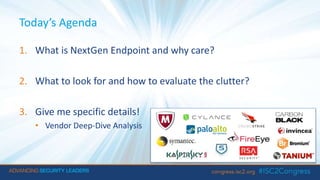
• Vendor Deep-Dive Analysis
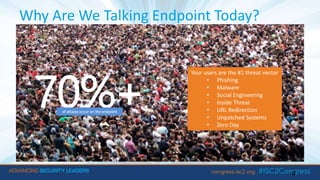
Why Are We Talking Endpoint Today?
4
Your users are the #1 threat vector
• Phishing
• Malware
• Social Engineering
• Inside Threat
• URL Redirection
• Unpatched Systems
• Zero Day
70%+of attacks occur on the endpoint
Why is NextGen Endpoint So Hot?
» Industry is failing to kill bad code
» Failure of the current solution
• 47% legacy AV customers have been successfully compromised (Gartner)
• Hackers write real-time evasion code against legacy AV
» Customer Needs Multiple Protection Schemes
• Signature based, Behavior Based, Real-time Updates (Cloud)
» Consolidation
» Audit Compliance
5
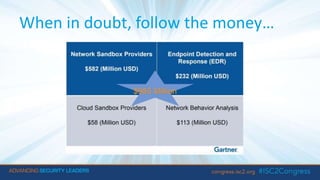
When in doubt, follow the money…
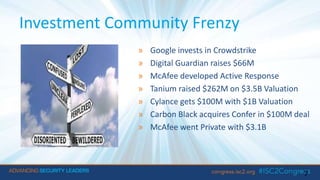
Investment Community Frenzy
7
» Google invests in Crowdstrike
» Digital Guardian raises $66M
» McAfee developed Active Response
» Tanium raised $262M on $3.5B Valuation
» Cylance gets $100M with $1B Valuation
» Carbon Black acquires Confer in $100M deal
» McAfee went Private with $3.1B
Today’s Agenda
1. What is NextGen Endpoint and why care?
2. What to look for and how to evaluate the clutter?
3. Give me specific details!
• Vendor Deep-Dive Analysis
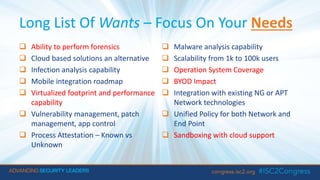
Long List Of Wants – Focus On Your Needs
 Ability to perform forensics
 Cloud based solutions an alternative
 Infection analysis capability
 Mobile integration roadmap
 Virtualized footprint and performance
capability
 Vulnerability management, patch
management, app control
 Process Attestation – Known vs
Unknown
 Malware analysis capability
 Scalability from 1k to 100k users
 Operation System Coverage
 BYOD Impact
 Integration with existing NG or APT
Network technologies
 Unified Policy for both Network and
End Point
 Sandboxing with cloud support
 Ability to perform forensics
 Cloud based solutions an alternative
 Infection analysis capability
 Mobile integration roadmap
 Virtualized footprint and performance
capability
 Vulnerability management, patch
management, app control
 Process Attestation – Known vs
Unknown
 Malware analysis capability
 Scalability from 1k to 100k users
 Operation System Coverage
 BYOD Impact
 Integration with existing NG or APT
Network technologies
 Unified Policy for both Network and
End Point
 Sandboxing with cloud support
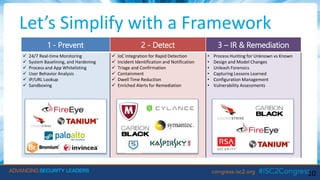
Let’s Simplify with a Framework
10
1 - Prevent 2 - Detect 3 – IR & Remediation
 24/7 Real-time Monitoring
 System Baselining, and Hardening
 Process and App Whitelisting
 User Behavior Analysis
 IP/URL Lookup
 Sandboxing
 IoC Integration for Rapid Detection
 Incident Identification and Notification
 Triage and Confirmation
 Containment
 Dwell Time Reduction
 Enriched Alerts for Remediation
• Process Hunting for Unknown vs Known
• Design and Model Changes
• Unleash Forensics
• Capturing Lessons Learned
• Configuration Management
• Vulnerability Assessments
What’s influencing your peers when buying?
» Flexible Licensing Models
» Attractive Admin Interface and Ease of Use
» Ambidextrous Vendor Integration
» Performance
» OS Coverage
» Reference Customers
11
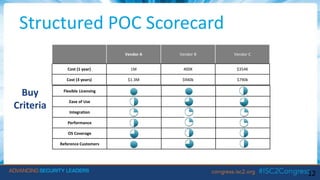
Structured POC Scorecard
12
Vendor A Vendor B Vendor C
Cost (1 year) 1M 400K $354K
Cost (3 years) $1.3M $940k $790k
Flexible Licensing 9.9 9.4 6.2
Ease of Use 6.4 8.0 8.0
Integration 3.1 2.7 2.2
Performance 4.4 4.3 3.6
OS Coverage 8.4 6.5 5.5
Reference Customers 9.1 7.1 6.5
Buy
Criteria
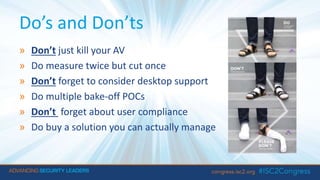
Do’s and Don’ts
» Don’t just kill your AV
» Do measure twice but cut once
» Don’t forget to consider desktop support
» Do multiple bake-off POCs
» Don’t forget about user compliance
» Do buy a solution you can actually manage
Today’s Agenda
1. What is NextGen Endpoint and why should I care?
2. What should I look for and how do I evaluate the clutter?
3. Give me details!
• Vendor Deep-Dive Evaluation Notes
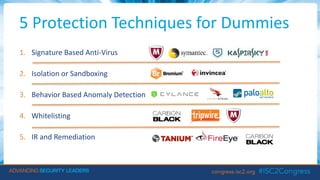
5 Protection Techniques for Dummies
1. Signature Based Anti-Virus
2. Isolation or Sandboxing
3. Behavior Based Anomaly Detection
4. Whitelisting
5. IR and Remediation
How does it work? LegacyAV
» Compare signatures from bit patterns of known threats
» AV scans file before user interaction detecting known threats
» Yes it’s legacy but has evolved to handle near zero day threats
» Smart AV uses cloud to phone home ‘real-time’ for detection
» Remediation techniques: Clean and Quarantine
How does it work? Isolation
FACT: An average workstation is capable of hosting hundreds of tiny disposable computers concurrently
THEREFORE: Why not create a container (or Sandbox, microVM) to allow threats execute with minimal resources
» Work on a “need to know” basis with OS
• Leverages hardware based isolation to defeat both known and unknown threats
• CPU bound hypervisor (aka microVisor)
» microVM’s are isolated from both OS and each other -> kills risk of lateral movements attacks
• Uses microVM capability enabled in modern operating systems
• microVM containers pawn off new applications or suspected threats in a secure environment
• Threat is allowed to run and if dangerous the process is stopped and the container trashed
» Desired Results
• Safe environment to play
• Capture detailed threat information which can be used for forensic analysis
Bromium – How does it work?
» All user actions are disposable
• Task based isolation at a hardware level is unprecedented!
» Controls all access to files systems, registry, communications and auth
» Works on virtualization technology and does not use signatures
» Isolates suspect file into a microVM to allow the file to execute
» Only needed resources are visible and all trusted resources are visible
» Converts printing files to a trustworthy format
» Can be CPU and memory intensive at times
18
How does it work?
Behavior-Based Anomaly Detection
» Monitor process and memory execution for anomalies
» In theory there’s a finite number of ways to attack a system and most
commonly known attack vectors.
• Accordingly intercept the process and watch for known attack vectors and stop the
process when it occurs.
• Simultaneously report it and kickoff forensic analysis and for remediation before too late
» Differs from Sandboxing
• Triggers as process is invoked, so does not need to containerize  increases speed
CrowdStrike – How does it work?
» Works like a high-definition surveillance camera
• Want to know what happened and how blow by blow
• Pattern bad behavior and make money off of this knowledge
» Cloud based with detection and a prevention philosophy
• Small kernel driver and no hardware required Heavy process monitoring and cloud
based analysis real-time
• Protects when Internet is down using custom protection and exploit blocking
• Uses known attack vectors to analyze the suspected threat and will block the processes
» Now also provide VirusTotals, SO both behavior and signature-based
CrowdStrike – Details
» CS has a deep understanding of hacker trade craft
• Adversary focus enables visibility into who is attacking and how
• Extensive IoA and IoC library in a cloud database
• Forensic data is extensive - follows the infection and traces origin
» Big on Indicator of Attack (IOA) which is modeled and recorded as patterns
• User established network connection, Process is executed, registry edited, memory called
» Tech Notes
• When you deploy CS the agent doesn’t require a reboot
• Kernel mode driver - records all patterns of memory call, io operations, network connections, etc
• 1.5MB agent, very small compared to 50MB other agents
• Uses on ~5MBs of day per user per agent
• Locally caches events when offline
PANTraps - Overview
» Behavior Based (Cyvera Acquisition 2014)
• Monitors for known illegal activities at process level, kills process upon detection
• Looks for a common set of tools or techniques used in all known exploits to detect threats
» Uses small driver enabled with behavioral techniques to detect threats
• Monitor the process and analyse the behaviour of the application
• Triggers Wildfire Cloud system to check the Hash of the file.
• Compares to user policies governing what software is allowed to run and from what directories as well as
Java apps and external media
» Tech Notes
• Runs on approximately 50MB of RAM with average of .1% CPU utilization
• Sends in-depth data to endpoint server for forensic analysis and reporting
• Local server caches Wildfire verdicts and provides a responses locally to other victims
Cylance – Overview
» Solve the problem of ‘Malware Identification’ at Scale
• Uses statically analyzing features found in the binary itself
• Use machine learning through math models
» Do “File Genome” - Similar attribute mapping scoring as biologists do with human genome
» Avoid Patent 0 or Sacrificial Lamb
» Tech Notes
• Never see the file execute, quarantine prior to execution in bits/bytes from the binary on host
• Strong coverage across operating systems
• No infrastructure to install, all cloud based management
• Cylance Footprint vs Traditional AV
- 1/10 of CPU
- 1/40 of IO
- 1/3 of network usage
- 20-40 MBs large
23
Tanium - Overview
» It’s fast
» Query thousands of endpoints in real time and report
• Software versions an in-depth inventories
• User processes and activities
• Current software being run by users with history
» Perform single touch software patching, updates, and deployments
» Provides real-time monitoring of all endpoints
» Incident response: mark desktops for re-imaging and kill switches if a threat is
detected
» Analysts use Tanium to delete files that were identified as threats by other systems
» Forensic information is detailed and can be reported in many different ways or
queries.
Thank You
Atif Ghauri
CTO & SVP Herjavec Group
aghauri@herjavecgroup.com
26

NextGen Endpoint Security for Dummies

  • 1.
    NextGen Endpoint ForDummies: Tech Survey & Decision Guide Atif Ghauri, CISSP CTO & SVP at Herjavec Group
  • 2.
    Live Survey –Show of Hands a) Are you currently using an NextGen Endpoint Solution? b) Are you looking for NextGen Endpoint Solution? c) Are you ripping out your NextGen Endpoint Solution?
  • 3.
    Today’s Agenda 1. Whatis NextGen Endpoint and why care? 2. What to look for and how to evaluate the clutter? 3. Give me specific details! • Vendor Deep-Dive Analysis
  • 4.
    Why Are WeTalking Endpoint Today? 4 Your users are the #1 threat vector • Phishing • Malware • Social Engineering • Inside Threat • URL Redirection • Unpatched Systems • Zero Day 70%+of attacks occur on the endpoint
  • 5.
    Why is NextGenEndpoint So Hot? » Industry is failing to kill bad code » Failure of the current solution • 47% legacy AV customers have been successfully compromised (Gartner) • Hackers write real-time evasion code against legacy AV » Customer Needs Multiple Protection Schemes • Signature based, Behavior Based, Real-time Updates (Cloud) » Consolidation » Audit Compliance 5
  • 6.
    When in doubt,follow the money…
  • 7.
    Investment Community Frenzy 7 »Google invests in Crowdstrike » Digital Guardian raises $66M » McAfee developed Active Response » Tanium raised $262M on $3.5B Valuation » Cylance gets $100M with $1B Valuation » Carbon Black acquires Confer in $100M deal » McAfee went Private with $3.1B
  • 8.
    Today’s Agenda 1. Whatis NextGen Endpoint and why care? 2. What to look for and how to evaluate the clutter? 3. Give me specific details! • Vendor Deep-Dive Analysis
  • 9.
    Long List OfWants – Focus On Your Needs  Ability to perform forensics  Cloud based solutions an alternative  Infection analysis capability  Mobile integration roadmap  Virtualized footprint and performance capability  Vulnerability management, patch management, app control  Process Attestation – Known vs Unknown  Malware analysis capability  Scalability from 1k to 100k users  Operation System Coverage  BYOD Impact  Integration with existing NG or APT Network technologies  Unified Policy for both Network and End Point  Sandboxing with cloud support  Ability to perform forensics  Cloud based solutions an alternative  Infection analysis capability  Mobile integration roadmap  Virtualized footprint and performance capability  Vulnerability management, patch management, app control  Process Attestation – Known vs Unknown  Malware analysis capability  Scalability from 1k to 100k users  Operation System Coverage  BYOD Impact  Integration with existing NG or APT Network technologies  Unified Policy for both Network and End Point  Sandboxing with cloud support
  • 10.
    Let’s Simplify witha Framework 10 1 - Prevent 2 - Detect 3 – IR & Remediation  24/7 Real-time Monitoring  System Baselining, and Hardening  Process and App Whitelisting  User Behavior Analysis  IP/URL Lookup  Sandboxing  IoC Integration for Rapid Detection  Incident Identification and Notification  Triage and Confirmation  Containment  Dwell Time Reduction  Enriched Alerts for Remediation • Process Hunting for Unknown vs Known • Design and Model Changes • Unleash Forensics • Capturing Lessons Learned • Configuration Management • Vulnerability Assessments
  • 11.
    What’s influencing yourpeers when buying? » Flexible Licensing Models » Attractive Admin Interface and Ease of Use » Ambidextrous Vendor Integration » Performance » OS Coverage » Reference Customers 11
  • 12.
    Structured POC Scorecard 12 VendorA Vendor B Vendor C Cost (1 year) 1M 400K $354K Cost (3 years) $1.3M $940k $790k Flexible Licensing 9.9 9.4 6.2 Ease of Use 6.4 8.0 8.0 Integration 3.1 2.7 2.2 Performance 4.4 4.3 3.6 OS Coverage 8.4 6.5 5.5 Reference Customers 9.1 7.1 6.5 Buy Criteria
  • 13.
    Do’s and Don’ts »Don’t just kill your AV » Do measure twice but cut once » Don’t forget to consider desktop support » Do multiple bake-off POCs » Don’t forget about user compliance » Do buy a solution you can actually manage
  • 14.
    Today’s Agenda 1. Whatis NextGen Endpoint and why should I care? 2. What should I look for and how do I evaluate the clutter? 3. Give me details! • Vendor Deep-Dive Evaluation Notes
  • 15.
    5 Protection Techniquesfor Dummies 1. Signature Based Anti-Virus 2. Isolation or Sandboxing 3. Behavior Based Anomaly Detection 4. Whitelisting 5. IR and Remediation
  • 16.
    How does itwork? LegacyAV » Compare signatures from bit patterns of known threats » AV scans file before user interaction detecting known threats » Yes it’s legacy but has evolved to handle near zero day threats » Smart AV uses cloud to phone home ‘real-time’ for detection » Remediation techniques: Clean and Quarantine
  • 17.
    How does itwork? Isolation FACT: An average workstation is capable of hosting hundreds of tiny disposable computers concurrently THEREFORE: Why not create a container (or Sandbox, microVM) to allow threats execute with minimal resources » Work on a “need to know” basis with OS • Leverages hardware based isolation to defeat both known and unknown threats • CPU bound hypervisor (aka microVisor) » microVM’s are isolated from both OS and each other -> kills risk of lateral movements attacks • Uses microVM capability enabled in modern operating systems • microVM containers pawn off new applications or suspected threats in a secure environment • Threat is allowed to run and if dangerous the process is stopped and the container trashed » Desired Results • Safe environment to play • Capture detailed threat information which can be used for forensic analysis
  • 18.
    Bromium – Howdoes it work? » All user actions are disposable • Task based isolation at a hardware level is unprecedented! » Controls all access to files systems, registry, communications and auth » Works on virtualization technology and does not use signatures » Isolates suspect file into a microVM to allow the file to execute » Only needed resources are visible and all trusted resources are visible » Converts printing files to a trustworthy format » Can be CPU and memory intensive at times 18
  • 19.
    How does itwork? Behavior-Based Anomaly Detection » Monitor process and memory execution for anomalies » In theory there’s a finite number of ways to attack a system and most commonly known attack vectors. • Accordingly intercept the process and watch for known attack vectors and stop the process when it occurs. • Simultaneously report it and kickoff forensic analysis and for remediation before too late » Differs from Sandboxing • Triggers as process is invoked, so does not need to containerize  increases speed
  • 20.
    CrowdStrike – Howdoes it work? » Works like a high-definition surveillance camera • Want to know what happened and how blow by blow • Pattern bad behavior and make money off of this knowledge » Cloud based with detection and a prevention philosophy • Small kernel driver and no hardware required Heavy process monitoring and cloud based analysis real-time • Protects when Internet is down using custom protection and exploit blocking • Uses known attack vectors to analyze the suspected threat and will block the processes » Now also provide VirusTotals, SO both behavior and signature-based
  • 21.
    CrowdStrike – Details »CS has a deep understanding of hacker trade craft • Adversary focus enables visibility into who is attacking and how • Extensive IoA and IoC library in a cloud database • Forensic data is extensive - follows the infection and traces origin » Big on Indicator of Attack (IOA) which is modeled and recorded as patterns • User established network connection, Process is executed, registry edited, memory called » Tech Notes • When you deploy CS the agent doesn’t require a reboot • Kernel mode driver - records all patterns of memory call, io operations, network connections, etc • 1.5MB agent, very small compared to 50MB other agents • Uses on ~5MBs of day per user per agent • Locally caches events when offline
  • 22.
    PANTraps - Overview »Behavior Based (Cyvera Acquisition 2014) • Monitors for known illegal activities at process level, kills process upon detection • Looks for a common set of tools or techniques used in all known exploits to detect threats » Uses small driver enabled with behavioral techniques to detect threats • Monitor the process and analyse the behaviour of the application • Triggers Wildfire Cloud system to check the Hash of the file. • Compares to user policies governing what software is allowed to run and from what directories as well as Java apps and external media » Tech Notes • Runs on approximately 50MB of RAM with average of .1% CPU utilization • Sends in-depth data to endpoint server for forensic analysis and reporting • Local server caches Wildfire verdicts and provides a responses locally to other victims
  • 23.
    Cylance – Overview »Solve the problem of ‘Malware Identification’ at Scale • Uses statically analyzing features found in the binary itself • Use machine learning through math models » Do “File Genome” - Similar attribute mapping scoring as biologists do with human genome » Avoid Patent 0 or Sacrificial Lamb » Tech Notes • Never see the file execute, quarantine prior to execution in bits/bytes from the binary on host • Strong coverage across operating systems • No infrastructure to install, all cloud based management • Cylance Footprint vs Traditional AV - 1/10 of CPU - 1/40 of IO - 1/3 of network usage - 20-40 MBs large 23
  • 24.
    Tanium - Overview »It’s fast » Query thousands of endpoints in real time and report • Software versions an in-depth inventories • User processes and activities • Current software being run by users with history » Perform single touch software patching, updates, and deployments » Provides real-time monitoring of all endpoints » Incident response: mark desktops for re-imaging and kill switches if a threat is detected » Analysts use Tanium to delete files that were identified as threats by other systems » Forensic information is detailed and can be reported in many different ways or queries.
  • 26.
    Thank You Atif Ghauri CTO& SVP Herjavec Group aghauri@herjavecgroup.com 26

Editor's Notes

  • #4 Initial Onboarding Contract Terms Organizational Buy-In Use Case Development Core Security Operations Security Analytics Technology Deployment – Easy part, get the tech running Call Tree – Who do I wake up at 3 a.m.? Process Sync - Mutual synchronization on who does what and when (fun part) Access Access Access – Need access to do something Context of Technology - Need to understand your shop
  • #8 MATT
  • #17 Oldest of the technologies and has evolved to handle near zero day threats but cannot handle zero day threats. Using signatures that are created from bit pattern of known threats, AV scans each file before user interaction and can detect known threats and use remediation techniques like Clean and Quarantine. AV can now leverage the cloud to query servers on new hashes as the software discovers suspicious files on the endpoint. The cloud is updated in real time so if the new threat is detected somewhere in the world, the hash is uploaded into the cloud database. Therefore, the AV query to the cloud could be considered Near Zero Day. (McAfee, Symantec, Trend, Sophos)
  • #18 With advent of VM technology, companies are now using virtual environments to isolate and test new Applications or suspected threats in a secure environment. The principle is to create a protected area(sandbox or Micro VM) and to allow the threat to execute while only giving minimum or required resources. The threat is allowed to run and if deemed a threat, the process is stopped and the secured area is discarded, thus protecting the users environment. This allows not only a safe environment but also allows the software to capture detailed information about the threat which can be used for forensic analysis and data collection about the threat. (Bromium, Invincea)
  • #20 A new way to detect a threat is to use Behavioural techniques which monitor the execution of a process and, if determined that a threat is present, will stop the process. It is well known that there are only a finite number of ways to attack a system and most of the time the attack will use a combination of known attack vectors. Using this knowledge, the new technique is to intercept the process and watch for known attack vectors and stop the process when it occurs. At the same time, a detailed report is sent to a server for forensic analysis and for remediation information. This is different than Sandboxing in that it occurs as the process is happening and does not need a secure area to transfer the file to, which increases the speed of the desktop. (Cylance, Crowdstrike, PAN Traps)