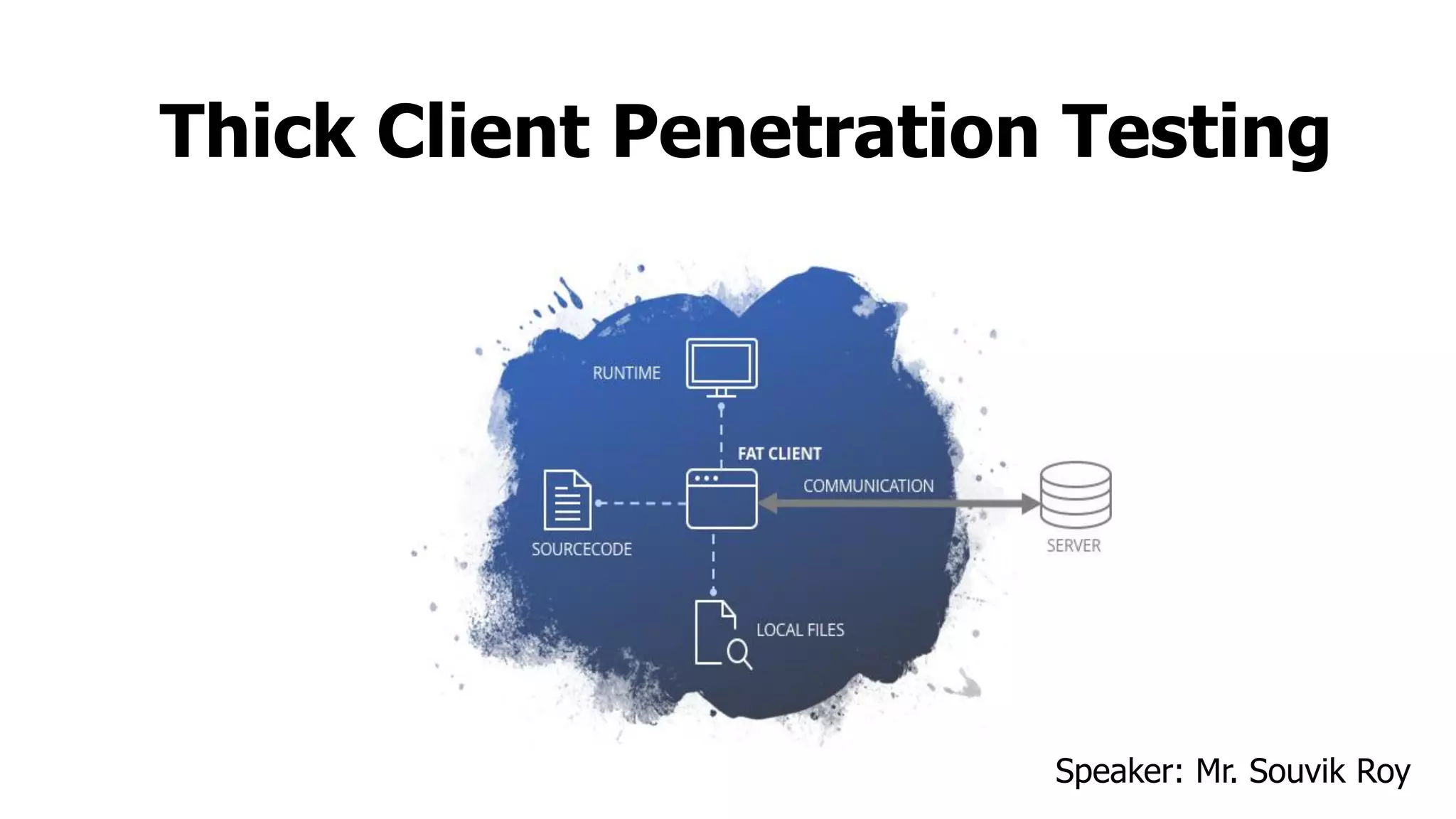
Thick Client Penetration Testing
Speaker: Mr. Souvik Roy
cat ~/.profile
# ~/.profile: executed by Bourne-compatible login shells.
if [ “ $IT Security Analyst " ]; then
if [ -f ~/.Application Security Engineer ]; then
. ~/.Web Application PenTester
. ~/.Source Code Reviewer
. ~/.Android Application PenTester
. ~/.Thick Client Application PenTester
fi
fi
mesg n 2> /OWASP/Kolkata_Lead || true.
Introduction
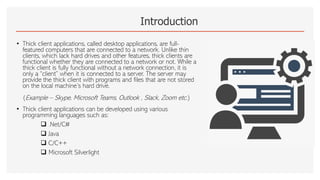
• Thick client applications, called desktop applications, are full-
featured computers that are connected to a network. Unlike thin
clients, which lack hard drives and other features, thick clients are
functional whether they are connected to a network or not. While a
thick client is fully functional without a network connection, it is
only a “client” when it is connected to a server. The server may
provide the thick client with programs and files that are not stored
on the local machine’s hard drive.
(Example – Skype, Microsoft Teams, Outlook , Slack, Zoom etc.)
• Thick client applications can be developed using various
programming languages such as:
❑ .Net/C#
❑ Java
❑ C/C++
❑ Microsoft Silverlight
Why Thick Client Penetration Testing?
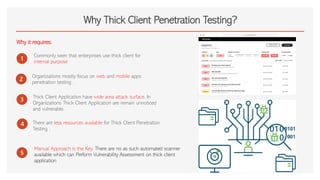
Why it requires:
1
Commonly seen that enterprises use thick client for
internal purpose
2
Organizations mostly focus on web and mobile apps
penetration testing .
3
Thick Client Application have wide area attack surface. In
Organizations Thick Client Application are remain unnoticed
and vulnerable.
4
5
There are less resources available for Thick Client Penetration
Testing .
Manual Approach is the Key. There are no as such automated scanner
available which can Perform Vulnerability Assessment on thick client
application
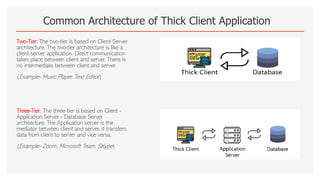
Common Architecture of Thick Client Application
Two-Tier: The two-tier is based on Client-Server
architecture. The two-tier architecture is like a
client-server application. Direct communication
takes place between client and server. There is
no intermediate between client and server.
(Example- Music Player, Text Editor)
Three-Tier: The three-tier is based on Client -
Application Server - Database Server
architecture. The Application server is the
mediator between client and server, it transfers
data from client to server and vice versa.
(Example- Zoom, Microsoft Team, SKype)
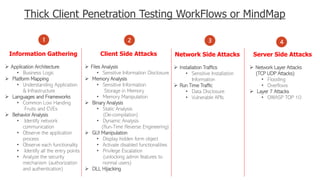
Thick Client Penetration Testing WorkFlows or MindMap
1
Information Gathering
➢ Application Architecture
• Business Logic
➢ Platform Mapping
• Understanding Application
& Infrastructure
➢ Languages and Frameworks
• Common Low Handing
Fruits and CVEs
➢ Behavior Analysis
• Identify network
communication
• Observe the application
process
• Observe each functionality
• Identify all the entry points
• Analyze the security
mechanism (authorization
and authentication)
2 3
Client Side Attacks
➢ Files Analysis
• Sensitive Information Disclosure
➢ Memory Analysis
• Sensitive Information
Storage in Memory
• Memory Manipulation
➢ Binary Analysis
• Static Analysis
(De-compilation)
• Dynamic Analysis
(Run-Time Reverse Engineering)
➢ GUI Manipulation
• Display hidden form object
• Activate disabled functionalities
• Privilege Escalation
(unlocking admin features to
normal users)
➢ DLL Hijacking
Network Side Attacks
➢ Installation Traffics
• Sensitive Installation
Information
➢ Run Time Traffic
• Data Disclosure
• Vulnerable APIs
4
Server Side Attacks
➢ Network Layer Attacks
(TCP UDP Attacks)
• Flooding
• Overflows
➢ Layer 7 Attacks
• OWASP TOP 10
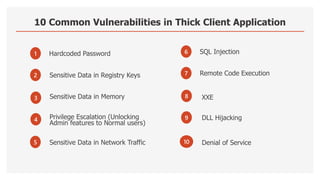
10 Common Vulnerabilities in Thick Client Application
1
Sensitive Data in Memory
2
Hardcoded Password
3
4
Sensitive Data in Registry Keys
Denial of Service
5 Sensitive Data in Network Traffic
6
XXE
7
SQL Injection
8
9
Remote Code Execution
DLL Hijacking
10
Privilege Escalation (Unlocking
Admin features to Normal users)
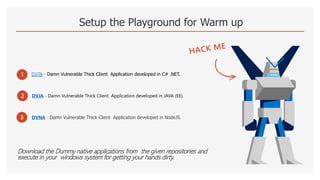
Setup the Playground for Warm up
Download the Dummy native applications from the given repositories and
execute in your windows system for getting your hands dirty.
1 DVTA - Damn Vulnerable Thick Client Application developed in C# .NET.
2
3
DVJA - Damn Vulnerable Thick Client Application developed in JAVA (EE).
DVNA - Damn Vulnerable Thick Client Application developed in NodeJS.
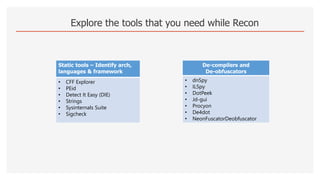
Explore the tools that you need while Recon
Static tools – Identify arch,
languages & framework
• CFF Explorer
• PEid
• Detect It Easy (DIE)
• Strings
• Sysinternals Suite
• Sigcheck
De-compilers and
De-obfuscators
• dnSpy
• ILSpy
• DotPeek
• Jd-gui
• Procyon
• De4dot
• NeonFuscatorDeobfuscator
Explore the tools that you need while Client Side Attacks
File analysis – look for
sensitive information &
files
• Process Monitor
• Regshot
• Process Explorer
• Process Hacker
• dnSpy
• Strings
• Procmon
• Accessenum
Memory Analysis &
Fuzzing
• Winhex
• Volatility
• Tsearch
• Userdump
• Spike
• Sulley
• AFL
• WinAFL
• PESecurity
• HxD
Binary Analysis – Look
for code logic, hidden
function, validation
checks, API keys, and
comments etc.
• Ghidra
• IDA Pro
• X64dbg
• OllyDbg
• Immunity Debugger
• Radare2
• Frida
• Bytecode Viewer
• PE Explore
• Metasploit
Test for weak GUI
Control tools
• WinSpy++
• WinManipulate
• Windows Enabler
• Window Detective
• UISpy
• Snoop WPF
Explore the tools that you need while Network Side Attacks
Network sniffers – check
communication b/w client & server
• Wireshark
• TCPView
• Sysinternal
• SmartSniff
• Tcpdump
Proxy tools – Capture traffic between
client and local/server & allow us to
modify requests/response
• Echo mirage
• Burp Suite
• Fiddler
• MITM Relay
• Charles Web Proxy
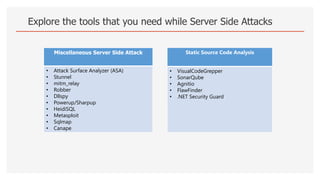
Explore the tools that you need while Server Side Attacks
Miscellaneous Server Side Attack
• Attack Surface Analyzer (ASA)
• Stunnel
• mitm_relay
• Robber
• Dllspy
• Powerup/Sharpup
• HeidiSQL
• Metasploit
• Sqlmap
• Canape
Static Source Code Analysis
• VisualCodeGrepper
• SonarQube
• Agnitio
• FlawFinder
• .NET Security Guard
Practical Time
Let me show a Glimpse of Attack on DVTA
Have a cup of coffee and Catch Your Breath
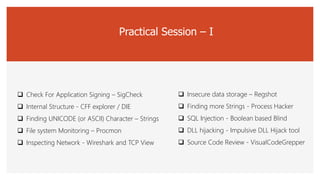
Practical Session – I
❑ Check For Application Signing – SigCheck
❑ Internal Structure - CFF explorer / DIE
❑ Finding UNICODE (or ASCII) Character – Strings
❑ File system Monitoring – Procmon
❑ Inspecting Network - Wireshark and TCP View
❑ Insecure data storage – Regshot
❑ Finding more Strings - Process Hacker
❑ SQL Injection - Boolean based Blind
❑ DLL hijacking - Impulsive DLL Hijack tool
❑ Source Code Review - VisualCodeGrepper

Thick Client Penetration Testing.pdf

  • 1.
    Thick Client PenetrationTesting Speaker: Mr. Souvik Roy
  • 2.
    cat ~/.profile # ~/.profile:executed by Bourne-compatible login shells. if [ “ $IT Security Analyst " ]; then if [ -f ~/.Application Security Engineer ]; then . ~/.Web Application PenTester . ~/.Source Code Reviewer . ~/.Android Application PenTester . ~/.Thick Client Application PenTester fi fi mesg n 2> /OWASP/Kolkata_Lead || true.
  • 3.
    Introduction • Thick clientapplications, called desktop applications, are full- featured computers that are connected to a network. Unlike thin clients, which lack hard drives and other features, thick clients are functional whether they are connected to a network or not. While a thick client is fully functional without a network connection, it is only a “client” when it is connected to a server. The server may provide the thick client with programs and files that are not stored on the local machine’s hard drive. (Example – Skype, Microsoft Teams, Outlook , Slack, Zoom etc.) • Thick client applications can be developed using various programming languages such as: ❑ .Net/C# ❑ Java ❑ C/C++ ❑ Microsoft Silverlight
  • 4.
    Why Thick ClientPenetration Testing? Why it requires: 1 Commonly seen that enterprises use thick client for internal purpose 2 Organizations mostly focus on web and mobile apps penetration testing . 3 Thick Client Application have wide area attack surface. In Organizations Thick Client Application are remain unnoticed and vulnerable. 4 5 There are less resources available for Thick Client Penetration Testing . Manual Approach is the Key. There are no as such automated scanner available which can Perform Vulnerability Assessment on thick client application
  • 5.
    Common Architecture ofThick Client Application Two-Tier: The two-tier is based on Client-Server architecture. The two-tier architecture is like a client-server application. Direct communication takes place between client and server. There is no intermediate between client and server. (Example- Music Player, Text Editor) Three-Tier: The three-tier is based on Client - Application Server - Database Server architecture. The Application server is the mediator between client and server, it transfers data from client to server and vice versa. (Example- Zoom, Microsoft Team, SKype)
  • 6.
    Thick Client PenetrationTesting WorkFlows or MindMap 1 Information Gathering ➢ Application Architecture • Business Logic ➢ Platform Mapping • Understanding Application & Infrastructure ➢ Languages and Frameworks • Common Low Handing Fruits and CVEs ➢ Behavior Analysis • Identify network communication • Observe the application process • Observe each functionality • Identify all the entry points • Analyze the security mechanism (authorization and authentication) 2 3 Client Side Attacks ➢ Files Analysis • Sensitive Information Disclosure ➢ Memory Analysis • Sensitive Information Storage in Memory • Memory Manipulation ➢ Binary Analysis • Static Analysis (De-compilation) • Dynamic Analysis (Run-Time Reverse Engineering) ➢ GUI Manipulation • Display hidden form object • Activate disabled functionalities • Privilege Escalation (unlocking admin features to normal users) ➢ DLL Hijacking Network Side Attacks ➢ Installation Traffics • Sensitive Installation Information ➢ Run Time Traffic • Data Disclosure • Vulnerable APIs 4 Server Side Attacks ➢ Network Layer Attacks (TCP UDP Attacks) • Flooding • Overflows ➢ Layer 7 Attacks • OWASP TOP 10
  • 7.
    10 Common Vulnerabilitiesin Thick Client Application 1 Sensitive Data in Memory 2 Hardcoded Password 3 4 Sensitive Data in Registry Keys Denial of Service 5 Sensitive Data in Network Traffic 6 XXE 7 SQL Injection 8 9 Remote Code Execution DLL Hijacking 10 Privilege Escalation (Unlocking Admin features to Normal users)
  • 8.
    Setup the Playgroundfor Warm up Download the Dummy native applications from the given repositories and execute in your windows system for getting your hands dirty. 1 DVTA - Damn Vulnerable Thick Client Application developed in C# .NET. 2 3 DVJA - Damn Vulnerable Thick Client Application developed in JAVA (EE). DVNA - Damn Vulnerable Thick Client Application developed in NodeJS.
  • 9.
    Explore the toolsthat you need while Recon Static tools – Identify arch, languages & framework • CFF Explorer • PEid • Detect It Easy (DIE) • Strings • Sysinternals Suite • Sigcheck De-compilers and De-obfuscators • dnSpy • ILSpy • DotPeek • Jd-gui • Procyon • De4dot • NeonFuscatorDeobfuscator
  • 10.
    Explore the toolsthat you need while Client Side Attacks File analysis – look for sensitive information & files • Process Monitor • Regshot • Process Explorer • Process Hacker • dnSpy • Strings • Procmon • Accessenum Memory Analysis & Fuzzing • Winhex • Volatility • Tsearch • Userdump • Spike • Sulley • AFL • WinAFL • PESecurity • HxD Binary Analysis – Look for code logic, hidden function, validation checks, API keys, and comments etc. • Ghidra • IDA Pro • X64dbg • OllyDbg • Immunity Debugger • Radare2 • Frida • Bytecode Viewer • PE Explore • Metasploit Test for weak GUI Control tools • WinSpy++ • WinManipulate • Windows Enabler • Window Detective • UISpy • Snoop WPF
  • 11.
    Explore the toolsthat you need while Network Side Attacks Network sniffers – check communication b/w client & server • Wireshark • TCPView • Sysinternal • SmartSniff • Tcpdump Proxy tools – Capture traffic between client and local/server & allow us to modify requests/response • Echo mirage • Burp Suite • Fiddler • MITM Relay • Charles Web Proxy
  • 12.
    Explore the toolsthat you need while Server Side Attacks Miscellaneous Server Side Attack • Attack Surface Analyzer (ASA) • Stunnel • mitm_relay • Robber • Dllspy • Powerup/Sharpup • HeidiSQL • Metasploit • Sqlmap • Canape Static Source Code Analysis • VisualCodeGrepper • SonarQube • Agnitio • FlawFinder • .NET Security Guard
  • 13.
    Practical Time Let meshow a Glimpse of Attack on DVTA Have a cup of coffee and Catch Your Breath
  • 14.
    Practical Session –I ❑ Check For Application Signing – SigCheck ❑ Internal Structure - CFF explorer / DIE ❑ Finding UNICODE (or ASCII) Character – Strings ❑ File system Monitoring – Procmon ❑ Inspecting Network - Wireshark and TCP View ❑ Insecure data storage – Regshot ❑ Finding more Strings - Process Hacker ❑ SQL Injection - Boolean based Blind ❑ DLL hijacking - Impulsive DLL Hijack tool ❑ Source Code Review - VisualCodeGrepper