




• A specialized field in computer networking that involves securing a computer
network infrastructure.
• handled by a network administrator or system administrator who implements the
security policy, network software and hardware needed to protect.
• prevent and monitor unauthorized access, misuse, modification, or denial of a
computer network and network-accessible resources.
• covers both, public and private networks, that are used in
 everyday jobs
 conducting transactions and communications among businesses
 government agencies individuals.
• Protect vital information while still allowing access to those who need it
Trade secrets, medical records, etc.
• Provide authentication and access control for resources
• Guarantee availability of resources
• Authentication
 The process of verifying the identity of a user
 Password, Key, smart card or other device, fingerprint, voice, or retinal scans
• Access control
 Limits the access to authorized users, resources provided by the application
• Confidentiality
 Protects against unauthorized release of message content
• Integrity
 Guarantees that a message is received as sent
• Non-repudiation
 Protects against sender/receiver denying sending/receiving a message
 Someone cannot deny something
• Availability
 Guarantees that the system services are always available when needed
• Security Audit
 Keeps track of transaction for late use (diagnostic, alarms…)
• Key Management
 Allows to negotiate, setup and maintain keys between communicating entities
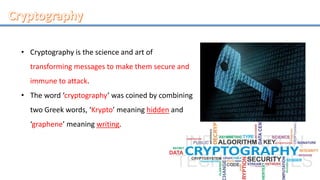
• Cryptography is the science and art of
transforming messages to make them secure and
immune to attack.
• The word ‘cryptography’ was coined by combining
two Greek words, ‘Krypto’ meaning hidden and
‘graphene’ meaning writing.
• an implementation of cryptographic techniques and their accompanying
infrastructure to provide information security services.
• A cryptosystem is also referred to as a cipher system.
The objective of cryptosystem
at the end of the process, only
the sender and the receiver will
know the plaintext.
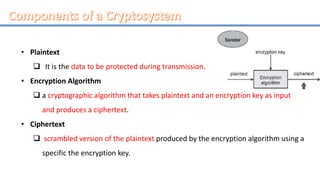
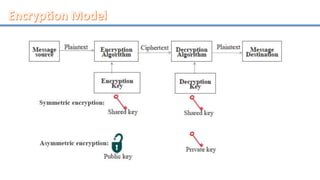
• Plaintext
 It is the data to be protected during transmission.
• Encryption Algorithm
 a cryptographic algorithm that takes plaintext and an encryption key as input
and produces a ciphertext.
• Ciphertext
 scrambled version of the plaintext produced by the encryption algorithm using a
specific the encryption key.
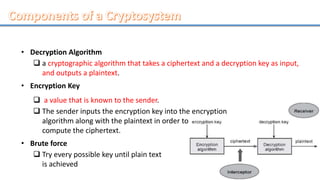
• Decryption Algorithm
 a cryptographic algorithm that takes a ciphertext and a decryption key as input,
and outputs a plaintext.
• Encryption Key
 a value that is known to the sender.
 The sender inputs the encryption key into the encryption
algorithm along with the plaintext in order to
compute the ciphertext.
• Brute force
 Try every possible key until plain text
is achieved
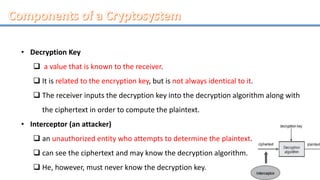
• Decryption Key
 a value that is known to the receiver.
 It is related to the encryption key, but is not always identical to it.
 The receiver inputs the decryption key into the decryption algorithm along with
the ciphertext in order to compute the plaintext.
• Interceptor (an attacker)
 an unauthorized entity who attempts to determine the plaintext.
 can see the ciphertext and may know the decryption algorithm.
 He, however, must never know the decryption key.
• Symmetric Key Algorithms (AES , DES, IDEA)
• Public–Key Algorithms or Asymmetric cryptography
• Digital Signatures
• Symmetric-key algorithms
 use the same cryptographic keys for both encryption of plaintext and decryption
of ciphertext.
 keys may be identical or there may be a simple transformation to go between the
two keys.
 the keys, represent a shared secret between two or more parties that can be
used to maintain a private information link.
 same key is one of the main drawbacks of symmetric key encryption.
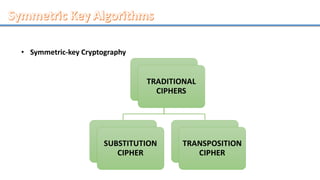
• Symmetric-key Cryptography
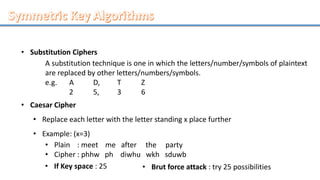
• Substitution Ciphers
A substitution technique is one in which the letters/number/symbols of plaintext
are replaced by other letters/numbers/symbols.
e.g. A D, T Z
2 5, 3 6
• Caesar Cipher
• Replace each letter with the letter standing x place further
• Example: (x=3)
• Plain : meet me after the party
• Cipher : phhw ph diwhu wkh sduwb
• If Key space : 25 • Brut force attack : try 25 possibilities
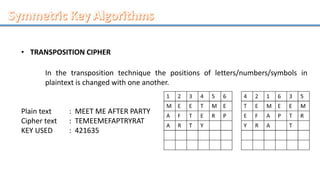
• TRANSPOSITION CIPHER
In the transposition technique the positions of letters/numbers/symbols in
plaintext is changed with one another.
Plain text : MEET ME AFTER PARTY
Cipher text : TEMEEMEFAPTRYRAT
KEY USED : 421635
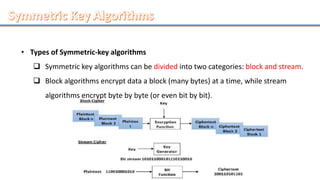
• Types of Symmetric-key algorithms
 Symmetric key algorithms can be divided into two categories: block and stream.
 Block algorithms encrypt data a block (many bytes) at a time, while stream
algorithms encrypt byte by byte (or even bit by bit).
• Examples of Symmetric algorithms
 AES (Advanced Encryption Standard)
 DES (Digital Encryption Standard)
 IDEA (International Data Encryption Algorithm) and etc.
• Other terms for symmetric-key encryption
 secret-key
 single-key
 shared-key
 one-key
 private-key
• Based on mathematical algorithms
• Asymmetric
 Use two separate keys
• Ingredients
 Plain text
 Encryption algorithm
 Public and private key
 Cipher text
 Decryption algorithm
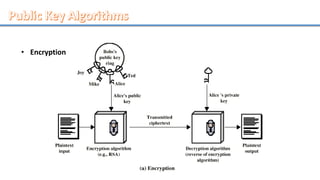
• Encryption
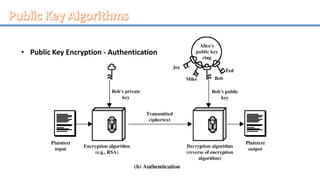
• Public Key Encryption - Authentication
• Public Key Encryption – Operation
 One key made public
o Used for encryption
 Other kept private
o Used for decryption
 Infeasible to determine decryption key given encryption key and algorithm
 Either key can be used for encryption, the other for decryption
• Public Key Encryption – Steps
 User generates pair of keys
 User places one key in public domain
 To send a message to user, encrypt using public key
 user decrypts using private key
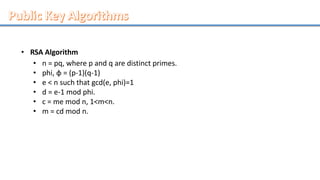
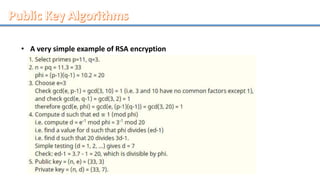
• RSA Algorithm
• n = pq, where p and q are distinct primes.
• phi, φ = (p-1)(q-1)
• e < n such that gcd(e, phi)=1
• d = e-1 mod phi.
• c = me mod n, 1<m<n.
• m = cd mod n.
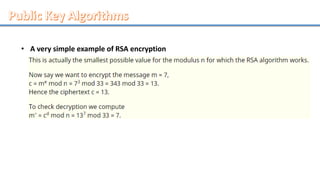
• A very simple example of RSA encryption
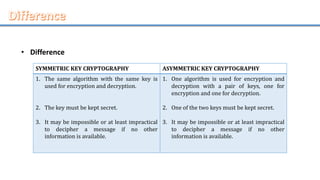
• Difference
SYMMETRIC KEY CRYPTOGRAPHY ASYMMETRIC KEY CRYPTOGRAPHY
1. The same algorithm with the same key is
used for encryption and decryption.
2. The key must be kept secret.
3. It may be impossible or at least impractical
to decipher a message if no other
information is available.
1. One algorithm is used for encryption and
decryption with a pair of keys, one for
encryption and one for decryption.
2. One of the two keys must be kept secret.
3. It may be impossible or at least impractical
to decipher a message if no other
information is available.
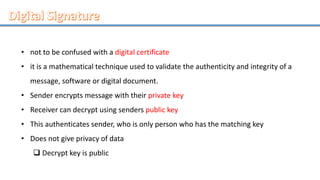
• not to be confused with a digital certificate
• it is a mathematical technique used to validate the authenticity and integrity of a
message, software or digital document.
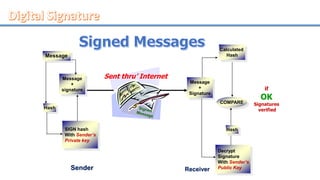
• Sender encrypts message with their private key
• Receiver can decrypt using senders public key
• This authenticates sender, who is only person who has the matching key
• Does not give privacy of data
 Decrypt key is public
• How digital signatures work
o Digital signatures are based on public key cryptography
o such as RSA, one can generate two keys that are mathematically linked: one
private and one public.
• How to create a digital signature
o signing software (such as an email program) creates a one-way hash of the
electronic data to be signed.
o The private key is then used to encrypt the hash. along with other information,
such as the hashing algorithm -- is the digital signature.
o The reason for encrypting the hash instead of the entire message or document
is that a hash function can convert an arbitrary input into a fixed length value,
which is usually much shorter. This saves time since hashing is much faster than
signing.
Message
+
Signature
Hash
Decrypt
Signature
With Sender’s
Public Key
SIGN hash
With Sender’s
Private key
Message
+
signature
COMPARE
Calculated
HashMessage
Sender Receiver
Hash
Sent thru’ Internet
if
OK
Signatures
verified
• Private key protection
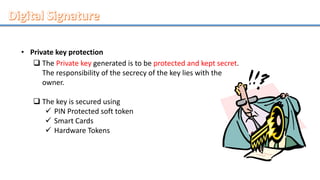
 The Private key generated is to be protected and kept secret.
The responsibility of the secrecy of the key lies with the
owner.
 The key is secured using
 PIN Protected soft token
 Smart Cards
 Hardware Tokens
• Most modern email programs
 the use of digital signatures and digital certificates making it easy to sign any
outgoing emails and validate digitally signed incoming messages.
• Digital signatures are also used extensively to provide
 proof of authenticity
 data integrity
 non-repudiation of communications and transactions conducted over the
Internet.
What are the benefits of digital signatures?
 Authentication and Integrity
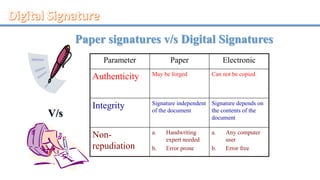
Paper signatures v/s Digital Signatures
Parameter Paper Electronic
Authenticity May be forged Can not be copied
Integrity Signature independent
of the document
Signature depends on
the contents of the
document
Non-
repudiation
a. Handwriting
expert needed
b. Error prone
a. Any computer
user
b. Error free
V/s
Network security

Network security

  • 2.
    • A specializedfield in computer networking that involves securing a computer network infrastructure. • handled by a network administrator or system administrator who implements the security policy, network software and hardware needed to protect. • prevent and monitor unauthorized access, misuse, modification, or denial of a computer network and network-accessible resources.
  • 3.
    • covers both,public and private networks, that are used in  everyday jobs  conducting transactions and communications among businesses  government agencies individuals.
  • 4.
    • Protect vitalinformation while still allowing access to those who need it Trade secrets, medical records, etc. • Provide authentication and access control for resources • Guarantee availability of resources
  • 5.
    • Authentication  Theprocess of verifying the identity of a user  Password, Key, smart card or other device, fingerprint, voice, or retinal scans • Access control  Limits the access to authorized users, resources provided by the application • Confidentiality  Protects against unauthorized release of message content • Integrity  Guarantees that a message is received as sent
  • 6.
    • Non-repudiation  Protectsagainst sender/receiver denying sending/receiving a message  Someone cannot deny something • Availability  Guarantees that the system services are always available when needed • Security Audit  Keeps track of transaction for late use (diagnostic, alarms…) • Key Management  Allows to negotiate, setup and maintain keys between communicating entities
  • 8.
    • Cryptography isthe science and art of transforming messages to make them secure and immune to attack. • The word ‘cryptography’ was coined by combining two Greek words, ‘Krypto’ meaning hidden and ‘graphene’ meaning writing.
  • 9.
    • an implementationof cryptographic techniques and their accompanying infrastructure to provide information security services. • A cryptosystem is also referred to as a cipher system. The objective of cryptosystem at the end of the process, only the sender and the receiver will know the plaintext.
  • 10.
    • Plaintext  Itis the data to be protected during transmission. • Encryption Algorithm  a cryptographic algorithm that takes plaintext and an encryption key as input and produces a ciphertext. • Ciphertext  scrambled version of the plaintext produced by the encryption algorithm using a specific the encryption key.
  • 11.
    • Decryption Algorithm a cryptographic algorithm that takes a ciphertext and a decryption key as input, and outputs a plaintext. • Encryption Key  a value that is known to the sender.  The sender inputs the encryption key into the encryption algorithm along with the plaintext in order to compute the ciphertext. • Brute force  Try every possible key until plain text is achieved
  • 12.
    • Decryption Key a value that is known to the receiver.  It is related to the encryption key, but is not always identical to it.  The receiver inputs the decryption key into the decryption algorithm along with the ciphertext in order to compute the plaintext. • Interceptor (an attacker)  an unauthorized entity who attempts to determine the plaintext.  can see the ciphertext and may know the decryption algorithm.  He, however, must never know the decryption key.
  • 14.
    • Symmetric KeyAlgorithms (AES , DES, IDEA) • Public–Key Algorithms or Asymmetric cryptography • Digital Signatures
  • 16.
    • Symmetric-key algorithms use the same cryptographic keys for both encryption of plaintext and decryption of ciphertext.  keys may be identical or there may be a simple transformation to go between the two keys.  the keys, represent a shared secret between two or more parties that can be used to maintain a private information link.  same key is one of the main drawbacks of symmetric key encryption.
  • 17.
  • 18.
    • Substitution Ciphers Asubstitution technique is one in which the letters/number/symbols of plaintext are replaced by other letters/numbers/symbols. e.g. A D, T Z 2 5, 3 6 • Caesar Cipher • Replace each letter with the letter standing x place further • Example: (x=3) • Plain : meet me after the party • Cipher : phhw ph diwhu wkh sduwb • If Key space : 25 • Brut force attack : try 25 possibilities
  • 19.
    • TRANSPOSITION CIPHER Inthe transposition technique the positions of letters/numbers/symbols in plaintext is changed with one another. Plain text : MEET ME AFTER PARTY Cipher text : TEMEEMEFAPTRYRAT KEY USED : 421635
  • 20.
    • Types ofSymmetric-key algorithms  Symmetric key algorithms can be divided into two categories: block and stream.  Block algorithms encrypt data a block (many bytes) at a time, while stream algorithms encrypt byte by byte (or even bit by bit).
  • 21.
    • Examples ofSymmetric algorithms  AES (Advanced Encryption Standard)  DES (Digital Encryption Standard)  IDEA (International Data Encryption Algorithm) and etc. • Other terms for symmetric-key encryption  secret-key  single-key  shared-key  one-key  private-key
  • 23.
    • Based onmathematical algorithms • Asymmetric  Use two separate keys • Ingredients  Plain text  Encryption algorithm  Public and private key  Cipher text  Decryption algorithm
  • 24.
  • 25.
    • Public KeyEncryption - Authentication
  • 26.
    • Public KeyEncryption – Operation  One key made public o Used for encryption  Other kept private o Used for decryption  Infeasible to determine decryption key given encryption key and algorithm  Either key can be used for encryption, the other for decryption
  • 27.
    • Public KeyEncryption – Steps  User generates pair of keys  User places one key in public domain  To send a message to user, encrypt using public key  user decrypts using private key
  • 28.
    • RSA Algorithm •n = pq, where p and q are distinct primes. • phi, φ = (p-1)(q-1) • e < n such that gcd(e, phi)=1 • d = e-1 mod phi. • c = me mod n, 1<m<n. • m = cd mod n.
  • 29.
    • A verysimple example of RSA encryption
  • 30.
    • A verysimple example of RSA encryption
  • 31.
    • Difference SYMMETRIC KEYCRYPTOGRAPHY ASYMMETRIC KEY CRYPTOGRAPHY 1. The same algorithm with the same key is used for encryption and decryption. 2. The key must be kept secret. 3. It may be impossible or at least impractical to decipher a message if no other information is available. 1. One algorithm is used for encryption and decryption with a pair of keys, one for encryption and one for decryption. 2. One of the two keys must be kept secret. 3. It may be impossible or at least impractical to decipher a message if no other information is available.
  • 33.
    • not tobe confused with a digital certificate • it is a mathematical technique used to validate the authenticity and integrity of a message, software or digital document. • Sender encrypts message with their private key • Receiver can decrypt using senders public key • This authenticates sender, who is only person who has the matching key • Does not give privacy of data  Decrypt key is public
  • 34.
    • How digitalsignatures work o Digital signatures are based on public key cryptography o such as RSA, one can generate two keys that are mathematically linked: one private and one public. • How to create a digital signature o signing software (such as an email program) creates a one-way hash of the electronic data to be signed. o The private key is then used to encrypt the hash. along with other information, such as the hashing algorithm -- is the digital signature. o The reason for encrypting the hash instead of the entire message or document is that a hash function can convert an arbitrary input into a fixed length value, which is usually much shorter. This saves time since hashing is much faster than signing.
  • 35.
    Message + Signature Hash Decrypt Signature With Sender’s Public Key SIGNhash With Sender’s Private key Message + signature COMPARE Calculated HashMessage Sender Receiver Hash Sent thru’ Internet if OK Signatures verified
  • 36.
    • Private keyprotection  The Private key generated is to be protected and kept secret. The responsibility of the secrecy of the key lies with the owner.  The key is secured using  PIN Protected soft token  Smart Cards  Hardware Tokens
  • 37.
    • Most modernemail programs  the use of digital signatures and digital certificates making it easy to sign any outgoing emails and validate digitally signed incoming messages. • Digital signatures are also used extensively to provide  proof of authenticity  data integrity  non-repudiation of communications and transactions conducted over the Internet. What are the benefits of digital signatures?  Authentication and Integrity
  • 38.
    Paper signatures v/sDigital Signatures Parameter Paper Electronic Authenticity May be forged Can not be copied Integrity Signature independent of the document Signature depends on the contents of the document Non- repudiation a. Handwriting expert needed b. Error prone a. Any computer user b. Error free V/s