Images

         Prakash Khaire
B V Patel Institute of BMC and IT
Introduction
• Still images are the important element of a
  multimedia project or a web site.
  – To make a multimedia presentation look elegant
    and complete.
• It is necessary to spend ample amount of time
  to design the graphics and the layouts.
• Competent, computer literate skills in graphic
  art and design are vital to the success of a
  multimedia project.
Digital Image
•   A digital image is represented by a matrix of numeric values each
    representing a quantized intensity value.
     – When I is a two-dimensional matrix, then I(r,c) is the intensity value at the
       position corresponding to row r and column c of the matrix.
•   The points at which an image is sampled are known as picture elements
•   commonly abbreviated as pixels.
•   The pixel values of intensity images are called gray scale levels (we encode
    here the “color” of the image).
•   The intensity at each pixel is represented by an integer and is determined
    from the continuous image by averaging over a small neighborhood
    around the pixel location.
•   If there are just two intensity values, for example, black, and white, they
    are represented by the numbers 0 and 1; such images are called binary-
    valued images.
•   If 8-bit integers are used to store each pixel value, the gray levels range
    from 0 (black) to 255 (white).
Digital Image Format
• Captured Image Format
  – The image format is specified by two main
    parameters: spatial resolution, which is specified as
    pixels x pixels (eg. 640x480)and color encoding, which
    is specified by bits per pixel.
  – Both parameter values depend on hardware and
    software for input/output of images.
• Stored Image Format
  – When we store an image, we are storing a two-
    dimensional array of values, in which each value
    represents the data associated with a pixel in the
    image. For a bitmap, this value is a binary digit.
Bitmap
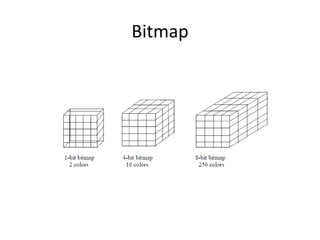
• A bitmap is a simple information matrix describing the
  individual dots that are the smallest elements of resolution
  on a computer screen or other display or printing device.
• A one-dimensional matrix is required for monochrome
  (black and white);
• Greater depth (more bits of information) is required to
  describe more than 16 million colors the picture elements
  may have.
• The state of all the pixels on a computer screen make up
  the image seen by the viewer, whether in combinations of
  black and white or colored pixels in a line of text, a
  photograph-like picture, or a simple background pattern.
Bitmap
Graphics Software Programs
• Drawing programs –
  Adobe Illustrator
• Paint programs – Paint
  Shop Pro
• Image-editing
  programs – Photoshop
  (does the work of all 3)
Multimedia tools(images)

Multimedia tools(images)

  • 1.
    Images Prakash Khaire B V Patel Institute of BMC and IT
  • 2.
    Introduction • Still imagesare the important element of a multimedia project or a web site. – To make a multimedia presentation look elegant and complete. • It is necessary to spend ample amount of time to design the graphics and the layouts. • Competent, computer literate skills in graphic art and design are vital to the success of a multimedia project.
  • 3.
    Digital Image • A digital image is represented by a matrix of numeric values each representing a quantized intensity value. – When I is a two-dimensional matrix, then I(r,c) is the intensity value at the position corresponding to row r and column c of the matrix. • The points at which an image is sampled are known as picture elements • commonly abbreviated as pixels. • The pixel values of intensity images are called gray scale levels (we encode here the “color” of the image). • The intensity at each pixel is represented by an integer and is determined from the continuous image by averaging over a small neighborhood around the pixel location. • If there are just two intensity values, for example, black, and white, they are represented by the numbers 0 and 1; such images are called binary- valued images. • If 8-bit integers are used to store each pixel value, the gray levels range from 0 (black) to 255 (white).
  • 4.
    Digital Image Format •Captured Image Format – The image format is specified by two main parameters: spatial resolution, which is specified as pixels x pixels (eg. 640x480)and color encoding, which is specified by bits per pixel. – Both parameter values depend on hardware and software for input/output of images. • Stored Image Format – When we store an image, we are storing a two- dimensional array of values, in which each value represents the data associated with a pixel in the image. For a bitmap, this value is a binary digit.
  • 5.
    Bitmap • A bitmapis a simple information matrix describing the individual dots that are the smallest elements of resolution on a computer screen or other display or printing device. • A one-dimensional matrix is required for monochrome (black and white); • Greater depth (more bits of information) is required to describe more than 16 million colors the picture elements may have. • The state of all the pixels on a computer screen make up the image seen by the viewer, whether in combinations of black and white or colored pixels in a line of text, a photograph-like picture, or a simple background pattern.
  • 6.
  • 7.
    Graphics Software Programs •Drawing programs – Adobe Illustrator • Paint programs – Paint Shop Pro • Image-editing programs – Photoshop (does the work of all 3)