Lesson 6-Images
’ a picture worth a thousand words’
Overview Creation of multimedia images. Creation of still images. Colors and palettes in multimedia. Image file types used in multimedia.
Creation of Multimedia Images Before commencing the creation of images in Multimedia, one should: Plan their approach using flow charts and storyboards. Organize the available tools. Have multiple monitors, if possible, for lots of screen real estate.
Creation of Still Images Still images may be the most important element of a multimedia project. The type of still images created depends on the display resolution, and hardware and software capabilities.
Creation of Still Images Types of still images. 3-D drawing and rendering.
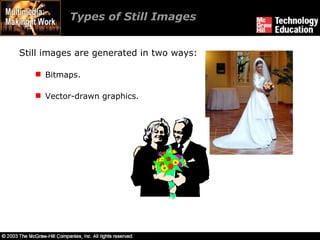
Types of Still Images Still images are generated in two ways: Bitmaps. Vector-drawn graphics.
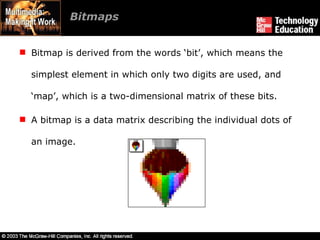
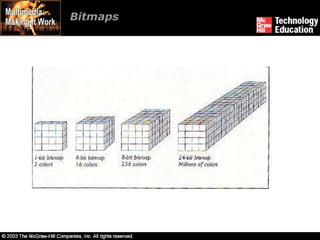
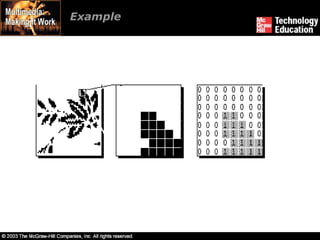
Bitmaps Bitmap is derived from the words ‘bit’, which means the simplest element in which only two digits are used, and ‘map’, which is a two-dimensional matrix of these bits. A bitmap is a data matrix describing the individual dots of an image.
Bitmaps
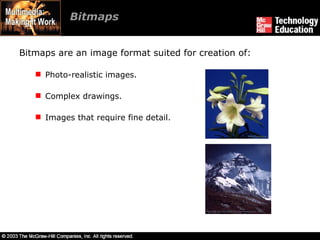
Bitmaps  Bitmaps are an image format suited for creation of: Photo-realistic images. Complex drawings. Images that require fine detail.
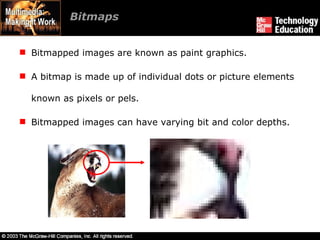
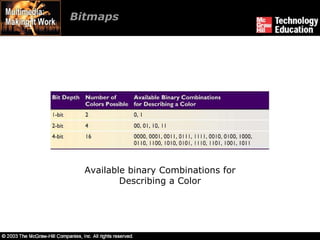
Bitmaps  Bitmapped images are known as paint graphics. A bitmap is made up of individual dots or picture elements known as pixels or pels. Bitmapped images can have varying bit and color depths.
Example
Bitmaps  Available binary Combinations for Describing a Color
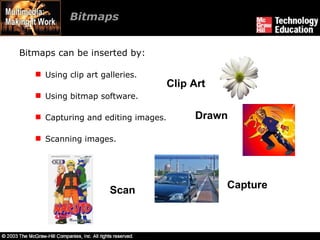
Bitmaps  Bitmaps can be inserted by: Using clip art galleries. Using bitmap software. Capturing and editing images. Scanning images. Clip Art Capture Scan Drawn
Using Clip Art Galleries A clip art gallery is an assortment of graphics, photographs, sound, and video. Clip arts are a popular alternative for users who do not want to create their own images. Clip arts are available on CD-ROMs and on the Internet.
Using Bitmap Software The industry standard for bitmap painting and editing programs are: Adobe's Photoshop and Illustrator. Macromedia's Fireworks. Corel's Painter. CorelDraw. Quark Express.
Capturing and Editing Images Capturing and storing images directly from the screen is another way to assemble images for multimedia. The PRINT SCREEN button in Windows and COMMAND-CONTROL-SHIFT-4 keystroke on the Macintosh copies the screen image to the clipboard.
Capturing and Editing Images  Image editing programs enable the user to: Enhance and make composite images. Alter and distort images. Add and delete elements. Morph (manipulate still images to create animated transformations).
Scanning Images Users can scan images from conventional sources and make necessary alterations and manipulations.
Vector-Drawn Graphics  Applications of vector-drawn images. How vector-drawn images work? Vector-drawn images v/s bitmaps.
Applications of Vector-Drawn Images Vector-drawn images are used in the following areas: Computer-aided design (CAD) programs. Graphic artists designing for the print media. 3-D animation programs. Applications requiring drawing of graphic shapes.
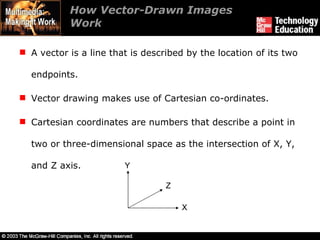
How Vector-Drawn Images Work A vector is a line that is described by the location of its two endpoints. Vector drawing makes use of Cartesian co-ordinates. Cartesian coordinates are numbers that describe a point in two or three-dimensional space as the intersection of X, Y, and Z axis. X Y Z
Vector-Drawn Images v/s Bitmaps Vector images use less memory space and have a smaller file size as compared to bitmaps. For the Web, pages that use vector graphics in plug-ins download faster, and when used for animation, draw faster than bitmaps.
Vector-Drawn Images v/s Bitmaps Vector images cannot be used for photorealistic images. Vector images require a plug-in for Web-based display. Bitmaps are not easily scalable and resizable. Bitmaps can be converted to vector images using autotracing.
3-D Drawing and Rendering 3-D animation tools. Features of a 3-D application. Panoramas.
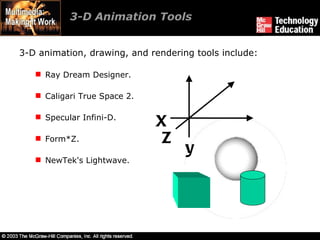
3-D Animation Tools  3-D animation, drawing, and rendering tools include: Ray Dream Designer. Caligari True Space 2. Specular Infini-D. Form*Z. NewTek's Lightwave. X y Z
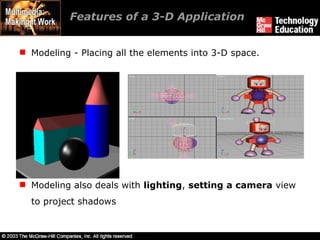
Features of a 3-D Application Modeling - Placing all the elements into 3-D space. Modeling also deals with  lighting ,  setting   a camera  view to project shadows
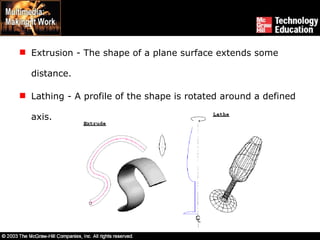
Extrusion - The shape of a plane surface extends some distance. Lathing - A profile of the shape is rotated around a defined axis.
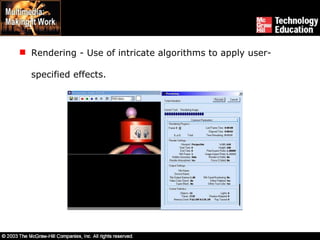
Rendering - Use of intricate algorithms to apply user-specified effects.
Panoramas Panoramic images are created by stitching together a sequence of photos around a circle and adjusting them into a single seamless bitmap. Software such as ULead Cool 360, and Panorama Factory are required in order to create panoramas.
Colors and Palettes in Multimedia Understanding natural light and color. Color palettes.
Understanding Natural Light and Color Light comes from an atom where an electron passes from a higher to a lower energy level. Each atom produces uniquely specific colors. Color is the frequency of a light wave within the narrow band of the electromagnetic spectrum, to which the human eye responds.
Understanding Natural Light and Color Additive color. Subtractive color. Monitor-specific color. Color models.
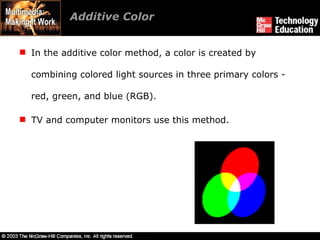
Additive Color In the additive color method, a color is created by combining colored light sources in three primary colors - red, green, and blue (RGB). TV and computer monitors use this method.
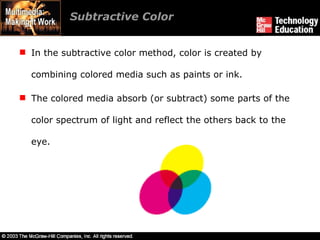
Subtractive Color In the subtractive color method, color is created by combining colored media such as paints or ink. The colored media absorb (or subtract) some parts of the color spectrum of light and reflect the others back to the eye.
Subtractive color is the process used to create color in printing. The printed page consists of tiny halftone dots of three primary colors- cyan, magenta, and yellow (CMY). Subtractive Color
Monitor-Specific Colors Colors should be used according to the target audience's monitor specifications. The preferred monitor resolution is 800x600 pixels. The preferred color depth is 32 bits.
Color Models Models used to specify color in computer terms are: RGB model - A 24-bit methodology where color is specified in terms of red, green, and blue values ranging from 0 to 255. HSB and HSL models – Color is specified as an angle from 0 to 360 degrees on a color wheel. Other models include CMYK, CIE, YIQ, YUV, and YCC.
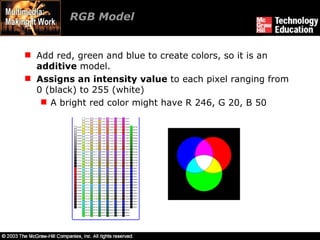
RGB Model Add red, green and blue to create colors, so it is an  additive  model. Assigns an intensity value  to each pixel ranging from 0 (black) to 255 (white) A bright red color might have R 246, G 20, B 50
HSB Model Based on human perception of color, describe three fundamental properties of color: Hue Saturation  (or  chroma )  Brightness  - relative lightness or darkness of color, also measured as % There is no HSB mode for creating or editing images
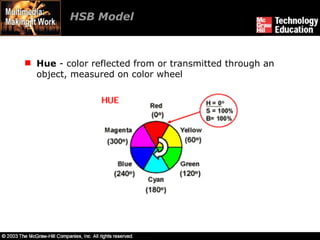
HSB Model Hue  - color reflected from or transmitted through an object, measured on color wheel
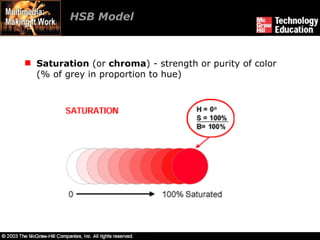
HSB Model Saturation  (or  chroma ) - strength or purity of color (% of grey in proportion to hue)
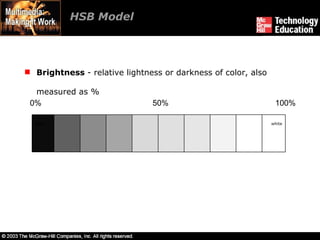
HSB Model Brightness  - relative lightness or darkness of color, also measured as % 0% 50% 100% Black white
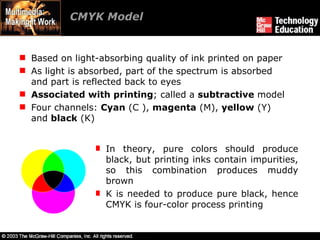
CMYK Model Based on light-absorbing quality of ink printed on paper As light is absorbed, part of the spectrum is absorbed and part is reflected back to eyes Associated with printing ; called a  subtractive  model Four channels:  Cyan  (C ),  magenta  (M),  yellow  (Y) and  black  (K) In theory, pure colors should produce black, but printing inks contain impurities, so this combination produces muddy brown K is needed to produce pure black, hence CMYK is four-color process printing
Color Palettes  Palettes are mathematical tables that define the color of pixels displayed on the screen. Palettes are called ‘color lookup tables’ or CLUTs on Macintosh. The most common palettes are 1, 4, 8, 16, and 24-bit deep.
Color Palettes  Dithering: Dithering is a process whereby the color value of each pixel is changed to the closest matching color value in the target palette. This is done using a mathematical algorithm.
Image File Types used in Multimedia  Macintosh formats. Windows formats. Cross-platform formats.
Macintosh Formats On the Macintosh, the most commonly used format is PICT. PICT is a complicated and versatile format developed by Apple. Almost every image application on the Macintosh can import or export PICT files. In a PICT file, both vector-drawn objects and bitmaps can reside side-by-side.
Windows Formats The most commonly used image file format on Windows is DIB. DIB stands for Device-independent bitmaps. The preferred file type for multimedia developers in Windows is Resource Interchange File Format (RIFF).
Windows Formats Bitmap formats used most often by Windows developers are: BMP - A Windows bitmap file. Native bitmap file format of the Microsoft Windows environment TIFF - Extensively used in DTP packages. Used to exchange documents between different applications and platforms PCX - Used by MS-DOS paint software. One of the oldest bitmapped formats popularized by MS-DOS paint programs that first appeared in the early 1980's
Cross-Platform Formats The image file formats that are compatible across platforms are: DXF - Used by CAD applications. Initial Graphics Exchange Standard (IGS or IGES) - Standard for transferring CAD drawings.  JPEG and GIF - Most commonly used formats on the Web.
Summary The computer generates still images as bitmaps and vector-drawn images. Images can be incorporated in multimedia using clip arts, bitmap software, or by capturing, editing, or scanning images. Creating 3-D images involves modeling, extruding, lathing, shading, and rendering. Color is one of the most vital components of multimedia.
Ch06

  • 1.
  • 2.
    ’ a pictureworth a thousand words’
  • 3.
    Overview Creation ofmultimedia images. Creation of still images. Colors and palettes in multimedia. Image file types used in multimedia.
  • 4.
    Creation of MultimediaImages Before commencing the creation of images in Multimedia, one should: Plan their approach using flow charts and storyboards. Organize the available tools. Have multiple monitors, if possible, for lots of screen real estate.
  • 5.
    Creation of StillImages Still images may be the most important element of a multimedia project. The type of still images created depends on the display resolution, and hardware and software capabilities.
  • 6.
    Creation of StillImages Types of still images. 3-D drawing and rendering.
  • 7.
    Types of StillImages Still images are generated in two ways: Bitmaps. Vector-drawn graphics.
  • 8.
    Bitmaps Bitmap isderived from the words ‘bit’, which means the simplest element in which only two digits are used, and ‘map’, which is a two-dimensional matrix of these bits. A bitmap is a data matrix describing the individual dots of an image.
  • 9.
  • 10.
    Bitmaps Bitmapsare an image format suited for creation of: Photo-realistic images. Complex drawings. Images that require fine detail.
  • 11.
    Bitmaps Bitmappedimages are known as paint graphics. A bitmap is made up of individual dots or picture elements known as pixels or pels. Bitmapped images can have varying bit and color depths.
  • 12.
  • 13.
    Bitmaps Availablebinary Combinations for Describing a Color
  • 14.
    Bitmaps Bitmapscan be inserted by: Using clip art galleries. Using bitmap software. Capturing and editing images. Scanning images. Clip Art Capture Scan Drawn
  • 15.
    Using Clip ArtGalleries A clip art gallery is an assortment of graphics, photographs, sound, and video. Clip arts are a popular alternative for users who do not want to create their own images. Clip arts are available on CD-ROMs and on the Internet.
  • 16.
    Using Bitmap SoftwareThe industry standard for bitmap painting and editing programs are: Adobe's Photoshop and Illustrator. Macromedia's Fireworks. Corel's Painter. CorelDraw. Quark Express.
  • 17.
    Capturing and EditingImages Capturing and storing images directly from the screen is another way to assemble images for multimedia. The PRINT SCREEN button in Windows and COMMAND-CONTROL-SHIFT-4 keystroke on the Macintosh copies the screen image to the clipboard.
  • 18.
    Capturing and EditingImages Image editing programs enable the user to: Enhance and make composite images. Alter and distort images. Add and delete elements. Morph (manipulate still images to create animated transformations).
  • 19.
    Scanning Images Userscan scan images from conventional sources and make necessary alterations and manipulations.
  • 20.
    Vector-Drawn Graphics Applications of vector-drawn images. How vector-drawn images work? Vector-drawn images v/s bitmaps.
  • 21.
    Applications of Vector-DrawnImages Vector-drawn images are used in the following areas: Computer-aided design (CAD) programs. Graphic artists designing for the print media. 3-D animation programs. Applications requiring drawing of graphic shapes.
  • 22.
    How Vector-Drawn ImagesWork A vector is a line that is described by the location of its two endpoints. Vector drawing makes use of Cartesian co-ordinates. Cartesian coordinates are numbers that describe a point in two or three-dimensional space as the intersection of X, Y, and Z axis. X Y Z
  • 23.
    Vector-Drawn Images v/sBitmaps Vector images use less memory space and have a smaller file size as compared to bitmaps. For the Web, pages that use vector graphics in plug-ins download faster, and when used for animation, draw faster than bitmaps.
  • 24.
    Vector-Drawn Images v/sBitmaps Vector images cannot be used for photorealistic images. Vector images require a plug-in for Web-based display. Bitmaps are not easily scalable and resizable. Bitmaps can be converted to vector images using autotracing.
  • 25.
    3-D Drawing andRendering 3-D animation tools. Features of a 3-D application. Panoramas.
  • 26.
    3-D Animation Tools 3-D animation, drawing, and rendering tools include: Ray Dream Designer. Caligari True Space 2. Specular Infini-D. Form*Z. NewTek's Lightwave. X y Z
  • 27.
    Features of a3-D Application Modeling - Placing all the elements into 3-D space. Modeling also deals with lighting , setting a camera view to project shadows
  • 28.
    Extrusion - Theshape of a plane surface extends some distance. Lathing - A profile of the shape is rotated around a defined axis.
  • 29.
    Rendering - Useof intricate algorithms to apply user-specified effects.
  • 30.
    Panoramas Panoramic imagesare created by stitching together a sequence of photos around a circle and adjusting them into a single seamless bitmap. Software such as ULead Cool 360, and Panorama Factory are required in order to create panoramas.
  • 31.
    Colors and Palettesin Multimedia Understanding natural light and color. Color palettes.
  • 32.
    Understanding Natural Lightand Color Light comes from an atom where an electron passes from a higher to a lower energy level. Each atom produces uniquely specific colors. Color is the frequency of a light wave within the narrow band of the electromagnetic spectrum, to which the human eye responds.
  • 33.
    Understanding Natural Lightand Color Additive color. Subtractive color. Monitor-specific color. Color models.
  • 34.
    Additive Color Inthe additive color method, a color is created by combining colored light sources in three primary colors - red, green, and blue (RGB). TV and computer monitors use this method.
  • 35.
    Subtractive Color Inthe subtractive color method, color is created by combining colored media such as paints or ink. The colored media absorb (or subtract) some parts of the color spectrum of light and reflect the others back to the eye.
  • 36.
    Subtractive color isthe process used to create color in printing. The printed page consists of tiny halftone dots of three primary colors- cyan, magenta, and yellow (CMY). Subtractive Color
  • 37.
    Monitor-Specific Colors Colorsshould be used according to the target audience's monitor specifications. The preferred monitor resolution is 800x600 pixels. The preferred color depth is 32 bits.
  • 38.
    Color Models Modelsused to specify color in computer terms are: RGB model - A 24-bit methodology where color is specified in terms of red, green, and blue values ranging from 0 to 255. HSB and HSL models – Color is specified as an angle from 0 to 360 degrees on a color wheel. Other models include CMYK, CIE, YIQ, YUV, and YCC.
  • 39.
    RGB Model Addred, green and blue to create colors, so it is an additive model. Assigns an intensity value to each pixel ranging from 0 (black) to 255 (white) A bright red color might have R 246, G 20, B 50
  • 40.
    HSB Model Basedon human perception of color, describe three fundamental properties of color: Hue Saturation (or chroma ) Brightness - relative lightness or darkness of color, also measured as % There is no HSB mode for creating or editing images
  • 41.
    HSB Model Hue - color reflected from or transmitted through an object, measured on color wheel
  • 42.
    HSB Model Saturation (or chroma ) - strength or purity of color (% of grey in proportion to hue)
  • 43.
    HSB Model Brightness - relative lightness or darkness of color, also measured as % 0% 50% 100% Black white
  • 44.
    CMYK Model Basedon light-absorbing quality of ink printed on paper As light is absorbed, part of the spectrum is absorbed and part is reflected back to eyes Associated with printing ; called a subtractive model Four channels: Cyan (C ), magenta (M), yellow (Y) and black (K) In theory, pure colors should produce black, but printing inks contain impurities, so this combination produces muddy brown K is needed to produce pure black, hence CMYK is four-color process printing
  • 45.
    Color Palettes Palettes are mathematical tables that define the color of pixels displayed on the screen. Palettes are called ‘color lookup tables’ or CLUTs on Macintosh. The most common palettes are 1, 4, 8, 16, and 24-bit deep.
  • 46.
    Color Palettes Dithering: Dithering is a process whereby the color value of each pixel is changed to the closest matching color value in the target palette. This is done using a mathematical algorithm.
  • 47.
    Image File Typesused in Multimedia Macintosh formats. Windows formats. Cross-platform formats.
  • 48.
    Macintosh Formats Onthe Macintosh, the most commonly used format is PICT. PICT is a complicated and versatile format developed by Apple. Almost every image application on the Macintosh can import or export PICT files. In a PICT file, both vector-drawn objects and bitmaps can reside side-by-side.
  • 49.
    Windows Formats Themost commonly used image file format on Windows is DIB. DIB stands for Device-independent bitmaps. The preferred file type for multimedia developers in Windows is Resource Interchange File Format (RIFF).
  • 50.
    Windows Formats Bitmapformats used most often by Windows developers are: BMP - A Windows bitmap file. Native bitmap file format of the Microsoft Windows environment TIFF - Extensively used in DTP packages. Used to exchange documents between different applications and platforms PCX - Used by MS-DOS paint software. One of the oldest bitmapped formats popularized by MS-DOS paint programs that first appeared in the early 1980's
  • 51.
    Cross-Platform Formats Theimage file formats that are compatible across platforms are: DXF - Used by CAD applications. Initial Graphics Exchange Standard (IGS or IGES) - Standard for transferring CAD drawings. JPEG and GIF - Most commonly used formats on the Web.
  • 52.
    Summary The computergenerates still images as bitmaps and vector-drawn images. Images can be incorporated in multimedia using clip arts, bitmap software, or by capturing, editing, or scanning images. Creating 3-D images involves modeling, extruding, lathing, shading, and rendering. Color is one of the most vital components of multimedia.