Multimedia System Image Nyoman Bogi Aditya Karna, ST, MSEE Sisfo IM Telkom
Multimedia Object Image Introduction Compression Types: GIF/JPEG Sound Introduction Compression Types: WAV/MPEG Video Introduction Compression Types: MPEG
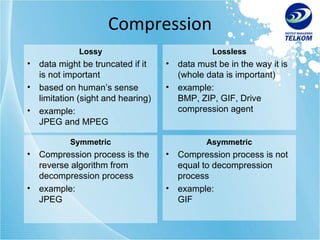
Compression Lossy data might be truncated if it is not important based on human’s sense limitation (sight and hearing) example: JPEG and MPEG Lossless data must be in the way it is (whole data is important) example: BMP, ZIP, GIF, Drive compression agent Symmetric Compression process is the reverse algorithm from decompression process example: JPEG Asymmetric Compression process is not equal to decompression process example: GIF
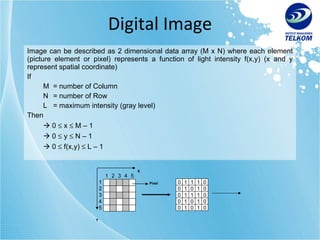
Digital Image Image can be described as 2 dimensional data array (M x N) where each element (picture element or pixel) represents a function of light intensity f(x,y) (x and y represent spatial coordinate) If M  = number of Column N  = number of Row L  = maximum intensity (gray level) Then    0    x    M – 1    0    y    N – 1    0    f(x,y)    L – 1 0 1 1 1 0 0 1 0 1 0 0 1 1 1 0 0 1 0 1 0 0 1 0 1 0 1 2 3 4 5 2 3 4 5 1 Pixel X Y
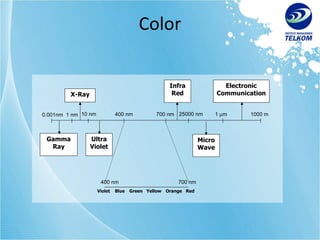
Color 0.001nm 400 nm 10 nm 25000 nm 1   m 1000 m 700 nm 1 nm Gamma Ray Ultra Violet X-Ray Violet Blue Green Yellow Orange Red 400 nm 700 nm InfraRed Micro Wave Electronic Communication
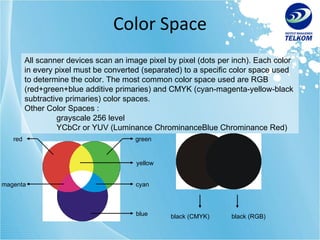
Color Space All scanner devices scan an image pixel by pixel (dots per inch). Each color in every pixel must be converted (separated) to a specific color space used to determine the color. The most common color space used are RGB (red+green+blue additive primaries) and CMYK (cyan-magenta-yellow-black subtractive primaries) color spaces. Other Color Spaces : grayscale 256 level YCbCr or YUV (Luminance ChrominanceBlue Chrominance Red) green red blue cyan magenta yellow black (CMYK) black (RGB)
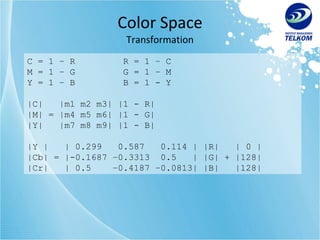
Color Space Transformation C = 1 – R R = 1 – C M = 1 – G G = 1 – M Y = 1 – B B = 1 - Y  |C|  |m1 m2 m3| |1 - R| |M| = |m4 m5 m6| |1 - G| |Y|  |m7 m8 m9| |1 - B|  |Y |  | 0.299  0.587  0.114 | |R|  | 0 | |Cb| = |-0.1687 –0.3313  0.5  | |G| + |128| |Cr|  | 0.5  –0.4187 –0.0813| |B|  |128|
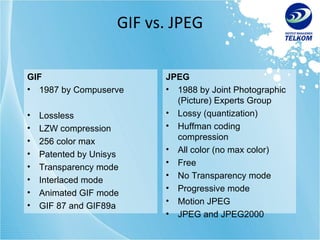
GIF vs. JPEG GIF 1987 by Compuserve Lossless LZW compression 256 color max Patented by Unisys Transparency mode Interlaced mode Animated GIF mode GIF 87 and GIF89a JPEG 1988 by Joint Photographic (Picture) Experts Group Lossy (quantization) Huffman coding compression All color (no max color) Free No Transparency mode Progressive mode Motion JPEG JPEG and JPEG2000
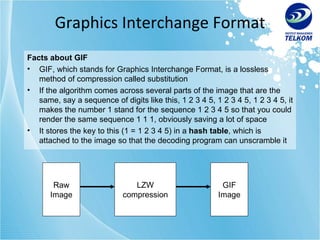
Graphics Interchange Format Facts about GIF GIF, which stands for Graphics Interchange Format, is a lossless method of compression called substitution If the algorithm comes across several parts of the image that are the same, say a sequence of digits like this, 1 2 3 4 5, 1 2 3 4 5, 1 2 3 4 5, it makes the number 1 stand for the sequence 1 2 3 4 5 so that you could render the same sequence 1 1 1, obviously saving a lot of space It stores the key to this (1 = 1 2 3 4 5) in a  hash table , which is attached to the image so that the decoding program can unscramble it LZW compression Raw Image GIF Image
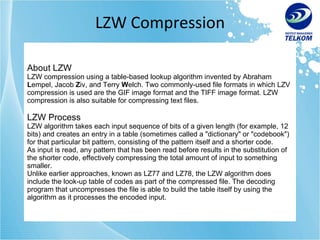
LZW Compression About LZW LZW compression using a table-based lookup algorithm invented by Abraham  L empel, Jacob  Z iv, and Terry  W elch. Two commonly-used file formats in which LZV compression is used are the GIF image format and the TIFF image format. LZW compression is also suitable for compressing text files. LZW Process LZW algorithm takes each input sequence of bits of a given length (for example, 12 bits) and creates an entry in a table (sometimes called a "dictionary" or "codebook") for that particular bit pattern, consisting of the pattern itself and a shorter code. As input is read, any pattern that has been read before results in the substitution of the shorter code, effectively compressing the total amount of input to something smaller. Unlike earlier approaches, known as LZ77 and LZ78, the LZW algorithm does include the look-up table of codes as part of the compressed file. The decoding program that uncompresses the file is able to build the table itself by using the algorithm as it processes the encoded input.
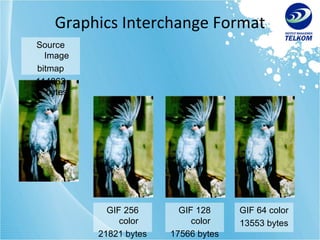
Graphics Interchange Format Source Image bitmap 114862 bytes GIF 256 color 21821 bytes GIF 128 color 17566 bytes GIF 64 color 13553 bytes
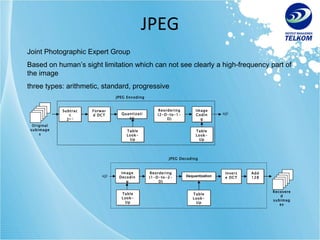
JPEG Joint Photographic Expert Group Based on human’s sight limitation which can not see clearly a high-frequency part of the image three types: arithmetic, standard, progressive JPEG Encoding Subtract 2 n-1 Quantization Forward DCT Reordering (2-D-to-1-D) Image Coding s(j) Original subimages Table Look-Up Table Look-Up JPEG Decoding Image Decoding Reordering (1-D-to-2-D) Inverse DCT s(j) Table Look-Up Table Look-Up Dequantization Add 128 Recovered subimages
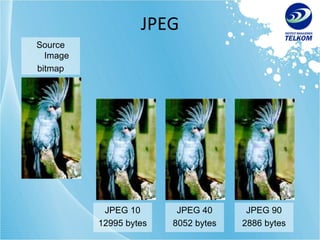
JPEG Source Image bitmap 114862 bytes JPEG 10 12995 bytes JPEG 40 8052 bytes JPEG 90 2886 bytes
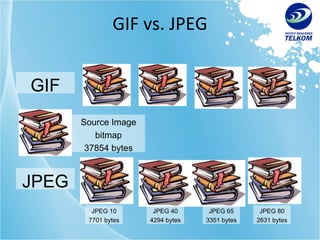
GIF vs. JPEG Source Image bitmap 37854 bytes GIF JPEG 10 7701 bytes JPEG JPEG 40 4294 bytes JPEG 80 2631 bytes JPEG 65 3351 bytes
http://www.imtelkom.ac.id

Multimedia Object - Image

  • 1.
    Multimedia System ImageNyoman Bogi Aditya Karna, ST, MSEE Sisfo IM Telkom
  • 2.
    Multimedia Object ImageIntroduction Compression Types: GIF/JPEG Sound Introduction Compression Types: WAV/MPEG Video Introduction Compression Types: MPEG
  • 3.
    Compression Lossy datamight be truncated if it is not important based on human’s sense limitation (sight and hearing) example: JPEG and MPEG Lossless data must be in the way it is (whole data is important) example: BMP, ZIP, GIF, Drive compression agent Symmetric Compression process is the reverse algorithm from decompression process example: JPEG Asymmetric Compression process is not equal to decompression process example: GIF
  • 4.
    Digital Image Imagecan be described as 2 dimensional data array (M x N) where each element (picture element or pixel) represents a function of light intensity f(x,y) (x and y represent spatial coordinate) If M = number of Column N = number of Row L = maximum intensity (gray level) Then  0  x  M – 1  0  y  N – 1  0  f(x,y)  L – 1 0 1 1 1 0 0 1 0 1 0 0 1 1 1 0 0 1 0 1 0 0 1 0 1 0 1 2 3 4 5 2 3 4 5 1 Pixel X Y
  • 5.
    Color 0.001nm 400nm 10 nm 25000 nm 1  m 1000 m 700 nm 1 nm Gamma Ray Ultra Violet X-Ray Violet Blue Green Yellow Orange Red 400 nm 700 nm InfraRed Micro Wave Electronic Communication
  • 6.
    Color Space Allscanner devices scan an image pixel by pixel (dots per inch). Each color in every pixel must be converted (separated) to a specific color space used to determine the color. The most common color space used are RGB (red+green+blue additive primaries) and CMYK (cyan-magenta-yellow-black subtractive primaries) color spaces. Other Color Spaces : grayscale 256 level YCbCr or YUV (Luminance ChrominanceBlue Chrominance Red) green red blue cyan magenta yellow black (CMYK) black (RGB)
  • 7.
    Color Space TransformationC = 1 – R R = 1 – C M = 1 – G G = 1 – M Y = 1 – B B = 1 - Y |C| |m1 m2 m3| |1 - R| |M| = |m4 m5 m6| |1 - G| |Y| |m7 m8 m9| |1 - B| |Y | | 0.299 0.587 0.114 | |R| | 0 | |Cb| = |-0.1687 –0.3313 0.5 | |G| + |128| |Cr| | 0.5 –0.4187 –0.0813| |B| |128|
  • 8.
    GIF vs. JPEGGIF 1987 by Compuserve Lossless LZW compression 256 color max Patented by Unisys Transparency mode Interlaced mode Animated GIF mode GIF 87 and GIF89a JPEG 1988 by Joint Photographic (Picture) Experts Group Lossy (quantization) Huffman coding compression All color (no max color) Free No Transparency mode Progressive mode Motion JPEG JPEG and JPEG2000
  • 9.
    Graphics Interchange FormatFacts about GIF GIF, which stands for Graphics Interchange Format, is a lossless method of compression called substitution If the algorithm comes across several parts of the image that are the same, say a sequence of digits like this, 1 2 3 4 5, 1 2 3 4 5, 1 2 3 4 5, it makes the number 1 stand for the sequence 1 2 3 4 5 so that you could render the same sequence 1 1 1, obviously saving a lot of space It stores the key to this (1 = 1 2 3 4 5) in a hash table , which is attached to the image so that the decoding program can unscramble it LZW compression Raw Image GIF Image
  • 10.
    LZW Compression AboutLZW LZW compression using a table-based lookup algorithm invented by Abraham L empel, Jacob Z iv, and Terry W elch. Two commonly-used file formats in which LZV compression is used are the GIF image format and the TIFF image format. LZW compression is also suitable for compressing text files. LZW Process LZW algorithm takes each input sequence of bits of a given length (for example, 12 bits) and creates an entry in a table (sometimes called a "dictionary" or "codebook") for that particular bit pattern, consisting of the pattern itself and a shorter code. As input is read, any pattern that has been read before results in the substitution of the shorter code, effectively compressing the total amount of input to something smaller. Unlike earlier approaches, known as LZ77 and LZ78, the LZW algorithm does include the look-up table of codes as part of the compressed file. The decoding program that uncompresses the file is able to build the table itself by using the algorithm as it processes the encoded input.
  • 11.
    Graphics Interchange FormatSource Image bitmap 114862 bytes GIF 256 color 21821 bytes GIF 128 color 17566 bytes GIF 64 color 13553 bytes
  • 12.
    JPEG Joint PhotographicExpert Group Based on human’s sight limitation which can not see clearly a high-frequency part of the image three types: arithmetic, standard, progressive JPEG Encoding Subtract 2 n-1 Quantization Forward DCT Reordering (2-D-to-1-D) Image Coding s(j) Original subimages Table Look-Up Table Look-Up JPEG Decoding Image Decoding Reordering (1-D-to-2-D) Inverse DCT s(j) Table Look-Up Table Look-Up Dequantization Add 128 Recovered subimages
  • 13.
    JPEG Source Imagebitmap 114862 bytes JPEG 10 12995 bytes JPEG 40 8052 bytes JPEG 90 2886 bytes
  • 14.
    GIF vs. JPEGSource Image bitmap 37854 bytes GIF JPEG 10 7701 bytes JPEG JPEG 40 4294 bytes JPEG 80 2631 bytes JPEG 65 3351 bytes
  • 15.