Introduction to
JPEG and MPEG
MADE BY :
AJAY KUMAR A1004815088
NITIN SHARMA A1004815084
SIDDHARTH RATHORE A1004815099
Fundamentals of
Images
Fundamentals of images
 An image consists of pixels (picture elements)
 Each pixel represents luminance (and colour)
 Typically, 8-bits per pixel
3
Fundamentals of images
 Colour
 Colour spaces (representations)
 RGB (red-green-blue)
 CMY (cyan-magenta-yellow)
 YUV
 Y = 0.3R+0.6G+0.1B (luminance)
 U=R-Y
 V=B-Y
 Greyscale
 Binary
4
Fundamentals of images
 A TV frame is about 640x480 pixels
 If each pixels is represented by 8-bits for each
colour, then the total image size is
 640×480*3=921,600 bytes or ≈7.4Mbits
 At 30 frames per second, this would be
 ≈ 220Mbits/second
5
Fundamentals of images
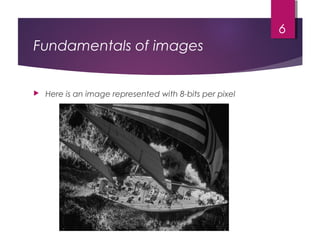
 Here is an image represented with 8-bits per pixel
6
Fundamentals of images
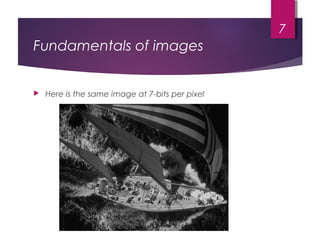
 Here is the same image at 7-bits per pixel
7
Fundamentals of images
 Do we need all these bits?
 No!
 The previous example illustrated the eye’s sensitivity
to luminance
 We can build a perceptual model
 Only code what is important to the human visual
system (HVS)
 Usually a function of spatial frequency
8
Fundamentals of images
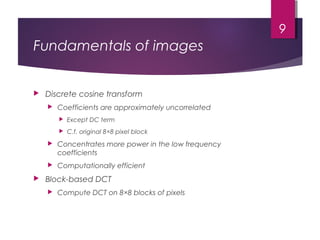
 Discrete cosine transform
 Coefficients are approximately uncorrelated
 Except DC term
 C.f. original 8×8 pixel block
 Concentrates more power in the low frequency
coefficients
 Computationally efficient
 Block-based DCT
 Compute DCT on 8×8 blocks of pixels
9
Fundamentals of images
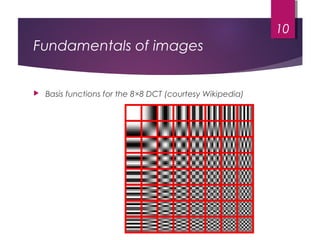
 Basis functions for the 8×8 DCT (courtesy Wikipedia)
10
Fundamentals of
JPEG
JPEG
 JPEG (Joint Photographic Experts Group) is an ISO
/IEC group of experts that develops and maintains
standards for a suite of compression algorithms for
computer image files.
 Together with the Graphic Interchange Format (GIF)
and Portable Network Graphics (PNG) file formats,
the JPEG is one of the image file formats supported
on the World Wide Web, usually with the file suffix of
".jpg". You can create a progressive JPEG that is
similar to an interlaced GIF.
12
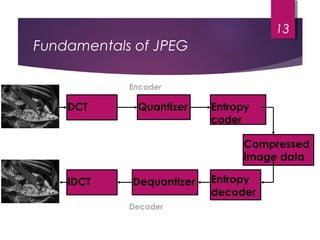
Fundamentals of JPEG
13
DCT Quantizer Entropy
coder
IDCT Dequantizer Entropy
decoder
Compressed
image data
Encoder
Decoder
Fundamentals of JPEG
 JPEG works on 8×8 blocks
 Extract 8×8 block of pixels
 Convert to DCT domain
 Quantize each coefficient
 Different stepsize for each coefficient
 Based on sensitivity of human visual system
 Order coefficients in zig-zag order
 Entropy code the quantized values
14
Fundamentals of JPEG
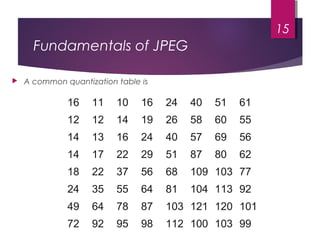
16 11 10 16 24 40 51 61
12 12 14 19 26 58 60 55
14 13 16 24 40 57 69 56
14 17 22 29 51 87 80 62
18 22 37 56 68 109 103 77
24 35 55 64 81 104 113 92
49 64 78 87 103 121 120 101
72 92 95 98 112 100 103 99
15
 A common quantization table is
Fundamentals of JPEG
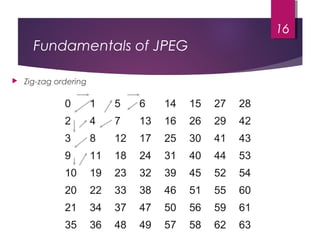
0 1 5 6 14 15 27 28
2 4 7 13 16 26 29 42
3 8 12 17 25 30 41 43
9 11 18 24 31 40 44 53
10 19 23 32 39 45 52 54
20 22 33 38 46 51 55 60
21 34 37 47 50 56 59 61
35 36 48 49 57 58 62 63
16
 Zig-zag ordering
Fundamentals of JPEG
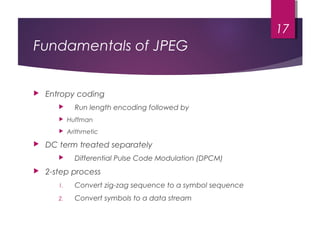
 Entropy coding
 Run length encoding followed by
 Huffman
 Arithmetic
 DC term treated separately
 Differential Pulse Code Modulation (DPCM)
 2-step process
1. Convert zig-zag sequence to a symbol sequence
2. Convert symbols to a data stream
17
Fundamentals of JPEG
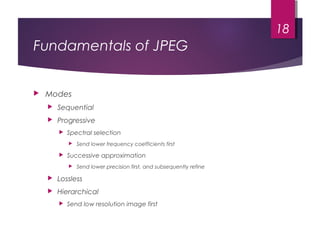
 Modes
 Sequential
 Progressive
 Spectral selection
 Send lower frequency coefficients first
 Successive approximation
 Send lower precision first, and subsequently refine
 Lossless
 Hierarchical
 Send low resolution image first
18
Fundamentals of
MPEG-1/2
Fundamentals of MPEG
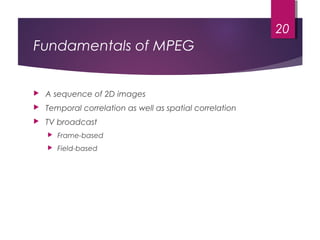
 A sequence of 2D images
 Temporal correlation as well as spatial correlation
 TV broadcast
 Frame-based
 Field-based
20
MPEG
 Moving Picture Experts Group
 Standard for video compression
 Similarities with JPEG
21
MPEG
 Design is a compromise between
 Bit rate
 Encoder/decoder complexity
 Random access capability
22
MPEG
 Images
 Spatial redundancy
 Perceptual redundancy
 Video
 Spatial redundancy
 Intraframe coding
 Temporal redundancy
 Interframe coding
 Perceptual redundancy
23
MPEG
 Consider a sequence of n frames of video.
 It consists of:
 I-frames
 P-frames
 B-frames
 A sequence of one I-frame followed by P- and B-
frames is known as a GOP
 Group of Pictures
 E.g. IBBPBBPBBPBBP
24
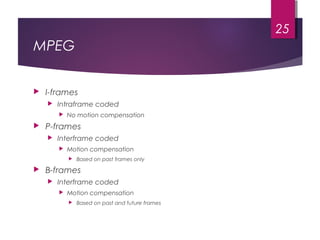
MPEG
 I-frames
 Intraframe coded
 No motion compensation
 P-frames
 Interframe coded
 Motion compensation
 Based on past frames only
 B-frames
 Interframe coded
 Motion compensation
 Based on past and future frames
25
MPEG
 Like JPEG, the DC term is treated separately
 DPCM
 B-frame compression high
 Need buffer and delay
26
MPEG-1
 MPEG-1 was designed for coding progressive video
at a transmission rate of about 1.5 million bits per
second. It was designed specifically for Video-CD
and CD-i media.
 MPEG-1 audio layer-3 MP3 has also evolved from
early MPEG work.
27
MPEG-2
 MPEG-2 was designed for coding interlaced images
at transmission rates above 4 million bits per second.
 MPEG-2 is used for digital TV broadcast and DVD.
An MPEG-2 player can handle MPEG-1 data as well.
28
MPEG-3
 A proposed MPEG-3 standard, intended for High
Definition TV (HDTV), was merged with the MPEG-2
standard when it became apparent that the MPEG-
2 standard met the HDTV requirements.
29
MPEG-4
 MPEG-4 is a much more ambitious standard and
addresses speech and video
synthesis, fractal geometry, computer visualization,
and an artificial intelligence AI approach to
reconstructing images.
 MPEG-4 addresses a standard way for authors to
create and define the media objects in a
multimedia presentation, how these can be
synchronized and related to each other in
transmission, and how users are to be able to
interact with the media objects.
30
MPEG-21
 MPEG-21 provides a larger, architectural framework for
the creation and delivery of multimedia. It defines
seven key elements:
  
 Digital item declaration
 Digital item identification and declaration
 Content handling and usage
 Intellectual property management and protection
 Terminals and networks
 Content representation
 Event reporting
31

Jpeg and mpeg ppt

  • 1.
    Introduction to JPEG andMPEG MADE BY : AJAY KUMAR A1004815088 NITIN SHARMA A1004815084 SIDDHARTH RATHORE A1004815099
  • 2.
  • 3.
    Fundamentals of images An image consists of pixels (picture elements)  Each pixel represents luminance (and colour)  Typically, 8-bits per pixel 3
  • 4.
    Fundamentals of images Colour  Colour spaces (representations)  RGB (red-green-blue)  CMY (cyan-magenta-yellow)  YUV  Y = 0.3R+0.6G+0.1B (luminance)  U=R-Y  V=B-Y  Greyscale  Binary 4
  • 5.
    Fundamentals of images A TV frame is about 640x480 pixels  If each pixels is represented by 8-bits for each colour, then the total image size is  640×480*3=921,600 bytes or ≈7.4Mbits  At 30 frames per second, this would be  ≈ 220Mbits/second 5
  • 6.
    Fundamentals of images Here is an image represented with 8-bits per pixel 6
  • 7.
    Fundamentals of images Here is the same image at 7-bits per pixel 7
  • 8.
    Fundamentals of images Do we need all these bits?  No!  The previous example illustrated the eye’s sensitivity to luminance  We can build a perceptual model  Only code what is important to the human visual system (HVS)  Usually a function of spatial frequency 8
  • 9.
    Fundamentals of images Discrete cosine transform  Coefficients are approximately uncorrelated  Except DC term  C.f. original 8×8 pixel block  Concentrates more power in the low frequency coefficients  Computationally efficient  Block-based DCT  Compute DCT on 8×8 blocks of pixels 9
  • 10.
    Fundamentals of images Basis functions for the 8×8 DCT (courtesy Wikipedia) 10
  • 11.
  • 12.
    JPEG  JPEG (JointPhotographic Experts Group) is an ISO /IEC group of experts that develops and maintains standards for a suite of compression algorithms for computer image files.  Together with the Graphic Interchange Format (GIF) and Portable Network Graphics (PNG) file formats, the JPEG is one of the image file formats supported on the World Wide Web, usually with the file suffix of ".jpg". You can create a progressive JPEG that is similar to an interlaced GIF. 12
  • 13.
    Fundamentals of JPEG 13 DCTQuantizer Entropy coder IDCT Dequantizer Entropy decoder Compressed image data Encoder Decoder
  • 14.
    Fundamentals of JPEG JPEG works on 8×8 blocks  Extract 8×8 block of pixels  Convert to DCT domain  Quantize each coefficient  Different stepsize for each coefficient  Based on sensitivity of human visual system  Order coefficients in zig-zag order  Entropy code the quantized values 14
  • 15.
    Fundamentals of JPEG 1611 10 16 24 40 51 61 12 12 14 19 26 58 60 55 14 13 16 24 40 57 69 56 14 17 22 29 51 87 80 62 18 22 37 56 68 109 103 77 24 35 55 64 81 104 113 92 49 64 78 87 103 121 120 101 72 92 95 98 112 100 103 99 15  A common quantization table is
  • 16.
    Fundamentals of JPEG 01 5 6 14 15 27 28 2 4 7 13 16 26 29 42 3 8 12 17 25 30 41 43 9 11 18 24 31 40 44 53 10 19 23 32 39 45 52 54 20 22 33 38 46 51 55 60 21 34 37 47 50 56 59 61 35 36 48 49 57 58 62 63 16  Zig-zag ordering
  • 17.
    Fundamentals of JPEG Entropy coding  Run length encoding followed by  Huffman  Arithmetic  DC term treated separately  Differential Pulse Code Modulation (DPCM)  2-step process 1. Convert zig-zag sequence to a symbol sequence 2. Convert symbols to a data stream 17
  • 18.
    Fundamentals of JPEG Modes  Sequential  Progressive  Spectral selection  Send lower frequency coefficients first  Successive approximation  Send lower precision first, and subsequently refine  Lossless  Hierarchical  Send low resolution image first 18
  • 19.
  • 20.
    Fundamentals of MPEG A sequence of 2D images  Temporal correlation as well as spatial correlation  TV broadcast  Frame-based  Field-based 20
  • 21.
    MPEG  Moving PictureExperts Group  Standard for video compression  Similarities with JPEG 21
  • 22.
    MPEG  Design isa compromise between  Bit rate  Encoder/decoder complexity  Random access capability 22
  • 23.
    MPEG  Images  Spatialredundancy  Perceptual redundancy  Video  Spatial redundancy  Intraframe coding  Temporal redundancy  Interframe coding  Perceptual redundancy 23
  • 24.
    MPEG  Consider asequence of n frames of video.  It consists of:  I-frames  P-frames  B-frames  A sequence of one I-frame followed by P- and B- frames is known as a GOP  Group of Pictures  E.g. IBBPBBPBBPBBP 24
  • 25.
    MPEG  I-frames  Intraframecoded  No motion compensation  P-frames  Interframe coded  Motion compensation  Based on past frames only  B-frames  Interframe coded  Motion compensation  Based on past and future frames 25
  • 26.
    MPEG  Like JPEG,the DC term is treated separately  DPCM  B-frame compression high  Need buffer and delay 26
  • 27.
    MPEG-1  MPEG-1 wasdesigned for coding progressive video at a transmission rate of about 1.5 million bits per second. It was designed specifically for Video-CD and CD-i media.  MPEG-1 audio layer-3 MP3 has also evolved from early MPEG work. 27
  • 28.
    MPEG-2  MPEG-2 wasdesigned for coding interlaced images at transmission rates above 4 million bits per second.  MPEG-2 is used for digital TV broadcast and DVD. An MPEG-2 player can handle MPEG-1 data as well. 28
  • 29.
    MPEG-3  A proposedMPEG-3 standard, intended for High Definition TV (HDTV), was merged with the MPEG-2 standard when it became apparent that the MPEG- 2 standard met the HDTV requirements. 29
  • 30.
    MPEG-4  MPEG-4 isa much more ambitious standard and addresses speech and video synthesis, fractal geometry, computer visualization, and an artificial intelligence AI approach to reconstructing images.  MPEG-4 addresses a standard way for authors to create and define the media objects in a multimedia presentation, how these can be synchronized and related to each other in transmission, and how users are to be able to interact with the media objects. 30
  • 31.
    MPEG-21  MPEG-21 providesa larger, architectural framework for the creation and delivery of multimedia. It defines seven key elements:     Digital item declaration  Digital item identification and declaration  Content handling and usage  Intellectual property management and protection  Terminals and networks  Content representation  Event reporting 31