Image Representation
• Weconsider images to be represented as two-dimensional arrays
which contain intesity / luminance values as their respective array
elements. In case of grayscale images having n bit of accuracy per
pixel, we are able to encode 2^n different grayscales.
• A binary image therefore requires only 1 bpp (bpp = bit per pixel).
• Colour images are represented in different ways. The most classical
way is the RGB representation where each colour channel (red,
green, blue) is encoded in a separate array containing the
respective colour intensity values. A typical colour image with 24
bpp consists therefore of 3 8bpp colour channels.
• The human eye is not equally sensitive to all three colours – we
perceive green best, followed by red, blue is perceived worst.
Based on this fact (and some other more technical reasons-
perceptual non-uniformity) alternative colour scheme have been
developed.
3.
JPEG
• is acommonly used method of lossy compression for
digital images, particularly for those images produced
by digital photography.
• The degree of compression can be adjusted, allowing a
selectable tradeoff between storage size and
image quality. JPEG typically achieves 10:1 compression
with little perceptible loss in image quality.[2]
• It is the most common format for storing and
transmitting photographic images on the World Wide
Web.These format variations are often not
distinguished, and are simply called JPEG.
4.
JPEG
• invented bythe Joint Photographic Expert Group
in the late 1980s
• The goal of this committee was to reduce the file
size of natural, photographic-like true-color
images as much as possible without affecting the
quality of the Image as experienced by the
human sensory engine
• Development of JPEG-2000: Standard developing
was started at 1996. JPEG2000 is the new JPEG
standard which was finally approved in August
2000.
5.
JPEG
• The JPEGcompression algorithm is at its best on photographs and
paintings of realistic scenes with smooth variations of tone and
color. For web usage, where reducing the amount of data used for
an image is important for responsive presentation, JPEG's
compression benefits make JPEG popular.
• However, JPEG is not well suited for line drawings and other textual
or iconic graphics, where the sharp contrasts between adjacent
pixels can cause noticeable artifacts. Such images are better saved
in a lossless graphics format such as TIFF, GIF, PNG, or a raw image
format. The JPEG standard includes a lossless coding mode, but that
mode is not supported in most products.
• As the typical use of JPEG is a lossy compression method, which
reduces the image fidelity, it is inappropriate for exact reproduction
of imaging data (such as some scientific and medical imaging
applications and certain technical image processing work).
6.
Overview
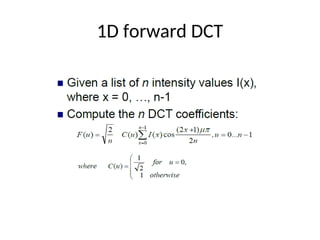
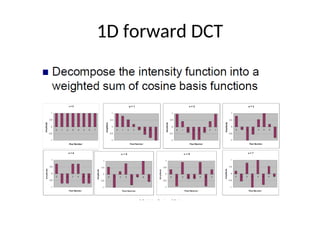
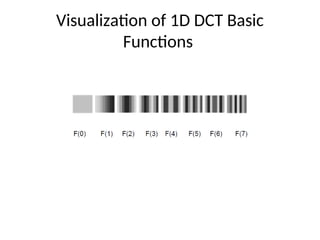
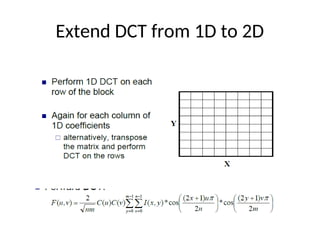
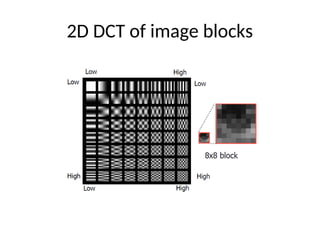
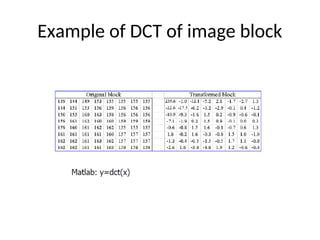
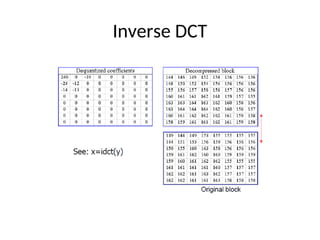
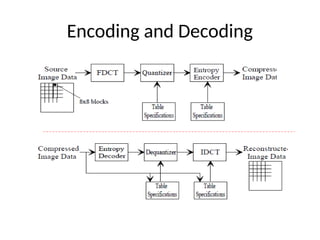
• Based onDiscrete Cosine Transform (DCT):
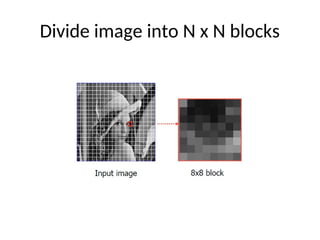
0) Image is divided into block N×N
1) The blocks are transformed with 2-D DCT
2) DCT coefficients are quantized
3) The quantized coefficients are encoded
Image pre-processing
• Shiftvalues [0, 2^P-1] to [-2^(P-1), 2^(P-1)-1]-
e.g. if (P=8), shift [0, 255] to [-127, 127]
• DCT requires range be centered around 0
• Values in 8x8 pixel blocks are spatial values
and there are 64 samples values in each block
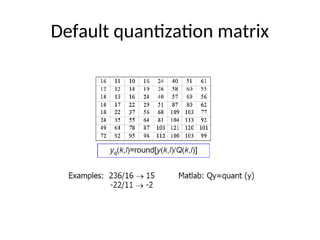
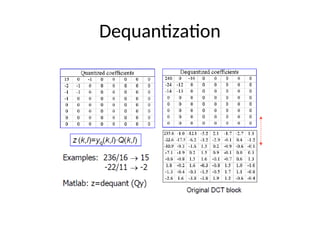
Quantization
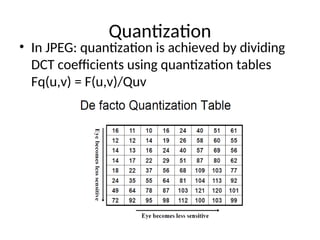
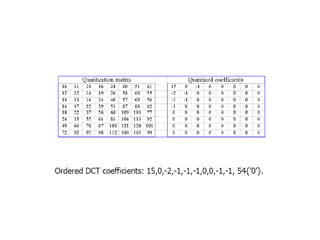
• In JPEG:quantization is achieved by dividing
DCT coefficients using quantization tables
Fq(u,v) = F(u,v)/Quv
17.
Entropy encoding
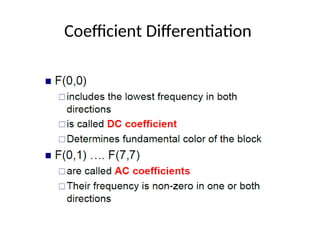
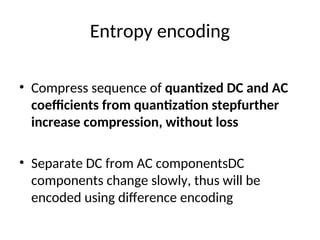
• Compresssequence of quantized DC and AC
coefficients from quantization stepfurther
increase compression, without loss
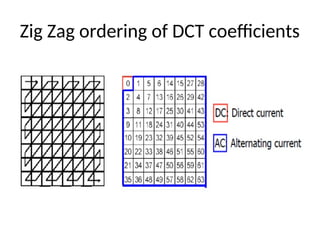
• Separate DC from AC componentsDC
components change slowly, thus will be
encoded using difference encoding
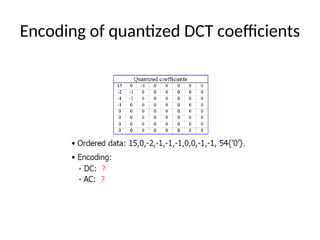
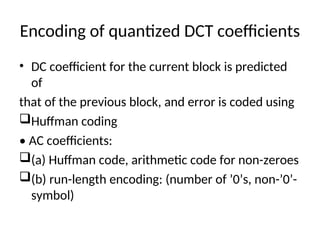
Encoding of quantizedDCT coefficients
• DC coefficient for the current block is predicted
of
that of the previous block, and error is coded using
Huffman coding
• AC coefficients:
(a) Huffman code, arithmetic code for non-zeroes
(b) run-length encoding: (number of ’0’s, non-’0’-
symbol)
RGB vs YCbCr
•24 bits RGB representation: apply DCT for each
component separately
- does not make use of the correlation between color
components
- does not make use of lowe sensitivity of the human
eyes
to chrominance component
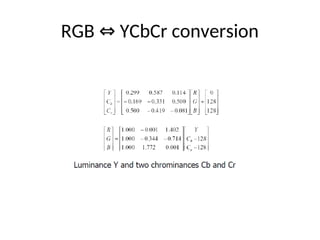
• Convert RGB into a YCbCr representation: Y is
luminance, and Yb, Yc are chrominance
• Downsample the two chrominance components
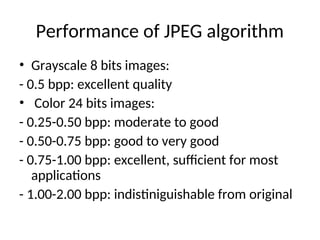
Performance of JPEGalgorithm
• Grayscale 8 bits images:
- 0.5 bpp: excellent quality
• Color 24 bits images:
- 0.25-0.50 bpp: moderate to good
- 0.50-0.75 bpp: good to very good
- 0.75-1.00 bpp: excellent, sufficient for most
applications
- 1.00-2.00 bpp: indistiniguishable from original
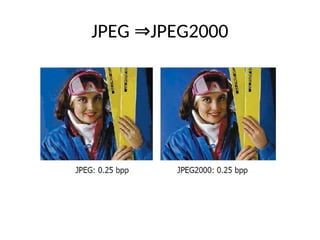
JPEG2000 key features
•Transform: Wavelet, Wavelet packet, Wavelet
in tiles
• Quantization: Scalar (with dead zones)
• Entropy coding: EBCOT(Embedded Block
Coding with Optimized Truncation )
• Region of interest (ROI)
• Lossless color transform

![JPEG
• is a commonly used method of lossy compression for
digital images, particularly for those images produced
by digital photography.
• The degree of compression can be adjusted, allowing a
selectable tradeoff between storage size and
image quality. JPEG typically achieves 10:1 compression
with little perceptible loss in image quality.[2]
• It is the most common format for storing and
transmitting photographic images on the World Wide
Web.These format variations are often not
distinguished, and are simply called JPEG.](https://image.slidesharecdn.com/414755cs41120182019111imagecompression1-250410134400-f80990f0/85/4_14755_CS411_20182019_1__1_1_ImageCompression-1-ppt-3-320.jpg)
![Image pre-processing
• Shift values [0, 2^P-1] to [-2^(P-1), 2^(P-1)-1]-
e.g. if (P=8), shift [0, 255] to [-127, 127]
• DCT requires range be centered around 0
• Values in 8x8 pixel blocks are spatial values
and there are 64 samples values in each block](https://image.slidesharecdn.com/414755cs41120182019111imagecompression1-250410134400-f80990f0/85/4_14755_CS411_20182019_1__1_1_ImageCompression-1-ppt-9-320.jpg)