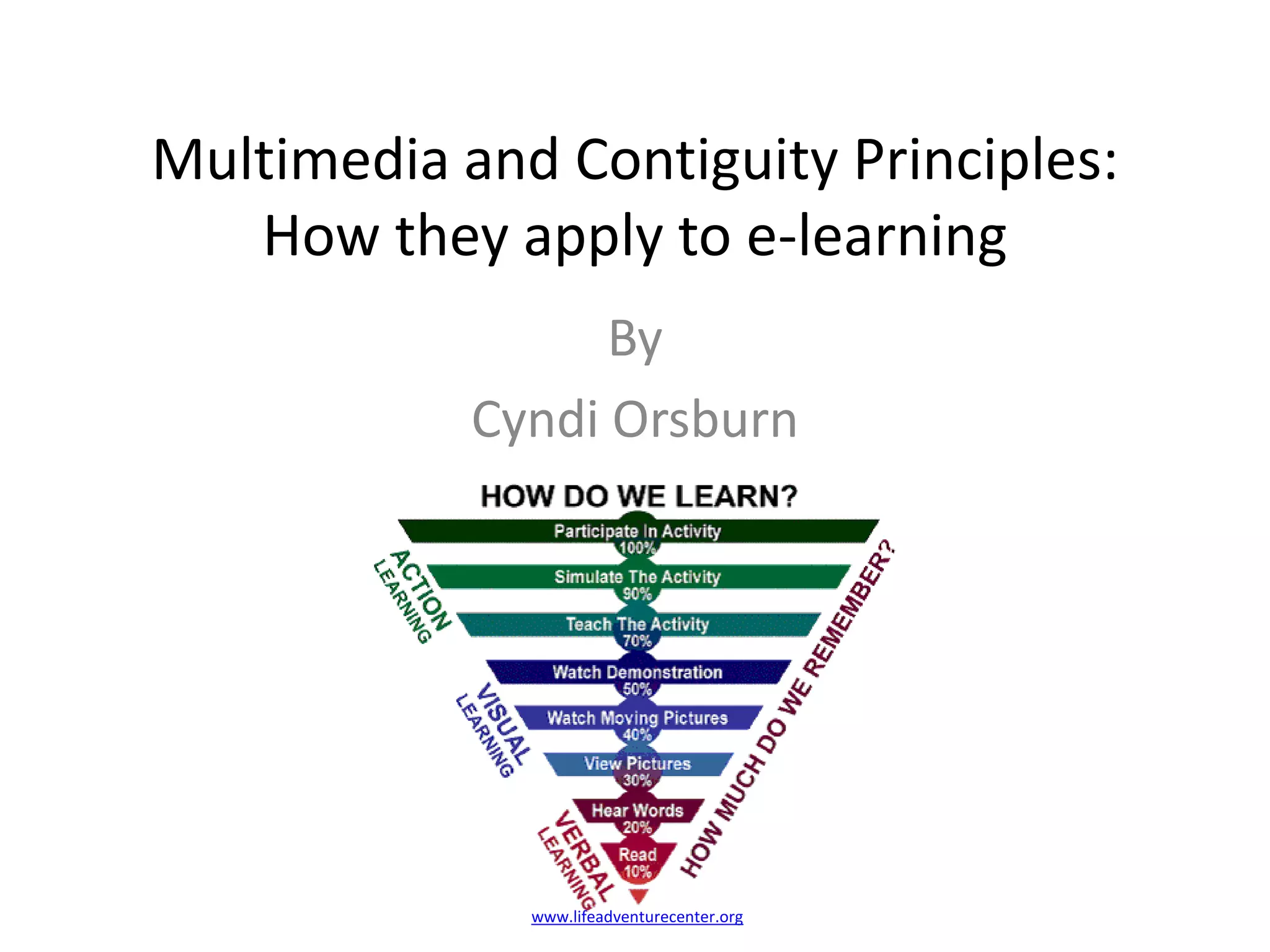
Multimedia and Contiguity Principles: How they apply to e-learningBy Cyndi Orsburnwww.lifeadventurecenter.org
Learning ObjectivesThis presentation will introduce the concepts of multimedia and contiguity with examples.The student will be able to correctly identify the definition of multimedia and contiguity.The student will be able to identify examples of multimedia and contiguityafter viewing this presentation.academictech.doit.wisc.edu
What is multimedia? Multimedia refers to a presentation that contains both words and graphics.Words include both the text on the screen and spoken text that people hear as they view the screen. You are reading words right now. Graphics are drawings, charts, maps, animation or videos. Some samples are pictured onthe right.www.thomsonreuters.com
Multimedia presentations help people to learn better because they help them engage in active learning by making connections between the picture and words.When you see new material in both pictures and words, it helps you to make strong mental connections to the material. blog.slideshare.netWhen you see just words or pictures that are purely decorative, they do not help you understand as well. So, learning may be more shallow. www.yessy.com
There are six common types of graphics used in multimedia presentations. They include: decorative, representational, organizational, relational, transformative and interpretive.Graphic type:Example:Decorative visuals make it look nicer, but don’t contribute to learning.Representational graphics show what something looks like.Organizational graphics show relationshipsDecorativeRepresentationalwww.nlm.nih.govOrganizationalwww.lelandra.comwww.allbusiness.com
There are six common types of graphics used in multimedia presentations. They include: decorative, representational, organizational, relational, transformative and interpretive.Graphic type:Example:Relational visuals summarize quantitative informationTransformational graphics illustrate change in time or spaceInterpretive graphics help make the abstract concreteRelationalTransformationalInterpretivewww.psychosocial.comwww.cybergrammar.co.uk
Graphics and text can be used to promote learning and to help teach several types of content including facts, concepts, processes, procedures or principlesFactsConceptswww.health.qld.gov.auwww.worksheetlibrary.com
Graphics and words can be used to teach content including processes, procedures or principlesProcessesProceduresPrinciplesPrinciples of Learningwww.hitchins.netwww.mustangpeak.netjaclynnthinks.wordpress.com
Graphics and text  can be used as topic organizers and to show relationshipsTopic organizersShow relationshipsbokardo.comit.toolbox.com
Graphics and text can serve as lesson interfacesLesson interfaceYou can click on the various individual graphics to learn about each of the labeled topics in the picture of the cell.Graphics can also be links to new learning pages.psychology.wichita.edu/.../62/interactivity.htm
Evidence show us that people learn better with graphics and text than just text or graphics alone.Graphics onlyText and graphicsText Step 1Cross the two shoestring ends over each other once and then loop one end under the other to make the first basic knot of a bow.Step 2In your right hand hold the right shoelace, with palm down, in your pinky, ring and middle fingers.Step 3In your left hand hold the left shoelace, with palms down, in your pinky, ring and middle fingers.Step 4Position your index fingers and thumbs in gun position.Step 5With your right hand place your index finger over the right shoelace and your thumb under the right shoelace. Your hand will be spinning towards you and the string will rest on top of your index finger and thumb.Step 6With your left hand spin your thumb away from you over the shoelace and your index finger under the shoelace. Your hand will spin away from you and the string will rest on top of your index finger and thumb.Step 7With your right index finger on the bottom and right thumb on top grab the left shoestring between your left finger and thumb.Step 8Hook the right string with your left index finger between the right index finger and thumb.Step 9Pull strings in opposite directions.
Multimedia presentations of text and graphics work best for novice learners. Using words and pictures together helps them engage in active processing, so they can mentally construct visual and verbal representations of the new information and connect these with previously stored information. Experienced learners can create their own mental images without this help.www.articulate.comelianealhadeff.blogspot.com
Animations and video are no more effective than still pictures in the learning process and may even distract from learning. Animation does benefit the low-knowledge learners, but it doesn’t help high-knowledge learners.www.fas.orgwww.injury.com
Contiguity Principle 1: The words on the screen should be placed near the parts of the onscreen graphic to which they refer. For example in this particular  diagram, the vessel labels on the heart are placed close to the blood vessel in the diagram that they describe. There is also a line pointing to the name of the corresponding part to help your brain make visual connections.Major vessels of the heart
Contiguity Principle 2: Spoken words should be heard at the same time that the graphic they describe is presented on the screen.Please read this caption aloud as you  look at the picture.Visual images and their verbal description should be presented at the same time.newritings.files.wordpress.com/2008/12/pirate
Violationsof the contiguity principle include:Putting a lot of text at the bottom of the pageNumbering graphic elements with a legend at the bottom of the pagePutting directions on a screen separate from the activity.Feedback on a screen separate from the task or questionsLinks to a reference on another pageIn scrolling windows, text and graphics that are separated from one another or partially coveredWHY? Anytime you separate the text and graphics, you can overload short term memory or you have wasted cognitive processing which degrades the learning process.
Review of Multimedia and ContiguityMultimedia refers to a presentation that contains both words and graphics.Graphics are drawings, charts, maps, animation or videos.Words include both the text on the screen and spoken textThere are six common types of graphics: decorative, representational, organizational, relational, transformative and interpretive.Multimedia presentations help people to learn better because they help them engage in active learning by making connections between the picture and words.Multimedia can be used to teach content including processes, procedures or principlesMultimedia can be used as topic organizers, to show relationships, and lesson interfacesEvidence show us that people learn better with graphics and text.Multimedia presentations of text and graphics work best for novice learnersAnimations and video are no more effective than still pictures in the learning process and may distract from learning.Contiguity Principle 1: The words on the screen should be placed near the parts of the onscreen graphic to which they refer. Contiguity Principle 2 Spoken words should be heard at the same time that the graphic they describe is presented on the screen.
Review QuizMultimedia meansa. Text onlyb. Graphics onlyc. Both text & graphicsClick on correct answer.Right - hear applause.Wrong - hear suction.Contiguity meansa. Present the text and graphics close  to what they describeb. Put all text at the bottom of the page away from the graphics.c. Assign numbers to the details in a graphic and a legend at the bottom of the page.
Review Quiza.b.An example of a properly done multimedia presentation is:a. Click hereorb. Click here Right – hear applauseWrong – hear suctioncnobleza.files.wordpress.commail.watertown.k12.ma.us
Review Quiza.b.An example of contiguity is answera. Click hereorb. Click hereRight – hear applauseWrong – hear suctiontornadoplanet.orgwww.wunderground.com
ResourcesColvin Clark, R. and Mayer, R. (2008). E-learning and the science of instruction: Proven guidelines for consumers and designers of multimedia instruction. San Francisco, CA: PfeifferImages are from Goggle and labeled with creator websites.

Multimedia And Contiguity Principles

  • 1.
    Multimedia and ContiguityPrinciples: How they apply to e-learningBy Cyndi Orsburnwww.lifeadventurecenter.org
  • 2.
    Learning ObjectivesThis presentationwill introduce the concepts of multimedia and contiguity with examples.The student will be able to correctly identify the definition of multimedia and contiguity.The student will be able to identify examples of multimedia and contiguityafter viewing this presentation.academictech.doit.wisc.edu
  • 3.
    What is multimedia?Multimedia refers to a presentation that contains both words and graphics.Words include both the text on the screen and spoken text that people hear as they view the screen. You are reading words right now. Graphics are drawings, charts, maps, animation or videos. Some samples are pictured onthe right.www.thomsonreuters.com
  • 4.
    Multimedia presentations helppeople to learn better because they help them engage in active learning by making connections between the picture and words.When you see new material in both pictures and words, it helps you to make strong mental connections to the material. blog.slideshare.netWhen you see just words or pictures that are purely decorative, they do not help you understand as well. So, learning may be more shallow. www.yessy.com
  • 5.
    There are sixcommon types of graphics used in multimedia presentations. They include: decorative, representational, organizational, relational, transformative and interpretive.Graphic type:Example:Decorative visuals make it look nicer, but don’t contribute to learning.Representational graphics show what something looks like.Organizational graphics show relationshipsDecorativeRepresentationalwww.nlm.nih.govOrganizationalwww.lelandra.comwww.allbusiness.com
  • 6.
    There are sixcommon types of graphics used in multimedia presentations. They include: decorative, representational, organizational, relational, transformative and interpretive.Graphic type:Example:Relational visuals summarize quantitative informationTransformational graphics illustrate change in time or spaceInterpretive graphics help make the abstract concreteRelationalTransformationalInterpretivewww.psychosocial.comwww.cybergrammar.co.uk
  • 7.
    Graphics and textcan be used to promote learning and to help teach several types of content including facts, concepts, processes, procedures or principlesFactsConceptswww.health.qld.gov.auwww.worksheetlibrary.com
  • 8.
    Graphics and wordscan be used to teach content including processes, procedures or principlesProcessesProceduresPrinciplesPrinciples of Learningwww.hitchins.netwww.mustangpeak.netjaclynnthinks.wordpress.com
  • 9.
    Graphics and text can be used as topic organizers and to show relationshipsTopic organizersShow relationshipsbokardo.comit.toolbox.com
  • 10.
    Graphics and textcan serve as lesson interfacesLesson interfaceYou can click on the various individual graphics to learn about each of the labeled topics in the picture of the cell.Graphics can also be links to new learning pages.psychology.wichita.edu/.../62/interactivity.htm
  • 11.
    Evidence show usthat people learn better with graphics and text than just text or graphics alone.Graphics onlyText and graphicsText Step 1Cross the two shoestring ends over each other once and then loop one end under the other to make the first basic knot of a bow.Step 2In your right hand hold the right shoelace, with palm down, in your pinky, ring and middle fingers.Step 3In your left hand hold the left shoelace, with palms down, in your pinky, ring and middle fingers.Step 4Position your index fingers and thumbs in gun position.Step 5With your right hand place your index finger over the right shoelace and your thumb under the right shoelace. Your hand will be spinning towards you and the string will rest on top of your index finger and thumb.Step 6With your left hand spin your thumb away from you over the shoelace and your index finger under the shoelace. Your hand will spin away from you and the string will rest on top of your index finger and thumb.Step 7With your right index finger on the bottom and right thumb on top grab the left shoestring between your left finger and thumb.Step 8Hook the right string with your left index finger between the right index finger and thumb.Step 9Pull strings in opposite directions.
  • 12.
    Multimedia presentations oftext and graphics work best for novice learners. Using words and pictures together helps them engage in active processing, so they can mentally construct visual and verbal representations of the new information and connect these with previously stored information. Experienced learners can create their own mental images without this help.www.articulate.comelianealhadeff.blogspot.com
  • 13.
    Animations and videoare no more effective than still pictures in the learning process and may even distract from learning. Animation does benefit the low-knowledge learners, but it doesn’t help high-knowledge learners.www.fas.orgwww.injury.com
  • 14.
    Contiguity Principle 1:The words on the screen should be placed near the parts of the onscreen graphic to which they refer. For example in this particular diagram, the vessel labels on the heart are placed close to the blood vessel in the diagram that they describe. There is also a line pointing to the name of the corresponding part to help your brain make visual connections.Major vessels of the heart
  • 15.
    Contiguity Principle 2:Spoken words should be heard at the same time that the graphic they describe is presented on the screen.Please read this caption aloud as you look at the picture.Visual images and their verbal description should be presented at the same time.newritings.files.wordpress.com/2008/12/pirate
  • 16.
    Violationsof the contiguityprinciple include:Putting a lot of text at the bottom of the pageNumbering graphic elements with a legend at the bottom of the pagePutting directions on a screen separate from the activity.Feedback on a screen separate from the task or questionsLinks to a reference on another pageIn scrolling windows, text and graphics that are separated from one another or partially coveredWHY? Anytime you separate the text and graphics, you can overload short term memory or you have wasted cognitive processing which degrades the learning process.
  • 17.
    Review of Multimediaand ContiguityMultimedia refers to a presentation that contains both words and graphics.Graphics are drawings, charts, maps, animation or videos.Words include both the text on the screen and spoken textThere are six common types of graphics: decorative, representational, organizational, relational, transformative and interpretive.Multimedia presentations help people to learn better because they help them engage in active learning by making connections between the picture and words.Multimedia can be used to teach content including processes, procedures or principlesMultimedia can be used as topic organizers, to show relationships, and lesson interfacesEvidence show us that people learn better with graphics and text.Multimedia presentations of text and graphics work best for novice learnersAnimations and video are no more effective than still pictures in the learning process and may distract from learning.Contiguity Principle 1: The words on the screen should be placed near the parts of the onscreen graphic to which they refer. Contiguity Principle 2 Spoken words should be heard at the same time that the graphic they describe is presented on the screen.
  • 18.
    Review QuizMultimedia meansa.Text onlyb. Graphics onlyc. Both text & graphicsClick on correct answer.Right - hear applause.Wrong - hear suction.Contiguity meansa. Present the text and graphics close to what they describeb. Put all text at the bottom of the page away from the graphics.c. Assign numbers to the details in a graphic and a legend at the bottom of the page.
  • 19.
    Review Quiza.b.An exampleof a properly done multimedia presentation is:a. Click hereorb. Click here Right – hear applauseWrong – hear suctioncnobleza.files.wordpress.commail.watertown.k12.ma.us
  • 20.
    Review Quiza.b.An exampleof contiguity is answera. Click hereorb. Click hereRight – hear applauseWrong – hear suctiontornadoplanet.orgwww.wunderground.com
  • 21.
    ResourcesColvin Clark, R.and Mayer, R. (2008). E-learning and the science of instruction: Proven guidelines for consumers and designers of multimedia instruction. San Francisco, CA: PfeifferImages are from Goggle and labeled with creator websites.