Online Workshop
KEY PRINCIPLES IN USING MULTIMEDIA
TO MAKE ONLINE LESSONS
EFFECTIVE AND ENGAGING
IECTA – BALI
29 JANUARY 2022
By Johansyah
Do you like using pictures/animation/sounds
in teaching (English)?
Why?
Raise your virtual hand, and say:
 Name
 From (institution/city)
 The answer
WORKSHOP OBJECTIVES
 Learning the key principles
 Understanding the rationale behind the principles
 Reflecting on common practice of using
multimedia in teaching
 Applying the principles in group work practice
THE KEY PRINCIPLES
1
USE WORDS AND GRAPHICS
RATHER THAN WORDS ALONE
PRINCIPLE 1
Words:
• printed text: words printed on the screen that people read.
• spoken text: words presented as speech that people listen to.
Graphics:
• static illustrations: drawings, charts, graphs, maps, or photos.
• dynamic graphics: animation or video.
PRINCIPLE 1
The rationale:
Multimedia presentations can encourage learners to engage in
active learning: thus, students are more likely to understand
material.
PRINCIPLE 1
Active Learning?
Cognitive processing:
 attending to the relevant material
 mentally organizing the material into a coherent cognitive representation
 mentally integrating the material with their existing knowledge
 mentally representing the material in words and in pictures
 mentally making connections between the pictorial and verbal
representations
When learners mentally connect words and pictures, they are
engaged in meaningful learning that is more likely to support
understanding.
Makimaki?
PRINCIPLE 1
(in Maori language?)
Monkey! (Monyet, Bojog)
Solar-powered electricity?
PRINCIPLE 1
Explain it in words?
 Decorative graphics decorate the page without enhancing the message of
the lesson
 Representational graphics portray a single element
 Relational graphics portray a quantitative relationship among two or
more variables (graphs/charts)
 Organizational graphics depict the relationships among elements
(diagrams)
 Transformational graphics depict changes in an object over time
(animations)
 Interpretive graphics illustrate invisible relationships
PRINCIPLE 1
Types of Graphics
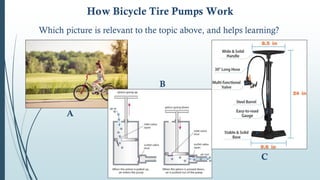
How Bicycle Tire Pumps Work
Which picture is relevant to the topic above, and helps learning?
A
B
C
Suggestions when using different types of graphics
 Graphics and text are used to present instructional content especially for novice learners.
 Graphics are relevant to the instructional purpose rather than decorative.
 Animations are used primarily to illustrate hands-on procedures or to serve an interpretive
function.
 Complex animations include visual cues to direct attention to relevant portions of the
animation.
 Organizational graphics are used to show relationships among ideas or lesson topics or
where the parts are located within a whole structure.
 Relational graphics are used to show quantitative relationships among variables.
 Transformational graphics, such as a video showing how to operate equipment, are used to
show changes over time.
 Interpretive graphics, such as a series of static frames, are used to explain how a system
works or to make invisible phenomena visible.
 Graphics are used as a lesson interface for case studies.
PRINCIPLE 1
2
ALIGN WORDS TO
CORRESPONDING GRAPHICS
(CONTIGUITY)
2-A. Place Printed Words Near Corresponding Graphics
PRINCIPLE 2
The rationale:
Humans are sense‐makers who try to see the meaningful relationships between
words and pictures. When words and pictures are separated from one another on
the screen, people must use their scarce cognitive resources just to match them up.
This creates what can be called extraneous processing - cognitive processing that is
unrelated to the instructional goal.
In contrast, when words and pictures are integrated, people can hold them
together in their working memories and therefore make meaningful connections
between them. This act of mentally connecting corresponding words and pictures
is an important part of the sense‐making process that leads to meaningful
learning.
Most Common Violations of this principle:
 Feedback is displayed on a separate screen from the practice or question.
 Directions to complete practice exercises are placed on a separate screen
from the application screen on which the directions are to be applied.
 All text is placed at the bottom of the screen away from graphics.
 An animation or video plays on one half of the screen while text describing
the animation is displayed simultaneously on the other half of the screen.
 Key elements in a graphic are numbered, and a legend at the bottom or side
of the screen includes the name for each numbered element.
PRINCIPLE 2
PRINCIPLE 2
Which picture is easier to learn?
A
B
Spoken words (narration) that describe an event or element should play at the
same time as the graphic (animation or video) is depicting the event or element.
2-B. Synchronize Spoken Words with Corresponding Graphics
The Rationale:
When corresponding narration and graphics are presented at different times, the
learner has to hold the words in working memory until the corresponding graphics
are presented, or vice versa. Given the limits on working memory, some text
information may be lost before the corresponding graphics are displayed (or vice
versa).
The problem is that when a lesson separates corresponding words and graphics,
learners experience a heavier load on working memory - leaving less capacity for deep
learning.
PRINCIPLE 2
The unsynchronized!
PRINCIPLE 2
 A link to audio is indicated by one icon and a link to video is indicated by
another icon.
 A segment provides a narrated description followed by animation or video.
Most Common Violations of this principle:
PRINCIPLE 2
3
PRESENT WORDS AS AUDIO
NARRATION RATHER THAN
ON‐SCREEN TEXT
(MODALITY)
PRINCIPLE 3
The Rationale:
The psychological advantage of using audio presentation is a result of the incoming
information being split across two separate cognitive channels - words in the auditory
channel and pictures in the visual channel - rather than concentrating both words (as
on‐screen text) and pictures in the visual channel.
Presenting words in spoken form rather than printed form allows us to off‐load
processing of words from the visual channel to the auditory channel, thereby freeing
more capacity for processing graphics in the visual channel.
Put words in spoken form rather than printed form whenever the graphic
(animation, video, or series of static frames) is the focus of the words and
both are presented simultaneously.
PRINCIPLE 3
Printed words + Graphics Spoken words + Graphics
Does it mean you should never use printed text? No!
Not printed words when:
- Graphics and their verbal commentary are presented at the same time.
- The material is complex and presented at a rapid continuous pace.
If the material is easy or the learner has control over the pacing of the material, the
modality principle becomes less important.
In some cases words should remain available to the learner over time as printed text
- particularly, when the words are technical, unfamiliar, not in the learner’s native
language, lengthy, or needed for future reference.
PRINCIPLE 3
4
EXPLAIN GRAPHICS WITH WORDS
IN AUDIO OR TEXT, BUT NOT BOTH
(REDUNDANCY)
PRINCIPLE 4
4-A. Do Not Add On‐Screen Text to Narrated Graphics
The Rationale:
Adding redundant on‐screen text to a multimedia presentation could overload the
visual channel, creating what is called extraneous cognitive load (cognitive processing
that does not serve an instructional objective but wastes limited processing capacity).
The learning styles hypothesis is based on the information acquisition theory of
multimedia learning, which holds that learning consists of receiving information.
According to the information acquisition theory, three ways of delivering the same
information is better than two, especially if one or two of the routes do not work
well for some learners. Therefore, the information acquisition theory predicts that
students will learn more deeply from multimedia presentations when redundant
on‐screen text is included rather than excluded.
PRINCIPLE 4
4-A. Do Not Add On‐Screen Text to Narrated Graphics
IF …
 It will not overload the learner’s visual information processing system
 There is no pictorial presentation/graphics
 There is ample opportunity to process the pictorial presentation
 Only a few selected key words or a shortened summary are presented on
the screen
 The verbal material is complex or contains unfamiliar key words
4-B. Consider Adding On‐Screen Text to Narration in Special
Situations
PRINCIPLE 4
SO, …
 Graphics are described by words presented in the form of audio
narration, not by concurrent narration and redundant text.
 On‐screen text can be narrated when the screens do not include
graphics.
 When words are unfamiliar, they are presented as text.
 Short on‐screen text labels or summaries are expanded with audio
narration.
PRINCIPLE 4
5
ADDING EXTRA MATERIAL CAN
HURT LEARNING
(COHERENCE)
Keep the lesson uncluttered.
Avoid adding any material that does not support the
instructional goals.
PRINCIPLE 5
The Rationale:
When learners use their limited processing capacity on extraneous material, less
capacity is available for making sense of the essential content. Adding interesting
but unnecessary material to e‐learning can harm the learning process.
Teachers should make:
 Lessons that do not contain interesting stories or details that are not essential to
the instructional goal.
 Lessons that do not use illustrations, photos, and video clips that may be
interesting but are not essential to the knowledge and skills to be learned.
 Lessons that do not contain extraneous sounds in the form of background
music or sounds.
 Lessons that use simpler visual illustrations such as line drawings when the
goal is to help learners build understanding.
 Lessons that present the core content with the minimal amount of words and
graphics needed to help the learner understand the main points.
PRINCIPLE 5
Source:
Ruth C. Clark, Richard E. Mayer. E-Learning and the Science of Instruction. Proven
Guidelines for Consumers and Designers of Multimedia Learning. Wiley, 2016.
ASK ME 3 QUESTIONS!
APPLYING THE PRINCIPLES IN
GROUP WORK PRACTICE
Work in groups. Choose one topic from the three options.
Make a short lesson/presentation which includes some
combination of words and graphics.
Consider the key principles when you make your lesson.
You have 30 minutes to do so.
Afterwards, 3 volunteer groups to present their lesson.
OR
If you have a lesson with some graphics, and you want to
share it with your group, you can use it!
The lesson topic is unlimited.
1.
Topic: Describing objects
Level: Elementary
Grammar/Vocabulary: Colours, shapes, materials (made of)
2.
Topic: Giving directions
Level: Pre-intermediate
Grammar/Vocabulary: Prepositions of place/movement +
Public places + Street features
3.
Topic: How to make/do something
Level: Intermediate
Grammar/Vocabulary: Imperative + Sequencing devices
Presentation
Volunteer? One group for each level.
Others analyse the lesson, and the use of
words and graphics in it.
THANK YOU
F. JOHANSYAH
fjohansyah@gmail.com
https://www.linkedin.com/in/johan-syah-336b3444/

Key Principles in Using Multimedia - IECTA Jan 22.pptx.pdf

  • 1.
    Online Workshop KEY PRINCIPLESIN USING MULTIMEDIA TO MAKE ONLINE LESSONS EFFECTIVE AND ENGAGING IECTA – BALI 29 JANUARY 2022 By Johansyah
  • 2.
    Do you likeusing pictures/animation/sounds in teaching (English)? Why? Raise your virtual hand, and say:  Name  From (institution/city)  The answer
  • 3.
    WORKSHOP OBJECTIVES  Learningthe key principles  Understanding the rationale behind the principles  Reflecting on common practice of using multimedia in teaching  Applying the principles in group work practice
  • 4.
  • 5.
    1 USE WORDS ANDGRAPHICS RATHER THAN WORDS ALONE
  • 6.
    PRINCIPLE 1 Words: • printedtext: words printed on the screen that people read. • spoken text: words presented as speech that people listen to. Graphics: • static illustrations: drawings, charts, graphs, maps, or photos. • dynamic graphics: animation or video.
  • 7.
    PRINCIPLE 1 The rationale: Multimediapresentations can encourage learners to engage in active learning: thus, students are more likely to understand material.
  • 8.
    PRINCIPLE 1 Active Learning? Cognitiveprocessing:  attending to the relevant material  mentally organizing the material into a coherent cognitive representation  mentally integrating the material with their existing knowledge  mentally representing the material in words and in pictures  mentally making connections between the pictorial and verbal representations When learners mentally connect words and pictures, they are engaged in meaningful learning that is more likely to support understanding.
  • 9.
    Makimaki? PRINCIPLE 1 (in Maorilanguage?) Monkey! (Monyet, Bojog)
  • 10.
  • 11.
     Decorative graphicsdecorate the page without enhancing the message of the lesson  Representational graphics portray a single element  Relational graphics portray a quantitative relationship among two or more variables (graphs/charts)  Organizational graphics depict the relationships among elements (diagrams)  Transformational graphics depict changes in an object over time (animations)  Interpretive graphics illustrate invisible relationships PRINCIPLE 1 Types of Graphics
  • 12.
    How Bicycle TirePumps Work Which picture is relevant to the topic above, and helps learning? A B C
  • 13.
    Suggestions when usingdifferent types of graphics  Graphics and text are used to present instructional content especially for novice learners.  Graphics are relevant to the instructional purpose rather than decorative.  Animations are used primarily to illustrate hands-on procedures or to serve an interpretive function.  Complex animations include visual cues to direct attention to relevant portions of the animation.  Organizational graphics are used to show relationships among ideas or lesson topics or where the parts are located within a whole structure.  Relational graphics are used to show quantitative relationships among variables.  Transformational graphics, such as a video showing how to operate equipment, are used to show changes over time.  Interpretive graphics, such as a series of static frames, are used to explain how a system works or to make invisible phenomena visible.  Graphics are used as a lesson interface for case studies. PRINCIPLE 1
  • 14.
    2 ALIGN WORDS TO CORRESPONDINGGRAPHICS (CONTIGUITY)
  • 15.
    2-A. Place PrintedWords Near Corresponding Graphics PRINCIPLE 2 The rationale: Humans are sense‐makers who try to see the meaningful relationships between words and pictures. When words and pictures are separated from one another on the screen, people must use their scarce cognitive resources just to match them up. This creates what can be called extraneous processing - cognitive processing that is unrelated to the instructional goal. In contrast, when words and pictures are integrated, people can hold them together in their working memories and therefore make meaningful connections between them. This act of mentally connecting corresponding words and pictures is an important part of the sense‐making process that leads to meaningful learning.
  • 16.
    Most Common Violationsof this principle:  Feedback is displayed on a separate screen from the practice or question.  Directions to complete practice exercises are placed on a separate screen from the application screen on which the directions are to be applied.  All text is placed at the bottom of the screen away from graphics.  An animation or video plays on one half of the screen while text describing the animation is displayed simultaneously on the other half of the screen.  Key elements in a graphic are numbered, and a legend at the bottom or side of the screen includes the name for each numbered element. PRINCIPLE 2
  • 17.
    PRINCIPLE 2 Which pictureis easier to learn? A B
  • 18.
    Spoken words (narration)that describe an event or element should play at the same time as the graphic (animation or video) is depicting the event or element. 2-B. Synchronize Spoken Words with Corresponding Graphics The Rationale: When corresponding narration and graphics are presented at different times, the learner has to hold the words in working memory until the corresponding graphics are presented, or vice versa. Given the limits on working memory, some text information may be lost before the corresponding graphics are displayed (or vice versa). The problem is that when a lesson separates corresponding words and graphics, learners experience a heavier load on working memory - leaving less capacity for deep learning. PRINCIPLE 2
  • 19.
  • 20.
     A linkto audio is indicated by one icon and a link to video is indicated by another icon.  A segment provides a narrated description followed by animation or video. Most Common Violations of this principle: PRINCIPLE 2
  • 21.
    3 PRESENT WORDS ASAUDIO NARRATION RATHER THAN ON‐SCREEN TEXT (MODALITY)
  • 22.
    PRINCIPLE 3 The Rationale: Thepsychological advantage of using audio presentation is a result of the incoming information being split across two separate cognitive channels - words in the auditory channel and pictures in the visual channel - rather than concentrating both words (as on‐screen text) and pictures in the visual channel. Presenting words in spoken form rather than printed form allows us to off‐load processing of words from the visual channel to the auditory channel, thereby freeing more capacity for processing graphics in the visual channel. Put words in spoken form rather than printed form whenever the graphic (animation, video, or series of static frames) is the focus of the words and both are presented simultaneously.
  • 23.
    PRINCIPLE 3 Printed words+ Graphics Spoken words + Graphics
  • 24.
    Does it meanyou should never use printed text? No! Not printed words when: - Graphics and their verbal commentary are presented at the same time. - The material is complex and presented at a rapid continuous pace. If the material is easy or the learner has control over the pacing of the material, the modality principle becomes less important. In some cases words should remain available to the learner over time as printed text - particularly, when the words are technical, unfamiliar, not in the learner’s native language, lengthy, or needed for future reference. PRINCIPLE 3
  • 25.
    4 EXPLAIN GRAPHICS WITHWORDS IN AUDIO OR TEXT, BUT NOT BOTH (REDUNDANCY)
  • 26.
    PRINCIPLE 4 4-A. DoNot Add On‐Screen Text to Narrated Graphics The Rationale: Adding redundant on‐screen text to a multimedia presentation could overload the visual channel, creating what is called extraneous cognitive load (cognitive processing that does not serve an instructional objective but wastes limited processing capacity).
  • 27.
    The learning styleshypothesis is based on the information acquisition theory of multimedia learning, which holds that learning consists of receiving information. According to the information acquisition theory, three ways of delivering the same information is better than two, especially if one or two of the routes do not work well for some learners. Therefore, the information acquisition theory predicts that students will learn more deeply from multimedia presentations when redundant on‐screen text is included rather than excluded. PRINCIPLE 4 4-A. Do Not Add On‐Screen Text to Narrated Graphics
  • 28.
    IF …  Itwill not overload the learner’s visual information processing system  There is no pictorial presentation/graphics  There is ample opportunity to process the pictorial presentation  Only a few selected key words or a shortened summary are presented on the screen  The verbal material is complex or contains unfamiliar key words 4-B. Consider Adding On‐Screen Text to Narration in Special Situations PRINCIPLE 4
  • 29.
    SO, …  Graphicsare described by words presented in the form of audio narration, not by concurrent narration and redundant text.  On‐screen text can be narrated when the screens do not include graphics.  When words are unfamiliar, they are presented as text.  Short on‐screen text labels or summaries are expanded with audio narration. PRINCIPLE 4
  • 30.
    5 ADDING EXTRA MATERIALCAN HURT LEARNING (COHERENCE)
  • 31.
    Keep the lessonuncluttered. Avoid adding any material that does not support the instructional goals. PRINCIPLE 5 The Rationale: When learners use their limited processing capacity on extraneous material, less capacity is available for making sense of the essential content. Adding interesting but unnecessary material to e‐learning can harm the learning process.
  • 32.
    Teachers should make: Lessons that do not contain interesting stories or details that are not essential to the instructional goal.  Lessons that do not use illustrations, photos, and video clips that may be interesting but are not essential to the knowledge and skills to be learned.  Lessons that do not contain extraneous sounds in the form of background music or sounds.  Lessons that use simpler visual illustrations such as line drawings when the goal is to help learners build understanding.  Lessons that present the core content with the minimal amount of words and graphics needed to help the learner understand the main points. PRINCIPLE 5
  • 34.
    Source: Ruth C. Clark,Richard E. Mayer. E-Learning and the Science of Instruction. Proven Guidelines for Consumers and Designers of Multimedia Learning. Wiley, 2016.
  • 35.
    ASK ME 3QUESTIONS!
  • 36.
    APPLYING THE PRINCIPLESIN GROUP WORK PRACTICE
  • 37.
    Work in groups.Choose one topic from the three options. Make a short lesson/presentation which includes some combination of words and graphics. Consider the key principles when you make your lesson. You have 30 minutes to do so. Afterwards, 3 volunteer groups to present their lesson. OR If you have a lesson with some graphics, and you want to share it with your group, you can use it! The lesson topic is unlimited.
  • 38.
    1. Topic: Describing objects Level:Elementary Grammar/Vocabulary: Colours, shapes, materials (made of) 2. Topic: Giving directions Level: Pre-intermediate Grammar/Vocabulary: Prepositions of place/movement + Public places + Street features 3. Topic: How to make/do something Level: Intermediate Grammar/Vocabulary: Imperative + Sequencing devices
  • 39.
    Presentation Volunteer? One groupfor each level. Others analyse the lesson, and the use of words and graphics in it.
  • 40.