Module 1

MULTIMEDIA PRINCIPLES AND CONCEPTS
Multimedia Principle
-includes graphics and words rather than text alone on course
pages and presentations.
Graphics = still pictures, animations, videos
Words = text or sounds
Types of Graphics
1.
2.
3.
4.
5.
6.
7.

Decorative
Representational
Organizational
Relational
Transformational
Interpretive
Content Types & Graphics

Decorative
- added for aesthetic appeal
Representational
- illustrate the appearance of an object

Organizational
- show qualitative relationships

Relational
-

Summarize quantitative relationships
Transformational
- illustrate change over time or space

Interpretive
- Make intangible phenomena invisible

Content Types & Graphics
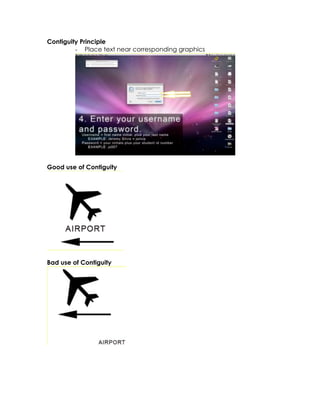
Contiguity Principle
- Place text near corresponding graphics

Good use of Contiguity

Bad use of Contiguity
Effects of Following the Multimedia Principle
1.
Students participate in active learning because they are
making connections between graphics and text
2.
Active learning leads to engaged learning which can
increase motivation and academic achievement
3.
Active learning leads to knowledge construction rather
than information acquisition which involves more profound
cognitive processing
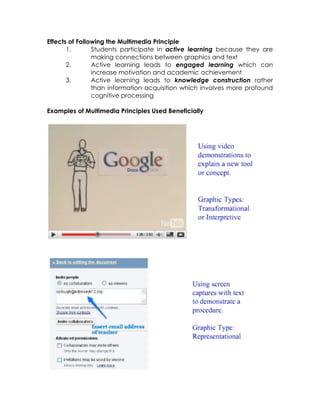
Examples of Multimedia Principles Used Beneficially
Examples of not using Multimedia Principles Correctly
Contiguity Principle
1.
Graphics and text should be placed near each other on
the screen.
2.
Spoken words and graphics should be presented
simultaneously.
Contiguity Principle Do’s and Don’ts
Do : When a graphic is showing instructions, steps, descriptions, or
actions make sure the printed words are right next to it on the
screen.
Don’t : When scrolling, text should never be separate from the
graphic above or below it.
Don’t : Never put feedback on a separate page from a student
answer
Don’t : Directions should not appear on a separate page from their
application
When a graphic is showing a task, an action, or a description, the
narration should be presented at the same time.
Don’t : Present a segment of narration that comes first and is
followed by the video or animation second.
Don’t : Provide an icon or link for the narration that is separate than
the icon or link for the graphic.
Examples of Using Contiguity Principles Correctly
Module 1
Module 1

Module 1

  • 1.
    Module 1 MULTIMEDIA PRINCIPLESAND CONCEPTS Multimedia Principle -includes graphics and words rather than text alone on course pages and presentations. Graphics = still pictures, animations, videos Words = text or sounds Types of Graphics 1. 2. 3. 4. 5. 6. 7. Decorative Representational Organizational Relational Transformational Interpretive Content Types & Graphics Decorative - added for aesthetic appeal
  • 2.
    Representational - illustrate theappearance of an object Organizational - show qualitative relationships Relational - Summarize quantitative relationships
  • 3.
    Transformational - illustrate changeover time or space Interpretive - Make intangible phenomena invisible Content Types & Graphics
  • 4.
    Contiguity Principle - Placetext near corresponding graphics Good use of Contiguity Bad use of Contiguity
  • 5.
    Effects of Followingthe Multimedia Principle 1. Students participate in active learning because they are making connections between graphics and text 2. Active learning leads to engaged learning which can increase motivation and academic achievement 3. Active learning leads to knowledge construction rather than information acquisition which involves more profound cognitive processing Examples of Multimedia Principles Used Beneficially
  • 6.
    Examples of notusing Multimedia Principles Correctly
  • 7.
    Contiguity Principle 1. Graphics andtext should be placed near each other on the screen. 2. Spoken words and graphics should be presented simultaneously. Contiguity Principle Do’s and Don’ts Do : When a graphic is showing instructions, steps, descriptions, or actions make sure the printed words are right next to it on the screen. Don’t : When scrolling, text should never be separate from the graphic above or below it. Don’t : Never put feedback on a separate page from a student answer Don’t : Directions should not appear on a separate page from their application When a graphic is showing a task, an action, or a description, the narration should be presented at the same time. Don’t : Present a segment of narration that comes first and is followed by the video or animation second. Don’t : Provide an icon or link for the narration that is separate than the icon or link for the graphic.
  • 8.
    Examples of UsingContiguity Principles Correctly