
Mobile Application Security Testing
3 Angles to perform a successful security
testing
1. Client Side Checks;
2. Dynamic / Runtime / Local Storage / DB /
SD Checks &
3. Static Code Analysis (a.k.a Reverse Engg.)
By : Abhilash @ IBM
Static Code Analysis
Why Static Code Analysis is required ?
In Lay-man terms  Code analysis
of ApK file….
M1, M4, M5,
 M1 : Improper Platform Usage : Android Intents,
permissions
 M4 : Insecure Authorization : Identifying Session keys,
session mgmt. logic
 M5 – Insufficient Cryptography : covering cryptographic
keys (like Md5, SHA keys) and encryption logic
M7, M8, M9,M10
 M7 – Client Code Quality : like buffer overflows, format string
vulnerabilities, and various other code-level mistakes
 M8 – Code Tampering : covers binary patching, local resource
modification, method hooking and dynamic memory
modification.
 M9 – Reverse Engineering : analysis of libraries, algorithms,
and other assets.
 M10 – Extraneous Functionality : Hidden backdoor
functionalities , commented code (accidently left by
developer)
7/10 M’s are covered in Static Code
Analysis
Which is >50%
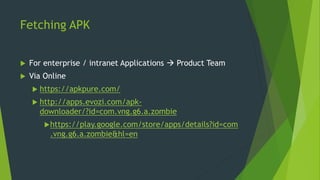
Fetching APK
 For enterprise / intranet Applications  Product Team
 Via Online
 https://apkpure.com/
 http://apps.evozi.com/apk-
downloader/?id=com.vng.g6.a.zombie
https://play.google.com/store/apps/details?id=com
.vng.g6.a.zombie&hl=en
Conversion of APK to Source Code
 Manual via dex2jar/Apktool
 http://stackoverflow.com/questions/12732882/reverse-engineering-from-an-apk-
file-to-a-project
 Via Online
 http://www.javadecompilers.com/apk
 Apk files are nothing but zip files.
 Zip files contains resources and assembled java code
 But unzip will miss classes.dex and resources.arsc files
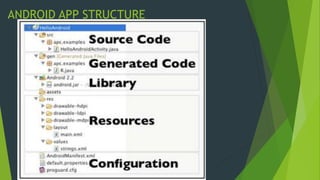
ANDROID APP STRUCTURE
Methods to perform Code Analysis
 Manual
 Automated
Manual Code Analysis
Installing and Configuring Text Editors
 Android Studio (or)
 Sublime Text
Why Sublime Text ?
Goto Anything functionality
Search of Key strokes
Quick File Switching
 Demo
What needs to be looked :
Samples - hardcoded passwords
Samples - Encryption
Automated Code Analysis
 MobSF (Mobile Security Framework)
 QARK (Quick Android Review Kit)
 ApkTool
 & Many more…… both commercial and open source tools
available…
*These are open source tools
Installing and Configuring MobSF
 Demo
Installing and Configuring QARK
 Demo
Installing and Configuring ApkTool
 Demo
Android Intents
 An intent is a Messaging
Object
 which can be used to
request an Action from
an another App
Component.
 App Components can be
 Activities ; Services ;
 Broadcast Receivers ;
 Content Providers
 2 types of Intents
 Explicit
 Implicit
Some of the uses of Intents are
 Start a Service
 Launch an Activity
 Display a web page
 Display List of Contacts
 Broadcast a Message and
 Many More …………………………….
Doubt !!!
Y intents are used Y not APIs ?
API Intent
API calls are Synchronous Intent based calls are
Asynchronous
API calls are compile-time
binding
Intent based calls are run-
time binding
BUT …. Intents can similarly be
used as APIs  Explicit
Implicit Intents
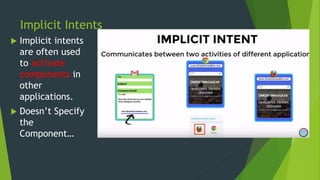
 Implicit intents
are often used
to activate
components in
other
applications.
 Doesn’t Specify
the
Component…
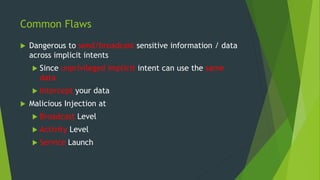
Common Flaws
 Dangerous to send/broadcast sensitive information / data
across implicit intents
 Since unprivileged implicit intent can use the same
data
 Intercept your data
 Malicious Injection at
 Broadcast Level
 Activity Level
 Service Launch
Explicit Intents
 An explicit intent is most
commonly used when
launching an activity (from
another one) within the
same application.
 Specifies the component
Example
Next Time 
 Playing around Intents
 Deep-drive in Intent Filters
 Malicious Intents
 Intent Spoofing and intent traffic analysis
 Prevention techniques
 Self signing of Android app for reverse engg.
Thankyou….

Mobile Application Security Testing (Static Code Analysis) of Android App

  • 1.
    Mobile Application SecurityTesting 3 Angles to perform a successful security testing 1. Client Side Checks; 2. Dynamic / Runtime / Local Storage / DB / SD Checks & 3. Static Code Analysis (a.k.a Reverse Engg.) By : Abhilash @ IBM
  • 2.
    Static Code Analysis WhyStatic Code Analysis is required ? In Lay-man terms  Code analysis of ApK file….
  • 3.
    M1, M4, M5, M1 : Improper Platform Usage : Android Intents, permissions  M4 : Insecure Authorization : Identifying Session keys, session mgmt. logic  M5 – Insufficient Cryptography : covering cryptographic keys (like Md5, SHA keys) and encryption logic
  • 4.
    M7, M8, M9,M10 M7 – Client Code Quality : like buffer overflows, format string vulnerabilities, and various other code-level mistakes  M8 – Code Tampering : covers binary patching, local resource modification, method hooking and dynamic memory modification.  M9 – Reverse Engineering : analysis of libraries, algorithms, and other assets.  M10 – Extraneous Functionality : Hidden backdoor functionalities , commented code (accidently left by developer)
  • 5.
    7/10 M’s arecovered in Static Code Analysis Which is >50%
  • 6.
    Fetching APK  Forenterprise / intranet Applications  Product Team  Via Online  https://apkpure.com/  http://apps.evozi.com/apk- downloader/?id=com.vng.g6.a.zombie https://play.google.com/store/apps/details?id=com .vng.g6.a.zombie&hl=en
  • 7.
    Conversion of APKto Source Code  Manual via dex2jar/Apktool  http://stackoverflow.com/questions/12732882/reverse-engineering-from-an-apk- file-to-a-project  Via Online  http://www.javadecompilers.com/apk  Apk files are nothing but zip files.  Zip files contains resources and assembled java code  But unzip will miss classes.dex and resources.arsc files
  • 8.
  • 9.
    Methods to performCode Analysis  Manual  Automated
  • 10.
  • 11.
    Installing and ConfiguringText Editors  Android Studio (or)  Sublime Text Why Sublime Text ? Goto Anything functionality Search of Key strokes Quick File Switching  Demo
  • 13.
    What needs tobe looked :
  • 14.
  • 16.
  • 20.
  • 21.
     MobSF (MobileSecurity Framework)  QARK (Quick Android Review Kit)  ApkTool  & Many more…… both commercial and open source tools available… *These are open source tools
  • 22.
  • 25.
  • 28.
  • 31.
    Android Intents  Anintent is a Messaging Object  which can be used to request an Action from an another App Component.  App Components can be  Activities ; Services ;  Broadcast Receivers ;  Content Providers  2 types of Intents  Explicit  Implicit
  • 32.
    Some of theuses of Intents are  Start a Service  Launch an Activity  Display a web page  Display List of Contacts  Broadcast a Message and  Many More …………………………….
  • 33.
    Doubt !!! Y intentsare used Y not APIs ? API Intent API calls are Synchronous Intent based calls are Asynchronous API calls are compile-time binding Intent based calls are run- time binding BUT …. Intents can similarly be used as APIs  Explicit
  • 34.
    Implicit Intents  Implicitintents are often used to activate components in other applications.  Doesn’t Specify the Component…
  • 35.
    Common Flaws  Dangerousto send/broadcast sensitive information / data across implicit intents  Since unprivileged implicit intent can use the same data  Intercept your data  Malicious Injection at  Broadcast Level  Activity Level  Service Launch
  • 36.
    Explicit Intents  Anexplicit intent is most commonly used when launching an activity (from another one) within the same application.  Specifies the component
  • 37.
  • 38.
    Next Time  Playing around Intents  Deep-drive in Intent Filters  Malicious Intents  Intent Spoofing and intent traffic analysis  Prevention techniques  Self signing of Android app for reverse engg.
  • 39.

Editor's Notes

  • #4 side-channel data leakage - vulnerabilities from the OS, frameworks, compiler environment, new hardware, etc
  • #8 https://github.com/androguard/androguard
  • #39 https://www.appvigil.co/blog/2015/04/intent-spoofing-vulnerability-in-android-apps/ https://github.com/pwntester/OWASP-GoatDroid-Dolphis