Android - Model
Architecture
Indonesia
Mar 2016
Fandy Gotama
2
Security
3
Security: HTTPS
- Always use HTTPS,
- Pay attention to TLS version supported by Android API,
- Do coordinate with the Phone Provider,
- Small user might experience slowness, expect bad
review.
4
Security: Securing your API
- OAuth,
- HTTP Basic Authentication,
- API Key.
5
Networking best practices
6
Networking best practices
- Don’t build your own custom http, use libraries,
- Always use timeout,
- Use Jackson library to parse JSON data to POJO,
- Always cache your data (including images),
- Pay attention to your activity / fragment lifecycle.
7
MVP
Model Architecture
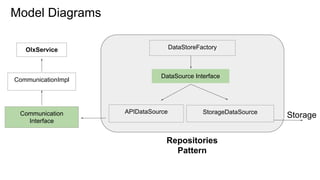
Model Diagrams
OlxService
CommunicationImpl
Communication
Interface
APIDataSource StorageDataSource
Repositories
Pattern
Storage
DataSource Interface
DataStoreFactory
9
Model Architecture
- Using repository pattern,
- Repository encapsulated set of objects in data store,
- Clean separation, and one way dependency between
presenter and model layer.
10
Model Breakdown
11
Repository Implementation
- In charge for getting data requested by presenter.
12
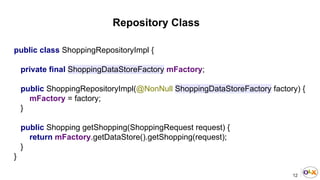
Repository Class
public class ShoppingRepositoryImpl {
private final ShoppingDataStoreFactory mFactory;
public ShoppingRepositoryImpl(@NonNull ShoppingDataStoreFactory factory) {
mFactory = factory;
}
public Shopping getShopping(ShoppingRequest request) {
return mFactory.getDataStore().getShopping(request);
}
}
13
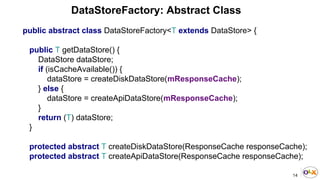
DataStoreFactory
- An abstract class, has a job to get data from cache or
from API,
- Repository will call getDataStore() method get the data.
14
public abstract class DataStoreFactory<T extends DataStore> {
public T getDataStore() {
DataStore dataStore;
if (isCacheAvailable()) {
dataStore = createDiskDataStore(mResponseCache);
} else {
dataStore = createApiDataStore(mResponseCache);
}
return (T) dataStore;
}
protected abstract T createDiskDataStore(ResponseCache responseCache);
protected abstract T createApiDataStore(ResponseCache responseCache);
DataStoreFactory: Abstract Class
15
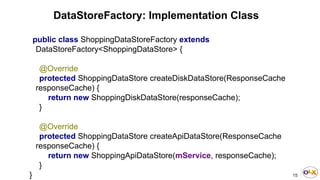
DataStoreFactory: Implementation Class
public class ShoppingDataStoreFactory extends
DataStoreFactory<ShoppingDataStore> {
@Override
protected ShoppingDataStore createDiskDataStore(ResponseCache
responseCache) {
return new ShoppingDiskDataStore(responseCache);
}
@Override
protected ShoppingDataStore createApiDataStore(ResponseCache
responseCache) {
return new ShoppingApiDataStore(mService, responseCache);
}
}
16
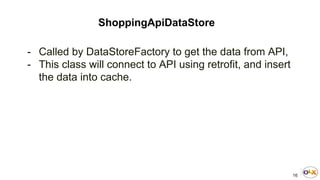
ShoppingApiDataStore
- Called by DataStoreFactory to get the data from API,
- This class will connect to API using retrofit, and insert
the data into cache.
17
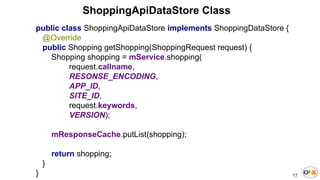
ShoppingApiDataStore Class
public class ShoppingApiDataStore implements ShoppingDataStore {
@Override
public Shopping getShopping(ShoppingRequest request) {
Shopping shopping = mService.shopping(
request.callname,
RESONSE_ENCODING,
APP_ID,
SITE_ID,
request.keywords,
VERSION);
mResponseCache.putList(shopping);
return shopping;
}
}
18
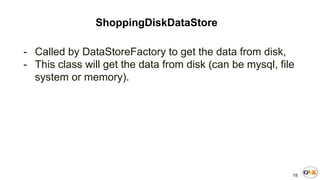
ShoppingDiskDataStore
- Called by DataStoreFactory to get the data from disk,
- This class will get the data from disk (can be mysql, file
system or memory).
19
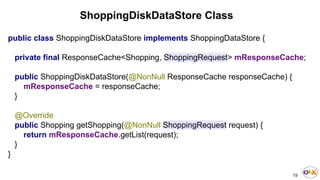
ShoppingDiskDataStore Class
public class ShoppingDiskDataStore implements ShoppingDataStore {
private final ResponseCache<Shopping, ShoppingRequest> mResponseCache;
public ShoppingDiskDataStore(@NonNull ResponseCache responseCache) {
mResponseCache = responseCache;
}
@Override
public Shopping getShopping(@NonNull ShoppingRequest request) {
return mResponseCache.getList(request);
}
}
20
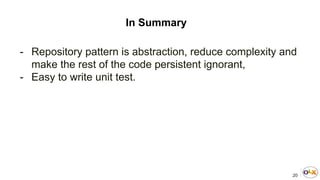
In Summary
- Repository pattern is abstraction, reduce complexity and
make the rest of the code persistent ignorant,
- Easy to write unit test.
21
Source Code
https://github.com/CommunityShareCode/MVP
22
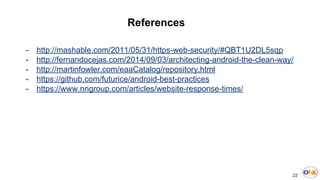
References
- http://mashable.com/2011/05/31/https-web-security/#QBT1U2DL5sqp
- http://fernandocejas.com/2014/09/03/architecting-android-the-clean-way/
- http://martinfowler.com/eaaCatalog/repository.html
- https://github.com/futurice/android-best-practices
- https://www.nngroup.com/articles/website-response-times/
23
Q&A

Android - Model Architecture