Mobile App Security Testing
1
1. What is Mobile App ? How many Types of Mobile Apps?
2. What is Mobile Testing ? Security Testing ? Mobile App Security Testing ?
3. What is meant by Threat ? Types of Threats ? Vulnerabilities ? Attacks ?
4. What are the Mobile Security Testing Key Concepts ?
5. What are the top most mobile security issues ?
6. Mobile Security Testing Advantages .
7. Mobile Security Testing Strategies to enhance the Application Security.
8. What is the necessity of mobile security testing and its statistics ?
9. Mobile Application Security Testing Methodology.
10. What are the Mobile Security Testing Deliverables ?
11. How to implement mobile security testing technique Manually and Automation ?
AGENDA
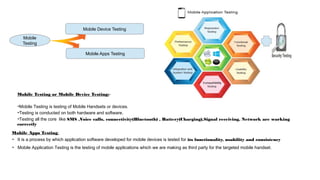
Mobile Apps Testing
Mobile Device Testing
Mobile
Testing
Mobile Testing or Mobile Device Testing:-
➔Mobile Testing is testing of Mobile Handsets or devices.
➔Testing is conducted on both hardware and software.
➔Testing all the core like SMS ,Voice calls, connectivity(Bluetooth) , Battery(Charging),Signal receiving, Network are working
correctly
Mobile Apps Testing:
➔ It is a process by which application software developed for mobile devices is tested for its functionality, usability and consistency
➔ Mobile Application Testing is the testing of mobile applications which we are making as third party for the targeted mobile handset.
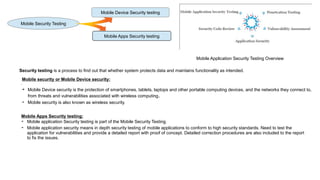
Mobile Device Security testing
Mobile Apps Security testing
Mobile Security Testing
.
Mobile security or Mobile Device security:
➔ Mobile Device security is the protection of smartphones, tablets, laptops and other portable computing devices, and the networks they connect to,
from threats and vulnerabilities associated with wireless computing.
➔ Mobile security is also known as wireless security.
Mobile Apps Security testing:
➔ Mobile application Security testing is part of the Mobile Security Testing.
➔ Mobile application security means in depth security testing of mobile applications to conform to high security standards. Need to test the
application for vulnerabilities and provide a detailed report with proof of concept. Detailed correction procedures are also included to the report
to fix the issues.
Mobile Application Security Testing Overview
Security testing is a process to find out that whether system protects data and maintains functionality as intended.
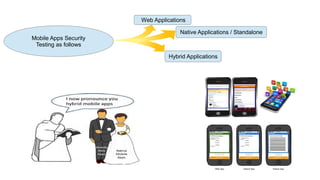
Mobile Apps Security
Testing as follows
Web Applications
Native Applications / Standalone
Hybrid Applications
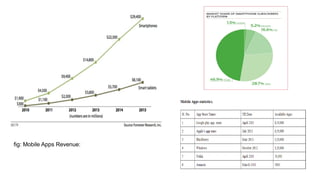
fig: Mobile Apps Revenue:
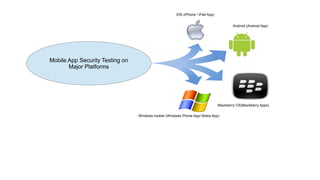
Mobile App Security Testing on
Major Platforms
IOS (iPhone / iPad App)
Android (Android App)
Windows mobile (Windows Phone App/ Nokia App)
Blackberry OS(Blackberry Apps)
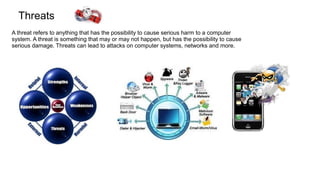
Threats
A threat refers to anything that has the possibility to cause serious harm to a computer
system. A threat is something that may or may not happen, but has the possibility to cause
serious damage. Threats can lead to attacks on computer systems, networks and more.
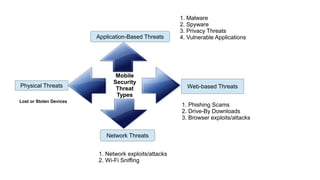
Mobile
Security
Threat
Types
Application-Based Threats
Web-based Threats
Network Threats
Physical Threats
1. Malware
2. Spyware
3. Privacy Threats
4. Vulnerable Applications
1. Phishing Scams
2. Drive-By Downloads
3. Browser exploits/attacks
1. Network exploits/attacks
2. Wi-Fi Sniffing
Lost or Stolen Devices
MALICIOUS SOFTWARE [ VIRUS ] EFFECTS AS FOLLOWS...
❏ It can slow down your computer/mobile device/application/database server/web server
❏ It might corrupt your system files.
❏ It might make some programs faulty or corrupt.
❏ It might damage your boot sector creating problems when you boot into the windows.
❏ It might steal important information from your computer and send to some other person.
❏ It might change the power ratings of your computer and could blast the system.
❏ It can possibly wipe out your hard drive.
❏ It can redirect websites, send spam emails, alter data, destroy data, steal passwords and bank details, format our
hard disk and destroys everything.
❏ It might give you sleepless nights and nightmares [terrifying dreams] if you are able to sleep.
Mobile application security testing
advantages
• Identify design flaws improves the security of your application.
• Supports user confidence in application security.
• Helps prevent application downtime and improve productivity.
• Protect your organization’s information assets and reputation
• Find out if client software may be manipulated to provide unauthorized access.
• Identifies specific risks to the organization and provides detailed recommendations to
mitigate them.
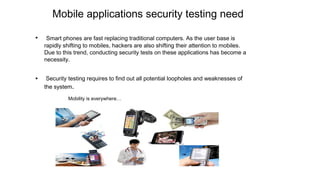
Mobile applications security testing need
• Smart phones are fast replacing traditional computers. As the user base is
rapidly shifting to mobiles, hackers are also shifting their attention to mobiles.
Due to this trend, conducting security tests on these applications has become a
necessity.
• Security testing requires to find out all potential loopholes and weaknesses of
the system.
Mobility is everywhere…
Why is security relevant for Mobile Platform?
• 40% Increase in the number for Organizations Developing Mobile Platform based applications.
• 30% Increase in the no of Mobile Banking Applications.
• 50% Increase in the number of people using the Mobile Phones for their day to day transactions.
• 82% Chances of end users not using their Mobile Phones with proper caution.
• 79% Chances of Mobile Phone users Jail Breaking their Phones.
• 65% Chances of Mobile Phone users not installing Anti-virus on their Mobile Phones.
• 71% Chances of any application to get misused.
• 57% Chances of a user losing his sensitive credentials to a hacker.
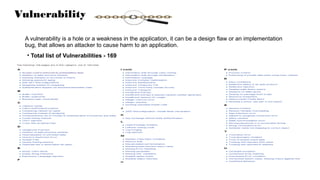
Vulnerability
A vulnerability is a hole or a weakness in the application, it can be a design flaw or an implementation
bug, that allows an attacker to cause harm to an application.
• Total list of Vulnerabilities - 169
Attack
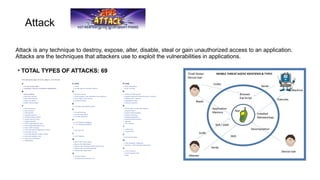
Attack is any technique to destroy, expose, alter, disable, steal or gain unauthorized access to an application.
Attacks are the techniques that attackers use to exploit the vulnerabilities in applications.
• TOTAL TYPES OF ATTACKS: 69
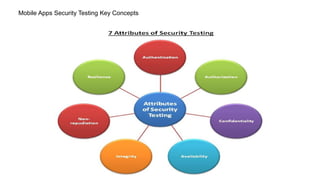
Mobile Apps Security Testing Key Concepts
Authentication:
Authentication is the process of checking credentials [i.e., checking user username or password] to identify the user.
Authorization:
Authorization is the process of giving privileges to the authenticated users. That means all authenticated users can not performs
all operations. Depending on his roles some privileges are given to them in the form authorization. Its like user permissions,
group permissions are an examples of authorization.
For example for a particular bank customers, employees, administrators can login into that websites. But the options available
to these persons are different at customer level, bank employee level, administrators level etc. This is authorization.
Availability
It is a process of checking that information & communications services must be kept available to authorized persons when they
need it. Ex: ATM
Confidentiality
It is a process of checking that information is accessible only for authenticated/authorized users and protecting the information
from any other users.
Integrity
Its a process of checking that information received is not altered/modified during the transit.
Non-repudiation
Its a process of checking action/communication cannot later be denied.
Resilience
Resilience can be built into information system using encryption, using SSL, extended authentication like use of
one time password, 2 layer authentication or token.
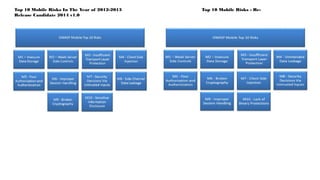
Top 10 Mobile Risks In The Year of 2012-2013 Top 10 Mobile Risks - Re-
Release Candidate 2014 v1.0
Mobile Security Strategies to enhance mobile application
security
There are several strategies to enhance mobile application security including:
• Strong authentication and authorization
• Ensuring transport layer security
• Encryption of data when written to memory
• Granting application access on a per-API level
• Processes tied to a user ID
• Application whitelisting
• Predefined interactions between the mobile application and the OS
• Requiring user input for privileged/elevated access
• Proper session handling
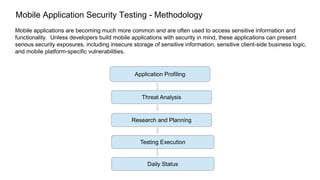
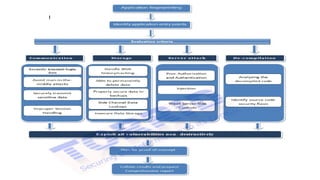
Mobile Application Security Testing - Methodology
Mobile applications are becoming much more common and are often used to access sensitive information and
functionality. Unless developers build mobile applications with security in mind, these applications can present
serious security exposures, including insecure storage of sensitive information, sensitive client-side business logic,
and mobile platform-specific vulnerabilities.
Application Profiling
Threat Analysis
Research and Planning
Testing Execution
Daily Status
Application Profiling
Need to review of all available documentation.
Walk through the application in-scope of user roles.
Document authentication flow
Document authorization flow
Goal is to create Security - centric data sheet and deep understanding of the target before testing begins.
Threat Analysis
Identifying the critical data, critical modules and actions within the application that would be the target of an attacker.
Its done with inspection of the application and interaction with the development team or business owner.
Need to note down the key worry points in the testing scope.
Primary threats to the application perspective are documented.
Research and Planning
Once the application target has been fully identified the team will provide test case database to populate a formal testing
plan. the work plan creation also includes per-project research for application-specific components or functionality and
creation of custom test cases.
Testing Execution
Our testing approach starts by dividing the target into functional testing blocks, and executing the work plan through those
components in succession. in a typical engagement a testing block can include groups of functionality or specific goals
aligned with a direct threat scenario. the assessment activities themselves are manual, with tool-assisted testing only being
leveraged in cases where they will be productive.
Daily Status
As part of the ongoing engagement we need to deliver a daily report with the current findings and progress.constant
findings delivery during the engagement allows our development team to begin triaging bugs early and on remediation
strategies.retesting For the majority of our engagements we also will perform validation of the corrective action for bugs we
have identified, which can be performed immediately after the assessment phase or at a later time
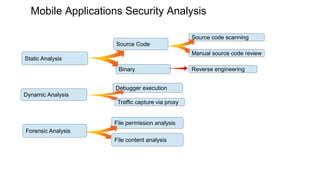
Mobile Applications Security Analysis
Static Analysis
Dynamic Analysis
Forensic Analysis
Source Code
Binary
Source code scanning
Manual source code review
Reverse engineering
Debugger execution
Traffic capture via proxy
File permission analysis
File content analysis
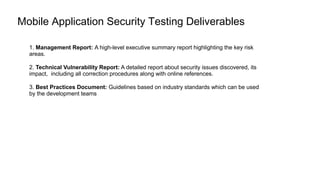
Mobile Application Security Testing Deliverables
1. Management Report: A high-level executive summary report highlighting the key risk
areas.
2. Technical Vulnerability Report: A detailed report about security issues discovered, its
impact, including all correction procedures along with online references.
3. Best Practices Document: Guidelines based on industry standards which can be used
by the development teams
Thanks
Krishnaiah Dasari(SDET)

Mobile Apps Security Testing -1

  • 1.
  • 2.
    1. What isMobile App ? How many Types of Mobile Apps? 2. What is Mobile Testing ? Security Testing ? Mobile App Security Testing ? 3. What is meant by Threat ? Types of Threats ? Vulnerabilities ? Attacks ? 4. What are the Mobile Security Testing Key Concepts ? 5. What are the top most mobile security issues ? 6. Mobile Security Testing Advantages . 7. Mobile Security Testing Strategies to enhance the Application Security. 8. What is the necessity of mobile security testing and its statistics ? 9. Mobile Application Security Testing Methodology. 10. What are the Mobile Security Testing Deliverables ? 11. How to implement mobile security testing technique Manually and Automation ? AGENDA
  • 3.
    Mobile Apps Testing MobileDevice Testing Mobile Testing Mobile Testing or Mobile Device Testing:- ➔Mobile Testing is testing of Mobile Handsets or devices. ➔Testing is conducted on both hardware and software. ➔Testing all the core like SMS ,Voice calls, connectivity(Bluetooth) , Battery(Charging),Signal receiving, Network are working correctly Mobile Apps Testing: ➔ It is a process by which application software developed for mobile devices is tested for its functionality, usability and consistency ➔ Mobile Application Testing is the testing of mobile applications which we are making as third party for the targeted mobile handset.
  • 4.
    Mobile Device Securitytesting Mobile Apps Security testing Mobile Security Testing . Mobile security or Mobile Device security: ➔ Mobile Device security is the protection of smartphones, tablets, laptops and other portable computing devices, and the networks they connect to, from threats and vulnerabilities associated with wireless computing. ➔ Mobile security is also known as wireless security. Mobile Apps Security testing: ➔ Mobile application Security testing is part of the Mobile Security Testing. ➔ Mobile application security means in depth security testing of mobile applications to conform to high security standards. Need to test the application for vulnerabilities and provide a detailed report with proof of concept. Detailed correction procedures are also included to the report to fix the issues. Mobile Application Security Testing Overview Security testing is a process to find out that whether system protects data and maintains functionality as intended.
  • 5.
    Mobile Apps Security Testingas follows Web Applications Native Applications / Standalone Hybrid Applications
  • 8.
  • 9.
    Mobile App SecurityTesting on Major Platforms IOS (iPhone / iPad App) Android (Android App) Windows mobile (Windows Phone App/ Nokia App) Blackberry OS(Blackberry Apps)
  • 10.
    Threats A threat refersto anything that has the possibility to cause serious harm to a computer system. A threat is something that may or may not happen, but has the possibility to cause serious damage. Threats can lead to attacks on computer systems, networks and more.
  • 11.
    Mobile Security Threat Types Application-Based Threats Web-based Threats NetworkThreats Physical Threats 1. Malware 2. Spyware 3. Privacy Threats 4. Vulnerable Applications 1. Phishing Scams 2. Drive-By Downloads 3. Browser exploits/attacks 1. Network exploits/attacks 2. Wi-Fi Sniffing Lost or Stolen Devices
  • 12.
    MALICIOUS SOFTWARE [VIRUS ] EFFECTS AS FOLLOWS... ❏ It can slow down your computer/mobile device/application/database server/web server ❏ It might corrupt your system files. ❏ It might make some programs faulty or corrupt. ❏ It might damage your boot sector creating problems when you boot into the windows. ❏ It might steal important information from your computer and send to some other person. ❏ It might change the power ratings of your computer and could blast the system. ❏ It can possibly wipe out your hard drive. ❏ It can redirect websites, send spam emails, alter data, destroy data, steal passwords and bank details, format our hard disk and destroys everything. ❏ It might give you sleepless nights and nightmares [terrifying dreams] if you are able to sleep.
  • 13.
    Mobile application securitytesting advantages • Identify design flaws improves the security of your application. • Supports user confidence in application security. • Helps prevent application downtime and improve productivity. • Protect your organization’s information assets and reputation • Find out if client software may be manipulated to provide unauthorized access. • Identifies specific risks to the organization and provides detailed recommendations to mitigate them.
  • 14.
    Mobile applications securitytesting need • Smart phones are fast replacing traditional computers. As the user base is rapidly shifting to mobiles, hackers are also shifting their attention to mobiles. Due to this trend, conducting security tests on these applications has become a necessity. • Security testing requires to find out all potential loopholes and weaknesses of the system. Mobility is everywhere…
  • 15.
    Why is securityrelevant for Mobile Platform? • 40% Increase in the number for Organizations Developing Mobile Platform based applications. • 30% Increase in the no of Mobile Banking Applications. • 50% Increase in the number of people using the Mobile Phones for their day to day transactions. • 82% Chances of end users not using their Mobile Phones with proper caution. • 79% Chances of Mobile Phone users Jail Breaking their Phones. • 65% Chances of Mobile Phone users not installing Anti-virus on their Mobile Phones. • 71% Chances of any application to get misused. • 57% Chances of a user losing his sensitive credentials to a hacker.
  • 16.
    Vulnerability A vulnerability isa hole or a weakness in the application, it can be a design flaw or an implementation bug, that allows an attacker to cause harm to an application. • Total list of Vulnerabilities - 169
  • 17.
    Attack Attack is anytechnique to destroy, expose, alter, disable, steal or gain unauthorized access to an application. Attacks are the techniques that attackers use to exploit the vulnerabilities in applications. • TOTAL TYPES OF ATTACKS: 69
  • 18.
    Mobile Apps SecurityTesting Key Concepts
  • 19.
    Authentication: Authentication is theprocess of checking credentials [i.e., checking user username or password] to identify the user. Authorization: Authorization is the process of giving privileges to the authenticated users. That means all authenticated users can not performs all operations. Depending on his roles some privileges are given to them in the form authorization. Its like user permissions, group permissions are an examples of authorization. For example for a particular bank customers, employees, administrators can login into that websites. But the options available to these persons are different at customer level, bank employee level, administrators level etc. This is authorization. Availability It is a process of checking that information & communications services must be kept available to authorized persons when they need it. Ex: ATM Confidentiality It is a process of checking that information is accessible only for authenticated/authorized users and protecting the information from any other users.
  • 20.
    Integrity Its a processof checking that information received is not altered/modified during the transit. Non-repudiation Its a process of checking action/communication cannot later be denied. Resilience Resilience can be built into information system using encryption, using SSL, extended authentication like use of one time password, 2 layer authentication or token.
  • 21.
    Top 10 MobileRisks In The Year of 2012-2013 Top 10 Mobile Risks - Re- Release Candidate 2014 v1.0
  • 22.
    Mobile Security Strategiesto enhance mobile application security There are several strategies to enhance mobile application security including: • Strong authentication and authorization • Ensuring transport layer security • Encryption of data when written to memory • Granting application access on a per-API level • Processes tied to a user ID • Application whitelisting • Predefined interactions between the mobile application and the OS • Requiring user input for privileged/elevated access • Proper session handling
  • 23.
    Mobile Application SecurityTesting - Methodology Mobile applications are becoming much more common and are often used to access sensitive information and functionality. Unless developers build mobile applications with security in mind, these applications can present serious security exposures, including insecure storage of sensitive information, sensitive client-side business logic, and mobile platform-specific vulnerabilities. Application Profiling Threat Analysis Research and Planning Testing Execution Daily Status
  • 24.
    Application Profiling Need toreview of all available documentation. Walk through the application in-scope of user roles. Document authentication flow Document authorization flow Goal is to create Security - centric data sheet and deep understanding of the target before testing begins. Threat Analysis Identifying the critical data, critical modules and actions within the application that would be the target of an attacker. Its done with inspection of the application and interaction with the development team or business owner. Need to note down the key worry points in the testing scope. Primary threats to the application perspective are documented. Research and Planning Once the application target has been fully identified the team will provide test case database to populate a formal testing plan. the work plan creation also includes per-project research for application-specific components or functionality and creation of custom test cases.
  • 25.
    Testing Execution Our testingapproach starts by dividing the target into functional testing blocks, and executing the work plan through those components in succession. in a typical engagement a testing block can include groups of functionality or specific goals aligned with a direct threat scenario. the assessment activities themselves are manual, with tool-assisted testing only being leveraged in cases where they will be productive. Daily Status As part of the ongoing engagement we need to deliver a daily report with the current findings and progress.constant findings delivery during the engagement allows our development team to begin triaging bugs early and on remediation strategies.retesting For the majority of our engagements we also will perform validation of the corrective action for bugs we have identified, which can be performed immediately after the assessment phase or at a later time
  • 26.
    Mobile Applications SecurityAnalysis Static Analysis Dynamic Analysis Forensic Analysis Source Code Binary Source code scanning Manual source code review Reverse engineering Debugger execution Traffic capture via proxy File permission analysis File content analysis
  • 28.
    Mobile Application SecurityTesting Deliverables 1. Management Report: A high-level executive summary report highlighting the key risk areas. 2. Technical Vulnerability Report: A detailed report about security issues discovered, its impact, including all correction procedures along with online references. 3. Best Practices Document: Guidelines based on industry standards which can be used by the development teams
  • 29.