Android pentesting
Introductions
Agenda:
1. Methodology
2. Static testing
3. Dynamic testing
Ч.1.Методологии
1. OWASP Mobile Top-10
2. MSTG - Mobile Security Testing Guide
3. MASVS - Mobile Application Security
Verification Standard
P.1.Methodology
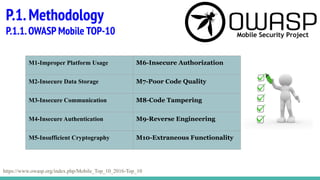
P.1.1.OWASP Mobile TOP-10
https://www.owasp.org/index.php/Mobile_Top_10_2016-Top_10
M1-Improper Platform Usage M6-Insecure Authorization
M2-Insecure Data Storage M7-Poor Code Quality
M3-Insecure Communication M8-Code Tampering
M4-Insecure Authentication M9-Reverse Engineering
M5-Insufficient Cryptography M10-Extraneous Functionality
P.1.Methodology
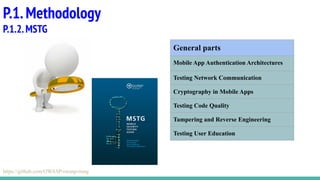
P.1.2.MSTG
General parts
Mobile App Authentication Architectures
Testing Network Communication
Cryptography in Mobile Apps
Testing Code Quality
Tampering and Reverse Engineering
Testing User Education
https://github.com/OWASP/owasp-mstg
P.1.Methodology
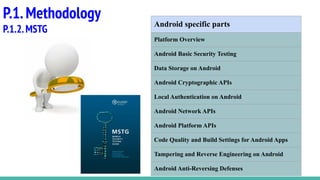
P.1.2.MSTG
Android specific parts
Platform Overview
Android Basic Security Testing
Data Storage on Android
Android Cryptographic APIs
Local Authentication on Android
Android Network APIs
Android Platform APIs
Code Quality and Build Settings for Android Apps
Tampering and Reverse Engineering on Android
Android Anti-Reversing Defenses
P.1.Methodology
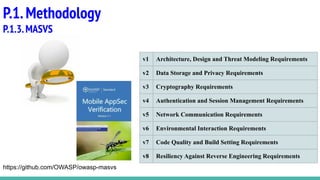
P.1.3.MASVS
v1 Architecture, Design and Threat Modeling Requirements
v2 Data Storage and Privacy Requirements
v3 Cryptography Requirements
v4 Authentication and Session Management Requirements
v5 Network Communication Requirements
v6 Environmental Interaction Requirements
v7 Code Quality and Build Setting Requirements
v8 Resiliency Against Reverse Engineering Requirements
https://github.com/OWASP/owasp-masvs
P.2.Static testing Android-app
1. MobSF
2. Androbugs framework
3. QARK
4. VCG scanner
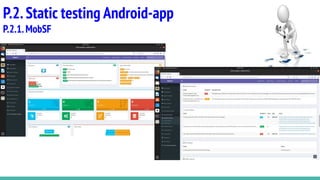
Mobile Security Framework (MobSF) is an automated, all-in-one mobile application
(Android/iOS/Windows) pen-testing, malware analysis and security assessment framework
capable of performing static and dynamic analysis.
P.2.Static testing Android-app
P.2.1.MobSF
https://github.com/MobSF/Mobile-Security-Framework-MobSF
P.2.Static testing Android-app
P.2.1.MobSF
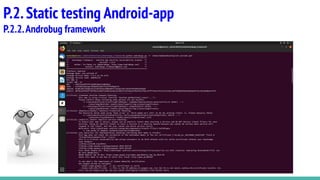
AndroBugs Framework is an Android vulnerability analysis system that helps
developers or hackers to find the potential security vulnerabilities in Android
applications. No splendid GUI interface, but the most efficient (less than 2 minutes per
scan in average) and more accurate.
P.2.Static testing Android-app
P.2.2.Androbugs framework
https://github.com/AndroBugs/AndroBugs_Framework
P.2.Static testing Android-app
P.2.2.Androbug framework
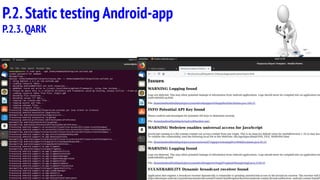
QARK is an easy to use tool capable of finding common security
vulnerabilities in Android applications. Unlike commercial products,
it is 100% free to use. QARK features educational information
allowing security reviewers to locate precise, in-depth explanations
of the vulnerabilities. QARK automates the use of multiple
decompilers, leveraging their combined outputs, to produce
superior results, when decompiling APKs. Finally, the major
advantage QARK has over traditional tools, that just point you to
possible vulnerabilities, is that it can produce ADB commands, or
even fully functional APKs, that turn hypothetical vulnerabilities into
working "POC" exploits.
P.2.Static testing Android-app
P.2.3.QARK
https://github.com/linkedin/qark
P.2.Static testing Android-app
P.2.3.QARK
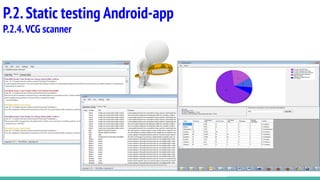
VCG is an automated code security review tool for C++, C#,
VB, PHP, Java and PL/SQL which is intended to drastically
speed up the code review process by identifying
bad/insecure code.
P.2.Static testing Android-app
P.2.4.VCG scanner
https://sourceforge.net/projects/visualcodegrepp/
P.2.Static testing Android-app
P.2.4.VCG scanner
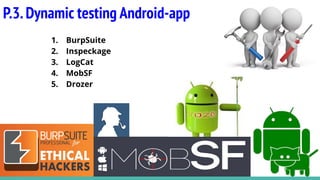
P.3.Dynamic testing Android-app
1. BurpSuite
2. Inspeckage
3. LogCat
4. MobSF
5. Drozer
P.3.Dynamic testing Android-app
P.3.1.BurpSuite
https://habr.com/ru/post/432820/
P.3.Dynamic testing Android-app
P.3.1.BurpSuite
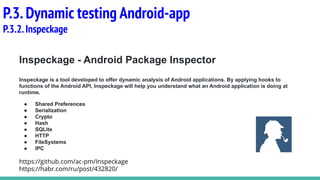
Inspeckage - Android Package Inspector
Inspeckage is a tool developed to offer dynamic analysis of Android applications. By applying hooks to
functions of the Android API, Inspeckage will help you understand what an Android application is doing at
runtime.
● Shared Preferences
● Serialization
● Crypto
● Hash
● SQLite
● HTTP
● FileSystems
● IPC
https://github.com/ac-pm/Inspeckage
https://habr.com/ru/post/432820/
P.3.Dynamic testing Android-app
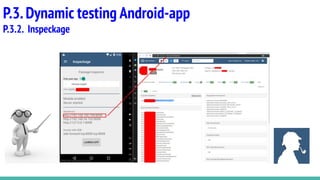
P.3.2.Inspeckage
P.3.Dynamic testing Android-app
P.3.2. Inspeckage
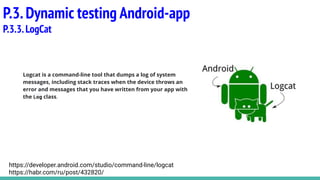
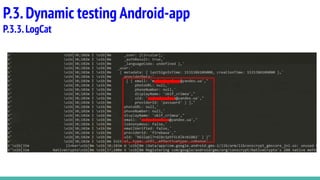
Logcat is a command-line tool that dumps a log of system
messages, including stack traces when the device throws an
error and messages that you have written from your app with
the Log class.
P.3.Dynamic testing Android-app
P.3.3.LogCat
https://developer.android.com/studio/command-line/logcat
https://habr.com/ru/post/432820/
P.3.Dynamic testing Android-app
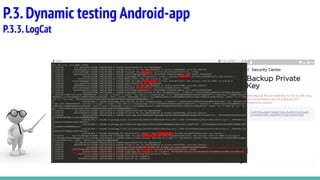
P.3.3.LogCat
P.3.Dynamic testing Android-app
P.3.3.LogCat
P.3.Dynamic testing Android-app
P.3.4.MobSF
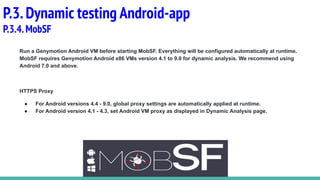
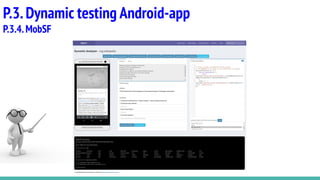
Run a Genymotion Android VM before starting MobSF. Everything will be configured automatically at runtime.
MobSF requires Genymotion Android x86 VMs version 4.1 to 9.0 for dynamic analysis. We recommend using
Android 7.0 and above.
HTTPS Proxy
● For Android versions 4.4 - 9.0, global proxy settings are automatically applied at runtime.
● For Android version 4.1 - 4.3, set Android VM proxy as displayed in Dynamic Analysis page.
P.3.Dynamic testing Android-app
P.3.4.MobSF
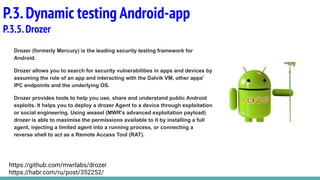
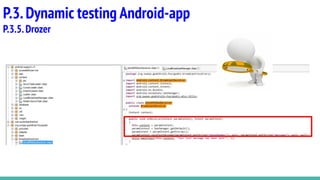
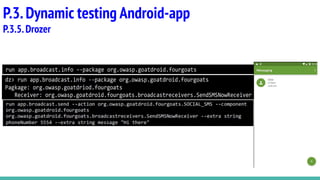
Drozer (formerly Mercury) is the leading security testing framework for
Android.
Drozer allows you to search for security vulnerabilities in apps and devices by
assuming the role of an app and interacting with the Dalvik VM, other apps'
IPC endpoints and the underlying OS.
Drozer provides tools to help you use, share and understand public Android
exploits. It helps you to deploy a drozer Agent to a device through exploitation
or social engineering. Using weasel (MWR's advanced exploitation payload)
drozer is able to maximise the permissions available to it by installing a full
agent, injecting a limited agent into a running process, or connecting a
reverse shell to act as a Remote Access Tool (RAT).
P.3.Dynamic testing Android-app
P.3.5.Drozer
https://github.com/mwrlabs/drozer
https://habr.com/ru/post/352252/
P.3.Dynamic testing Android-app
P.3.5.Drozer
P.3.Dynamic testing Android-app
P.3.5.Drozer
Any questions???

Android pentesting

  • 1.
  • 2.
  • 3.
    Ч.1.Методологии 1. OWASP MobileTop-10 2. MSTG - Mobile Security Testing Guide 3. MASVS - Mobile Application Security Verification Standard
  • 4.
    P.1.Methodology P.1.1.OWASP Mobile TOP-10 https://www.owasp.org/index.php/Mobile_Top_10_2016-Top_10 M1-ImproperPlatform Usage M6-Insecure Authorization M2-Insecure Data Storage M7-Poor Code Quality M3-Insecure Communication M8-Code Tampering M4-Insecure Authentication M9-Reverse Engineering M5-Insufficient Cryptography M10-Extraneous Functionality
  • 5.
    P.1.Methodology P.1.2.MSTG General parts Mobile AppAuthentication Architectures Testing Network Communication Cryptography in Mobile Apps Testing Code Quality Tampering and Reverse Engineering Testing User Education https://github.com/OWASP/owasp-mstg
  • 6.
    P.1.Methodology P.1.2.MSTG Android specific parts PlatformOverview Android Basic Security Testing Data Storage on Android Android Cryptographic APIs Local Authentication on Android Android Network APIs Android Platform APIs Code Quality and Build Settings for Android Apps Tampering and Reverse Engineering on Android Android Anti-Reversing Defenses
  • 7.
    P.1.Methodology P.1.3.MASVS v1 Architecture, Designand Threat Modeling Requirements v2 Data Storage and Privacy Requirements v3 Cryptography Requirements v4 Authentication and Session Management Requirements v5 Network Communication Requirements v6 Environmental Interaction Requirements v7 Code Quality and Build Setting Requirements v8 Resiliency Against Reverse Engineering Requirements https://github.com/OWASP/owasp-masvs
  • 8.
    P.2.Static testing Android-app 1.MobSF 2. Androbugs framework 3. QARK 4. VCG scanner
  • 9.
    Mobile Security Framework(MobSF) is an automated, all-in-one mobile application (Android/iOS/Windows) pen-testing, malware analysis and security assessment framework capable of performing static and dynamic analysis. P.2.Static testing Android-app P.2.1.MobSF https://github.com/MobSF/Mobile-Security-Framework-MobSF
  • 10.
  • 11.
    AndroBugs Framework isan Android vulnerability analysis system that helps developers or hackers to find the potential security vulnerabilities in Android applications. No splendid GUI interface, but the most efficient (less than 2 minutes per scan in average) and more accurate. P.2.Static testing Android-app P.2.2.Androbugs framework https://github.com/AndroBugs/AndroBugs_Framework
  • 12.
  • 13.
    QARK is aneasy to use tool capable of finding common security vulnerabilities in Android applications. Unlike commercial products, it is 100% free to use. QARK features educational information allowing security reviewers to locate precise, in-depth explanations of the vulnerabilities. QARK automates the use of multiple decompilers, leveraging their combined outputs, to produce superior results, when decompiling APKs. Finally, the major advantage QARK has over traditional tools, that just point you to possible vulnerabilities, is that it can produce ADB commands, or even fully functional APKs, that turn hypothetical vulnerabilities into working "POC" exploits. P.2.Static testing Android-app P.2.3.QARK https://github.com/linkedin/qark
  • 14.
  • 15.
    VCG is anautomated code security review tool for C++, C#, VB, PHP, Java and PL/SQL which is intended to drastically speed up the code review process by identifying bad/insecure code. P.2.Static testing Android-app P.2.4.VCG scanner https://sourceforge.net/projects/visualcodegrepp/
  • 16.
  • 17.
    P.3.Dynamic testing Android-app 1.BurpSuite 2. Inspeckage 3. LogCat 4. MobSF 5. Drozer
  • 18.
  • 19.
  • 20.
    Inspeckage - AndroidPackage Inspector Inspeckage is a tool developed to offer dynamic analysis of Android applications. By applying hooks to functions of the Android API, Inspeckage will help you understand what an Android application is doing at runtime. ● Shared Preferences ● Serialization ● Crypto ● Hash ● SQLite ● HTTP ● FileSystems ● IPC https://github.com/ac-pm/Inspeckage https://habr.com/ru/post/432820/ P.3.Dynamic testing Android-app P.3.2.Inspeckage
  • 21.
  • 22.
    Logcat is acommand-line tool that dumps a log of system messages, including stack traces when the device throws an error and messages that you have written from your app with the Log class. P.3.Dynamic testing Android-app P.3.3.LogCat https://developer.android.com/studio/command-line/logcat https://habr.com/ru/post/432820/
  • 23.
  • 24.
  • 25.
    P.3.Dynamic testing Android-app P.3.4.MobSF Runa Genymotion Android VM before starting MobSF. Everything will be configured automatically at runtime. MobSF requires Genymotion Android x86 VMs version 4.1 to 9.0 for dynamic analysis. We recommend using Android 7.0 and above. HTTPS Proxy ● For Android versions 4.4 - 9.0, global proxy settings are automatically applied at runtime. ● For Android version 4.1 - 4.3, set Android VM proxy as displayed in Dynamic Analysis page.
  • 26.
  • 27.
    Drozer (formerly Mercury)is the leading security testing framework for Android. Drozer allows you to search for security vulnerabilities in apps and devices by assuming the role of an app and interacting with the Dalvik VM, other apps' IPC endpoints and the underlying OS. Drozer provides tools to help you use, share and understand public Android exploits. It helps you to deploy a drozer Agent to a device through exploitation or social engineering. Using weasel (MWR's advanced exploitation payload) drozer is able to maximise the permissions available to it by installing a full agent, injecting a limited agent into a running process, or connecting a reverse shell to act as a Remote Access Tool (RAT). P.3.Dynamic testing Android-app P.3.5.Drozer https://github.com/mwrlabs/drozer https://habr.com/ru/post/352252/
  • 28.
  • 29.
  • 30.