






A
PROJECT REPORT
ON
“SHORT RANGE PERSONAL RADAR”
Submitted in partial fulfillment of the requirements
For the award of the degree
BACHELOR OF ENGINEERING
IN
ELECTRONICS & COMMUNICATION ENGINEERING
Submitted By:
Name of the student
Rahul Datta (0225EC131078)
Sarvesh Kushwaha (0225EC131090)
Shashikant Shyam (0225EC131095)
Shivam Patel (0225EC131098)
Under the guidance of:
Prof. Vishal Shrivastava
Electronics & Communication Engineering Department
DEPARTMENT OF ELECTRONICS & COMMUNICATION
ENGINEERING
GLOBAL NATURE CARE SANGATHANS GROUP OF
INSTITUTIONS, JABALPUR (M.P.)
RAJEEV GANDHI PROUDYOGIKI VISHWAVIDYALAYA, BHOPAL (M.P.)
DECEMBER 2016
GLOBAL NATURE CARE SANGATHAN’S GROUP OF
INSTITUTION
DECLARATION
We, hereby declare that this report entitled “SHORT RANGE PERSONAL
RADAR” is an authentic record of our own work carried out toward the partial
fulfillment for the award of degree of Bachelor of Engineering in Electronics &
Communication Engineering, under the guidance of “Prof. Vishal Shrivastava”
(Asst. Prof. Department of EC GNCSGI Jabalpur) during August to December 2016.
Rahul Datta (0225EC131078)
Sarvesh Kushwaha (0225EC131090)
Shashikant Shyam (0225EC131095)
Shivam Patel (0225EC131098)
GLOBAL NATURE CARE SANGATHAN’S GROUP OF
INSTITUTION
CERTIFICATE
This is certified that “Sarvesh Kushwaha” has completed a Minor Project on
“Short Range Personal Radar” for the partial fulfillment for award of degree of
Bachelor of Engineering in Electronics & Communication Engineering.
Date: __________ Project Guide
Prof. Vishal Shrivastava
Asst. Prof. (EC Deptt.)
Mr. Prateek Mishra Dr. Rajeev Khatri
H.O.D. (EC Deptt.) Director
GNCSGI Jabalpur GNCSGI Jabalpur
Date: __________ Date: __________
RAJIV GANDHI PROUDYOGIKI VISHWAVIDYALAYA,
BHOPAL
CERTIFICATE
This is to certify that
Sarvesh Kushwaha
Has successfully completed his Minor project on
“SHORT RANGE PERSONAL RADAR”
During year 2016 in the partial fulfillment for the degree of
BACHELOR OF ENGINEERING
IN
ELECTRONICS & COMMUNICATION ENGINEERING
INTERNAL EXAMINER EXTERNAL EXAMINER
INDEX
1.Abstract……………………………………………………PAGE 5
2.Introduction and Motivation…………………….PAGE 6
3.Brief Review………………………………………………PAGE 13
4.Proposed Problem Statement……………………PAGE 14
5.Proposed Work………………………………………….PAGE 15
6.Program…………………………….………………………PAGE 16
7.Bibliography……………………………………………..PAGE 23
8.References…………………………………………………PAGE 25
Abstract
The short range personal radar is a wonderful versatile tool for a plethora of applications. As the
name suggests it basically involves designing a radar system which successfully employs radio
frequency signals for detection and ranging of any obstacle in its range of surveillance.
While the basic controlling of the circuit is facilitated by the 8051 microcontroller programmed
in embedded c, the major task deals with the interfacing of various components of the project
with the microcontroller successfully thus implementing the radar sub-circuit’s accomplished
results to be effectively displayed on the led panel. Thus all we have to work on is the
assembling of the circuit, the most significant and core requirement- the coding of the
microcontroller and then mapping of the detected obstacle on the led panel.
The software used for simulation is Proteus 8. The radar circuit mounted on a dc motor shall
send a radio wave and receive its reflected form supplying the coded information to the
microcontrollers interrupt pin if any obstacle is detected in its range, this information shall be
analyzed and then with the help of decoders it will be conveyed to us by a glowing led on the
panel.
Introduction and Motivation
A micro-controller can be compared to a small stand alone computer; it is a very powerful
device, which is capable of executing a series of pre-programmed tasks and interacting with
other hardware devices. Being packed in a tiny integrated circuit (IC) whose size and weight is
usually negligible, it is becoming the perfect controller for robots or any machines requiring
some kind of intelligent automation. A single microcontroller can be sufficient to control a small
mobile robot, an automatic washer machine or a security system. Any microcontroller contains
a memory to store the program to be executed, and a number of input/output lines that can be
used to interact with other devices, like reading the state of a sensor or controlling a motor.
Now a days, microcontrollers are so cheap and easily available that it is common to use them
instead of simple logic circuits like counters for the sole purpose of gaining some design
flexibility and saving some space. Some machines and robots will even rely on a multitude of
microcontrollers, each one dedicated to a certain task. Most recent microcontrollers are ‘In
System Programmable’, meaning that you can modify the program being executed, without
removing the microcontroller from its place.
Today, microcontrollers are an indispensable tool for the robotics hobbyist as well as for the
engineer. Starting in this field can be a little difficult, because you usually can’t understand how
everything works inside that integrated circuit, so you have to study the system gradually, a
small part at a time, until you can figure out the whole image and understand how the system
work.
The 8051 micro-controller architecture
The 8051 is the name of a big family of microcontrollers. The device which we are going to use
along this tutorial is the ‘AT89S52‘ which is a typical 8051 microcontroller manufactured by
Atmel™. Note that this part doesn’t aim to explain the functioning of the different components
of an 89S52 microcontroller, but rather to give you a general idea of the organization of the
chip and the available features, which shall be explained in detail along this tutorial.
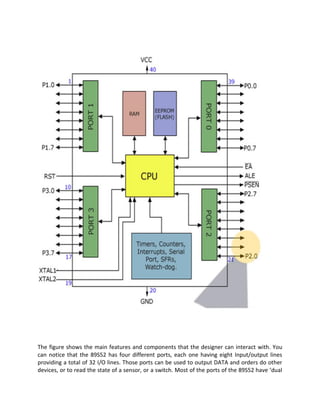
The block diagram provided by Atmel™ in their datasheet showing the architecture the 89S52
device can seem very complicated, and since we are going to use the C high level language to
program it, a simpler architecture can be represented as the figure.
The figure shows the main features and components that the designer can interact with. You
can notice that the 89S52 has four different ports, each one having eight Input/output lines
providing a total of 32 I/O lines. Those ports can be used to output DATA and orders do other
devices, or to read the state of a sensor, or a switch. Most of the ports of the 89S52 have ‘dual
function’ meaning that they can be used for two different functions: the first one is to perform
input/output operations and the second one is used to implement special features of the
microcontroller like counting external pulses, interrupting the execution of the program
according to external events, performing serial data transfer or connecting the chip to a
computer to update the software.
Each port has eight pins, and will be treated from the software point of view as an 8-bit variable
called ‘register’, each bit being connected to a different Input/Output pin.
You can also notice two different memory types: RAM and EEPROM. Shortly, RAM is used to
store variable during program execution, while the EEPROM memory is used to store the
program itself, that’s why it is often referred to as the ‘program memory’. The memory
organization will be discussed in detail later.
The special features of the 89S52 microcontroller are grouped in the blue box at the bottom of
figure. At this stage of the tutorial, it is just important to note that the 89S52 incorporates
hardware circuits that can be used to prevent the processor from executing various repetitive
tasks and save processing power for more complex calculations. Those simple tasks can be
counting the number of external pulses on a pin, or generating precise timing sequences.
It is clear that the CPU (Central Processing Unit) is the heart of the microcontrollers, It is the
CPU that will Read the program from the FLASH memory and execute it by interacting with the
different peripherals discussed above.
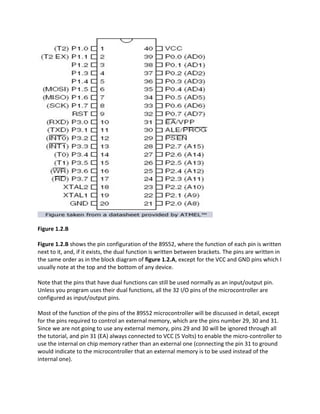
Figure 1.2.B
Figure 1.2.B shows the pin configuration of the 89S52, where the function of each pin is written
next to it, and, if it exists, the dual function is written between brackets. The pins are written in
the same order as in the block diagram of figure 1.2.A, except for the VCC and GND pins which I
usually note at the top and the bottom of any device.
Note that the pins that have dual functions can still be used normally as an input/output pin.
Unless you program uses their dual functions, all the 32 I/O pins of the microcontroller are
configured as input/output pins.
Most of the function of the pins of the 89S52 microcontroller will be discussed in detail, except
for the pins required to control an external memory, which are the pins number 29, 30 and 31.
Since we are not going to use any external memory, pins 29 and 30 will be ignored through all
the tutorial, and pin 31 (EA) always connected to VCC (5 Volts) to enable the micro-controller to
use the internal on chip memory rather than an external one (connecting the pin 31 to ground
would indicate to the microcontroller that an external memory is to be used instead of the
internal one).
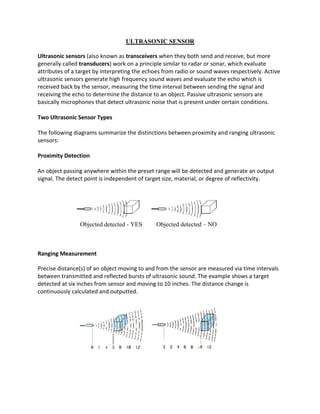
ULTRASONIC SENSOR
Ultrasonic sensors (also known as transceivers when they both send and receive, but more
generally called transducers) work on a principle similar to radar or sonar, which evaluate
attributes of a target by interpreting the echoes from radio or sound waves respectively. Active
ultrasonic sensors generate high frequency sound waves and evaluate the echo which is
received back by the sensor, measuring the time interval between sending the signal and
receiving the echo to determine the distance to an object. Passive ultrasonic sensors are
basically microphones that detect ultrasonic noise that is present under certain conditions.
Two Ultrasonic Sensor Types
The following diagrams summarize the distinctions between proximity and ranging ultrasonic
sensors:
Proximity Detection
An object passing anywhere within the preset range will be detected and generate an output
signal. The detect point is independent of target size, material, or degree of reflectivity.
Objected detected - YES Objected detected – NO
Ranging Measurement
Precise distance(s) of an object moving to and from the sensor are measured via time intervals
between transmitted and reflected bursts of ultrasonic sound. The example shows a target
detected at six inches from sensor and moving to 10 inches. The distance change is
continuously calculated and outputted.
Brief Review
Because ultrasonic sensors use sound rather than light for detection, they work in applications
where photoelectric sensors may not. Ultrasonics are a great solution for clear object detection,
clear label detection and for liquid level measurement, applications that photoelectric struggle
with because of target translucence. Target color and/or reflectivity do not affect ultrasonic
sensors which can operate reliably in high-glare environments.
Passive ultrasonic sensors may be used to detect high-pressure gas or liquid leaks, or other
hazardous conditions that generate ultrasonic sound.
Proposed Problem Statement
1. We plan to design a type of close proximity infrared radar system used to detect any
object close to the device by making scanning with angle 180°and distance from 10cm
to 500cm.
2. The system is based on microcontroller design. The user will hear a voice just as alarm
sound and the distance of the object will be readable on the screen of small LCD.
3. The user also can see the light given by LED appear in the direction of the object.
Proposed Work
Work done so far -
For making personal radar, we have collected all the information.
All the information regarding personal radar has been collected. Required elements like-
registers, IC's etc. Are arranged includes all the accessories. The element are arranged in the
bread board and trail has done. The trial version of personal radar has not work as expected.
There were some mistakes and that will be found out then rectified. The coding the micro
controller for personal radar has some errors, but project model has worked singnificantly.
Work to be done –
The codes will be uploaded to the micro controller and the circuit will be simulated in TinaPro
and PCB for the personal radar will be designed. PCB design is then implemented in the blank
PCB. After that all the components and connections will be fixed in the PCB. Array of LED will be
used to make the display and object location. Sensors, PCB and LED display will be combined
and the codes will be uploaded. Then the project will be ready to be tested.
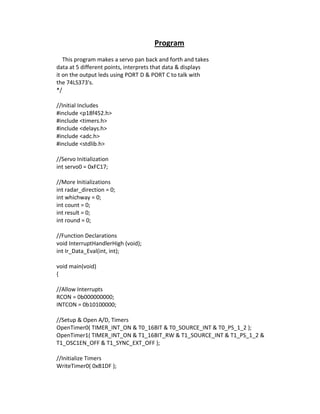
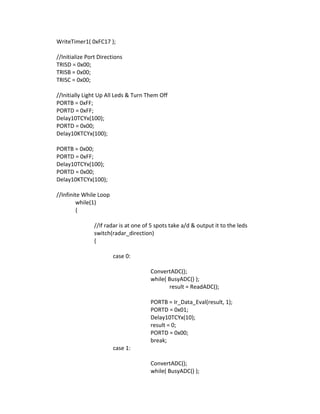
Program
This program makes a servo pan back and forth and takes
data at 5 different points, interprets that data & displays
it on the output leds using PORT D & PORT C to talk with
the 74LS373's.
*/
//Initial Includes
#include <p18f452.h>
#include <timers.h>
#include <delays.h>
#include <adc.h>
#include <stdlib.h>
//Servo Initialization
int servo0 = 0xFC17;
//More Initializations
int radar_direction = 0;
int whichway = 0;
int count = 0;
int result = 0;
int round = 0;
//Function Declarations
void InterruptHandlerHigh (void);
int Ir_Data_Eval(int, int);
void main(void)
{
//Allow Interrupts
RCON = 0b000000000;
INTCON = 0b10100000;
//Setup & Open A/D, Timers
OpenTimer0( TIMER_INT_ON & T0_16BIT & T0_SOURCE_INT & T0_PS_1_2 );
OpenTimer1( TIMER_INT_ON & T1_16BIT_RW & T1_SOURCE_INT & T1_PS_1_2 &
T1_OSC1EN_OFF & T1_SYNC_EXT_OFF );
//Initialize Timers
WriteTimer0( 0xB1DF );
WriteTimer1( 0xFC17 );
//Initialize Port Directions
TRISD = 0x00;
TRISB = 0x00;
TRISC = 0x00;
//Initially Light Up All Leds & Turn Them Off
PORTB = 0xFF;
PORTD = 0xFF;
Delay10TCYx(100);
PORTD = 0x00;
Delay10KTCYx(100);
PORTB = 0x00;
PORTD = 0xFF;
Delay10TCYx(100);
PORTD = 0x00;
Delay10KTCYx(100);
//Infinite While Loop
while(1)
{
//If radar is at one of 5 spots take a/d & output it to the leds
switch(radar_direction)
{
case 0:
ConvertADC();
while( BusyADC() );
result = ReadADC();
PORTB = Ir_Data_Eval(result, 1);
PORTD = 0x01;
Delay10TCYx(10);
result = 0;
PORTD = 0x00;
break;
case 1:
ConvertADC();
while( BusyADC() );
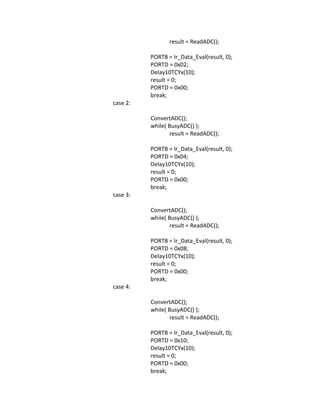
result = ReadADC();
PORTB = Ir_Data_Eval(result, 0);
PORTD = 0x02;
Delay10TCYx(10);
result = 0;
PORTD = 0x00;
break;
case 2:
ConvertADC();
while( BusyADC() );
result = ReadADC();
PORTB = Ir_Data_Eval(result, 0);
PORTD = 0x04;
Delay10TCYx(10);
result = 0;
PORTD = 0x00;
break;
case 3:
ConvertADC();
while( BusyADC() );
result = ReadADC();
PORTB = Ir_Data_Eval(result, 0);
PORTD = 0x08;
Delay10TCYx(10);
result = 0;
PORTD = 0x00;
break;
case 4:
ConvertADC();
while( BusyADC() );
result = ReadADC();
PORTB = Ir_Data_Eval(result, 0);
PORTD = 0x10;
Delay10TCYx(10);
result = 0;
PORTD = 0x00;
break;
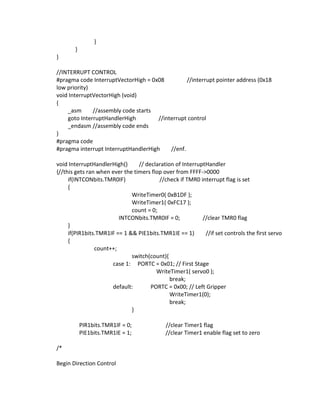
}
}
}
//INTERRUPT CONTROL
#pragma code InterruptVectorHigh = 0x08 //interrupt pointer address (0x18
low priority)
void InterruptVectorHigh (void)
{
_asm //assembly code starts
goto InterruptHandlerHigh //interrupt control
_endasm //assembly code ends
}
#pragma code
#pragma interrupt InterruptHandlerHigh //enf.
void InterruptHandlerHigh() // declaration of InterruptHandler
{//this gets ran when ever the timers flop over from FFFF->0000
if(INTCONbits.TMR0IF) //check if TMR0 interrupt flag is set
{
WriteTimer0( 0xB1DF );
WriteTimer1( 0xFC17 );
count = 0;
INTCONbits.TMR0IF = 0; //clear TMR0 flag
}
if(PIR1bits.TMR1IF == 1 && PIE1bits.TMR1IE == 1) //if set controls the first servo
{
count++;
switch(count){
case 1: PORTC = 0x01; // First Stage
WriteTimer1( servo0 );
break;
default: PORTC = 0x00; // Left Gripper
WriteTimer1(0);
break;
}
PIR1bits.TMR1IF = 0; //clear Timer1 flag
PIE1bits.TMR1IE = 1; //clear Timer1 enable flag set to zero
/*
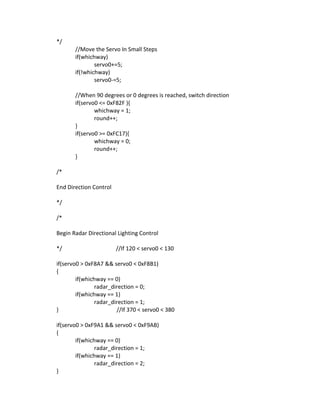
Begin Direction Control
*/
//Move the Servo In Small Steps
if(whichway)
servo0+=5;
if(!whichway)
servo0-=5;
//When 90 degrees or 0 degrees is reached, switch direction
if(servo0 <= 0xF82F ){
whichway = 1;
round++;
}
if(servo0 >= 0xFC17){
whichway = 0;
round++;
}
/*
End Direction Control
*/
/*
Begin Radar Directional Lighting Control
*/ //If 120 < servo0 < 130
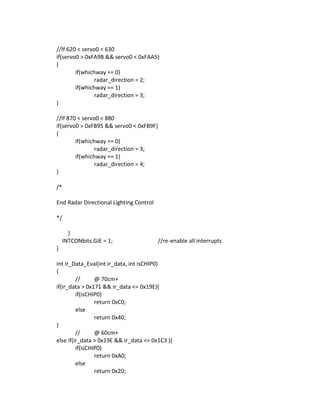
if(servo0 > 0xF8A7 && servo0 < 0xF8B1)
{
if(whichway == 0)
radar_direction = 0;
if(whichway == 1)
radar_direction = 1;
} //If 370 < servo0 < 380
if(servo0 > 0xF9A1 && servo0 < 0xF9AB)
{
if(whichway == 0)
radar_direction = 1;
if(whichway == 1)
radar_direction = 2;
}
//If 620 < servo0 < 630
if(servo0 > 0xFA9B && servo0 < 0xFAA5)
{
if(whichway == 0)
radar_direction = 2;
if(whichway == 1)
radar_direction = 3;
}
//If 870 < servo0 < 880
if(servo0 > 0xFB95 && servo0 < 0xFB9F)
{
if(whichway == 0)
radar_direction = 3;
if(whichway == 1)
radar_direction = 4;
}
/*
End Radar Directional Lighting Control
*/
}
INTCONbits.GIE = 1; //re-enable all interrupts
}
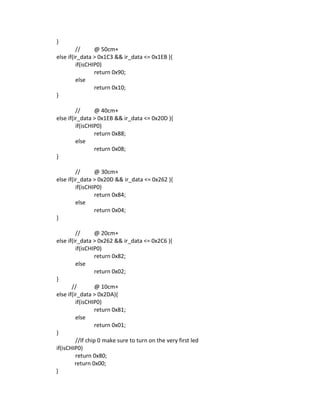
int Ir_Data_Eval(int ir_data, int isCHIP0)
{
// @ 70cm+
if(ir_data > 0x171 && ir_data <= 0x19E){
if(isCHIP0)
return 0xC0;
else
return 0x40;
}
// @ 60cm+
else if(ir_data > 0x19E && ir_data <= 0x1C3 ){
if(isCHIP0)
return 0xA0;
else
return 0x20;
}
// @ 50cm+
else if(ir_data > 0x1C3 && ir_data <= 0x1EB ){
if(isCHIP0)
return 0x90;
else
return 0x10;
}
// @ 40cm+
else if(ir_data > 0x1EB && ir_data <= 0x20D ){
if(isCHIP0)
return 0x88;
else
return 0x08;
}
// @ 30cm+
else if(ir_data > 0x20D && ir_data <= 0x262 ){
if(isCHIP0)
return 0x84;
else
return 0x04;
}
// @ 20cm+
else if(ir_data > 0x262 && ir_data <= 0x2C6 ){
if(isCHIP0)
return 0x82;
else
return 0x02;
}
// @ 10cm+
else if(ir_data > 0x2DA){
if(isCHIP0)
return 0x81;
else
return 0x01;
}
//If chip 0 make sure to turn on the very first led
if(isCHIP0)
return 0x80;
return 0x00;
}
Bibliography
Literature survey
PAPER TITLE : Design Infrared Radar System
AUTHOR : Yahya S.H. Khraisat
Description : The paper describes about interface of controller and motor with sensor.
The stepper motor will be turned on with instruction to rotate 180 by PIC. The stepper motor
will drive the IR SENSOR this sensor consist of emitter and detector. The emitter will send an
infrared signal to detect an object. When this signal hits the object, the signal will be reflected
back to the detector. Then the detector will send analog signal with suitable voltage and angle.
The voltage of this signal is suitable with the distance. The controller will make its and convert
analog signal to digital by A/D and give a command to the led which indicate in the direction of
the object.
Literature Survey
PAPER TITLE : Short Range Radar Based on UWB Technology
AUTHOR : L. Sakkila, C. Tatkeu, Y. ElHillali, A. Rivenq, ElBahhar and J-M. Rouvaen.
Description : Radar sends very short electromagnetic pulses. This type of radar can employ
traditional UWB waveforms such as Gaussian or monocycle pulses. To calculate the distance
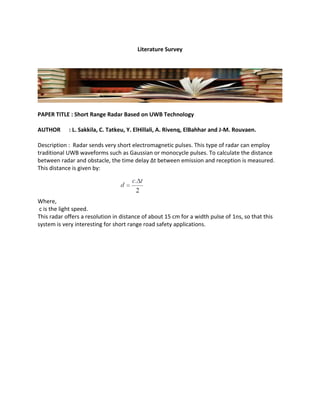
between radar and obstacle, the time delay Δt between emission and reception is measured.
This distance is given by:
Where,
c is the light speed.
This radar offers a resolution in distance of about 15 cm for a width pulse of 1ns, so that this
system is very interesting for short range road safety applications.
References
[1]. http://www.radio-electronics.com/info/electronics-design/pcb/pcb-design-
layoutprocess.php
[2].www.viasion.com/PCB/circuit-pcb.pdf
[3].http://www.pyroelectro.com/projects/ir_radar/
[4].http://www.siliconindia.com/aiepic/project/short_range_personal_radarpid=8134.html
[5].http://www.engineersgarage.com/sites/default/files/7805.pdf
[6].http://www.futurlec.com/Datasheet/74ls/74LS04.pdf
[7].http://labdasar.ee.itb.ac.id/lab/EL2195/pendukung%20praktikum/74LS08_2INANDGATE.pdf
[8].http://electroschematics.com/wp-content/uploads/2008/11/lm358.pdf
[9].http://www.omron-ap.co.in/technical_guide/proximity_sensor/index.asp
BOOKS
[1]. Mehta V.K., “ Principles of Electronics “S.Chand & Co. Ltd., New Delhi
[2] Boylstead Robert & Nasceslsky Louis “ Electronic Devices & Circuit Theory”
Prentice Hall of India Private Ltd., New Delhi
[3] Millman Jacob & Halkias C. Christos “Integrated Electronics “
Tata Mc Graw Hill Publishing Ltd., New Delhi.

Minor Project Report on - short range personal 'RADAR'.

  • 1.
    A PROJECT REPORT ON “SHORT RANGEPERSONAL RADAR” Submitted in partial fulfillment of the requirements For the award of the degree BACHELOR OF ENGINEERING IN ELECTRONICS & COMMUNICATION ENGINEERING Submitted By: Name of the student Rahul Datta (0225EC131078) Sarvesh Kushwaha (0225EC131090) Shashikant Shyam (0225EC131095) Shivam Patel (0225EC131098) Under the guidance of: Prof. Vishal Shrivastava Electronics & Communication Engineering Department DEPARTMENT OF ELECTRONICS & COMMUNICATION ENGINEERING GLOBAL NATURE CARE SANGATHANS GROUP OF INSTITUTIONS, JABALPUR (M.P.) RAJEEV GANDHI PROUDYOGIKI VISHWAVIDYALAYA, BHOPAL (M.P.) DECEMBER 2016
  • 2.
    GLOBAL NATURE CARESANGATHAN’S GROUP OF INSTITUTION DECLARATION We, hereby declare that this report entitled “SHORT RANGE PERSONAL RADAR” is an authentic record of our own work carried out toward the partial fulfillment for the award of degree of Bachelor of Engineering in Electronics & Communication Engineering, under the guidance of “Prof. Vishal Shrivastava” (Asst. Prof. Department of EC GNCSGI Jabalpur) during August to December 2016. Rahul Datta (0225EC131078) Sarvesh Kushwaha (0225EC131090) Shashikant Shyam (0225EC131095) Shivam Patel (0225EC131098)
  • 3.
    GLOBAL NATURE CARESANGATHAN’S GROUP OF INSTITUTION CERTIFICATE This is certified that “Sarvesh Kushwaha” has completed a Minor Project on “Short Range Personal Radar” for the partial fulfillment for award of degree of Bachelor of Engineering in Electronics & Communication Engineering. Date: __________ Project Guide Prof. Vishal Shrivastava Asst. Prof. (EC Deptt.) Mr. Prateek Mishra Dr. Rajeev Khatri H.O.D. (EC Deptt.) Director GNCSGI Jabalpur GNCSGI Jabalpur Date: __________ Date: __________
  • 4.
    RAJIV GANDHI PROUDYOGIKIVISHWAVIDYALAYA, BHOPAL CERTIFICATE This is to certify that Sarvesh Kushwaha Has successfully completed his Minor project on “SHORT RANGE PERSONAL RADAR” During year 2016 in the partial fulfillment for the degree of BACHELOR OF ENGINEERING IN ELECTRONICS & COMMUNICATION ENGINEERING INTERNAL EXAMINER EXTERNAL EXAMINER
  • 5.
    INDEX 1.Abstract……………………………………………………PAGE 5 2.Introduction andMotivation…………………….PAGE 6 3.Brief Review………………………………………………PAGE 13 4.Proposed Problem Statement……………………PAGE 14 5.Proposed Work………………………………………….PAGE 15 6.Program…………………………….………………………PAGE 16 7.Bibliography……………………………………………..PAGE 23 8.References…………………………………………………PAGE 25
  • 6.
    Abstract The short rangepersonal radar is a wonderful versatile tool for a plethora of applications. As the name suggests it basically involves designing a radar system which successfully employs radio frequency signals for detection and ranging of any obstacle in its range of surveillance. While the basic controlling of the circuit is facilitated by the 8051 microcontroller programmed in embedded c, the major task deals with the interfacing of various components of the project with the microcontroller successfully thus implementing the radar sub-circuit’s accomplished results to be effectively displayed on the led panel. Thus all we have to work on is the assembling of the circuit, the most significant and core requirement- the coding of the microcontroller and then mapping of the detected obstacle on the led panel. The software used for simulation is Proteus 8. The radar circuit mounted on a dc motor shall send a radio wave and receive its reflected form supplying the coded information to the microcontrollers interrupt pin if any obstacle is detected in its range, this information shall be analyzed and then with the help of decoders it will be conveyed to us by a glowing led on the panel.
  • 7.
    Introduction and Motivation Amicro-controller can be compared to a small stand alone computer; it is a very powerful device, which is capable of executing a series of pre-programmed tasks and interacting with other hardware devices. Being packed in a tiny integrated circuit (IC) whose size and weight is usually negligible, it is becoming the perfect controller for robots or any machines requiring some kind of intelligent automation. A single microcontroller can be sufficient to control a small mobile robot, an automatic washer machine or a security system. Any microcontroller contains a memory to store the program to be executed, and a number of input/output lines that can be used to interact with other devices, like reading the state of a sensor or controlling a motor. Now a days, microcontrollers are so cheap and easily available that it is common to use them instead of simple logic circuits like counters for the sole purpose of gaining some design flexibility and saving some space. Some machines and robots will even rely on a multitude of microcontrollers, each one dedicated to a certain task. Most recent microcontrollers are ‘In System Programmable’, meaning that you can modify the program being executed, without removing the microcontroller from its place. Today, microcontrollers are an indispensable tool for the robotics hobbyist as well as for the engineer. Starting in this field can be a little difficult, because you usually can’t understand how everything works inside that integrated circuit, so you have to study the system gradually, a small part at a time, until you can figure out the whole image and understand how the system work. The 8051 micro-controller architecture The 8051 is the name of a big family of microcontrollers. The device which we are going to use along this tutorial is the ‘AT89S52‘ which is a typical 8051 microcontroller manufactured by Atmel™. Note that this part doesn’t aim to explain the functioning of the different components of an 89S52 microcontroller, but rather to give you a general idea of the organization of the chip and the available features, which shall be explained in detail along this tutorial. The block diagram provided by Atmel™ in their datasheet showing the architecture the 89S52 device can seem very complicated, and since we are going to use the C high level language to program it, a simpler architecture can be represented as the figure.
  • 8.
    The figure showsthe main features and components that the designer can interact with. You can notice that the 89S52 has four different ports, each one having eight Input/output lines providing a total of 32 I/O lines. Those ports can be used to output DATA and orders do other devices, or to read the state of a sensor, or a switch. Most of the ports of the 89S52 have ‘dual
  • 9.
    function’ meaning thatthey can be used for two different functions: the first one is to perform input/output operations and the second one is used to implement special features of the microcontroller like counting external pulses, interrupting the execution of the program according to external events, performing serial data transfer or connecting the chip to a computer to update the software. Each port has eight pins, and will be treated from the software point of view as an 8-bit variable called ‘register’, each bit being connected to a different Input/Output pin. You can also notice two different memory types: RAM and EEPROM. Shortly, RAM is used to store variable during program execution, while the EEPROM memory is used to store the program itself, that’s why it is often referred to as the ‘program memory’. The memory organization will be discussed in detail later. The special features of the 89S52 microcontroller are grouped in the blue box at the bottom of figure. At this stage of the tutorial, it is just important to note that the 89S52 incorporates hardware circuits that can be used to prevent the processor from executing various repetitive tasks and save processing power for more complex calculations. Those simple tasks can be counting the number of external pulses on a pin, or generating precise timing sequences. It is clear that the CPU (Central Processing Unit) is the heart of the microcontrollers, It is the CPU that will Read the program from the FLASH memory and execute it by interacting with the different peripherals discussed above.
  • 10.
    Figure 1.2.B Figure 1.2.Bshows the pin configuration of the 89S52, where the function of each pin is written next to it, and, if it exists, the dual function is written between brackets. The pins are written in the same order as in the block diagram of figure 1.2.A, except for the VCC and GND pins which I usually note at the top and the bottom of any device. Note that the pins that have dual functions can still be used normally as an input/output pin. Unless you program uses their dual functions, all the 32 I/O pins of the microcontroller are configured as input/output pins. Most of the function of the pins of the 89S52 microcontroller will be discussed in detail, except for the pins required to control an external memory, which are the pins number 29, 30 and 31. Since we are not going to use any external memory, pins 29 and 30 will be ignored through all the tutorial, and pin 31 (EA) always connected to VCC (5 Volts) to enable the micro-controller to use the internal on chip memory rather than an external one (connecting the pin 31 to ground would indicate to the microcontroller that an external memory is to be used instead of the internal one).
  • 11.
    ULTRASONIC SENSOR Ultrasonic sensors(also known as transceivers when they both send and receive, but more generally called transducers) work on a principle similar to radar or sonar, which evaluate attributes of a target by interpreting the echoes from radio or sound waves respectively. Active ultrasonic sensors generate high frequency sound waves and evaluate the echo which is received back by the sensor, measuring the time interval between sending the signal and receiving the echo to determine the distance to an object. Passive ultrasonic sensors are basically microphones that detect ultrasonic noise that is present under certain conditions. Two Ultrasonic Sensor Types The following diagrams summarize the distinctions between proximity and ranging ultrasonic sensors: Proximity Detection An object passing anywhere within the preset range will be detected and generate an output signal. The detect point is independent of target size, material, or degree of reflectivity. Objected detected - YES Objected detected – NO Ranging Measurement Precise distance(s) of an object moving to and from the sensor are measured via time intervals between transmitted and reflected bursts of ultrasonic sound. The example shows a target detected at six inches from sensor and moving to 10 inches. The distance change is continuously calculated and outputted.
  • 14.
    Brief Review Because ultrasonicsensors use sound rather than light for detection, they work in applications where photoelectric sensors may not. Ultrasonics are a great solution for clear object detection, clear label detection and for liquid level measurement, applications that photoelectric struggle with because of target translucence. Target color and/or reflectivity do not affect ultrasonic sensors which can operate reliably in high-glare environments. Passive ultrasonic sensors may be used to detect high-pressure gas or liquid leaks, or other hazardous conditions that generate ultrasonic sound.
  • 15.
    Proposed Problem Statement 1.We plan to design a type of close proximity infrared radar system used to detect any object close to the device by making scanning with angle 180°and distance from 10cm to 500cm. 2. The system is based on microcontroller design. The user will hear a voice just as alarm sound and the distance of the object will be readable on the screen of small LCD. 3. The user also can see the light given by LED appear in the direction of the object.
  • 16.
    Proposed Work Work doneso far - For making personal radar, we have collected all the information. All the information regarding personal radar has been collected. Required elements like- registers, IC's etc. Are arranged includes all the accessories. The element are arranged in the bread board and trail has done. The trial version of personal radar has not work as expected. There were some mistakes and that will be found out then rectified. The coding the micro controller for personal radar has some errors, but project model has worked singnificantly. Work to be done – The codes will be uploaded to the micro controller and the circuit will be simulated in TinaPro and PCB for the personal radar will be designed. PCB design is then implemented in the blank PCB. After that all the components and connections will be fixed in the PCB. Array of LED will be used to make the display and object location. Sensors, PCB and LED display will be combined and the codes will be uploaded. Then the project will be ready to be tested.
  • 17.
    Program This program makesa servo pan back and forth and takes data at 5 different points, interprets that data & displays it on the output leds using PORT D & PORT C to talk with the 74LS373's. */ //Initial Includes #include <p18f452.h> #include <timers.h> #include <delays.h> #include <adc.h> #include <stdlib.h> //Servo Initialization int servo0 = 0xFC17; //More Initializations int radar_direction = 0; int whichway = 0; int count = 0; int result = 0; int round = 0; //Function Declarations void InterruptHandlerHigh (void); int Ir_Data_Eval(int, int); void main(void) { //Allow Interrupts RCON = 0b000000000; INTCON = 0b10100000; //Setup & Open A/D, Timers OpenTimer0( TIMER_INT_ON & T0_16BIT & T0_SOURCE_INT & T0_PS_1_2 ); OpenTimer1( TIMER_INT_ON & T1_16BIT_RW & T1_SOURCE_INT & T1_PS_1_2 & T1_OSC1EN_OFF & T1_SYNC_EXT_OFF ); //Initialize Timers WriteTimer0( 0xB1DF );
  • 18.
    WriteTimer1( 0xFC17 ); //InitializePort Directions TRISD = 0x00; TRISB = 0x00; TRISC = 0x00; //Initially Light Up All Leds & Turn Them Off PORTB = 0xFF; PORTD = 0xFF; Delay10TCYx(100); PORTD = 0x00; Delay10KTCYx(100); PORTB = 0x00; PORTD = 0xFF; Delay10TCYx(100); PORTD = 0x00; Delay10KTCYx(100); //Infinite While Loop while(1) { //If radar is at one of 5 spots take a/d & output it to the leds switch(radar_direction) { case 0: ConvertADC(); while( BusyADC() ); result = ReadADC(); PORTB = Ir_Data_Eval(result, 1); PORTD = 0x01; Delay10TCYx(10); result = 0; PORTD = 0x00; break; case 1: ConvertADC(); while( BusyADC() );
  • 19.
    result = ReadADC(); PORTB= Ir_Data_Eval(result, 0); PORTD = 0x02; Delay10TCYx(10); result = 0; PORTD = 0x00; break; case 2: ConvertADC(); while( BusyADC() ); result = ReadADC(); PORTB = Ir_Data_Eval(result, 0); PORTD = 0x04; Delay10TCYx(10); result = 0; PORTD = 0x00; break; case 3: ConvertADC(); while( BusyADC() ); result = ReadADC(); PORTB = Ir_Data_Eval(result, 0); PORTD = 0x08; Delay10TCYx(10); result = 0; PORTD = 0x00; break; case 4: ConvertADC(); while( BusyADC() ); result = ReadADC(); PORTB = Ir_Data_Eval(result, 0); PORTD = 0x10; Delay10TCYx(10); result = 0; PORTD = 0x00; break;
  • 20.
    } } } //INTERRUPT CONTROL #pragma codeInterruptVectorHigh = 0x08 //interrupt pointer address (0x18 low priority) void InterruptVectorHigh (void) { _asm //assembly code starts goto InterruptHandlerHigh //interrupt control _endasm //assembly code ends } #pragma code #pragma interrupt InterruptHandlerHigh //enf. void InterruptHandlerHigh() // declaration of InterruptHandler {//this gets ran when ever the timers flop over from FFFF->0000 if(INTCONbits.TMR0IF) //check if TMR0 interrupt flag is set { WriteTimer0( 0xB1DF ); WriteTimer1( 0xFC17 ); count = 0; INTCONbits.TMR0IF = 0; //clear TMR0 flag } if(PIR1bits.TMR1IF == 1 && PIE1bits.TMR1IE == 1) //if set controls the first servo { count++; switch(count){ case 1: PORTC = 0x01; // First Stage WriteTimer1( servo0 ); break; default: PORTC = 0x00; // Left Gripper WriteTimer1(0); break; } PIR1bits.TMR1IF = 0; //clear Timer1 flag PIE1bits.TMR1IE = 1; //clear Timer1 enable flag set to zero /* Begin Direction Control
  • 21.
    */ //Move the ServoIn Small Steps if(whichway) servo0+=5; if(!whichway) servo0-=5; //When 90 degrees or 0 degrees is reached, switch direction if(servo0 <= 0xF82F ){ whichway = 1; round++; } if(servo0 >= 0xFC17){ whichway = 0; round++; } /* End Direction Control */ /* Begin Radar Directional Lighting Control */ //If 120 < servo0 < 130 if(servo0 > 0xF8A7 && servo0 < 0xF8B1) { if(whichway == 0) radar_direction = 0; if(whichway == 1) radar_direction = 1; } //If 370 < servo0 < 380 if(servo0 > 0xF9A1 && servo0 < 0xF9AB) { if(whichway == 0) radar_direction = 1; if(whichway == 1) radar_direction = 2; }
  • 22.
    //If 620 <servo0 < 630 if(servo0 > 0xFA9B && servo0 < 0xFAA5) { if(whichway == 0) radar_direction = 2; if(whichway == 1) radar_direction = 3; } //If 870 < servo0 < 880 if(servo0 > 0xFB95 && servo0 < 0xFB9F) { if(whichway == 0) radar_direction = 3; if(whichway == 1) radar_direction = 4; } /* End Radar Directional Lighting Control */ } INTCONbits.GIE = 1; //re-enable all interrupts } int Ir_Data_Eval(int ir_data, int isCHIP0) { // @ 70cm+ if(ir_data > 0x171 && ir_data <= 0x19E){ if(isCHIP0) return 0xC0; else return 0x40; } // @ 60cm+ else if(ir_data > 0x19E && ir_data <= 0x1C3 ){ if(isCHIP0) return 0xA0; else return 0x20;
  • 23.
    } // @ 50cm+ elseif(ir_data > 0x1C3 && ir_data <= 0x1EB ){ if(isCHIP0) return 0x90; else return 0x10; } // @ 40cm+ else if(ir_data > 0x1EB && ir_data <= 0x20D ){ if(isCHIP0) return 0x88; else return 0x08; } // @ 30cm+ else if(ir_data > 0x20D && ir_data <= 0x262 ){ if(isCHIP0) return 0x84; else return 0x04; } // @ 20cm+ else if(ir_data > 0x262 && ir_data <= 0x2C6 ){ if(isCHIP0) return 0x82; else return 0x02; } // @ 10cm+ else if(ir_data > 0x2DA){ if(isCHIP0) return 0x81; else return 0x01; } //If chip 0 make sure to turn on the very first led if(isCHIP0) return 0x80; return 0x00; }
  • 24.
    Bibliography Literature survey PAPER TITLE: Design Infrared Radar System AUTHOR : Yahya S.H. Khraisat Description : The paper describes about interface of controller and motor with sensor. The stepper motor will be turned on with instruction to rotate 180 by PIC. The stepper motor will drive the IR SENSOR this sensor consist of emitter and detector. The emitter will send an infrared signal to detect an object. When this signal hits the object, the signal will be reflected back to the detector. Then the detector will send analog signal with suitable voltage and angle. The voltage of this signal is suitable with the distance. The controller will make its and convert analog signal to digital by A/D and give a command to the led which indicate in the direction of the object.
  • 25.
    Literature Survey PAPER TITLE: Short Range Radar Based on UWB Technology AUTHOR : L. Sakkila, C. Tatkeu, Y. ElHillali, A. Rivenq, ElBahhar and J-M. Rouvaen. Description : Radar sends very short electromagnetic pulses. This type of radar can employ traditional UWB waveforms such as Gaussian or monocycle pulses. To calculate the distance between radar and obstacle, the time delay Δt between emission and reception is measured. This distance is given by: Where, c is the light speed. This radar offers a resolution in distance of about 15 cm for a width pulse of 1ns, so that this system is very interesting for short range road safety applications.
  • 26.
    References [1]. http://www.radio-electronics.com/info/electronics-design/pcb/pcb-design- layoutprocess.php [2].www.viasion.com/PCB/circuit-pcb.pdf [3].http://www.pyroelectro.com/projects/ir_radar/ [4].http://www.siliconindia.com/aiepic/project/short_range_personal_radarpid=8134.html [5].http://www.engineersgarage.com/sites/default/files/7805.pdf [6].http://www.futurlec.com/Datasheet/74ls/74LS04.pdf [7].http://labdasar.ee.itb.ac.id/lab/EL2195/pendukung%20praktikum/74LS08_2INANDGATE.pdf [8].http://electroschematics.com/wp-content/uploads/2008/11/lm358.pdf [9].http://www.omron-ap.co.in/technical_guide/proximity_sensor/index.asp BOOKS [1]. MehtaV.K., “ Principles of Electronics “S.Chand & Co. Ltd., New Delhi [2] Boylstead Robert & Nasceslsky Louis “ Electronic Devices & Circuit Theory” Prentice Hall of India Private Ltd., New Delhi [3] Millman Jacob & Halkias C. Christos “Integrated Electronics “ Tata Mc Graw Hill Publishing Ltd., New Delhi.