RADAR SYSTEM
WITH ARDUINO
PROCESSOR
MODULES:
• ARDUINO UNO
• SG-90 SERVO MOTOR
• HC-SR04 ULTRASONIC SENSOR
• PIEZO BUZZER
• LED
17.12.2016
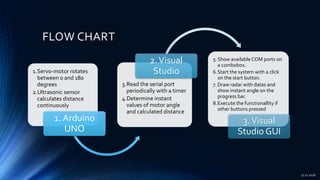
FLOW CHART
1.Servo-motor rotates
between 0 and 180
degrees
2.Ultrasonic sensor
calculates distance
continuously
1. Arduino
UNO
3.Read the serial port
periodically with a timer
4.Determine instant
values of motor angle
and calculated distance
2.Visual
Studio
5.Show available COM ports on
a combobox.
6.Start the system with a click
on the start button.
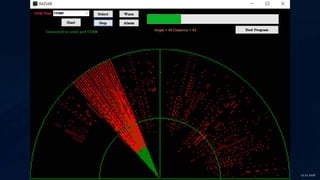
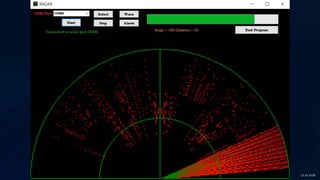
7. Draw radar with datas and
show instant angle on the
progress bar.
8.Execute the functionallity if
other buttons pressed
3.Visual
Studio GUI
17.12.2016
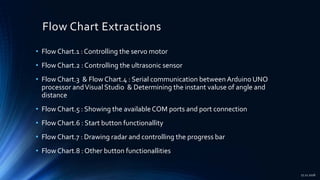
Flow Chart Extractions
• Flow Chart.1 : Controlling the servo motor
• Flow Chart.2 : Controlling the ultrasonic sensor
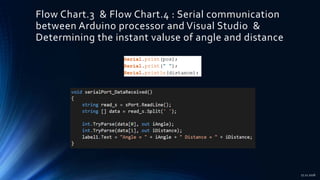
• Flow Chart.3 & Flow Chart.4 : Serial communication between Arduino UNO
processor andVisual Studio & Determining the instant valuse of angle and
distance
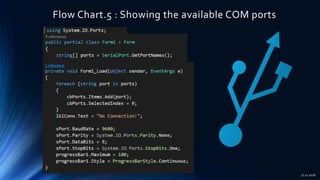
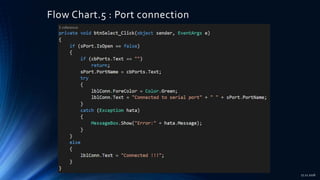
• Flow Chart.5 : Showing the available COM ports and port connection
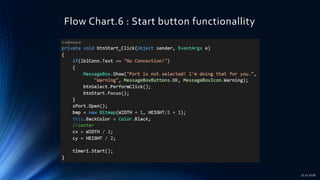
• Flow Chart.6 : Start button functionallity
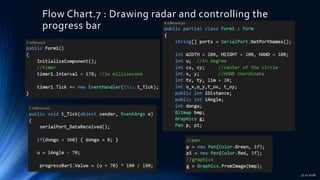
• Flow Chart.7 : Drawing radar and controlling the progress bar
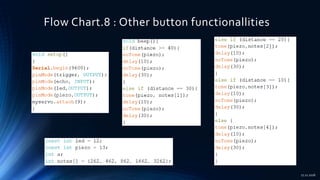
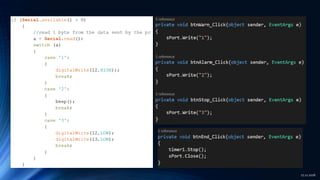
• Flow Chart.8 : Other button functionallities
17.12.2016
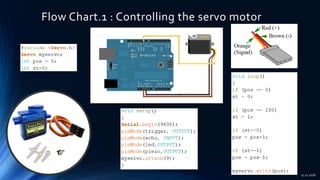
Flow Chart.1 : Controlling the servo motor
17.12.2016
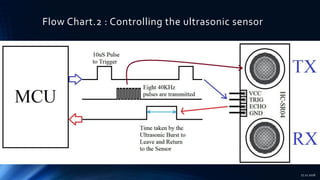
Flow Chart.2 : Controlling the ultrasonic sensor
17.12.2016
17.12.2016
17.12.2016
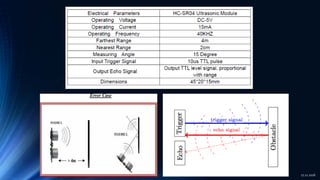
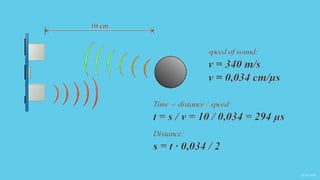
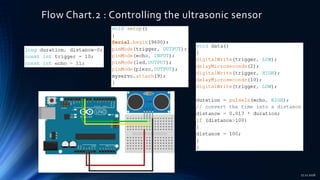
Flow Chart.2 : Controlling the ultrasonic sensor
17.12.2016
Flow Chart.3 & Flow Chart.4 : Serial communication
between Arduino processor and Visual Studio &
Determining the instant valuse of angle and distance
17.12.2016
Flow Chart.5 : Showing the available COM ports
17.12.2016
Flow Chart.5 : Port connection
17.12.2016
Flow Chart.6 : Start button functionallity
17.12.2016
Flow Chart.7 : Drawing radar and controlling the
progress bar
17.12.2016
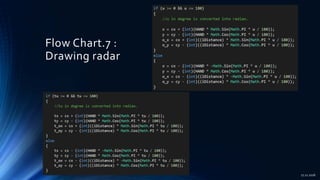
Flow Chart.7 :
Drawing radar
17.12.2016
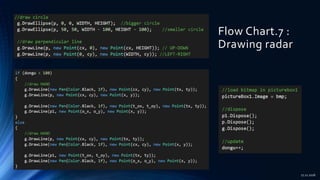
Flow Chart.7 :
Drawing radar
17.12.2016
Flow Chart.8 : Other button functionallities
17.12.2016
17.12.2016
17.12.2016
17.12.2016

Radar System with Arduino Processor

  • 1.
    RADAR SYSTEM WITH ARDUINO PROCESSOR MODULES: •ARDUINO UNO • SG-90 SERVO MOTOR • HC-SR04 ULTRASONIC SENSOR • PIEZO BUZZER • LED 17.12.2016
  • 2.
    FLOW CHART 1.Servo-motor rotates between0 and 180 degrees 2.Ultrasonic sensor calculates distance continuously 1. Arduino UNO 3.Read the serial port periodically with a timer 4.Determine instant values of motor angle and calculated distance 2.Visual Studio 5.Show available COM ports on a combobox. 6.Start the system with a click on the start button. 7. Draw radar with datas and show instant angle on the progress bar. 8.Execute the functionallity if other buttons pressed 3.Visual Studio GUI 17.12.2016
  • 3.
    Flow Chart Extractions •Flow Chart.1 : Controlling the servo motor • Flow Chart.2 : Controlling the ultrasonic sensor • Flow Chart.3 & Flow Chart.4 : Serial communication between Arduino UNO processor andVisual Studio & Determining the instant valuse of angle and distance • Flow Chart.5 : Showing the available COM ports and port connection • Flow Chart.6 : Start button functionallity • Flow Chart.7 : Drawing radar and controlling the progress bar • Flow Chart.8 : Other button functionallities 17.12.2016
  • 4.
    Flow Chart.1 :Controlling the servo motor 17.12.2016
  • 5.
    Flow Chart.2 :Controlling the ultrasonic sensor 17.12.2016
  • 6.
  • 7.
  • 8.
    Flow Chart.2 :Controlling the ultrasonic sensor 17.12.2016
  • 9.
    Flow Chart.3 &Flow Chart.4 : Serial communication between Arduino processor and Visual Studio & Determining the instant valuse of angle and distance 17.12.2016
  • 10.
    Flow Chart.5 :Showing the available COM ports 17.12.2016
  • 11.
    Flow Chart.5 :Port connection 17.12.2016
  • 12.
    Flow Chart.6 :Start button functionallity 17.12.2016
  • 13.
    Flow Chart.7 :Drawing radar and controlling the progress bar 17.12.2016
  • 14.
    Flow Chart.7 : Drawingradar 17.12.2016
  • 15.
    Flow Chart.7 : Drawingradar 17.12.2016
  • 16.
    Flow Chart.8 :Other button functionallities 17.12.2016
  • 17.
  • 18.
  • 19.