Mini Project –  Digital Video Editing   Author:  University of Hertfordshire Date created : Date revised : 2009 Abstract The following resources come from the 2009/10  B.Sc  in Media Technology and Digital Broadcast  (course number 2ELE0073) from the University of Hertfordshire.  All the mini projects are designed as level two modules of the undergraduate programmes. The objectives of this module are to demonstrate within a digital broadcast environment: an understanding of technical requirements for digital video production process. an awareness of technical constraints for content creation and distribution. the creation of a video sequences with extra effects added. This project entails the creation, editing, and encoding of a video sequence with the intention of distribution over a particular digital broadcast platform (e.g. DVB-T or ipTV). This project provides an awareness of current video standards for television and also introduces the use of contemporary digital video authoring tools and processes. © University of Hertfordshire 2009 This work is licensed under a  Creative Commons Attribution 2.0 License
Contents Project Summary Tasks to complete Adobe® Premiere Pro CS3® - Presets How to decide the technical parameters when create a new p... Project Settings Tasks to complete Capture for  chroma  keying Video Editing Techniques Tasks to complete  Video encoding Video encoding - technical concerns  Bit rate mode Credits In addition to the resources found below there are supporting documents which should be used in combination with this resource.  Please see: Mini Projects - Introductory presentation.  Mini Projects - E-Log. Mini Projects - Staff  & Student Guide. Mini Projects - Standard Grading Criteria. Mini Projects - Reflection. You will also need the ‘Mini Project- Digital Video Editing’ text document.
Project Summary This project entails the  creation ,  editing , and  encoding  of a digital video sequence with the intention of a particular application: Distribution over a particular digital broadcast platform (e.g. DVB-T or ipTV). Storage on a particular digital media
Tasks to complete Preproduction Planning the recording Production Recording (and importing from tape) Selecting Assembling Editing Post-production (Encoding) with the intention of distribution over  a particular  transmission media or with the intention of storage on a particular storage media
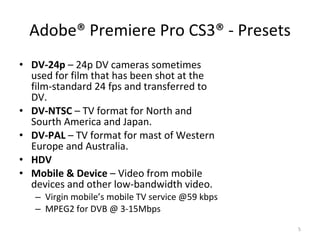
Adobe®  Premiere Pro CS3 ®  - Presets DV-24p  – 24p DV cameras sometimes used for film that has been shot at the film-standard 24 fps and transferred to DV. DV-NTSC  – TV format for North and Sourth America and Japan. DV-PAL  – TV format for mast of Western Europe and Australia. HDV Mobile & Device  – Video from mobile devices and other low-bandwidth video. Virgin mobile’s mobile TV service @59 kbps MPEG2 for DVB @ 3-15Mbps
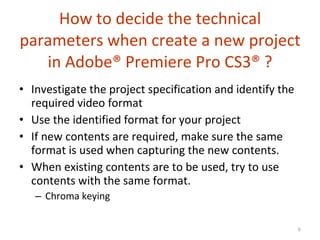
How to decide the technical parameters when create a new project in  Adobe®  Premiere Pro CS3 ®  ? Investigate the project specification and identify the required video format Use the identified format for your project If new contents are required, make sure the same format is used when capturing the new contents. When existing contents are to be used, try to use contents with the same format. Chroma keying
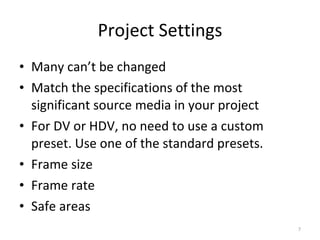
Project Settings Many can’t be changed Match the specifications of the most significant source media in your project For DV or HDV, no need to use a custom preset. Use one of the standard presets. Frame size Frame rate Safe areas
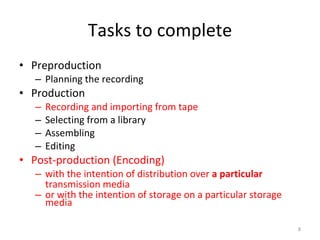
Tasks to complete Preproduction Planning the recording Production Recording and importing from tape Selecting from a library Assembling Editing Post-production (Encoding) with the intention of distribution over  a particular  transmission media or with the intention of storage on a particular storage media
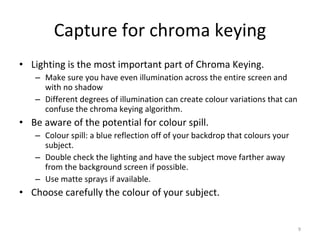
Capture for chroma keying Lighting is the most important part of Chroma Keying. Make sure you have even illumination across the entire screen and with no shadow Different degrees of illumination can create colour variations that can confuse the chroma keying algorithm. Be aware of the potential for colour spill. Colour spill: a blue reflection off of your backdrop that colours your subject. Double check the lighting and have the subject move farther away from the background screen if possible. Use matte sprays if available. Choose carefully the colour of your subject.
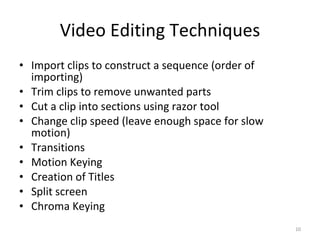
Video Editing Techniques Import clips to construct a sequence (order of importing) Trim clips to remove unwanted parts Cut a clip into sections using razor tool Change clip speed (leave enough space for slow motion) Transitions Motion Keying Creation of Titles Split screen Chroma Keying
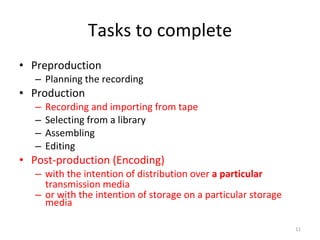
Tasks to complete Preproduction Planning the recording Production Recording and importing from tape Selecting from a library Assembling Editing Post-production (Encoding) with the intention of distribution over  a particular  transmission media or with the intention of storage on a particular storage media
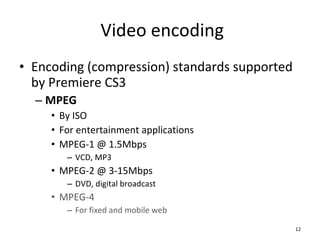
Video encoding Encoding (compression) standards supported by Premiere CS3 MPEG By ISO For entertainment applications MPEG-1 @ 1.5Mbps VCD, MP3 MPEG-2 @ 3-15Mbps DVD, digital broadcast MPEG-4 For fixed and mobile web
Video encoding (cont.) Encoding (compression) standards supported by Premiere CS3 Flash By Adobe ready to play on any computer with a Flash-enabled browser. Quick Time (Apple) / RealMedia (RealNetworks) / Windows Media (Microsoft) for use in Windows PCs and for playback on the Internet. H.26x By ITU-T For videoconference over ISDN (low bandwidth)
Video encoding - technical concerns  Frame size Frame rate Bit rate Bit rate mode Average (target) rate Bit rate range
Bit rate mode VBR (variable bit rate) Generally better image quality than CBR as it increases the bit rate during action scenes. Offers a one- or two-pass option. Two passes take longer but create a higher quality image sequence. Storage, DVB broadcast CBR (constant bit rate) Ideal for real-time applications with a known bandwidth MCBR (multiple CBR) Multiple CBR encoded sequences in a single file Internet applications with unknown bandwidth
This resource was created by the University of Hertfordshire and released as an open educational resource through the Open Engineering Resources project of the HE Academy Engineering Subject Centre. The Open Engineering Resources project was funded by HEFCE and part of the JISC/HE Academy UKOER programme. © University of Hertfordshire 2009 © University of Hertfordshire 2009    This work is licensed under a  Creative Commons Attribution 2.0 License . Abode and  Premiere Pro CS3   are either registered trademarks or trademarks of Adobe Systems Incorporated in the United States and/or other countries The name of the University of Hertfordshire, UH and the UH logo are the name and registered marks of the University of Hertfordshire. To the fullest extent permitted by law the University of Hertfordshire reserves all its rights in its name and marks which may not be used  except with its written permission.  The JISC logo is licensed under the terms of the Creative Commons Attribution-Non-Commercial-No Derivative Works 2.0 UK: England & Wales Licence.  All reproductions must comply with the terms of that licence. The HEA logo is owned by the Higher Education Academy Limited may be freely distributed and copied for educational purposes only, provided that appropriate acknowledgement is given to the Higher Education Academy as the copyright holder and original publisher.

Mini Project- Digital Video Editing

  • 1.
    Mini Project – Digital Video Editing Author: University of Hertfordshire Date created : Date revised : 2009 Abstract The following resources come from the 2009/10 B.Sc in Media Technology and Digital Broadcast (course number 2ELE0073) from the University of Hertfordshire. All the mini projects are designed as level two modules of the undergraduate programmes. The objectives of this module are to demonstrate within a digital broadcast environment: an understanding of technical requirements for digital video production process. an awareness of technical constraints for content creation and distribution. the creation of a video sequences with extra effects added. This project entails the creation, editing, and encoding of a video sequence with the intention of distribution over a particular digital broadcast platform (e.g. DVB-T or ipTV). This project provides an awareness of current video standards for television and also introduces the use of contemporary digital video authoring tools and processes. © University of Hertfordshire 2009 This work is licensed under a Creative Commons Attribution 2.0 License
  • 2.
    Contents Project SummaryTasks to complete Adobe® Premiere Pro CS3® - Presets How to decide the technical parameters when create a new p... Project Settings Tasks to complete Capture for chroma keying Video Editing Techniques Tasks to complete Video encoding Video encoding - technical concerns Bit rate mode Credits In addition to the resources found below there are supporting documents which should be used in combination with this resource. Please see: Mini Projects - Introductory presentation. Mini Projects - E-Log. Mini Projects - Staff & Student Guide. Mini Projects - Standard Grading Criteria. Mini Projects - Reflection. You will also need the ‘Mini Project- Digital Video Editing’ text document.
  • 3.
    Project Summary Thisproject entails the creation , editing , and encoding of a digital video sequence with the intention of a particular application: Distribution over a particular digital broadcast platform (e.g. DVB-T or ipTV). Storage on a particular digital media
  • 4.
    Tasks to completePreproduction Planning the recording Production Recording (and importing from tape) Selecting Assembling Editing Post-production (Encoding) with the intention of distribution over a particular transmission media or with the intention of storage on a particular storage media
  • 5.
    Adobe® PremierePro CS3 ® - Presets DV-24p – 24p DV cameras sometimes used for film that has been shot at the film-standard 24 fps and transferred to DV. DV-NTSC – TV format for North and Sourth America and Japan. DV-PAL – TV format for mast of Western Europe and Australia. HDV Mobile & Device – Video from mobile devices and other low-bandwidth video. Virgin mobile’s mobile TV service @59 kbps MPEG2 for DVB @ 3-15Mbps
  • 6.
    How to decidethe technical parameters when create a new project in Adobe® Premiere Pro CS3 ® ? Investigate the project specification and identify the required video format Use the identified format for your project If new contents are required, make sure the same format is used when capturing the new contents. When existing contents are to be used, try to use contents with the same format. Chroma keying
  • 7.
    Project Settings Manycan’t be changed Match the specifications of the most significant source media in your project For DV or HDV, no need to use a custom preset. Use one of the standard presets. Frame size Frame rate Safe areas
  • 8.
    Tasks to completePreproduction Planning the recording Production Recording and importing from tape Selecting from a library Assembling Editing Post-production (Encoding) with the intention of distribution over a particular transmission media or with the intention of storage on a particular storage media
  • 9.
    Capture for chromakeying Lighting is the most important part of Chroma Keying. Make sure you have even illumination across the entire screen and with no shadow Different degrees of illumination can create colour variations that can confuse the chroma keying algorithm. Be aware of the potential for colour spill. Colour spill: a blue reflection off of your backdrop that colours your subject. Double check the lighting and have the subject move farther away from the background screen if possible. Use matte sprays if available. Choose carefully the colour of your subject.
  • 10.
    Video Editing TechniquesImport clips to construct a sequence (order of importing) Trim clips to remove unwanted parts Cut a clip into sections using razor tool Change clip speed (leave enough space for slow motion) Transitions Motion Keying Creation of Titles Split screen Chroma Keying
  • 11.
    Tasks to completePreproduction Planning the recording Production Recording and importing from tape Selecting from a library Assembling Editing Post-production (Encoding) with the intention of distribution over a particular transmission media or with the intention of storage on a particular storage media
  • 12.
    Video encoding Encoding(compression) standards supported by Premiere CS3 MPEG By ISO For entertainment applications MPEG-1 @ 1.5Mbps VCD, MP3 MPEG-2 @ 3-15Mbps DVD, digital broadcast MPEG-4 For fixed and mobile web
  • 13.
    Video encoding (cont.)Encoding (compression) standards supported by Premiere CS3 Flash By Adobe ready to play on any computer with a Flash-enabled browser. Quick Time (Apple) / RealMedia (RealNetworks) / Windows Media (Microsoft) for use in Windows PCs and for playback on the Internet. H.26x By ITU-T For videoconference over ISDN (low bandwidth)
  • 14.
    Video encoding -technical concerns Frame size Frame rate Bit rate Bit rate mode Average (target) rate Bit rate range
  • 15.
    Bit rate modeVBR (variable bit rate) Generally better image quality than CBR as it increases the bit rate during action scenes. Offers a one- or two-pass option. Two passes take longer but create a higher quality image sequence. Storage, DVB broadcast CBR (constant bit rate) Ideal for real-time applications with a known bandwidth MCBR (multiple CBR) Multiple CBR encoded sequences in a single file Internet applications with unknown bandwidth
  • 16.
    This resource wascreated by the University of Hertfordshire and released as an open educational resource through the Open Engineering Resources project of the HE Academy Engineering Subject Centre. The Open Engineering Resources project was funded by HEFCE and part of the JISC/HE Academy UKOER programme. © University of Hertfordshire 2009 © University of Hertfordshire 2009 This work is licensed under a Creative Commons Attribution 2.0 License . Abode and Premiere Pro CS3 are either registered trademarks or trademarks of Adobe Systems Incorporated in the United States and/or other countries The name of the University of Hertfordshire, UH and the UH logo are the name and registered marks of the University of Hertfordshire. To the fullest extent permitted by law the University of Hertfordshire reserves all its rights in its name and marks which may not be used except with its written permission. The JISC logo is licensed under the terms of the Creative Commons Attribution-Non-Commercial-No Derivative Works 2.0 UK: England & Wales Licence.  All reproductions must comply with the terms of that licence. The HEA logo is owned by the Higher Education Academy Limited may be freely distributed and copied for educational purposes only, provided that appropriate acknowledgement is given to the Higher Education Academy as the copyright holder and original publisher.