+

Motion Graphics
Unit 64
Assignment 1
+

What are motion graphics?
Motion graphics are
graphics that use video
footage and/or animation
technology to create the
illusion of motion or
rotation, and are usually
combined with audio for
using in multimedia
projects.
+

What are motion graphics?

Motion graphics are very useful for showing something in a more
interesting and visually exiting way, which is why many
companies use them to present their logos or idents. Motion
graphics can be found on a lot of different media now days, for
example TV, internet (+ internet videos), DVD menus and many
others.
+

Video Compositing

Compositing is the combination of visual elements from from separate
sources into single images, often to create the illusion that all those
elements are parts of the same scene. Live-action shooting for
compositing is variously called “Chroma key, blue screen, green
screen and others. Today, most compositing is achieved through digital
image manipulation. For example above there is an image showing 4
of the same character, composited on top of a background layer.
+

Motion Graphics and Video
Compositing Examples
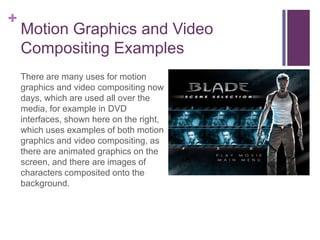
There are many uses for motion
graphics and video compositing now
days, which are used all over the
media, for example in DVD
interfaces, shown here on the right,
which uses examples of both motion
graphics and video compositing, as
there are animated graphics on the
screen, and there are images of
characters composited onto the
background.
+

Motion Graphics and Video
Compositing Examples
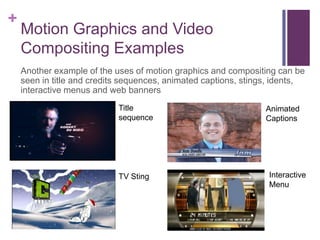
Another example of the uses of motion graphics and compositing can be
seen in title and credits sequences, animated captions, stings, idents,
interactive menus and web banners
Title
sequence

TV Sting

Animated
Captions

Interactive
Menu
+

Characteristics
DVD interfaces:
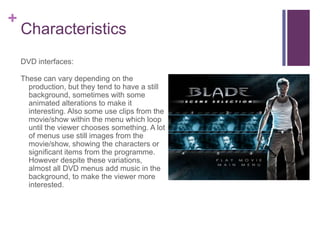
These can vary depending on the
production, but they tend to have a still
background, sometimes with some
animated alterations to make it
interesting. Also some use clips from the
movie/show within the menu which loop
until the viewer chooses something. A lot
of menus use still images from the
movie/show, showing the characters or
significant items from the programme.
However despite these variations,
almost all DVD menus add music in the
background, to make the viewer more
interested.
+

Characteristics
Title and credits sequence:
Depending on the type of
programming, title sequences
tend to be more exiting to create
the build up to the actual movie.
However the credits sequence
tend to be slower with only text,
and some company logos at the
end, unlike the title sequences
which can be overlaid on top of
the programme its self as well as
other graphics.
+

Characteristics
Animated captions:
These tend to be very quick and
subtle, used to display
information like a name for
example. Animated captions do
not need to be complicated as
they are meant to be in the lower
third of the screen, also they
should not take the attention
away from the subject the image.
+

Characteristics
Stings:
These are shorter and more
concise idents used when the
usual idents are too long for the
scheduled programming.
+

Technological Constraints
Although motion graphics are widely used by many media related
companies, there are some technical constraints which limit
them, for example video format can be an issue, as using the
wrong type, or a type which the computers cannot read, will
mean that the motion graphic cannot be played/shown. Also
frame rate can be an issue, for example if you create the motion
graphic in 24fps, but it has to be shown in 25fps for broadcast,
you might get a different result, to what it originally looked like.
Another constraint are the visual effects, because there are many
different TVs, and some older models may not be able to give
and accurate image, colours may be off and the image may be
blurred. This can lead the viewers to think differently of your ident
and therefore the brand as a whole.
+

Aspect ratio

The aspect ratio of an image describes the proportional relationship
between its width and its height. It is commonly expressed as two numbers
separated by a colon, as in 16:9. For an x:y aspect ratio, no matter how big
or small the image is, if the width is divided into x units of equal length and
the height is measured using this same length unit, the height will be
measured to be y units. The common European television aspect ratio is
5:3 (or 1.6667:1), however HD televisions now days are often at an aspect
ration of 16:9 (or 1.77:1 or 1.78:1)
+

Video Formats

Most countries in North and South America, including the US and Canada, utilize the National
Television Standards Committee (NTSC) format, while Europe, Australia and parts of Asia use a
competing format called Phase Alternating Line (PAL). The major distinction between these two
formats is the rate at which a broadcast is displayed on a TV screen: NTSC displays at 30 frames per
second (fps), while PAL provides 25 fps. Each format also uses a different number of lines on an old
analogue TV display when showing the signal, creating two different resolutions. The widespread
adoption of High-Definition Televisions (HDTVs) by many consumers has not eliminated this
difference, however, since older broadcasting methods have influenced digital signal playback.
SECAM (Sequentiel Couleur avec Mémoire, French for "sequential colour with memory") is an
analogue television system, using frequency modulation to encode chrominance information. It is so
named because it uses memory to store lines of colour information, in order to eliminate the colour
artifacts found on systems using the NTSC standard. It was developed for the same purpose as PAL,
but uses a different (and many would argue inferior) mechanism to do so. R-Y and B-Y information is
transmitted in alternate lines, and a video line store is used to combine the signals together. This
means that the vertical colour resolution is halved relative to PAL and NTSC.
+

Frame rate

Frame rate, also known as frames per second (FPS), is the frequency
(rate) at which an imaging device produces unique consecutive images
called frames. The term applies to film and video cameras, computer
graphics, and motion capture systems. Frame rate is most often
expressed in frames per second (FPS) and is also expressed in
progressive scan monitors as hertz (Hz).
+

Resolution

The display resolution of a digital television, computer monitor or display
device is the number of distinct pixels in each dimension that can be
displayed. For example a common resolution with films now days is 1920
x 1080, meaning 1920 pixels in width, and 1080 pixels high.
+

Compression

Data compression involves encoding information using fewer bits than
the original representation. Compression can be either lossy or
lossless. No information is lost in lossless compression. Lossy
compression reduces bits by identifying unnecessary information and
removing it. The process of reducing the size of a data file is popularly
referred to as data compression, although its formal name is source
coding.

Motion graphics

  • 1.
  • 2.
    + What are motiongraphics? Motion graphics are graphics that use video footage and/or animation technology to create the illusion of motion or rotation, and are usually combined with audio for using in multimedia projects.
  • 3.
    + What are motiongraphics? Motion graphics are very useful for showing something in a more interesting and visually exiting way, which is why many companies use them to present their logos or idents. Motion graphics can be found on a lot of different media now days, for example TV, internet (+ internet videos), DVD menus and many others.
  • 4.
    + Video Compositing Compositing isthe combination of visual elements from from separate sources into single images, often to create the illusion that all those elements are parts of the same scene. Live-action shooting for compositing is variously called “Chroma key, blue screen, green screen and others. Today, most compositing is achieved through digital image manipulation. For example above there is an image showing 4 of the same character, composited on top of a background layer.
  • 5.
    + Motion Graphics andVideo Compositing Examples There are many uses for motion graphics and video compositing now days, which are used all over the media, for example in DVD interfaces, shown here on the right, which uses examples of both motion graphics and video compositing, as there are animated graphics on the screen, and there are images of characters composited onto the background.
  • 6.
    + Motion Graphics andVideo Compositing Examples Another example of the uses of motion graphics and compositing can be seen in title and credits sequences, animated captions, stings, idents, interactive menus and web banners Title sequence TV Sting Animated Captions Interactive Menu
  • 7.
    + Characteristics DVD interfaces: These canvary depending on the production, but they tend to have a still background, sometimes with some animated alterations to make it interesting. Also some use clips from the movie/show within the menu which loop until the viewer chooses something. A lot of menus use still images from the movie/show, showing the characters or significant items from the programme. However despite these variations, almost all DVD menus add music in the background, to make the viewer more interested.
  • 8.
    + Characteristics Title and creditssequence: Depending on the type of programming, title sequences tend to be more exiting to create the build up to the actual movie. However the credits sequence tend to be slower with only text, and some company logos at the end, unlike the title sequences which can be overlaid on top of the programme its self as well as other graphics.
  • 9.
    + Characteristics Animated captions: These tendto be very quick and subtle, used to display information like a name for example. Animated captions do not need to be complicated as they are meant to be in the lower third of the screen, also they should not take the attention away from the subject the image.
  • 10.
    + Characteristics Stings: These are shorterand more concise idents used when the usual idents are too long for the scheduled programming.
  • 11.
    + Technological Constraints Although motiongraphics are widely used by many media related companies, there are some technical constraints which limit them, for example video format can be an issue, as using the wrong type, or a type which the computers cannot read, will mean that the motion graphic cannot be played/shown. Also frame rate can be an issue, for example if you create the motion graphic in 24fps, but it has to be shown in 25fps for broadcast, you might get a different result, to what it originally looked like. Another constraint are the visual effects, because there are many different TVs, and some older models may not be able to give and accurate image, colours may be off and the image may be blurred. This can lead the viewers to think differently of your ident and therefore the brand as a whole.
  • 12.
    + Aspect ratio The aspectratio of an image describes the proportional relationship between its width and its height. It is commonly expressed as two numbers separated by a colon, as in 16:9. For an x:y aspect ratio, no matter how big or small the image is, if the width is divided into x units of equal length and the height is measured using this same length unit, the height will be measured to be y units. The common European television aspect ratio is 5:3 (or 1.6667:1), however HD televisions now days are often at an aspect ration of 16:9 (or 1.77:1 or 1.78:1)
  • 13.
    + Video Formats Most countriesin North and South America, including the US and Canada, utilize the National Television Standards Committee (NTSC) format, while Europe, Australia and parts of Asia use a competing format called Phase Alternating Line (PAL). The major distinction between these two formats is the rate at which a broadcast is displayed on a TV screen: NTSC displays at 30 frames per second (fps), while PAL provides 25 fps. Each format also uses a different number of lines on an old analogue TV display when showing the signal, creating two different resolutions. The widespread adoption of High-Definition Televisions (HDTVs) by many consumers has not eliminated this difference, however, since older broadcasting methods have influenced digital signal playback. SECAM (Sequentiel Couleur avec Mémoire, French for "sequential colour with memory") is an analogue television system, using frequency modulation to encode chrominance information. It is so named because it uses memory to store lines of colour information, in order to eliminate the colour artifacts found on systems using the NTSC standard. It was developed for the same purpose as PAL, but uses a different (and many would argue inferior) mechanism to do so. R-Y and B-Y information is transmitted in alternate lines, and a video line store is used to combine the signals together. This means that the vertical colour resolution is halved relative to PAL and NTSC.
  • 14.
    + Frame rate Frame rate,also known as frames per second (FPS), is the frequency (rate) at which an imaging device produces unique consecutive images called frames. The term applies to film and video cameras, computer graphics, and motion capture systems. Frame rate is most often expressed in frames per second (FPS) and is also expressed in progressive scan monitors as hertz (Hz).
  • 15.
    + Resolution The display resolutionof a digital television, computer monitor or display device is the number of distinct pixels in each dimension that can be displayed. For example a common resolution with films now days is 1920 x 1080, meaning 1920 pixels in width, and 1080 pixels high.
  • 16.
    + Compression Data compression involvesencoding information using fewer bits than the original representation. Compression can be either lossy or lossless. No information is lost in lossless compression. Lossy compression reduces bits by identifying unnecessary information and removing it. The process of reducing the size of a data file is popularly referred to as data compression, although its formal name is source coding.