STUDENT`S NAME ID NUMBER
JACOB ANAK JACKY 57212115256
MOHAMAD HUSSEIN BIN MOHD
JAAFAR
57212115326
MUHAMAD SYAIRAZI BIN ALI 57212115214
EFFA SYAFIQA NABILA BINTI MOHD
ROSLI
57212115315
NURUL `ATIKAH BINTI OMAR 57212115056
 LECTURER`S NAME : MADAM FAUZIAH
BINTI ABDUL RAHMAN
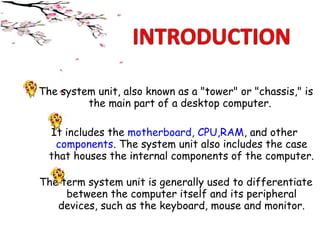
The system unit, also known as a "tower" or "chassis," is
the main part of a desktop computer.
It includes the motherboard, CPU,RAM, and other 
components. The system unit also includes the case
that houses the internal components of the computer.
The term system unit is generally used to differentiate
between the computer itself and its peripheral
devices, such as the keyboard, mouse and monitor.
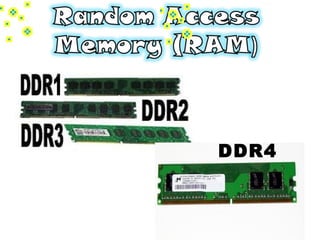
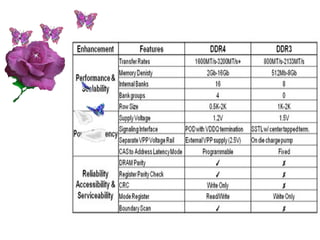
DDR4
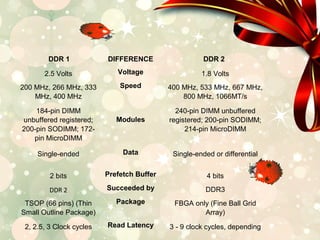
DDR 1 DIFFERENCE DDR 2
2.5 Volts Voltage 1.8 Volts
200 MHz, 266 MHz, 333
MHz, 400 MHz
Speed 400 MHz, 533 MHz, 667 MHz,
800 MHz, 1066MT/s
184-pin DIMM
unbuffered registered;
200-pin SODIMM; 172-
pin MicroDIMM
Modules 240-pin DIMM unbuffered
registered; 200-pin SODIMM;
214-pin MicroDIMM
Single-ended Data Single-ended or differential
2 bits
Prefetch Buffer 4 bits
DDR2
Succeeded by
DDR3
TSOP (66 pins) (Thin
Small Outline Package)
Package FBGA only (Fine Ball Grid
Array)
2, 2.5, 3 Clock cycles
Read Latency 3 - 9 clock cycles, depending
Table 1 : Differences between DDR 1 and DDR 2
DDR 1 DIFFERENCE DDR 2
2.5 Volts Voltage 1.8 Volts
200 MHz, 266 MHz, 333
MHz, 400 MHz
Speed 400 MHz, 533 MHz, 667 MHz,
800 MHz, 1066MT/s
184-pin DIMM
unbuffered registered;
200-pin SODIMM; 172-
pin MicroDIMM
Modules
240-pin DIMM unbuffered
registered; 200-pin SODIMM;
214-pin MicroDIMM
Single-ended Data Single-ended or differential
2 bits Prefetch Buffer 4 bits
DDR 2 Succeeded by DDR3
TSOP (66 pins) (Thin
Small Outline Package)
Package FBGA only (Fine Ball Grid
Array)
2, 2.5, 3 Clock cycles Read Latency 3 - 9 clock cycles, depending
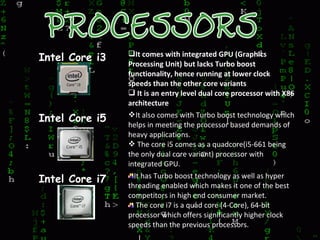
Intel Core i3 It comes with integrated GPU (Graphics
Processing Unit) but lacks Turbo boost
functionality, hence running at lower clock
speeds than the other core variants
 It is an entry level dual core processor with X86
architecture
Intel Core i5 It also comes with Turbo boost technology which
helps in meeting the processor based demands of
heavy applications.
 The core i5 comes as a quadcore(i5-661 being
the only dual core variant) processor with
integrated GPU.
Intel Core i7 It has Turbo boost technology as well as hyper
threading enabled which makes it one of the best
competitors in high end consumer market.
The core i7 is a quad core (4-Core), 64-bit
processor which offers significantly higher clock
speeds than the previous processors.
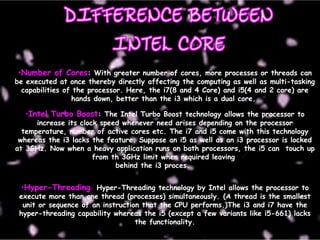
•Number of Cores: With greater number of cores, more processes or threads can
be executed at once thereby directly affecting the computing as well as multi-tasking
capabilities of the processor. Here, the i7(8 and 4 Core) and i5(4 and 2 core) are
hands down, better than the i3 which is a dual core.
•Intel Turbo Boost: The Intel Turbo Boost technology allows the processor to
increase its clock speed whenever need arises depending on the processor
temperature, number of active cores etc. The i7 and i5 come with this technology
whereas the i3 lacks the feature. Suppose an i5 as well as an i3 processor is locked
at 3GHz. Now when a heavy application runs on both processors, the i5 can touch up
from th 3GHz limit when required leaving
behind the i3 proces.
•Hyper-Threading: Hyper-Threading technology by Intel allows the processor to
execute more than one thread (processes) simultaneously. (A thread is the smallest
unit or sequence of an instruction that the CPU performs.)The i3 and i7 have the
hyper-threading capability whereas the i5 (except a few variants like i5-661) lacks
the functionality.
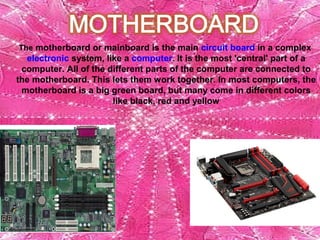
The motherboard or mainboard is the main circuit board in a complex 
electronic system, like a computer. It is the most 'central' part of a 
computer. All of the different parts of the computer are connected to 
the motherboard. This lets them work together. In most computers, the 
motherboard is a big green board, but many come in different colors 
like black, red and yellow
Modern motherboards include:
1.Sockets (or slots) in which one or more microprocessors may be 
installed. In the case of CPUs in ball grid array packages, such as the
VIA C3, the CPU is directly soldered to the motherboard.
2.Slots into which the system's main memory is to be installed 
(typically in the form of DIMM modules containing DRAM chips)
3.A chipset which forms an interface between the CPU's front-side bus, 
main memory, and peripheral buses
4.Non-volatile memory chips (usually Flash ROM in modern 
motherboards) containing the system's firmware or BIOS
5.A clock generator which produces the system clock signal to 
synchronize the various components
6.Slots for expansion cards (the interface to the system via the buses 
supported by the chipset)
7.Power connectors, which receive electrical power from the 
computer power supply and distribute it to the CPU, chipset, main 
memory, and expansion cards. As of 2007, some graphics 
cards (e.g. GeForce 8 and Radeon R600) require more power than the 
motherboard can provide, and thus dedicated connectors have been 
introduced to attach them directly to the power supply.
8.Connectors for hard drives, typically SATA only. Disk drives also 
connect to the power supply.
Comparison of various personal computer processors on the market today
Sequence of operations that occur when a computer executesan instruction
The system unit contains the motherboard, which acts as the central connector
for the processor, memory, and circuits within the computer. It also contains the
power supply, which converts AC power to DC; a cooling fan, which keeps the
processor and circuits cool; and an internal speaker, which emits beeps and a few
basic tones. Additionally, the system unit holds drive bays for storage devices
and expansion cards for additional memory, a modem, sound, video, and games.
The Components of the System Unit

The Components of the System Unit