 1. INTRODUCTION.
 2. WORKING.
 3. POSITION.
 4. HISTORY
 5. POPULARITY.
INTEL’S
HEADQUARTER
AMD’S HEADQUARTER
 Intel Corporation is an American multinational
semiconductor chip maker corporation headquartered
in Santa Clara, California.
 Whereas, Advanced Micro Devices, Inc. or AMD is
also an American multinational semiconductor
company based in Sunnyvale, California, that develops
computer processors and related technologies for
commercial and consumer markets. Its main products
include microprocessors, motherboard chipsets,
embedded processors and graphics processors for
servers, workstations and personal computers, and
embedded systems applications.
What does “core”
refers?
 As it refers, to the sensitive or we can say the central
main part of any system.
For eg:-
1.The core of the galaxy.
2.The core of the sun or the earth.
 Here “CORE” refers to the part of a processor.
which is use to perform the opertion,
execution, etc.
INTRODUCTION
 A dual core processor is a C.P.U. With two processors
or “execution cores” in the same integrated circuits.
 Each processor has its own cache and controller, which
enables it to function or as efficiently as a single
processor .
 However, because the two processors are linked
together, they can perform operations up to twice as
fast as a single processor can.
 The INTEL CORE DUO, the AMD X2 and the DUAL
CORE POWER PC G5 are all examples of CPUs that
use dual-core technologies .
 These CPUs each combine two processor cores on a
single silicon chip.
 This is different than a “dual processor” configuration
in which two physically separate CPUs work together .
 However, some high-end machines, such as the
POWER PC G5, QUAD use two separate dual core
processor together , providing up to four times the
performance of a single processor .
 While dual-core system, has twice the processing
power of a single processor machine.
 It does not always perform twice as fast.
 This is because the software running on the machine
may not be able to take full advantage or both
processors.
 In a dual core processor, each core handles incoming
data strings simultaneously to improve efficiency.
 When one core is executing, the other can be accessing
the system bus or executing its own code.
 A multiprocessor system is faster than a single core
system.
 An attractive value of dual core processors is that they
do not require new motherboard but can be used in
existing boards that feature the correct sockets.
 Multicore is similar to dual-core in that it is an
expansion to the dual core technology which allows for
more than two separate processors.
 A CPU with two processors in the same integrated
circuit.
 A dual core system is faster than a single core system.
 They do not require new motherboard.
 examples:
The intel core duo, the AMD X2, the dual core power PC
G5.
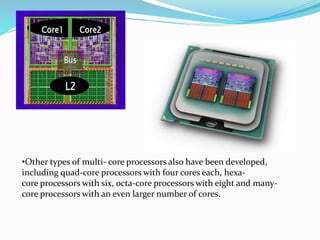
•Other types of multi- core processors also have been developed,
including quad-core processors with four cores each, hexa-
core processors with six, octa-core processors with eight and many-
core processors with an even larger number of cores.
Four core processor
Eight core processor
WORKING
•The working of the traditional processors is relatively slow.
•This is because the set of instructions which we fed into the
system is executed and then stored in cache.
•The situation is difficult to handle when it comes to perform
multitasks and store it on the hard disk.
 The data retrieval is far slower than the actual working of the
CPU.
 The processor has to move forward and backward for
executing and storing set of instructions or programs.
 Hence as a result the CPU works really slowly.
Mother board with microprocessors
Mother board with four microprocessors
 Each processor is capable of handling the data stream
concurrently.
 The working of the dual core takes place on the same
motherboard.
 This means one does not have to install additional
motherboard to run two processors at a time.
REQUIREMENT
 The dual core processor requires the OS to have a multi
threading capability along with software which contains
SMT (Simultaneous Multi Threading Technology)
technology written into its code.
 It is important to use SMT software other wise the
system would not be able to make use of dual
processors.
 One of the most common examples of simultaneous
multi threading software is Adobe Photoshop.
 The multi processors are systems with two individual
central processing units while the dual core
processors share the resources are embedded on the
single chip.
 However the performance of the dual core is better
than the single core processors.
 Pentium D is the dual core
version of the preliminary
Pentium 4 processors.
How do Dual Core Processors
Work
 The dual core processor differs from a single core in
that the single core processor must take the incoming
data bits one at a time, process that bit of data and
move on the next one.
 A dual core process detects incoming data streams and
determines whether they could be calculated more
quickly if both cores were working.
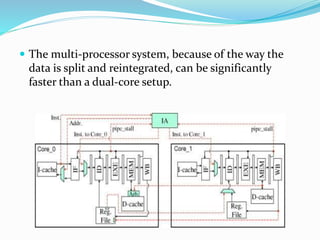
 The multi-processor system, because of the way the
data is split and reintegrated, can be significantly
faster than a dual-core setup.
POSITION
 Motherboard (sometimes alternatively known as the
main board , system board, planar board or logic
board, or colloquially, a mobo) is a printed circuit board
(PCB) found in all modern computers which holds many of
the crucial components of the system, such as the central
processing unit (CPU) and memory, and provides
connectors for other peripherals.
 Motherboard specifically refers to a PCB with expansion
capability - the board is the "mother" of all components
attached to it, which often include sound cards, video
cards, network cards, extra hard drives or other forms of
persistent storage, TV tuner cards, cards providing extra
USB or Fire wire slots, and a variety of thousands of other
kinds of custom components. (The term mainboard is
applied to devices with a single board and no additional
expansions or capability - in modern terms this would
include controlling boards in televisions, washing
machines and other embedded systems, which are not true
motherboards.)
Insertion of a microprocessor
1.
2. 3.
4.
Position of
microprocessor
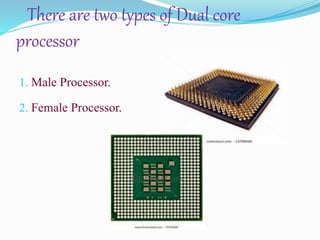
There are two types of Dual core
processor
1. Male Processor.
2. Female Processor.
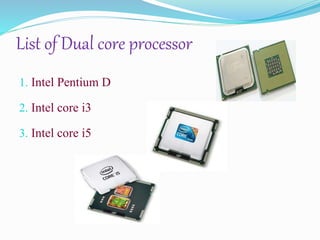
List of Dual core processor
1. Intel Pentium D
2. Intel core i3
3. Intel core i5
Advantages & Disadvantages
1. Consuming less power
2. Features
3. Degrade less
========================================
1.Not work twice
2.User dependent
3.Costly
4. Difficult to manage
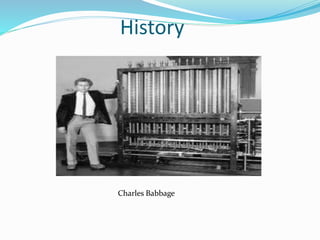
History
Charles Babbage
ROBERT NOYCE
POPULARITY
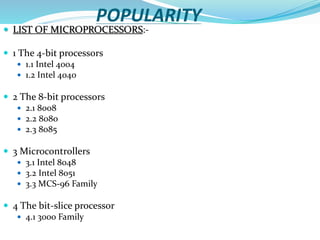
 LIST OF MICROPROCESSORS:-
 1 The 4-bit processors
 1.1 Intel 4004
 1.2 Intel 4040
 2 The 8-bit processors
 2.1 8008
 2.2 8080
 2.3 8085
 3 Microcontrollers
 3.1 Intel 8048
 3.2 Intel 8051
 3.3 MCS-96 Family
 4 The bit-slice processor
 4.1 3000 Family
 5 The 16-bit processors: MCS-86 family
 6 32-bit processors: the non-x86 microprocessors
 6.1 iAPX 432
 6.2 i960 aka 80960
 6.3 i860 aka 80860
 6.4 Xscale
 7 32-bit processors: the 80386 range
 7.1 80386DX
 7.2 80386SX
 7.3 80376
 7.4 80386SL
 7.5 80386EX
 8 32-bit processors: the 80486 range
 8.1 80486DX
 8.2 80486SX
 8.3 80486DX2
 8.4 80486SL
 8.5 80486DX4
 9 32-bit processors: P5 microarchitecture
 9.1 Original Pentium
 9.2 Pentium with MMX Technology
 10 32-bit processors: P6/Pentium M microarchitecture
 10.1 Pentium Pro
 10.2 Pentium II
 10.3 Celeron (Pentium II-based)
 10.4 Pentium III
 10.5 Pentium II and III Xeon
 10.6 Celeron (Pentium III Coppermine-based)
 10.7 Celeron (Pentium III Tualatin-based)
 10.8 Pentium M
 10.9 Celeron M
 10.10 Intel Core
 10.11 Dual-Core Xeon LV
 11 32-bit processors: NetBurst microarchitecture
 11.1 Pentium 4
 11.2 Xeon
 11.3 Mobile Pentium 4-M
 11.4 Pentium 4 EE
 11.5 Pentium 4E
 11.6 Pentium 4F
 12 64-bit processors: IA-64
 12.1 Itanium
 12.2 Itanium 2
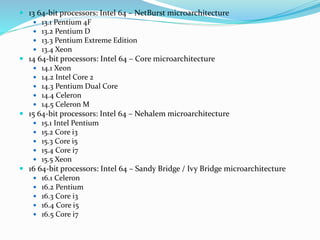
 13 64-bit processors: Intel 64 – NetBurst microarchitecture
 13.1 Pentium 4F
 13.2 Pentium D
 13.3 Pentium Extreme Edition
 13.4 Xeon
 14 64-bit processors: Intel 64 – Core microarchitecture
 14.1 Xeon
 14.2 Intel Core 2
 14.3 Pentium Dual Core
 14.4 Celeron
 14.5 Celeron M
 15 64-bit processors: Intel 64 – Nehalem microarchitecture
 15.1 Intel Pentium
 15.2 Core i3
 15.3 Core i5
 15.4 Core i7
 15.5 Xeon
 16 64-bit processors: Intel 64 – Sandy Bridge / Ivy Bridge microarchitecture
 16.1 Celeron
 16.2 Pentium
 16.3 Core i3
 16.4 Core i5
 16.5 Core i7
1. LAKSH
2. NIKITA
3. SHAMIMA
4. SAMIKSHA
5. SWAPNIL

Processors

  • 3.
     1. INTRODUCTION. 2. WORKING.  3. POSITION.  4. HISTORY  5. POPULARITY.
  • 4.
  • 5.
     Intel Corporationis an American multinational semiconductor chip maker corporation headquartered in Santa Clara, California.  Whereas, Advanced Micro Devices, Inc. or AMD is also an American multinational semiconductor company based in Sunnyvale, California, that develops computer processors and related technologies for commercial and consumer markets. Its main products include microprocessors, motherboard chipsets, embedded processors and graphics processors for servers, workstations and personal computers, and embedded systems applications.
  • 6.
  • 7.
     As itrefers, to the sensitive or we can say the central main part of any system. For eg:- 1.The core of the galaxy. 2.The core of the sun or the earth.  Here “CORE” refers to the part of a processor. which is use to perform the opertion, execution, etc.
  • 8.
    INTRODUCTION  A dualcore processor is a C.P.U. With two processors or “execution cores” in the same integrated circuits.  Each processor has its own cache and controller, which enables it to function or as efficiently as a single processor .  However, because the two processors are linked together, they can perform operations up to twice as fast as a single processor can.  The INTEL CORE DUO, the AMD X2 and the DUAL CORE POWER PC G5 are all examples of CPUs that use dual-core technologies .  These CPUs each combine two processor cores on a single silicon chip.
  • 9.
     This isdifferent than a “dual processor” configuration in which two physically separate CPUs work together .  However, some high-end machines, such as the POWER PC G5, QUAD use two separate dual core processor together , providing up to four times the performance of a single processor .  While dual-core system, has twice the processing power of a single processor machine.  It does not always perform twice as fast.  This is because the software running on the machine may not be able to take full advantage or both processors.
  • 10.
     In adual core processor, each core handles incoming data strings simultaneously to improve efficiency.  When one core is executing, the other can be accessing the system bus or executing its own code.  A multiprocessor system is faster than a single core system.  An attractive value of dual core processors is that they do not require new motherboard but can be used in existing boards that feature the correct sockets.  Multicore is similar to dual-core in that it is an expansion to the dual core technology which allows for more than two separate processors.
  • 11.
     A CPUwith two processors in the same integrated circuit.  A dual core system is faster than a single core system.  They do not require new motherboard.  examples: The intel core duo, the AMD X2, the dual core power PC G5.
  • 12.
    •Other types ofmulti- core processors also have been developed, including quad-core processors with four cores each, hexa- core processors with six, octa-core processors with eight and many- core processors with an even larger number of cores.
  • 13.
  • 14.
    WORKING •The working ofthe traditional processors is relatively slow. •This is because the set of instructions which we fed into the system is executed and then stored in cache. •The situation is difficult to handle when it comes to perform multitasks and store it on the hard disk.
  • 15.
     The dataretrieval is far slower than the actual working of the CPU.  The processor has to move forward and backward for executing and storing set of instructions or programs.  Hence as a result the CPU works really slowly.
  • 16.
    Mother board withmicroprocessors Mother board with four microprocessors
  • 17.
     Each processoris capable of handling the data stream concurrently.  The working of the dual core takes place on the same motherboard.  This means one does not have to install additional motherboard to run two processors at a time.
  • 18.
    REQUIREMENT  The dualcore processor requires the OS to have a multi threading capability along with software which contains SMT (Simultaneous Multi Threading Technology) technology written into its code.  It is important to use SMT software other wise the system would not be able to make use of dual processors.
  • 19.
     One ofthe most common examples of simultaneous multi threading software is Adobe Photoshop.  The multi processors are systems with two individual central processing units while the dual core processors share the resources are embedded on the single chip.
  • 20.
     However theperformance of the dual core is better than the single core processors.  Pentium D is the dual core version of the preliminary Pentium 4 processors.
  • 21.
    How do DualCore Processors Work  The dual core processor differs from a single core in that the single core processor must take the incoming data bits one at a time, process that bit of data and move on the next one.  A dual core process detects incoming data streams and determines whether they could be calculated more quickly if both cores were working.
  • 22.
     The multi-processorsystem, because of the way the data is split and reintegrated, can be significantly faster than a dual-core setup.
  • 23.
    POSITION  Motherboard (sometimesalternatively known as the main board , system board, planar board or logic board, or colloquially, a mobo) is a printed circuit board (PCB) found in all modern computers which holds many of the crucial components of the system, such as the central processing unit (CPU) and memory, and provides connectors for other peripherals.  Motherboard specifically refers to a PCB with expansion capability - the board is the "mother" of all components attached to it, which often include sound cards, video cards, network cards, extra hard drives or other forms of persistent storage, TV tuner cards, cards providing extra USB or Fire wire slots, and a variety of thousands of other kinds of custom components. (The term mainboard is applied to devices with a single board and no additional expansions or capability - in modern terms this would include controlling boards in televisions, washing machines and other embedded systems, which are not true motherboards.)
  • 25.
    Insertion of amicroprocessor 1. 2. 3. 4.
  • 26.
  • 27.
    There are twotypes of Dual core processor 1. Male Processor. 2. Female Processor.
  • 28.
    List of Dualcore processor 1. Intel Pentium D 2. Intel core i3 3. Intel core i5
  • 29.
    Advantages & Disadvantages 1.Consuming less power 2. Features 3. Degrade less ======================================== 1.Not work twice 2.User dependent 3.Costly 4. Difficult to manage
  • 30.
  • 31.
  • 32.
    POPULARITY  LIST OFMICROPROCESSORS:-  1 The 4-bit processors  1.1 Intel 4004  1.2 Intel 4040  2 The 8-bit processors  2.1 8008  2.2 8080  2.3 8085  3 Microcontrollers  3.1 Intel 8048  3.2 Intel 8051  3.3 MCS-96 Family  4 The bit-slice processor  4.1 3000 Family
  • 33.
     5 The16-bit processors: MCS-86 family  6 32-bit processors: the non-x86 microprocessors  6.1 iAPX 432  6.2 i960 aka 80960  6.3 i860 aka 80860  6.4 Xscale  7 32-bit processors: the 80386 range  7.1 80386DX  7.2 80386SX  7.3 80376  7.4 80386SL  7.5 80386EX  8 32-bit processors: the 80486 range  8.1 80486DX  8.2 80486SX  8.3 80486DX2  8.4 80486SL  8.5 80486DX4
  • 34.
     9 32-bitprocessors: P5 microarchitecture  9.1 Original Pentium  9.2 Pentium with MMX Technology  10 32-bit processors: P6/Pentium M microarchitecture  10.1 Pentium Pro  10.2 Pentium II  10.3 Celeron (Pentium II-based)  10.4 Pentium III  10.5 Pentium II and III Xeon  10.6 Celeron (Pentium III Coppermine-based)  10.7 Celeron (Pentium III Tualatin-based)  10.8 Pentium M  10.9 Celeron M  10.10 Intel Core  10.11 Dual-Core Xeon LV  11 32-bit processors: NetBurst microarchitecture  11.1 Pentium 4  11.2 Xeon  11.3 Mobile Pentium 4-M  11.4 Pentium 4 EE  11.5 Pentium 4E  11.6 Pentium 4F  12 64-bit processors: IA-64  12.1 Itanium  12.2 Itanium 2
  • 35.
     13 64-bitprocessors: Intel 64 – NetBurst microarchitecture  13.1 Pentium 4F  13.2 Pentium D  13.3 Pentium Extreme Edition  13.4 Xeon  14 64-bit processors: Intel 64 – Core microarchitecture  14.1 Xeon  14.2 Intel Core 2  14.3 Pentium Dual Core  14.4 Celeron  14.5 Celeron M  15 64-bit processors: Intel 64 – Nehalem microarchitecture  15.1 Intel Pentium  15.2 Core i3  15.3 Core i5  15.4 Core i7  15.5 Xeon  16 64-bit processors: Intel 64 – Sandy Bridge / Ivy Bridge microarchitecture  16.1 Celeron  16.2 Pentium  16.3 Core i3  16.4 Core i5  16.5 Core i7
  • 36.
    1. LAKSH 2. NIKITA 3.SHAMIMA 4. SAMIKSHA 5. SWAPNIL