Microblogging for Language Learning: a Review of Options and their Potential. Rita Zeinstejer EFL Teacher Rosario, Argentina
content Microblogging:  its features Twitter   (+  Twibes ) Plurk Edmodo
 
What’s Microblogging…? exponent of “ snack culture ” privileges text brevity, users´mobility and virtual networks as social environments answers one question:  What´s happening…?
microblogging imposes necessity to abbreviate fitting in ideas develops skills for word selection   fulfils a need of …being fast and getting instant feedback  … getting more connections encourages autonomous learning uses tags to build up a network shapes your own community helps share real time data
used to ask for and provide help share ideas  get advice  make recommendations  announce events
Twitter “ a free social networking and micro-blogging service that allows users to send updates…”   Wikipedia “ the most popular of the genre of 'microblogging' tools that emulate SMS messaging but fall short of blogging…”  V. Stevens “ one of the largest platforms in the world for sharing real-time data” Douglas A. McIntyre  ,  in TIME
Features http://twitter.com/home combines features of SMS text messages and blogs  up to 140 characters long  text-based posts updates instantly delivered  delivery restrictions updates via instant messaging, SMS, RSS, email
Why the interest…? relevance quickness distinct style conversational
Everyday use…? dissemination of publications and materials  product recommendations  serendipitous improvement  serendipitous discovery locating original sources of ideas, quotes, etc. following celebrities
tweet  to….  follow conversations follow others  participate in a community collaborate in  twitterature  correct  tweets integrate note-passing into a lesson
Benefits as a classroom tool….? offers opportunities to practice specific language skills.  stds learn how to focus on what they say better  class chatter: conversations continue inside and outside of class  development of classroom community  get a sense of the world increase parental awareness  track a word  track a conference  instant feedback  follow a professional/ famous person storytelling
basically…..  all about  conversation   keep students in contact  emphasize fluency in communication  focus on conciseness and accuracy  well suited to task-based language learning can lead to more interactive and swift discussions
Tips… answer “ What has your attention ?” promote a blog post ask for opinions follow interesting people direct student’s attention to good things be wary of always promoting your stuff talk about non-education stuff too
Twibes finds Twitter people interested in similar topics enables people to meet and participate in conversations gathers likeminded members around key words organizes tweets encourages community formation anybody can find and join any group
Plurk http://bit.ly/8kUkZg   ability to embed video from YouTube and images horizontal time line: scroll back through time lines threads easier to follow distinction between friends and fans accumulating 'karma'
Plurk http://bit.ly/8kUkZg   Plurk  widget  allows usage of emoticons  choice of verbs for the message  manageable flow of information safer environment
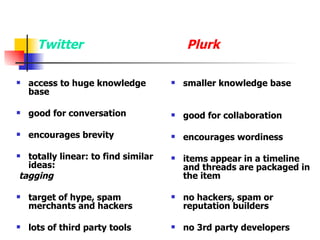
Twitter access to huge knowledge base  good for conversation encourages brevity totally linear: to find similar ideas: tagging target of hype, spam merchants and hackers lots of third party tools Plurk smaller knowledge base good for collaboration encourages wordiness items appear in a timeline and threads are packaged in the item no hackers, spam or reputation builders no 3rd party developers
How to use  Plurk  in the classroom..? share resources and links correct sentences build up collaborative stories speak about their everyday lives and share put up images to comment on/describe
How to use  Plurk  in the classroom..? create a learner diary post sentences one verb every day send reminders ask questions
Edmodo a private communication platform built for teachers and students a blend of social networking  and online classes
  What’s Edmodo? NOT open NOT a wiki  (only teachers can edit) NOT a VLE But a safe, quiet space online to get you and your stds wired an extension of your f2f class for communication purposes a simple way to exchange and share opinions, files, homework, links, audio
Features http://www.edmodo.com/ archiving tagging grouping threaded replies: not last on top group-generated coding messages, files, links real time updates: auto-refreshing status updates  inline editing of posts and replies   spotlight feature: fast location of data  see all posts by user
assignments to whole groups due dates set, receive grading, comments embed video add MM files add a poll
Unlike  Twitter threading not on mobile phones no @ or # nomenclature stds cannot directly communicate with each other
advantages  no paper fast communication scaffolding participation from home joining different groups privacy teacher decides which posts are public very userfriendly MM sharing code protection
it develops…. digital pride digital safety digital responsibility digital respect social skills netiquette
a few  Twitter-esque  uses outside the classroom   an easy communications tool for a school club:  share files, post links, exchange info   a PD tool   a project management tool for teams  in educational settings: * schedule meetings  * to-do lists * assigning tasks a family communication tool
classroom use…? post homework online return homework online communicate with experts share useful websites –links and games post spelling:  SpellingCity :  help use words in context send reminders: class events/ dates calendar
The Future of Work in 10 years´time…? 10 years ago: no Twitter 20 years ago: no Web
Rita Zeinstejer EFL Teacher- Advanced Courses, Self Access, Laboratory, Multimedia Coordinator at  Asociacion Rosarina de Cultura Inglesa Cambridge ESOL Oral Examiner CALL SIG Coordinator at  APrIR  2001-2008 Member of “ Webheads in Action ” an online Community of Practice doing research on Internet tools for Language Learning. Presenter at online and f2f international Seminars and Congresses. Google Certified Teacher 2008 CALL-IS TESOL Steering Committee Member 2009-2012 CALL Consultant www.zeinstejer.com Email:  [email_address]

Microblogging

  • 1.
    Microblogging for LanguageLearning: a Review of Options and their Potential. Rita Zeinstejer EFL Teacher Rosario, Argentina
  • 2.
    content Microblogging: its features Twitter (+ Twibes ) Plurk Edmodo
  • 3.
  • 4.
    What’s Microblogging…? exponentof “ snack culture ” privileges text brevity, users´mobility and virtual networks as social environments answers one question: What´s happening…?
  • 5.
    microblogging imposes necessityto abbreviate fitting in ideas develops skills for word selection fulfils a need of …being fast and getting instant feedback … getting more connections encourages autonomous learning uses tags to build up a network shapes your own community helps share real time data
  • 6.
    used to askfor and provide help share ideas get advice make recommendations announce events
  • 7.
    Twitter “ afree social networking and micro-blogging service that allows users to send updates…” Wikipedia “ the most popular of the genre of 'microblogging' tools that emulate SMS messaging but fall short of blogging…” V. Stevens “ one of the largest platforms in the world for sharing real-time data” Douglas A. McIntyre , in TIME
  • 8.
    Features http://twitter.com/home combinesfeatures of SMS text messages and blogs up to 140 characters long text-based posts updates instantly delivered delivery restrictions updates via instant messaging, SMS, RSS, email
  • 9.
    Why the interest…?relevance quickness distinct style conversational
  • 10.
    Everyday use…? disseminationof publications and materials product recommendations serendipitous improvement serendipitous discovery locating original sources of ideas, quotes, etc. following celebrities
  • 11.
    tweet to…. follow conversations follow others participate in a community collaborate in twitterature correct tweets integrate note-passing into a lesson
  • 12.
    Benefits as aclassroom tool….? offers opportunities to practice specific language skills. stds learn how to focus on what they say better class chatter: conversations continue inside and outside of class development of classroom community get a sense of the world increase parental awareness track a word track a conference instant feedback follow a professional/ famous person storytelling
  • 13.
    basically….. allabout conversation keep students in contact emphasize fluency in communication focus on conciseness and accuracy well suited to task-based language learning can lead to more interactive and swift discussions
  • 14.
    Tips… answer “What has your attention ?” promote a blog post ask for opinions follow interesting people direct student’s attention to good things be wary of always promoting your stuff talk about non-education stuff too
  • 15.
    Twibes finds Twitterpeople interested in similar topics enables people to meet and participate in conversations gathers likeminded members around key words organizes tweets encourages community formation anybody can find and join any group
  • 16.
    Plurk http://bit.ly/8kUkZg ability to embed video from YouTube and images horizontal time line: scroll back through time lines threads easier to follow distinction between friends and fans accumulating 'karma'
  • 17.
    Plurk http://bit.ly/8kUkZg Plurk widget allows usage of emoticons choice of verbs for the message manageable flow of information safer environment
  • 18.
    Twitter access tohuge knowledge base good for conversation encourages brevity totally linear: to find similar ideas: tagging target of hype, spam merchants and hackers lots of third party tools Plurk smaller knowledge base good for collaboration encourages wordiness items appear in a timeline and threads are packaged in the item no hackers, spam or reputation builders no 3rd party developers
  • 19.
    How to use Plurk in the classroom..? share resources and links correct sentences build up collaborative stories speak about their everyday lives and share put up images to comment on/describe
  • 20.
    How to use Plurk in the classroom..? create a learner diary post sentences one verb every day send reminders ask questions
  • 21.
    Edmodo a privatecommunication platform built for teachers and students a blend of social networking and online classes
  • 22.
    What’sEdmodo? NOT open NOT a wiki (only teachers can edit) NOT a VLE But a safe, quiet space online to get you and your stds wired an extension of your f2f class for communication purposes a simple way to exchange and share opinions, files, homework, links, audio
  • 23.
    Features http://www.edmodo.com/ archivingtagging grouping threaded replies: not last on top group-generated coding messages, files, links real time updates: auto-refreshing status updates inline editing of posts and replies spotlight feature: fast location of data see all posts by user
  • 24.
    assignments to wholegroups due dates set, receive grading, comments embed video add MM files add a poll
  • 25.
    Unlike Twitterthreading not on mobile phones no @ or # nomenclature stds cannot directly communicate with each other
  • 26.
    advantages nopaper fast communication scaffolding participation from home joining different groups privacy teacher decides which posts are public very userfriendly MM sharing code protection
  • 27.
    it develops…. digitalpride digital safety digital responsibility digital respect social skills netiquette
  • 28.
    a few Twitter-esque uses outside the classroom an easy communications tool for a school club: share files, post links, exchange info a PD tool a project management tool for teams in educational settings: * schedule meetings * to-do lists * assigning tasks a family communication tool
  • 29.
    classroom use…? posthomework online return homework online communicate with experts share useful websites –links and games post spelling: SpellingCity : help use words in context send reminders: class events/ dates calendar
  • 30.
    The Future ofWork in 10 years´time…? 10 years ago: no Twitter 20 years ago: no Web
  • 31.
    Rita Zeinstejer EFLTeacher- Advanced Courses, Self Access, Laboratory, Multimedia Coordinator at Asociacion Rosarina de Cultura Inglesa Cambridge ESOL Oral Examiner CALL SIG Coordinator at APrIR 2001-2008 Member of “ Webheads in Action ” an online Community of Practice doing research on Internet tools for Language Learning. Presenter at online and f2f international Seminars and Congresses. Google Certified Teacher 2008 CALL-IS TESOL Steering Committee Member 2009-2012 CALL Consultant www.zeinstejer.com Email: [email_address]