Using Social Media  in Education How Social Media Can Help Teachers  and Their Students in Child-Centered Learning
Vicky Frank Executive Director Director of Digital Strategies Seward Inc. Introductions
Overview of Social Media Professional Benefit Research tool – fresh content! Build professional network Establish credentials Contribute to learning community Student Benefit Communicate instantly Teach media literacy Collaboration and teamwork Engagement and dialog Organizing/Synthesizing information
What to expect today What is Web 2.0? (15 min) What is social media? (30 min) Why social media? Goals, plus/minus (30 min) Group discussion: How can social media benefit your students? (30 min) Questions & Answers (15 min)
What is “Web 2.0”?
Web 1.0 Web 2.0 Read-only (Passive) Read/Write (Participative) “ Professional” content “ Amateur” content Limited user experience Rich user experience Isolated Social Control Trust Own Share Websites Blogs Directories (taxonomy) Tags (folksonomy) Taxonomy is the practice and science of classification. Aggregating the tags of many users creates a folksonomy.
 
Social Media Defined New communication technologies that allow Internet users to easily  interact  with other users and  create  and  share  web content in the form of blogs, video, podcasts, wikis, RSS feeds, etc.
Tools: Community: New forms of teacher-to-student communication Add a channel of communication to teaching New forms of student-to-student communication Build a community of learners New forms of teacher-to-teacher communication Build a professional development community New ways to research/find fresh content Share work New ways to build an expert network Solicit feedback New media literacy Collaborate on projects
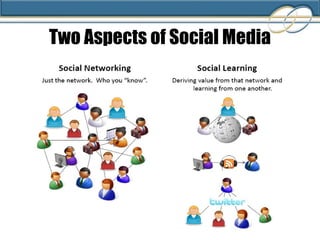
Twitter Email (xobni) MS Instant Messenger Seward Blog Elluminate Skype Phone Google Analytics Google AdWords Twitalyzer LinkAnalysis Website Grader Twitter Twitter Mashups LinkedIn Plaxo ZoomInfo Facebook (personal) Communications Measurement/Analytics Social Learning Networking Delicious Diigo Slideshare Wikipedia Technorati YouTube Flickr iTunes (podcasts) Blogs Audible (books) RSS  Hulu (TV, movies)
Two Aspects of Social Media
Social Media in the Classroom What are some of the leading tools? What are the benefits of using them? How are they being used in the classroom? Let’s try them!
Wikis knowledge transfer easy  collaborative fresh content + - time-consuming some wikis use unique markup language A wiki is a collection of Web pages designed to enable anyone with access to contribute or modify content.
Wiki (facts, collaboration)
Wikis in the Classroom Using wikis to support student group work Use them a to summarize small group discussions Students encouraged to add to wiki after class and read/comment other students' entries Base class discussions on wiki reading assignments Assign groups of students to create wikis on topics to be covered in the class
Wiki Benefits Less vocal people can have an equal voice Serves as a permanent shared record of what is said in class (otherwise lost) Ensures the teacher can devote time and comment on each group's work Enhances socialization and communication between students
Blogs great archive foster dialog great exposure comments fresh content comment might need moderation smaller groups of authors + - A  blog  (short for  weblog ) is a type of website, with regular entries of commentary, descriptions of events, or other material such as graphics or video.
Blog / Weblog  Seward Inc.’s Blog http://blog.sewardinc.com  http://technorati.com Personal directory of blogs
Blogs in the Classroom Using blogs to encourage self expression, inform students, and support learning Have students create personal blogs on child-centered learning or specific methods Blogs become focal points for analysis and discussion by others in the class Blogs are used a ePortfolios
Blog Benefits Provide more current information to students Can incorporate video, audio, RSS, links, documents Students can access information and resources from anywhere with an Internet connection Blog articles are automatically archived Blog articles are indexed by search engines and can be shared via social media tools so they find a greater audience than their print counterpart
Content Bookmarking,  Sharing, and Dissemination
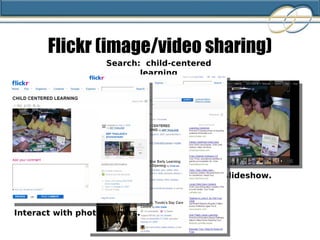
Flickr image/video sharing knowledge transfer easy collaborative easily shared photo library self-organizing (tagged) archive  +
   Search    Comment    Bookmark    Use  (with permission)    Share! http://www.flickr.com/   Search: child-centered learning Try It!
Flickr (image/video sharing) View a slideshow.  Search:  child-centered learning Interact with photo owners.
Try It!
   Search    Comment    Bookmark    Use  (with permission)    Share!
SlideShare share and obtain knowledge build network collaborative find hot topics self-organizing (tagged) archive tag comment  + Document/Presentation sharing, network building, adding to the learning community.
   Search    Comment    Bookmark    Use  (with permission)    Share! http://www.slideshare.com/   Search: english as a second language Try It!
Bookmarking Tools Bookmarking tools to save, share, categorize, and use via the Internet. http://delicious.com/vfrank/education  Save/tag websites for later reference. Share. http://www.diigo.com  Annotate websites and save/tag for reference. Share. http://www.evernote.com   Clip a webpage, a business card, a picture, class notes, quotes from a book, a voice recording and more from the Internet. Searchable reference. Try It!
YouTube (video sharing) simple video-based hosted (no bandwidth costs) questionable content  video is time & labor-intensive  copyright / intellectual property + -
Rate Date Stamp Share Categorize Tag Comment Link to http://www.youtube.com/   Search: english as a second language Try It!
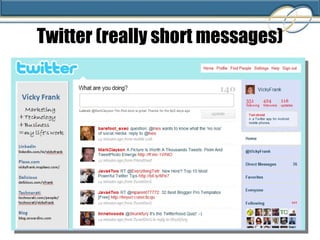
Twitter powerful networking tool very simple great exposure privacy issues requires a certain culture white noise + -
Twitter (really short messages)
Twitter Mashups http://nearbytweets.com/  to find Twitters within a specific mile radius of a location. Also can be filtered by keyword.  http://www.tweetizen.com/  to set up a specific group of people to tweet about a subject. Use as a discussion board or focus group tool. http://search.twitter.com/  ( http://www.tweetscan.com/ ) as a research tool to find out what people are saying about certain topics.  Twittervision ( http://twittervision.com ) See where in the world people are tweeting. Try It!
Twitter in the Classroom Using Twitter with Students: Communications tool for collaborating researchers Get students to focus in a concise way on a topic Tracking topics (by keyword) Classroom 'back channel'
Twitter Benefits Benefits: Strengthens a community feeling Research tool Instant, informal feedback Immediate communication with students while not in classroom
RSS (Really Simple Syndication) RSS is a way of letting students know about updates to your information. Also used to acquire information from friendly sources. Example: Podcasts, blogs, news, Moodle
Facebook privacy controls real people strong academic community  distraction walled garden  + - (FB was founded by/for Harvard students)
Facebook Search Allows you to search for Facebook members by "School.“ for SQU:  6 groups 360 members Ability to review and join group
Facebook in the Classroom Use Facebook to introduce class members to one another and share information about the class Set up a teacher-moderated group in Facebook so that students can add themselves to the group.  Members of the group (class and teacher) can post comments and/or participate in discussion threads. Members of the group (class and teacher) can augment the discussions with resources outside of Facebook (video, photos, webpages, SMS)
Facebook Benefits Helps introduce students to one another (and teacher) so they feel more comfortable when class begins Students not only get a "jump" on reading lists and requirements, but they get a chance to discuss and ask questions/share viewpoints Teachers can identify and correct initial problems or misconceptions students may have Improves social cohesion
Social Media Outcomes What can we expect from  social media/Web 2.0?
Risks (Perception) Perceived risks:  Loss of authority High expectations “ Who wants to read all that stuff?”
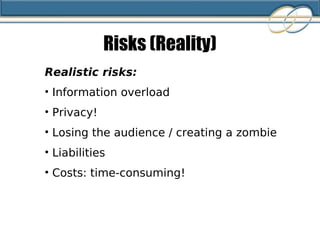
Risks (Reality) Realistic risks: Information overload Privacy! Losing the audience / creating a zombie Liabilities Costs: time-consuming!
Gains Constructive dialog Engagement! Word-of-mouth style promotion Direct feedback Increased media literacy Collaboration & teamwork Community of learners Broaden professional network
What is needed? Steady commitment A culture of sharing and openness Involve the students (and trust them) Lose control (micro-management & social media don't mix)
How could we use this to improve your classroom experience?
Questions?
Did we meet your expectations today?
References   Handout
Thank you!   Email:  [email_address] Seward Websites: http://www.sewardinc.com http://international.sewardinc.com  Seward blog:  http://blog.sewardinc.com Delicious: http://delicious.com/vfrank  Tag:  education LinkedIn: http://linkedin.com/in/vickyfrank   Twitter: @vickyfrank Questions, Feedback, Resources

Social Media For Educators

  • 1.
    Using Social Media in Education How Social Media Can Help Teachers and Their Students in Child-Centered Learning
  • 2.
    Vicky Frank ExecutiveDirector Director of Digital Strategies Seward Inc. Introductions
  • 3.
    Overview of SocialMedia Professional Benefit Research tool – fresh content! Build professional network Establish credentials Contribute to learning community Student Benefit Communicate instantly Teach media literacy Collaboration and teamwork Engagement and dialog Organizing/Synthesizing information
  • 4.
    What to expecttoday What is Web 2.0? (15 min) What is social media? (30 min) Why social media? Goals, plus/minus (30 min) Group discussion: How can social media benefit your students? (30 min) Questions & Answers (15 min)
  • 5.
  • 6.
    Web 1.0 Web2.0 Read-only (Passive) Read/Write (Participative) “ Professional” content “ Amateur” content Limited user experience Rich user experience Isolated Social Control Trust Own Share Websites Blogs Directories (taxonomy) Tags (folksonomy) Taxonomy is the practice and science of classification. Aggregating the tags of many users creates a folksonomy.
  • 7.
  • 8.
    Social Media DefinedNew communication technologies that allow Internet users to easily interact with other users and create and share web content in the form of blogs, video, podcasts, wikis, RSS feeds, etc.
  • 9.
    Tools: Community: Newforms of teacher-to-student communication Add a channel of communication to teaching New forms of student-to-student communication Build a community of learners New forms of teacher-to-teacher communication Build a professional development community New ways to research/find fresh content Share work New ways to build an expert network Solicit feedback New media literacy Collaborate on projects
  • 10.
    Twitter Email (xobni)MS Instant Messenger Seward Blog Elluminate Skype Phone Google Analytics Google AdWords Twitalyzer LinkAnalysis Website Grader Twitter Twitter Mashups LinkedIn Plaxo ZoomInfo Facebook (personal) Communications Measurement/Analytics Social Learning Networking Delicious Diigo Slideshare Wikipedia Technorati YouTube Flickr iTunes (podcasts) Blogs Audible (books) RSS Hulu (TV, movies)
  • 11.
    Two Aspects ofSocial Media
  • 12.
    Social Media inthe Classroom What are some of the leading tools? What are the benefits of using them? How are they being used in the classroom? Let’s try them!
  • 13.
    Wikis knowledge transfereasy collaborative fresh content + - time-consuming some wikis use unique markup language A wiki is a collection of Web pages designed to enable anyone with access to contribute or modify content.
  • 14.
  • 15.
    Wikis in theClassroom Using wikis to support student group work Use them a to summarize small group discussions Students encouraged to add to wiki after class and read/comment other students' entries Base class discussions on wiki reading assignments Assign groups of students to create wikis on topics to be covered in the class
  • 16.
    Wiki Benefits Lessvocal people can have an equal voice Serves as a permanent shared record of what is said in class (otherwise lost) Ensures the teacher can devote time and comment on each group's work Enhances socialization and communication between students
  • 17.
    Blogs great archivefoster dialog great exposure comments fresh content comment might need moderation smaller groups of authors + - A blog (short for weblog ) is a type of website, with regular entries of commentary, descriptions of events, or other material such as graphics or video.
  • 18.
    Blog / Weblog Seward Inc.’s Blog http://blog.sewardinc.com http://technorati.com Personal directory of blogs
  • 19.
    Blogs in theClassroom Using blogs to encourage self expression, inform students, and support learning Have students create personal blogs on child-centered learning or specific methods Blogs become focal points for analysis and discussion by others in the class Blogs are used a ePortfolios
  • 20.
    Blog Benefits Providemore current information to students Can incorporate video, audio, RSS, links, documents Students can access information and resources from anywhere with an Internet connection Blog articles are automatically archived Blog articles are indexed by search engines and can be shared via social media tools so they find a greater audience than their print counterpart
  • 21.
    Content Bookmarking, Sharing, and Dissemination
  • 22.
    Flickr image/video sharingknowledge transfer easy collaborative easily shared photo library self-organizing (tagged) archive +
  • 23.
    Search  Comment  Bookmark  Use (with permission)  Share! http://www.flickr.com/ Search: child-centered learning Try It!
  • 24.
    Flickr (image/video sharing)View a slideshow. Search: child-centered learning Interact with photo owners.
  • 25.
  • 26.
    Search  Comment  Bookmark  Use (with permission)  Share!
  • 27.
    SlideShare share andobtain knowledge build network collaborative find hot topics self-organizing (tagged) archive tag comment + Document/Presentation sharing, network building, adding to the learning community.
  • 28.
    Search  Comment  Bookmark  Use (with permission)  Share! http://www.slideshare.com/ Search: english as a second language Try It!
  • 29.
    Bookmarking Tools Bookmarkingtools to save, share, categorize, and use via the Internet. http://delicious.com/vfrank/education Save/tag websites for later reference. Share. http://www.diigo.com Annotate websites and save/tag for reference. Share. http://www.evernote.com Clip a webpage, a business card, a picture, class notes, quotes from a book, a voice recording and more from the Internet. Searchable reference. Try It!
  • 30.
    YouTube (video sharing)simple video-based hosted (no bandwidth costs) questionable content video is time & labor-intensive copyright / intellectual property + -
  • 31.
    Rate Date StampShare Categorize Tag Comment Link to http://www.youtube.com/ Search: english as a second language Try It!
  • 32.
    Twitter powerful networkingtool very simple great exposure privacy issues requires a certain culture white noise + -
  • 33.
  • 34.
    Twitter Mashups http://nearbytweets.com/ to find Twitters within a specific mile radius of a location. Also can be filtered by keyword. http://www.tweetizen.com/ to set up a specific group of people to tweet about a subject. Use as a discussion board or focus group tool. http://search.twitter.com/ ( http://www.tweetscan.com/ ) as a research tool to find out what people are saying about certain topics. Twittervision ( http://twittervision.com ) See where in the world people are tweeting. Try It!
  • 35.
    Twitter in theClassroom Using Twitter with Students: Communications tool for collaborating researchers Get students to focus in a concise way on a topic Tracking topics (by keyword) Classroom 'back channel'
  • 36.
    Twitter Benefits Benefits:Strengthens a community feeling Research tool Instant, informal feedback Immediate communication with students while not in classroom
  • 37.
    RSS (Really SimpleSyndication) RSS is a way of letting students know about updates to your information. Also used to acquire information from friendly sources. Example: Podcasts, blogs, news, Moodle
  • 38.
    Facebook privacy controlsreal people strong academic community distraction walled garden + - (FB was founded by/for Harvard students)
  • 39.
    Facebook Search Allowsyou to search for Facebook members by "School.“ for SQU: 6 groups 360 members Ability to review and join group
  • 40.
    Facebook in theClassroom Use Facebook to introduce class members to one another and share information about the class Set up a teacher-moderated group in Facebook so that students can add themselves to the group. Members of the group (class and teacher) can post comments and/or participate in discussion threads. Members of the group (class and teacher) can augment the discussions with resources outside of Facebook (video, photos, webpages, SMS)
  • 41.
    Facebook Benefits Helpsintroduce students to one another (and teacher) so they feel more comfortable when class begins Students not only get a "jump" on reading lists and requirements, but they get a chance to discuss and ask questions/share viewpoints Teachers can identify and correct initial problems or misconceptions students may have Improves social cohesion
  • 42.
    Social Media OutcomesWhat can we expect from social media/Web 2.0?
  • 43.
    Risks (Perception) Perceived risks: Loss of authority High expectations “ Who wants to read all that stuff?”
  • 44.
    Risks (Reality) Realisticrisks: Information overload Privacy! Losing the audience / creating a zombie Liabilities Costs: time-consuming!
  • 45.
    Gains Constructive dialogEngagement! Word-of-mouth style promotion Direct feedback Increased media literacy Collaboration & teamwork Community of learners Broaden professional network
  • 46.
    What is needed?Steady commitment A culture of sharing and openness Involve the students (and trust them) Lose control (micro-management & social media don't mix)
  • 47.
    How could weuse this to improve your classroom experience?
  • 48.
  • 49.
    Did we meetyour expectations today?
  • 50.
  • 51.
    Thank you!  Email: [email_address] Seward Websites: http://www.sewardinc.com http://international.sewardinc.com Seward blog: http://blog.sewardinc.com Delicious: http://delicious.com/vfrank Tag: education LinkedIn: http://linkedin.com/in/vickyfrank Twitter: @vickyfrank Questions, Feedback, Resources

Editor's Notes

  • #14 constructive dialog: with students & other stakeholders
  • #16 constructive dialog: with students & other stakeholders
  • #17 constructive dialog: with students & other stakeholders
  • #18 constructive dialog: with students & other stakeholders
  • #20 constructive dialog: with students & other stakeholders
  • #21 constructive dialog: with students & other stakeholders
  • #23 constructive dialog: with students & other stakeholders
  • #31 constructive dialog: with students & other stakeholders
  • #33 constructive dialog: with students & other stakeholders
  • #36 constructive dialog: with students & other stakeholders
  • #37 constructive dialog: with students & other stakeholders
  • #39 constructive dialog: with students & other stakeholders
  • #41 constructive dialog: with students & other stakeholders
  • #42 constructive dialog: with students & other stakeholders
  • #46 constructive dialog: with students & other stakeholders
  • #47 constructive dialog: with students & other stakeholders
  • #48 constructive dialog: with students & other stakeholders
  • #49 constructive dialog: with students & other stakeholders
  • #51 constructive dialog: with students & other stakeholders
  • #52 constructive dialog: with students & other stakeholders