Google Apps  in the Classroom Google Teacher Academy New York November 18, 2008 Rita Zeinstejer Rosario, Argentina
Google Apps  in the Classroom
 
create a customized search experience for your own website.  customize the look and feel of the results to match your site  provide fast and relevant search results   control where Google looks for information about that topic.
Students can use it: research class topics find “similar pages” search for images search from their cells The world’s  largest  search engine
Teachers can use it: translate webpages search for instructional material in different formats restrict search in stds’ pc’s > “safe search” The world’s  largest  search engine
webmail free accounts custom email addresses shared calendars collaborative websites shared online documents safe instant messaging easy-to-use customizable start page use your school domain http:// partnerpage.google.com / capuchinohighschool.org
 
You can also…. activate chat and camera! import contacts from Outlook and other accounts! customize your site, many options save your chat scripts
Additional Apps Google Docs Goggle Video Google Sites iGoogle Google Earth Google Groups Google Maps Google News Google Alerts Google Reader Google Search Google SketchUp Knol Picassa Google Calendar
Why Google apps…? students can use Google Apps to: collaborate with classmates using Google Sites make presentations with Google Docs keep organized using Google Calendar
Why  Google apps …? Teachers can use  Google Apps  to: have easy access to their colleagues using  Google Talk sign up for computerlab or library time using a  Google Calendar collect assingments online using  Gmail  or  Google docs
free online word processor create, store, share, collaborate on docs work together online > avoid attachments http://services.google.com/apps/resources/overviews/welcome/topicDocs/index.html
Why use Google Docs? Students can: work on their files from any pc get instant feedback publish papers and presentations to an authentic audience
Why use Google Docs? Teachers can: provide timely feedback to stds at any point collaborate with colleagues (material/assessment) publish handouts for stds and parents
most comprehensive on the Web contains millions of videos indexed and available for viewing  view a video while searching for more
create course website quickly  include subordinate pages to each unit share documents, videos, calendars, charts and other information  all in one place offers control over who has access
Students can use Google Sites to: manage a to-do list for their assignments create a personal portfolio of their work collaborate and share ideas for group work and peer tutoring
Teachers can use Google Sites to: create a class page allow stds to create pages include tutorial videos collaborate with other teachers/ school-wide projects manage international projects
personalized home page at-a-glance access to key info educational gadgets easily removed/ added
http:// www.google.com / ig
iGoogle gadgets   (themes selection) " Framed Photo "  displays a series of photos " GoogleGram "  creation of special daily messages  " Daily Me "  displays user's current mood and feelings   " Free Form "  allows the user to input text /images  " YouTube Channel "  displays videos from a  YouTube  channel,  " Personal List "  allows user to create a list of items " Countdown "  countdown timer
Why use iGoogle? Students can use it to: Stayed informed, news & events Add gadgets: class calendars to-do lists encyclopedias & dictionaries Create customized tabs for assignments, activities, personal interests
Why use iGoogle? Teachers can use it to: unleash stds creativity by having them make their own gadgets keep up-to-date with their blogs plan/organize their instructional day develop a custom tab to access their professional network
free, downloadable combines satellite imagery, maps, 3D terrain, 3D buildings explore organizations (NASA, Discovery Education) explore species/ night sky
Why use Google Earth…? Students can use it to: create tours of their school/community study climate change /effects of global warming track earthquakes  in real time explore animal kingdom  with national Geographic content
Why use Google Earth…? Teachers can use it to: set the scene for various lessons adapt abstract lessons to the real world : interaction with real-time data explore night http://www.googlelittrips.com/
allows users to start their own email discussion  groups/  message boards browse archives of  Usenet  groups .  search or browse for information  join a group join in on what others are talking about  create custom discuss
Why use Google Groups? Students can use it to: extend class discussion online share ideas, store docs, organize web resources   working on a team project create a private group for school clubs/sports teams   to share latest news, announcements, pix
Why use Google Groups? Teachers can use it to: make class handouts, reading material, assignments, web links  available for stds and parents send email announcements to parents centralize resources & communication
free web mapping service application  http://www.google.co.uk/maps It provides: terrain maps satellite imagery photographic street views http://en.wikipedia.org/wiki/Coverage_details_of_Google_Maps
Why use Google maps? Students can use it to: keep track of class penpals virtual tour countries  (transportation/hotels/sight-seeing) learn about plant/animal life by embedding info on habitats in maps
Why use Google maps? Teachers can use it to: plan a field trip with stds create a school map teach historical events  by embedding docs into interactive maps http:// www.theteacherscorner.net / penpals / index.php
makes news available in a single place thousands of sources browse top stories search for a specific topic personalize your news page http://news.google.com/
Why use Google News? Students can use it to: compare and contrast events find primary docs (+200 years) access news from cells
Why use Google News? Teachers can use it to: personalize their news page: stay informed search news for particular story relevant to lesson model for stds to examine bias and reliability
email updates of the latest relevant  Google  results (web, news, etc.) based on your choice of query or topic. alerts  can be delivered via feed to  Google Reader  or to your  iGoogle page
Six variations of alerts: news web blogs comprehensive video groups
feed aggregator, feed reader, news reader  constantly checks your favorite news sites and blogs for new content.   aggregates  syndicated web content  such as news headlines,  blogs ,  podcasts , and  vlogs  in a single location for easy viewing.  checks for new content at user-determined intervals and retrieves the update.
Why use Google Reader? Students can use it to: keep updated on current events and news collect, annotate, share research for collaborative project read items teacher shares for current assignments
Why use Google Reader? Teachers can use it to: keep track of stds blogs all on one page read other educators blogs and folllow best practices share news articles with colleagues and stds using the “ Shared items ” feature (+ annotations!)
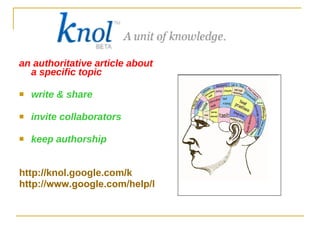
an authoritative article about a specific topic write & share invite collaborators keep authorship http://knol.google.com/k http://www.google.com/help/knol_screenshot.html
Why use Knol? Students can use it to: do research and verify authority of info publish project about topic researched collaborate to improve richness of their knols
Why use Knol? Teachers can use it to: teach info literacy/evaluate reliability of source publish lessons for colleagues provide doc with school rules/expectations
http://sketchup.google.com modeling software for 3D designs construct 3D models of buildings, trees, cars.
Why use SketchUp? Students can use it to: visualize geometry/ mathematical concepts create model buildings learn about architecture design full scale 3D environments share designs with others via web
Why use SketchUp? Teachers can use it to: engage stds in the 3D world around them recreate historical settings illustrate theoretical concepts
keep track of all your life's important events in one place add events and send invitations   share your schedule with friends and family  search for events you might enjoy set up automatic event reminders
texts of  scholarly   literature :  scholars who have contributed to their fields over the centuries  includes most  peer- reviewed  online  journals claims to cover more websites, journal sources and languages
web-based module add to your iGoogle like Gmail chat > talk everywhere see Picasa web albums and YouTube videos from this gadget
http:// picasa.google.com / organize, edit, share pictures locates pix and sorts them out into visual albums makes advanced photo editing simple allows photos to be uploaded easily access an online slideshow and download pix http://www.youtube.com/watch?v=rskC6c_5L1M
Why use Picasa? www.picasa.google.com Students can use it to: organize/manage photos for projects/reports quickly edit photos/images share photos of school events
Why use Picasa? www.picasa.google.com Teachers can use it to: create an album for each std create a slideshow for open house share fieldtrips online
www.blogger.com create rich multimedia posts including text, links, pictures, videos comments subscription
Why use Blogger? Students can use it to: keep a reflective learning journal post messages, photos,videos share schoolwork
Why use Blogger? Teachers can use it to: post resources, assignments, homework, lessons keep parents updated reflect on their teaching practices follow stds progress share ideas with other educators organize project work
Google pack   http://pack.google.com/intl/en/pack_installer.html
 
… .and more!!! Google Experiments: Google Labs
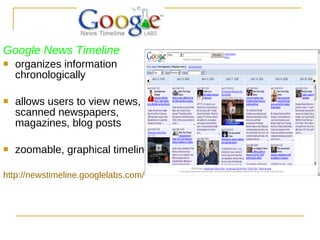
Google News Timeline organizes information chronologically allows users to view news, scanned newspapers, magazines, blog posts zoomable, graphical timeline. http://newstimeline.googlelabs.com/
refines your image search with visual similarity   allows you to search for images using pictures rather than words http://similar-images.googlelabs.com/
!!!!!!!
[email_address] www.zeinstejer.com

Google Apps in the Classroom

  • 1.
    Google Apps in the Classroom Google Teacher Academy New York November 18, 2008 Rita Zeinstejer Rosario, Argentina
  • 2.
    Google Apps in the Classroom
  • 3.
  • 4.
    create a customizedsearch experience for your own website. customize the look and feel of the results to match your site provide fast and relevant search results control where Google looks for information about that topic.
  • 5.
    Students can useit: research class topics find “similar pages” search for images search from their cells The world’s largest search engine
  • 6.
    Teachers can useit: translate webpages search for instructional material in different formats restrict search in stds’ pc’s > “safe search” The world’s largest search engine
  • 7.
    webmail free accountscustom email addresses shared calendars collaborative websites shared online documents safe instant messaging easy-to-use customizable start page use your school domain http:// partnerpage.google.com / capuchinohighschool.org
  • 8.
  • 9.
    You can also….activate chat and camera! import contacts from Outlook and other accounts! customize your site, many options save your chat scripts
  • 10.
    Additional Apps GoogleDocs Goggle Video Google Sites iGoogle Google Earth Google Groups Google Maps Google News Google Alerts Google Reader Google Search Google SketchUp Knol Picassa Google Calendar
  • 11.
    Why Google apps…?students can use Google Apps to: collaborate with classmates using Google Sites make presentations with Google Docs keep organized using Google Calendar
  • 12.
    Why Googleapps …? Teachers can use Google Apps to: have easy access to their colleagues using Google Talk sign up for computerlab or library time using a Google Calendar collect assingments online using Gmail or Google docs
  • 13.
    free online wordprocessor create, store, share, collaborate on docs work together online > avoid attachments http://services.google.com/apps/resources/overviews/welcome/topicDocs/index.html
  • 14.
    Why use GoogleDocs? Students can: work on their files from any pc get instant feedback publish papers and presentations to an authentic audience
  • 15.
    Why use GoogleDocs? Teachers can: provide timely feedback to stds at any point collaborate with colleagues (material/assessment) publish handouts for stds and parents
  • 16.
    most comprehensive onthe Web contains millions of videos indexed and available for viewing view a video while searching for more
  • 17.
    create course websitequickly include subordinate pages to each unit share documents, videos, calendars, charts and other information all in one place offers control over who has access
  • 18.
    Students can useGoogle Sites to: manage a to-do list for their assignments create a personal portfolio of their work collaborate and share ideas for group work and peer tutoring
  • 19.
    Teachers can useGoogle Sites to: create a class page allow stds to create pages include tutorial videos collaborate with other teachers/ school-wide projects manage international projects
  • 20.
    personalized home pageat-a-glance access to key info educational gadgets easily removed/ added
  • 21.
  • 22.
    iGoogle gadgets (themes selection) " Framed Photo " displays a series of photos " GoogleGram " creation of special daily messages " Daily Me " displays user's current mood and feelings " Free Form " allows the user to input text /images " YouTube Channel " displays videos from a YouTube channel, " Personal List " allows user to create a list of items " Countdown " countdown timer
  • 23.
    Why use iGoogle?Students can use it to: Stayed informed, news & events Add gadgets: class calendars to-do lists encyclopedias & dictionaries Create customized tabs for assignments, activities, personal interests
  • 24.
    Why use iGoogle?Teachers can use it to: unleash stds creativity by having them make their own gadgets keep up-to-date with their blogs plan/organize their instructional day develop a custom tab to access their professional network
  • 25.
    free, downloadable combinessatellite imagery, maps, 3D terrain, 3D buildings explore organizations (NASA, Discovery Education) explore species/ night sky
  • 26.
    Why use GoogleEarth…? Students can use it to: create tours of their school/community study climate change /effects of global warming track earthquakes in real time explore animal kingdom with national Geographic content
  • 27.
    Why use GoogleEarth…? Teachers can use it to: set the scene for various lessons adapt abstract lessons to the real world : interaction with real-time data explore night http://www.googlelittrips.com/
  • 28.
    allows users tostart their own email discussion groups/ message boards browse archives of Usenet groups . search or browse for information join a group join in on what others are talking about create custom discuss
  • 29.
    Why use GoogleGroups? Students can use it to: extend class discussion online share ideas, store docs, organize web resources working on a team project create a private group for school clubs/sports teams to share latest news, announcements, pix
  • 30.
    Why use GoogleGroups? Teachers can use it to: make class handouts, reading material, assignments, web links available for stds and parents send email announcements to parents centralize resources & communication
  • 31.
    free web mappingservice application http://www.google.co.uk/maps It provides: terrain maps satellite imagery photographic street views http://en.wikipedia.org/wiki/Coverage_details_of_Google_Maps
  • 32.
    Why use Googlemaps? Students can use it to: keep track of class penpals virtual tour countries (transportation/hotels/sight-seeing) learn about plant/animal life by embedding info on habitats in maps
  • 33.
    Why use Googlemaps? Teachers can use it to: plan a field trip with stds create a school map teach historical events by embedding docs into interactive maps http:// www.theteacherscorner.net / penpals / index.php
  • 34.
    makes news availablein a single place thousands of sources browse top stories search for a specific topic personalize your news page http://news.google.com/
  • 35.
    Why use GoogleNews? Students can use it to: compare and contrast events find primary docs (+200 years) access news from cells
  • 36.
    Why use GoogleNews? Teachers can use it to: personalize their news page: stay informed search news for particular story relevant to lesson model for stds to examine bias and reliability
  • 37.
    email updates ofthe latest relevant Google results (web, news, etc.) based on your choice of query or topic. alerts can be delivered via feed to Google Reader or to your iGoogle page
  • 38.
    Six variations ofalerts: news web blogs comprehensive video groups
  • 39.
    feed aggregator, feedreader, news reader constantly checks your favorite news sites and blogs for new content. aggregates syndicated web content such as news headlines, blogs , podcasts , and vlogs in a single location for easy viewing. checks for new content at user-determined intervals and retrieves the update.
  • 40.
    Why use GoogleReader? Students can use it to: keep updated on current events and news collect, annotate, share research for collaborative project read items teacher shares for current assignments
  • 41.
    Why use GoogleReader? Teachers can use it to: keep track of stds blogs all on one page read other educators blogs and folllow best practices share news articles with colleagues and stds using the “ Shared items ” feature (+ annotations!)
  • 42.
    an authoritative articleabout a specific topic write & share invite collaborators keep authorship http://knol.google.com/k http://www.google.com/help/knol_screenshot.html
  • 43.
    Why use Knol?Students can use it to: do research and verify authority of info publish project about topic researched collaborate to improve richness of their knols
  • 44.
    Why use Knol?Teachers can use it to: teach info literacy/evaluate reliability of source publish lessons for colleagues provide doc with school rules/expectations
  • 45.
    http://sketchup.google.com modeling softwarefor 3D designs construct 3D models of buildings, trees, cars.
  • 46.
    Why use SketchUp?Students can use it to: visualize geometry/ mathematical concepts create model buildings learn about architecture design full scale 3D environments share designs with others via web
  • 47.
    Why use SketchUp?Teachers can use it to: engage stds in the 3D world around them recreate historical settings illustrate theoretical concepts
  • 48.
    keep track ofall your life's important events in one place add events and send invitations share your schedule with friends and family search for events you might enjoy set up automatic event reminders
  • 49.
    texts of scholarly literature : scholars who have contributed to their fields over the centuries includes most peer- reviewed online journals claims to cover more websites, journal sources and languages
  • 50.
    web-based module addto your iGoogle like Gmail chat > talk everywhere see Picasa web albums and YouTube videos from this gadget
  • 51.
    http:// picasa.google.com /organize, edit, share pictures locates pix and sorts them out into visual albums makes advanced photo editing simple allows photos to be uploaded easily access an online slideshow and download pix http://www.youtube.com/watch?v=rskC6c_5L1M
  • 52.
    Why use Picasa?www.picasa.google.com Students can use it to: organize/manage photos for projects/reports quickly edit photos/images share photos of school events
  • 53.
    Why use Picasa?www.picasa.google.com Teachers can use it to: create an album for each std create a slideshow for open house share fieldtrips online
  • 54.
    www.blogger.com create richmultimedia posts including text, links, pictures, videos comments subscription
  • 55.
    Why use Blogger?Students can use it to: keep a reflective learning journal post messages, photos,videos share schoolwork
  • 56.
    Why use Blogger?Teachers can use it to: post resources, assignments, homework, lessons keep parents updated reflect on their teaching practices follow stds progress share ideas with other educators organize project work
  • 57.
    Google pack http://pack.google.com/intl/en/pack_installer.html
  • 58.
  • 59.
    … .and more!!!Google Experiments: Google Labs
  • 60.
    Google News Timelineorganizes information chronologically allows users to view news, scanned newspapers, magazines, blog posts zoomable, graphical timeline. http://newstimeline.googlelabs.com/
  • 61.
    refines your imagesearch with visual similarity allows you to search for images using pictures rather than words http://similar-images.googlelabs.com/
  • 62.
  • 63.