Manual Code Review
- Sandesh Anand
anand.sandesh@gmail.com
www.linkedin.com/in/anandsandesh/
Who am I?
• Security Consultant at Cigital Inc.
• Ex-Developer
• Areas of interest
– Static analysis
– Helping developers fix security bugs
– Web App pen testing
– Curious about all things security
What are we talking about?
• Why review code?
• Automated v/s Manual review
• Manual review – 10,000 ft. view
• Manual code review in 60 seconds
Why review code?
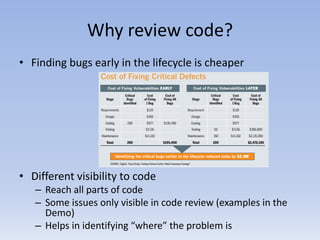
• Finding bugs early in the lifecycle is cheaper
• Different visibility to code
– Reach all parts of code
– Some issues only visible in code review (examples in the
Demo)
– Helps in identifying “where” the problem is
Why review code?
• So, pen testing is useless, right? Not quite.
Why not?
– Don’t want to be killed by a room full of pen-
testers
– Better at proving “exploitability”
– Makes it easier to evangelize security it an
organization
– Coverage different from code review (e.g.: Issues
in application sever configuration)
– Understand what a hacker is looking at
Automated v/s Manual
This topic never ends. Here are some highlights:
• Automated tools can plough through more code
at lesser time. Very useful for large applications
• Manual code review uses knowledge available to
the tester
• Tool support for certain programming languages
stronger than the other (Java v/s Perl)
• Quality of manual review depends on individual
And so on…..
Bottom line: Use both in a complimentary manner
Manual review – 10,000 ft. view
• Understand the application
– Purpose of the application
– Flow of the application
– Technologies used
– Environment (type of DB, frameworks, AppServer etc.)
– Business logic
– Etc.
• Understand the approach to security controls:
– Authentication and Authorization
– Handling un-trusted data
– Handling sensitive information
– Session handling
– Network boundaries
– Error handling and logging
– Misuse of security related APIs (crypto, randomness etc.)
– Etc.
• Look for specific vulnerabilities
– Issues common to most applications (e.g.: Race condition, resource management, information leakage,
validation routines)
– Language specific issues (e.g.: Format string attacks in C)
– Framework specific issues (e.g.: review ACEGI configuration)
– Looking for malicious code/ Insider threat
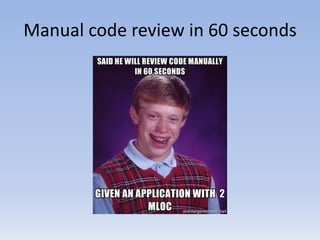
Manual code review in 60 seconds
• Understand the application
• Review security control (Hint: Pick logging)
• Look for specific vulnerabilities
Questions?

Manual Code Review

  • 1.
    Manual Code Review -Sandesh Anand anand.sandesh@gmail.com www.linkedin.com/in/anandsandesh/
  • 2.
    Who am I? •Security Consultant at Cigital Inc. • Ex-Developer • Areas of interest – Static analysis – Helping developers fix security bugs – Web App pen testing – Curious about all things security
  • 3.
    What are wetalking about? • Why review code? • Automated v/s Manual review • Manual review – 10,000 ft. view • Manual code review in 60 seconds
  • 4.
    Why review code? •Finding bugs early in the lifecycle is cheaper • Different visibility to code – Reach all parts of code – Some issues only visible in code review (examples in the Demo) – Helps in identifying “where” the problem is
  • 5.
    Why review code? •So, pen testing is useless, right? Not quite. Why not? – Don’t want to be killed by a room full of pen- testers – Better at proving “exploitability” – Makes it easier to evangelize security it an organization – Coverage different from code review (e.g.: Issues in application sever configuration) – Understand what a hacker is looking at
  • 6.
    Automated v/s Manual Thistopic never ends. Here are some highlights: • Automated tools can plough through more code at lesser time. Very useful for large applications • Manual code review uses knowledge available to the tester • Tool support for certain programming languages stronger than the other (Java v/s Perl) • Quality of manual review depends on individual And so on….. Bottom line: Use both in a complimentary manner
  • 7.
    Manual review –10,000 ft. view • Understand the application – Purpose of the application – Flow of the application – Technologies used – Environment (type of DB, frameworks, AppServer etc.) – Business logic – Etc. • Understand the approach to security controls: – Authentication and Authorization – Handling un-trusted data – Handling sensitive information – Session handling – Network boundaries – Error handling and logging – Misuse of security related APIs (crypto, randomness etc.) – Etc. • Look for specific vulnerabilities – Issues common to most applications (e.g.: Race condition, resource management, information leakage, validation routines) – Language specific issues (e.g.: Format string attacks in C) – Framework specific issues (e.g.: review ACEGI configuration) – Looking for malicious code/ Insider threat
  • 8.
    Manual code reviewin 60 seconds
  • 9.
    Manual code reviewin 60 seconds • Understand the application • Review security control (Hint: Pick logging) • Look for specific vulnerabilities
  • 10.