Burp Plugin Development for
                   Java n00bs
                                            44Con 2012


www.7elements.co.uk | blog.7elements.co.uk | @7elements
/me
•   Marc Wickenden
•   Principal Security Consultant at 7 Elements
•   Love coding (particularly Ruby)
•   @marcwickenden on the Twitterz
•   Most importantly though…..


www.7elements.co.uk | blog.7elements.co.uk | @7elements
I am a Java n00b
If you already know Java
You’re either:
• In the wrong room
• About to be really offended!
Agenda
•   The problem
•   Getting ready
•   Introduction to the Eclipse IDE
•   Burp Extender Hello World!
•   Manipulating runtime data
•   Decoding a custom encoding scheme
•   “Shelling out” to other scripts
•   Limitations of Burp Extender
•   Really cool Burp plugins already out there to fire
    your imagination
Oh…..and there’ll be cats
The problem
• Burp Suite is awesome
• De facto web app tool
• Open source alternatives don’t compare
  IMHO
• Tools available/cohesion/protocol support
• Burp Extender
The problem
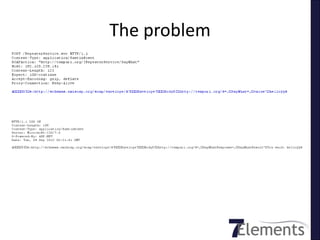
I wrote a plugin

Coding by Google FTW!
How? - Burp Extender
• “allows third-party developers to extend the
  functionality of Burp Suite”
• “Extensions can read and modify Burp’s
  runtime data and configuration”
• “initiate key actions”
• “extend Burp’s user interface”
                       http://portswigger.net/burp/extender/
Burp Extender
• Achieves this via 6 interfaces:
  – IBurpExtender
  – IBurpExtenderCallbacks
  – IHttpRequestResponse
  – IScanIssue
  – IScanQueueItem
  – IMenuItemHander
Java 101
•   Java source is compiled to bytecode (class file)
•   Runs on Java Virtual Machine (JVM)
•   Class-based
•   OO
•   Write once, run anywhere (WORA)
•   Two distributions: JRE and JDK
Java 101 continued…
• Usual OO stuff applies:
  objects, classes, methods, properties/variable
  s
• Lines end with ;
Java 101 continued…
• Source files must be named after the public
  class they contain
• public keyword denotes method can be called
  from code in other classes or outside class
  hierarchy
Java 101 continued…
• class hierarchy defined by directory structure:
• uk.co.sevenelements.HelloWorld =
  uk/co/sevenelements/HelloWorld.class
• JAR file is essentially ZIP file of
  classes/directories
Java 101 continued…
• void keyword indicates method will not return
  data to the caller
• main method called by Java launcher to pass
  control to the program
• main must accept array of String objects (args)
Java 101 continued…
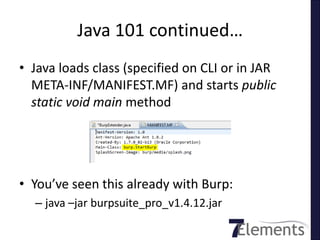
• Java loads class (specified on CLI or in JAR
  META-INF/MANIFEST.MF) and starts public
  static void main method


• You’ve seen this already with Burp:
  – java –jar burpsuite_pro_v1.4.12.jar
Enough 101
Let’s write some codez
First we need some tools
• Eclipse IDE – de facto free dev tool for Java
• Not necessarily the best or easiest thing to use
• Alternatives to consider:
  – Jet Brains IntelliJ (my personal favourite)
  – NetBeans (never used)
  – Jcreator (again, never used)
  – Terminal/vim/javac < MOAR L33T
Download Eclipse Classic

 Or install from your USB drive
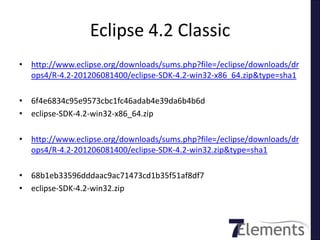
Eclipse 4.2 Classic
• http://www.eclipse.org/downloads/sums.php?file=/eclipse/downloads/dr
  ops4/R-4.2-201206081400/eclipse-SDK-4.2-win32-x86_64.zip&type=sha1

• 6f4e6834c95e9573cbc1fc46adab4e39da6b4b6d
• eclipse-SDK-4.2-win32-x86_64.zip

• http://www.eclipse.org/downloads/sums.php?file=/eclipse/downloads/dr
  ops4/R-4.2-201206081400/eclipse-SDK-4.2-win32.zip&type=sha1

• 68b1eb33596dddaac9ac71473cd1b35f51af8df7
• eclipse-SDK-4.2-win32.zip
Java JDK
• Used to be bundled with Eclipse
• Due to licensing (I think) this is no longer the
  case
• Grab from Sun Oracle’s website:
• http://download.oracle.com/otn-pub/java/jdk/7u7-b11/jdk-7u7-windows-
  x64.exe?AuthParam=1347522941_2b61ee3cd1f38a0abd1be312c3990fe5
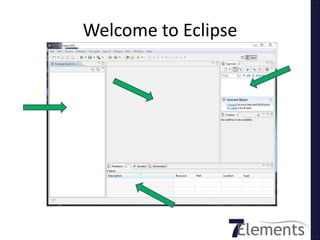
Welcome to Eclipse
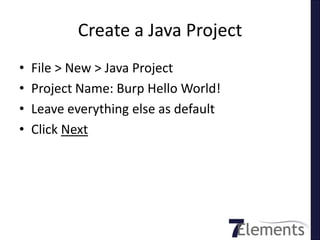
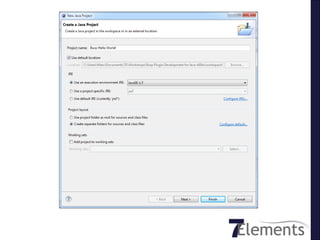
Create a Java Project
•   File > New > Java Project
•   Project Name: Burp Hello World!
•   Leave everything else as default
•   Click Next
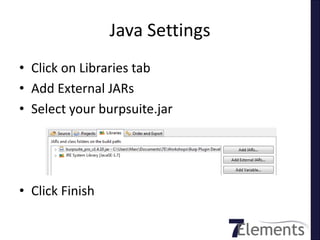
Java Settings
• Click on Libraries tab
• Add External JARs
• Select your burpsuite.jar


• Click Finish
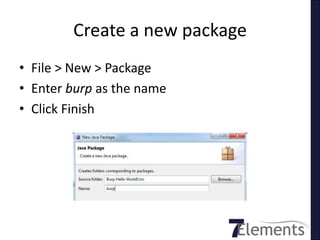
Create a new package
• File > New > Package
• Enter burp as the name
• Click Finish
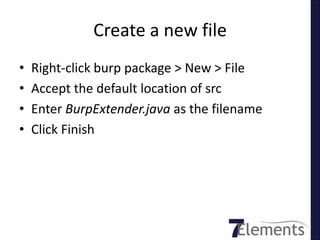
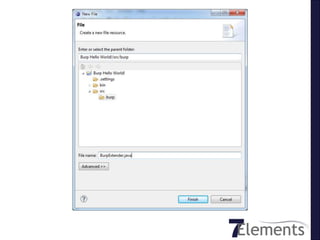
Create a new file
•   Right-click burp package > New > File
•   Accept the default location of src
•   Enter BurpExtender.java as the filename
•   Click Finish
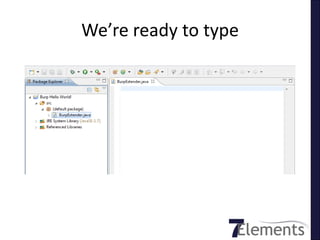
We’re ready to type
Loading external classes
• We need to tell Java about external classes
  – Ruby has require
  – PHP has include or require
  – Perl has require
  – C has include
  – Java uses import
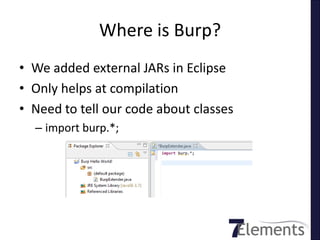
Where is Burp?
• We added external JARs in Eclipse
• Only helps at compilation
• Need to tell our code about classes
  – import burp.*;
IBurpExtender
• Available at
  http://portswigger.net/burp/extender/burp/IBurpExtender.html


   – “ Implementations must be called BurpExtender,
     in the package burp, must be declared public, and
     must provide a default (public, no-argument)
     constructor”
In other words
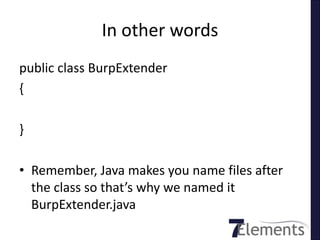
public class BurpExtender
{

}

• Remember, Java makes you name files after
  the class so that’s why we named it
  BurpExtender.java
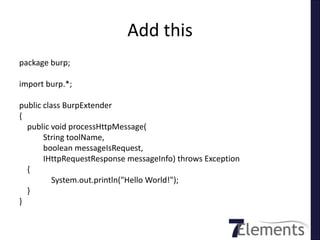
Add this
package burp;

import burp.*;

public class BurpExtender
{
  public void processHttpMessage(
       String toolName,
       boolean messageIsRequest,
       IHttpRequestResponse messageInfo) throws Exception
  {
          System.out.println("Hello World!");
  }
}
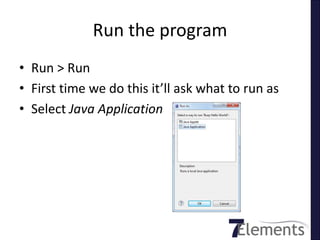
Run the program
• Run > Run
• First time we do this it’ll ask what to run as
• Select Java Application
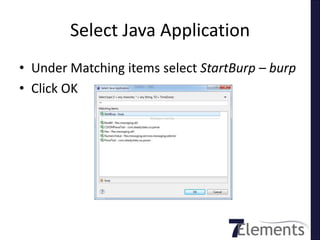
Select Java Application
• Under Matching items select StartBurp – burp
• Click OK
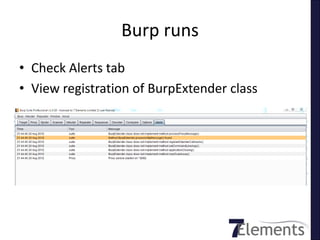
Burp runs
• Check Alerts tab
• View registration of BurpExtender class
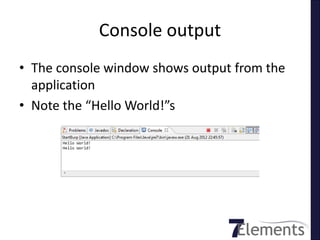
Console output
• The console window shows output from the
  application
• Note the “Hello World!”s
Congratulations
What’s happening?
• Why is it spamming “Hello World!” to the
  console?
• We defined processHttpMessage()
• http://portswigger.net/burp/extender/burp/IB
  urpExtender.html
  – “This method is invoked whenever any of Burp's
    tools makes an HTTP request or receives a
    response”
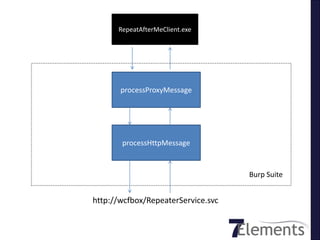
Burp Suite Flow
RepeatAfterMeClient.exe


       processProxyMessage


       processHttpMessage


                                    Burp Suite


http://wcfbox/RepeaterService.svc
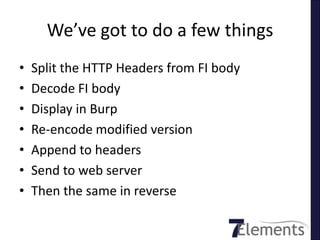
We’ve got to do a few things
•   Split the HTTP Headers from FI body
•   Decode FI body
•   Display in Burp
•   Re-encode modified version
•   Append to headers
•   Send to web server
•   Then the same in reverse
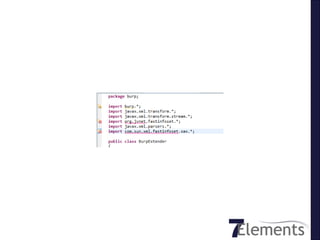
• Right-click Project > Build Path > Add External
  Archives
• Select FastInfoset.jar
• Note that imports are now yellow
Decoding the Fastinfoset to
         console
First: we get it wrong
• Burp returns message body as byte[]
• Hmm, bytes are hard, let’s convert to String
• Split on rnrn
Then we do it right
• Fastinfoset is a binary encoding
• Don’t try and convert it to a String
• Now things work
Decoding Fastinfoset through
           Proxy
We’re nearly there……
Running outside of Eclipse
• Plugin is working nicely, now what?
• Export to JAR
• Command line to run is:

• java –jar yourjar.jar;burp_pro_v1.4.12.jar burp.startBurp
Limitations
• We haven’t coded to handle/decode the
  response
• Just do the same in reverse
• processHttpMessage fires before
  processProxyMessage so we can’t alter then
  re-encode message
• Solution: chain two Burp instances together
Attribution
• All lolcatz courtesy of lolcats.com
• No cats were harming in the making of this
  workshop
• Though some keyboards were….
Questions


                                                      ?

www.7elements.co.uk | blog.7elements.co.uk | @7elements

Burp plugin development for java n00bs (44 con)

  • 1.
    Burp Plugin Developmentfor Java n00bs 44Con 2012 www.7elements.co.uk | blog.7elements.co.uk | @7elements
  • 2.
    /me • Marc Wickenden • Principal Security Consultant at 7 Elements • Love coding (particularly Ruby) • @marcwickenden on the Twitterz • Most importantly though….. www.7elements.co.uk | blog.7elements.co.uk | @7elements
  • 3.
    I am aJava n00b
  • 4.
    If you alreadyknow Java You’re either: • In the wrong room • About to be really offended!
  • 5.
    Agenda • The problem • Getting ready • Introduction to the Eclipse IDE • Burp Extender Hello World! • Manipulating runtime data • Decoding a custom encoding scheme • “Shelling out” to other scripts • Limitations of Burp Extender • Really cool Burp plugins already out there to fire your imagination
  • 6.
  • 8.
    The problem • BurpSuite is awesome • De facto web app tool • Open source alternatives don’t compare IMHO • Tools available/cohesion/protocol support • Burp Extender
  • 9.
  • 10.
    I wrote aplugin Coding by Google FTW!
  • 11.
    How? - BurpExtender • “allows third-party developers to extend the functionality of Burp Suite” • “Extensions can read and modify Burp’s runtime data and configuration” • “initiate key actions” • “extend Burp’s user interface” http://portswigger.net/burp/extender/
  • 12.
    Burp Extender • Achievesthis via 6 interfaces: – IBurpExtender – IBurpExtenderCallbacks – IHttpRequestResponse – IScanIssue – IScanQueueItem – IMenuItemHander
  • 13.
    Java 101 • Java source is compiled to bytecode (class file) • Runs on Java Virtual Machine (JVM) • Class-based • OO • Write once, run anywhere (WORA) • Two distributions: JRE and JDK
  • 14.
    Java 101 continued… •Usual OO stuff applies: objects, classes, methods, properties/variable s • Lines end with ;
  • 15.
    Java 101 continued… •Source files must be named after the public class they contain • public keyword denotes method can be called from code in other classes or outside class hierarchy
  • 16.
    Java 101 continued… •class hierarchy defined by directory structure: • uk.co.sevenelements.HelloWorld = uk/co/sevenelements/HelloWorld.class • JAR file is essentially ZIP file of classes/directories
  • 17.
    Java 101 continued… •void keyword indicates method will not return data to the caller • main method called by Java launcher to pass control to the program • main must accept array of String objects (args)
  • 18.
    Java 101 continued… •Java loads class (specified on CLI or in JAR META-INF/MANIFEST.MF) and starts public static void main method • You’ve seen this already with Burp: – java –jar burpsuite_pro_v1.4.12.jar
  • 19.
  • 21.
  • 22.
    First we needsome tools • Eclipse IDE – de facto free dev tool for Java • Not necessarily the best or easiest thing to use • Alternatives to consider: – Jet Brains IntelliJ (my personal favourite) – NetBeans (never used) – Jcreator (again, never used) – Terminal/vim/javac < MOAR L33T
  • 23.
    Download Eclipse Classic Or install from your USB drive
  • 24.
    Eclipse 4.2 Classic •http://www.eclipse.org/downloads/sums.php?file=/eclipse/downloads/dr ops4/R-4.2-201206081400/eclipse-SDK-4.2-win32-x86_64.zip&type=sha1 • 6f4e6834c95e9573cbc1fc46adab4e39da6b4b6d • eclipse-SDK-4.2-win32-x86_64.zip • http://www.eclipse.org/downloads/sums.php?file=/eclipse/downloads/dr ops4/R-4.2-201206081400/eclipse-SDK-4.2-win32.zip&type=sha1 • 68b1eb33596dddaac9ac71473cd1b35f51af8df7 • eclipse-SDK-4.2-win32.zip
  • 25.
    Java JDK • Usedto be bundled with Eclipse • Due to licensing (I think) this is no longer the case • Grab from Sun Oracle’s website: • http://download.oracle.com/otn-pub/java/jdk/7u7-b11/jdk-7u7-windows- x64.exe?AuthParam=1347522941_2b61ee3cd1f38a0abd1be312c3990fe5
  • 26.
  • 27.
    Create a JavaProject • File > New > Java Project • Project Name: Burp Hello World! • Leave everything else as default • Click Next
  • 29.
    Java Settings • Clickon Libraries tab • Add External JARs • Select your burpsuite.jar • Click Finish
  • 30.
    Create a newpackage • File > New > Package • Enter burp as the name • Click Finish
  • 31.
    Create a newfile • Right-click burp package > New > File • Accept the default location of src • Enter BurpExtender.java as the filename • Click Finish
  • 33.
  • 34.
    Loading external classes •We need to tell Java about external classes – Ruby has require – PHP has include or require – Perl has require – C has include – Java uses import
  • 35.
    Where is Burp? •We added external JARs in Eclipse • Only helps at compilation • Need to tell our code about classes – import burp.*;
  • 36.
    IBurpExtender • Available at http://portswigger.net/burp/extender/burp/IBurpExtender.html – “ Implementations must be called BurpExtender, in the package burp, must be declared public, and must provide a default (public, no-argument) constructor”
  • 37.
    In other words publicclass BurpExtender { } • Remember, Java makes you name files after the class so that’s why we named it BurpExtender.java
  • 38.
    Add this package burp; importburp.*; public class BurpExtender { public void processHttpMessage( String toolName, boolean messageIsRequest, IHttpRequestResponse messageInfo) throws Exception { System.out.println("Hello World!"); } }
  • 39.
    Run the program •Run > Run • First time we do this it’ll ask what to run as • Select Java Application
  • 40.
    Select Java Application •Under Matching items select StartBurp – burp • Click OK
  • 41.
    Burp runs • CheckAlerts tab • View registration of BurpExtender class
  • 42.
    Console output • Theconsole window shows output from the application • Note the “Hello World!”s
  • 43.
  • 45.
    What’s happening? • Whyis it spamming “Hello World!” to the console? • We defined processHttpMessage() • http://portswigger.net/burp/extender/burp/IB urpExtender.html – “This method is invoked whenever any of Burp's tools makes an HTTP request or receives a response”
  • 46.
  • 47.
    RepeatAfterMeClient.exe processProxyMessage processHttpMessage Burp Suite http://wcfbox/RepeaterService.svc
  • 49.
    We’ve got todo a few things • Split the HTTP Headers from FI body • Decode FI body • Display in Burp • Re-encode modified version • Append to headers • Send to web server • Then the same in reverse
  • 51.
    • Right-click Project> Build Path > Add External Archives • Select FastInfoset.jar • Note that imports are now yellow
  • 52.
  • 53.
    First: we getit wrong • Burp returns message body as byte[] • Hmm, bytes are hard, let’s convert to String • Split on rnrn
  • 55.
    Then we doit right • Fastinfoset is a binary encoding • Don’t try and convert it to a String • Now things work
  • 57.
  • 59.
  • 61.
    Running outside ofEclipse • Plugin is working nicely, now what? • Export to JAR • Command line to run is: • java –jar yourjar.jar;burp_pro_v1.4.12.jar burp.startBurp
  • 62.
    Limitations • We haven’tcoded to handle/decode the response • Just do the same in reverse • processHttpMessage fires before processProxyMessage so we can’t alter then re-encode message • Solution: chain two Burp instances together
  • 63.
    Attribution • All lolcatzcourtesy of lolcats.com • No cats were harming in the making of this workshop • Though some keyboards were….
  • 64.
    Questions ? www.7elements.co.uk | blog.7elements.co.uk | @7elements
  • 65.

Editor's Notes

  • #5 In the wrong roomAbout to be really offendedI don’t know much about Java, I don’t know the right terms for things and I don’t know the best style of writing it. But this code will work and that’s my primary objective today.It don’t have to be pretty, it just has to work. That’s the difference between delivering a good test or a bad one imho
  • #6 So, what are we going to cover?
  • #7 Can’t do a slide deck without cats
  • #9 Particularly Professional
  • #10 Previous app testWCF Service written in C#Not using WCF Binary protocolSOAP with Fastinfoset XML encodingBurp Suite couldn’t read it
  • #23 IntelliJ Community Edition is availableWe’re going with Eclipse because it works and is free and fully functionalYou can port this learning to anything else
  • #25 SHA1’s are here if you want to verify them
  • #27 Package Explorer – like a directory listing of your classes and src filesMain window where we edit filesTask list – I normally close this to be honestOutline view, quite useful, gives a break down of methods, properties of classes you are working onProblems – keep your eye on this bad boy, can be very useful
  • #36 Notice how it’s already popping up little tips. In this case we’ve declared an import but not used any of the classes.We’ll fix that…
  • #37 Javadoc is the Java standard for documentation. It is generated automatically from comments in the code.Burp Extender has javadoc available online. We are going to use this a lot.Let’s start…..er, right….
  • #38 This is our bare bones. Note the import burp.*; isn’t shown
  • #39 Don’t worry too much about what it all means just at the secondhttps://github.com/7Elements/burp_workshop/tree/master/Burp%20Hello%20World!
  • #44 Congratulations, you’re first Burp plugin
  • #45 This code is however, as useful as one of these
  • #48 https://github.com/7Elements/burp_workshop/tree/master/Burp%20Interface%20Flow
  • #49 Our problem was fastinfoset. Start google coding: find out about it, look for code snippets. Work out the approach.
  • #51 We’ve imported some fastinfoset classes but Eclipse is telling us it can’t find them. We need to add an external jar.
  • #54 https://github.com/7Elements/burp_workshop/tree/master/Burp%20Fastinfoset%20Decoder
  • #56 https://github.com/7Elements/burp_workshop/tree/master/Burp%20Fastinfoset%20Decoder%20-%20Take%20Two
  • #58 That’s great, writing out to the console – but we need to intercept and send onwardsWe need to shuffle stuff around a bit then..https://github.com/7Elements/burp_workshop/tree/master/Burp%20Fastinfoset%20Decoder%20-%20Take%20Three
  • #59 Walk through adding code to processProxyMessageShow how we can decode in the Burp Proxy window by returning new byte[]Then how it fails because the app receives plain text not FI
  • #60 Now we add a re-encode method to the processHttpMessage using custom HTTP headerWe can exploit the flow order in Burp.Remember proxyProxyMessage is called *before* processHttpMessage– winhttps://github.com/7Elements/burp_workshop/tree/master/Burp%20Fastinfoset%20Decoder%20-%20Take%20Four